自動提案
バージョン 4.13 で変更: Weblate 4.13 以前では、サービスは 設定 で設定していました。
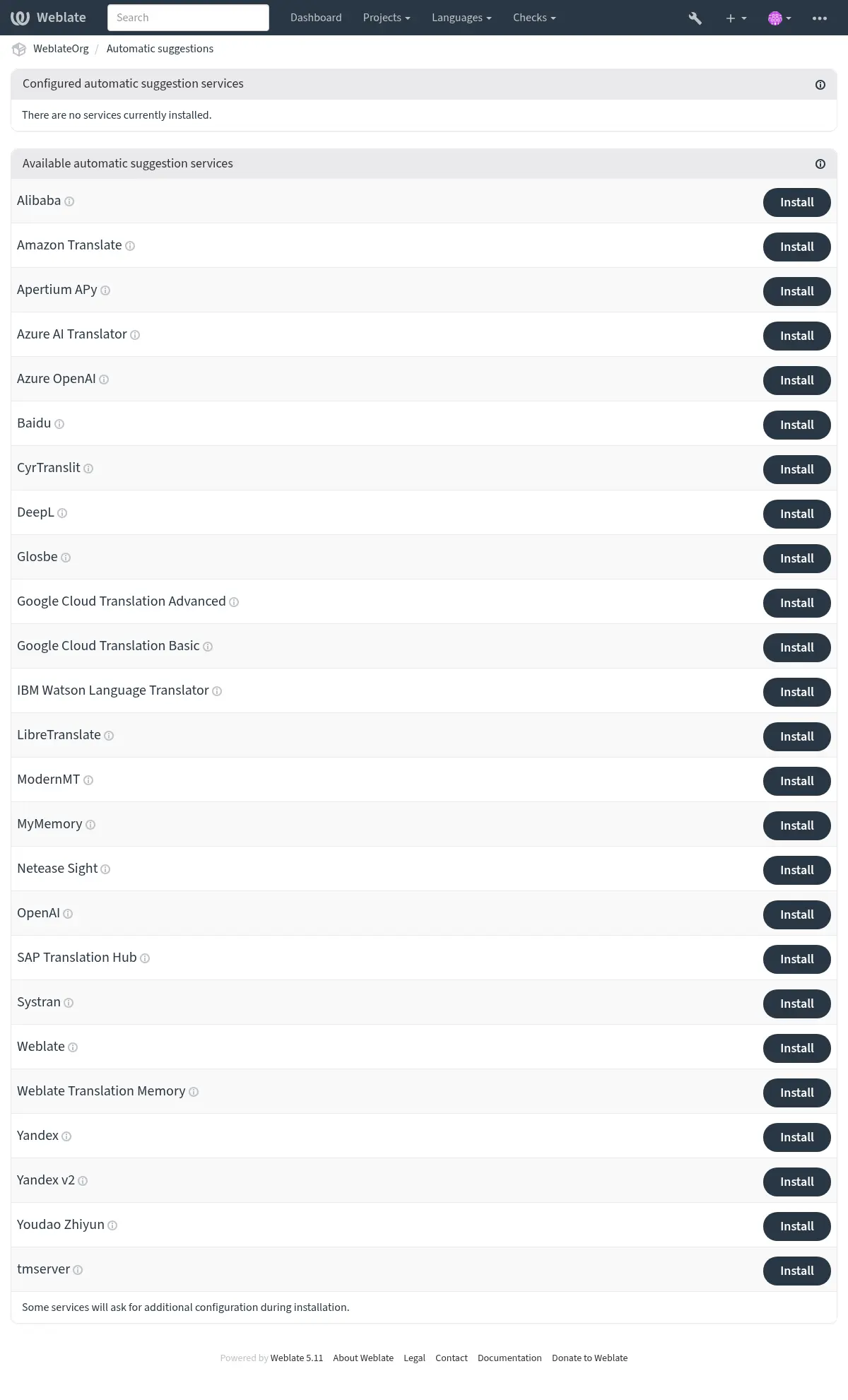
複数の機械翻訳および翻訳メモリのサービスに標準で対応しています。各サービスは、管理者がサイト全体複数の機械翻訳サービスと翻訳メモリ サービスに対応しています。各サービスは、管理者がサイト全体(管理画面 の 自動提案 の下)またはプロジェクト設定から有効にします。
注釈
それぞれのサービスに利用規約があるので、自分の希望する使用方法が可能かどうかを確認してください。
各サービスは、コンポーネント構成 で設定した原文の言語から翻訳されます。参照: 原文の言語。
Per-project automatic suggestion can also be configured via the Weblate の REST API.
参考
Priority of machine translation and translation memory services
Weblate 翻訳メモリ matches with 100% score take priority over machine translation services. If 100% match in translation memory is found, no machine translation is performed. If several 100% matches occur, the first one returned by the database is used.
Each machine translation service has a predefined maximum score it can produce. The use of installed translation services is ordered according to their maximum score. For each string with translation score lower than the service's maximum, the service is asked to produce a translation. Translations with a score exceeding the current one are accepted.
Source strings for the machine translation
Added in version 5.11.
The origin of source strings for all third-party services can be configured. This can be used to tweak the service to get the best results. Following choices are available:
- Automatic selection
Chooses the best source language automatically.
This is the default behavior.
- Component source language
Uses the component source language.
This was the behavior before the 5.11 release.
- Secondary language defined in project or component
Use project Secondary language or component Secondary language.
Falls back to the automatic selection of the source language if the secondary language not configured.
Alibaba
Added in version 5.3.
- サービス ID:
alibaba- Maximal score:
80
- 設定:
source_languageSource language selection
設定できる値:
auto-- 自動選択source-- Component source languagesecondary-- Secondary language defined in project or componentkeyアクセス キー ID
secretアクセス キー シークレット
regionリージョン ID
Alibaba Translate は、テキストを翻訳するためのニューラル機械翻訳サービスで、最大 214 の言語ペアに対応しています。
Apertium APy
- サービス ID:
apertium-apy- Maximal score:
88
- 設定:
source_languageSource language selection
設定できる値:
auto-- 自動選択source-- Component source languagesecondary-- Secondary language defined in project or componenturlAPI URL
限定した言語セットに対して翻訳を提供する自由ソフトウェアの機械翻訳プラットフォームです。
Apertium が推奨する使用方法は、Apertium-APy サーバーを独自に実行することです。
Amazon Translate
- サービス ID:
aws- Maximal score:
88
- 設定:
source_languageSource language selection
設定できる値:
auto-- 自動選択source-- Component source languagesecondary-- Secondary language defined in project or componentkeyアクセス キー ID
secretAPI 秘密鍵
regionリージョン名(地域名)
Amazon Translate は、対応している多くの言語間でテキストを英語に、またその逆に翻訳したりするためのニューラル機械翻訳サービスです。このサービスには、TranslateFullAccess 管理ポリシーが必要です。
このサービスは自動的に 用語集 を使用します。参照: 自動提案における用語集。
Azure OpenAI
Added in version 5.8.
- サービス ID:
azure-openai- Maximal score:
90
- 設定:
source_languageSource language selection
設定できる値:
auto-- 自動選択source-- Component source languagesecondary-- Secondary language defined in project or componentkeyAPI キー
persona翻訳者の人物像
翻訳の正確性を高めるために、翻訳者の人物像を記述します。例: 「あなたはリスの繁殖業者です。」
style翻訳ファイル
翻訳スタイルについて説明します。例: 「くだけた言い回しを使用する」
azure_endpointAzure OpenAI のエンドポイント URL
インスタンスのエンドポイント URL、例: https://my-instance.openai.azure.com。
deploymentAzure OpenAI のデプロイ
モデル固有のデプロイメント名。
Azure 上で動作する OpenAI を使用して翻訳を実行します。
参考
Baidu
- サービス ID:
baidu- Maximal score:
90
- 設定:
source_languageSource language selection
設定できる値:
auto-- 自動選択source-- Component source languagesecondary-- Secondary language defined in project or componentkeyクライアント ID
secretクライアント シークレット
Baidu が提供する機械翻訳サービス。
このサービスは API を使用しています。使用するには、Baidu から ID と API キーを取得してください。
CyrTranslit
Added in version 5.7.
- サービス ID:
cyrtranslit- Maximal score:
100
- 設定:
source_languageSource language selection
設定できる値:
auto-- 自動選択source-- Component source languagesecondary-- Secondary language defined in project or component
Cyrtranslit ライブラリを使用した機械翻訳サービス。
このサービスは、キリル文字とラテン文字の両方の文字セットを持つ言語のテキストを相互変換します。
DeepL
- サービス ID:
deepl- Maximal score:
91
- 設定:
source_languageSource language selection
設定できる値:
auto-- 自動選択source-- Component source languagesecondary-- Secondary language defined in project or componenturlAPI URL
keyAPI キー
formalityフォーマリティ
言語が(イン)フォーマルとして指定されていない場合は、指定された形式を使用します
context翻訳情報
翻訳の正確性を高めるために、翻訳の文脈を記述します。
DeepL は有料サービスであり、複数の言語向けに優れた機械翻訳を提供しています。DeepL API サブスクリプションを購入するか、DeepL Pro (classic) プランを使用してください。
DeepL のサービスで使用する API の URL です。執筆時点では、v1 API の他に、v2 API の無料版と有料版があります。
https://api.deepl.com/v2/(Weblate のデフォルト)有料プラン用の API を使用し、使用量をもとにしたサブスクリプションです。
https://api-free.deepl.com/v2/無料プラン用の API を使用し、使用量をもとにしたサブスクリプションです。
https://api.deepl.com/v1/CAT ツール用を使用し、ユーザー単位でサブスクリプションを使用できます。
以前 Weblate は DeepL によって CAT ツールとして分類されていたため、v1 API を使用することになっていましたが、現在は v2 API を使用することになっています。そのため、デフォルトは v2 になっており、デフォルトの CAT サブスクリプションを持っていて Weblate がそのサブスクリプションを使用したい場合は v1 に変更できます。
使用する URL を確認する最も簡単な方法は、ブラウザーで次のような URL を開く事:
https://api.deepl.com/v2/translate?text=Hello&target_lang=FR&auth_key=XXX
XXX を自分の auth_key に置き換えます。"Bonjour" を含む JSON オブジェクトを受信した場合は正常な URL です。異なる場合は、他の 3 種類を試してください。
Weblate は DeepL の敬称と親称に対応しており、言語(例えば de@formal と de@informal があります)に応じたものが選択されます。
翻訳コンテキストは、翻訳の質を向上させるためにオプションで指定できます。詳細は DeepL 翻訳コンテキストのドキュメント を確認してください。
このサービスは自動的に 用語集 を使用します。参照: 自動提案における用語集。
Glosbe
- サービス ID:
glosbe- Maximal score:
90
- 設定:
source_languageSource language selection
設定できる値:
auto-- 自動選択source-- Component source languagesecondary-- Secondary language defined in project or component
ほぼすべての使用している言語の、無料の辞書と翻訳メモリ。
API は無料で使用できますが、翻訳機能は使用するデータ ソースのライセンスに従います。不正使用を防止するために、設定時間内に 1 つの IP から呼び出せる回数には制限があります。
Google Cloud Translation Basic
- サービス ID:
google-translate- Maximal score:
90
- 設定:
source_languageSource language selection
設定できる値:
auto-- 自動選択source-- Component source languagesecondary-- Secondary language defined in project or componentkeyAPI キー
Google Cloud サービスが提供する機械翻訳サービス。
このサービスは、Google Translation API v2 を使用するので、API キーの取得と Google API コンソールでの課金の有効化が必要です。
Google Cloud Translation Advanced
- サービス ID:
google-translate-api-v3- Maximal score:
90
- 設定:
source_languageSource language selection
設定できる値:
auto-- 自動選択source-- Component source languagesecondary-- Secondary language defined in project or componentcredentialsGoogle 翻訳サービスのアカウント情報
サービスアカウントの JSON キーを入力してください。
projectGoogle 翻訳プロジェクト
Google Cloud プロジェクトの数字または英数字 ID を入力してください。
locationGoogle 翻訳の地域
Google Cloud プロジェクトで使用しているリージョン、またはあなたの最寄りの Google Cloud Translation リージョンを選択してください。
bucket_nameGoogle Storage バケット名
用語集ファイルを保存する Google Cloud Storage のバケット名を入力してください。
Google Cloud サービスが提供する機械翻訳サービス。
このサービスは Google Translation API v3 を使用しており、アクセスするには JSON 形式の認証情報が必要です。
このサービスを利用するために必要な実行手順:
オプションで、バケットを設定して 用語集 を使用するサービスの設定方法:
IBM Watson Language Translator
Added in version 4.16.
- サービス ID:
ibm- Maximal score:
88
- 設定:
source_languageSource language selection
設定できる値:
auto-- 自動選択source-- Component source languagesecondary-- Secondary language defined in project or componenturlAPI URL
keyAPI キー
警告
このサービスはベンダーによって非推奨となっており、2024 年 12 月 10 日をもって完全に廃止されます。
IBM Watson Language Translator は、テキストをある言語から別の言語に翻訳します。このサービスは、複数のドメイン固有のモデルを提供します。
LibreTranslate
Added in version 4.7.1.
- サービス ID:
libretranslate- Maximal score:
89
- 設定:
source_languageSource language selection
設定できる値:
auto-- 自動選択source-- Component source languagesecondary-- Secondary language defined in project or componenturlAPI URL
keyAPI キー
LibreTranslate は、無料のオープンソースの機械翻訳サービスです。公開するインスタンスには API キーが必要ですが、LibreTranslate は自分のサーバーにインストールできます。また、API を無料開放しているミラーサイトもあります。
https://libretranslate.com/(公式に公開されたインスタンス)外部から Web サイトに接続するには API キーが必要です。
Azure AI Translator
- サービス ID:
microsoft-translator- Maximal score:
90
- 設定:
source_languageSource language selection
設定できる値:
auto-- 自動選択source-- Component source languagesecondary-- Secondary language defined in project or componentkeyAPI キー
base_urlアプリケーション ベース URL
設定できる値:
api.cognitive.microsofttranslator.com‐‐ 全世界(地域設定無し)api-apc.cognitive.microsofttranslator.com‐‐ アジア太平洋地域api-eur.cognitive.microsofttranslator.com-- ヨーロッパapi-nam.cognitive.microsofttranslator.com-- 北米api.translator.azure.cn-- 中国api.cognitive.microsofttranslator.us-- Azure 米国政府クラウドendpoint_url認証サービスの URL
以下の地域欄で、地域サービスまたはマルチサービスを指定することができます。
設定できる値:
api.cognitive.microsoft.com‐‐ 全世界api.cognitive.azure.cn-- 中国api.cognitive.microsoft.us-- Azure 米国政府クラウドregion認証サービス地域
categoryカテゴリ
独自のシステムカテゴリ ID を指定して、一般的なカテゴリの代わりに使用してください。
Cognitive Services のひとつとして Azure portal でマイクロソフトが提供する機械翻訳サービス。
Weblate は Translator API V3 を実装しています。
このサービスは、動的辞書 を介して 用語集 を自動的に使用します。参照: 自動提案における用語集。
Translator Text API V2
Translator API V2 で使用するキーは、API 3 にも使用できます。
Translator Text API V3
Azure ポータルに登録して、そこで取得したキーを使用します。新しい Azure キーを使用する場合は、サービスの言語に対して リージョン の設定も必要です。
カスタム トランスレーター を使用してカスタム カテゴリを指定することもできます。
ヒント
Azure China の場合は、Azure ポータルからエンドポイントを使用してください。
ModernMT
Added in version 4.2.
- サービス ID:
modernmt- Maximal score:
90
- 設定:
source_languageSource language selection
設定できる値:
auto-- 自動選択source-- Component source languagesecondary-- Secondary language defined in project or componenturlAPI URL
keyAPI キー
context_vectorコンテキストベクトル
メモリー ID:ウェイト のコンマ区切りのリスト。例: 1234:0.123,4567:0.456
このサービスは自動的に 用語集 を使用します。参照: 自動提案における用語集。
参考
MyMemory
- サービス ID:
mymemory- Maximal score:
100
- 設定:
source_languageSource language selection
設定できる値:
auto-- 自動選択source-- Component source languagesecondary-- Secondary language defined in project or componentemail連絡先メールアドレス
usernameユーザー名
keyAPI キー
大量の翻訳メモリと機械翻訳。
現在、無料の匿名使用での制限は、100 リクエスト / 日。メールアドレス に連絡先のメールアドレスを指定した場合の制限は、1000 リクエスト / 日。追加は、応相談。
Netease Sight
- サービス ID:
netease-sight- Maximal score:
90
- 設定:
source_languageSource language selection
設定できる値:
auto-- 自動選択source-- Component source languagesecondary-- Secondary language defined in project or componentkeyクライアント ID
secretクライアント シークレット
NetEase が提供する機械翻訳サービス。
このサービスは API を使用するので、NetEase からキーとシークレットの取得が必要です。
OpenAI
Added in version 5.3.
- サービス ID:
openai- Maximal score:
90
- 設定:
source_languageSource language selection
設定できる値:
auto-- 自動選択source-- Component source languagesecondary-- Secondary language defined in project or componentkeyAPI キー
persona翻訳者の人物像
翻訳の正確性を高めるために、翻訳者の人物像を記述します。例: 「あなたはリスの繁殖業者です。」
style翻訳ファイル
翻訳スタイルについて説明します。例: 「くだけた言い回しを使用する」
base_urlOpenAI API ベース URL
OpenAI の既定の URL と異なる場合、OpenAI API のベース URL
modelOpenAI モデル
設定できる値:
auto-- 自動選択gpt-4o-mini-- GPT-4o minigpt-4o-- GPT-4oo3-mini-- OpenAI o3-minio3-- OpenAI o3o1-mini-- OpenAI o1-minio1-- OpenAI o1gpt-4.5-preview-- GPT-4.5gpt-4-turbo-- GPT-4 Turbogpt-4-- GPT-4gpt-3.5-turbo-- GPT-3.5 Turbocustom-- カスタムモデルcustom_modelカスタム モデル名
モデルが「カスタムモデル」に設定されていた場合のみ必要
OpenAI を使用して翻訳を実行します。
OpenAI API は、さまざまな機能と価格帯を備えたさまざまなモデルの組み合わせがあります。自動選択では利用可能な最適なモデルが選択されますが、用途に合った特定のモデルを選択することもできます。
人物像と翻訳スタイル フィールドを使用して、翻訳をさらに詳細設定します。これは OpenAI のプロンプトで使用することにより翻訳スタイルを変更できます。
このサービスは自動的に 用語集 を使用します。参照: 自動提案における用語集。
バージョン 5.7 で変更: カスタム モデルとベース URL に対応しました。
SAP Translation Hub
- サービス ID:
sap-translation-hub- Maximal score:
100
- 設定:
source_languageSource language selection
設定できる値:
auto-- 自動選択source-- Component source languagesecondary-- Secondary language defined in project or componenturlAPI URL
keyAPI キー
usernameSAP ユーザー名
passwordSAP パスワード
enable_mt機械翻訳の有効化
domain翻訳のドメイン
翻訳ドメインの ID(BC など)。ドメインを指定しない場合、このメソッドは使用可能なすべてのドメインで翻訳を検索します。
SAP が提供する機械翻訳サービス。
このサービスを使用するには、SAP アカウント(および SAP Cloud Platform で有効な SAP Translation Hub)が必要です。
また、用語データベースだけでなく、機械翻訳サービスを使用するかどうかも構成できます。
注釈
サンドボックス API にアクセスするには、 url および key の設定が必要です。
productive API に接続するには、url、username および password の設定が必要です。
シストラン
- サービス ID:
systran- Maximal score:
90
- 設定:
source_languageSource language selection
設定できる値:
auto-- 自動選択source-- Component source languagesecondary-- Secondary language defined in project or componentkeyAPI キー
シストランが提供する機械翻訳サービス。
このサービスは API を使用するので、<https://translate.systran.net/en/account> から API キーの取得が必要です。
tmserver
- サービス ID:
tmserver- Maximal score:
100
- 設定:
source_languageSource language selection
設定できる値:
auto-- 自動選択source-- Component source languagesecondary-- Secondary language defined in project or componenturlAPI URL
Translate-toolkit に付属したサーバーを使用して、独自の翻訳メモリ サーバーを実行し、Weblate とやり取りできます。また、tmserver の拡張版である amaGama サーバーでも使用できます。
まず、翻訳メモリにデータをインポートする:
build_tmdb -d /var/lib/tm/db -s en -t cs locale/cs/LC_MESSAGES/django.po
build_tmdb -d /var/lib/tm/db -s en -t de locale/de/LC_MESSAGES/django.po
build_tmdb -d /var/lib/tm/db -s en -t fr locale/fr/LC_MESSAGES/django.po
tmserver を起動して、要求をリッスンする:
tmserver -d /var/lib/tm/db
Weblate と通信するように設定します。デフォルトの URL は
http://localhost:8888/tmserver/です。
Weblate
- サービス ID:
weblate- Maximal score:
100
- 設定:
このサービスには設定がありません。
Weblate の機械翻訳サービスは、Weblate内の 翻訳済み、 承認済み、または 翻訳禁止 状態 に現在存在する文字列と完全に一致する場合に翻訳を提供できます。
Weblate 翻訳メモリ
- サービス ID:
weblate-translation-memory- Maximal score:
100
- 設定:
このサービスには設定がありません。
機械翻訳サービスとして 翻訳メモリ を使用します。過去に翻訳された(または翻訳メモリにアップロードされた)文字列は、この方法で翻訳できます。この提案ソースは、あいまい一致で機能します。
注釈
翻訳メモリ を再作成すると、この TM ソースの機能が低下します。
Yandex
- サービス ID:
yandex- Maximal score:
90
- 設定:
source_languageSource language selection
設定できる値:
auto-- 自動選択source-- Component source languagesecondary-- Secondary language defined in project or componentkeyAPI キー
Yandex が提供する機械翻訳サービス。
このサービスは Translation API を使用するので、Yandex から API キーの取得が必要です。
Yandex v2
Added in version 5.1.
- サービス ID:
yandex-v2- Maximal score:
90
- 設定:
source_languageSource language selection
設定できる値:
auto-- 自動選択source-- Component source languagesecondary-- Secondary language defined in project or componentkeyAPI キー
Yandex が提供する機械翻訳サービス。
このサービスは Translation API を使用するので、Yandex Cloud から API キーの取得が必要です。
Youdao Zhiyun
- サービス ID:
youdao-zhiyun- Maximal score:
90
- 設定:
source_languageSource language selection
設定できる値:
auto-- 自動選択source-- Component source languagesecondary-- Secondary language defined in project or componentkeyクライアント ID
secretクライアント シークレット
Youdao が提供する機械翻訳サービス。
このサービスは API を使用するので、Youdao から ID と API キーの取得が必要です。
カスタム機械翻訳
また、数行の Python コードを使用して、独自の機械翻訳サービスを実装できます。Python モジュール dictionary を使用して、言語の固定リストでの機械翻訳を実装する例:
# Copyright © Michal Čihař <michal@weblate.org>
#
# SPDX-License-Identifier: GPL-3.0-or-later

"""Machine translation example."""

import dictionary  # type: ignore[import-not-found]

from weblate.machinery.base import DownloadTranslations, MachineTranslation


class SampleTranslation(MachineTranslation):
    """Sample machine translation interface."""

    name = "Sample"

    def download_languages(self):
        """Return list of languages your machine translation supports."""
        return {"cs"}

    def download_translations(
        self,
        source_language,
        target_language,
        text: str,
        unit,
        user,
        threshold: int = 75,
    ) -> DownloadTranslations:
        """Return tuple with translations."""
        for t in dictionary.translate(text):
            yield {"text": t, "quality": 100, "service": self.name, "source": text}
独自のクラス一覧を WEBLATE_MACHINERY に設定すると、Weblate は設定したクラスの使用を開始します。