代码托管集成
Weblate 与代码托管平台的集成体现在多个独立环节:代码库访问、接收通知以及推送翻译结果。具体配置取决于您使用的是 Hosted Weblate 还是自行托管 Weblate 实例,以及 Weblate 是直接推送代码还是创建 Pull Request / Merge Request。
本页面仅作为针对各平台的对照检查清单。有关具体配置语法的准确说明,请以各自对应的设置页面为准。
设置概况
授予 Weblate 访问该仓库的权限。
如果在 Hosted Weblate 上对接 GitHub 仓库,请在 Weblate 的 连接 GitHub 帐户 流程中安装 Hosted Weblate App。通过该 App 即可直接向 Hosted Weblate 授予仓库访问权限,无需手动将 weblate 用户添加为 GitHub 仓库成员。
对其他的 Hosted Weblate 仓库和 GitHub 应用工作流之外的直接 SSH 推送,在可用的地方添加托管的 weblate 用户,见 从 Hosted Weblate 访问仓库。
对于自行托管的Weblate,建立一个专用代码托管用户,并使用Weblate的SSH密钥或使用一个HTTP令牌准许访问,参见 访问代码托管站点(GitHub, GitLab, Bitbucket, Azure DevOps, ...)上的仓库。
配置 源代码仓库 让 Weblate 可以克隆该仓库。
请配置接收通知,以便在代码推送后 Weblate 能及时拉取变更。仓库的 Webhook 或 App 必须指向对应的 Weblate Hook URL,同时项目必须已启用 启用钩子。
决定Weblate应该如何推送译文回来:
(可选)当 Weblate 需要直接推送到上游仓库的某个分支,而非在支持的平台上使用 Fork 时,请配置 推送分支。
推送 Weblate 的更改
每个翻译部件可以设置一个推送 URL(请参见 仓库推送 URL),如果是那样, Weblate 能够将更改推送到远程仓库。Weblate 还可以配置在每次提交时自动推送更改(这默认开启,请参见 提交时推送)。
如果您不希望自动推送变更,可以在 仓库维护 页面中手动推送,或通过 API 使用 wlc push 命令进行推送。
如果不想要 Weblate 直接推送,系统也支持 GitHub 拉取请求、GitLab 合并请求、Gitea 拉取请求、Pagure 合并请求、Azure DevOps 拉取请求 或 Gerrit 审核请求 审核。您可以通过在 部件配置 中选择 GitHub、GitLab、Gitea、Gerrit、Azure DevOps 或 Pagure 作为 版本控制系统 来激活这些。
整体上,Git、Mercurial、GitHub、GitLab、Gitea、Pagure、Azure DevOps、Gerrit、Bitbucket 数据中心和 Bitbucket 云提供以下选项:
需要的设置 |
|||
|---|---|---|---|
不推送 |
空 |
空 |
|
直接推送 |
SSH URL |
空 |
|
推送到单独的分支 |
SSH URL |
分支名称 |
|
不推送 |
空 |
空 |
|
直接推送 |
SSH URL |
空 |
|
来自派生的 GitHub 拉取请求 |
空 |
空 |
|
来自分支的 GitHub 拉取请求 |
SSH URL [1] |
分支名称 |
|
来自派生的 GitLab 合并请求 |
空 |
空 |
|
来自分支的 GitLab 合并请求 |
SSH URL [1] |
分支名称 |
|
来自派生的 Gitea 合并请求 |
空 |
空 |
|
来自分支的 Gitea 合并请求 |
SSH URL [1] |
分支名称 |
|
来自派生的 Pargue 合并请求 |
空 |
空 |
|
来自分支的 Pagure 合并请求 |
SSH URL [1] |
分支名称 |
|
来自派生的 Azure DevOps 拉取请求 |
空 |
空 |
|
来自分支的 Azure DevOps 拉取请求 |
SSH URL [1] |
分支名称 |
|
Gerrit 审核 |
SSH URL |
目标分支名(可选) |
|
来自分叉的 BitBucket 数据中心拉取请求 |
空 |
空 |
|
来自分支的 Bitbucket 数据中心拉取请求 |
SSH URL [1] |
分支名称 |
|
来自派生的 Bitbucket Cloud 拉取请求 |
空 |
空 |
|
来自分支的 Bitbucket Cloud 拉取请求 |
SSH URL [1] |
分支名称 |
GitHub
GitHub 仓库访问
Hosted Weblate GitHub 应用
在 Hosted Weblate 上,推荐的配置方式是从您项目所在的 Weblate 工作区连接 Hosted Weblate App。请通过 连接 GitHub 帐户 流程,将该 App 安装至拥有待翻译仓库的 GitHub 用户或组织下,为其授予对应仓库的访问权限,随后即可直接从已连接的 GitHub 帐户导入部件。
基于 GitHub App 的集成会使用 GitHub 的“安装访问令牌”(Installation Access Token)来进行代码克隆、推送翻译分支、创建 Pull Request 以及接收传入的通知。通过这种方式导入的部件,无需再邀请 Hosted Weblate 的 weblate GitHub 用户,也无需单独配置仓库 Webhook。
请仅当有意在 GitHub 应用工作流外配置直接 SSH 推送时使用 Hosted Weblate weblate GitHub 用户,见 从 Hosted Weblate 访问仓库。
HTTPS 加个人访问令牌
For a single private repository, HTTPS access with an access token is usually the simplest setup when the provider supports Git over HTTPS. Use the provider-required username and token in 源代码仓库.
Configure 仓库推送 URL only when Weblate should push changes directly or when the chosen workflow requires a push URL, see 推送 Weblate 的更改.
The token needs read access for cloning and write access for pushing. Provider-specific VCS backends that create pull or merge requests might require separate API credentials.
要使用这种方式:
按照 创建用于命令行使用的访问令牌 所述创建个人访问令牌。
在仓库 URL 中包括令牌:
https://username:token@github.com/owner/repo.git。
这适合刚开始使用 Weblate 或只有单个仓库的情况。
SSH 加专门用户
For setups with multiple repositories, use SSH access with a dedicated code
hosting user for Weblate. Add Weblate's public SSH key to that user, grant the
user access to the repositories, and use SSH URLs in 源代码仓库,
for example git@example.com:group/project.git.
Configure 仓库推送 URL only when Weblate should push changes directly or when the chosen workflow requires a push URL, see 推送 Weblate 的更改.
This also avoids provider restrictions on SSH key reuse. Some code hosting sites allow a public SSH key to be added only once, or only to a single user or deploy key entry. Keeping Weblate's SSH key on a dedicated user lets that user be granted access to multiple repositories without reusing the key in several places.
This keeps personal, project, or API access tokens out of repository URLs. Provider API credentials are still needed when using a provider-specific VCS backend to create pull or merge requests; those credentials are configured separately from the Git repository URL.
对于 GitHub,请创建一个专用账户(例如 weblate-bot);在 Weblate 中配置仓库时,请将仓库 URL 填为 GitHub SSH 地址(例如 git@github.com:owner/repo.git)。
在 Hosted Weblate 上,仅当您不使用推荐的 Hosted Weblate App 集成、而是需要直接进行 SSH 推送时,才应使用这种专用 SSH 账户的配置方式。
备注
将 GitHub 用于拉取请求时,推送分支 配置影响行为:如未设置,项目将被分叉,更改通过分叉推送。如已设置,更改将推送到上游仓库和选择的分支。
GitHub 通知
Weblate 自带对 GitHub 的原生支持。
如果你在用 Hosted Weblate,使用来自 Weblate 的 连接 GitHub 账户 流程的 Hosted Weblate 应用。它使用 GitHub App webhooks,因此你无需在 GitHub 中配置单独的 Webhook。从连接的 GitHub 账户导入的部件不邀请 Hosted Weblate weblate GitHub 用户,同样用该应用进行仓库访问和拉取请求。
保留 Hosted Weblate legacy App 用于现有的纯 Webhook 安装。其传送物使用一般性的 GitHub webhook URL 并用 Hosted Weblate 运营方配置的单独 webhook secret 进行身份认证。只有您仍需要通过该旧版 App 向 Hosted Weblate 传送 GitHub 事件通知时才使用它。
对于自建(Self-hosted)Weblate 实例,请按照下文说明,直接在 Weblate 界面中完成 GitHub App 的注册。Weblate 会自动生成 App 清单(App Manifest),GitHub 返回凭据后将直接存入数据库,无需修改任何配置文件。
注册来自 Weblate 的 GitHub 应用
配置 GitHub App 最快捷的方式,是让 Weblate 自动生成包含正确权限、订阅事件及预填 Webhook URL 的配置清单(App Manifest):
使用具有管理权限的账号登录 Weblate。
依次打开:管理 → 代码托管连接 → 注册 Weblate GitHub App。
填写表单。GitHub 主机 默认填有
github.com;如有需要,请将其修改为您的 GitHub Enterprise 主机名。若要在个人账号下注册该 App,请将 组织 一栏留空;若要在组织下注册,请输入对应的组织 Slug。点击 继续前往 GitHub 并在 GitHub 的 Create GitHub App 界面确认(您仍可以在该页面重新命名 App)。
GitHub 会重定向回 Weblate,随后 Weblate 会使用该临时授权码换取 App ID、私钥、Webhook 密钥及 Slug 并存入数据库。完成此操作后,连接 GitHub 账号 按钮将立即可用。
配置清单(Manifest)会自动声明 Weblate 所需的权限与事件订阅(包括 Contents 与 Pull requests 的读写权限、Metadata 的只读权限、Organization administration 的只读权限、Workflows 的读写权限,以及 Installation、Meta 和 Push 事件),并自动设置回调 URL、安装 URL 以及每个 App 专属的 Webhook URL,因此无需手动配置 GitHub App。GitHub 默认会将 Installation 和 Installation repositories 事件投递给所有 GitHub App。
GitHub 只会显示你当前有权安装(或提交安装申请)的个人账号及组织。如果列表中没有显示某个组织,请检查你在该组织中的角色以及组织的 App 安装限制。在 GitHub.com 上,公开 App 可以安装到任意账号下,而私有 App 只能安装到创建它的账号下。
连接工作区
已连接的 GitHub 账号会绑定至 Weblate 工作区。具有该工作区内任意项目管理权限的用户,均可在该工作区中连接 GitHub 账号。连接完成后,该工作区下的所有项目均可从该 GitHub App 获权访问的仓库中导入部件。对于组织账号,Weblate 会验证在 GitHub 上执行安装授权的用户是否拥有该组织的管理权限。
不在工作区的项目不能通过 Github App 连接 Github 账户。
通过 GitHub App 流程导入的部件会使用专用的 GitHub (via Weblate GitHub app) VCS 后端。部件设置界面中的仓库 URL 为只读状态,防止 App 的授权访问权限被套用或滥用到其他无关仓库上。
应用的 Webhook URL
每个已注册的 Weblate GitHub App 都有专属的 Webhook URL,其中包含用于唯一标识该 App 的不透明令牌(opaque token):
https://weblate.example.com/hooks/integrations/<webhook_token>/
如果没在使用 GitHub 应用,请在仓库设置中添加 Weblate webhook (Webhooks) 接收到 Github 仓库的每个推送的通知,如下方图片显示的那样:
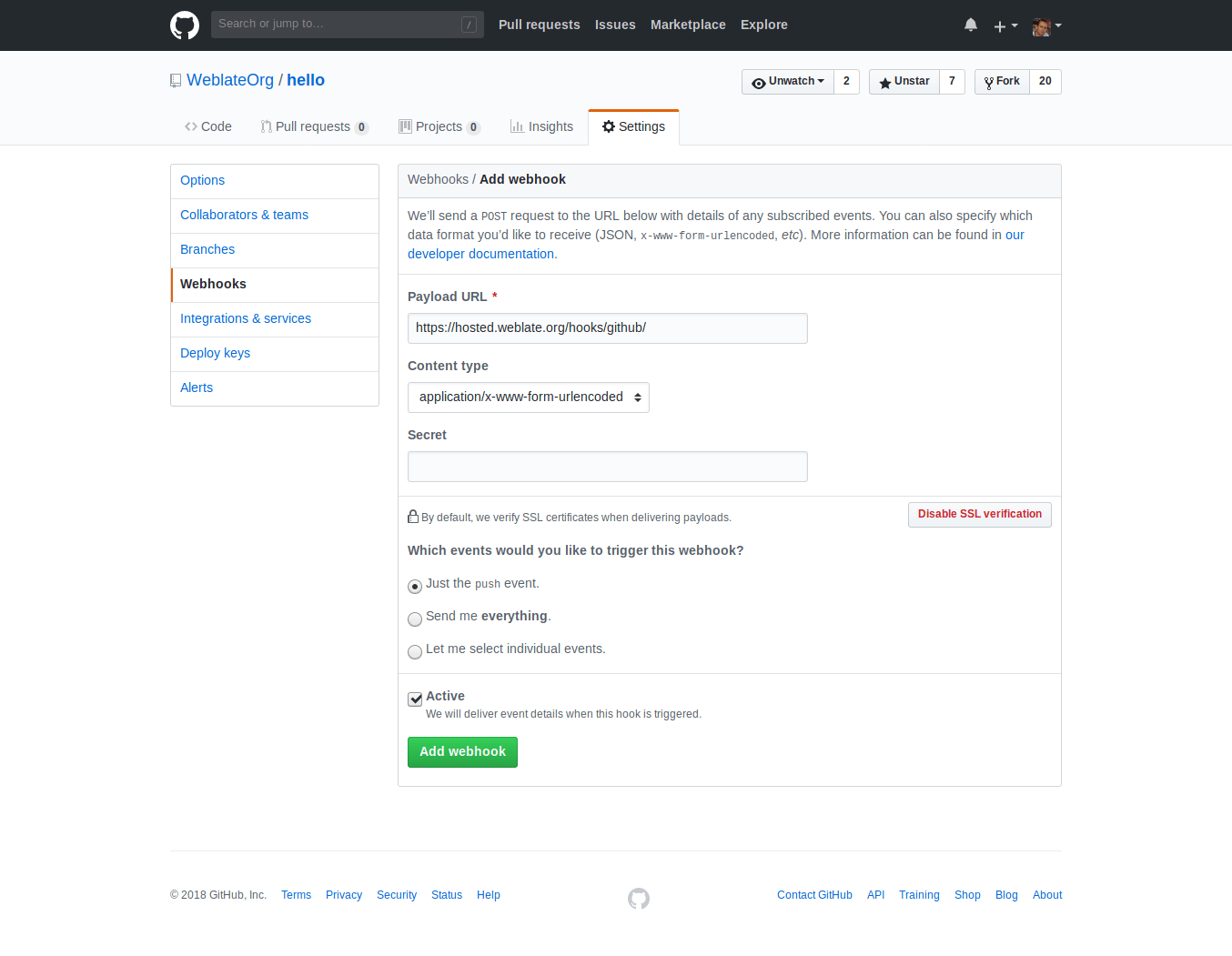
Payload URL 由附加 /hooks/github/ 的 Weblate URL 所组成。比如,Hosted Weblate 服务的 URL 为 https://hosted.weblate.org/hooks/github/.
可以将其他值保留为默认设置。Weblate 可以处理两种内容类型,并只消费 push 事件。
GitHub 拉取请求
这在 Git 顶部添加了一个薄层,使用 GitHub API 允许将翻译更改作为拉取请求推送,而不是直接推送到仓库。
Git 将更改直接推送到仓库,而 GitHub 后端创建拉取请求。仅访问 Git 仓库不需要后者。
若要创建 Pull Request,请将 版本控制系统 选择为 GitHub,并配置 GITHUB_CREDENTIALS。对于 GitHub.com,请使用 api.github.com 作为 API 主机(Host)。所使用的令牌(Token)必须赋予 Weblate 读取与写入仓库内容、以及创建 Pull Request 的权限。如果需要 Weblate Fork 私有仓库,该令牌可能还需要具备管理员权限。
GitLab
GitLab 仓库访问
HTTPS 加个人或项目访问令牌
For a single private repository, HTTPS access with an access token is usually the simplest setup when the provider supports Git over HTTPS. Use the provider-required username and token in 源代码仓库.
Configure 仓库推送 URL only when Weblate should push changes directly or when the chosen workflow requires a push URL, see 推送 Weblate 的更改.
The token needs read access for cloning and write access for pushing. Provider-specific VCS backends that create pull or merge requests might require separate API credentials.
对于 GitLab,令牌需要 write_repository 作用域。项目访问令牌需要 Developer 角色进行推送。
URL 需要包含用户名。对个人访问令牌,它是实际用户名:https://user:personal_access_token@gitlab.com/example/example.git;对项目访问令牌,可以是非空白值:https://example:project_access_token@gitlab.com/example/example.git 。
备注
不同的 GitLab 版本使用项目访问令牌的规则各异。非空白值是当前要求,但较老版本有不同预期(项目名、bot 用户名)。如不确定请查看匹配你版本的 GitLab 文档。
SSH 加专门用户
For setups with multiple repositories, use SSH access with a dedicated code
hosting user for Weblate. Add Weblate's public SSH key to that user, grant the
user access to the repositories, and use SSH URLs in 源代码仓库,
for example git@example.com:group/project.git.
Configure 仓库推送 URL only when Weblate should push changes directly or when the chosen workflow requires a push URL, see 推送 Weblate 的更改.
This also avoids provider restrictions on SSH key reuse. Some code hosting sites allow a public SSH key to be added only once, or only to a single user or deploy key entry. Keeping Weblate's SSH key on a dedicated user lets that user be granted access to multiple repositories without reusing the key in several places.
This keeps personal, project, or API access tokens out of repository URLs. Provider API credentials are still needed when using a provider-specific VCS backend to create pull or merge requests; those credentials are configured separately from the Git repository URL.
对于 GitLab,请创建一个专用用户并使用 GitLab SSH URL,例如 git@gitlab.com:group/project.git。
对于 GitLab 上的 Hosted Weblate 仓库,添加含必需的仓库权限的 hosted weblate 用户,见 从 Hosted Weblate 访问仓库。
GitLab 通知
Weblate 支持 GitLab hooks,添加项目的 webhook,目的地为你的 Weblate 安装上的 /hooks/gitlab/ URL,例如 https://hosted.weblate.org/hooks/gitlab/ 。
故障排除
如果 webhooks 被交付,检查 GitLab webhook request history.
响应载荷包含匹配部件的信息。
GitLab 合并请求
这使用 GitLab API 在 Git 上添加了一个薄层,以允许将翻译更改作为合并请求推送,而不是直接推送到仓库。
不需要使用它来访问 Git 仓库,普通的 Git 工作方式相同,唯一的区别是如何处理推送到仓库。使用 Git 将更改直接推送到仓库,而 GitLab 后端创建合并请求。
若要创建 Merge Request,请将 版本控制系统 选择为 GitLab,并配置 GITLAB_CREDENTIALS。
推送分支 配置影响 Weblate 开合并请求前推送更改的位置:如未设置,项目将被分叉,更改通过分叉推送。如已设置,更改将推送到上游仓库和选择的分支。
Gitea、Forgejo 以及 Codeberg
Gitea、Forgejo 和 Codeberg 仓库访问
HTTPS 加访问令牌
For a single private repository, HTTPS access with an access token is usually the simplest setup when the provider supports Git over HTTPS. Use the provider-required username and token in 源代码仓库.
Configure 仓库推送 URL only when Weblate should push changes directly or when the chosen workflow requires a push URL, see 推送 Weblate 的更改.
The token needs read access for cloning and write access for pushing. Provider-specific VCS backends that create pull or merge requests might require separate API credentials.
SSH 加专门用户
For setups with multiple repositories, use SSH access with a dedicated code
hosting user for Weblate. Add Weblate's public SSH key to that user, grant the
user access to the repositories, and use SSH URLs in 源代码仓库,
for example git@example.com:group/project.git.
Configure 仓库推送 URL only when Weblate should push changes directly or when the chosen workflow requires a push URL, see 推送 Weblate 的更改.
This also avoids provider restrictions on SSH key reuse. Some code hosting sites allow a public SSH key to be added only once, or only to a single user or deploy key entry. Keeping Weblate's SSH key on a dedicated user lets that user be granted access to multiple repositories without reusing the key in several places.
This keeps personal, project, or API access tokens out of repository URLs. Provider API credentials are still needed when using a provider-specific VCS backend to create pull or merge requests; those credentials are configured separately from the Git repository URL.
对于 Codeberg 上的 Hosted Weblate 仓库,添加含必需的仓库权限的 hosted weblate 用户,见 从 Hosted Weblate 访问仓库。
Gitea 通知
Weblate 已经支持 Gitea webhooks,为 Push events 事件添加 Gitea Webhook,目的地为你的 Weblate 安装上的 /hooks/gitea/ URL,例如 https://hosted.weblate.org/hooks/gitea/。这可以在 Settings 之下的 Webhooks 中完成。
Forgejo 通知
Weblate 支持 Forgejo webhooks,在你的 Weblate 安装上添加含目的地 Push events 事件的 Forgejo Webhook 到 /hooks/forgejo/ URL,如 https://hosted.weblate.org/hooks/forgejo/。可以在仓库 设置 下的 Webhooks 中完成此配置。
Gitea 拉取请求
Added in version 4.12.
这使用 Gitea API 在 Git 上添加了一个薄层,以允许将翻译更改作为拉取请求推送,而不是直接推送到仓库。
不需要使用它来访问 Git 仓库,普通的 Git 工作方式相同,唯一的区别是如何处理推送到仓库。使用 Git 将更改直接推送到仓库,而 Gitea 后端创建拉取请求。
若要创建 Pull Request,请将 版本控制系统 选择为 Gitea,并配置 GITEA_CREDENTIALS。
Bitbucket
Bitbucket 仓库访问
HTTPS 加访问令牌
For a single private repository, HTTPS access with an access token is usually the simplest setup when the provider supports Git over HTTPS. Use the provider-required username and token in 源代码仓库.
Configure 仓库推送 URL only when Weblate should push changes directly or when the chosen workflow requires a push URL, see 推送 Weblate 的更改.
The token needs read access for cloning and write access for pushing. Provider-specific VCS backends that create pull or merge requests might require separate API credentials.
SSH 加专门用户
For setups with multiple repositories, use SSH access with a dedicated code
hosting user for Weblate. Add Weblate's public SSH key to that user, grant the
user access to the repositories, and use SSH URLs in 源代码仓库,
for example git@example.com:group/project.git.
Configure 仓库推送 URL only when Weblate should push changes directly or when the chosen workflow requires a push URL, see 推送 Weblate 的更改.
This also avoids provider restrictions on SSH key reuse. Some code hosting sites allow a public SSH key to be added only once, or only to a single user or deploy key entry. Keeping Weblate's SSH key on a dedicated user lets that user be granted access to multiple repositories without reusing the key in several places.
This keeps personal, project, or API access tokens out of repository URLs. Provider API credentials are still needed when using a provider-specific VCS backend to create pull or merge requests; those credentials are configured separately from the Git repository URL.
对于 BitBucket 上的 Hosted Weblate 仓库,添加含必需的仓库权限的 hosted weblate 用户,见 从 Hosted Weblate 访问仓库。
Bitbucket 通知
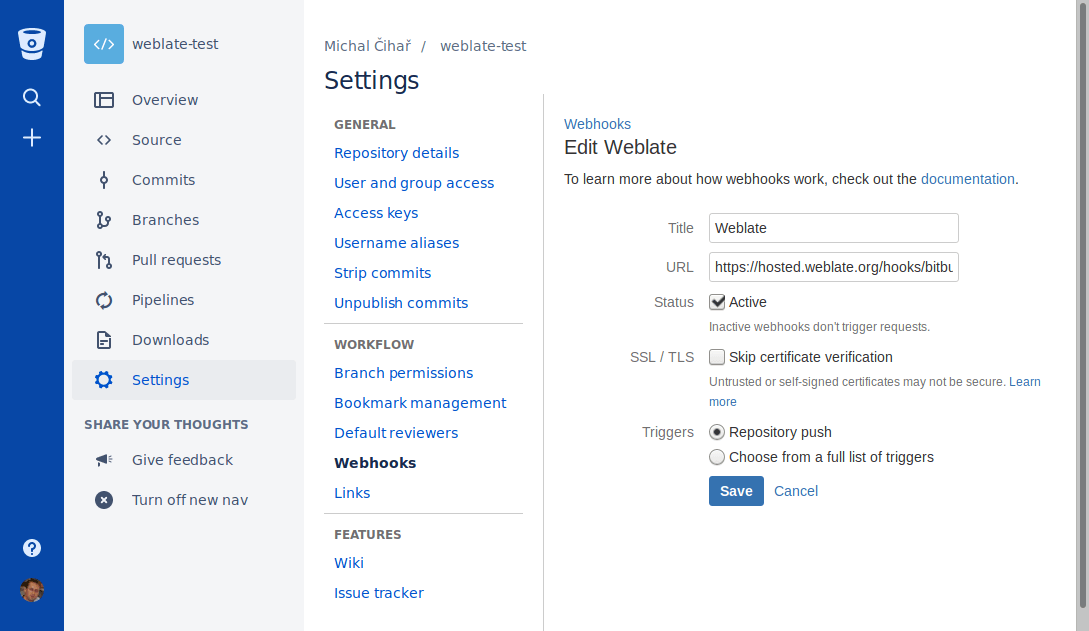
Weblate 支持 Bitbucket webhooks。添加仓库推送时触发的 webhook,目的地为你的 Weblate 安装上的 /hooks/bitbucket/,例如 https://hosted.weblate.org/hooks/bitbucket/。
Bitbucket 数据中心拉取请求
Added in version 4.16.
这使用 Bitbucket 数据中心 API 在 Git 上添加了一个薄层,以允许将翻译更改作为拉取请求推送,而不是直接推送到仓库。
警告
这不支持 Bitbucket Cloud API。
不需要使用它来访问 Git 仓库,普通的 Git 工作方式相同,唯一的区别是如何处理推送到仓库。使用 Git 将更改直接推送到仓库,而 Bitbucket 数据中心 后端创建拉取请求。
要创建拉去请求,将 Bitbucket 数据中心 选为 版本控制系统 并配置 BITBUCKETSERVER_CREDENTIALS。
Bitbucket Cloud 拉取请求
Added in version 5.8.
这使用 Bitbucket Cloud API 在 Git 上添加了一个薄层,以允许将翻译更改作为拉取请求推送,而不是直接推送到仓库。
警告
这和 BitBucket 数据中心 API 不同。
不需要使用它来访问 Git 仓库,普通的 Git 工作方式相同,唯一的区别是如何处理推送到仓库。使用 Git 将更改直接推送到仓库,而 Bitbucket Cloud 后端创建拉取请求。
要创建拉取请求,将 Bitbucket Cloud 选为 版本控制系统 并配置 BITBUCKETCLOUD_CREDENTIALS。
Azure DevOps
Azure Repos 仓库访问
HTTPS 加访问令牌
For a single private repository, HTTPS access with an access token is usually the simplest setup when the provider supports Git over HTTPS. Use the provider-required username and token in 源代码仓库.
Configure 仓库推送 URL only when Weblate should push changes directly or when the chosen workflow requires a push URL, see 推送 Weblate 的更改.
The token needs read access for cloning and write access for pushing. Provider-specific VCS backends that create pull or merge requests might require separate API credentials.
请使用 Azure Repos 页面上给出的 HTTPS clone URL。
SSH 加专门用户
For setups with multiple repositories, use SSH access with a dedicated code
hosting user for Weblate. Add Weblate's public SSH key to that user, grant the
user access to the repositories, and use SSH URLs in 源代码仓库,
for example git@example.com:group/project.git.
Configure 仓库推送 URL only when Weblate should push changes directly or when the chosen workflow requires a push URL, see 推送 Weblate 的更改.
This also avoids provider restrictions on SSH key reuse. Some code hosting sites allow a public SSH key to be added only once, or only to a single user or deploy key entry. Keeping Weblate's SSH key on a dedicated user lets that user be granted access to multiple repositories without reusing the key in several places.
This keeps personal, project, or API access tokens out of repository URLs. Provider API credentials are still needed when using a provider-specific VCS backend to create pull or merge requests; those credentials are configured separately from the Git repository URL.
请使用 Azure Repos 页面上给出的 SSH URL。
Azure 仓库通知
Weblate 支持 Azure Repos web hooks。为 Code pushed 事件添加 webhook,目的地为你的 Weblate 安装上的 /hooks/azure/ URL,例如 https://hosted.weblate.org/hooks/azure/。这可以在 Project settings 之下的 Service hooks 中完成。
Azure DevOps 拉取请求
这在 Git 顶部添加了一个薄层,使用 Azure DevOps API 允许将翻译更改作为拉取请求推送,而不是直接推送到仓库。
Git 将更改直接推送到仓库,而 Azure DevOps 后端创建拉取请求。仅访问 Git 仓库不需要后者。
若要创建 Pull Request,请将 版本控制系统 选择为 Azure DevOps,并配置 AZURE_DEVOPS_CREDENTIALS。
Pagure
Pagure 仓库访问
HTTPS 加访问令牌
For a single private repository, HTTPS access with an access token is usually the simplest setup when the provider supports Git over HTTPS. Use the provider-required username and token in 源代码仓库.
Configure 仓库推送 URL only when Weblate should push changes directly or when the chosen workflow requires a push URL, see 推送 Weblate 的更改.
The token needs read access for cloning and write access for pushing. Provider-specific VCS backends that create pull or merge requests might require separate API credentials.
SSH 加专门用户
For setups with multiple repositories, use SSH access with a dedicated code
hosting user for Weblate. Add Weblate's public SSH key to that user, grant the
user access to the repositories, and use SSH URLs in 源代码仓库,
for example git@example.com:group/project.git.
Configure 仓库推送 URL only when Weblate should push changes directly or when the chosen workflow requires a push URL, see 推送 Weblate 的更改.
This also avoids provider restrictions on SSH key reuse. Some code hosting sites allow a public SSH key to be added only once, or only to a single user or deploy key entry. Keeping Weblate's SSH key on a dedicated user lets that user be granted access to multiple repositories without reusing the key in several places.
This keeps personal, project, or API access tokens out of repository URLs. Provider API credentials are still needed when using a provider-specific VCS backend to create pull or merge requests; those credentials are configured separately from the Git repository URL.
Pagure 通知
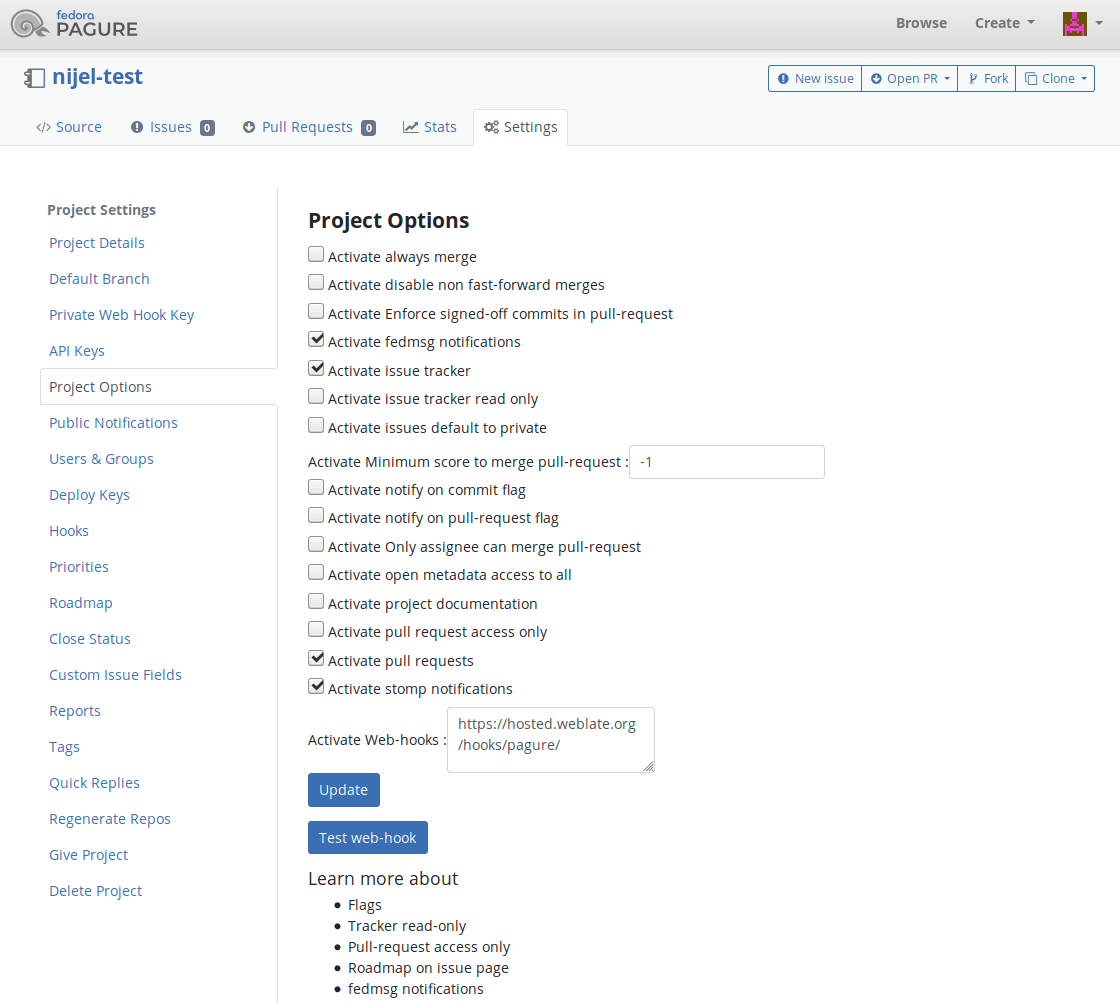
Weblate 已经支持 Pagure hooks。添加项目的 webhook,目的地为你的 Weblate 安装上的 /hooks/pagure/(例如 https://hosted.weblate.org/hooks/pagure/)。这可以在 Project options 之下的 Activate Web-hooks 中完成:
Pagure 合并请求
Added in version 4.3.2.
这使用 Pagure API 在 Git 上添加了一个薄层,以允许将翻译更改作为合并请求推送,而不是直接推送到仓库。
不需要使用它来访问 Git 仓库,普通的 Git 工作方式相同,唯一的区别是如何处理推送到仓库。使用 Git 将更改直接推送到仓库,而 Pagure 后端创建合并请求。
若要创建 Merge Request,请将 版本控制系统 选择为 Pagure,并配置 PAGURE_CREDENTIALS。
其他工作流
Gitee 仓库访问
HTTPS 加访问令牌
For a single private repository, HTTPS access with an access token is usually the simplest setup when the provider supports Git over HTTPS. Use the provider-required username and token in 源代码仓库.
Configure 仓库推送 URL only when Weblate should push changes directly or when the chosen workflow requires a push URL, see 推送 Weblate 的更改.
The token needs read access for cloning and write access for pushing. Provider-specific VCS backends that create pull or merge requests might require separate API credentials.
SSH 加专门用户
For setups with multiple repositories, use SSH access with a dedicated code
hosting user for Weblate. Add Weblate's public SSH key to that user, grant the
user access to the repositories, and use SSH URLs in 源代码仓库,
for example git@example.com:group/project.git.
Configure 仓库推送 URL only when Weblate should push changes directly or when the chosen workflow requires a push URL, see 推送 Weblate 的更改.
This also avoids provider restrictions on SSH key reuse. Some code hosting sites allow a public SSH key to be added only once, or only to a single user or deploy key entry. Keeping Weblate's SSH key on a dedicated user lets that user be granted access to multiple repositories without reusing the key in several places.
This keeps personal, project, or API access tokens out of repository URLs. Provider API credentials are still needed when using a provider-specific VCS backend to create pull or merge requests; those credentials are configured separately from the Git repository URL.
Gitee 通知
Weblate 已经支持 Gitee webhooks。为 Push 事件添加 Webhook,目的地为你的 Weblate 安装上的 /hooks/gitee/ URL,例如 https://hosted.weblate.org/hooks/gitee/。这可以在 Management 之下的 Webhooks 中完成。
Gerrit 审核请求
Gerrit 支持使用 git-review 工具在 Git 上添加一个薄层,以允许将翻译更改作为 Gerrit 审查请求推送,而不是将它们直接推送到仓库。
可选的 推送分支 配置项用于指定提交 Gerrit review 时的目标分支。如果留空,则默认使用组件的主分支(仓库分支)。请使用简短的分支名(例如 main),Weblate 和 git-review 会自动将代码推送到 refs/for/<分支名> 进行审核。无论在上述哪个配置里,你都可以在分支名后面加上 % 来附加 Gerrit 的推送参数(例如 main%topic=l10n)。Gerrit 会认定这些选项是由配置的 Weblate Gerrit 账号提交的,并校验该账号的对应权限。
Gerrit 文档详细介绍了设置此类仓库所需的配置。这个后端没有独立的代码托管凭证。
Docker 凭证
对 Docker 安装,代码托管 API 凭证也可以通过环境变量提供,见 代码托管站点凭证。