Traduction à l’aide de Weblate
Thank you for your interest in translating with Weblate!
Generally, there are two most used modes of translation: * Project accepts direct translations * Project accepts the suggestions made by users. Sometimes, anonymous suggestions are accepted as well.
There are more translation workflows detailed in Flux de travail de traduction.
Projects, or the components in them are either visible to everyone, or only to a certain group of translators.
Voir aussi
Projets de traduction
Translation projects hold related components; resources for the same software, book, or project.
Liens de traduction
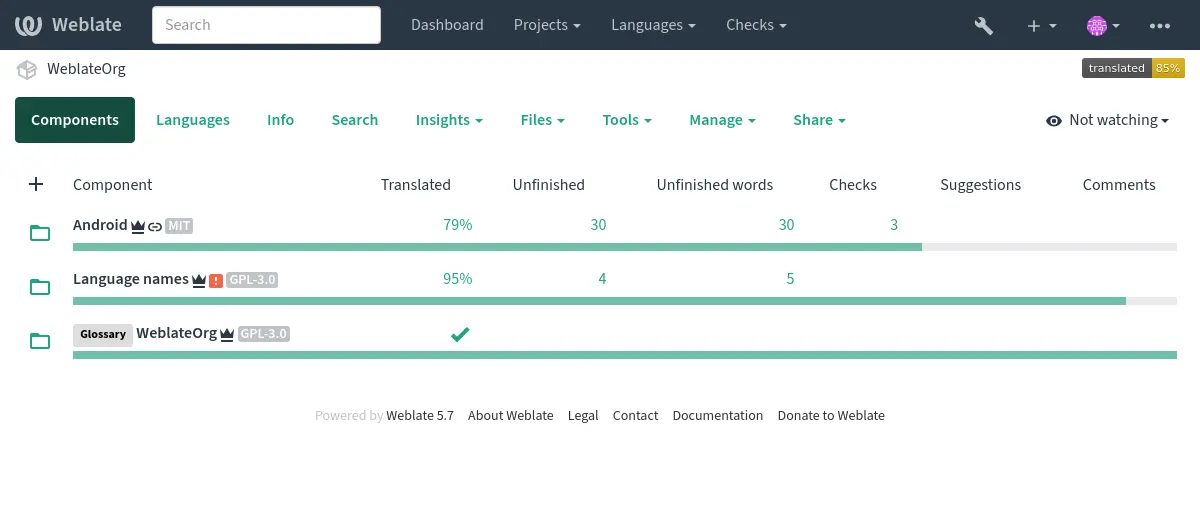
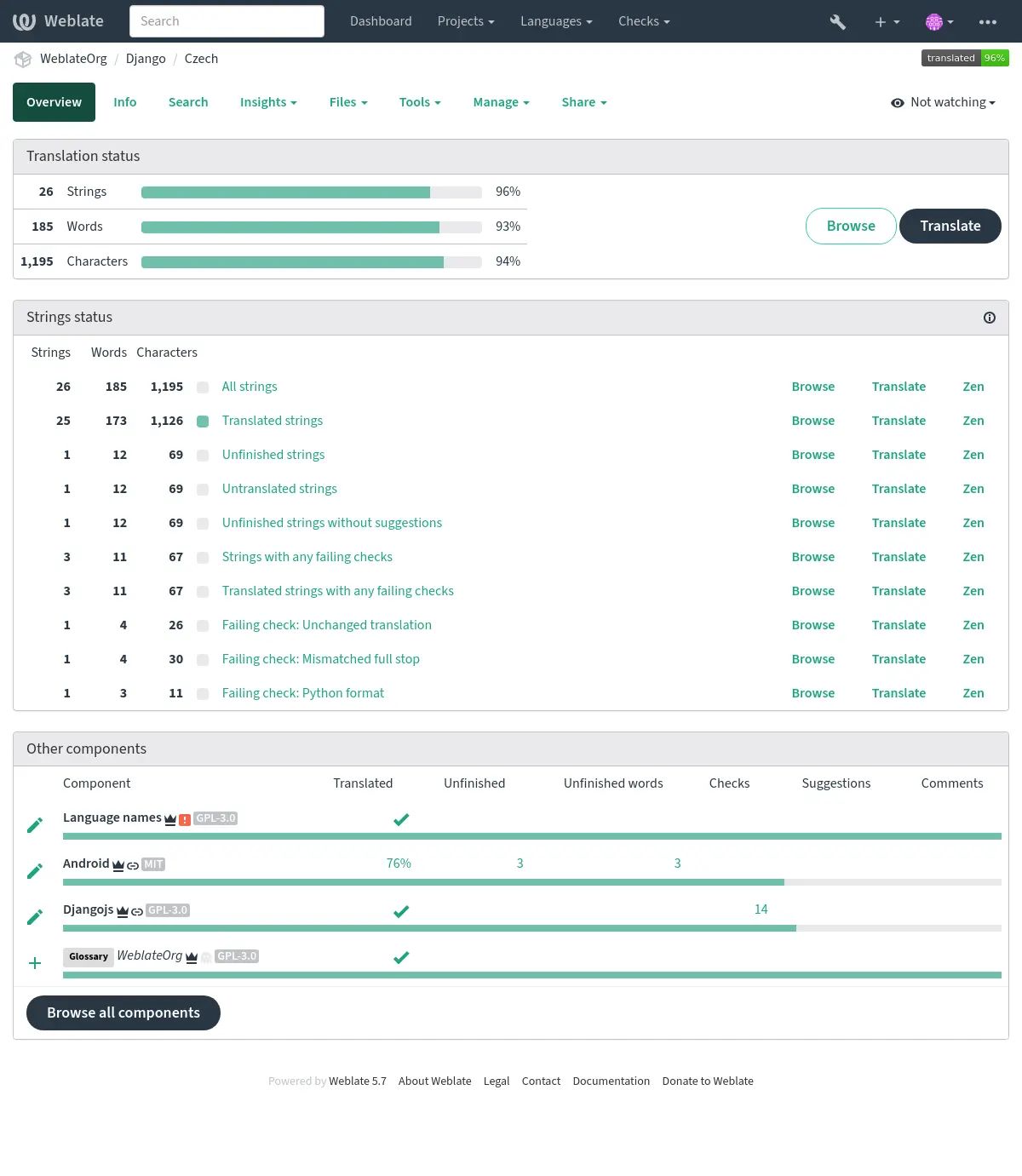
Having navigated to a component, a set of links lead to its actual translation. The translation is further divided into individual checks, like Untranslated strings or Unfinished strings. If the whole project is already translated without any errors, All strings is still available. Alternatively you can use the Search feature to find a specific string or term.
Suggestions
Note
Les droits réels peuvent varier en fonction de la configuration de votre Weblate.
Anonymous users (by default) can only forward suggestions. Doing so is still available to signed-in users, in cases where uncertainty about a translation arises, prompting other translators to review it.
All suggestions are scanned on a daily basis to remove duplicates and those matching current translations.
Variantes
Variants are used to group different-length variants of a string. The frontend of your project can then utilize different strings depending on the size of a screen or window.
Voir aussi
Étiquettes
Labels are used to categorize strings within a project to further customize the localization workflow (for example to define categories of strings).
Following labels are used by Weblate:
- Traduit automatiquement
String translated using Traduction automatique.
- La source doit être vérifiée
String marked for review using Relectures des chaînes sources.
Voir aussi
Traduction
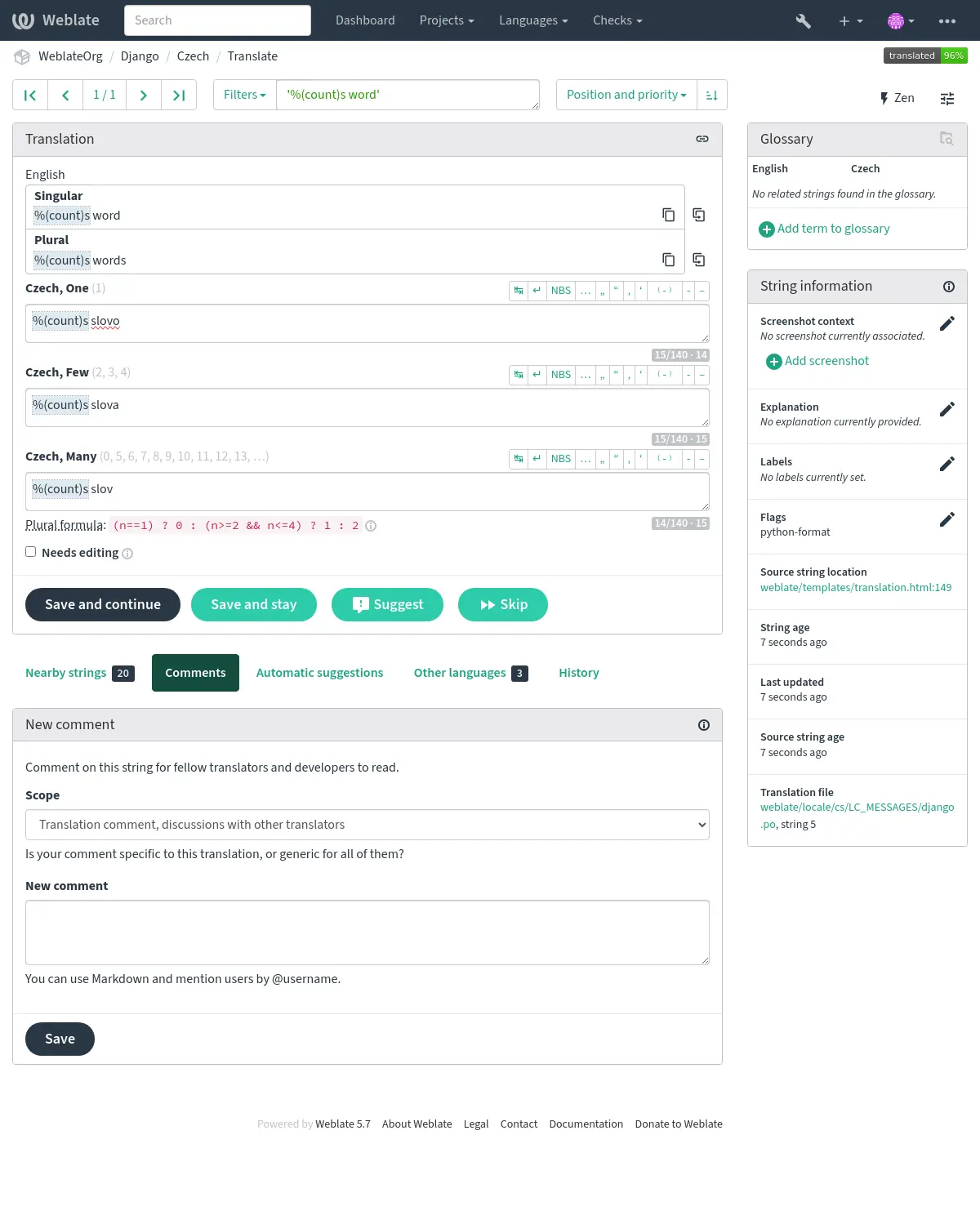
On the translation page, the source string and an editing area for its translation are shown. Should the translation be plural, multiple source strings and editing areas are shown, each described and labeled in the amount of plural forms the translated language has.
Tous les caractères blancs spéciaux sont soulignés en rouge et indiqués par des symboles gris. Les espaces consécutives sont également soulignées en rouge pour alerter le traducteur d’un éventuel problème de formatage.
Various bits of extra info can be shown on this page, most of which coming from the project source code (like context, comments or where the message is being used). Translation fields for any secondary languages translators select in the preferences will be shown (see Langues secondaires) above the source string.
Below the translation, translators will find suggestion made by others, to be accepted (✓), accepted with changes (✏️), or deleted (🗑).
Pluriels
Words changing form to account for their numeric designation are called plurals. Each language has its own definition of them. English, for example, supports one. In the singular definition of an example « car », implicitly one car is referenced, in the plural definition of « cars », two or more cars are referenced (or the concept of cars as a noun). Languages like, for example, Czech or Arabic have more forms of plurals, and their rules for plurals are different as well.
Weblate has full support for each of these forms, in each respective language. Each grammatical number is translated in a separate field for a pre-defined set of cardinal numbers specific to the translation language. The number of fields and how they are in turn used in the translated application or project, depends on the configured plural formula. Weblate shows the basic information and the Language Plural Rules by the Unicode Consortium is a more detailed description.
Voir aussi
Alternative translations
Ajouté dans la version 4.13.
Note
This is currently only supported with Multivalue CSV file.
With some formats, it is possible to have more translations for a single string. You can add more alternative translations using the Tools menu. Any blank alternative translations will be automatically removed upon saving.
Raccourcis clavier
Les raccourcis clavier suivants peuvent être utilisés lors de la traduction :
Raccourcis clavier |
Description |
|---|---|
Alt+Home |
Naviguer vers la première traduction dans la recherche en cours. |
Alt+End |
Naviguer jusqu’à la dernière traduction dans la recherche en cours. |
Alt+PageUp or Ctrl+↑ or Alt+↑ or Cmd+↑ |
Naviguer vers la traduction précédente dans la recherche en cours. |
Alt+PageDown or Ctrl+↓ or Alt+↓ or Cmd+↓ |
Naviguer vers la traduction suivante dans la recherche en cours. |
Ctrl+Enter or Cmd+Entrée |
Submit current form; this is same as pressing Save and continue while editing translation. |
Ctrl+Shift+Enter or Cmd+Shift+Entrée |
Unmark translation as needing edit and submit it. |
Alt+Enter or Option+Enter |
Submit the string as a suggestion; this is same as pressing Suggest while editing translation. |
Ctrl+E or Cmd+E |
Placer le focus dans l’éditeur de traduction. |
Ctrl+U or Cmd+U |
Placer le focus dans l’éditeur de commentaire. |
Ctrl+M or Cmd+M |
Affiche l’onglet Automatic suggestions, consultez Suggestions automatiques. |
Ctrl+1 to Ctrl+9 or Cmd+1 to Cmd+9 |
Copie l’élément numéroté depuis la chaîne source. |
Ctrl+M followed by 1 to 9 or Cmd+M followed by 1 to 9 |
Copie la traduction automatique du numéro donné dans la traduction actuelle. |
Ctrl+I followed by 1 to 9 or Cmd+I followed by 1 to 9 |
Ignorer un élément de la liste des contrôles de qualité défaillants. |
Ctrl+J or Cmd+J |
Affiche l’onglet Chaînes à proximité. |
Ctrl+S or Cmd + S |
Focus search field. |
Ctrl+O or Cmd + O |
Copy source string. |
Ctrl+Y or Cmd + Y |
Toggle the Needs editing checkbox. |
→ and ← |
Browse the next translation strings. Browse the previous translation strings. |
Clavier visuel
A small visual keyboard row is shown just above the translation field. Its rows are specific to each language; it can be useful for local punctuation or characters that are hard to type by hand.
Les symboles affichés se répartissent en trois catégories :
User configured Caractères spéciaux defined in the Profil utilisateur
Per-language characters provided by Weblate (e.g. quotes or RTL-specific characters)
Les caractères configurés en utilisant
SPECIAL_CHARS
Contexte de traduction
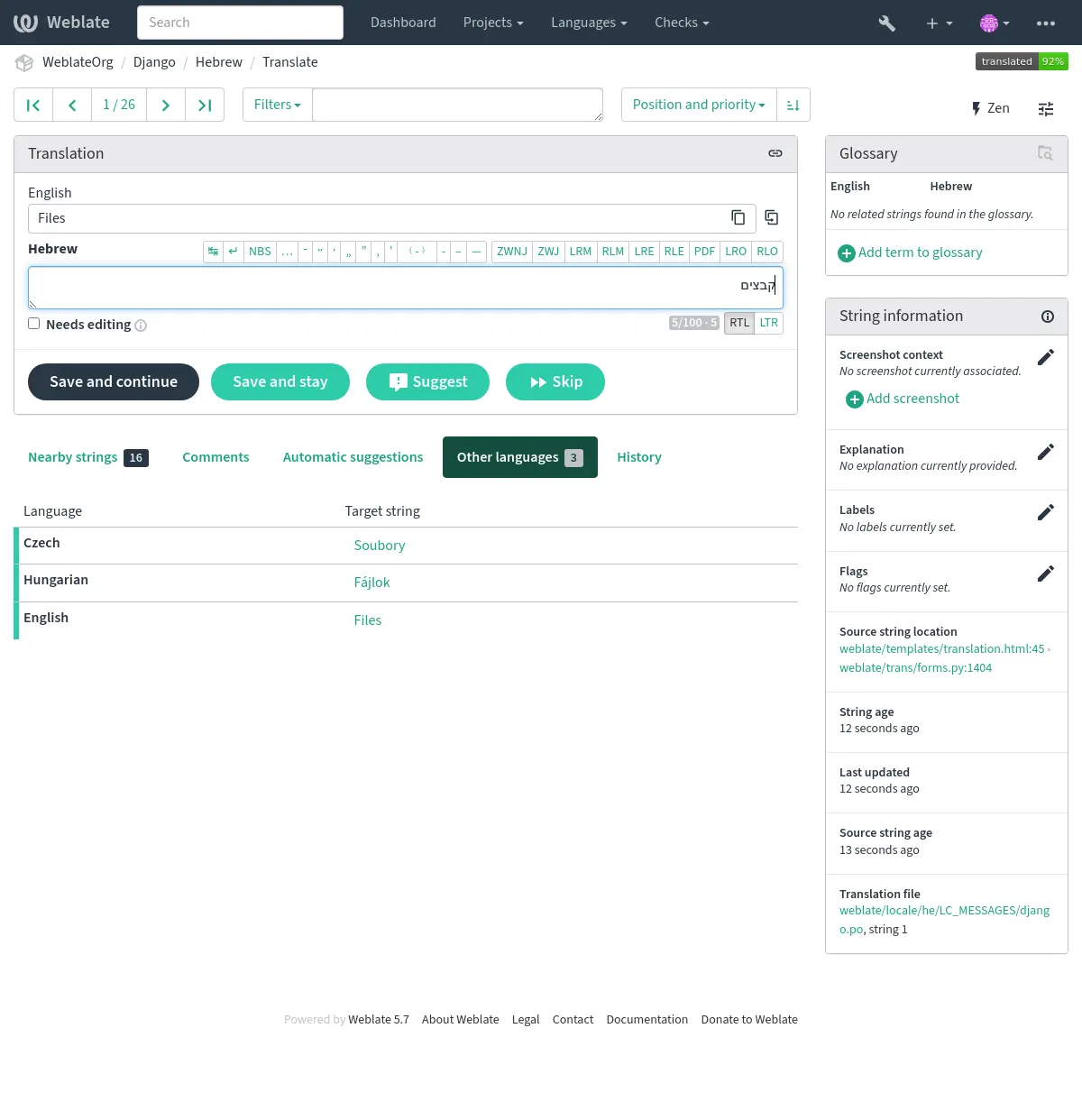
This contextual description provides related info about the current string.
- Attributs de la chaîne
Des éléments comme l’ID de message, le contexte (
msgctxt) ou l’emplacement dans le code source.- Captures d’écran
Des captures d’écran peuvent être téléversées sur Weblate pour mieux informer les traducteurs sur l’endroit et de la manière dont la chaîne est utilisée, voir Visual context for strings.
- Chaînes à proximité
Displays neighbouring strings from the translation file. These are usually also used in a similar context and prove useful in keeping the translation consistent.
- Autres occurrences
Dans le cas où un message apparaît à plusieurs endroits (par exemple, plusieurs composants), cet onglet les affiche tous s’ils sont jugés incohérents (voir Incohérence). Vous pouvez choisir lequel utiliser.
- Mémoire de traduction
Regarder les chaînes de caractères similaires traduites dans le passé, voir Mémoire de traduction.
- Glossaire
Affiche les termes du glossaire du projet utilisés dans le message actuel.
- Modifications récentes
Liste des personnes qui ont récemment modifié ce message en utilisant Weblate.
- Projet
Project info like instructions for translators, or a directory or link to the string in the version control system repository the project uses.
If you want direct links, the translation format has to support it.
Historique de la traduction
Every change is by default (unless turned-off in component settings) saved in the database, and can be reverted. Optionally, translations can also be reverted in the underlying version control system.
Longueur de la chaîne traduite
Weblate can limit the length of a translation in several ways to ensure the translated string is not too long:
The default limitation for translation is ten times longer than the source string. This can be modified with
LIMIT_TRANSLATION_LENGTH_BY_SOURCE_LENGTH. If you are hitting this, it can also be caused by a monolingual translation being wrongly set up as a bilingual one, making Weblate mistaking the translation key for the actual source string. See Formats monolingues et bilingues for more info.Maximum length in characters defined by the translation file or flag, as per Taille maximum de la traduction.
Maximal rendered size in pixels as defined by flags; see Taille maximale de la traduction.
Suggestions automatiques
Based on configuration and your translated language, Weblate provides suggestions from several machine translation tools and Mémoire de traduction. All machine translations are available in a single tab of each translation page.
You can also perform a concordance search on the Mémoire de traduction.
Voir aussi
Vous pouvez trouver la liste des outils pris en charge dans Suggestions automatiques.
Traduction automatique
Vous pouvez utiliser la traduction automatique pour amorcer une traduction basée sur des sources externes. Cet outil s’appelle Traduction automatique accessible dans le menu Outils, une fois que vous avez sélectionné un composant et une langue :
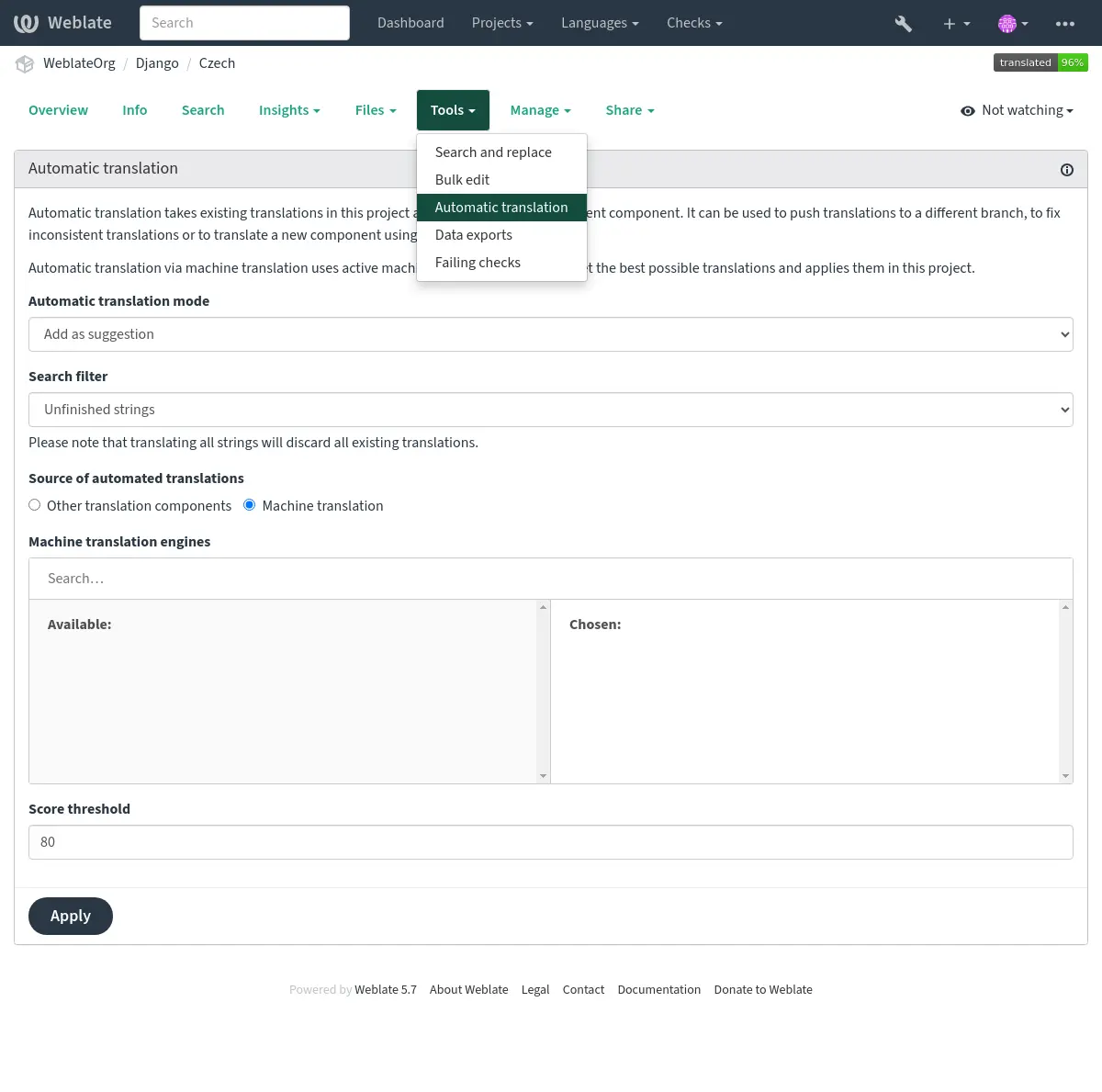
Deux modes de fonctionnement sont possibles :
Utilisation d’autres composants Weblate comme source de traduction.
Utilisation de services de traduction automatique sélectionnés avec des traductions atteignant un certain seuil de qualité.
Vous pouvez également choisir les chaînes de caractères qui doivent être traduites automatiquement.
Avertissement
Soyez conscient que cela remplacera les traductions existantes si elles sont utilisées avec des filtres larges tels que Toutes les chaînes.
Useful in several situations like consolidating translation between different components (for example the application and its website) or when bootstrapping a translation for a new component using existing translations (translation memory).
The automatically translated strings are labelled Automatically translated.
Voir aussi
Limite de requêtes
To avoid abuse of the interface, rate limiting is applied to several operations like searching, sending contact forms, or translating. If affected by it, you are blocked for a certain period, until you can perform the operation again.
Default limits and fine-tuning is described in the administrative manual, see Limite de requêtes.
Rechercher et remplacer
Change terminology effectively or perform bulk fixing of the strings using Search and replace in the Tools menu.
Indication
Don’t worry about messing up the strings, as it is a two-step process. A preview of edited strings is shown before confirming the change.
Modification en masse
Bulk editing allows performing one operation for multiple strings. Define strings by searching for them and actions to perform on matching ones. Supported operations:
Change string state (for example to approve all unreviewed strings).
Ajustement des drapeaux de traduction (voir Customizing behavior using flags)
Ajustement des libellés de chaînes de caractères (voir String labels)
Indication
This tool is called Bulk edit, accessible in the Tools menu of each project, component or translation.
Voir aussi
Matrix View
You can compare different languages efficiently using this view It is available on every component page, from the Tools menu. First select all languages you want to compare, confirm your selection, then click on any translation to open and edit it.
The matrix view is also a very good starting point to find missing translations in different languages, and quickly add them from one view.
Zen Mode
This mode simplifies the layout and removes additional UI elements such as Nearby strings or the Glossary. It is available by clicking the Zen button on the top-right of the regular editor (translation of a string).
You can select the Zen editor as your default editor using the Préférences tab on your Profil utilisateur. You can also choose there between having translations listed Top to bottom or Side by side, depending on your personal preference.
Commentaires
Three types of comments can be posted: * for translations * for source strings * for reporting source string bugs when this functionality is turned on using Activer la révision des chaînes sources.
Choose the suitable type for the topic you want to discuss. Source string comments are in any event good for providing feedback on the original string, for example that it should be rephrased, or to ask questions about it.
Markdown syntax can be used in all comments, as well as mentioning other users by using``@username``.
Voir aussi
Réception de feedback sur les chaînes sources, Relectures des chaînes sources, Activer la révision des chaînes sources