檢查和修復
自訂自動修正
還可以應用除了自動修正以外自己的自動修正,並將它們包括到 AUTOFIX_LIST。
自動修復很強大,但可能導致損壞;寫腳本的時候要小心。
例如,後面的自動修復會將每次出現的字串 foo 在翻譯中替換為 bar :
# Copyright © Michal Čihař <michal@weblate.org>
#
# SPDX-License-Identifier: GPL-3.0-or-later

from django.utils.translation import gettext_lazy

from weblate.trans.autofixes.base import AutoFix


class ReplaceFooWithBar(AutoFix):
    """Replace foo with bar."""

    name = gettext_lazy("Foobar")

    def fix_single_target(self, target, source, unit):
        if "foo" in target:
            return target.replace("foo", "bar"), True
        return target, False
為了安裝客製的檢查,在 AUTOFIX_LIST 中為 Python 類提供完全合規的路徑,請參見 自訂的品質檢查、附加元件和自動修復。
使用標誌自定義行為
You can fine-tune Weblate’s behavior by using flags. The flags provide visual feedback to the translators and help them to improve their translation. The flags are merged from following sources:
Source string, see 源字串另外的資訊.
Per-string flags extracted from the file format, see 支援的文件格式.
Translation flags (currently only
read-onlyflag for bilingual source string).File-format specific flags.
The flags are comma-separated; if they have parameters, they are separated with colon. You can use quotes to include whitespaces or special characters in the string. For example:
placeholders:"special:value":"other value", regex:.*
單引號或是雙引號是可接受的,特殊符號就會被使用反斜線 `` 挑脫處理:
placeholders:"quoted \"string\"":'single \'quoted\''
placeholders:r"^#*"
To verify that translators do not change the heading of a Markdown document: A failing check will be triggered if the string 『### Index』 is translated as 『# Indice』
placeholders:r"\]\([^h].*?\)"
To ensure that internal links are not being translated (i.e. [test](../checks) does not become [test](../chequeos).
這裡是現在能接受的標記的列表:
rst-text將文字視為 reStructuredText 檔案,影響 未更動的翻譯。
dos-eol使用 DOS 的行末標記,而不是 Unix的(
\r\ninstead of\n)。read-only字串應該只讀,並且不能在 Weblate 中編輯。請參見 唯讀字串。
terminologyUsed in 詞彙表. Copies the string into all glossary languages so it can be used consistently in all translations. Also useful in combination with
read-only, for example in product names.priority:N字串的優先順序。高優先順序的字串首先出現被翻譯。預設的優先順序是 100,字串的優先順序越高,就會越早安排翻譯。
max-length:N將字串的最大長度限制為 N 個字元,請參見 翻譯最大長度。
xml-textfont-family:NAME定義 font-family 來提供檢查,請參見 管理字型。
font-weight:WEIGHT定義 font-weight 來提供檢查,請參見 管理字型。
font-size:SIZE定義 font-size 來提供檢查,請參見 管理字型。
font-spacing:SPACING定義渲染檢查的字母間隔,請參見 管理字型。
icu-flags:FLAGSDefine flags for customizing the behavior of the ICU MessageFormat quality check.
icu-tag-prefix:PREFIXSet a required prefix for XML tags for the ICU MessageFormat quality check.
placeholders:NAME:NAME2:...翻譯中需要的佔位字串,請參見 佔位符。
replacements:FROM:TO:FROM2:TO2...當檢查結果文字引數時執行替換(例如在 翻譯的最大長度 或 翻譯最大長度 中)。這一典型應用的情況拓展了非譯元素,確保匹配那些即使使用了長值的文字,例如 placements:%s:」John Doe」``。
variants:SOURCE將此字串標記為具有匹配源的字串的變體。見 字串變量。
regex:REGEX正則表達式用來比對翻譯,參閱:正則表達式 。
forbidden表示術語表中的禁止翻譯,請參閱:ref:“詞彙表禁止”。
strict-same使用內建的單詞黑名單,來避免“沒有翻譯”的檢查提示。請參見 未更動的翻譯。
strict-formatMake format checks enforce using format even for plural forms with a single value, see 格式化字串.
check-glossary啟用 與詞彙表不同 品質確認。
angularjs-format啟用 AngularJS 插值字串 品質確認。
c-format啟用 C 格式 品質確認。
c-sharp-format啟用 C# 格式 品質確認。
es-format啟用 ECMAScript 模板字面值 品質確認。
i18next-interpolation啟用 i18next 插補 品質確認。
icu-message-format啟用 ICU MessageFormat 品質確認。
java-printf-format啟用 Java 格式 品質確認。
java-format啟用 Java MessageFormat 品質確認。
javascript-format啟用 JavaScript 格式 品質確認。
lua-format啟用 Lua 格式 品質確認。
object-pascal-format啟用 Object Pascal 格式 品質確認。
percent-placeholders啟用 百分比佔位符 品質確認。
perl-brace-formatEnable the Perl 大括號格式 quality check.
perl-format啟用 Perl 格式 品質確認。
php-format啟用 PHP 格式 品質確認。
python-brace-format啟用 Python 大括號格式 品質確認。
python-format啟用 Python 格式 品質確認。
qt-format啟用 Qt 格式 品質確認。
qt-plural-format啟用 Qt 複數格式 品質確認。
ruby-format啟用 Ruby 格式 品質確認。
scheme-format啟用 Scheme 格式 品質確認。
vue-format啟用 Vue I18n 格式 品質確認。
md-textTreat text as a Markdown document, and provide Markdown syntax highlighting on the translation text area. Enables Markdown 連結, Markdown 參照, and Markdown 語法 quality checks.
case-insensitive調整查核為不論字母大小寫。目前只影響 佔位符 品質查核。
safe-html啟用 不安全的 HTML 品質確認。
url字串應為 URL 組成。啟用 網址 品質確認。
ignore-all-checks略過所有品質確認。
ignore-bbcode略過 BBCode 標記 品質確認。
ignore-duplicate略過 連續重複單字 品質確認。
ignore-check-glossary略過 與詞彙表不同 品質確認。
ignore-double-space略過 兩個空白 品質確認。
ignore-angularjs-format略過 AngularJS 插值字串 品質確認。
ignore-c-format略過檢查 C 格式品質檢查。
ignore-c-sharp-formatSkip the C# 格式 quality check.
ignore-es-formatSkip the ECMAScript 模板字面值 quality check.
ignore-i18next-interpolationSkip the i18next 插補 quality check.
ignore-icu-message-formatSkip the ICU MessageFormat quality check.
ignore-java-printf-formatSkip the Java 格式 quality check.
ignore-java-formatSkip the Java MessageFormat quality check.
ignore-javascript-formatSkip the JavaScript 格式 quality check.
ignore-lua-formatSkip the Lua 格式 quality check.
ignore-object-pascal-formatSkip the Object Pascal 格式 quality check.
ignore-percent-placeholdersSkip the 百分比佔位符 quality check.
ignore-perl-brace-formatSkip the Perl 大括號格式 quality check.
ignore-perl-formatSkip the Perl 格式 quality check.
ignore-php-formatSkip the PHP 格式 quality check.
ignore-python-brace-formatSkip the Python 大括號格式 quality check.
ignore-python-formatSkip the Python 格式 quality check.
ignore-qt-formatSkip the Qt 格式 quality check.
ignore-qt-plural-formatSkip the Qt 複數格式 quality check.
ignore-ruby-formatSkip the Ruby 格式 quality check.
ignore-scheme-formatSkip the Scheme 格式 quality check.
ignore-vue-formatSkip the Vue I18n 格式 quality check.
ignore-translatedSkip the 已經翻譯過 quality check.
ignore-inconsistentSkip the 不一致 quality check.
ignore-kashidaSkip the 使用 Kashida letter quality check.
ignore-md-linkSkip the Markdown 連結 quality check.
ignore-md-reflinkSkip the Markdown 參照 quality check.
ignore-md-syntaxSkip the Markdown 語法 quality check.
ignore-max-lengthSkip the 翻譯最大長度 quality check.
ignore-max-sizeSkip the 翻譯的最大長度 quality check.
ignore-escaped-newlineSkip the Mismatched \n quality check.
ignore-end-colonSkip the 冒號不相符 quality check.
ignore-end-ellipsisSkip the 刪節號不相符 quality check.
ignore-end-exclamationSkip the 驚嘆號不相符 quality check.
ignore-end-stopSkip the 句號不相符 quality check.
ignore-end-question略過 問號不相符 品質確認。
ignore-end-semicolon略過 分號不相符 品質確認。
ignore-newline-countSkip the 斷列符不相配 quality check.
ignore-pluralsSkip the 缺少複數形 quality check.
ignore-placeholdersSkip the 佔位符 quality check.
ignore-punctuation-spacingSkip the 標點符號間距 quality check.
ignore-regexSkip the 正則表達式 quality check.
ignore-reusedSkip the 重複使用的翻譯 quality check.
ignore-same-pluralsSkip the 相同複數形 quality check.
ignore-begin-newlineSkip the 開頭換行 quality check.
ignore-begin-spaceSkip the 開頭空格 quality check.
ignore-end-newlineSkip the 後隨換行 quality check.
ignore-end-spaceSkip the 後隨空格 quality check.
ignore-sameSkip the 未更動的翻譯 quality check.
ignore-safe-htmlSkip the 不安全的 HTML quality check.
ignore-urlSkip the 網址 quality check.
ignore-xml-tagsSkip the XML 標記 quality check.
ignore-xml-invalidSkip the XML 語法 quality check.
ignore-zero-width-spaceSkip the 零寬度空格 quality check.
ignore-ellipsis略過 刪節號 品質查核。
ignore-icu-message-format-syntax略過 ICU MessageFormat 語法 品質查核。
ignore-long-untranslated略過 長期未翻譯 品質查核。
ignore-multiple-failures略過 多項未通過查核 品質查核。
ignore-unnamed-format略過 多個未命名變數 品質查核。
ignore-optional-plural略過 未複數化 品質查核。
備註
通常規則是,任何檢查都使用識別文字來命名 ignore-*,所以能夠將規則應用在定制檢查中。
每個源字串的設定,在 組件組態 設定中,並且在翻譯檔案自身中(例如在 GNU gettex 中),能夠理解這些標記。
強制檢查
您可以通過設定 組件組態 中的 強制查核 ,來設定不能省略的檢查列表。列出每個檢查在使用者界面中都不能省略,並且檢查失敗的任何字串都被標記為 Needs editing (參閱 翻譯狀態 )。
管理字型
提示
上傳到Weberate的字體純粹用於:ref:“Check-Max-Size`”檢查,它們在WebLate使用者界面中沒有效果。
用於計算呈現文本需要的尺寸的 :ref: 『 check-max-size 『檢查需要字體被載入進 Weblate 並被一個翻譯標識選中 (見 使用標誌自定義行為)。
在您的翻譯專案 Manage 選單下 Fonts 中的 Weblate 字型管理工具提供了介面來上傳並管理字型。可以上傳 TrueType 或 OpenType 字型,設定 font-groups 並在檢查中使用它們。
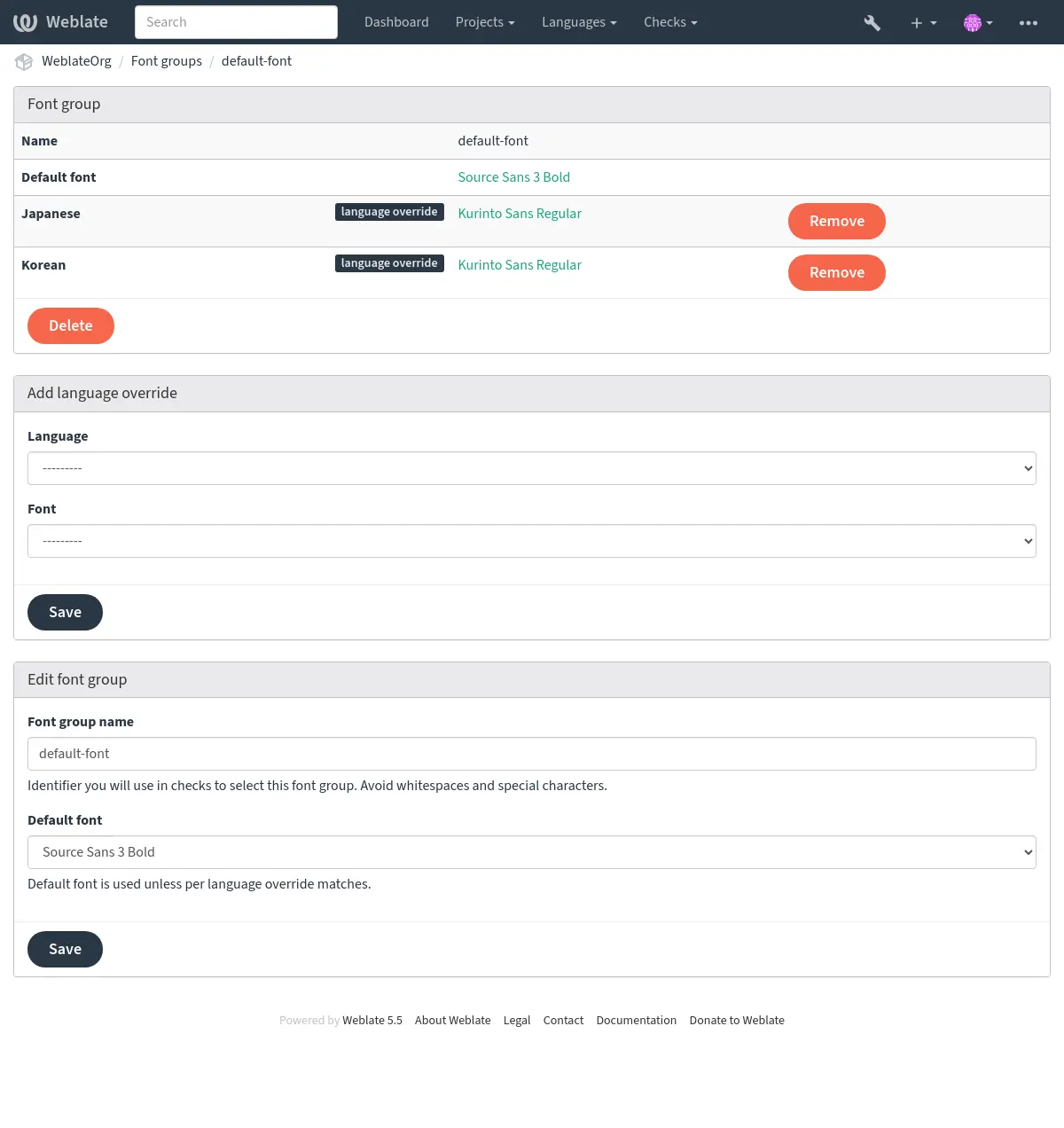
字型組允許為不同語言確定不同字型,這是非拉丁語言中典型需要的:
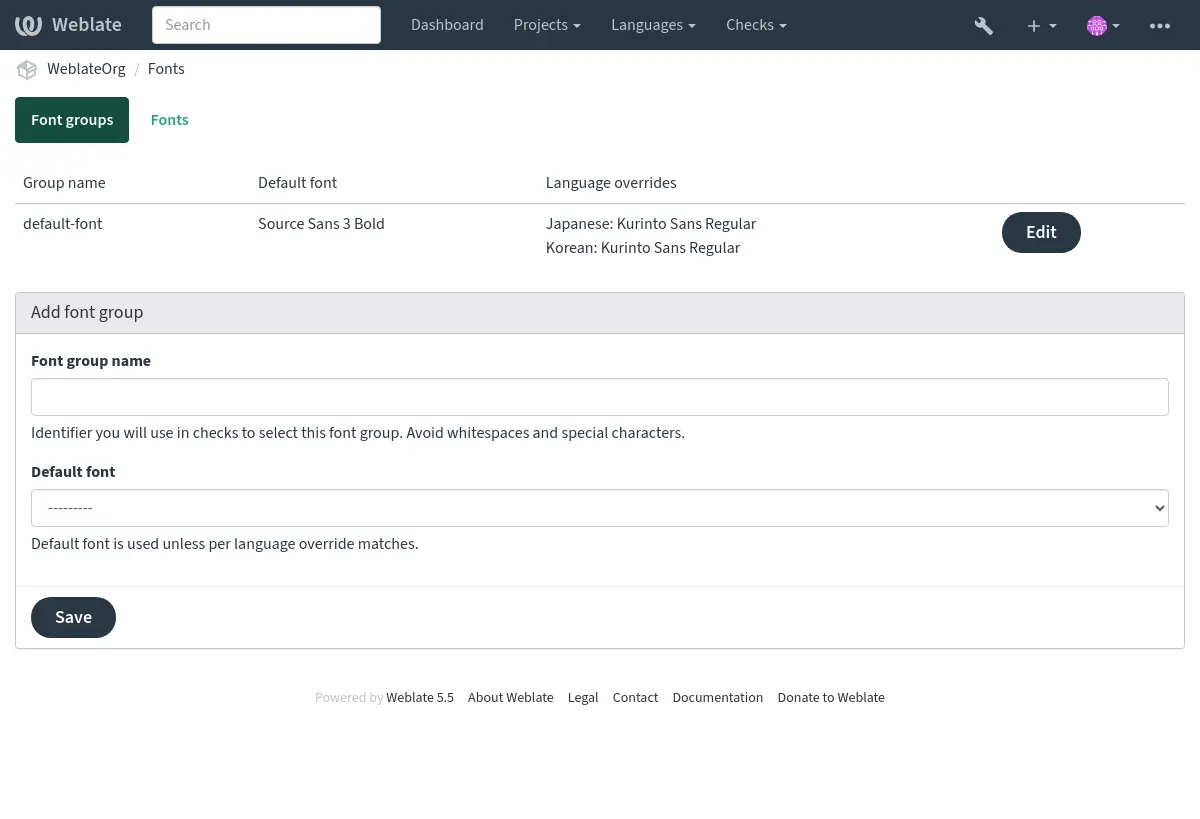
字型組透過名稱識別,名稱不能包含空白字元或特殊字元,這使它能夠容易地用在檢查定義中:
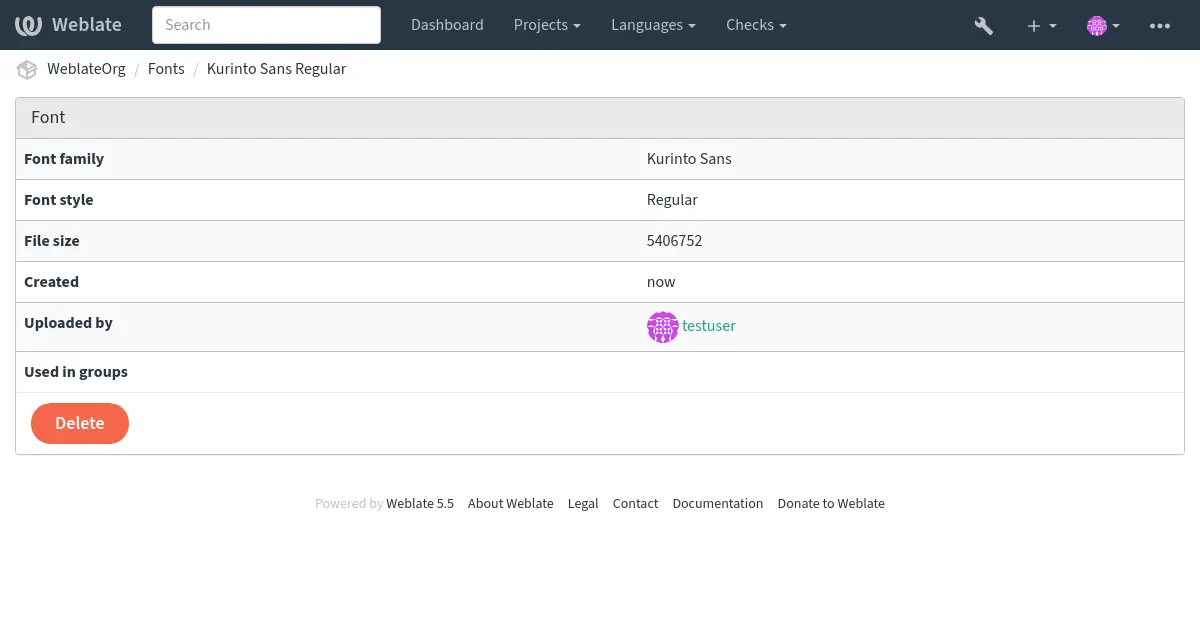
字型族和樣式在上傳後自動識別:
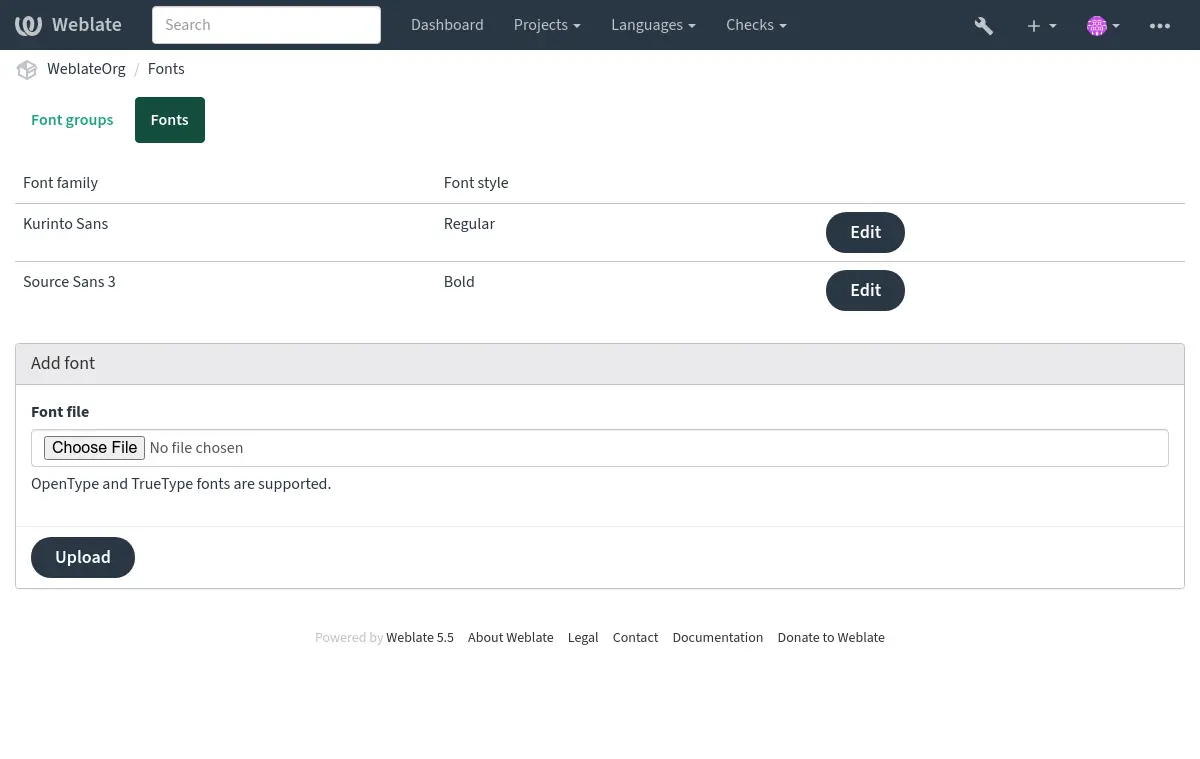
可以將幾種字型載入到 Weblate 中:
為了使用字型來檢查字串長度,將適當的標記傳遞給它 (請參見 使用標誌自定義行為)。可能會需要後面這些:
max-size:500/max-size:300:5Defines maximal width in pixels and, optionally, the maximum number of lines (word wrapping is applied).
font-family:ubuntu確定字型組,透過指定其識別文字來使用。
font-size:22定義字型大小(pixels)。
撰寫自定義查核
Weblate 內建了很大範圍的品質檢查,(請參見 品質檢查 ),儘管可能沒有覆蓋想要檢查的所有內容。可以使用 CHECK_LIST 來調整執行檢查的列表,也可以新增客製的檢查。
weblate.checks.Check 子類別
設定一些特性。
應用
check(如果想要處理程式碼中的複數的話)或check_single方法(它將為您完成)。
一些例子:
為了安裝客製的檢查,在 CHECK_LIST 中為 Python 類提供完全合格的路徑,請參見 自訂的品質檢查、附加元件和自動修復。
檢查翻譯文字不含有 “ foo ”
這是非常簡單的檢查,只檢查翻譯中是否遺失了字串“ foo ”。
# Copyright © Michal Čihař <michal@weblate.org>
#
# SPDX-License-Identifier: GPL-3.0-or-later

"""Simple quality check example."""

from django.utils.translation import gettext_lazy

from weblate.checks.base import TargetCheck


class FooCheck(TargetCheck):
    # Used as identifier for check, should be unique
    # Has to be shorter than 50 characters
    check_id = "foo"

    # Short name used to display failing check
    name = gettext_lazy("Foo check")

    # Description for failing check
    description = gettext_lazy("Your translation is foo")

    # Real check code
    def check_single(self, source, target, unit):
        return "foo" in target
檢查捷克語翻譯文字的複數差異
使用語言資訊來檢查,驗證捷克語中的兩種複數形式不同。
# Copyright © Michal Čihař <michal@weblate.org>
#
# SPDX-License-Identifier: GPL-3.0-or-later

"""Quality check example for Czech plurals."""

from django.utils.translation import gettext_lazy

from weblate.checks.base import TargetCheck


class PluralCzechCheck(TargetCheck):
    # Used as identifier for check, should be unique
    # Has to be shorter than 50 characters
    check_id = "foo"

    # Short name used to display failing check
    name = gettext_lazy("Foo check")

    # Description for failing check
    description = gettext_lazy("Your translation is foo")

    # Real check code
    def check_target_unit(self, sources, targets, unit):
        if unit.translation.language.is_base(("cs",)):
            return targets[1] == targets[2]
        return False

    def check_single(self, source, target, unit) -> bool:
        """We don't check target strings here."""
        return False