Configuring automatic suggestions#
A 4.13 verzióban változott: Prior to Weblate 4.13, the services were configured in the Beállítások.
The support for several machine translation and translation memory services is built-in. Each service can be turned on by the administrator for whole site or at the project settings:
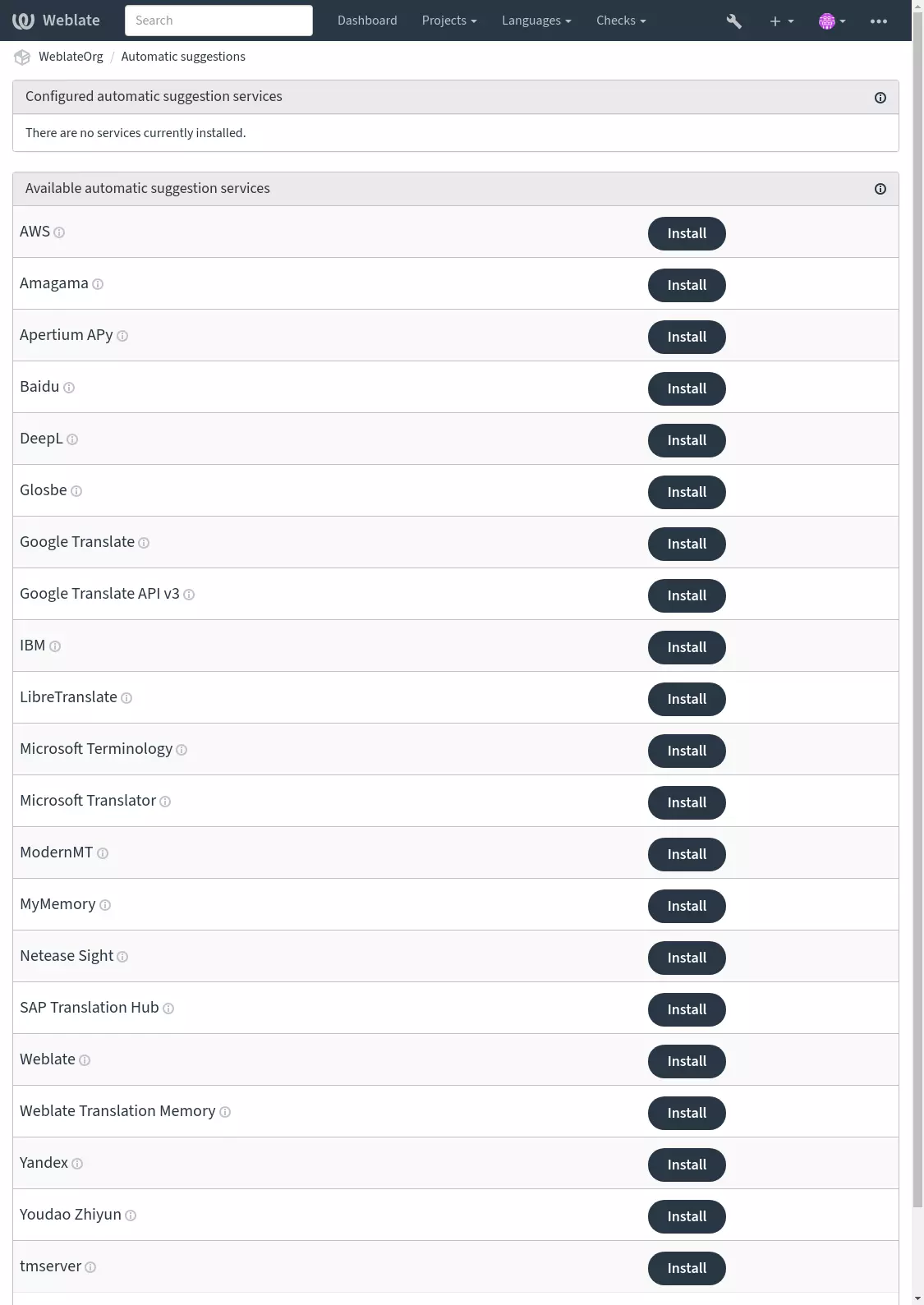
Megjegyzés
They come subject to their terms of use, so ensure you are allowed to use them how you want.
The services translate from the source language as configured at Component configuration, see Forrásnyelv.
Lásd még
Amagama#
- Service ID:
amagama- Beállítások:
This service has no configuration.
Special installation of tmserver run by the authors of Virtaal.
Lásd még
Apertium APy#
- Service ID:
apertium-apy- Beállítások:
urlAPI webcíme
A libre software machine translation platform providing translations to a limited set of languages.
The recommended way to use Apertium is to run your own Apertium-APy server.
Lásd még
AWS#
- Service ID:
aws- Beállítások:
keyHozzáférési kulcs azonosítója
secretAPI titkos kulcsa
regionRégiónév
Amazon Translate is a neural machine translation service for translating text to and from English across a breadth of supported languages.
Lásd még
Baidu#
- Service ID:
baidu- Beállítások:
keyKliensazonosító
secretKlienstitok
Machine translation service provided by Baidu.
This service uses an API and you need to obtain an ID and API key from Baidu to use it.
Lásd még
DeepL#
- Service ID:
deepl- Beállítások:
urlAPI webcíme
keyAPI-kulcs
DeepL is paid service providing good machine translation for a few languages. You need to purchase DeepL API subscription or you can use legacy DeepL Pro (classic) plan.
API URL to use with the DeepL service. At the time of writing, there is the v1 API as well as a free and a paid version of the v2 API.
https://api.deepl.com/v2/(default in Weblate)Is meant for API usage on the paid plan, and the subscription is usage-based.
https://api-free.deepl.com/v2/Is meant for API usage on the free plan, and the subscription is usage-based.
https://api.deepl.com/v1/Is meant for CAT tools and is usable with a per-user subscription.
Previously Weblate was classified as a CAT tool by DeepL, so it was supposed to use the v1 API, but now is supposed to use the v2 API. Therefore it defaults to v2, and you can change it to v1 in case you have an existing CAT subscription and want Weblate to use that.
The easiest way to find out which one to use is to open an URL like the following in your browser:
https://api.deepl.com/v2/translate?text=Hello&target_lang=FR&auth_key=XXX
Replace the XXX with your auth_key. If you receive a JSON object which contains „Bonjour”, you have the correct URL; if not, try the other three.
Weblate supports DeepL formality, it will choose matching one based on the
language (for example, there is de@formal and de@informal).
Lásd még
Glosbe#
- Service ID:
glosbe- Beállítások:
This service has no configuration.
Free dictionary and translation memory for almost every living language.
The API is gratis to use, but usage of the translations is subject to the license of the used data source. There is a limit of calls that may be done from one IP in a set period of time, to prevent abuse.
Lásd még
Google Translate#
- Service ID:
google-translate- Beállítások:
keyAPI-kulcs
Machine translation service provided by Google.
This service uses the Google Translation API, and you need to obtain an API key and turn on billing in the Google API console.
Lásd még
Google Translate API v3#
- Service ID:
google-translate-api-v3- Beállítások:
credentialsGoogle Fordító szolgáltatásfiók információi
projectGoogle Fordító projekt
locationGoogle Fordító helye
Machine translation service provided by Google Cloud services.
LibreTranslate#
Új a(z) 4.7.1 verzióban.
- Service ID:
libretranslate- Beállítások:
urlAPI webcíme
keyAPI-kulcs
LibreTranslate is a free and open-source service for machine translations. The public instance requires an API key, but LibreTranslate can be self-hosted and there are several mirrors available to use the API for free.
https://libretranslate.com/(official public instance)Requires an API key to use outside of the website.
Microsoft Terminology#
- Service ID:
microsoft-terminology- Beállítások:
This service has no configuration.
The Microsoft Terminology Service API allows you to programmatically access the terminology, definitions and user interface (UI) strings available in the Language Portal through a web service.
Lásd még
Microsoft Translator#
- Service ID:
microsoft-translator- Beállítások:
keyAPI-kulcs
base_urlAlkalmazás alap webcíme
Available choices:
api.cognitive.microsofttranslator.com– Global (non-regional)api-apc.cognitive.microsofttranslator.com– Asia Pacificapi-eur.cognitive.microsofttranslator.com– Europeapi-nam.cognitive.microsofttranslator.com– North Americaapi.translator.azure.cn– Chinaapi.cognitive.microsofttranslator.us– Azure US Government cloudendpoint_urlHitelesítési szolgáltatás URL-e
A regionális vagy többes szolgáltatás a lenti régió mező használatával adható meg.
Available choices:
api.cognitive.microsoft.com– Globalapi.cognitive.azure.cn– Chinaapi.cognitive.microsoft.us– Azure US Government cloudregionHitelesítési szolgáltatás régiója
Machine translation service provided by Microsoft in Azure portal as a one of Cognitive Services.
Weblate implements Translator API V3.
Translator Text API V2#
The key you use with Translator API V2 can be used with API 3.
Translator Text API V3#
You need to register at Azure portal and use the key you obtain there.
With new Azure keys, you also need to set region to locale of your service.
Tipp
For Azure China, please use your endpoint from the Azure Portal.
ModernMT#
Új a(z) 4.2 verzióban.
- Service ID:
modernmt- Beállítások:
urlAPI webcíme
keyAPI-kulcs
Lásd még
MyMemory#
- Service ID:
mymemory- Beállítások:
emailKapcsolat e-mail-címe
usernameFelhasználónév
keyAPI-kulcs
Huge translation memory with machine translation.
Free, anonymous usage is currently limited to 100 requests/day, or to 1000
requests/day when you provide a contact e-mail address in email.
You can also ask them for more.
Lásd még
Netease Sight#
- Service ID:
netease-sight- Beállítások:
keyKliensazonosító
secretKlienstitok
Machine translation service provided by NetEase.
This service uses an API, and you need to obtain key and secret from NetEase.
Lásd még
SAP Translation Hub#
- Service ID:
sap-translation-hub- Beállítások:
urlAPI webcíme
keyAPI-kulcs
usernameSAP-felhasználónév
passwordSAP-jelszó
enable_mtGépi fordítás engedélyezése
domainFordítási tartomány
A fordítási tartomány azonosítója, például BC. Ha nem adott meg tartományt, akkor a metódus az összes elérhető tartományban keres fordításokat.
Machine translation service provided by SAP.
You need to have a SAP account (and the SAP Translation Hub enabled in the SAP Cloud Platform) to use this service.
You can also configure whether to also use machine translation services, in addition to the term database.
Megjegyzés
To access the Sandbox API, you need to set url
and key.
To access the productive API, you need to set url, username and password.
tmserver#
- Service ID:
tmserver- Beállítások:
urlAPI webcíme
You can run your own translation memory server by using the one bundled with Translate-toolkit and let Weblate talk to it. You can also use it with an amaGama server, which is an enhanced version of tmserver.
First you will want to import some data to the translation memory:
build_tmdb -d /var/lib/tm/db -s en -t cs locale/cs/LC_MESSAGES/django.po
build_tmdb -d /var/lib/tm/db -s en -t de locale/de/LC_MESSAGES/django.po
build_tmdb -d /var/lib/tm/db -s en -t fr locale/fr/LC_MESSAGES/django.po
Start tmserver to listen to your requests:
tmserver -d /var/lib/tm/db
Configure Weblate to talk to it, the default URL is
http://localhost:8888/tmserver/.
IBM Watson Language Translator#
- Service ID:
ibm- Beállítások:
urlAPI webcíme
keyAPI-kulcs
IBM Watson Language Translator translates text from one language to another. The service offers multiple domain-specific models.
Lásd még
Weblate#
- Service ID:
weblate- Beállítások:
This service has no configuration.
Weblate machine translation service can provide translations for strings that are already translated inside Weblate. It looks for exact matches in the existing strings.
Weblate Translation Memory#
- Service ID:
weblate-translation-memory- Beállítások:
This service has no configuration.
Use Fordítási memória as a machine translation service. Any string that has been translated in past (or uploaded to the translation memory) can be translated in this way.
Yandex#
- Service ID:
yandex- Beállítások:
keyAPI-kulcs
Machine translation service provided by Yandex.
This service uses a Translation API, and you need to obtain an API key from Yandex.
Youdao Zhiyun#
- Service ID:
youdao-zhiyun- Beállítások:
keyKliensazonosító
secretKlienstitok
Machine translation service provided by Youdao.
This service uses an API, and you need to obtain an ID and an API key from Youdao.
Custom machine translation#
You can also implement your own machine translation services using a few lines of
Python code. This example implements machine translation in a fixed list of
languages using dictionary Python module:
# Copyright © Michal Čihař <michal@weblate.org>
#
# SPDX-License-Identifier: GPL-3.0-or-later

"""Machine translation example."""

import dictionary

from weblate.machinery.base import MachineTranslation


class SampleTranslation(MachineTranslation):
    """Sample machine translation interface."""

    name = "Sample"

    def download_languages(self):
        """Return list of languages your machine translation supports."""
        return {"cs"}

    def download_translations(
        self,
        source,
        language,
        text: str,
        unit,
        user,
        search: bool,
        threshold: int = 75,
    ):
        """Return tuple with translations."""
        for t in dictionary.translate(text):
            yield {"text": t, "quality": 100, "service": self.name, "source": text}
You can list your own class in WEBLATE_MACHINERY and Weblate
will start using that.