Weblate との連携
Weblate の基本
プロジェクトとコンポーネントの構造
Weblate では、翻訳はプロジェクトとコンポーネントで構成されています。各プロジェクトには複数のコンポーネントを含めることができ、コンポーネントには個々の言語への翻訳を含めることができます。コンポーネントは、翻訳可能な 1 つのファイル(例: GNU gettext PO(ポータブル オブジェクト) や Android 文字列リソース)に対応します。プロジェクトは、コンポーネントを論理的なまとまりに分類(例えば、1 つのアプリケーション内で使用するすべての翻訳をグループ化)するのに便利です。
Additionally, components within projects can be structured using categories. Components can belong to a category, and categories can be nested.
内部ではデフォルトで、各プロジェクトごとに、共通する文字列の翻訳はプロジェクト内の他のコンポーネントに自動反映させます。これにより、反復や複数バージョンの翻訳の負担を軽減します。コンポーネント独自の翻訳が望ましい場合は、 翻訳の自動反映の有効化 を利用して翻訳の反映を コンポーネント構成 ごとに無効にできます。
リポジトリの統合
Weblate は上流のバージョン管理リポジトリと統合するように構築されています。継続的な現地語化 にはビルディング ブロックと、それらの間で変更がどのように流れるかについて説明されています。
参考
アーキテクチャの概要 は、Weblate 内部の動作原理を説明します。
ユーザー属性
Weblate は、翻訳者の氏名とメールアドレスを使用して、バージョン管理リポジトリ内に翻訳者の情報を適切に保存します。コミットに実際のメールアドレスを添付することは、分散型バージョン管理の精神に沿ったものであり、GitHub などのサービスが、Weblate で行われたあなたの貢献を GitHub プロフィールに関連付けることができます。
この機能は、バージョン管理コミット内に公開されたメールアドレスが悪用されるリスクも伴います。さらに、そのようなコミットが GitHub などの公開ホスティングで公開されると、事実上、それを削除する方法はありません。Weblate では、これを回避するために、アカウント でコミット用の匿名メールアドレスが選択できます。
したがって、管理者が考慮する必要がある Weblate の設定時の項目:
そのようなメールの使用については、サービス条件に明確に記載することが必要です。そのようなドキュメントが必要な場合は、法的文書 を参考になります。
PRIVATE_COMMIT_EMAIL_OPT_INを設定すると、デフォルトでメールアドレスを非公開にできます。
Importing a localization project into Weblate
Weblate has been developed with VCS integration in mind as it’s core feature, so the easiest way is to grant Weblate the access to your repository. The import process will guide you through configuring your translations into Weblate components.
Alternatively, you can let Weblate set up a local-only repository containing all the translations without integration.
Weblate の機能で更新済みの翻訳の取得
Weblate stores updated strings in a database and commits them to a local version-control repository. You can add a Weblate repository (when Git エクスポーター is turned on) as an additional remote repository and fetch translation updates from it.
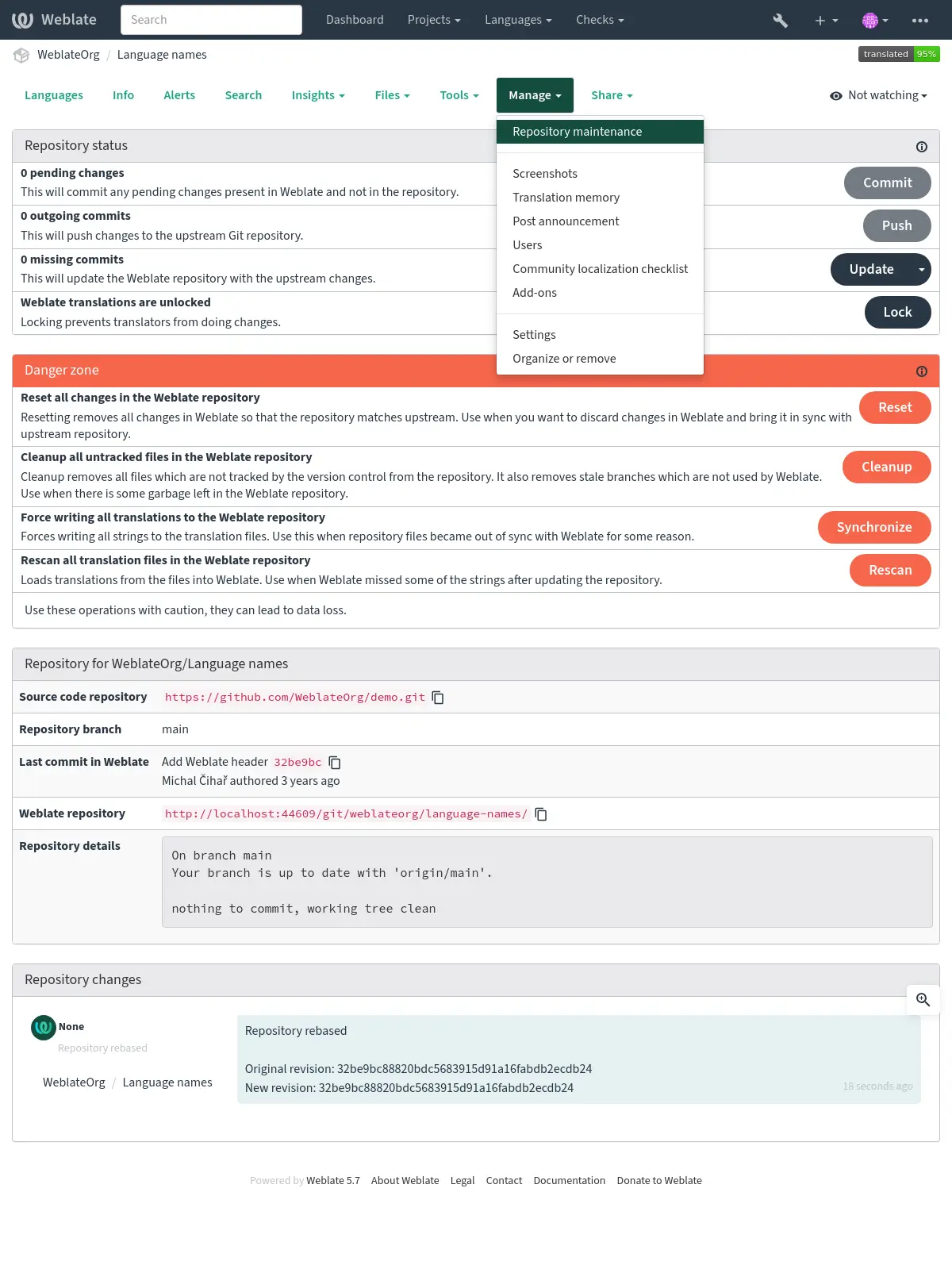
Prior to this, you might want to commit any pending local changes made in Weblate (see 遅延コミット). This can be done from the user interface (in the Repository maintenance), or from the command-line using Weblate クライアント.
リポジトリへのプッシュを自動化するには、Weblate にリポジトリへのプッシュ アクセスを許可し、コンポーネント構成 で リポジトリの送信先 URL を設定します。参照: 変更点を Weblate からプッシュ。
Alternatively, use Weblate の REST API to update translations so that they match the latest version from the upstream in your remote VCS repository.
リモートでの変更を Weblate に取り込む
To fetch any strings recently updated in your remote VCS repository into Weblate, allow Weblate to pull from the upstream repository. This can be achieved in the user interface (in the Repository maintenance), or from the command-line using Weblate クライアント.
This can be automated by setting a webhook in your repository to trigger Weblate whenever there is a new commit. See リポジトリの更新 for more details.
If not using VCS integration, you can use the UI or Weblate の REST API to update the translations so that they match your codebase.
新しい原文の追加
翻訳ファイルがコードと共にリモート VCS に保存されている場合、開発者が新しい文字列を追加するワークフローになっていることが多いです。どのような方法で文字列を追加するとしても、誤りが入らないように、原文の品質ゲートウェイ の使用を検討してください。
翻訳ファイルがコードから分離されている場合、次の方法で Weblate に新しい文字列を導入できます。
Manually, using Add new translation string from Tools menu in the source language. You can choose between the radio buttons Singular and Plural inside the form. Select the appropriate form of the new translation string to be added.
自動で、API
POST /api/translations/(string:project)/(string:component)/(string:language)/units/を使用します。原文のファイルを 既存の翻訳ファイルの置き換え としてアップロードします(これは既存の文字列を上書きするので、ファイルに古い文字列と新しい文字列の両方が含まれていることを確認してください)。または 新しい文字列の追加 をします。参照: インポート方法。
注釈
Weblate で文字列を追加するには、文字列の管理 が必要です。
Updating target-language files
For monolingual files (see 対応するファイル形式), Weblate might add new translation strings present in the モノリンガル用の、基礎となる言語ファイル, and not in actual translations. It does not however perform any automatic cleanup of stale strings, as that might have unexpected results. If you still want to do this, please install the 翻訳ファイルのクリーンアップ add-on, which handles cleanup according to your requirements.
Weblate will also not try to update bilingual files when the source changes,
so if you need po files to be updated from pot, do it yourself by
using Update source strings インポート方法, or by using
the POT に合わせて PO ファイルを更新 (msgmerge) add-on.
ヒント
Source string extraction tools, such as xgettext or lupdate, need to be executed outside of Weblate.
新しい文字列の紹介
文字列の管理 を有効にして Weblate に新しい文字列を追加できます。しかし、通常は、新しい文字列を導入したコード変更と一緒に導入することをお勧めします。
Monolingual formats need to be configured so that new strings are added to モノリンガル用の、基礎となる言語ファイル. This is typically done by developers, as they write the code. You might want to use a review process of those strings using 原文の品質ゲートウェイ.
通常、バイリンガル形式では何らかのツールを使用してソース コードから文字列を抽出します(like xgettext や intltool-update のように)。その方法については、現地語化フレームワークのドキュメントに従ってください。文字列が抽出されたら、既存の翻訳を更新するために追加の手順が必要になることがあります。参照: Updating target-language files。
ヒント
現在、Weblate では文字列抽出の自動化は対象外です。文字列抽出には、信頼されていないコードの実行が通常必要であるため、現地語化専用のプラットフォームよりも、一般的な継続的な現地語化に適しています。
これを継続的な連携パイプラインに統合して、新しい文字列を翻訳用に自動的に表示させることもできます。このようなパイプラインは マージ競合の回避 もカバーする必要があります。
Managing the local VCS repository
Weblate stores all translations in its underlying version control repository. It is suggested to be connected to a remote one, but internal-only setup is also possible. The Repository maintenance allows controlling this repository.
ヒント
With 継続的な現地語化, any changes are automatically pushed from the repository, so there is usually no need to manually manage it manually.