Integraties hosten code
Weblate integreert op verschillende plaatsen met sites voor het hosten van code: toegang tot opslagruimten, inkomende notificaties en het terugplaatsen van vertalingen. De exacte opstelling is afhankelijk van het feit of u Hosted Weblate gebruikt of uw eigen instantie van Weblate uitvoert en of Weblate direct pull requests zou moeten pushen of maken.
Gebruik deze pagina als een provider-geöriënteerde controlelijst. De individuele pagina’s voor de instellingen behouden de canonical verwijzing voor het instellen van syntaxis.
Overzicht instellingen
Geef Weblate toegang tot de opslagruimte.
Op Hosted Weblate, voeg de gehoste gebruiker weblate toe waar die beschikbaar is, bekijk Toegang tot opslagruimten vanuit Hosted Weblate.
Voor zelf gehoste Weblate, maak een aangewezen gebruiker voor het hosten van code en geef die toegang met Weblate’s SSH-sleutel of een HTTPS-token, bekijk Toegang tot opslagruimten van sites voor het hosten van code (GitHub, GitLab, Bitbucket, Azure DevOps, …).
Configureer Broncode-opslagruimte zodat Weblate de opslagruimte kan klonen.
Configureer inkomende notificaties, zodat Weblate wijzigingen kort na het pushen ophaalt. De webhook voor de opslagruimtere of de app moet verwijzen naar de overeenkomende URL voor de hook van Weblate, en het project moet Hooks inschakelen hebben ingeschakeld.
Bepaal hoe Weblate push-vertalingen terug zou moeten plaatsen:
Gebruik Git of Mercurial en URL voor pushen naar de opslagruimte om direct te pushen.
Gebruik een provider-specifiek VCS-backend, zoals GitHub of GitLab, om pull of merge requests te maken. Deze backends hebben inloggegevens voor de API nodig in de instellingen van Weblate.
Stel, optioneel, Push-tak in voor wanneer Weblate naar een branch in de opslagruimte upstream zou moeten pushen in plaats van naar een fork, indien ondersteund.
Wijzigingen vanuit Weblate pushen
Elk vertaalonderdeel kan een URL voor pushen ingesteld hebben (bekijk URL voor pushen naar de opslagruimte), en in dat geval zal Weblate in staat zijn de wijziging naar de opslagruimte op afstand te pushen. Weblate kan ook worden geconfigureerd om automatisch wijzigingen te pushen bij elke indiening (commit); dit is standaard ingeschakeld, bekijk Pushen na commit.
Wanneer u niet wilt dat wijzigingen automatisch worden gepusht, kunt u handmatig pushen onder Onderhoud opslagruimte of met de API via wlc push.
Voor het geval dat u geen direct pushen door Weblate wilt, is er ondersteuning voor GitHub pull requests, GitLab verzoeken voor samenvoegen, Gitea pull requests, Pagure verzoeken voor samenvoegen, Azure DevOps pull requests, of reviews van Verzoeken Gerrit review. U kunt deze activeren door te kiezen voor GitHub, GitLab, Gitea, Gerrit, Azure DevOps, of Pagure als Versiebeheersysteem in Configuratie onderdeel.
In het algemeen zijn de volgende opties beschikbaar met Git, Mercurial, GitHub, GitLab, Gitea, Pagure, Azure DevOps, Gerrit, Bitbucket Data Center en Bitbucket Cloud:
Gewenste instelling |
|||
|---|---|---|---|
Niet pushen |
leeg |
leeg |
|
Direct pushen |
SSH URL |
leeg |
|
Pushen naar afzonderlijke tak |
SSH URL |
Naam tak |
|
Niet pushen |
leeg |
leeg |
|
Direct pushen |
SSH URL |
leeg |
|
GitHub pull request vanuit fork |
leeg |
leeg |
|
GitHub pull request vanuit tak |
SSH URL [1] |
Naam tak |
|
GitLab merge request vanuit fork |
leeg |
leeg |
|
GitLab merge request vanuit tak |
SSH URL [1] |
Naam tak |
|
Gitea merge request vanuit fork |
leeg |
leeg |
|
Gitea merge request vanuit tak |
SSH URL [1] |
Naam tak |
|
Pagure merge request vanuit fork |
leeg |
leeg |
|
Pagure merge request vanuit tak |
SSH URL [1] |
Naam tak |
|
Azure DevOps pull request vanuit fork |
leeg |
leeg |
|
Azure DevOps pull request vanuit tak |
SSH URL [1] |
Naam tak |
|
Gerrit review |
SSH URL |
Naam doelbranch (optioneel) |
|
Pull request op Bitbucket Data Center uit fork |
leeg |
leeg |
|
Bitbucket Data Center pull request vanuit tak |
SSH URL [1] |
Naam tak |
|
Bitbucket Cloud pull request vanuit fork |
leeg |
leeg |
|
Bitbucket Cloud pull request vanuit tak |
SSH URL [1] |
Naam tak |
GitHub
Toegang tot opslagruimten van GitHub
HTTPS with personal access token
For a single private repository, HTTPS access with an access token is usually the simplest setup when the provider supports Git over HTTPS. Use the provider-required username and token in Broncode-opslagruimte.
Configure URL voor pushen naar de opslagruimte only when Weblate should push changes directly or when the chosen workflow requires a push URL, see Wijzigingen vanuit Weblate pushen.
The token needs read access for cloning and write access for pushing. Provider-specific VCS backends that create pull or merge requests might require separate API credentials.
Die benadering gebruiken:
Maak een persoonlijk toegangstoken zoals beschreven in Een toegangstoken maken om te gebruiken op de opdrachtregel.
Neem het token op in de URL van uw opslagruimte:
https://gebruikersnaam:token@github.com/eigenaar/repo.git.
Dit is geschikt als u net begint met Weblate of werkt met een enkele opslagruimte.
SSH with a dedicated user
For setups with multiple repositories, use SSH access with a dedicated code
hosting user for Weblate. Add Weblate’s public SSH key to that user, grant the
user access to the repositories, and use SSH URLs in Broncode-opslagruimte,
for example git@example.com:group/project.git.
Configure URL voor pushen naar de opslagruimte only when Weblate should push changes directly or when the chosen workflow requires a push URL, see Wijzigingen vanuit Weblate pushen.
This also avoids provider restrictions on SSH key reuse. Some code hosting sites allow a public SSH key to be added only once, or only to a single user or deploy key entry. Keeping Weblate’s SSH key on a dedicated user lets that user be granted access to multiple repositories without reusing the key in several places.
This keeps personal, project, or API access tokens out of repository URLs. Provider API credentials are still needed when using a provider-specific VCS backend to create pull or merge requests; those credentials are configured separately from the Git repository URL.
On Hosted Weblate, use the hosted weblate user on supported code hosting sites, see Toegang tot opslagruimten vanuit Hosted Weblate.
For GitHub, create a dedicated user, for example weblate-bot, and use
GitHub SSH URLs for your repositories, for example
git@github.com:owner/repo.git.
Deze benadering wordt ook gebruikt voor Hosted Weblate, die voor dat doel een aangewezen gebruiker weblate heeft.
Notitie
Bij het gebruiken van GitHub voor pull requests, beïnvloedt de configuratie van Push-tak het gedrag: indien niet ingesteld wordt het project geforkt en de wijzigingen gepusht via een fork. Indien wel ingesteld, worden wijzigingen gepusht naar de opslagruimte upstream en de gekozen tak.
GitHub notificaties
Weblate heeft eigen ondersteuning voor GitHub.
Wanneer u Hosted Weblate gebruikt, is de aanbevolen benadering om de Weblate app te installeren. De app levert GitHub-notificaties af aan Hosted Weblate, dus u hoeft geen afzonderlijke Webhook in GitHub te configureren. Het geeft echter niet zelf Hosted Weblate toegang tot de opslagruimte. Om wijzigingen terug te pushen moet u nog steeds de Hosted Weblate weblate GitHub-gebruiker toevoegen als een deelnemer met schrijftoegang, bekijk Toegang tot opslagruimten vanuit Hosted Weblate.
Als u de app niet gebruikt, voeg de Weblate webhook toe in de instellingen voor de opslagruimte (Webhooks), voor het ontvangen van notificaties voor elke push naar een opslagruimte van GitHub, zoals weergegeven in de afbeelding hieronder:
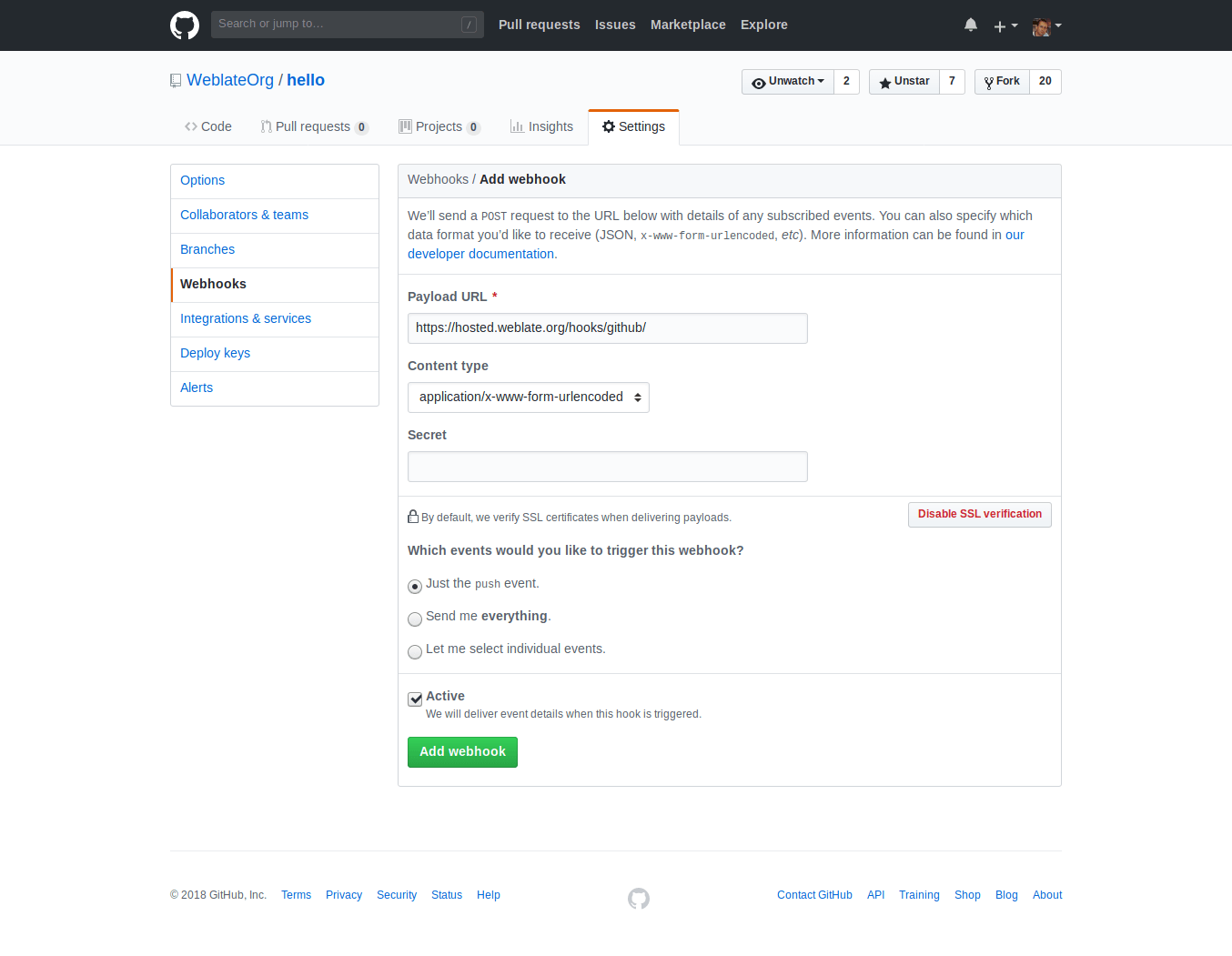
De Payload URL bestaat uit uw URL voor Weblate, gevolgd door /hooks/github/, voor de service Hosted Weblate is dit bijvoorbeeld https://hosted.weblate.org/hooks/github/.
U kunt de andere waarden laten staan op de standaard instellingen Weblate kan beide typen inhoud afhandelen en gebruikt alleen de gebeurtenis push.
GitHub pull requests
Dit voegt een dunne laag toe bovenop Git met de GitHub API om het pushen van wijzigingen in de vertalingen als pull requests mogelijk te maken, in plaats van ze direct naar de opslagruimte te pushen.
Git pusht wijzigingen direct naar een opslagruimte, terwijl het backend GitHub pull requests maakt. Het laatste is niet nodig om puur toegang te krijgen tot opslagruimten van Git.
Selecteer, om pull requests te maken, GitHub als Versiebeheersysteem en configureer GITHUB_CREDENTIALS. Gebruik voor GitHub.com api.github.com als de API-host. Het token moet Weblate toestaan om inhoud van de opslagruimte te lezen en te schrijven en pull requests te maken. Als Weblate private opslagruimten zou moeten forken, heeft het token misschien ook beheersrechten nodig.
GitLab
Toegang tot opslagruimten van GitLab
HTTPS with personal or project access token
For a single private repository, HTTPS access with an access token is usually the simplest setup when the provider supports Git over HTTPS. Use the provider-required username and token in Broncode-opslagruimte.
Configure URL voor pushen naar de opslagruimte only when Weblate should push changes directly or when the chosen workflow requires a push URL, see Wijzigingen vanuit Weblate pushen.
The token needs read access for cloning and write access for pushing. Provider-specific VCS backends that create pull or merge requests might require separate API credentials.
For GitLab, the token needs write_repository scope to be able to push changes to the repository. The project access token requires Developer role for pushing.
De URL moet een gebruikersnaam bevatten. Voor een persoonlijk toegangstoken is dat de feitelijke gebruikersnaam: https://gebruiker:persoonlijk_toegangs_token@gitlab.com/example/example.git. Voor project-toegangstokens mag het een niet lege waarde zijn:https://voorbeeld:project_toegangs_token@gitlab.com/example/example.git.
Notitie
De regels voor het gebruiken van project-toegangstokens zijn gewijzigd tussen uitgaven van GitLab, de niet lege waarde is het huidige vereiste, maar oudere versies hadden verschillende verwachtingen (projectnaam, bot gebruikersnaam). Bekijk de documentatie van GitLab die overeenkomt met uw versie als u er niet zeker van bent.
SSH with a dedicated user
For setups with multiple repositories, use SSH access with a dedicated code
hosting user for Weblate. Add Weblate’s public SSH key to that user, grant the
user access to the repositories, and use SSH URLs in Broncode-opslagruimte,
for example git@example.com:group/project.git.
Configure URL voor pushen naar de opslagruimte only when Weblate should push changes directly or when the chosen workflow requires a push URL, see Wijzigingen vanuit Weblate pushen.
This also avoids provider restrictions on SSH key reuse. Some code hosting sites allow a public SSH key to be added only once, or only to a single user or deploy key entry. Keeping Weblate’s SSH key on a dedicated user lets that user be granted access to multiple repositories without reusing the key in several places.
This keeps personal, project, or API access tokens out of repository URLs. Provider API credentials are still needed when using a provider-specific VCS backend to create pull or merge requests; those credentials are configured separately from the Git repository URL.
On Hosted Weblate, use the hosted weblate user on supported code hosting sites, see Toegang tot opslagruimten vanuit Hosted Weblate.
For GitLab, create a dedicated user and use GitLab SSH URLs, for example
git@gitlab.com:group/project.git.
GitLab notificaties
Weblate heeft ondersteuning voor hooks van GitLab. Voeg een webhook voor het project toe met als doel de URL /hooks/gitlab/ op uw installatie van Weblate, bijvoorbeeld https://hosted.weblate.org/hooks/gitlab/.
Probleemoplossing
Controleer GitLab webhook request history als webhooks worden afgeleverd.
De lading van het antwoord bevat informatie over overeenkomende onderdelen.
GitLab verzoeken voor samenvoegen
Dit voegt een dunne laag toe bovenop Git met de GitLab API om het pushen van wijzigingen in vertalingen als merge requests mogelijk te maken, in plaats van ze direct naar de opslagruimte te pushen.
Er is geen noodzaak om dit te gebruiken voor toegang tot opslagruimten van Git, gewoonlijk werkt Git hetzelfde. Het enige verschil is hoe het pushen naar een opslagruimte wordt afgehandeld. Met het backend Git worden wijzigingen direct naar de opslagruimte gepusht, terwijl het backend GitLab een merge request maakt.
Selecteer, om merge requests te maken, GitLab als Versiebeheersysteem en configureer GITLAB_CREDENTIALS.
The Push-tak configuration affects where Weblate pushes changes before opening the merge request. If it is not set, the project is forked and changes are pushed through a fork. If it is set, changes are pushed to the upstream repository and chosen branch.
Gitea, Forgejo en Codeberg
Gitea, Forgejo, and Codeberg repository access
HTTPS with an access token
For a single private repository, HTTPS access with an access token is usually the simplest setup when the provider supports Git over HTTPS. Use the provider-required username and token in Broncode-opslagruimte.
Configure URL voor pushen naar de opslagruimte only when Weblate should push changes directly or when the chosen workflow requires a push URL, see Wijzigingen vanuit Weblate pushen.
The token needs read access for cloning and write access for pushing. Provider-specific VCS backends that create pull or merge requests might require separate API credentials.
SSH with a dedicated user
For setups with multiple repositories, use SSH access with a dedicated code
hosting user for Weblate. Add Weblate’s public SSH key to that user, grant the
user access to the repositories, and use SSH URLs in Broncode-opslagruimte,
for example git@example.com:group/project.git.
Configure URL voor pushen naar de opslagruimte only when Weblate should push changes directly or when the chosen workflow requires a push URL, see Wijzigingen vanuit Weblate pushen.
This also avoids provider restrictions on SSH key reuse. Some code hosting sites allow a public SSH key to be added only once, or only to a single user or deploy key entry. Keeping Weblate’s SSH key on a dedicated user lets that user be granted access to multiple repositories without reusing the key in several places.
This keeps personal, project, or API access tokens out of repository URLs. Provider API credentials are still needed when using a provider-specific VCS backend to create pull or merge requests; those credentials are configured separately from the Git repository URL.
On Hosted Weblate, use the hosted weblate user on supported code hosting sites, see Toegang tot opslagruimten vanuit Hosted Weblate.
Voor opslagruimten van Hosted Weblate op Codeberg, voeg de gehoste gebruiker van weblate toe waar schrijftoegang nodig is, bekijk Toegang tot opslagruimten vanuit Hosted Weblate.
Gitea notificaties
Weblate heeft ondersteuning voor webhooks van Gitea. Voeg een Gitea Webhook toe voor de gebeurtenis Push events met als doel de URL /hooks/gitea/ op uw installatie van Weblate, bijvoorbeeld https://hosted.weblate.org/hooks/gitea/. Dit kan worden gedaan in Webhooks onder Settings voor de opslagruimte.
Forgejo notificaties
Weblate heeft ondersteuning voor webhooks van Forgejo. Voeg een Forgejo Webhook toe voor de gebeurtenis Push events met als doel de URL /hooks/forgejo/ op uw installatie van Weblate, bijvoorbeeld https://hosted.weblate.org/hooks/forgejo/. Dit kan worden gedaan in Webhooks onder Settings voor de opslagruimte.
Gitea pull requests
Added in version 4.12.
Dit voegt een dunne laag toe bovenop Git met behulp van de Gitea API om wijzigingen in vertalingen als pull requests te kunnen pushen, in plaats van ze direct naar de opslagruimte te pushen.
Het is niet nodig om dit te gebruiken voor toegang tot opslagruimten van Git, gewoonlijk werkt Git hetzelfde. Het enige verschil is hoe het pushen naar een opslagruimte wordt afgehandeld. Met Git worden wijzigingen direct naar de opslagruimte gepusht, terwijl de backend Gitea pull requests maakt.
Selecteer, om pull requests te maken, Gitea als Versiebeheersysteem en configureer GITEA_CREDENTIALS.
Bitbucket
Bitbucket repository access
HTTPS with an access token
For a single private repository, HTTPS access with an access token is usually the simplest setup when the provider supports Git over HTTPS. Use the provider-required username and token in Broncode-opslagruimte.
Configure URL voor pushen naar de opslagruimte only when Weblate should push changes directly or when the chosen workflow requires a push URL, see Wijzigingen vanuit Weblate pushen.
The token needs read access for cloning and write access for pushing. Provider-specific VCS backends that create pull or merge requests might require separate API credentials.
SSH with a dedicated user
For setups with multiple repositories, use SSH access with a dedicated code
hosting user for Weblate. Add Weblate’s public SSH key to that user, grant the
user access to the repositories, and use SSH URLs in Broncode-opslagruimte,
for example git@example.com:group/project.git.
Configure URL voor pushen naar de opslagruimte only when Weblate should push changes directly or when the chosen workflow requires a push URL, see Wijzigingen vanuit Weblate pushen.
This also avoids provider restrictions on SSH key reuse. Some code hosting sites allow a public SSH key to be added only once, or only to a single user or deploy key entry. Keeping Weblate’s SSH key on a dedicated user lets that user be granted access to multiple repositories without reusing the key in several places.
This keeps personal, project, or API access tokens out of repository URLs. Provider API credentials are still needed when using a provider-specific VCS backend to create pull or merge requests; those credentials are configured separately from the Git repository URL.
On Hosted Weblate, use the hosted weblate user on supported code hosting sites, see Toegang tot opslagruimten vanuit Hosted Weblate.
Hosted Weblate heeft een aangewezen gebruiker weblate voor toegang tot Bitbucket, bekijk Toegang tot opslagruimten vanuit Hosted Weblate.
Direct pushen, gebruik Git of Mercurial met URL voor pushen naar de opslagruimte.
Bitbucket notificaties
Weblate heeft ondersteuning voor webhooks van Bitbucket. Voeg een webhook toe die wordt geactiveerd bij pushen vanuit de opslagruimte, met als doel de URL /hooks/bitbucket/ op uw installatie van Weblate, bijvoorbeeld https://hosted.weblate.org/hooks/bitbucket/.
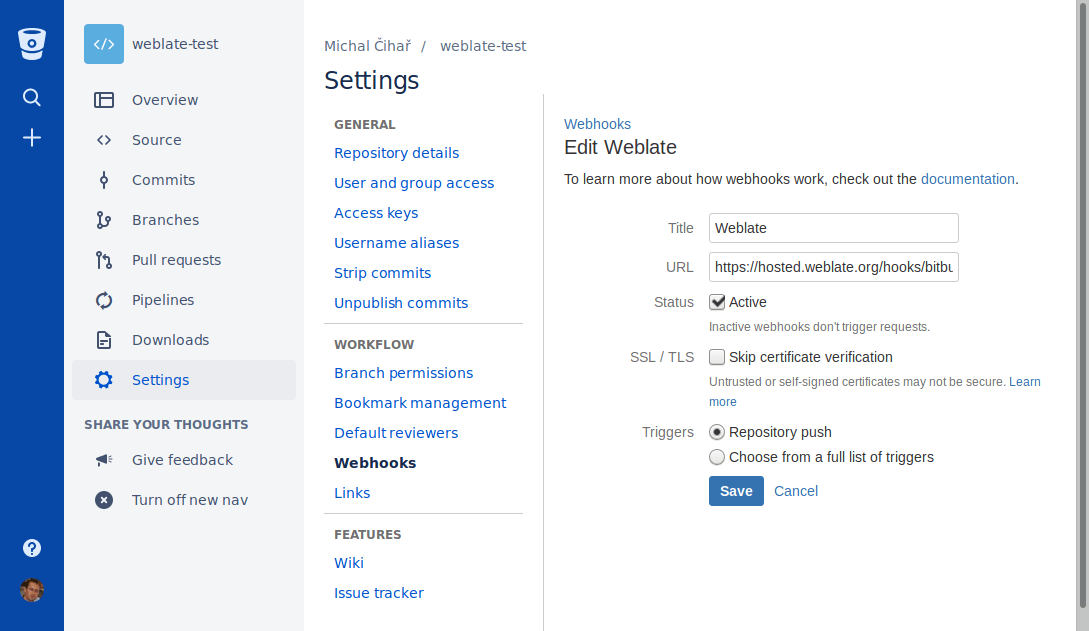
Pull requesten op Bitbucket Data Center
Added in version 4.16.
Dit voegt een dunne laag toe bovenop Git die de Bitbucket Data Center API gebruikt om wijzigingen in vertalingen als pull requesten te pushen, in plaats van ze direct naar de opslagruimte te pushen.
Waarschuwing
Dit ondersteunt niet Bitbucket Cloud API.
Er is geen noodzaak om dit te gebruiken om toegang te krijgen tot opslagruimten van Git, gewoonlijk werkt Git hetzelfde. Het enige verschil is hoe het pushen naar een opslagruimte wordt afgehandeld. Met Git worden wijzigingen rechtstreeks naar de opslagruimte gepusht, terwijl de backend Bitbucket Data Center een pull request maakt.
Selecteer, om pull requests te maken, Bitbucket Data Center als Versiebeheersysteem en configureer BITBUCKETSERVER_CREDENTIALS.
Bitbucket Cloud pull requests
Added in version 5.8.
Dit voegt een dunne laag toe bovenop Git met behulp van de Bitbucket Cloud API om wijzigingen in vertalingen als pull requests te kunnen pushen, in plaats van ze direct naar de opslagruimte te pushen.
Waarschuwing
Dit is anders dan in de Bitbucket data Center API.
Het is niet nodig om dit te gebruiken voor toegang tot opslagruimten van Git, gewoonlijk werkt Git hetzelfde. Het enige verschil is hoe het pushen naar een opslagruimte wordt afgehandeld. Met Git worden wijzigingen direct naar de opslagruimte gepusht, terwijl de backend Bitbucket Cloud een pull request maakt.
Selecteer, om pull requests te maken, Bitbucket Cloud als Versiebeheersysteem en configureer BITBUCKETCLOUD_CREDENTIALS.
Azure DevOps
Azure Repos repository access
HTTPS with an access token
For a single private repository, HTTPS access with an access token is usually the simplest setup when the provider supports Git over HTTPS. Use the provider-required username and token in Broncode-opslagruimte.
Configure URL voor pushen naar de opslagruimte only when Weblate should push changes directly or when the chosen workflow requires a push URL, see Wijzigingen vanuit Weblate pushen.
The token needs read access for cloning and write access for pushing. Provider-specific VCS backends that create pull or merge requests might require separate API credentials.
Use the HTTPS clone URL shown by Azure Repos for the repository.
SSH with a dedicated user
For setups with multiple repositories, use SSH access with a dedicated code
hosting user for Weblate. Add Weblate’s public SSH key to that user, grant the
user access to the repositories, and use SSH URLs in Broncode-opslagruimte,
for example git@example.com:group/project.git.
Configure URL voor pushen naar de opslagruimte only when Weblate should push changes directly or when the chosen workflow requires a push URL, see Wijzigingen vanuit Weblate pushen.
This also avoids provider restrictions on SSH key reuse. Some code hosting sites allow a public SSH key to be added only once, or only to a single user or deploy key entry. Keeping Weblate’s SSH key on a dedicated user lets that user be granted access to multiple repositories without reusing the key in several places.
This keeps personal, project, or API access tokens out of repository URLs. Provider API credentials are still needed when using a provider-specific VCS backend to create pull or merge requests; those credentials are configured separately from the Git repository URL.
On Hosted Weblate, use the hosted weblate user on supported code hosting sites, see Toegang tot opslagruimten vanuit Hosted Weblate.
Use the SSH URL shown by Azure Repos for the repository.
Azure Repos notificaties
Weblate heeft ondersteuning voor webhooks van Azure Repos. Voeg een webhook toe voor de gebeurtenis Code pushed met als doel de URL /hooks/azure/ op uw installatie van Weblate, bijvoorbeeld https://hosted.weblate.org/hooks/azure/. Dit kan worden gedaan in Service hooks onder Project settings.
Azure DevOps pull requests
Dit voegt eenvoudigweg een dunne laag toe bovenop Git die de Azure DevOps API gebruikt om wijzigingen in vertalingen als pull requests te pushen, in plaats van ze direct naar de opslagruimte te pushen.
Git pusht wijzigingen direct naar een opslagruimte, terwijl de backend Azure DevOps pull requests maakt. Het laatste is niet nodig om alleen toegang te krijgen tot opslagruimten van Git.
Selecteer, om pull requests te maken, Azure DevOps als Versiebeheersysteem en configureer AZURE_DEVOPS_CREDENTIALS.
Pagure
Pagure repository access
HTTPS with an access token
For a single private repository, HTTPS access with an access token is usually the simplest setup when the provider supports Git over HTTPS. Use the provider-required username and token in Broncode-opslagruimte.
Configure URL voor pushen naar de opslagruimte only when Weblate should push changes directly or when the chosen workflow requires a push URL, see Wijzigingen vanuit Weblate pushen.
The token needs read access for cloning and write access for pushing. Provider-specific VCS backends that create pull or merge requests might require separate API credentials.
SSH with a dedicated user
For setups with multiple repositories, use SSH access with a dedicated code
hosting user for Weblate. Add Weblate’s public SSH key to that user, grant the
user access to the repositories, and use SSH URLs in Broncode-opslagruimte,
for example git@example.com:group/project.git.
Configure URL voor pushen naar de opslagruimte only when Weblate should push changes directly or when the chosen workflow requires a push URL, see Wijzigingen vanuit Weblate pushen.
This also avoids provider restrictions on SSH key reuse. Some code hosting sites allow a public SSH key to be added only once, or only to a single user or deploy key entry. Keeping Weblate’s SSH key on a dedicated user lets that user be granted access to multiple repositories without reusing the key in several places.
This keeps personal, project, or API access tokens out of repository URLs. Provider API credentials are still needed when using a provider-specific VCS backend to create pull or merge requests; those credentials are configured separately from the Git repository URL.
On Hosted Weblate, use the hosted weblate user on supported code hosting sites, see Toegang tot opslagruimten vanuit Hosted Weblate.
Pagure notificaties
Weblate heeft ondersteuning voor hooks van Pagure. Voeg een webhook toe met als doel de URL /hooks/pagure/ op uw installatie van Weblate, bijvoorbeeld https://hosted.weblate.org/hooks/pagure/. Dit kan worden gedaan in Activate Web-hooks onder Project options:
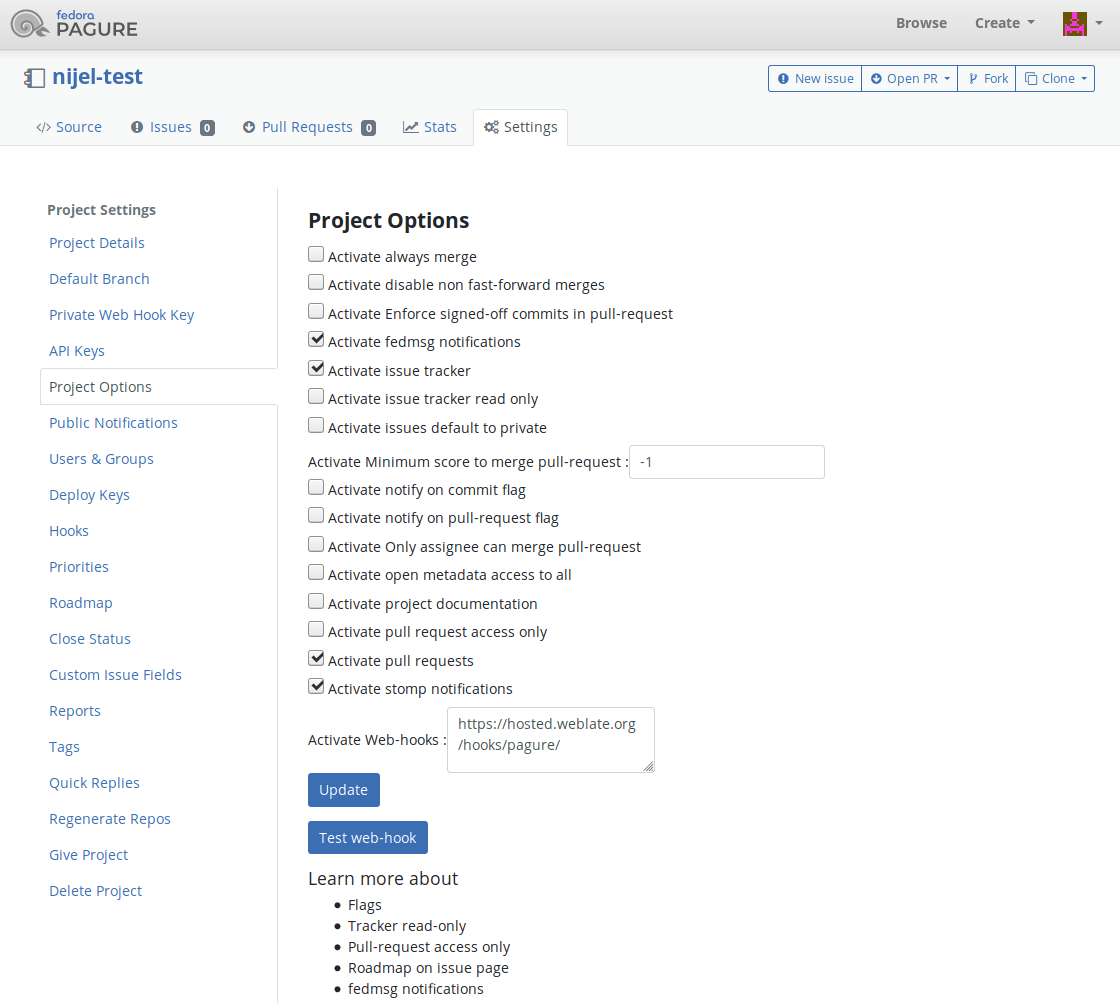
Pagure verzoeken voor samenvoegen
Added in version 4.3.2.
Dit voegt een dunne laag toe bovenop Git die de Pagure API gebruikt om wijzigingen in vertalingen als merge requests te pushen, in plaats van ze direct naar de opslagruimte te pushen.
Er is geen noodzaak om dit te gebruiken om toegang te krijgen tot opslagruimten van Git, gewoonlijk werkt Git hetzelfde. Het enige verschil is hoe het pushen naar een opslagruimte wordt afgehandeld. Met Git worden wijzigingen rechtstreeks naar de opslagruimte gepusht, terwijl de backend Pagure een merge request maakt.
Selecteer, om merge requests te maken, Pagure als Versiebeheersysteem en configureer PAGURE_CREDENTIALS.
Andere werkstromen
Gitee repository access
HTTPS with an access token
For a single private repository, HTTPS access with an access token is usually the simplest setup when the provider supports Git over HTTPS. Use the provider-required username and token in Broncode-opslagruimte.
Configure URL voor pushen naar de opslagruimte only when Weblate should push changes directly or when the chosen workflow requires a push URL, see Wijzigingen vanuit Weblate pushen.
The token needs read access for cloning and write access for pushing. Provider-specific VCS backends that create pull or merge requests might require separate API credentials.
SSH with a dedicated user
For setups with multiple repositories, use SSH access with a dedicated code
hosting user for Weblate. Add Weblate’s public SSH key to that user, grant the
user access to the repositories, and use SSH URLs in Broncode-opslagruimte,
for example git@example.com:group/project.git.
Configure URL voor pushen naar de opslagruimte only when Weblate should push changes directly or when the chosen workflow requires a push URL, see Wijzigingen vanuit Weblate pushen.
This also avoids provider restrictions on SSH key reuse. Some code hosting sites allow a public SSH key to be added only once, or only to a single user or deploy key entry. Keeping Weblate’s SSH key on a dedicated user lets that user be granted access to multiple repositories without reusing the key in several places.
This keeps personal, project, or API access tokens out of repository URLs. Provider API credentials are still needed when using a provider-specific VCS backend to create pull or merge requests; those credentials are configured separately from the Git repository URL.
On Hosted Weblate, use the hosted weblate user on supported code hosting sites, see Toegang tot opslagruimten vanuit Hosted Weblate.
Gitee notificaties
Weblate heeft ondersteuning voor webhooks van Gitee. Voeg een WebHook toe voor de gebeurtenis Push met als doel de URL /hooks/gitee/ op uw installatie van Weblate, bijvoorbeeld https://hosted.weblate.org/hooks/gitee/. Dit kan worden gedaan in WebHooks onder Management van de opslagruimte.
Verzoeken Gerrit review
Ondersteuning van Gerrit voegt een dunne laag toe bovenop Git die het programma git-review gebruikt om wijzigingen in vertalingen als Gerrit review requests te pushen, in plaats van ze direct naar de opslagruimte te pushen.
De optionele instelling Push-tak selecteert de doelbranch voor de review van Gerrit. Laat die leeg om Tak opslagruimte te gebruiken. Gebruik de verkorte branchnaam, zoals main; Weblate en git-review pushen de review automatisch naar refs/for/<branch>. Neem geen opties voor pushen van Gerrit, zoals %submit of %l=Code-Review+2 in de branchnaam.
De documentatie van Gerrit heeft de details voor de noodzakelijke configuratie om dergelijke opslagruimten op te stellen. Er is geen afzonderlijke instelling voor inloggegevens voor code hosten voor dit backend.
Inloggegevens Docker
Voor installaties van Docker kunnen inloggegevens voor de API van code hosten ook worden opgegeven met omgevingsvariabelen, bekijk Inloggegevens sites hosten code.