Comhtháthú óstála cóid
Comhtháthaíonn Weblate le suíomhanna óstála cóid i roinnt áiteanna ar leith: rochtain ar stórtha, fógraí isteach, agus aistriúcháin a bhrú ar ais. Braitheann an socrú cruinn ar cibé an n-úsáideann tú Weblate Óstáilte nó an ritheann tú d’eispéireas Weblate féin, agus ar cibé ar cheart do Weblate iarratais a bhrú go díreach nó iarratais tarraingthe a chruthú.
Bain úsáid as an leathanach seo mar sheicliosta atá dírithe ar sholáthraithe. Is iad na leathanaigh socruithe aonair an tagairt chanónach le haghaidh comhréir na socruithe.
Forbhreathnú ar an socrú
Tabhair rochtain do Weblate ar an stórlann.
I gcás Weblate óstáilte, cuir an t-úsáideoir óstáilte weblate leis más rud é go bhfuil sé ar fáil, féach Teacht ar stórtha ó Hosted Weblate.
I gcás Weblate féinóstáilte, cruthaigh úsáideoir óstála cód tiomnaithe agus deonaigh rochtain ag baint úsáide as eochair SSH Weblate nó comhartha HTTPS, féach Rochtain a fháil ar stórtha ar shuíomhanna óstála cód (GitHub, GitLab, Bitbucket, Azure DevOps, ...).
Cumraigh Stór cód foinse ionas gur féidir le Weblate an stórlann a chlónáil.
Cumraigh fógraí isteach ionas go dtarraingeoidh Weblate athruithe go luath i ndiaidh brú. Caithfidh an crúca gréasáin nó an aip sa stóras pointeáil chuig URL crúca Weblate comhoiriúnach, agus ní mór Cumasaigh crúcaí a bheith cumasaithe ag an tionscadal.
Cinneadh a dhéanamh ar an gcaoi ar cheart do Weblate aistriúcháin a chur ar ceal:
Úsáid Git nó mearcair agus URL bhrú stórais chun brú go díreach.
Bain úsáid as cúltaca VCS atá sainiúil don soláthraí, amhail GitHub nó GitLab, chun iarratais tarraingthe nó cumasc a chruthú. Teastaíonn dintiúir API i socruithe Weblate ó na cúltaca seo.
Is féidir Brainse a bhrú a shocrú más mian le Weblate brú chuig brainse sa stór suas an srutha seachas forc a úsáid nuair a thacaítear leis.
Athruithe a bhrú ó Weblate
Is féidir URL brú a shocrú do gach comhpháirt aistriúcháin (féach URL bhrú stórais), agus sa chás sin beidh Weblate in ann athruithe a bhrú chuig an stór iargúlta. Is féidir Weblate a chumrú freisin chun athruithe a bhrú go huathoibríoch ar gach commit; tá sé seo cumasaithe de réir réamhshocraithe, féach Brúigh ar thiomantas.
Mura dteastaíonn uait go ndéanfar athruithe a bhrú go huathoibríoch, is féidir leat iad a bhrú de láimh faoi Repository maintenance nó trí úsáid a bhaint as an API trí wlc push.
Mura dteastaíonn brúnna díreacha ó Weblate uait, tá tacaíocht ann do léirmheasanna Iarratais tharraingt GitHub, Iarratais chumasc GitLab, Iarratais tarraingt Gitea, leathanach iarratais chumaisc, Iarratais tarraingthe Azure DevOps, nó Iarratais athbhreithnithe Gerrit. Is féidir leat iad seo a ghníomhachtú trí GitHub, GitLab, Gitea, Gerrit, Azure DevOps, nó Pagure a roghnú mar Córas rialaithe leagan i Cumraíocht na Comhpháirte.
Tríd is tríd, tá na roghanna seo a leanas ar fáil le Git, Mercurial, GitHub, GitLab, Gitea, Pagure, Azure DevOps, Gerrit, Bitbucket Data Center agus Bitbucket Cloud:
Socrú inmhianaithe |
|||
|---|---|---|---|
Gan bhrú |
folamh |
folamh |
|
Brúigh go díreach |
URL SSH |
folamh |
|
Brúigh chuig brainse ar leith |
URL SSH |
Ainm brainse |
|
Gan bhrú |
folamh |
folamh |
|
Brúigh go díreach |
URL SSH |
folamh |
|
Iarratas tarraingt GitHub ón bhforc |
folamh |
folamh |
|
Iarratas tarraingt GitHub ón bhrainse |
URL SSH [1] |
Ainm brainse |
|
Iarratas cumaisc GitLab ón bhforc |
folamh |
folamh |
|
Iarratas cumaisc GitLab ón bhrainse |
URL SSH [1] |
Ainm brainse |
|
Iarratas chumasc Gitea ón bhforc |
folamh |
folamh |
|
Iarratas chumasc Gitea ón bhrainse |
URL SSH [1] |
Ainm brainse |
|
Iarratas cumaisc leathanach ón bhforc |
folamh |
folamh |
|
leathanach iarratas cumaisc ón bhrainse |
URL SSH [1] |
Ainm brainse |
|
Tarraingíonn Azure DevOps iarratas ón bhforc |
folamh |
folamh |
|
Tarraingíonn Azure DevOps iarratas ón bhrainse |
URL SSH [1] |
Ainm brainse |
|
Athbhreithniú Gerrit |
URL SSH |
Ainm na brainse sprice (roghnach) |
|
Iarratas tarraingte ón bhforc ag Ionad Sonraí Bitbucket |
folamh |
folamh |
|
Iarratas tarraingte ón mbrainse ag Ionad Sonraí Bitbucket |
URL SSH [1] |
Ainm brainse |
|
Iarratas tarraingt Bitbucket Cloud ón bhforc |
folamh |
folamh |
|
Iarratas tarraingt Bitbucket Cloud ón bhrainse |
URL SSH [1] |
Ainm brainse |
GitHub
Rochtain stórtha GitHub
HTTPS with personal access token
For a single private repository, HTTPS access with an access token is usually the simplest setup when the provider supports Git over HTTPS. Use the provider-required username and token in Stór cód foinse.
Configure URL bhrú stórais only when Weblate should push changes directly or when the chosen workflow requires a push URL, see Athruithe a bhrú ó Weblate.
The token needs read access for cloning and write access for pushing. Provider-specific VCS backends that create pull or merge requests might require separate API credentials.
Chun an cur chuige seo a úsáid:
Cruthaigh comhartha rochtana pearsanta mar a thuairiscítear in Comhartha rochtana a chruthú lena úsáid ag an líne ordaithe.
Cuir an comhartha san áireamh i URL do stórtha:
https://ainm úsáideora:token@github.com/owner/repo.git.
Tá sé seo oiriúnach nuair atá tú ag tosú le Weblate nó ag obair le stór aonair.
SSH with a dedicated user
For setups with multiple repositories, use SSH access with a dedicated code
hosting user for Weblate. Add Weblate's public SSH key to that user, grant the
user access to the repositories, and use SSH URLs in Stór cód foinse,
for example git@example.com:group/project.git.
Configure URL bhrú stórais only when Weblate should push changes directly or when the chosen workflow requires a push URL, see Athruithe a bhrú ó Weblate.
This also avoids provider restrictions on SSH key reuse. Some code hosting sites allow a public SSH key to be added only once, or only to a single user or deploy key entry. Keeping Weblate's SSH key on a dedicated user lets that user be granted access to multiple repositories without reusing the key in several places.
This keeps personal, project, or API access tokens out of repository URLs. Provider API credentials are still needed when using a provider-specific VCS backend to create pull or merge requests; those credentials are configured separately from the Git repository URL.
On Hosted Weblate, use the hosted weblate user on supported code hosting sites, see Teacht ar stórtha ó Hosted Weblate.
For GitHub, create a dedicated user, for example weblate-bot, and use
GitHub SSH URLs for your repositories, for example
git@github.com:owner/repo.git.
Úsáidtear an cur chuige seo le haghaidh Hosted Weblate freisin, a bhfuil úsáideoir weblate tiomnaithe aige chuige sin.
Note
Agus GitHub á úsáid le haghaidh iarratais tarraingthe, bíonn tionchar ag an gcumraíocht Brainse a bhrú ar an iompar: mura socraítear í, déantar forc ar an tionscadal agus brúitear athruithe trí fhorc. Má shocraítear í, brúitear athruithe chuig an stór suas an srutha agus an brainse roghnaithe.
Fógraí GitHub
Tagann Weblate le tacaíocht dhúchais do GitHub.
Más rud é go bhfuil tú ag úsáid Hosted Weblate, is é an cur chuige molta ná an aip Weblate app a shuiteáil. Seolann an aip fógraí GitHub chuig Hosted Weblate, mar sin ní gá duit Webhook ar leith a chumrú i GitHub. Mar sin féin, ní thugann sé rochtain scríbhneoireachta ar an stór do Hosted Weblate leis féin. Chun athruithe a bhrú siar, ní mór duit an t-úsáideoir GitHub weblate de chuid Hosted Weblate a chur leis mar chomhoibrí le rochtain scríbhneoireachta, féach Teacht ar stórtha ó Hosted Weblate.
Mura bhfuil an aip á húsáid agat, cuir an webhook Weblate leis i socruithe an stórais (Webhooks) chun fógraí a fháil ar gach brú chuig stóras GitHub, mar a thaispeántar san íomhá thíos:
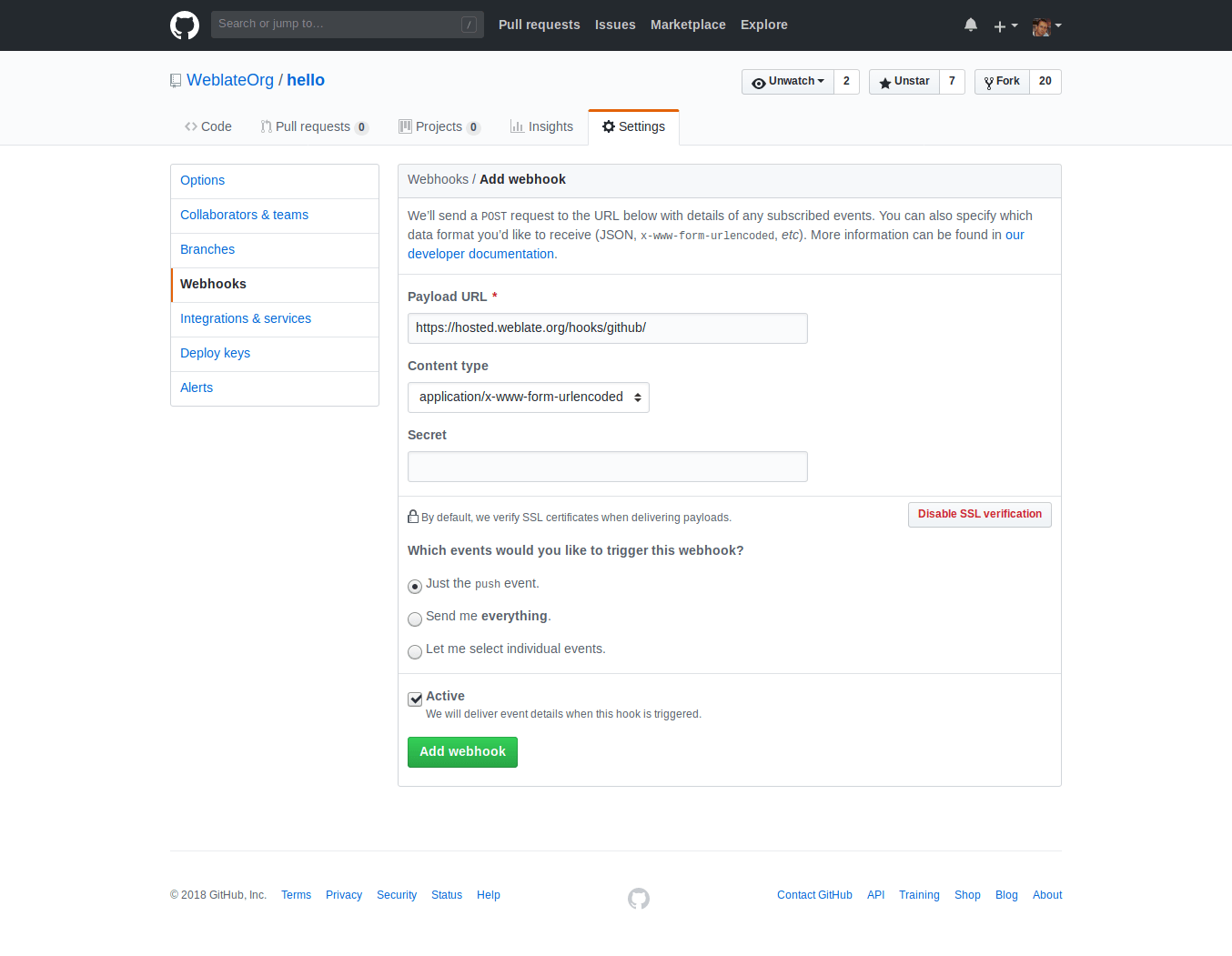
Is éard atá sa Payload URL do URL Weblate atá i gceangal le /hooks/github/, mar shampla don tseirbhís Hosted Weblate, is é seo https://hosted.weblate.org/hooks/github/.
Is féidir leat luachanna eile a fhágáil ag na socruithe réamhshocraithe. Is féidir le Weblate an dá chineál ábhair a láimhseáil agus ní úsáideann sé ach an teagmhas push.
Iarratais tharraingt GitHub
Cuireann sé seo sraith tanaí ar bharr Git ag baint úsáide as an GitHub API chun athruithe aistriúcháin a bhrú mar iarratais tarraingthe, in ionad brú díreach chuig an stór.
Cuireann Git athruithe go díreach chuig stórlann, agus cruthaíonn an cúl-deireadh GitHub iarratais tarraingthe. Níl an dara ceann ag teastáil chun rochtain a fháil ar stórlanna Git amháin.
Chun iarratais tarraingthe a chruthú, roghnaigh GitHub mar Córas rialaithe leagan agus cumraigh GITHUB_CREDENTIALS. I gcás GitHub.com, bain úsáid as api.github.com mar an óstach API. Caithfidh an comhartha cead a thabhairt do Weblate ábhar an stórais a léamh agus a scríobh agus iarratais tarraingthe a chruthú. Má dhéanann Weblate forc ar stórais phríobháideacha, d'fhéadfadh go mbeadh rochtain riaracháin ag teastáil ón gcomhartha freisin.
GitLab
Rochtain stórtha GitLab
HTTPS with personal or project access token
For a single private repository, HTTPS access with an access token is usually the simplest setup when the provider supports Git over HTTPS. Use the provider-required username and token in Stór cód foinse.
Configure URL bhrú stórais only when Weblate should push changes directly or when the chosen workflow requires a push URL, see Athruithe a bhrú ó Weblate.
The token needs read access for cloning and write access for pushing. Provider-specific VCS backends that create pull or merge requests might require separate API credentials.
For GitLab, the token needs write_repository scope to be able to push changes to the repository. The project access token requires Developer role for pushing.
Caithfidh ainm úsáideora a bheith sa URL. I gcás comhartha rochtana pearsanta, is é an t-ainm úsáideora iarbhír atá ann: https://user:personal_access_token@gitlab.com/example/example.git. I gcás comharthaí rochtana tionscadail, is féidir luach neamh-bhán a bheith ann: https://example:project_access_token@gitlab.com/example/example.git.
Note
Tá na rialacha maidir le comharthaí rochtana tionscadail a úsáid athraithe idir eisiúintí GitLab, is é an luach neamh-bhán an riachtanas reatha, ach bhí ionchais dhifriúla ag leaganacha níos sine (ainm tionscadail, ainm úsáideora bot). Seiceáil doiciméadacht GitLab a mheaitseálann do leagan mura bhfuil tú cinnte.
SSH with a dedicated user
For setups with multiple repositories, use SSH access with a dedicated code
hosting user for Weblate. Add Weblate's public SSH key to that user, grant the
user access to the repositories, and use SSH URLs in Stór cód foinse,
for example git@example.com:group/project.git.
Configure URL bhrú stórais only when Weblate should push changes directly or when the chosen workflow requires a push URL, see Athruithe a bhrú ó Weblate.
This also avoids provider restrictions on SSH key reuse. Some code hosting sites allow a public SSH key to be added only once, or only to a single user or deploy key entry. Keeping Weblate's SSH key on a dedicated user lets that user be granted access to multiple repositories without reusing the key in several places.
This keeps personal, project, or API access tokens out of repository URLs. Provider API credentials are still needed when using a provider-specific VCS backend to create pull or merge requests; those credentials are configured separately from the Git repository URL.
On Hosted Weblate, use the hosted weblate user on supported code hosting sites, see Teacht ar stórtha ó Hosted Weblate.
For GitLab, create a dedicated user and use GitLab SSH URLs, for example
git@gitlab.com:group/project.git.
Fógraí GitLab
Tá tacaíocht ag Weblate do crúcaí GitLab. Cuir crúca gréasáin tionscadail leis an gceann scríbe chuig URL /hooks/gitlab/ ar do shuiteáil Weblate, mar shampla https://hosted.weblate.org/hooks/gitlab/.
Fabhtcheartú
Seiceáil Stair iarratais ar chrúcaí gréasáin GitLab an seachadtar crúcaí gréasáin.
Tá faisnéis faoi chomhpháirteanna meaitseáilte san ualach freagartha.
Iarratais chumasc GitLab
Cuireann sé seo sraith tanaí ar bharr Git ag baint úsáide as an GitLab API chun ligean d'athruithe aistriúcháin a bhrú mar iarratais chumasc seachas iad a bhrú go díreach chuig an stór.
Níl aon ghá é seo a úsáid chun rochtain a fháil ar stórtha Git, oibríonn an gnáth- Git ar an mbealach céanna, is é an t-aon difríocht ná an chaoi a láimhseáiltear brú chuig stór. Le Git brúitear athruithe go díreach chuig an stór, agus cruthaíonn an cúl-deireadh GitLab iarratas cumaisc.
Chun iarratais chumasc a chruthú, roghnaigh GitLab mar Córas rialaithe leagan agus cumraigh GITLAB_CREDENTIALS.
The Brainse a bhrú configuration affects where Weblate pushes changes before opening the merge request. If it is not set, the project is forked and changes are pushed through a fork. If it is set, changes are pushed to the upstream repository and chosen branch.
Gitea, Forgejo, agus Codeberg
Gitea, Forgejo, and Codeberg repository access
HTTPS with an access token
For a single private repository, HTTPS access with an access token is usually the simplest setup when the provider supports Git over HTTPS. Use the provider-required username and token in Stór cód foinse.
Configure URL bhrú stórais only when Weblate should push changes directly or when the chosen workflow requires a push URL, see Athruithe a bhrú ó Weblate.
The token needs read access for cloning and write access for pushing. Provider-specific VCS backends that create pull or merge requests might require separate API credentials.
SSH with a dedicated user
For setups with multiple repositories, use SSH access with a dedicated code
hosting user for Weblate. Add Weblate's public SSH key to that user, grant the
user access to the repositories, and use SSH URLs in Stór cód foinse,
for example git@example.com:group/project.git.
Configure URL bhrú stórais only when Weblate should push changes directly or when the chosen workflow requires a push URL, see Athruithe a bhrú ó Weblate.
This also avoids provider restrictions on SSH key reuse. Some code hosting sites allow a public SSH key to be added only once, or only to a single user or deploy key entry. Keeping Weblate's SSH key on a dedicated user lets that user be granted access to multiple repositories without reusing the key in several places.
This keeps personal, project, or API access tokens out of repository URLs. Provider API credentials are still needed when using a provider-specific VCS backend to create pull or merge requests; those credentials are configured separately from the Git repository URL.
On Hosted Weblate, use the hosted weblate user on supported code hosting sites, see Teacht ar stórtha ó Hosted Weblate.
I gcás stórtha Weblate óstáilte ar Codeberg, cuir an t-úsáideoir óstáilte weblate leis i gcás ina bhfuil rochtain scríofa ag teastáil, féach Teacht ar stórtha ó Hosted Weblate.
Fógraí Gitea
Tá tacaíocht ag Weblate do webhooks Gitea. Cuir Gitea Webhook leis don imeacht Push events agus an ceann scríbe á chur leis an URL /hooks/gitea/ ar do shuiteáil Weblate, mar shampla https://hosted.weblate.org/hooks/gitea/. Is féidir é seo a dhéanamh i Webhooks faoin stórlann Settings.
Fógraí Forgejo
Tá tacaíocht ag Weblate do ghreamú gréasáin Forgejo. Cuir Forgejo Webhook leis don imeacht Push events agus an ceann scríbe á chur leis an URL /hooks/forgejo/ ar do shuiteáil Weblate, mar shampla https://hosted.weblate.org/hooks/forgejo/. Is féidir é seo a dhéanamh i Webhooks faoin stórlann Settings.
Iarratais tarraingt Gitea
Added in version 4.12.
Cuireann sé seo sraith tanaí ar bharr Git ag baint úsáide as an Gitea API chun ligean d'athruithe aistriúcháin a bhrú mar iarratais tarraingthe seachas a bhrú go díreach chuig an stór.
Níl aon ghá é seo a úsáid chun rochtain a fháil ar stórtha Git, oibríonn an gnáth- Git ar an mbealach céanna, is é an t-aon difríocht ná an chaoi a láimhseáiltear brú chuig stór. Le Git brúitear athruithe go díreach chuig an stór, agus cruthaíonn an cúl-deireadh Gitea iarratais tarraingthe.
Chun iarratais tarraingthe a chruthú, roghnaigh Gitea mar Córas rialaithe leagan agus cumraigh GITEA_CREDENTIALS.
Bitbuicéad
Bitbucket repository access
HTTPS with an access token
For a single private repository, HTTPS access with an access token is usually the simplest setup when the provider supports Git over HTTPS. Use the provider-required username and token in Stór cód foinse.
Configure URL bhrú stórais only when Weblate should push changes directly or when the chosen workflow requires a push URL, see Athruithe a bhrú ó Weblate.
The token needs read access for cloning and write access for pushing. Provider-specific VCS backends that create pull or merge requests might require separate API credentials.
SSH with a dedicated user
For setups with multiple repositories, use SSH access with a dedicated code
hosting user for Weblate. Add Weblate's public SSH key to that user, grant the
user access to the repositories, and use SSH URLs in Stór cód foinse,
for example git@example.com:group/project.git.
Configure URL bhrú stórais only when Weblate should push changes directly or when the chosen workflow requires a push URL, see Athruithe a bhrú ó Weblate.
This also avoids provider restrictions on SSH key reuse. Some code hosting sites allow a public SSH key to be added only once, or only to a single user or deploy key entry. Keeping Weblate's SSH key on a dedicated user lets that user be granted access to multiple repositories without reusing the key in several places.
This keeps personal, project, or API access tokens out of repository URLs. Provider API credentials are still needed when using a provider-specific VCS backend to create pull or merge requests; those credentials are configured separately from the Git repository URL.
On Hosted Weblate, use the hosted weblate user on supported code hosting sites, see Teacht ar stórtha ó Hosted Weblate.
Tá úsáideoir tiomnaithe weblate ag Weblate óstáilte le haghaidh rochtain Bitbucket, féach Teacht ar stórtha ó Hosted Weblate.
Chun brú go díreach, bain úsáid as Git nó mearcair le URL bhrú stórais.
Fógraí Bitbucket
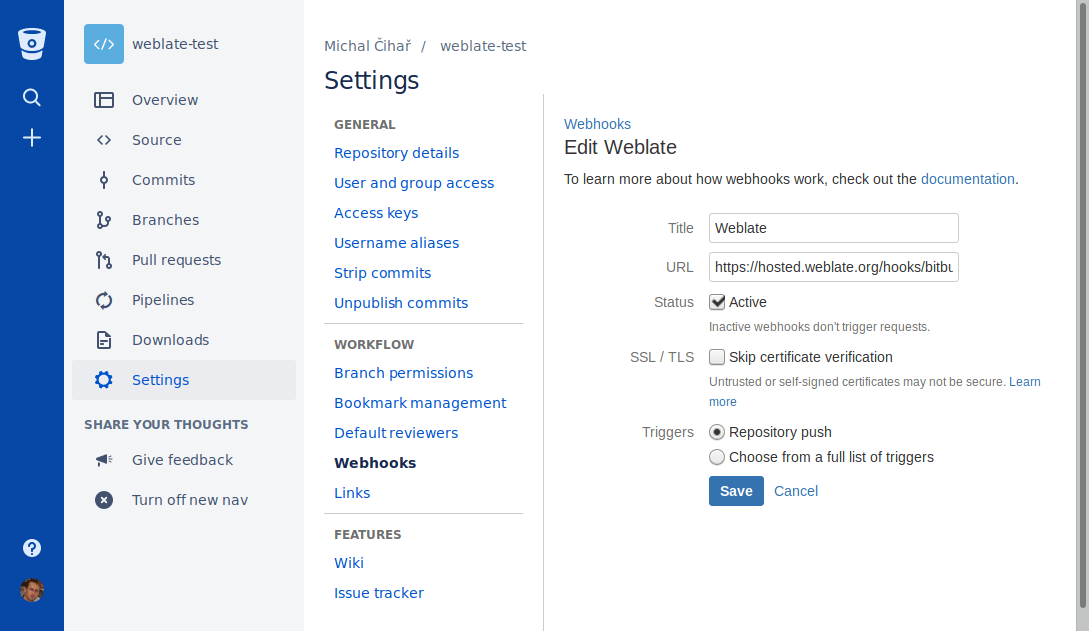
Tá tacaíocht ag Weblate do ghreamáin Bitbucket. Cuir greamán gréasáin leis a spreagann nuair a bhrúitear an stór, agus an ceann scríbe ag URL /hooks/bitbucket/ ar do shuiteáil Weblate, mar shampla https://hosted.weblate.org/hooks/bitbucket/.
Iarratais ar tharraingt Ionad Sonraí Bitbucket
Added in version 4.16.
Cuireann sé seo sraith tanaí ar bharr Git ag baint úsáide as Bitbucket Data Center API chun go bhféadfar athruithe aistriúcháin a bhrú mar iarratais tarraingthe seachas iad a bhrú go díreach chuig an stór.
Warning
Ní thacaíonn sé seo le Bitbucket Cloud API.
Níl aon ghá é seo a úsáid chun rochtain a fháil ar stórtha Git, oibríonn an gnáth- Git ar an gcaoi chéanna, is é an t-aon difríocht ná an chaoi a láimhseáiltear brú chuig stór. Le Git brúitear athruithe go díreach chuig an stór, agus cruthaíonn an cúl-deireadh Bitbucket Data Center iarratas tarraingthe.
Chun iarratais tarraingthe a chruthú, roghnaigh Bitbucket Data Center mar Córas rialaithe leagan agus cumraigh BITBUCKETSERVER_CREDENTIALS.
Iarratais ar tharraingt Bitbucket Cloud
Added in version 5.8.
Cuireann sé seo sraith tanaí ar bharr Git ag baint úsáide as an Bitbucket Cloud API chun go bhféadfar athruithe aistriúcháin a bhrú mar iarratais tarraingthe seachas iad a bhrú go díreach chuig an stór.
Warning
Tá sé seo difriúil ó Bitbucket Data Center API.
Níl aon ghá é seo a úsáid chun rochtain a fháil ar stórtha Git, oibríonn an gnáth- Git ar an mbealach céanna, is é an t-aon difríocht ná an chaoi a láimhseáiltear brú chuig stór. Le Git brúitear athruithe go díreach chuig an stór, agus cruthaíonn an cúl-deireadh Bitbucket Cloud iarratas tarraingthe.
Chun iarratais tarraingthe a chruthú, roghnaigh Bitbucket Cloud mar Córas rialaithe leagan agus cumraigh BITBUCKETCLOUD_CREDENTIALS.
Azure DevOps
Azure Repos repository access
HTTPS with an access token
For a single private repository, HTTPS access with an access token is usually the simplest setup when the provider supports Git over HTTPS. Use the provider-required username and token in Stór cód foinse.
Configure URL bhrú stórais only when Weblate should push changes directly or when the chosen workflow requires a push URL, see Athruithe a bhrú ó Weblate.
The token needs read access for cloning and write access for pushing. Provider-specific VCS backends that create pull or merge requests might require separate API credentials.
Use the HTTPS clone URL shown by Azure Repos for the repository.
SSH with a dedicated user
For setups with multiple repositories, use SSH access with a dedicated code
hosting user for Weblate. Add Weblate's public SSH key to that user, grant the
user access to the repositories, and use SSH URLs in Stór cód foinse,
for example git@example.com:group/project.git.
Configure URL bhrú stórais only when Weblate should push changes directly or when the chosen workflow requires a push URL, see Athruithe a bhrú ó Weblate.
This also avoids provider restrictions on SSH key reuse. Some code hosting sites allow a public SSH key to be added only once, or only to a single user or deploy key entry. Keeping Weblate's SSH key on a dedicated user lets that user be granted access to multiple repositories without reusing the key in several places.
This keeps personal, project, or API access tokens out of repository URLs. Provider API credentials are still needed when using a provider-specific VCS backend to create pull or merge requests; those credentials are configured separately from the Git repository URL.
On Hosted Weblate, use the hosted weblate user on supported code hosting sites, see Teacht ar stórtha ó Hosted Weblate.
Use the SSH URL shown by Azure Repos for the repository.
Fógraí Azure Repos
Tá tacaíocht ag Weblate do ghreamairí gréasáin Azure Repos. Cuir greamairí gréasáin leis don imeacht Cód brúite le ceann scríbe chuig URL /hooks/azure/ ar do shuiteáil Weblate, mar shampla https://hosted.weblate.org/hooks/azure/. Is féidir é seo a dhéanamh i Greamairí seirbhíse faoi Socruithe tionscadail.
Iarratais tarraingthe Azure DevOps
Cuireann sé seo sraith tanaí ar bharr Git ag baint úsáide as an Azure DevOps API chun athruithe aistriúcháin a bhrú mar iarratais tarraingthe, in ionad brú díreach chuig an stór.
Cuireann Git athruithe go díreach chuig stórlann, agus cruthaíonn an cúl-deireadh Azure DevOps iarratais tarraingthe. Níl an dara ceann ag teastáil chun rochtain a fháil ar stórlanna Git amháin.
Chun iarratais tarraingthe a chruthú, roghnaigh Azure DevOps mar Córas rialaithe leagan agus cumraigh AZURE_DEVOPS_CREDENTIALS.
Pagure
Pagure repository access
HTTPS with an access token
For a single private repository, HTTPS access with an access token is usually the simplest setup when the provider supports Git over HTTPS. Use the provider-required username and token in Stór cód foinse.
Configure URL bhrú stórais only when Weblate should push changes directly or when the chosen workflow requires a push URL, see Athruithe a bhrú ó Weblate.
The token needs read access for cloning and write access for pushing. Provider-specific VCS backends that create pull or merge requests might require separate API credentials.
SSH with a dedicated user
For setups with multiple repositories, use SSH access with a dedicated code
hosting user for Weblate. Add Weblate's public SSH key to that user, grant the
user access to the repositories, and use SSH URLs in Stór cód foinse,
for example git@example.com:group/project.git.
Configure URL bhrú stórais only when Weblate should push changes directly or when the chosen workflow requires a push URL, see Athruithe a bhrú ó Weblate.
This also avoids provider restrictions on SSH key reuse. Some code hosting sites allow a public SSH key to be added only once, or only to a single user or deploy key entry. Keeping Weblate's SSH key on a dedicated user lets that user be granted access to multiple repositories without reusing the key in several places.
This keeps personal, project, or API access tokens out of repository URLs. Provider API credentials are still needed when using a provider-specific VCS backend to create pull or merge requests; those credentials are configured separately from the Git repository URL.
On Hosted Weblate, use the hosted weblate user on supported code hosting sites, see Teacht ar stórtha ó Hosted Weblate.
Fógraí leathanaigh
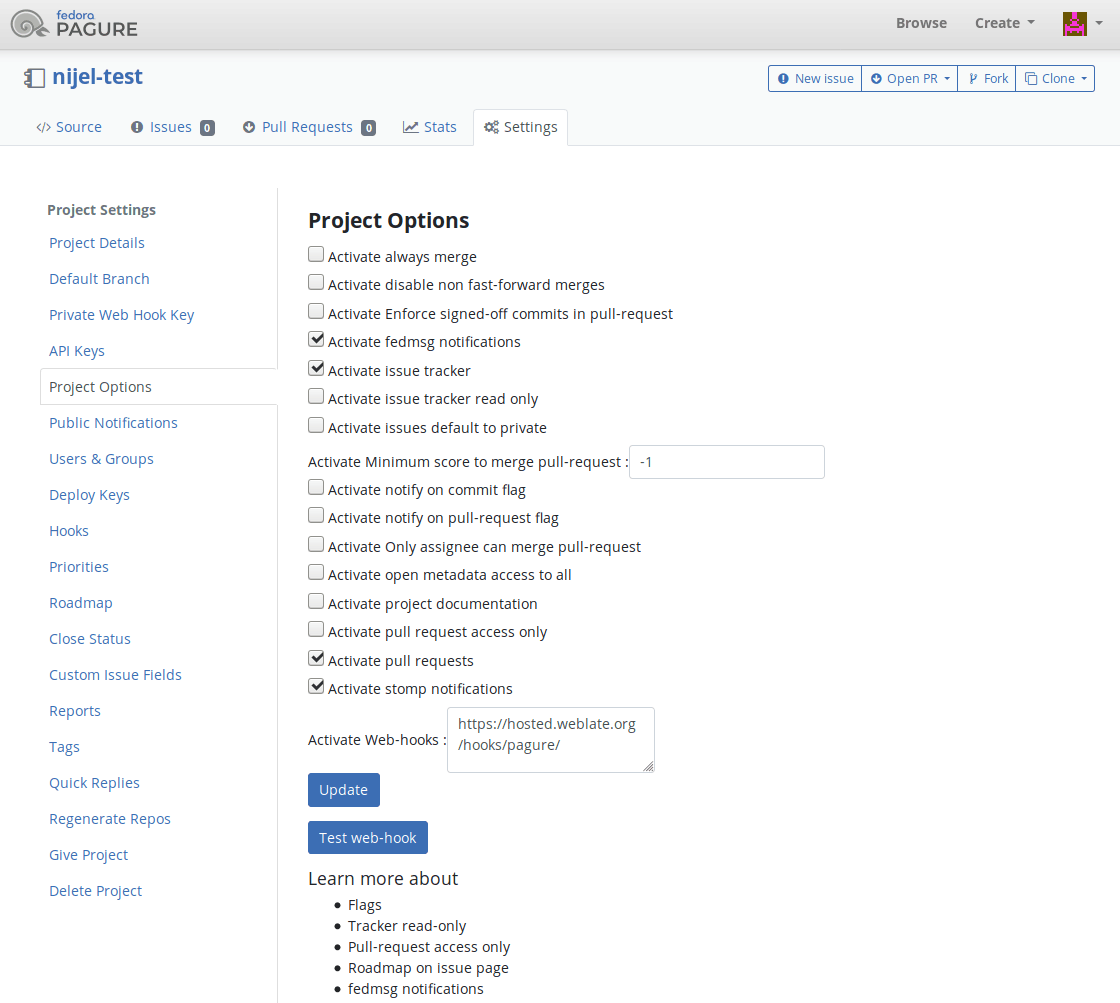
Tá tacaíocht ag Weblate do crúcaí Pagure. Cuir crúca gréasáin leis an gceann scríbe chuig URL /hooks/pagure/ ar do shuiteáil Weblate, mar shampla https://hosted.weblate.org/hooks/pagure/. Is féidir é seo a dhéanamh i Gníomhachtaigh Crúcaí Gréasáin faoi Roghanna tionscadail:
leathanach iarratais chumaisc
Added in version 4.3.2.
Cuireann sé seo sraith tanaí ar bharr Git ag baint úsáide as an Pagure API chun ligean d'athruithe aistriúcháin a bhrú mar iarratais chumasc seachas iad a bhrú go díreach chuig an stór.
Níl aon ghá é seo a úsáid chun rochtain a fháil ar stórtha Git, oibríonn an gnáth- Git ar an gcaoi chéanna, is é an t-aon difríocht ná an chaoi a láimhseáiltear brú chuig stór. Le Git brúitear athruithe go díreach chuig an stór, agus cruthaíonn an cúl-deireadh Pagure iarratas cumaisc.
Chun iarratais chumasc a chruthú, roghnaigh Pagure mar Córas rialaithe leagan agus cumraigh PAGURE_CREDENTIALS.
Sreafaí oibre eile
Gitee repository access
HTTPS with an access token
For a single private repository, HTTPS access with an access token is usually the simplest setup when the provider supports Git over HTTPS. Use the provider-required username and token in Stór cód foinse.
Configure URL bhrú stórais only when Weblate should push changes directly or when the chosen workflow requires a push URL, see Athruithe a bhrú ó Weblate.
The token needs read access for cloning and write access for pushing. Provider-specific VCS backends that create pull or merge requests might require separate API credentials.
SSH with a dedicated user
For setups with multiple repositories, use SSH access with a dedicated code
hosting user for Weblate. Add Weblate's public SSH key to that user, grant the
user access to the repositories, and use SSH URLs in Stór cód foinse,
for example git@example.com:group/project.git.
Configure URL bhrú stórais only when Weblate should push changes directly or when the chosen workflow requires a push URL, see Athruithe a bhrú ó Weblate.
This also avoids provider restrictions on SSH key reuse. Some code hosting sites allow a public SSH key to be added only once, or only to a single user or deploy key entry. Keeping Weblate's SSH key on a dedicated user lets that user be granted access to multiple repositories without reusing the key in several places.
This keeps personal, project, or API access tokens out of repository URLs. Provider API credentials are still needed when using a provider-specific VCS backend to create pull or merge requests; those credentials are configured separately from the Git repository URL.
On Hosted Weblate, use the hosted weblate user on supported code hosting sites, see Teacht ar stórtha ó Hosted Weblate.
Fógraí Gitee
Tá tacaíocht ag Weblate do webhooks Gitee. Cuir WebHook leis don imeacht Push agus an ceann scríbe ag URL /hooks/gitee/ ar do shuiteáil Weblate, mar shampla https://hosted.weblate.org/hooks/gitee/. Is féidir é seo a dhéanamh i WebHooks faoin stórlann Management.
Iarratais athbhreithnithe Gerrit
Cuireann tacaíocht Gerrit sraith tanaí ar bharr Git ag baint úsáide as an uirlis git-review chun go bhféadfar athruithe aistriúcháin a bhrú de réir mar a iarrann athbhreithniú Gerrit, in ionad iad a bhrú go díreach chuig an stór.
Roghnaíonn an socrú roghnach Brainse a bhrú an brainse sprice don athbhreithniú Gerrit. Fág folamh é chun Brainse stór a úsáid. Bain úsáid as ainm gearr na brainse, amhail main; brúnn Weblate agus git-review an t-athbhreithniú chuig refs/for/<branch> go huathoibríoch. Ná cuir roghanna brú Gerrit amhail %submit nó %l=Code-Review+2 san ainm brainse.
Tá na sonraí maidir leis an chumraíocht is gá chun na stórtha sin a bhunú i ndoiciméadacht Gerrit. Níl aon socrú dintiúir óstála cóid ar leith ann don chúl-deireadh seo.
Dintiúir Docker
I gcás suiteálacha Docker, is féidir dintiúir API óstála cóid a sholáthar trí athróga comhshaoil freisin, féach Dintiúir suímh óstála cód.