附加元件
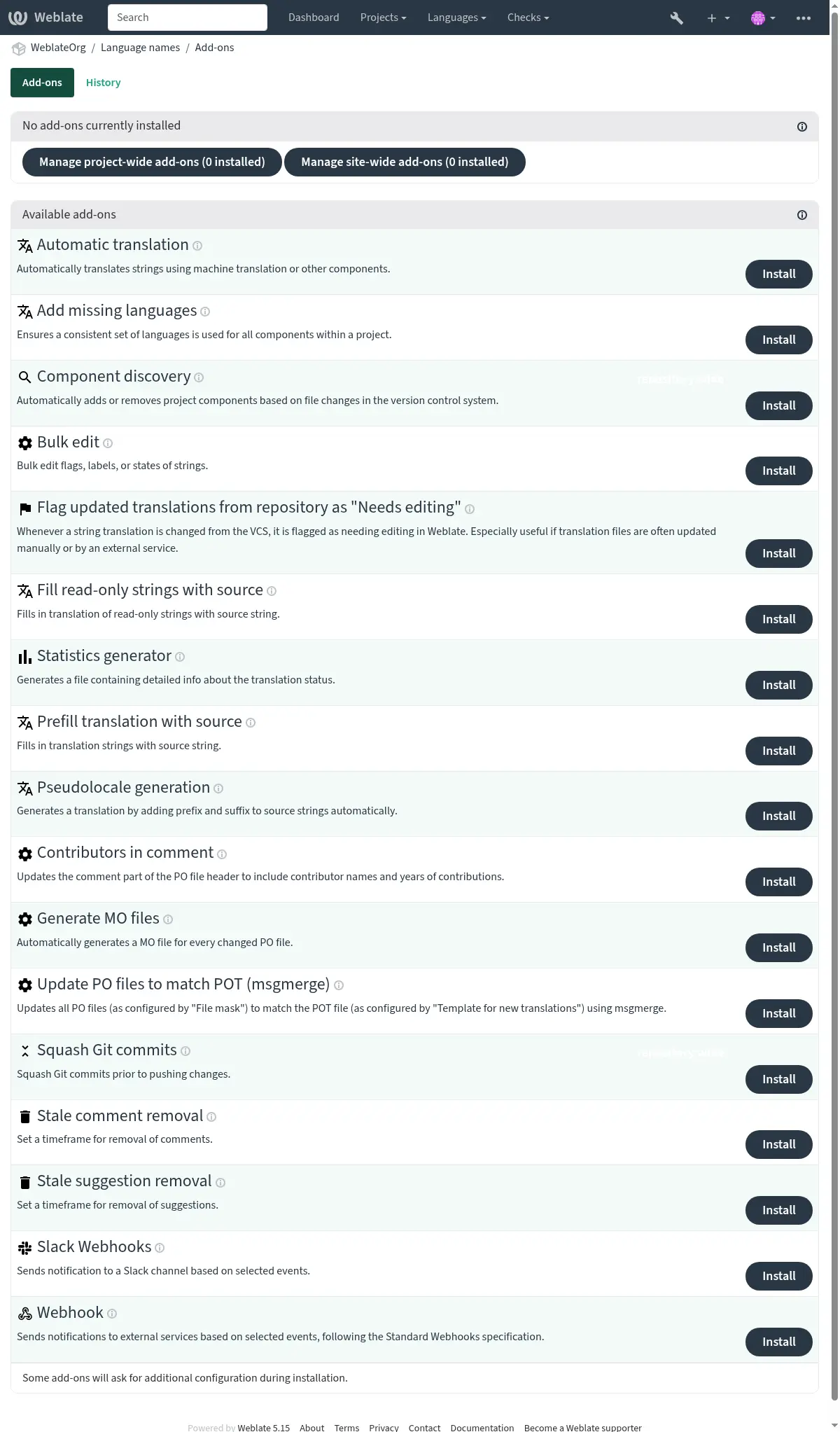
Add-ons provide ways to customize and automate the translation workflow. Admins can add and manage add-ons from the Operations ↓ Add-ons menu of each respective translation project or component. Add-ons can be also installed site-wide in 管理介面.
提示
You can also configure add-ons using API,
DEFAULT_ADDONS, or install_addon.
Events that trigger add-ons
Add-on installation
Triggered when add-on is being installed.
Component update
每當組件發生變化時觸發,例如:
Strings are changed in the repository.
A string is added.
A new translation is added.
Daily
Triggered daily, but add-ons usually split the daily load between components depending on BACKGROUND_TASKS.
Event change
Triggered after a Change event is created.
Repository post-add
Triggered just after the new translation is added and committed.
Repository post-commit
Triggered just after the changes are committed.
Repository post-push
Triggered just after the repository is pushed upstream.
Repository post-update
Triggered whenever new changes are pulled from the upstream repository.
Repository pre-commit
Triggered just before the changes are committed.
Repository pre-push
Triggered just before the repository is pushed upstream.
Repository pre-update
Triggered just before the repository update is attempted.
Unit post-save
Triggered just after the string is saved.
Unit post-sync
Triggered after the string is synchronized with the VCS.
Unit pre-create
Triggered just after the newly created string is saved.
內建附加元件
自動翻譯
- Add-on ID:
weblate.autotranslate.autotranslate- 組態:
- 觸發:
使用機器翻譯或其他組件來自動翻譯字串。
JavaScript 在地化 CDN
在 4.2 版被加入.
- Add-on ID:
weblate.cdn.cdnjs- 組態:
threshold最低翻譯數
翻譯字串必須達到的百分比,才能納入翻譯。
css_selectorCSS 選擇器
用來偵測可在地化元素的 CSS 選擇器。
cookie_name語言 Cookie 名稱
儲存語言偏好設定的 Cookie 名稱。
files從 HTML 檔案擷取字串
在目前儲存庫或遠端網址中,要剖析其可翻譯字串的檔案名稱列表。
- 觸發:
Add-on installation, Daily, Repository post-commit, Repository post-update
將翻譯發佈給內容遞交網路,供 JavaScript 或 HTML 在地化處理使用。
可以用於在地化靜態 HTML 網頁,或者在 JavaScript 程式碼中載入在地化檔案。
為您的元件產生一個唯一的 URL,您可以將其包含在 HTML 頁面中以在地化它們。請參見 使用 Weblate CDN 翻譯 HTML 和 JavaScript 以了解詳情。
備註
This add-on requires additional configuration on the Weblate server.
LOCALIZE_CDN_PATH configures where generated files will be
written (on a filesystem), and LOCALIZE_CDN_URL defines where
they will be served (URL). Serving of the files is not done by Weblate and
has to be set up externally (typically using a CDN service).
This add-on is configured on Hosted Weblate and serves the files
via https://weblate-cdn.com/.
移除空白字串
在 4.4 版被加入.
- Add-on ID:
weblate.cleanup.blank- 組態:
This add-on has no configuration.
- 觸發:
Add-on installation, Repository post-commit, Repository post-update
從翻譯檔中移除沒有譯文的字串。
使用此方法可以使翻譯檔中不存在任何空字串(例如,如果您的在地化程式庫將它們顯示為缺失,而不是退回到來源字串)。
清理翻譯檔
- Add-on ID:
weblate.cleanup.generic- 組態:
This add-on has no configuration.
- 觸發:
Add-on installation, Repository post-update, Repository pre-commit
更新所有翻譯檔以符合單語言基礎檔。對大多數檔案格式而言,這代表會移除基礎檔中不再存在的失時效翻譯金鑰。
For formats containing additional content besides translation strings (such as HTML 檔案, Windows RC 檔案, or OpenDocument 格式) this also brings the translation file in sync with the base file.
加入遺漏語言
- Add-on ID:
weblate.consistency.languages- 組態:
This add-on has no configuration.
- 觸發:
確保對一個專案內所有組件使用一致的一組語言。
備註
The components shared from other projects are not considered in this.
每隔24小時,和在 Weblate 中加入新語言時,會檢查一次缺失的語言。
不像其他多數附加元件,這個附加元件影響整個專案。
提示
用 自動翻譯 自動翻譯新增加的字串。
組件探索
- Add-on ID:
weblate.discovery.discovery- 組態:
match用來比對出翻譯檔的常規表示式
file_format檔案格式
name_template自訂組件名稱
base_file_template定義單語的基礎檔名
保留雙語翻譯檔空白。
new_base_template定義新翻譯的基礎檔
用來建立新翻譯的檔案名稱。例如 gettext,請選擇 .pot 檔。
intermediate_template中間語言檔案
中間翻譯檔的檔名。大部分情況下,這即是開發者提供的翻譯檔,會在建立實際來源字串時使用。
language_regex語言篩選
掃描檔案遮罩時,用於篩選翻譯檔案的常規表示式。
copy_addons將附加元件,從主要組件拓製到新創建的組件
remove移除無相關檔案的組件
confirm我能確認上述符合專案看起來正確
- 觸發:
根據版本控制系統中的檔案更動自動加入或移除專案組件。
該匹配是使用允許複雜組態的正規表達式完成的,但這樣做需要一些知識。一些常見用例的例子可以在附加元件幫助部分找到。
The regular expression to match translation files has to contain two named groups to match component and language. All named groups in the regular expression can be used as variables in the template fields.
You can use Django template markup in all filename fields, for example:
{{ component }}組件檔名比對
{{ component|title }}組件檔名首字母大寫
{{ path }}: {{ component }}Custom match group from the regular expression
一旦點選了 Save,將顯示匹配組件的預覽,可以檢查組態是否匹配於自己的需要:
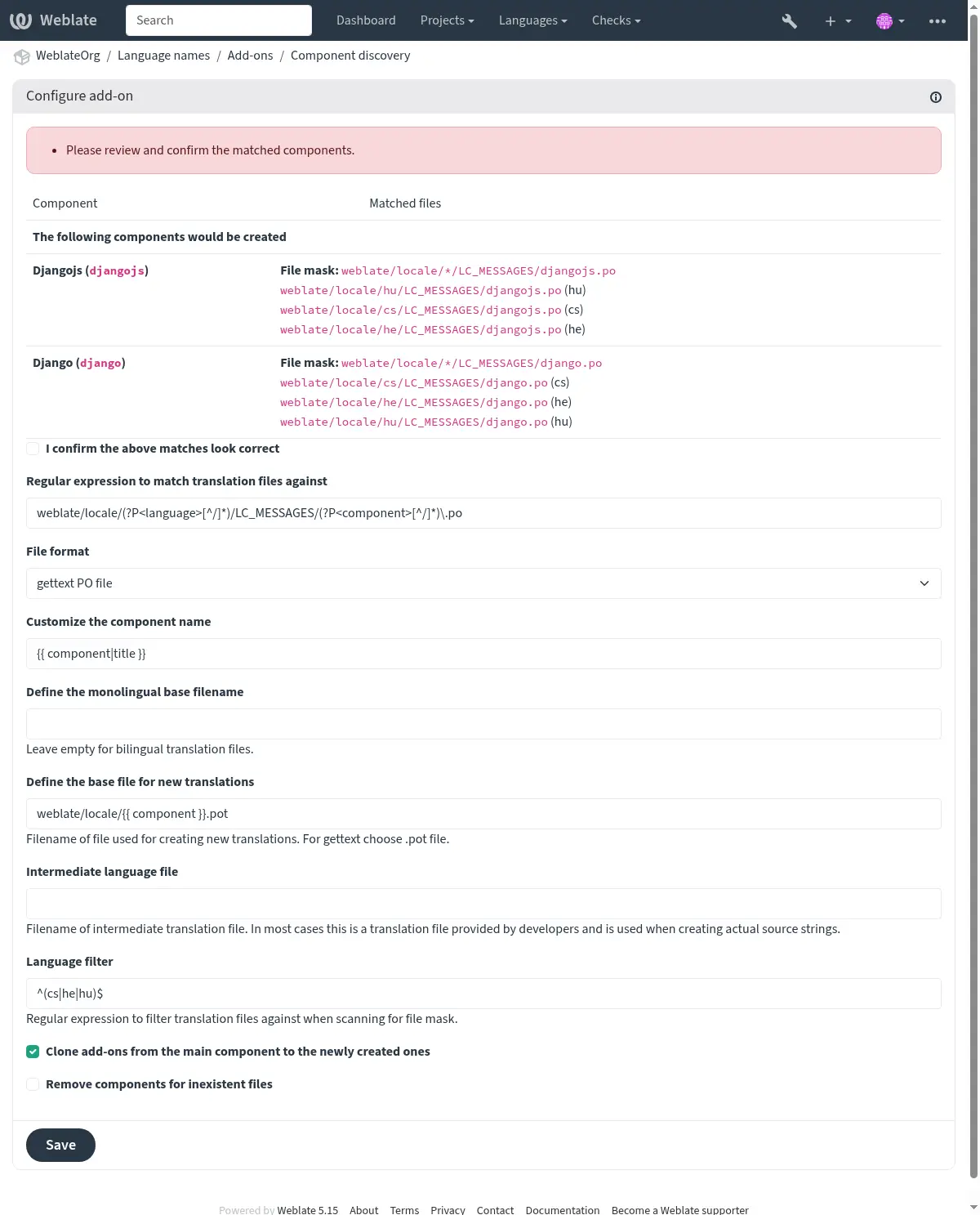
Component discovery examples
One folder per language
各語言各一個資料夾包含組件的翻譯檔。
- 常規表達式:
(?P<language>[^/.]*)/(?P<component>[^/]*)\.po- 符合的檔案:
cs/application.pocs/website.pode/application.pode/website.po
Gettext語言環境佈局
儲存 gettext PO 檔的常用結構。
- 常規表達式:
locale/(?P<language>[^/.]*)/LC_MESSAGES/(?P<component>[^/]*)\.po- 符合的檔案:
locale/cs/LC_MESSAGES/application.polocale/cs/LC_MESSAGES/website.polocale/de/LC_MESSAGES/application.polocale/de/LC_MESSAGES/website.po
複雜的檔案名稱
檔名同時使用組件名稱和語言名稱。
- 常規表達式:
src/locale/(?P<component>[^/]*)\.(?P<language>[^/.]*)\.po- 符合的檔案:
src/locale/application.cs.posrc/locale/website.cs.posrc/locale/application.de.posrc/locale/website.de.po
Repeated language code
路徑和檔名中都使用語言名稱。
- 常規表達式:
locale/(?P<language>[^/.]*)/(?P<component>[^/]*)/(?P=language)\.po- 符合的檔案:
locale/cs/application/cs.polocale/cs/website/cs.polocale/de/application/de.polocale/de/website/de.po
Split Android strings
Android 資源字串,切分為多份檔案。
- 常規表達式:
res/values-(?P<language>[^/.]*)/strings-(?P<component>[^/]*)\.xml- 符合的檔案:
res/values-cs/strings-about.xmlres/values-cs/strings-help.xmlres/values-de/strings-about.xmlres/values-de/strings-help.xml
Matching multiple paths
使用 Java properties 翻譯的多模組 Maven 專案管理。
- 常規表達式:
(?P<originalHierarchy>.+/)(?P<component>[^/]*)/src/main/resources/ApplicationResources_(?P<language>[^/.]*)\.properties- 組件名稱:
{{ originalHierarchy }}: {{ component }}- 符合的檔案:
parent/module1/submodule/src/main/resources/ApplicationResources_fr.propertiesparent/module1/submodule/src/main/resources/ApplicationResource_es.propertiesparent/module2/src/main/resources/ApplicationResource_de.propertiesparent/module2/src/main/resources/ApplicationResource_ro.properties
提示
Component discovery add-on uses Weblate 內部網址. It’s a convenient way to share
VCS setup between multiple components. Linked components use the local repository of
the main component set up by filling weblate://project/main-component
into the 來源碼儲存庫 field (in Operations ↓ Settings ↓
Version control system) of each respective component.
This saves time with configuration and system resources too.
提示
Ensure the new component contains the full set of translatable languages with 加入遺漏語言.
警告
To be discovered, a new component must contain a file that matches base_file_template
and at least one file with a name that matches match -- i.e., the component must
contain a base language file and at least one existing translation. Otherwise, it will be
ignored.
也參考
Fedora Messaging
在 5.15 版被加入.
- Add-on ID:
weblate.fedora_messaging.publish- 組態:
events變更事件
amqp_hostAMQP broker host
The AMQP broker to connect to.
amqp_sslUse SSL for AMQP connection
ca_certCA certificates
Bundle of PEM encoded CA certificates used to validate the certificate presented by the server.
client_keyClient SSL key
PEM encoded client private SSL key.
client_certClient SSL certificates
PEM encoded client SSL certificate.
- 觸發:
Sends notifications to a Fedora Messaging compatible AMQP exchange.
Fedora Messaging是基於AMQP的發佈者,用於Weberate中發生的所有變化。您可以在使用此操作中掛鉤正在發生的更改的其他服務。
Message topic
All messages have topic
weblate.<action>.<project>.<component>.<translation>. The action is
lowercase textual representation of action with underscores instead of space,
for example resource_update, all other parts are optional and represent
slug of the object or a language code.
Message body
The body consists of following fields (given that they are available for the event):
change_idNumerical ID of change
actionVerbose name of the change.
timestampISO formatted timestamp
targetNew value of the change (eg. new translation of the string)
oldOld value of the change (eg. previous translation of the string)
sourceSource string.
urlAbsolute URL to view the related object.
authorAuthor username (this can be different from user for example when accepting suggestions)
userActing username
project項目標識串
component組件標識串
translation翻譯語言代碼
Message headers
There are additional headers which you might utilize for routing as well:
actionVerbose name of the change.
project項目標識串
component組件標識串
Example messages
Repository merge event:
{
  "id": 1,
  "action": "Merged repository",
  "timestamp": "2017-06-15T11:30:47.325000+00:00",
  "url": "http://example.com/projects/test/test/",
  "component": "test"
}
New source string event:
{
  "id": 2,
  "action": "New source string",
  "timestamp": "2017-06-15T11:30:47.372000+00:00",
  "url": "http://example.com/translate/test/test/cs/?checksum=6412684aaf018e8e",
  "component": "test",
  "translation": "cs",
  "source": ["Hello, world!\n"]
}
Resource update event:
{
  "id": 6,
  "action": "Resource update",
  "timestamp": "2017-06-15T11:30:47.410000+00:00",
  "url": "http://example.com/projects/test/test/cs/",
  "project": "test",
  "component": "test",
  "translation": "cs"
}
{
  "id": 7,
  "action": "Resource update",
  "timestamp": "2017-06-15T11:30:47.510000+00:00",
  "url": "http://example.com/projects/test/test/de/",
  "project": "test",
  "component": "test",
  "translation": "de"
}
{
  "id": 8,
  "action": "Resource update",
  "timestamp": "2017-06-15T11:30:47.595000+00:00",
  "url": "http://example.com/projects/test/test/it/",
  "project": "test",
  "component": "test",
  "translation": "it"
}
Project removal event:
{
  "id": 9,
  "action": "Removed project",
  "timestamp": "2019-10-17T15:57:08.559420+00:00",
  "target": "test",
  "user": "testuser"
}
New contributor event:
{
  "id": 11,
  "action": "New contributor",
  "timestamp": "2019-10-17T15:57:08.759960+00:00",
  "url": "http://example.com/translate/test/test/cs/?checksum=6412684aaf018e8e",
  "author": "testuser",
  "user": "testuser",
  "project": "test",
  "component": "test",
  "translation": "cs",
  "source": ["Hello, world!\n"]
}
New translation event:
{
  "id": 12,
  "action": "New translation",
  "timestamp": "2019-10-17T15:57:08.772591+00:00",
  "url": "http://example.com/translate/test/test/cs/?checksum=6412684aaf018e8e",
  "target": ["Ahoj svete!\n"],
  "author": "testuser",
  "user": "testuser",
  "project": "test",
  "component": "test",
  "translation": "cs",
  "source": ["Hello, world!\n"]
}
大量編輯
- Add-on ID:
weblate.flags.bulk- 組態:
q查詢
state要設定的狀態
Available choices:¶ -1不變更
10需要編輯
11Needs rewriting
12Needs checking
20已翻譯
30已核可
add_flags要加入的翻譯旗標
remove_flags要移除的翻譯旗標
add_labels要加入的標籤
remove_labels要移除的標籤
- 觸發:
大量編輯字串的旗標、標籤或狀態。
範例:
搜尋查詢 |
|
|---|---|
要加入的標籤 |
recent |
搜尋查詢 |
|
|---|---|
要加入的翻譯旗標 |
|
搜尋查詢 |
|
|---|---|
要加入的翻譯旗標 |
|
將未變動的翻譯標記為「需要編輯」
- Add-on ID:
weblate.flags.same_edit- 組態:
This add-on has no configuration.
- 觸發:
每當新的可翻譯字串從 VCS 匯入且符合來源字串時,會在 Weblate 中標記為需要編輯。這對於未翻譯字串有來源字串的檔案格式來說特別有用。
也參考
標記新來源字串為「需要編輯」
- Add-on ID:
weblate.flags.source_edit- 組態:
This add-on has no configuration.
- 觸發:
每當新來源字串由 VCS 匯入時,會在 Weblate 中標記為需要編輯。這樣您可以輕鬆篩選並編輯開發者寫的來源字串。
也參考
將新翻譯標記為「需要編輯」
- Add-on ID:
weblate.flags.target_edit- 組態:
This add-on has no configuration.
- 觸發:
每當新的可翻譯字串從 VCS 匯入時,會在 Weblate 中標記為需要編輯。這樣您可以輕鬆篩選並編輯開發者建立的翻譯。
也參考
將儲存庫中更新的翻譯標記為「需要編輯」
- Add-on ID:
weblate.flags.target_repo_update- 組態:
This add-on has no configuration.
- 觸發:
當版本控制系統中的字串翻譯有更動時,Weblate 會將其標記為需要編輯。這項功能在翻譯檔案經常被手動更新或由外部服務修改的情況下特別實用。
也參考
用原文填充唯讀字串
在 4.18 版被加入.
- Add-on ID:
weblate.generate.fill_read_only- 組態:
This add-on has no configuration.
- 觸發:
將來源字串作為唯讀字串的翻譯填充。
統計數據產生器
- Add-on ID:
weblate.generate.generate- 組態:
filename產生的檔案名稱
template產生的檔案內容
- 觸發:
產生內含翻譯狀態詳細資訊的檔案。
您可以使用 Django 範本在檔名或內容中,參閱: 模板標記 取得更多標記描述細節。
例如為每一個翻譯產生簡介檔案:
- 產生的檔案名稱
locale/{{ language_code }}.json- 內容
{
   "language": "{{ language_code }}",
   "strings": "{{ stats.all }}",
   "translated": "{{ stats.translated }}",
   "last_changed": "{{ stats.last_changed }}",
   "last_author": "{{ stats.last_author }}",
}
也參考
將原文預先填充進翻譯
在 4.11 版被加入.
- Add-on ID:
weblate.generate.prefill- 組態:
This add-on has no configuration.
- 觸發:
用來源字串填充翻譯字串。
所有在此元件中未翻譯的字串將會使用來源字串取代,並標記為需要編輯。請使用此功能當您不允許有空字串於翻譯檔案。
偽語系產生
在 4.5 版被加入.
- Add-on ID:
weblate.generate.pseudolocale- 組態:
source來源字串
target目標翻譯
本翻譯中的所有字串都將被覆寫
prefix前置靜態文字
var_prefix前置可變文字
suffix後置靜態文字
var_suffix後置可變文字
var_multiplier可變文字乘數
根據來源字串的長度,決定變數文字要重複多少次。
include_readonly納入唯讀字串
- 觸發:
藉由在來源字串加前綴與後綴,來自動產生偽語系翻譯。
偽 locale 對於尋找未準備好進行在地化的字串很有用。這是透過修改所有可翻譯的來源字串來實現的,使得在用偽 locale 語言執行應用程式時很容易發現未修改的字串。
發現在地化對應物可能不適合組態的字串也是可能的。
Using the variable parts makes it possible to look for strings which might not
fit into the user interface after the localization - it extends the text based
on the source string length. The variable texts are repeated by length of the
text multiplied by the multiplier. For example Hello world with variable
text _ and variable multiplier of 1 becomes Hello world___________ -
the text is repeated once for each character in the source string.
字串將以下述模式產生:
Prepended static text Prepended variable text Source string Appended variable text Appended static text
提示
可以使用真正的語言進行檢測,但在 Weblate 中有專用的假語言環境——en_XA 和 ar_XB。
提示
您可以使用這個擴充套件來開始翻譯現有或相似的語言。一旦您加入翻譯到這元件,也將會套用擴充套件。例如:您有 fr 且想加入 fr_CA 翻譯,只需要將 fr 設定來源語言,fr_CA 為目標翻譯,並將前字尾留空。
在填滿新翻譯後解除安裝擴充套件以防止 Weblate 更改複製後的翻譯。
評註中的貢獻者紀錄
- Add-on ID:
weblate.gettext.authors- 組態:
This add-on has no configuration.
- 觸發:
更新 PO 檔標頭中的評註部分以納入貢獻者姓名及貢獻年份。
PO 檔案頭看上去是這樣的:
# Michal Čihař <michal@weblate.org>, 2012, 2018, 2019, 2020.
# Pavel Borecki <pavel@example.com>, 2018, 2019.
# Filip Hron <filip@example.com>, 2018, 2019.
# anonymous <noreply@weblate.org>, 2019.
更新「configure」檔案中的 ALL_LINGUAS 變數
- Add-on ID:
weblate.gettext.configure- 組態:
This add-on has no configuration.
- 觸發:
當新的翻譯新增時,更新 configure 、 configure.in 或任何 configure.ac 檔案中的 ALL_LINGUAS 變數。
自訂 gettext 輸出
在 5.13 版被移除: Replaced by 檔案格式參數.
更新 LINGUAS 檔案
- Add-on ID:
weblate.gettext.linguas- 組態:
This add-on has no configuration.
- 觸發:
當新增翻譯時更新 LINGUAS 檔。
產生 MO 檔案
- Add-on ID:
weblate.gettext.mo- 組態:
path產生的 MO 檔路徑
如果未指定,將使用 PO 檔的位置。
fuzzy包含需要編輯的字串
需要編輯的字串 (fuzzy) 通常無法直接被用為譯文。
- 觸發:
每次 PO 檔有變動時便自動產生 MO 檔。
產生的 MO 檔案的位置可以客製化,並且其欄位使用 模板標記。
備註
If a translation is removed, its PO file will be deleted from the repository, but the MO file generated by this add-on will not. The MO file must be removed from the upstream manually.
更新 PO 檔以符合 POT (msgmerge)
在 5.13 版的變更: Settings configuration has been moved to 檔案格式參數.
- Add-on ID:
weblate.gettext.msgmerge- 組態:
This add-on has no configuration.
- 觸發:
Updates all PO files (as configured by 檔案遮罩) to match the POT file (as configured by 新翻譯的模板) using msgmerge.
This add-on is essential when working with gettext PO files where the POT (template) file is updated with new strings or changes to existing strings. When the POT file is updated in the repository, this add-on automatically merges those changes into all language PO files, ensuring that:
New translatable strings appear in all languages
Removed strings are marked as obsolete
Modified strings are marked as needing review (fuzzy)
Most msgmerge command-line options can be set up through file format parameters configuration.
匯併 Git 送交
- Add-on ID:
weblate.git.squash- 組態:
squash送交匯併
Available choices:¶ all所有送交匯併為一
language每個語言
file每個檔案
author每位作者
append_trailers在將多個送交壓縮(squash)為一個送交時,將某些特定的元資料(trailers)附加到最終的送交資訊中
額外資訊的列看起來類似於 RFC 822 郵件信箱標頭,位於送交訊息的其他自由格式部分的末尾,例如「Co-authored-by: …」。
commit_message送交訊息
此送交訊息將用來取代從壓縮送交組合而成的送交訊息。
- 觸發:
推送更動前先匯併 Git 送交。
提示
To avoid unnecessary conflicts, it is recommended to configure automatic receiving of upstream changes by webhooks or API, see 更新儲存庫.
以下模式之一中,Git送交可以在推送更改之前被壓縮:
所有送交匯併為一
每個語言
每個檔案
每位作者
Original commit messages are kept, but authorship is lost unless Per author is selected, or the commit message is customized to include it.
The original commit messages can optionally be overridden with a custom commit message.
預告(送交行像 Co-authored-by: … )可選地從原始送交訊息中去掉,並且新增在去掉的送交訊息後面。這還可以為每一位翻譯者產生適當的 Co-authored-by: 信譽。
自訂 JSON 輸出
在 5.12 版的變更: Avoid spaces after separators option added.
在 5.13 版被移除: Replaced by 檔案格式參數.
格式化 Java properties 檔案
- Add-on ID:
weblate.properties.sort- 組態:
case_sensitive啟用區分大小寫的字串鍵排序
- 觸發:
格式化並排序 Java properties 檔案。
將新行合併為 Unix ones。
Unicode 跳脫符號的大寫格式(如果有的話)。
替除空白行與評註。
依鍵值排序字串。
移除重複字串。
陳舊評註移除
- Add-on ID:
weblate.removal.comments- 組態:
age保留的天數
- 觸發:
設定移除評註的時間間隔。
這可以用於刪除可能變得過時的陳舊註釋。小心使用,因為陳舊的註釋不意味著失去了重要性。
陳舊建議移除
- Add-on ID:
weblate.removal.suggestions- 組態:
age保留的天數
votes最低投票數
移除之最低票數。當停用投票時,這個欄位不會有效果。
- 觸發:
設定移除建議的時間間隔。
Can be very useful in connection with suggestion voting (see 同行評審) to remove suggestions which don't receive enough positive votes in a given timeframe.
更新 RESX 檔案
- Add-on ID:
weblate.resx.update- 組態:
This add-on has no configuration.
- 觸發:
更新所有翻譯檔以符合單語言上游基底檔。未使用的字串將移除,新增加的字串將根據來源字串複製加入。
提示
如果只想刪除陳舊的翻譯鍵,那麼使用 清理翻譯檔。
Slack Webhooks
在 5.12 版被加入.
- Add-on ID:
weblate.webhook.slack- 組態:
webhook_urlWebhook 網址
events變更事件
- 觸發:
根據選擇事件傳送通知到 Slack 頻道。
警告
The notification content might show HTML tags. This is a known issue that will be soon addressed; see https://github.com/WeblateOrg/weblate/issues/15056.
提示
To obtain a webhook URL, follow the steps outlined in the Slack Incoming Webhooks documentation
Webhook
在 5.11 版被加入.
在 5.15 版的變更: Compliance of the secret length with the specification is now validated.
- Add-on ID:
weblate.webhook.webhook- 組態:
webhook_urlWebhook 網址
secretWebhook secret
The Standard Webhooks secret is a base64 encoded string.
events變更事件
- 觸發:
依照 Standard Webhooks 規範,根據選取的事件傳送通知到外部服務。
The request payload complies with the Weblate Messaging schema.
The OpenAPI description can also be found at /api/docs/.
Sample request body:
{
   "change_id": 99,
   "action": "Translation changed",
   "timestamp": "2019-08-24T14:15:22Z",
   "target": "Nazdar svete!",
   "old": "Nazdar!",
   "source": "Hello, world",
   "url": "/translate/project-slug/component-slug/cs/?checksum=46add148a53cab6f",
   "author": "author-username",
   "user": "user-username",
   "project": "project-slug",
   "component": "component-slug",
   "translation": "cs"
}
Sample request body with categories:
{
   "change_id": 8910,
   "action": "Component renamed",
   "timestamp": "2025-06-11T07:15:09Z",
   "target": ["new-name"],
   "old": ["component-slug"],
   "url": "/projects/project-slug/parent-category/child-category/sub-category/component-slug/",
   "user": "testuser",
   "project": "project-slug",
   "component": "component-slug",
   "category": [
      "sub-category",
      "child-category",
      "parent-category"
   ]
}
Sample request headers:
{
   "webhook-id": "7f1c5477f6275a69af7b83236c20cb1a",
   "webhook-timestamp": "1748505623.044281",
   "webhook-signature": "v1,Ceo5qEr07ixe2NLpvHk3FH9bwy/WavXrAFQ/9tdO6mc="
}
The webhook-signature is a space separated list of HMAC signatures generated using the secret string,
the request payload, the webhook-timestamp, and the webhook-id. This ensures the authenticity
and integrity of the webhook request.
The provided secret is a base64 encoded string between 24 bytes (192 bits)
and 64 bytes (512 bits). It can be prefixed with whsec_ for easy
identification.
To verify a request, you can use the Webhook.verify method from the standardwebhooks library
or an implementation of the "Standard Webhooks Specification".
自訂 XML 輸出
在 4.15 版被加入.
在 5.13 版被移除: Replaced by 檔案格式參數.
自訂 YAML 輸出
在 5.13 版被移除: Replaced by 檔案格式參數.
Common add-on parameters
機器翻譯引擎
|
Amazon Translate |
|
DeepL |
|
Google Cloud Translation Advanced |
|
Google Cloud Translation Basic |
|
ModernMT |
|
OpenAI |
|
Weblate |
|
Weblate 翻譯記憶 |
變更事件
|
資源已更新 |
|
完成了翻譯 |
|
變更了翻譯 |
|
加入了評註 |
|
加入了建議 |
|
已加入譯文 |
|
自動翻譯 |
|
接受了建議 |
|
還原了翻譯 |
|
上傳了翻譯 |
|
已加入原文 |
|
鎖定了組件 |
|
解除了組件鎖定 |
|
已送交變更 |
|
已推送變更 |
|
已重設儲存庫 |
|
已合併儲存庫 |
|
已 rebase 儲存庫 |
|
儲存庫合併失敗 |
|
儲存庫 rebase 失敗 |
|
解析失敗 |
|
已移除翻譯 |
|
移除了建議 |
|
已取代翻譯 |
|
儲存庫推送失敗 |
|
在清理時移除了建議 |
|
來源字串有變更 |
|
已加入字串 |
|
已變更大量狀態 |
|
已變更可見性 |
|
加入了使用者 |
|
移除了使用者 |
|
核可了翻譯 |
|
標記為需要編輯 |
|
移除了組件 |
|
移除了專案 |
|
重新命名了專案 |
|
重新命名了組件 |
|
移動了組件 |
|
有新貢獻者加入 |
|
發佈了公告 |
|
觸發了警告 |
|
加入了語言 |
|
已請求加入語言 |
|
建立了專案 |
|
建立了組件 |
|
邀請了使用者 |
|
收到儲存庫通知 |
|
上傳並取代了翻譯檔案 |
|
已變更授權 |
|
已變更貢獻者授權契約 |
|
已加入畫面擷圖 |
|
已上傳畫面擷圖 |
|
儲存庫有更新字串 |
|
已安裝附加元件 |
|
已更改附加元件組態 |
|
已解除安裝附加元件 |
|
移除了字串 |
|
移除了評註 |
|
解決了評註 |
|
更新了解釋 |
|
移除了類別 |
|
重新命名了類別 |
|
移動了類別 |
|
儲存字串失敗 |
|
儲存庫有加入字串 |
|
上傳的檔案更新了字串 |
|
上傳的檔案加入了字串 |
|
透過上傳原文檔案更新了譯文 |
|
完成了組件翻譯 |
|
已套用強制檢查 |
|
已傳播變更 |
|
檔案已上傳 |
|
附加標記已更新 |
|
字型已上傳 |
|
字型已變更 |
|
字型已移除 |
|
已強制同步翻譯 |
|
已強制重新掃描翻譯 |
|
Screenshot removed |
|
Label added |
|
Label removed |
檔案格式
|
App store 中介資料檔案 |
|
ARB 檔 |
|
Android 字串資源 |
|
Advanced SubStation Alpha 字幕檔 |
|
Haiku catkeys |
|
Compose Multiplatform 資源 |
|
CSV 檔 |
|
多值 CSV 檔案 (UTF-8) |
|
簡易 CSV 檔 |
|
簡易 CSV 檔(ISO-8859-1) |
|
簡易 CSV 檔 (UTF-8) |
|
CSV 檔案 (UTF-8) |
|
DokuWiki 文本文件 |
|
DTD 檔 |
|
Flat XML 檔 |
|
Fluent 檔案 |
|
Format.JS JSON 檔案 |
|
go-i18n v1 JSON 檔 |
|
go-i18n v2 JSON 檔 |
|
go-i18n TOML file |
|
gotext JSON 檔 |
|
GWT 屬性 (UTF-8) |
|
GWT 屬性 (ISO-8859-1) |
|
HTML 檔 |
|
i18next JSON 檔 v3 |
|
i18next JSON 檔 v4 |
|
IDML 檔 |
|
INI 檔 |
|
Inno Setup INI 檔 |
|
Joomla 語言檔 |
|
JSON 檔 |
|
JSON 巢狀結構檔 |
|
Laravel PHP 字串 |
|
Markdown 檔案 |
|
MediaWiki 文本文件 |
|
@draggable/i18n 語言檔案 |
|
Mobile Kotlin 資源 |
|
Nextcloud JSON file |
|
OpenDocument 檔 |
|
PHP 字串 |
|
XLIFF 1.2 翻譯檔 |
|
gettext PO 檔 |
|
gettext PO 檔(單語) |
|
XLIFF 1.2 附 gettext 擴充功能 |
|
Java 屬性(ISO 8859-1) |
|
Java 屬性(UTF-16) |
|
Java 屬性(UTF-8) |
|
RC 檔 |
|
RESJSON file |
|
ResourceDictionary 檔案 |
|
.NET 資源檔 |
|
Ruby YAML 檔 |
|
SubRip 字幕檔 |
|
SubStation Alpha 字幕檔 |
|
iOS 字串 (UTF-16) |
|
iOS 字串 (UTF-8) |
|
Stringsdict 檔案 |
|
MicroDVD 字幕檔 |
|
TermBase eXchange 檔案 |
|
TOML file |
|
Qt Linguist 翻譯檔 |
|
純文字檔案 |
|
WebExtension JSON 檔 |
|
包含 placeables 支援的 XLIFF 1.2 |
|
XLIFF 2.0 translation file |
|
XLIFF 2.0 translation file with placeables support |
|
Excel Open XML |
|
XWiki Full Page |
|
XWiki Java Properties |
|
XWiki Page Properties |
|
YAML 檔 |
自訂附加元件列表
附加元件列表由 WEBLATE_ADDONS 進行組態。要新增其他附加元件,只需在這個設定中包含絕對類別名稱即可。
Writing add-on
您也可以編寫自己的附加元件,建立子類別 weblate.addons.base.BaseAddon 來定義附加元件元資料,接著實施 callback 來進行處理。
也參考
從附加元件執行指令稿
附加元件還可以用於執行外部腳本。這曾經整合在 Weblate 中,但現在必須寫一些代碼,將腳本包裹在附加元件中。
# Copyright © Michal Čihař <michal@weblate.org>
#
# SPDX-License-Identifier: GPL-3.0-or-later

"""Example pre commit script."""

from __future__ import annotations

from typing import ClassVar

from django.utils.translation import gettext_lazy

from weblate.addons.events import AddonEvent
from weblate.addons.scripts import BaseScriptAddon


class ExamplePreAddon(BaseScriptAddon):
    # Event used to trigger the script
    events: ClassVar[set[AddonEvent]] = {
        AddonEvent.EVENT_PRE_COMMIT,
    }
    # Name of the addon, has to be unique
    name = "weblate.example.pre"
    # Verbose name and long description
    verbose = gettext_lazy("Execute script before commit")
    description = gettext_lazy("This add-on executes a script.")

    # Script to execute
    script = "/bin/true"
    # File to add in commit (for pre commit event)
    # does not have to be set
    add_file = "po/{{ language_code }}.po"
安裝方法請參見 Custom quality checks, add-ons, automatic suggestions and auto-fixes。
對於任何給定的組件,目前路徑設定為版本控制系統( VCS )儲存庫的根目錄時,執行指令稿。
此外,可以存取後面的環境參數:
- WL_VCS
使用的版本控制系統。
- WL_REPO
上游儲存庫的網址。
- WL_PATH
版本控制系統( VCS )儲存庫的絕對路徑。
- WL_BRANCH
目前組件組態的儲存庫分支。
- WL_FILEMASK
目前元件的File mask。
- WL_TEMPLATE
單語言翻譯模板的檔名(可以為空)。
- WL_NEW_BASE
建立新的翻譯所使用檔案的檔名(可以為空)。
- WL_FILE_FORMAT
在目前專案中使用的檔案格式。
- WL_LANGUAGE
目前處理的翻譯的語言(對於元件級別的鉤子不可用)。
- WL_PREVIOUS_HEAD
更新後的上個 HEAD (僅在執行更新後鉤子後可用)。
- WL_COMPONENT_SLUG
組件標識串用於建構 URL。
- WL_PROJECT_SLUG
專案標識串用於建構 URL。
- WL_COMPONENT_NAME
組件名稱。
- WL_PROJECT_NAME
專案名稱。
- WL_COMPONENT_URL
組件 URL。
- WL_ENGAGE_URL
專案參與 URL。
也參考
Post-update repository processing
當 VCS 的上游源發生變化時,可用於更新翻譯檔案。為了實現這個功能,請記住 Weblate 只看到送交給版本控制系統( VCS )的檔案,所以需要同意更改作為指令碼的一部分。
例如 Gulp,可以使用後面的程式碼來執行:
#! /bin/sh
gulp --gulpfile gulp-i18n-extract.js
git commit -m 'Update source strings' src/languages/en.lang.json
Pre-commit 翻譯處理
在將翻譯送交到儲存庫之前,使用送交指令稿自動變更翻譯。
它作為組成目前翻譯檔名的單一參數而透過。
Add-on activity logging
Add-on activity log keeps track of the add-on execution and can be used to keep track of add-on activity.
The logs can be pruned after a certain time interval by configuring the ADDON_ACTIVITY_LOG_EXPIRY.