Память переводов
Weblate поставляется со встроенной памятью переводов, состоящей из:
Вручную импортированная память переводов (смотрите раздел Пользовательский интерфейс).
Automatically stored translations performed in Weblate (depending on Области памяти переводов).
Автоматически импортированные прошлые переводы.
Content in the translation memory can be applied to strings in several ways:
User can accept suggestions from the Автоматические советы tab while editing the string.
The selected strings can be processed using Автоматический перевод from the Operations menu.
Автоматический перевод add-on can automatically apply changes to new and existing strings.
Советы по установке см. в Память переводов Weblate, которая включена по умолчанию.
Области памяти переводов
Области памяти переводов обеспечивают конфиденциальность для различных проектов и пользователей. Также возможен обмен переводами.
Импортированная память переводов
Импорт произвольных данных памяти переводов с помощью команды import_memory делает содержимое памяти доступным для всех пользователей и проектов.
Память переводов на пользователя
Автоматически сохраняет все переводы пользователя в персональной памяти переводов соответствующего пользователя.
The default value for new users is automatically adjusted based on the Автоматическая очистка памяти переводов configuration. If automatic cleanup is enabled, this is disabled by default to prevent reintroducing inconsistent translations.
Память переводов для каждого проекта
Все переводы в рамках проекта автоматически сохраняются в памяти переводов проекта, доступной только для этого проекта.
Статус памяти переводов
Добавлено в версии 5.13.
Translation memory entries can have two different statuses: active and pending. Pending entries are included in suggestions, but with a quality penalty applied. If Автоматическая очистка памяти переводов is enabled, matching pending entries are removed when a translation becomes active.
Автоматическая очистка памяти переводов
Добавлено в версии 5.13.
When enabled for a project, Weblate replaces older automatically created translation memory entries when a translation becomes active:
With Включить рецензии enabled, cleanup happens when the translation is approved.
Without review, cleanup happens as soon as the translation reaches the translated state.
For the same source string, component, context, and source/target language pair, Weblate removes matching non-file entries from translation memory, including entries with a different target text. This applies across personal, project, and shared translation memory scopes. The current translation is then stored again as an active entry in the scopes that are enabled for that change.
Entries imported from external translation memory files are not cleaned up automatically. Entries with a different context are kept.
В контейнере Docker это можно настроить через WEBLATE_DEFAULT_AUTOCLEAN_TM.
Примечание
Enabling automatic cleanup also changes the default for new user profiles to not contribute to personal translation memory. This prevents reintroducing inconsistent translations that were supposed to be cleaned up.
См. также
Управление памятью переводов
Пользовательский интерфейс
Translation memory can be managed from several places in the Weblate UI:
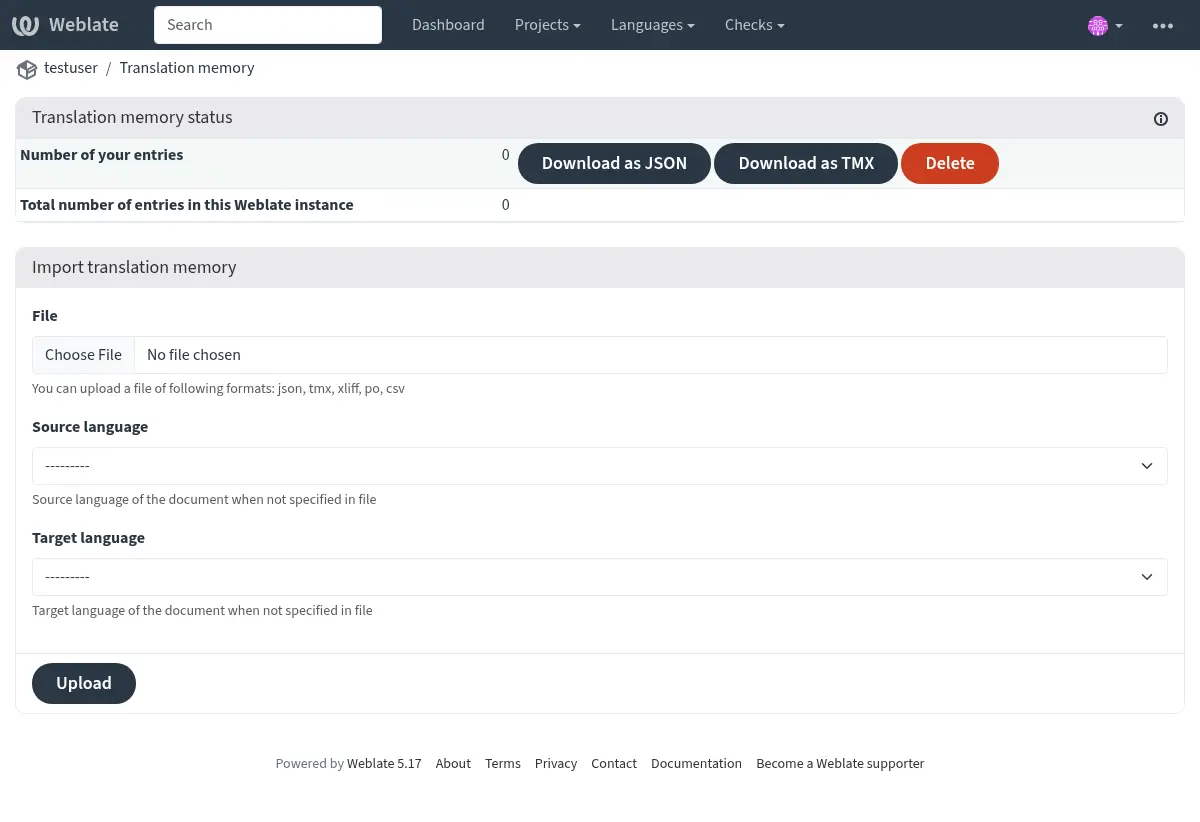
Open the user menu and choose Translation memory to manage your personal translation memory.
Open a project and choose Translation memory from the project menu to manage translation memory for that project.
Open Administration and choose Translation memory to manage uploaded translation memory for the whole Weblate instance.
The translation memory page shows entry counts for the selected scope. Depending on the scope, it also lists entries by origin, component, or language pair. The listed entries can be downloaded as JSON or TMX. Users with the required permissions can delete entries, and the project view can rebuild translation memory for the whole project or for individual components from the current translations.
The project view also shows whether shared translation memory and autoclean translation memory are enabled for the project, with a link to the project workflow settings when the user can edit the project.
Translation memory files can be imported on the same page. Uploaded files are stored in the selected scope:
Personal uploads are available in your personal translation memory.
Project uploads are available in the selected project’s translation memory.
Administration uploads are available as uploaded shared entries for the whole Weblate instance.
Подсказка
Translation memories in various formats can be imported into Weblate. The TMX format is provided for interoperability with other tools. All supported formats are TMX, JSON, XLIFF, PO, and CSV.
Source and target languages must be selected when uploading XLIFF, PO, or CSV files if the language information is not provided by the file itself.
См. также
You can search translation memory while editing strings from the Автоматические советы tab.
Интерфейс администратора
Administrative users have additional translation memory management controls. In Administration > Translation memory, the page lists uploaded shared entries, shared entries, and total entries for the Weblate instance. Depending on permissions, it can import uploaded shared memory, delete uploaded entries, and download uploaded, shared, or all entries as JSON or TMX.
Добавлено в версии 4.12.
The project translation memory view also allows rebuilding parts of or the entire project translation memory. Existing entries for the selected component or project are deleted, and the memory is populated again from the current translations in the background.
Интерфейс управления
Несколько команд управления могут управлять содержимым памяти переводов. Они работают со всей памятью переводов, без фильтрации по областям действия (если это не требуется параметрами):
dump_memoryЭкспортирует память переводов в виде JSON’а
import_memoryИмпортирует файлы TMX или JSON в память переводов
cleanup_memoryRemoves all entries with pending status from the translation memory
Добавлено в версии 4.14.
Weblate API охватывает базу данных переводов. Это позволяет автоматически манипулировать ею для различных целей или на основе событий в цикле перевода.