Add-ons
Add-ons provide ways to customize and automate the translation workflow. Admins can add and manage add-ons from the Operations ↓ Add-ons menu of each respective translation project or component. Add-ons can be also installed site-wide in Management interface.
Hint
You can also configure add-ons using API,
DEFAULT_ADDONS, or install_addon.
Add-ons that opt in to manual triggering can be run from add-on management or using the API. Results are recorded in the add-on activity log.
Add-ons that expose a component API show its base URL on the add-on’s API tab, alongside a link to the API root.
Add-ons are persistent administrative configuration. They run with their service identity in the scope where they are installed, rather than repeatedly using the permissions of the administrator who configured them. This ensures that equally authorized administrators see and save the same configuration, and that saving an unrelated change does not silently alter the add-on’s input scope. Removing or disabling the configuring administrator does not disable the add-on.
Project and category add-ons therefore include compatible restricted components in that scope. A component add-on can use inputs outside its destination component when documented by that add-on. Automatic translation determines its source components as follows:
Direct automatic-translation actions use the acting user’s component access.
A saved automatic-translation add-on uses its persistent administrative scope. Compatible components in the target project are eligible, including restricted components.
Components in another project are eligible when that project contributes to shared translation memory. This includes restricted components even though they do not create shared translation-memory entries; the add-on reads the explicitly selected component as an administrative input instead.
Restricted components remain filtered from ordinary listings and direct access. Grant add-on management permissions only to users trusted with the add-on’s complete input and effect scope. See Scope of teams and Restricted access.
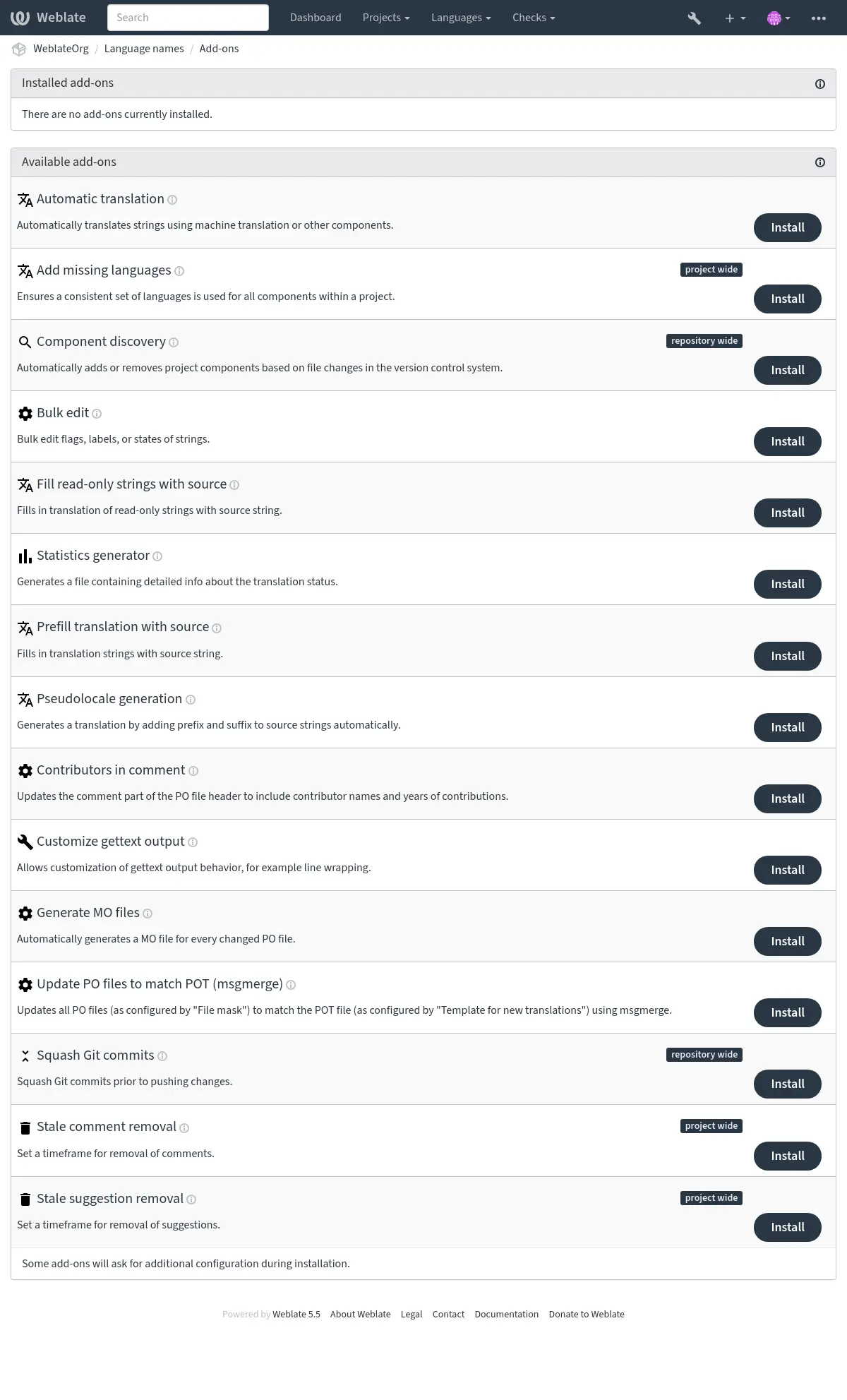
Events that trigger add-ons
Add-on installation
Triggered when add-on is being installed.
Component update
Triggered whenever a change happens in a component such as:
Strings are changed in the repository.
A string is added.
A new translation is added.
Daily
Triggered daily, but add-ons usually split the daily load between components depending on BACKGROUND_TASKS.
Event change
Triggered after a Change event is created.
Manual trigger
Triggered when an add-on is run manually from add-on management or the API.
Repository post-add
Triggered just after the new translation is added and committed.
Repository post-commit
Triggered just after the changes are committed.
Repository post-push
Triggered just after the repository is pushed upstream.
Repository post-remove
Triggered just after a translation is removed.
Repository post-update
Triggered whenever new changes are pulled from the upstream repository.
Repository pre-commit
Triggered just before the changes are committed.
Repository pre-push
Triggered just before the repository is pushed upstream.
Repository pre-update
Triggered just before the repository update is attempted.
Unit post-save
Triggered just after the string is saved.
Unit post-sync
Triggered after the string is synchronized with the VCS.
Unit pre-create
Triggered just after the newly created string is saved.
Built-in add-ons
AI quality evaluation
- Add-on ID:
weblate.ai.quality- Configuration:
serviceEvaluation service
Available choices:¶ anthropicAnthropic
openaiOpenAI
mistralMistral
ollamaOllama
azure-openaiAzure OpenAI
qQuery
intervalEvaluation frequency
Available choices:¶ disabledDisabled
dailyDaily
weeklyWeekly
monthlyMonthly
on_changeEvaluate translation changes
on_updateEvaluate repository updates
- Triggers:
Add-on installation, Component update, Daily, Event change, Manual trigger
Evaluates existing translations using an LLM and records quality checks.
This add-on evaluates existing translations using an LLM service configured under Automatic suggestions. It does not generate suggestions or change translations. Choose an Evaluation service from the configured LLM services; credentials and project overrides are reused.
The Query selects strings using the normal search syntax. By default, translated strings are selected. Source strings, read-only strings, and glossary entries are excluded. Each request includes all translation plural forms, source text, language information, string context, glossary terms, placeholders, and configured translation instructions. This data is sent to the selected provider.
Requests group strings from the same translation in file order, using the service’s automatic translation batch size (currently 20 strings for built-in LLM services). All plural forms of a string stay together. Related strings share context, allowing the evaluator to check meaning and terminology across the batch. Batching reduces the number of provider requests for scheduled, manual, and change-triggered runs; it does not skip unchanged strings.
Evaluation frequency defaults to weekly. Daily and monthly schedules are also available; disabled turns off scheduled evaluation. Background processing must be enabled. A successful full run starts the next interval. Manual runs bypass the interval. Enable Evaluate translation changes or Evaluate repository updates to additionally evaluate after those events. Installation does not immediately contact the provider. Each run can incur provider costs, including reevaluation of unchanged translations.
Evaluation runs in background tasks, with results and failure counts recorded in the existing add-on activity log. Failed requests retain existing valid findings and are tried again only by a subsequent run. Evaluation shares the service’s automatic translation cooldown: rate-limit responses activate it, and batches are skipped while it is active. More specific installations take precedence: component, nearest category, project, then site-wide.
Findings appear as standard checks for accuracy, fluency, terminology, style, and
formatting. Each finding includes a minor, major, or critical severity and an
explanation. Multiple findings in one category share a check, so ignoring that
check ignores the whole category for the string. Existing search filters and API
search work, for example check:ai_accuracy. Translation flags such as
ignore-ai-accuracy disable a category; ignore-all-checks disables all checks.
Changing the source or translation removes outdated findings. Results received after any source or translation in their batch changes are discarded for the whole batch. A failed or malformed response also leaves existing findings for the whole batch unchanged; other batches can still complete. Incomplete runs do not advance the scheduled evaluation date. Reevaluation of unchanged content preserves ignored categories, and a successful evaluation removes categories that no longer have findings. Removing or reconfiguring the add-on clears its findings. Evaluator metadata is internal and cannot be edited through the API; the add-on configuration uses the existing Add-ons permissions and validation.
Automation
Added in version 2026.10.
- Add-on ID:
weblate.automation.automation- Configuration:
workflowWorkflow
Enter an automation definition as YAML or JSON.
- Triggers:
Component update, Daily, Event change, Manual trigger, Repository post-commit, Repository post-push, Repository post-update
Runs ordered translation operations with conditions and branches.
Install this add-on on a component, category, project, or site. Inherited instances run separately for each component. Multiple instances can be installed. Configuring, previewing, and running an automation requires the usual add-on management permission. Saving its configuration does not execute it.
Enter YAML or JSON in Workflow. Use Preview without changes to validate it and inspect planned actions, then Run now for real execution. Results appear in the add-on activity log.
See also
Workflow definition for the script definition and reference.
Cookbook for complete examples.
Apply translation memory before machine translation for translation memory before machine translation.
Automatic translation
- Add-on ID:
weblate.autotranslate.autotranslate- Configuration:
modeAutomatic translation mode
Available choices:¶ suggestAdd as suggestion
translateAdd as translation
fuzzyAdd as “Needing edit”
approvedAdd as approved translation
qQuery
Please note that translating all strings will discard all existing translations.
auto_sourceSource of automated translations
Available choices:¶ othersOther translation components
mtMachine translation
componentComponent
Enter a source component ID. With 30 or more eligible source components, a project/component path is also accepted. In that case, component and project operations also accept a component slug from the target project. Leave blank to use eligible components from each target component’s project.
enginesTranslation services
thresholdScore threshold
- Triggers:
Automatically translates strings using machine translation or other components.
To control translation order, use the Automation add-on with a separate action for each pass. Follow the Apply translation memory before machine translation cookbook example to apply local translation memory first and send only the remaining strings to a machine translation service. Selecting multiple engines here uses Priority of machine translation and translation memory services; installation order of separate add-ons does not define an execution sequence.
JavaScript localization CDN
Added in version 4.2.
- Add-on ID:
weblate.cdn.cdnjs- Configuration:
thresholdTranslation threshold
The percentage of translated strings that must be present for translation to be included.
css_selectorCSS selector
CSS selector to detect localizable elements.
cookie_nameLanguage cookie name
Name of cookie which stores language preference.
filesExtract strings from HTML files
List of filenames in current repository or remote URLs to parse for translatable strings.
- Triggers:
Add-on installation, Daily, Repository post-commit, Repository post-remove, Repository post-update
Publishes translations into content delivery network for use in JavaScript or HTML localization.
Can be used to localize static HTML pages, or to load localization in the JavaScript code.
Generates a unique URL for your component you can include in HTML pages to localize them. See Translating HTML and JavaScript using Weblate CDN for more details.
Note
This add-on requires additional configuration on the Weblate server.
LOCALIZE_CDN_PATH configures where generated files will be
written (on a filesystem), and LOCALIZE_CDN_URL defines where
they will be served (URL). Serving of the files is not done by Weblate and
has to be set up externally (typically using a CDN service).
This add-on is configured on Hosted Weblate and serves the files
via https://weblate-cdn.com/.
Translation files CDN
Added in version 2026.5.
- Add-on ID:
weblate.cdn.files- Configuration:
This add-on has no configuration.
- Triggers:
Add-on installation, Component update, Repository post-commit, Repository post-remove, Repository post-update
Publishes translation files into a content delivery network.
Publishes translation files without converting them to another format. Files
are written below the add-on specific CDN directory and served from
LOCALIZE_CDN_URL/<add-on UUID>/. Single-file translations use the language
code and original file extension, for example cs.json or de.po.
Multi-file translations are served below the language code using paths relative
to the translation directory. Monolingual components include the source
language file, while bilingual components publish only target-language files.
See Localization CDN for secure serving guidance.
Kotlin SDK CDN
Added in version 2026.10.
- Add-on ID:
weblate.cdn.kotlin- Configuration:
maximum_ageMaximum build age (days)
Retires builds this many days after their first registration. Re-registering a build does not extend its age.
maximum_versionsMaximum retained versions
Limits retained builds across all package names. A build is retired when either this limit or the maximum age is reached.
- Triggers:
Add-on installation, Component update, Daily, Repository post-commit, Repository post-remove, Repository post-update
Publishes Android string and plural resources for registered Kotlin SDK builds.
Warning
The Kotlin SDK is available as an alpha release. No compatibility is guaranteed until the final Kotlin SDK is released. Endpoints, build metadata, CDN manifests, and generated resource formats may change without backward compatibility.
Install Kotlin SDK CDN on an Android string-resource component to
publish translations for builds registered by the Kotlin SDK. Configure
LOCALIZE_CDN_URL and LOCALIZE_CDN_PATH first. CDN output is
public, including translations from private components. Manifests expose the
application package name and version code. ARSC files expose published resource
names and their submitted IDs alongside translated text. Do not treat the
uploaded resource mapping as confidential; enable publication only when this
disclosure is intended. Registration and status API access remains permission-controlled.
Copy the Gradle plugin configuration from the add-on configuration page. It
includes the Weblate server URL, public CDN URL, project slug, and component
path (with any category path URL-encoded). Replace the placeholder with a
project-scoped API token whose permissions allow editing the component. Project
administrators can create one in the project’s API access tab; see
Per-project access tokens.
Keep that token in the build environment, not in the application. The add-on’s
API tab shows the API base URL; submit build metadata to its builds/
endpoint. See
Kotlin SDK builds for the request and response format.
For Gradle plugin and library setup, see Kotlin SDK for Android.
The add-on matches resource names and types from registered builds to current component translations. Strings, plurals, and Android styled text are supported. String arrays and resource references are not generated. Untranslated entries, read-only entries, and incomplete plural resources are omitted; applications retain their bundled values. Unsupported styling fails publication; the previous successful publication remains available.
Resource IDs must describe the final installed build. Uploading an identical mapping again is harmless; a different mapping for the same package and version is rejected. Old builds receive current translations by name, including after source text or formatting arguments change. Maintainers are responsible for compatibility with older application code.
Lifecycle settings
Maximum build age (days) defaults to 365 and accepts 1 through 730, measured from the first registration. Repeated uploads do not extend it.
Maximum retained versions defaults to 20 and accepts 1 through 100, counted across all package names. One additional unpublished replacement is allowed. New registrations can retire older unpublished replacements. Published builds are retired for this limit only after a replacement is published. Failed replacements preserve existing publications; maximum-age expiry still applies independently.
Either limit retires a build and immediately clears its metadata. Lightweight retired records are deleted on cleanup after 24 hours and successful manifest removal; their package/version identifiers can then be registered again. Failed or interrupted manifest removals are retried hourly. Until removal succeeds, the registration and its referenced artifacts are retained, and the files may remain publicly accessible. Resource mappings are immutable only while their registration records remain.
Each add-on permits at most 1000 registration records, including retired records. New registrations exceeding this limit return HTTP 409 until cleanup frees capacity; identical retries remain accepted. Metadata is bounded by the 5 MiB upload limit and maximum retained version count plus one replacement, without a separate byte quota. Limits are enforced during registration and scheduled cleanup.
Superseded artifacts are deleted on cleanup after a fixed 24-hour window. All artifact files, including superseded files and incomplete publication output, count towards hard limits of 5 GiB and 10000 files per add-on. The larger artifact allowance accommodates translated text and multiple locales; it does not guarantee capacity for every locale or build combination. Shared artifacts count only once. Publications exceeding either limit fail before writing new artifacts and preserve the previous manifest. Neither the window nor these limits are configurable. Limit manifest caching as described below.
Compilation stages one locale at a time on disk. A per-locale conservative encoded text and styling estimate exceeding 64 MiB fails publication.
Preparation additionally requires up to 5 GiB of temporary disk space per
publication job, separate from the published artifact allowance. Temporary
files contain staged ARSC output, shared by versions with identical resource mappings.
They are stored below LOCALIZE_CDN_PATH. Configure the server to
deny access to .kotlin-sdk-staging as described in
Localization CDN before enabling this add-on.
Manifest replacement follows the database commit. Failed or interrupted writes are retried by subsequent publication jobs, with artifacts for both the old and pending manifest protected until replacement succeeds.
Uninstalling the add-on attempts to remove its published files from the CDN origin immediately. Failed or interrupted removals are retried hourly; files may remain publicly accessible until cleanup succeeds. Removal does not revoke copies already cached or downloaded by clients.
Publication and cleanup run asynchronously after build registration, component updates, translation commits and removals, and during daily add-on processing. Failures appear in the add-on activity log and registration status. Previous successful publications remain available when replacement generation fails. If the component stops using the Android resource format, hourly maintenance retires its publications. The normal artifact retention window still applies.
CDN client contract
Each build has a stable manifest at
<CDN base>/<packageName>/<versionCode>/manifest.json. The version 1 manifest
contains schemaVersion, packageName, versionCode, and locales.
Locale keys are Weblate language codes. Each locale contains a relative url,
sha256, and byte size for its ARSC artifact. Resolve relative URLs against
the manifest URL. Artifact contents do not change after publication.
The manifest has a JSON Schema.
Configure the CDN origin to cache manifests for at most one hour (for example,
Cache-Control: public, max-age=3600), and artifact files with
Cache-Control: public, max-age=31536000, immutable. Artifact files may use
application/octet-stream. Configure these headers on the CDN server.
Translation updates and retirements can take up to one hour to reach clients.
Use Cache-Control: no-cache when immediate revalidation is preferred.
The fixed 24-hour artifact retention window exceeds the manifest cache lifetime.
The Kotlin SDK should validate artifact length and hash, cache successful downloads locally, and load them with Android’s resources-loader API on API 30 or newer. A missing manifest, missing locale, or download failure must preserve bundled resources. Retired manifests return 404 at the origin; cached copies can remain usable until they expire. Hashes detect corrupted or mismatched content; authentication relies on HTTPS and the configured CDN.
Remove blank strings
Added in version 4.4.
- Add-on ID:
weblate.cleanup.blank- Configuration:
This add-on has no configuration.
- Triggers:
Add-on installation, Repository post-commit, Repository post-update
Removes strings without a translation from translation files.
Use this to not have any empty strings in translation files (for example if your localization library displays them as missing instead of falling back to the source string).
Cleanup translation files
- Add-on ID:
weblate.cleanup.generic- Configuration:
This add-on has no configuration.
- Triggers:
Add-on installation, Repository post-update, Repository pre-commit
Update all translation files to match the monolingual base file. For most file formats, this means removing stale translation keys no longer present in the base file.
For formats containing additional content besides translation strings (such as HTML files, Windows RC files, or OpenDocument Format) this also brings the translation file in sync with the base file.
For a one-time cleanup of a single translation file, use Cleanup unused in Repository maintenance on that translation instead of installing the add-on.
Add missing languages
- Add-on ID:
weblate.consistency.languages- Configuration:
This add-on has no configuration.
- Triggers:
Ensures a consistent set of languages is used for all components within a project.
Note
The components shared from other projects are not considered in this.
Missing languages are checked once every 24 hours, and when new languages are added in Weblate.
Unlike most others, this add-on affects the whole project.
Hint
Auto-translate the newly added strings with Automatic translation.
Component discovery
- Add-on ID:
weblate.discovery.discovery- Configuration:
matchRegular expression to match translation files against
The regular expression must define a named group for component. Also define a named group for language when matching translation files. When the file mask is set, omit language and match the monolingual base or new base file instead.
file_formatFile format
name_templateCustomize the component name
Use Django template syntax. This template must include {{ component }}.
base_file_templateDefine the monolingual base filename
Leave empty for bilingual translation files. When set, this template must include {{ component }}.
new_base_templateDefine the base file for new translations
Filename of file used for creating new translations. For gettext choose .pot file. This template must include {{ component }}.
intermediate_templateIntermediate language file
Filename of intermediate translation file. In most cases this is a translation file provided by developers and is used when creating actual source strings. This template must include {{ component }}.
filemask_templateDefine the file mask
Leave empty to match translation files directly. When set, discovery matches the monolingual base or new base file and uses this template as the file mask. Include a language wildcard and {{ component }}, for example locale//{{ component }}.po or docs/{{ component }}_.md.
language_regexLanguage filter
Regular expression to filter translation files against when scanning for file mask.
copy_addonsClone add-ons from the main component to the newly created ones
removeRemove components for inexistent files
- Triggers:
Automatically adds or removes project components based on file changes in the version control system.
The matching is done using regular expressions enabling complex configuration, but some knowledge is required to do so. Usually the regular expression to match translation files has to contain two named groups to match component and language. When creating components from a monolingual base or new base file, omit the language group and match that source file instead. All named groups in the regular expression can be used as variables in the template fields.
Discovery requirements
To discover a component successfully, the configuration has to do all of the following:
The regular expression must define a
componentnamed group. Matching translation files also requires alanguagenamed group.Template fields used to name or locate per-component files must include
{{ component }}, so the rendered value actually changes for each discovered component.For monolingual formats, the component must contain a file matching
base_file_templateand at least one translation file matchingmatch, unless you set the file mask (see below).
Discovering components without translation files
Set Define the file mask to discover components from a monolingual base or new base file alone, even when no translation files exist yet. In that mode:
Configure Regular expression to match translation files against to match the monolingual base or new base file, and omit the
languagegroup. Keep full control over thecomponentcapture, for examplelocale/(?P<component>[^/]+)\.potordocs/(?P<component>[^/_]+)\.md.Fill Define the file mask with a path that includes both a language wildcard and
{{ component }}, for examplelocale/*/{{ component }}.poordocs/{{ component }}_*.md.Keep using the other filename templates with any named groups from the match expression.
Worked example: news_<lang>.md
This is a common filename-based language variant layout:
docs/news_en.mddocs/news_cs.mddocs/guide_en.md
Use the Filename-based language variants preset for a starting point, then choose the matching file format and review the populated values.
- Regular expression:
(?:(?P<path>.*/))?(?P<component>.+?)_(?P<language>[A-Za-z]{2,3}(?:[_-][A-Za-z0-9]+)*)\.(?P<extension>[^/.]+)- Component name:
{{ component }}- Discovered file masks:
docs/news_*.mddocs/guide_*.md
In this example, {{ component }} resolves to the basename before the language
suffix, so docs/news_en.md, docs/news_pt_BR.md, and
docs/news_pt-BR.md all become the news component.
You can use Django template markup in all filename fields, for example:
{{ component }}Component name parsed from the
componentmatch group{{ component|title }}Component filename with upper case first letter
{{ path }}: {{ component }}Custom match group from the regular expression
Once you hit Save, a preview of matching components will be presented, from where you can check whether the configuration actually matches your needs:
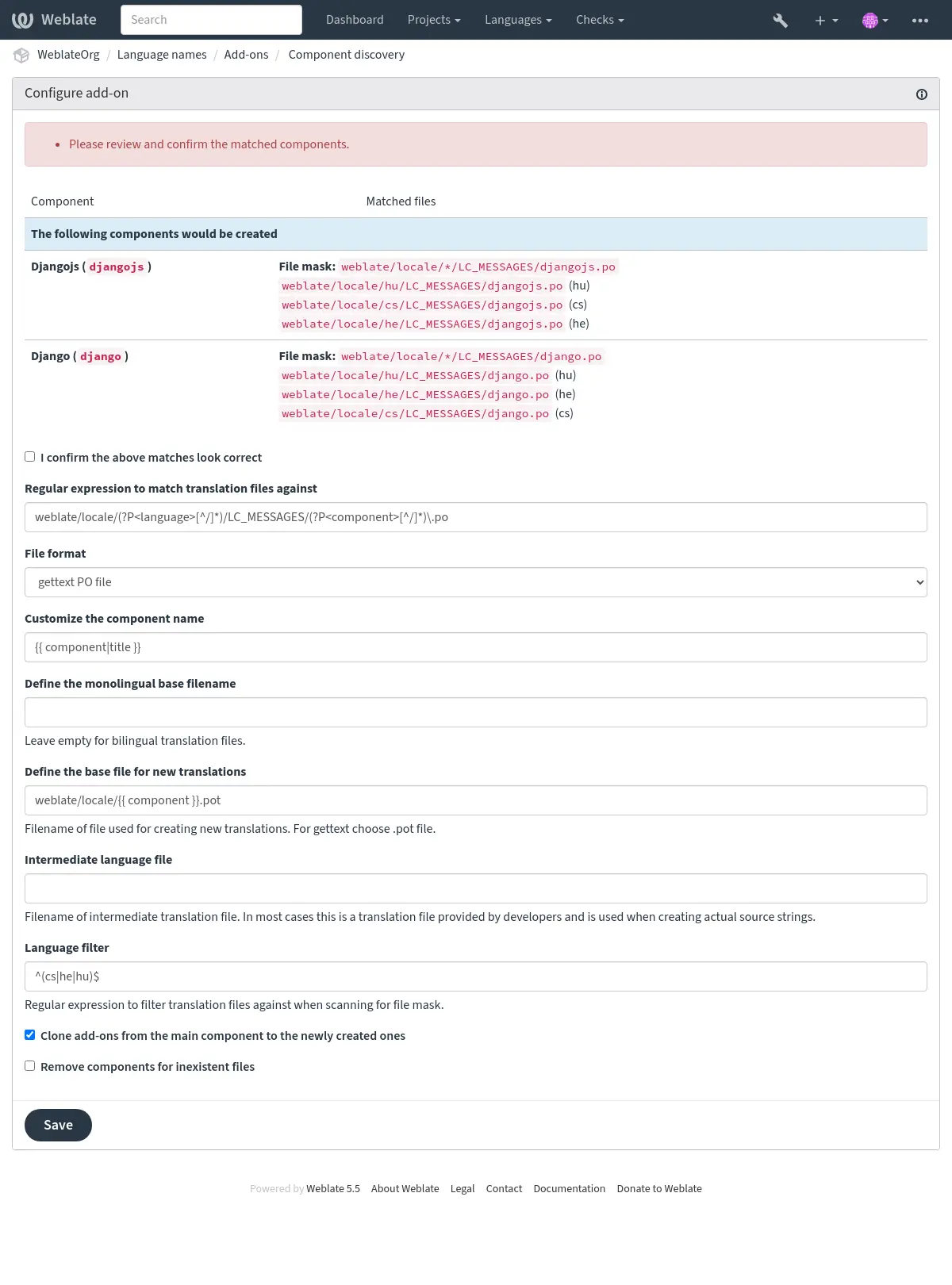
Component discovery examples
The worked example above covers the most common filename-based variant layout. The following examples show other repository structures you can match.
One folder per language
One folder per language containing translation files for components.
- Regular expression:
(?P<language>[^/.]*)/(?P<component>[^/]*)\.po- Matching files:
cs/application.pocs/website.pode/application.pode/website.po
Gettext locales layout
Usual structure for storing gettext PO files.
- Regular expression:
locale/(?P<language>[^/.]*)/LC_MESSAGES/(?P<component>[^/]*)\.po- Matching files:
locale/cs/LC_MESSAGES/application.polocale/cs/LC_MESSAGES/website.polocale/de/LC_MESSAGES/application.polocale/de/LC_MESSAGES/website.po
Complex filenames
Using both component and language name within filename.
- Regular expression:
src/locale/(?P<component>[^/]*)\.(?P<language>[^/.]*)\.po- Matching files:
src/locale/application.cs.posrc/locale/website.cs.posrc/locale/application.de.posrc/locale/website.de.po
Repeated language code
Using language in both path and filename.
- Regular expression:
locale/(?P<language>[^/.]*)/(?P<component>[^/]*)/(?P=language)\.po- Matching files:
locale/cs/application/cs.polocale/cs/website/cs.polocale/de/application/de.polocale/de/website/de.po
Split Android strings
Android resource strings, split into several files.
- Regular expression:
res/values-(?P<language>[^/.]*)/strings-(?P<component>[^/]*)\.xml- Matching files:
res/values-cs/strings-about.xmlres/values-cs/strings-help.xmlres/values-de/strings-about.xmlres/values-de/strings-help.xml
Matching multiple paths
Multi-module Maven project with Java properties translations.
- Regular expression:
(?P<originalHierarchy>.+/)(?P<component>[^/]*)/src/main/resources/ApplicationResources_(?P<language>[^/.]*)\.properties- Component name:
{{ originalHierarchy }}: {{ component }}- Matching files:
parent/module1/submodule/src/main/resources/ApplicationResources_fr.propertiesparent/module1/submodule/src/main/resources/ApplicationResource_es.propertiesparent/module2/src/main/resources/ApplicationResource_de.propertiesparent/module2/src/main/resources/ApplicationResource_ro.properties
Hint
Component discovery add-on uses Weblate internal URLs. It’s a convenient way to share
VCS setup between multiple components. Linked components use the local repository of
the main component set up by filling weblate://project/main-component
into the Source code repository field (in Operations ↓ Settings ↓
Version control system) of each respective component.
This saves time with configuration and system resources too.
Hint
Ensure the new component contains the full set of translatable languages with Add missing languages.
See also
Fedora Messaging
Added in version 5.15.
- Add-on ID:
weblate.fedora_messaging.publish- Configuration:
amqp_urlAMQP broker URL
The AMQP broker URL to connect to.
topic_prefixTopic prefix
Optional prefix to prepend to generated message topics.
publish_timeoutPublish timeout
How many seconds to wait for the broker delivery acknowledgement.
connection_attemptsConnection attempts
How many times to try connecting to the broker.
retry_delayRetry delay
How many seconds to wait between connection attempts.
ca_certCA certificate bundle (PEM)
Paste only PEM certificate blocks, each starting with “—–BEGIN CERTIFICATE—–” and ending with “—–END CERTIFICATE—–“.
client_keyClient private key (PEM)
Paste a single unencrypted PEM private key block. Encrypted private keys are not supported.
client_certClient certificate (PEM)
Paste only the PEM certificate block starting with “—–BEGIN CERTIFICATE—–”; do not paste the output from “openssl x509 -text”.
event_filterChange events to trigger
Choose which change events should trigger this add-on. Change events to trigger
eventsSelected change events
- Triggers:
Sends notifications to a Fedora Messaging compatible AMQP exchange.
Fedora Messaging is AMQP-based publisher for all changes happening in Weblate. You can hook additional services on changes happening in Weblate using this.
Message topic
All messages have topic
weblate.<action>.<project>.<category...>.<component>.<translation>.
When configured, topic_prefix is prepended to this topic using a single dot
separator, for example org.fedoraproject.weblate.project_backed_up.website.
The action is lowercase textual representation of action with underscores
instead of space, for example resource_updated; see Selected change events
for all action identifiers. The remaining parts match Weblate object path
segments.
For example, a project backup event for the website project uses
weblate.project_backed_up.website. A translation change in the website
project, frontend component, and Czech translation uses
weblate.translation_changed.website.frontend.cs. The same change in the
frontend component inside the parent and child categories uses
weblate.translation_changed.website.parent.child.frontend.cs.
Message body
The body consists of following fields (given that they are available for the event):
change_idNumerical ID of change
actionVerbose name of the change.
timestampISO formatted timestamp
targetNew value of the change (eg. new translation of the string)
oldOld value of the change (eg. previous translation of the string)
sourceSource string.
urlAbsolute URL to view the related object.
authorAuthor username (this can be different from user for example when accepting suggestions)
userActing username
projectProject slug
componentComponent slug
translationTranslation language code
Message headers
There are additional headers which you might utilize for routing as well:
actionVerbose name of the change.
projectProject slug
componentComponent slug
Example messages
Repository merge event:
{
  "id": 1,
  "action": "Merged repository",
  "timestamp": "2017-06-15T11:30:47.325000+00:00",
  "url": "http://example.com/projects/test/test/",
  "component": "test"
}
New source string event:
{
  "id": 2,
  "action": "New source string",
  "timestamp": "2017-06-15T11:30:47.372000+00:00",
  "url": "http://example.com/translate/test/test/cs/?checksum=6412684aaf018e8e",
  "component": "test",
  "translation": "cs",
  "source": ["Hello, world!\n"]
}
Resource update event:
{
  "id": 6,
  "action": "Resource update",
  "timestamp": "2017-06-15T11:30:47.410000+00:00",
  "url": "http://example.com/projects/test/test/cs/",
  "project": "test",
  "component": "test",
  "translation": "cs"
}
{
  "id": 7,
  "action": "Resource update",
  "timestamp": "2017-06-15T11:30:47.510000+00:00",
  "url": "http://example.com/projects/test/test/de/",
  "project": "test",
  "component": "test",
  "translation": "de"
}
{
  "id": 8,
  "action": "Resource update",
  "timestamp": "2017-06-15T11:30:47.595000+00:00",
  "url": "http://example.com/projects/test/test/it/",
  "project": "test",
  "component": "test",
  "translation": "it"
}
Project removal event:
{
  "id": 9,
  "action": "Removed project",
  "timestamp": "2019-10-17T15:57:08.559420+00:00",
  "target": "test",
  "user": "testuser"
}
New contributor event:
{
  "id": 11,
  "action": "New contributor",
  "timestamp": "2019-10-17T15:57:08.759960+00:00",
  "url": "http://example.com/translate/test/test/cs/?checksum=6412684aaf018e8e",
  "author": "testuser",
  "user": "testuser",
  "project": "test",
  "component": "test",
  "translation": "cs",
  "source": ["Hello, world!\n"]
}
New translation event:
{
  "id": 12,
  "action": "New translation",
  "timestamp": "2019-10-17T15:57:08.772591+00:00",
  "url": "http://example.com/translate/test/test/cs/?checksum=6412684aaf018e8e",
  "target": ["Ahoj svete!\n"],
  "author": "testuser",
  "user": "testuser",
  "project": "test",
  "component": "test",
  "translation": "cs",
  "source": ["Hello, world!\n"]
}
Bulk edit
- Add-on ID:
weblate.flags.bulk- Configuration:
qQuery
stateState to set
Available choices:¶ -1Do not change
10Needs editing
11Needs editing (Needs rewriting)
12Needs editing (Needs checking)
20Translated
30Approved
add_flagsSource flags to add — all languages
remove_flagsSource flags to remove — all languages
add_translation_flagsTranslation flags to add — matching translations
Applies only to matching translations, excluding source strings.
remove_translation_flagsTranslation flags to remove — matching translations
Removes locally set flags. Inherited flags remain in effect.
add_labelsLabels to add — all languages
remove_labelsLabels to remove — all languages
- Triggers:
Bulk edit flags, labels, or states of strings.
Examples:
Search query |
|
|---|---|
Labels to add |
recent |
Search query |
|
|---|---|
Translation flags to add |
|
Search query |
|
|---|---|
Translation flags to add |
|
Flag unchanged translations as “Needs rewriting”
- Add-on ID:
weblate.flags.same_edit- Configuration:
This add-on has no configuration.
- Triggers:
Whenever a new translatable string is imported from the VCS and it matches a source string, it is flagged as needing rewriting in Weblate. Especially useful for file formats that include source strings for untranslated strings.
Hint
You might also want to tighthen the Unchanged translation check by adding
strict-same flag to Translation flags.
See also
Flag new source strings as “Needs checking”
- Add-on ID:
weblate.flags.source_edit- Configuration:
This add-on has no configuration.
- Triggers:
Whenever a new source string is imported from the VCS, it is flagged as needing checking in Weblate. This way you can easily filter and edit source strings written by the developers.
See also
Flag new translations as “Needs rewriting”
- Add-on ID:
weblate.flags.target_edit- Configuration:
This add-on has no configuration.
- Triggers:
Whenever a new translatable string is imported from the VCS, it is flagged as needing rewriting in Weblate. This way you can easily filter and edit translations created by the developers.
See also
Flag updated translations from repository as “Needs rewriting”
- Add-on ID:
weblate.flags.target_repo_update- Configuration:
This add-on has no configuration.
- Triggers:
Whenever a string translation is changed from the VCS, it is flagged as needing rewriting in Weblate. Especially useful if translation files are often updated manually or by an external service.
See also
Fill read-only strings with source
Added in version 4.18.
- Add-on ID:
weblate.generate.fill_read_only- Configuration:
This add-on has no configuration.
- Triggers:
Fills in translation of read-only strings with source string.
Statistics generator
- Add-on ID:
weblate.generate.generate- Configuration:
scopeOutput scope
Available choices:¶ translationOne file per translation
componentOne file per component
filenameName of generated file
templateContent of generated file
- Triggers:
Add-on installation, Component update, Repository post-add, Repository post-remove, Repository pre-commit
Generates a file containing detailed info about the translation status.
You can use a Django template in both filename and content, see Template markup for a detailed markup description.
For example generating a summary file for each translation:
- Name of generated file
locale/{{ language_code }}.json- Content
{
   "language": "{{ language_code }}",
   "strings": "{{ stats.all }}",
   "translated": "{{ stats.translated }}",
   "last_changed": "{{ stats.last_changed }}",
   "last_author": "{{ stats.last_author }}",
}
Component-wide output
Set Output scope to One file per component to maintain one locale list or statistics file for the entire component. The default, One file per translation, preserves existing configurations.
Component output is generated on installation and configuration changes. It is updated when translations are committed, languages are added or removed, and component files are reloaded. Language metadata changes are included on the next such update or when the add-on is reconfigured. Unchanged output does not create a new commit.
Both modes support component and project variables in filenames and content.
In component mode, the content additionally receives translations, ordered
by repository language code. Each item provides:
language_code: the language code used in the repository.language_name: the English language name.language_native_name: the name translated into its own language using Weblate’s catalogs, with an English fallback when unavailable.language_direction:ltrorrtl.filenameandurl: the translation filename and Weblate URL.is_source: whether this is the component’s source translation.stats: the same statistics available in translation mode.
The source translation is included. Templates can exclude it using
{% if not item.is_source %}. Statistics use Weblate’s completion semantics.
Custom language names are retained; there is no external locale-data lookup.
For example, generate locales.json for a website:
[
{% for item in translations %}
  {
    "code": {{ item.language_code|json }},
    "file": {{ item.filename|json }},
    "name": {{ item.language_native_name|json }},
    "dir": {{ item.language_direction|json }}
  }{% if not forloop.last %},{% endif %}
{% endfor %}
]
Or generate languages.py for an application:
names = {
{% for item in translations %}
    {{ item.language_code|python }}: {{ item.language_native_name|python }},
{% endfor %}
}
completeness = {
{% for item in translations %}
    {{ item.language_code|python }}: {{ item.stats.translated_percent|python }},
{% endfor %}
}
The json and python filters serialize complete values, including string
quotes and escaping. Do not add quotes around their output. They also support
lists and dictionaries; {{ translations|json }} exports all available data.
Dates and times are serialized as ISO-formatted strings.
See also
Prefill translation with source
Added in version 4.11.
- Add-on ID:
weblate.generate.prefill- Configuration:
This add-on has no configuration.
- Triggers:
Fills in translation strings with source string.
All untranslated strings in the component will be filled with the source string, and marked as needing edit. Use this when you can not have empty strings in the translation files. .. AUTOGENERATED START: weblate.generate.pseudolocale .. This section is automatically generated by ./manage.py list_addons. Do not edit manually.
Pseudolocale generation
Added in version 4.5.
- Add-on ID:
weblate.generate.pseudolocale- Configuration:
sourceSource strings
targetTarget translation
All strings in this translation will be overwritten
prefixPrepended static text
var_prefixPrepended variable text
suffixAppended static text
var_suffixAppended variable text
var_multiplierVariable text multiplier
How many times to repeat the variable text depending on the length of the source string.
include_readonlyInclude read-only strings
- Triggers:
Generates a translation by adding prefix and suffix to source strings automatically.
Pseudolocales are useful to find strings that are not prepared for localization. This is done by altering all translatable source strings to make it easy to spot unaltered strings when running the application in the pseudolocale language.
Finding strings whose localized counterparts might not fit the layout is also possible.
Using the variable parts makes it possible to look for strings which might not
fit into the user interface after the localization - it extends the text based
on the source string length. The variable texts are repeated by length of the
text multiplied by the multiplier. For example Hello world with variable
text _ and variable multiplier of 1 becomes Hello world___________ -
the text is repeated once for each character in the source string.
The strings will be generated using following pattern:
Prepended static text Prepended variable text Source string Appended variable text Appended static text
Hint
You can use real languages for testing, but there are dedicated pseudolocales available in Weblate - en_XA and ar_XB.
Hint
You can use this add-on to start translation to a new locale of an existing language or similar language. Once you add the translation to the component, follow to the add-on. Example: If you have fr and want to start fr_CA translation, simply set fr as the source, fr_CA as the target, and leave the prefix and suffix blank.
Uninstall the add-on once you have the new translation filled to prevent Weblate from changing the translations made after the copying.
Update ALL_LINGUAS variable in the “configure” file
- Add-on ID:
weblate.gettext.configure- Configuration:
This add-on has no configuration.
- Triggers:
Add-on installation, Daily, Repository post-add, Repository post-remove
Updates the ALL_LINGUAS variable in “configure”, “configure.in” or “configure.ac” files, when a translation is added or removed.
Updates the ALL_LINGUAS variable in configure, configure.in or any
configure.ac files, when a translation is added or removed.
Customize gettext output
Removed in version 5.13: Replaced by File format parameters.
Update gettext template (Django)
Added in version 5.17.
- Add-on ID:
weblate.gettext.django- Configuration:
intervalUpdate frequency
How often the add-on should update the POT file when the component is refreshed.
Available choices:¶ dailyDaily
weeklyWeekly
monthlyMonthly
normalize_headerNormalize POT header
Updates gettext headers and replaces placeholder POT comments.
location_modeSource locations
Choose how extraction writes source locations to the POT file. Use this to keep locations in the template while omitting them from translated PO files.
Available choices:¶ fileUse file format settings
keepExtract locations to the POT file
omitDo not extract locations
- Triggers:
Updates the gettext template using Django’s built-in makemessages command.
This add-on updates the template configured in Template for new translations. It is available for gettext PO components, and the component must define a template for new translations.
The selected update frequency applies to automatic runs after repository refreshes. Installing or reconfiguring the add-on runs it immediately, and manual runs from add-on management or the API also bypass the frequency schedule. After a successful update, Weblate commits the changed template and reloads source strings.
The template update does not update translation PO files by itself. Keep Update PO files to match POT (msgmerge) installed when translation files should follow template changes automatically. The install form for this add-on can install that add-on, but existing add-on settings do not show that installation option again.
Django requirements
This add-on requires xgettext and msguniq. It runs Weblate’s internal extraction wrapper for Django messages instead of invoking a project’s manage.py makemessages, so it does not load project Django settings or applications.
The template for new translations must use the django or djangojs
domain. Supported template names are django.pot, djangojs.pot,
django.po, and djangojs.po. Weblate infers the source directory
from the template path and skips repository locale directories while extracting.
Update LINGUAS file
- Add-on ID:
weblate.gettext.linguas- Configuration:
This add-on has no configuration.
- Triggers:
Add-on installation, Daily, Repository post-add, Repository post-remove
Updates the LINGUAS file when a translation is added or removed.
Update POT file (Meson)
Added in version 5.17.
- Add-on ID:
weblate.gettext.meson- Configuration:
intervalUpdate frequency
How often the add-on should update the POT file when the component is refreshed.
Available choices:¶ dailyDaily
weeklyWeekly
monthlyMonthly
normalize_headerNormalize POT header
Updates gettext headers and replaces placeholder POT comments.
location_modeSource locations
Choose how extraction writes source locations to the POT file. Use this to keep locations in the template while omitting them from translated PO files.
Available choices:¶ fileUse file format settings
keepExtract locations to the POT file
omitDo not extract locations
data_dirsITS data directories
Newline-separated repository-relative directories containing an its subdirectory, for example po for po/its. Earlier directories override later directories and bundled rules.
comment_modeCode comments
Choose whether xgettext should extract no comments, all comments, or only comments marked with a specific tag.
Available choices:¶ offDo not extract comments
allExtract all comments
taggedExtract comments with tag
comment_tagComment tag
Tag passed to xgettext for comment extraction when using tagged comment mode.
checksxgettext checks
Additional xgettext validation checks to enable for extracted messages.
Available choices:¶ ellipsis-unicodeellipsis-unicode
space-ellipsisspace-ellipsis
quote-unicodequote-unicode
bullet-unicodebullet-unicode
keywordAdditional keywords
Newline-separated extra keywords passed to xgettext using –keyword.
keyword_exclusiveUse keywords exclusively
When enabled, passes
--keywordwithout a value to xgettext before the additional keyword, disabling all default keywords so that only the keyword specified above is recognized.presetMeson preset
Built-in xgettext argument preset matching Meson gettext integration. The GLib preset adds the keyword and format-flag options used by Meson’s gettext helper.
Available choices:¶ glibGLib
- Triggers:
Updates the gettext template using Meson gettext conventions.
This add-on updates the template configured in Template for new translations. It is available for gettext PO components, and the component must define a template for new translations.
The selected update frequency applies to automatic runs after repository refreshes. Installing or reconfiguring the add-on runs it immediately, and manual runs from add-on management or the API also bypass the frequency schedule. After a successful update, Weblate commits the changed template and reloads source strings.
The template update does not update translation PO files by itself. Keep Update PO files to match POT (msgmerge) installed when translation files should follow template changes automatically. The install form for this add-on can install that add-on, but existing add-on settings do not show that installation option again.
Meson requirements
This add-on requires xgettext; it does not invoke Meson. It follows
Meson gettext conventions by reading POTFILES or POTFILES.in
from the gettext directory and passing the GLib keyword and format-flag preset
to xgettext.
The gettext directory is the directory containing the template configured in
Template for new translations. It must contain meson.build and
POTFILES or POTFILES.in. A Meson project meson.build
must be present in that directory or one of its parent directories. If both
POTFILES and POTFILES.in exist, POTFILES is used.
An adjacent POTFILES.skip excludes listed source files from extraction.
Configure this add-on from the existing Meson gettext setup. In most Meson
projects, the gettext directory is po/, the template is named after the
gettext domain, and po/meson.build calls Meson’s gettext helper. Use the
same template path in Template for new translations, for example
po/example.pot, and keep POTFILES or POTFILES.in next to
that meson.build file.
Weblate does not read the source file list from meson.build. It uses
POTFILES or POTFILES.in, matching Meson’s gettext convention.
When the Meson project uses a non-default gettext directory or domain, mirror
that layout in the component template path.
Generate MO files
- Add-on ID:
weblate.gettext.mo- Configuration:
pathPath of generated MO file
If not specified, the location of the PO file will be used.
fuzzyInclude strings needing editing
Strings needing editing (fuzzy) are typically not ready for use as translations.
- Triggers:
Automatically generates a MO file for every changed PO file.
The location of the generated MO file can be customized and the field for it uses Template markup.
Note
If a translation is removed, its PO file will be deleted from the repository, but the MO file generated by this add-on will not. The MO file must be removed from the upstream manually.
Update PO files to match POT (msgmerge)
Changed in version 5.13: Settings configuration has been moved to File format parameters.
- Add-on ID:
weblate.gettext.msgmerge- Configuration:
This add-on has no configuration.
- Triggers:
Updates all PO files (as configured by “File mask”) to match the POT file (as configured by “Template for new translations”) using msgmerge.
This add-on is essential when working with gettext PO files where the POT (template) file is updated with new strings or changes to existing strings. When the POT file is updated in the repository, this add-on automatically merges those changes into all language PO files, ensuring that:
New translatable strings appear in all languages
Removed strings are marked as obsolete
Modified strings are marked as needing review (fuzzy)
Most msgmerge command-line options can be set up through file format parameters
configuration. Enable the po_remove_obsolete parameter to remove obsolete
#~ entries when PO files are saved.
Update POT file (Sphinx)
Added in version 5.17.
- Add-on ID:
weblate.gettext.sphinx- Configuration:
intervalUpdate frequency
How often the add-on should update the POT file when the component is refreshed.
Available choices:¶ dailyDaily
weeklyWeekly
monthlyMonthly
normalize_headerNormalize POT header
Updates gettext headers and replaces placeholder POT comments.
location_modeSource locations
Choose how extraction writes source locations to the POT file. Use this to keep locations in the template while omitting them from translated PO files.
Available choices:¶ fileUse file format settings
keepExtract locations to the POT file
omitDo not extract locations
filter_modeFiltering
Optionally remove strings that are not useful to translate after Sphinx extraction.
Available choices:¶ noneNone
weblate_docsWeblate documentation
- Triggers:
Updates the gettext template using Sphinx’s gettext builder without loading project configuration.
This add-on updates the template configured in Template for new translations. It is available for gettext PO components, and the component must define a template for new translations.
The selected update frequency applies to automatic runs after repository refreshes. Installing or reconfiguring the add-on runs it immediately, and manual runs from add-on management or the API also bypass the frequency schedule. After a successful update, Weblate commits the changed template and reloads source strings.
The template update does not update translation PO files by itself. Keep Update PO files to match POT (msgmerge) installed when translation files should follow template changes automatically. The install form for this add-on can install that add-on, but existing add-on settings do not show that installation option again.
Sphinx requirements
This add-on requires sphinx-build, provided by the sphinx
installation extra. The template for new translations must be a .pot
file below a locales directory. The directory before locales is
used as the Sphinx source directory and must contain conf.py.
Extraction uses Weblate’s bundled Sphinx configuration and does not load the project configuration. Weblate runs the Sphinx gettext builder, normalizes source references to paths relative to the source directory, and copies the generated template back to the configured template path.
Update POT file (xgettext)
Added in version 5.17.
- Add-on ID:
weblate.gettext.xgettext- Configuration:
intervalUpdate frequency
How often the add-on should update the POT file when the component is refreshed.
Available choices:¶ dailyDaily
weeklyWeekly
monthlyMonthly
normalize_headerNormalize POT header
Updates gettext headers and replaces placeholder POT comments.
location_modeSource locations
Choose how extraction writes source locations to the POT file. Use this to keep locations in the template while omitting them from translated PO files.
Available choices:¶ fileUse file format settings
keepExtract locations to the POT file
omitDo not extract locations
data_dirsITS data directories
Newline-separated repository-relative directories containing an its subdirectory, for example po for po/its. Earlier directories override later directories and bundled rules.
comment_modeCode comments
Choose whether xgettext should extract no comments, all comments, or only comments marked with a specific tag.
Available choices:¶ offDo not extract comments
allExtract all comments
taggedExtract comments with tag
comment_tagComment tag
Tag passed to xgettext for comment extraction when using tagged comment mode.
checksxgettext checks
Additional xgettext validation checks to enable for extracted messages.
Available choices:¶ ellipsis-unicodeellipsis-unicode
space-ellipsisspace-ellipsis
quote-unicodequote-unicode
bullet-unicodebullet-unicode
keywordAdditional keywords
Newline-separated extra keywords passed to xgettext using –keyword.
keyword_exclusiveUse keywords exclusively
When enabled, passes
--keywordwithout a value to xgettext before the additional keyword, disabling all default keywords so that only the keyword specified above is recognized.input_modeInput source
Choose whether xgettext should read source files from glob patterns or from a POTFILES/POTFILES.in manifest.
Available choices:¶ patternsSource file patterns
potfilesPOTFILES manifest
languagexgettext language
Programming language passed to xgettext, for example Python or C. Leave blank to let xgettext guess the language from file extensions.
source_patternsSource file patterns
Newline-separated repository-relative glob patterns for files to extract with xgettext.
potfiles_pathPOTFILES path
Repository-relative path to POTFILES or POTFILES.in. Entries are resolved relative to the repository root. If present next to the manifest, POTFILES.skip excludes listed files from extraction.
- Triggers:
Updates the gettext template using xgettext on selected source files.
This add-on updates the template configured in Template for new translations. It is available for gettext PO components, and the component must define a template for new translations.
The selected update frequency applies to automatic runs after repository refreshes. Installing or reconfiguring the add-on runs it immediately, and manual runs from add-on management or the API also bypass the frequency schedule. After a successful update, Weblate commits the changed template and reloads source strings.
The template update does not update translation PO files by itself. Keep Update PO files to match POT (msgmerge) installed when translation files should follow template changes automatically. The install form for this add-on can install that add-on, but existing add-on settings do not show that installation option again.
xgettext requirements
This add-on requires xgettext. Configure either source file patterns
or a POTFILES / POTFILES.in manifest. Source file patterns are
repository-relative glob patterns and only matching repository files are passed
to xgettext.
Entries in POTFILES or POTFILES.in are resolved relative to the
repository root. They must be relative paths, stay inside the repository, and
point to existing files. Blank lines and lines starting with # are ignored.
If a POTFILES.skip file exists next to the manifest, its entries are
excluded from extraction.
Automatic repository refresh runs are skipped unless the changed files match the configured source patterns, match files listed in the manifest, change a watched manifest, or change the add-on configuration.
Start from the build-system extraction setup when configuring this add-on.
Autotools projects usually keep gettext inputs in po/POTFILES.in and
options such as the gettext domain and xgettext flags in
po/Makevars or related Makefile.am files. Use manifest mode
with the same POTFILES.in when its entries are plain repository-relative
source paths, and copy relevant extraction behavior into the add-on settings,
for example the language, comment extraction, checks, and additional keyword.
For other build systems, use the source list or extraction command they already
run as the source of truth. CMake, custom Makefiles, npm scripts, or project
specific extraction scripts often call xgettext directly or generate
an intermediate file list. Configure source patterns for simple layouts, or use
manifest mode when the project maintains a plain file list. If a build-system
manifest contains transformations or prefixes that are not file paths, convert
it to plain repository-relative paths before using it as POTFILES.
Mixed source formats and ITS rules
Leave xgettext language blank to extract messages from different
formats into the same POT. Include all inputs in the source patterns or
POTFILES, for example:
common/messages.py
qt/application.desktop
qt/application.policy
data/application.metainfo.xml
Desktop entries use the native xgettext parser. Weblate bundles ITS rules for Polkit policies, AppStream/MetaInfo, GSettings, GTK Builder, and Shared MIME Info. These rules are included in the Weblate package, including Docker installations; no additional system packages are required for these formats. The Update POT file (Meson) add-on uses the same rules.
Extraction follows upstream gettext and ITS behavior. In particular, desktop
extraction includes keys such as Name, GenericName, and Comment;
Polkit rules select description and message elements without filtering
by gettext-domain. Use untranslated policy sources: upstream Polkit rules
also select elements carrying xml:lang.
For custom XML formats or overrides, configure ITS data directories.
Enter one repository-relative directory per line, in priority order. Each must
contain an its/ subdirectory with .loc locating rules and .its
extraction rules. For example, enter po for po/its/example.loc and
po/its/example.its, or . for its/ at the repository root.
In API add-on configuration, use a list: "data_dirs": ["po", "data"].
Earlier directories take precedence over later ones, followed by Weblate’s
bundled rules and gettext’s system rules. The directories are passed through
GETTEXTDATADIRS. Configure them explicitly even when using Meson; Weblate
does not read data_dirs from meson.build or inherit an administrator’s
GETTEXTDATADIRS environment variable.
Rule directories and files must stay inside the repository and must not be
symbolic links. A locating rule’s target must name an existing .its file
in the same directory. DTDs, entity declarations, and external rule references
are not supported. Weblate validates project-local rules before extraction and
reports invalid rules as add-on errors. Changes, additions, or deletions in the
configured its/ directories trigger extraction even when source files
have not changed.
See also
Squash Git commits
- Add-on ID:
weblate.git.squash- Configuration:
squashCommit squashing
Available choices:¶ allAll commits into one
languagePer language
filePer file
authorPer author
author-languagePer author and language
append_trailersAppend trailers to squashed commit message
Trailer lines are lines that look similar to RFC 822 e-mail headers, at the end of the otherwise free-form part of a commit message, such as ‘Co-authored-by: …’.
commit_messageCommit message
This commit message will be used instead of the combined commit messages from the squashed commits.
- Triggers:
Squash Git commits prior to pushing changes.
Hint
To avoid unnecessary conflicts, it is recommended to configure automatic receiving of upstream changes by webhooks or API, see Updating repositories.
Git commits can be squashed prior to pushing changes in one of the following modes:
All commits into one
Per language
Per file
Per author
Per author and language
Original commit messages are kept, but authorship is lost unless Per author is selected, or the commit message is customized to include it.
The original commit messages can optionally be overridden with a custom commit message.
Trailers (commit lines like Co-authored-by: …) can optionally be removed
from the original commit messages and appended to the end of the squashed
commit message. This also generates proper Co-authored-by: credit for every
translator.
Customize JSON output
Changed in version 5.12: Avoid spaces after separators option added.
Removed in version 5.13: Replaced by File format parameters.
Reset repository to upstream
Added in version 5.17.
- Add-on ID:
weblate.hosted.reset- Configuration:
This add-on has no configuration.
- Triggers:
Discards all changes in the Weblate repository each night.
Format the Java properties file
- Add-on ID:
weblate.properties.sort- Configuration:
case_sensitiveEnable case-sensitive key sorting
- Triggers:
Formats and sorts the Java properties file.
Consolidates newlines to Unix ones.
Uppercase formatting of Unicode escape sequences (in case they are present).
Strips blank lines and comments.
Sorts the strings by the keys.
Drops duplicate strings.
Stale comment removal
- Add-on ID:
weblate.removal.comments- Configuration:
ageDays to keep
- Triggers:
Set a timeframe for removal of comments.
This can be useful to remove old comments which might have become outdated. Use with care as comments getting old does not mean they have lost their importance.
Stale suggestion removal
- Add-on ID:
weblate.removal.suggestions- Configuration:
ageDays to keep
votesVoting threshold
Threshold for removal. Leave empty to remove suggestions regardless of votes. This field has no effect with voting turned off.
- Triggers:
Set a timeframe for removal of suggestions.
Can be very useful in connection with suggestion voting (see Peer review) to remove suggestions which don’t receive enough positive votes in a given timeframe.
Update RESX files
- Add-on ID:
weblate.resx.update- Configuration:
This add-on has no configuration.
- Triggers:
Update all translation files to match the monolingual upstream base file. Unused strings are removed, and new ones added as copies of the source string.
Hint
Use Cleanup translation files if you only want to remove stale translation keys.
Slack Webhooks
Added in version 5.12.
- Add-on ID:
weblate.webhook.slack- Configuration:
webhook_urlWebhook URL
event_filterChange events to trigger
Choose which change events should trigger this add-on. Change events to trigger
eventsSelected change events
- Triggers:
Sends notification to a Slack channel based on selected events.
Warning
The notification content might show HTML tags. This is a known issue that will be soon addressed; see https://github.com/WeblateOrg/weblate/issues/15056.
Hint
To obtain a webhook URL, follow the steps outlined in the Slack Incoming Webhooks documentation
Webhook
Added in version 5.11.
Changed in version 5.15: Compliance of the secret length with the specification is now validated.
- Add-on ID:
weblate.webhook.webhook- Configuration:
webhook_urlWebhook URL
secretWebhook secret
The Standard Webhooks secret is a base64 encoded string.
event_filterChange events to trigger
Choose which change events should trigger this add-on. Change events to trigger
eventsSelected change events
- Triggers:
Sends notifications to external services based on selected events, following the Standard Webhooks specification.
The request payload complies with the Weblate Messaging schema. The
action field uses the action name listed in Selected change events.
The OpenAPI description can also be found at /api/docs/.
Sample request body:
{
   "change_id": 99,
   "action": "Translation changed",
   "timestamp": "2019-08-24T14:15:22Z",
   "target": "Nazdar svete!",
   "old": "Nazdar!",
   "source": "Hello, world",
   "url": "/translate/project-slug/component-slug/cs/?checksum=46add148a53cab6f",
   "author": "author-username",
   "user": "user-username",
   "project": "project-slug",
   "component": "component-slug",
   "translation": "cs"
}
Sample request body with categories:
{
   "change_id": 8910,
   "action": "Component renamed",
   "timestamp": "2025-06-11T07:15:09Z",
   "target": ["new-name"],
   "old": ["component-slug"],
   "url": "/projects/project-slug/parent-category/child-category/sub-category/component-slug/",
   "user": "testuser",
   "project": "project-slug",
   "component": "component-slug",
   "category": [
      "sub-category",
      "child-category",
      "parent-category"
   ]
}
Sample request headers:
{
   "webhook-id": "7f1c5477f6275a69af7b83236c20cb1a",
   "webhook-timestamp": "1748505623.044281",
   "webhook-signature": "v1,Ceo5qEr07ixe2NLpvHk3FH9bwy/WavXrAFQ/9tdO6mc="
}
The webhook-signature is a space separated list of HMAC signatures generated using the secret string,
the request payload, the webhook-timestamp, and the webhook-id. This ensures the authenticity
and integrity of the webhook request.
The provided secret is a base64 encoded string between 24 bytes (192 bits)
and 64 bytes (512 bits). It can be prefixed with whsec_ for easy
identification.
To verify a request, you can use the Webhook.verify method from the standardwebhooks library
or an implementation of the “Standard Webhooks Specification”.
The Automatic translation mode Add as approved translation creates approved strings when reviews are enabled for the target language. If the project settings or a language workflow override disable reviews, it creates translated strings instead. The configured mode is preserved, including for project-wide and site-wide add-ons whose targets have different review settings. Configuring this mode requires the usual add-on management permission; it does not require the configuring user to be a reviewer.
The Component discovery add-on stops with an error if the repository scan exceeds 100,000 paths or matching translation files would require more than 1,000,000 path-to-mask comparisons. The comparison limit is checked using the number of repository paths multiplied by the number of file masks. These fixed limits bound resource consumption when repository content determines the masks. When either limit is exceeded, discovery does not create or remove components.
The Webhook and
Slack Webhooks add-ons request uncompressed responses and
reject responses with a Content-Encoding other than identity before
reading their bodies. They limit each response body to 1 MiB and response
headers to 64 KiB, including duplicate headers and separators.
If a response is encoded or either fixed limit is exceeded, Weblate closes the
response and records an add-on error without storing the response body or headers.
The remote service might already have accepted the notification even when
Weblate records this error.
Obsolete add-ons
Contributors in comment
Removed in version 2026.10: Replaced by Contributor comments.
Existing installations of weblate.gettext.authors are migrated to the
gettext value of the po_contributor_comments file format parameter for
each affected PO component. This includes components covered by category-,
project-, and site-wide installations. New components default to disabled unless
their file format parameters are copied from another component.
Remove weblate.addons.gettext.GettextAuthorComments from custom
WEBLATE_ADDONS lists and weblate.gettext.authors entries from
DEFAULT_ADDONS. Configure Contributor comments instead.
Customize XML output
Added in version 4.15.
Removed in version 5.13: Replaced by File format parameters.
Customize YAML output
Removed in version 5.13: Replaced by File format parameters.
Common add-on parameters
Translation services
|
Alibaba |
|
Amazon Translate |
|
Anthropic |
|
Apertium APy |
|
Azure AI Translator |
|
Azure OpenAI |
|
Baidu |
|
CyrTranslit |
|
DeepL |
|
Glosbe |
|
Google Cloud Translation Advanced |
|
Google Cloud Translation Basic |
|
LTEngine |
|
LibreTranslate |
|
Mistral |
|
ModernMT |
|
MyMemory |
|
Netease Sight |
|
Ollama |
|
OpenAI |
|
SAP Translation Hub |
|
Systran |
|
Weblate |
|
Weblate Translation Memory |
|
Yandex |
|
Yandex v2 |
|
Youdao Zhiyun |
|
eTranslation |
|
tmserver |
File format
|
XLIFF 1.2 with Apple extensions |
|
App store metadata files |
|
ARB file |
|
Android String Resource |
|
AsciiDoc file |
|
Advanced SubStation Alpha subtitle file |
|
Haiku catkeys |
|
Compose Multiplatform Resource |
|
CSV file |
|
Multivalue CSV file |
|
Simple CSV file |
|
DokuWiki text file |
|
DTD file |
|
Flat XML file |
|
Fluent file |
|
Format.JS JSON file |
|
go-i18n v1 JSON file |
|
go-i18n v2 JSON file |
|
go-i18n TOML file |
|
gotext JSON file |
|
GWT properties |
|
HTML file |
|
i18next JSON file v3 |
|
i18next JSON file v4 |
|
IDML file |
|
INI file |
|
Inno Setup INI file |
|
Joomla language file |
|
JSON file |
|
JSON nested structure file |
|
Laravel PHP strings |
|
Markdown file |
|
MDX file |
|
MediaWiki text file |
|
@draggable/i18n lang file |
|
Mobile Kotlin Resource |
|
Nextcloud JSON file |
|
OpenDocument file |
|
PHP strings |
|
gettext PO file |
|
gettext PO file (monolingual) |
|
XLIFF 1.2 with gettext extensions |
|
Java Properties |
|
RC file |
|
RESJSON file |
|
ResourceDictionary file |
|
.NET resource file |
|
Ruby YAML file |
|
SubRip subtitle file |
|
SubStation Alpha subtitle file |
|
iOS strings |
|
Stringsdict file |
|
MicroDVD subtitle file |
|
TermBase eXchange file |
|
TOML file |
|
Qt Linguist translation file (version 2) |
|
Qt Linguist translation file (version 1) |
|
Plain text file |
|
WebExtension JSON file |
|
WixLocalization file |
|
XLIFF 1.2 translation file |
|
XLIFF 2.0 translation file |
|
Excel Open XML |
|
XWiki Full Page |
|
XWiki Java Properties |
|
XWiki Page Properties |
|
YAML file |
Change events to trigger
|
Translation content events |
|
All change events |
|
Selected change events |
Selected change events
The following change actions can appear in notification payloads. Fedora Messaging uses the identifier column in message topics, while webhook payloads use the name column in the action field.
ID |
Identifier |
Name |
Description |
|---|---|---|---|
|
|
Resource updated |
A translation file was synchronized with its repository. |
|
|
Translation completed |
A language translation became fully translated after an individual edit. Automatic translation, uploads, and bulk edits do not emit this event. |
|
|
Translation changed |
An existing translation was edited by a user. |
|
|
Comment added |
A comment was added to a string. |
|
|
Suggestion added |
A translation suggestion was added. |
|
|
Translation added |
A previously untranslated string was translated by a user. |
|
|
Automatically translated |
A translation was added or changed by automatic translation. This is emitted instead of Translation added or Translation changed. |
|
|
Suggestion accepted |
A translation suggestion was accepted as the translation. |
|
|
Translation reverted |
A translation was restored to an earlier value. |
|
|
Translation uploaded |
A translation was added or changed by a translation file upload. This is emitted instead of Translation added or Translation changed. |
|
|
Source string added |
A source string was added outside repository or upload updates. |
|
|
Component locked |
A component was locked for translation. |
|
|
Component unlocked |
A component was unlocked for translation. |
|
|
Changes committed |
Pending component changes were committed. |
|
|
Changes pushed |
Repository changes were pushed upstream. |
|
|
Repository reset |
A repository was reset to its upstream state. |
|
|
Repository merged |
Upstream repository changes were merged. |
|
|
Repository rebased |
Repository changes were rebased on upstream. |
|
|
Repository merge failed |
Merging upstream repository changes failed. |
|
|
Repository rebase failed |
Rebasing repository changes failed. |
|
|
Parsing failed |
Weblate could not parse a translation file. |
|
|
Translation removed |
A language translation was removed. |
|
|
Suggestion removed |
A translation suggestion was removed. |
|
|
Translation replaced |
A translation was changed by a search-and-replace operation. This is emitted instead of Translation changed. |
|
|
Repository push failed |
Pushing repository changes upstream failed. |
|
|
Suggestion removed during cleanup |
An obsolete translation suggestion was removed during cleanup. |
|
|
Source string changed |
A source string was edited in Weblate. |
|
|
String added |
A new string was added in Weblate. |
|
|
Bulk status changed |
The translation state of one or more strings was changed in bulk. |
|
|
Visibility changed |
Project or component visibility was changed. |
|
|
User added |
A user was granted access. |
|
|
User removed |
A user’s access was removed. |
|
|
Translation approved |
A translation was approved during review. |
|
|
Marked for edit |
A translation was marked as needing editing. |
|
|
Component removed |
A translation component was removed. |
|
|
Project removed |
A translation project was removed. |
|
|
Project renamed |
A translation project was renamed. |
|
|
Component renamed |
A translation component was renamed. |
|
|
Moved component |
A component was moved within a project. |
|
|
Contributor joined |
A user made their first contribution to a translation. |
|
|
Announcement posted |
An announcement was posted. |
|
|
Alert triggered |
A component alert was triggered. |
|
|
Language added |
A language translation was added. |
|
|
Language requested |
A user requested a new language. |
|
|
Project created |
A translation project was created. |
|
|
Component created |
A translation component was created. |
|
|
User invited |
A user was invited to a project. |
|
|
Repository notification received |
Weblate received a repository notification from a code host. |
|
|
Translation replaced file by upload |
A translation file was replaced by an uploaded file. |
|
|
License changed |
Project or component license information changed. |
|
|
Contributor license agreement changed |
The contributor license agreement was changed. |
|
|
Screenshot added |
A screenshot was associated with a string. |
|
|
Screenshot uploaded |
A screenshot image was uploaded. |
|
|
String updated in the repository |
A string was changed while synchronizing from the repository. |
|
|
Add-on installed |
An add-on was installed. |
|
|
Add-on configuration changed |
An add-on’s configuration was changed. |
|
|
Add-on uninstalled |
An add-on was uninstalled. |
|
|
String removed |
A string was removed from a translation. |
|
|
Comment removed |
A string comment was removed. |
|
|
Comment resolved |
A string comment was marked as resolved. |
|
|
Explanation updated |
The explanation for a source string was updated. |
|
|
Category removed |
A component category was removed. |
|
|
Category renamed |
A component category was renamed. |
|
|
Category moved |
A component category was moved. |
|
|
Saving string failed |
Weblate could not save a changed string. |
|
|
String added in the repository |
A new string was found while synchronizing from the repository. |
|
|
String updated in the upload |
A string was changed while processing an uploaded file. |
|
|
String added in the upload |
A new string was found while processing an uploaded file. |
|
|
Translation updated by source upload |
A translation was synchronized after uploading a source file. |
|
|
Component translation completed |
All language translations in a component became fully translated after an individual edit. Automatic translation, uploads, and bulk edits do not emit this event. |
|
|
Applied enforced check |
A translation was marked as needing editing by an enforced check. |
|
|
Propagated change |
A translation edit was propagated to another matching string. |
|
|
File uploaded |
A file was uploaded to a translation. |
|
|
Extra flags updated |
Additional source-string flags were updated. |
|
|
Font uploaded |
A font was uploaded. |
|
|
Font changed |
An uploaded font was changed. |
|
|
Font removed |
An uploaded font was removed. |
|
|
Forced synchronization of translations |
Translation files were forcibly synchronized with the repository. |
|
|
Forced rescan of translations |
Translation files were forcibly rescanned for changes. |
|
|
Screenshot removed |
A screenshot was removed. |
|
|
Label added |
A label was added to a string. |
|
|
Label removed |
A label was removed from a string. |
|
|
Repository cleanup |
The repository working tree was cleaned up. |
|
|
Source string added in the upload |
A source string was added while processing an uploaded file. |
|
|
Source string added in the repository |
A source string was added while synchronizing from the repository. |
|
|
Project backed up |
A project backup was created. |
|
|
Project restored |
A project was restored from a backup. |
|
|
Component restored |
A component was restored from a backup. |
|
|
User edit reverted |
All selected edits by a user were reverted. |
|
|
Project setting changed |
A project setting was changed. |
|
|
Component setting changed |
A component setting was changed. |
|
|
User access changed |
A user’s access permissions were changed. |
|
|
Workspace created |
A workspace was created. |
|
|
Workspace setting changed |
A workspace setting was changed. |
|
|
Project moved |
A project was moved into or out of a workspace. |
|
|
Remote repository updated |
A remote repository update was completed. |
|
|
Remote repository update failed |
Updating a remote repository failed. |
|
|
Alert dismissed |
A component alert was dismissed. |
|
|
Alert reopened |
A component alert was reopened after its context changed. |
Customizing list of add-ons
The list of add-ons is configured by WEBLATE_ADDONS.
To add another add-on, simply include the absolute class name in this setting.
Writing add-on
You can write your own add-ons too, create a subclass of
weblate.addons.base.BaseAddon to define the add-on metadata, and
then implement a callback to do the processing.
See also
Executing scripts from add-on
Add-ons can also be used to execute external scripts. This used to be integrated in Weblate, but now you have to write some code to wrap your script with an add-on.
# Copyright © Michal Čihař <michal@weblate.org>
#
# SPDX-License-Identifier: GPL-3.0-or-later

"""Example pre commit script."""

from __future__ import annotations

from typing import ClassVar

from django.utils.translation import gettext_lazy

from weblate.addons.events import AddonEvent
from weblate.addons.scripts import BaseScriptAddon


class ExamplePreAddon(BaseScriptAddon):
    # Event used to trigger the script
    events: ClassVar[set[AddonEvent]] = {
        AddonEvent.EVENT_PRE_COMMIT,
    }
    # Name of the addon, has to be unique
    name = "weblate.example.pre"
    # Verbose name and long description
    verbose = gettext_lazy("Execute script before commit")
    description = gettext_lazy("This add-on executes a script.")

    # Script to execute
    script = "/bin/true"
    # File to add in commit (for pre commit event)
    # does not have to be set
    add_file = "po/{{ language_code }}.po"
For installation instructions see Custom quality checks, add-ons, translation services and auto-fixes.
The script is executed with the current directory set to the root of the VCS repository for any given component.
Additionally, the following environment variables are available:
- WL_VCS
Version control system used.
- WL_REPO
Upstream repository URL.
- WL_PATH
Absolute path to VCS repository.
- WL_BRANCH
Repository branch configured in the current component.
- WL_FILEMASK
File mask for current component.
- WL_TEMPLATE
Filename of template for monolingual translations (can be empty).
- WL_NEW_BASE
Filename of the file used for creating new translations (can be empty).
- WL_FILE_FORMAT
File format used in current component.
- WL_LANGUAGE
Language of currently processed translation (not available for component-level hooks).
- WL_PREVIOUS_HEAD
Previous HEAD after update (only available after running the post-update hook).
- WL_COMPONENT_SLUG
Component slug used to construct URL.
- WL_PROJECT_SLUG
Project slug used to construct URL.
- WL_COMPONENT_NAME
Component name.
- WL_PROJECT_NAME
Project name.
- WL_COMPONENT_URL
Component URL.
- WL_ENGAGE_URL
Project engage URL.
See also
Post-update repository processing
Can be used to update translation files when the VCS upstream source changes. To achieve this, please remember Weblate only sees files committed to the VCS, so you need to commit changes as a part of the script.
For example with Gulp you can do it using following code:
#! /bin/sh
gulp --gulpfile gulp-i18n-extract.js
git commit -m 'Update source strings' src/languages/en.lang.json
Pre-commit processing of translations
Use the commit script to automatically change a translation before it is committed to the repository.
It is passed as a single parameter consisting of the filename of a current translation.
Add-on activity logging
Add-on activity log keeps track of the add-on execution and can be used to keep track of add-on activity.
Each entry records whether processing is pending, successful, failed, or skipped. Skipped entries include the reason the add-on did not run, such as an incompatible component, no relevant changes, or a configured schedule that is not due yet. A successful entry can still mean that the add-on checked its inputs but found nothing to change.
For scope-wide add-ons that process components independently, the activity log contains a separate entry for each component.
The logs can be pruned after a certain time interval by configuring the ADDON_ACTIVITY_LOG_EXPIRY.