Ciągła lokalizacja
Istnieje infrastruktura, dzięki której Twoje tłumaczenie ściśle odpowiada rozwojowi. W ten sposób tłumacze mogą pracować nad tłumaczeniami przez cały czas, zamiast pracować nad ogromną ilością nowego tekstu tuż przed wydaniem.
Zobacz także
Integracja z Weblate describes basic ways to integrate your development with Weblate. Code hosting integrations lists provider-specific setup steps for common code hosting sites.
To jest proces:
Developers make changes and push them to the VCS repository.
Optionally the translation files are updated, see Introducing new strings.
Weblate pulls changes from the VCS repository, parses translation files and updates its database, see Aktualizacja repozytoriów.
Translators submit translations using the Weblate web interface, or upload offline changes.
Once the translators are finished, Weblate commits the changes to the local repository (see Leniwe zatwierdzenia).
Changes are pushed back to the upstream repository (see Wypychanie zmian z Weblate).
Podpowiedź
Upstream code hosting is not necessary, you can use Weblate with Pliki lokalne where there is only the repository inside Weblate.
Aktualizacja repozytoriów
You should set up some way of updating backend repositories from their source.
Use Hooki powiadomień to integrate with the majority of common code hosting services, see Code hosting integrations. You must also Włącz hooki for this to work.
Manually trigger update either in the repository management or using REST API Weblate or Klient Weblate
Enable
AUTO_UPDATEto automatically update all components on your Weblate instanceExecute
updategit(with selection of project or--allto update all)
Whenever Weblate updates the repository, the post-update addons will be triggered, see Dodatki.
Unikanie konfliktów scalania
The merge conflicts from Weblate arise when same file was changed both in Weblate and outside it. Depending on the situation, there are several approaches that might help here:
Avoiding merge conflicts by changing translation files in Weblate only
Avoiding merge conflicts by locking Weblate while doing outside changes
Avoiding merge conflicts by changing translation files in Weblate only
Avoiding edits outside Weblate is easy with monolingual files — you can add new strings within Weblate and leave whole editing of the files there. For bilingual files, there is usually some kind of message extraction process to generate translatable files from the source code. In some cases, this can be split into two parts:
The extraction generates template (for example gettext POT is generated using xgettext).
Further process merges it into actual translations (the gettext PO files are updated using msgmerge).
You can perform the second step within Weblate and it will ensure that all pending changes are included before this operation.
Avoiding merge conflicts by locking Weblate while doing outside changes
Integrating Weblate into your updating process so that it flushes changes before updating the files outside Weblate can be achieved by using REST API Weblate to force Weblate to push all pending changes and lock the translation while you are doing changes on your side.
The script for doing updates can look like this:
# Lock Weblate translation
wlc lock
# Push changes from Weblate to upstream repository
wlc push
# Pull changes from upstream repository to your local copy
git pull
# Update translation files, this example is for Django
./manage.py makemessages --keep-pot -a
git commit -m 'Locale updates' -- locale
# Push changes to upstream repository
git push
# Tell Weblate to pull changes (not needed if Weblate follows your repo
# automatically)
wlc pull
# Unlock translations
wlc unlock
If you have multiple components sharing the same repository, you need to lock them all separately:
wlc lock foo/bar
wlc lock foo/baz
wlc lock foo/baj
Informacja
The example uses Klient Weblate, which needs configuration (API keys) to be able to control Weblate remotely. You can also achieve this using any HTTP client instead of Klient Weblate, for example curl, see REST API Weblate.
Zarządzanie repozytorium
The Repository maintenance view shows repository status for a project, component, or translation and lets privileged users run maintenance operations from the user interface.
The same actions can also be triggered using REST API Weblate or, for the supported subset, Klient Weblate.
Availability of individual actions depends on permissions, the configured version control system, whether pushing is configured, and whether the selected object can be locked.
Działanie |
What it does |
Typical use |
|---|---|---|
Commit |
Commits pending changes stored in Weblate to the local repository. |
Flush pending Weblate changes before doing repository work elsewhere. |
Push |
Pushes committed local repository changes to the configured upstream. |
Send committed translations upstream when automatic push is disabled or delayed. |
Update |
Fetches upstream changes and integrates them using the component’s configured Styl scalania. |
Bring Weblate in sync with upstream using the default integration strategy. |
Update with merge |
Fetches upstream changes and integrates them with an explicit merge. |
Override the default merge style for a single update. |
Update with rebase |
Fetches upstream changes and rebases local Weblate commits on top of upstream. |
Keep history linear when that matches your workflow. |
Update with merge without fast-forward |
Fetches upstream changes and creates an explicit merge commit even when a fast-forward would be possible. |
Preserve merge commits for auditing or branch-management reasons. |
Lock / Unlock |
Prevents or allows translators to make further changes in Weblate. |
Freeze translation changes while doing repository maintenance outside Weblate. |
Reset and discard |
Resets Weblate’s local repository to upstream and discards pending Weblate changes. |
Use when upstream should overwrite the local Weblate repository state. |
Reset and reapply |
Resets Weblate’s local repository to upstream while preserving pending translations. See Reset and reapply recovery behavior. |
Recover from diverged history while keeping pending Weblate translations. |
Cleanup |
Removes untracked files and stale branches from the local repository checkout. |
Clean up leftover files or stale repository state in Weblate’s checkout. |
Synchronize |
Forces Weblate to write all known translations back to the repository files. |
Repair cases where repository files became out of sync with the database state. |
Rescan |
Re-reads translation files from the local repository into Weblate. |
Import file changes after manual repository work or file creation. |
Reset and reapply recovery behavior
The Reset and reapply operation keeps pending translations from Weblate while resetting the local repository state to match upstream.
The operation can restore pending translations only when the target language files still exist after the reset or when Weblate can create them for the component, for example using a valid Szablon dla nowych tłumaczeń.
If neither of these conditions is met, Weblate keeps the pending changes in its database and reports a recovery error instead of failing later with a generic parse error.
Avoiding merge conflicts by focusing on Git operations
Even when Weblate is the single source of the changes in the translation files, conflicts can appear when using Zesquashowane commity na Git add-on, Styl scalania is configured to Rebase, or you are squashing commits outside of Weblate (for example, when merging a pull request).
The reason for merge conflicts is different in this case - there are changes in Weblate which happened after you merged Weblate commits. This typically happens if merging is not automated and waits for days or weeks for a human to review them. Git is then sometimes no longer able to identify upstream changes as matching the Weblate ones and refuses to perform a rebase.
To approach this, you either need to minimize the amount of pending changes in Weblate when you merge a pull request, or avoid the conflicts completely by not squashing changes.
Here are few options how to avoid that:
Do not use neither Zesquashowane commity na Git nor squashing at merge time. This is the root cause why git doesn’t recognize changes after merging.
Let Weblate commit pending changes before merging. This will update the pull request with all its changes, and both repositories will be in sync.
Use the review features in Weblate (see Proces tłumaczenia) so that you can automatically merge GitHub pull requests after CI passes.
Use locking in Weblate to avoid changes while GitHub pull request is in review.
Zobacz także
Code hosting notifications
Provider-specific app and webhook instructions for GitHub, GitLab, Bitbucket, Pagure, Azure Repos, Gitea, Forgejo, and Gitee are covered in Code hosting integrations.
Provider-specific notifications
These legacy anchors are kept for compatibility. Current provider-specific app and webhook setup is documented in Code hosting integrations.
Automatyczna aktualizacja repozytoriów co noc
Weblate automatically fetches remote repositories nightly to improve
performance when merging changes later. You can optionally turn this into doing
nightly merges as well, by enabling AUTO_UPDATE.
Wypychanie zmian z Weblate
Each translation component can have a push URL set up (see URL repozytorium dla push), and in that case Weblate will be able to push changes to the remote repository. Weblate can also be configured to automatically push changes on every commit, see Przesyłaj przy commitowaniu.
For the push options table and provider-specific pull, merge, and review request workflows, see Wypychanie zmian z Weblate.
Zobacz także
See Dostęp do repozytoriów for setting up SSH keys, and Leniwe zatwierdzenia for info about when Weblate decides to commit changes.
Chronione gałęzie
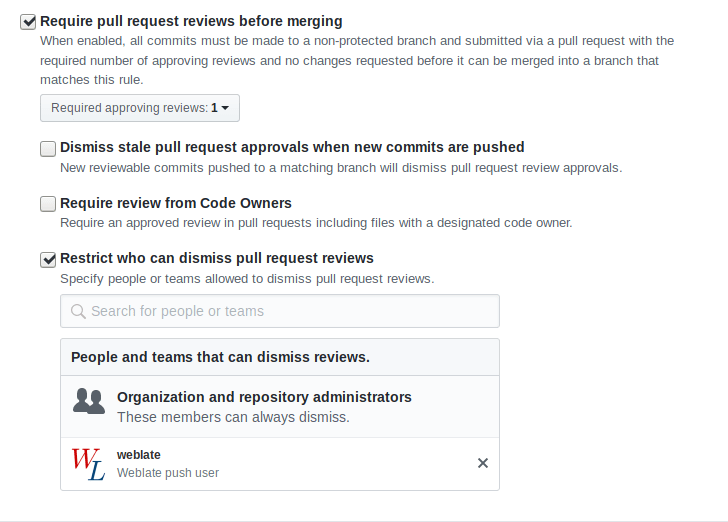
If you are using Weblate on protected branch, you can configure it to use pull requests and perform actual review on the translations (what might be problematic for languages you do not know). An alternative approach is to waive this limitation for the Weblate push user.
For example on GitHub this can be done in the repository configuration:
Interakcja z innymi
Weblate makes it easy to interact with others using its API.
Zobacz także
Leniwe zatwierdzenia
The behaviour of Weblate is to group commits from the same author into one commit if possible. This greatly reduces the number of commits, however you might need to explicitly tell it to do the commits in case you want to get the VCS repository in sync, e.g. for merge (this is by default allowed for the Managers group, see Lista przywilejów).
The changes in this mode are committed once any of the following conditions are fulfilled:
Somebody else changes an already changed string.
A merge from upstream occurs.
An explicit commit is requested.
A file download is requested.
Change is older than period defined as Wiek zmian do scommitowania on Konfiguracja komponentu.
Podpowiedź
Commits are created for every component. So in case you have many components you will still see lot of commits. You might utilize Zesquashowane commity na Git add-on in that case.
If you want to commit changes more frequently and without checking of age, you
can schedule a regular task to perform a commit. This can be done using
Periodic Tasks in Interfejs administracyjny Django. First create desired
Interval (for example 120 seconds). Then add new periodic task and
choose weblate.trans.tasks.commit_pending as Task with
{"hours": 0} as Keyword Arguments and desired interval.
Przetwarzanie repozytorium za pomocą skryptów
The way to customize how Weblate interacts with the repository is Dodatki. Consult Wykonywanie skryptów z dodatku for info on how to execute external scripts through add-ons.
Zachowanie takich samych tłumaczeń między komponentami
Once you have multiple translation components, you might want to ensure that the same strings have same translation. This can be achieved at several levels.
Propagacja tłumaczeń
With Zezwól na propagację tłumaczenia enabled (what is the default, see Konfiguracja komponentu), all new translations are automatically done in all components with matching strings. Such translations are properly credited to currently translating user in all components.
Warunki propagacji:
All components have to reside in a single project (linking component is not enough).
Enable Zezwól na propagację tłumaczenia to automatically reuse translations for matching strings.
The translation propagation requires the key to be match for monolingual translation formats, so keep that in mind when creating translation keys.
The strings are propagated while translating, strings loaded from the repository are not propagated.
Wskazówka
This feature currently has limitations, and we want to make it more universal. Please share your feedback at https://github.com/WeblateOrg/weblate/issues/3166.
Kontrola spójności
The Niespójność check fires whenever the strings are different. You can utilize this to review such differences manually and choose the right translation.
Tłumaczenie automatyczne
Automatic translation based on different components can be way to synchronize the translations across components. You can either trigger it manually (see Tłumaczenie automatyczne) or make it run automatically on repository update using add-on (see Tłumaczenie automatyczne).