Automatyczne sugestie
Zmienione w wersji 4.13: Prior to Weblate 4.13, the services were configured in the Konfiguracja.
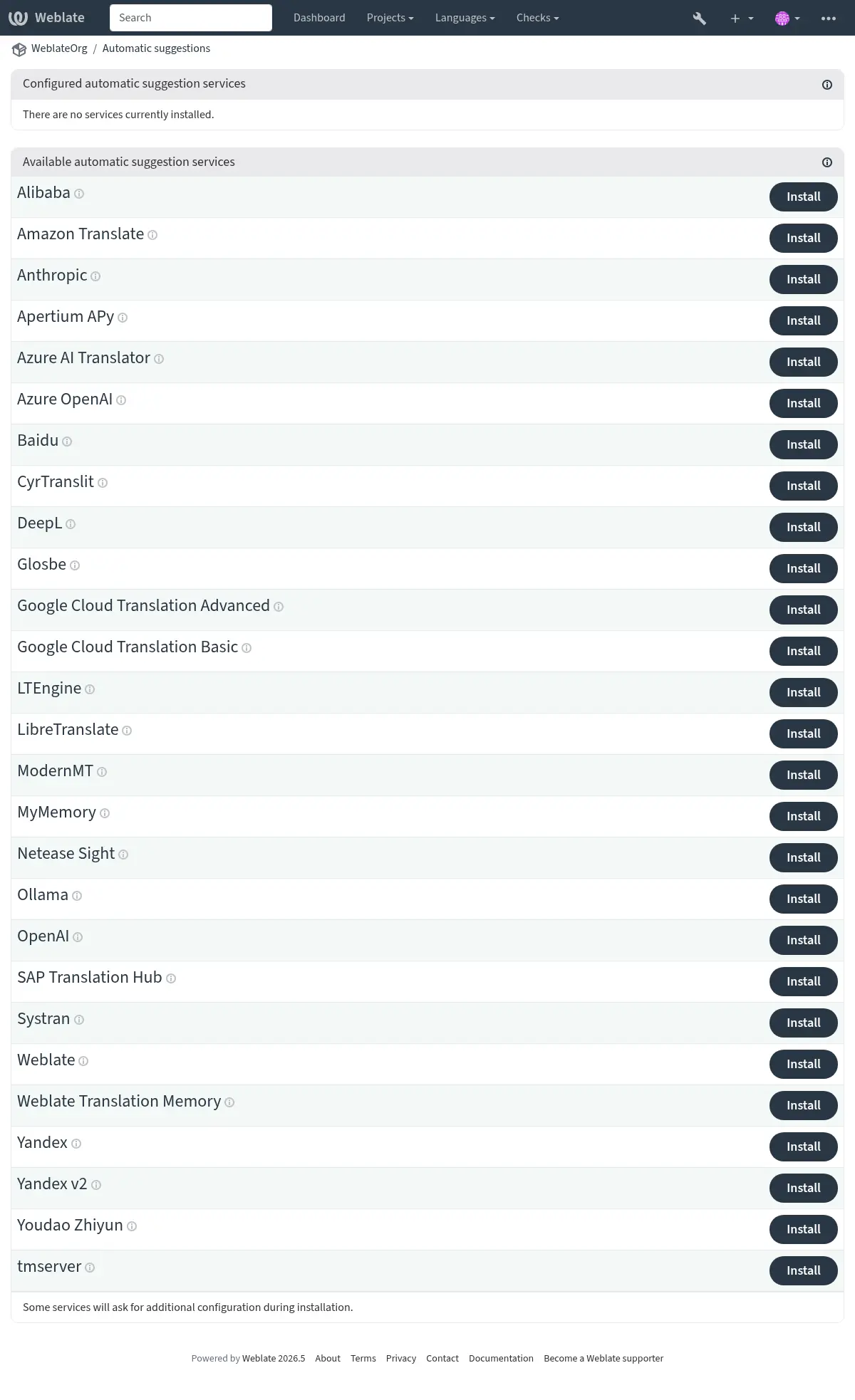
The support for several machine translation and translation memory services is built-in. Each service can be turned on by the administrator for whole site (under Automatic suggestions in Interfejs zarządzania) or at the project settings:
Informacja
They come subject to their terms of use, so ensure you are allowed to use them how you want. Third-party services can receive source strings, translations, and related context from Weblate.
Usługi tłumaczą z języka źródłowego zgodnie z konfiguracją w Konfiguracja komponentu, patrz Język źródłowy.
Per-project automatic suggestion can also be configured via the REST API Weblate.
Zobacz także
Priority of machine translation and translation memory services
Pamięć tłumaczeniowa Weblate matches with 100% score take priority over machine translation services. If 100% match in translation memory is found, no machine translation is performed. If several 100% matches occur, the first one returned by the database is used.
Each machine translation service has a predefined maximum score it can produce. The use of installed translation services is ordered according to their maximum score. For each string with translation score lower than the service’s maximum, the service is asked to produce a translation. Translations with a score exceeding the current one are accepted.
Source strings for the machine translation
Dodane w wersji 5.11.
The origin of source strings for all third-party services can be configured. This can be used to tweak the service to get the best results. Following choices are available:
- Automatic selection
Chooses the best source language automatically.
This is the default behavior.
- Component source language
Uses the component source language.
This was the behavior before the 5.11 release.
- Secondary language defined in project or component
Use project Język dodatkowy or component Język dodatkowy.
Falls back to the automatic selection of the source language if the secondary language not configured.
LLM translation context
LLM-based automatic suggestion services receive additional context about each translated string, when available. This includes the string context or monolingual key, additional explanation, configured secondary-language translation, plural information, failing quality checks, and placeholder contents. The added metadata is used only to guide the generated suggestion; the returned translation still has to preserve the source placeholders and markup.
Alibaba
Dodane w wersji 5.3.
- ID usługi:
alibaba- Maximal score:
80
- Konfiguracja:
source_languageWybór języka źródłowego
Dostępne opcje:
auto– Automatic selectionsource– Component source languagesecondary– Secondary language defined in project or componentkeyID klucza dostępu
secretSekret klucza dostępu
regionID regionu
Alibaba Translate is a neural machine translation service for translating text and it supports up to 214 language pairs.
Zobacz także
Anthropic
Dodane w wersji 5.16.
- ID usługi:
anthropic- Maximal score:
90
- Advanced features:
- Konfiguracja:
source_languageWybór języka źródłowego
Dostępne opcje:
auto– Automatic selectionsource– Component source languagesecondary– Secondary language defined in project or componentbase_urlAdres URL interfejsu API Anthropic
Bazowy adres URL Anthropic API. Pozostaw puste, aby użyć domyślnego adresu URL.
modelModel Anthropic
Dostępne opcje:
claude-sonnet-4-5– Claude Sonnet 4.5 (Recommended)claude-haiku-4-5– Claude Haiku 4.5claude-opus-4-5– Claude Opus 4.5custom– Custom modelpersonaPersona tłumacza
Opisz personę tłumacza, aby poprawić dokładność tłumaczenia. Na przykład: „Jesteś hodowcą wiewiórek”.
styleStyl tłumacza
Opisz styl tłumaczenia. Na przykład: „Używaj nieformalnego języka”.
keyKlucz API
custom_modelNazwa modelu niestandardowego
Potrzebne tylko wtedy, gdy model jest ustawiony na „Model niestandardowy”
max_tokensMaksimum tokenów
Maksymalna liczba tokenów do wygenerowania w odpowiedzi.
Performs translation using Anthropic’s Claude models.
The Anthropic API provides access to the Claude family of models, which are known for their strong reasoning and language capabilities. You need an API key from Anthropic to use this service.
Use persona and style fields to further fine-tune translations. These will be used in a prompt for Claude and allow you to change the style of the translations.
The service automatically uses Słownik, see Glossaries in automatic suggestion.
Zobacz także
Apertium APy
- ID usługi:
apertium-apy- Maximal score:
88
- Konfiguracja:
source_languageWybór języka źródłowego
Dostępne opcje:
auto– Automatic selectionsource– Component source languagesecondary– Secondary language defined in project or componenturlURL API
A libre software machine translation platform providing translations to a limited set of languages.
The recommended way to use Apertium is to run your own Apertium-APy server.
Zobacz także
Amazon Translate
- ID usługi:
aws- Maximal score:
88
- Advanced features:
- Konfiguracja:
source_languageWybór języka źródłowego
Dostępne opcje:
auto– Automatic selectionsource– Component source languagesecondary– Secondary language defined in project or componentkeyID klucza dostępu
secretTajny klucz API
regionNazwa regionu
Amazon Translate is a neural machine translation service for translating text to and from English across a breadth of supported languages. The service requires the TranslateFullAccess Managed Policy.
The service automatically uses Słownik, see Glossaries in automatic suggestion.
Azure OpenAI
Dodane w wersji 5.8.
- ID usługi:
azure-openai- Maximal score:
90
- Advanced features:
- Konfiguracja:
source_languageWybór języka źródłowego
Dostępne opcje:
auto– Automatic selectionsource– Component source languagesecondary– Secondary language defined in project or componentbase_urlURL API
modelModel LLM
personaPersona tłumacza
Opisz personę tłumacza, aby poprawić dokładność tłumaczenia. Na przykład: „Jesteś hodowcą wiewiórek”.
styleStyl tłumacza
Opisz styl tłumaczenia. Na przykład: „Używaj nieformalnego języka”.
keyKlucz API
azure_endpointAdres URL punktu końcowego Azure OpenAI
Adres URL punktu końcowego instancji, np.: https://my-instance.openai.azure.com.
deploymentWdrożenie Azure OpenAI
Unikalna nazwa wdrożenia modelu.
Performs translation using OpenAI hosted on Azure.
Zobacz także
Baidu
- ID usługi:
baidu- Maximal score:
90
- Konfiguracja:
source_languageWybór języka źródłowego
Dostępne opcje:
auto– Automatic selectionsource– Component source languagesecondary– Secondary language defined in project or componentkeyID klienta
secretTajny klucz klienta
Machine translation service provided by Baidu.
This service uses an API and you need to obtain an ID and API key from Baidu to use it.
Zobacz także
CyrTranslit
Dodane w wersji 5.7.
- ID usługi:
cyrtranslit- Maximal score:
100
- Konfiguracja:
source_languageWybór języka źródłowego
Dostępne opcje:
auto– Automatic selectionsource– Component source languagesecondary– Secondary language defined in project or component
Machine translation service using the Cyrtranslit library.
This service converts text between Cyrillic and Latin scripts for languages that have both scripts.
Zobacz także
DeepL
- ID usługi:
deepl- Maximal score:
91
- Advanced features:
- Konfiguracja:
source_languageWybór języka źródłowego
Dostępne opcje:
auto– Automatic selectionsource– Component source languagesecondary– Secondary language defined in project or componenturlURL API
keyKlucz API
formalityFormalność
Używa określonej formalności, jeśli język nie jest określony jako (nie)formalny
contextKontekst tłumaczenia
Opisz kontekst tłumaczenia, aby zwiększyć dokładność tłumaczenia.
next_genUżyj modelu nowej generacji
Preferuj LLM nowej generacji zamiast klasycznego modelu tłumaczenia maszynowego.
DeepL is paid service providing good machine translation for a few languages. You need to purchase DeepL API subscription or you can use legacy DeepL Pro (classic) plan.
API URL to use with the DeepL service. At the time of writing, there is the v1 API as well as a free and a paid version of the v2 API.
https://api.deepl.com/v2/(default in Weblate)Is meant for API usage on the paid plan, and the subscription is usage-based.
https://api-free.deepl.com/v2/Is meant for API usage on the free plan, and the subscription is usage-based.
https://api.deepl.com/v1/Is meant for CAT tools and is usable with a per-user subscription.
Informacja
Previously Weblate was classified as a CAT tool by DeepL, so it was supposed to use the v1 API, but now is supposed to use the v2 API. Therefore it defaults to v2, and you can change it to v1 in case you have an existing CAT subscription and want Weblate to use that.
Weblate supports DeepL formality, it will choose matching one based on the
language (for example, there is de@formal and de@informal).
The translation context can optionally be specified to improve translations quality. Read more on that in DeepL translation context documentation.
The service automatically uses Słownik, see Glossaries in automatic suggestion.
Zobacz także
Glosbe
- ID usługi:
glosbe- Maximal score:
90
- Konfiguracja:
source_languageWybór języka źródłowego
Dostępne opcje:
auto– Automatic selectionsource– Component source languagesecondary– Secondary language defined in project or component
Free dictionary and translation memory for almost every living language.
The API is gratis to use, but usage of the translations is subject to the license of the used data source. There is a limit of calls that may be done from one IP in a set period of time, to prevent abuse.
Zobacz także
Google Cloud Translation Basic
- ID usługi:
google-translate- Maximal score:
90
- Konfiguracja:
source_languageWybór języka źródłowego
Dostępne opcje:
auto– Automatic selectionsource– Component source languagesecondary– Secondary language defined in project or componentkeyKlucz API
Machine translation service provided by the Google Cloud services.
This service uses the Google Translation API v2, and you need to obtain an API key and turn on billing in the Google API console.
Zobacz także
Google Cloud Translation Advanced
- ID usługi:
google-translate-api-v3- Maximal score:
90
- Advanced features:
- Konfiguracja:
source_languageWybór języka źródłowego
Dostępne opcje:
auto– Automatic selectionsource– Component source languagesecondary– Secondary language defined in project or componentcredentialsInformacje o koncie usługi Tłumacz Google
Wprowadź klucz JSON dla konta usługi.
projectProjekt Tłumacza Google
Wprowadź numeryczny lub alfanumeryczny identyfikator projektu Google Cloud.
locationLokalizacja Tłumacza Google
Wybierz region Google Cloud Translation, który jest używany w projekcie Google Cloud lub jest najbliżej Ciebie.
bucket_nameNazwa zasobnika Google Storage
Wprowadź nazwę zasobnika Google Cloud Storage używanego do przechowywania plików słownika.
Machine translation service provided by the Google Cloud services.
This service uses the Google Translation API v3 and you need credentials in JSON format to access it.
In order to use this service, you first need to go through the following steps:
Optionally, you can configure the service to use Słownik by setting up a Bucket:
Tłumacz językowy IBM Watson
Removed in version 5.13.1: This service was withdrawn by vendor as of 10 December 2024.
LibreTranslate
Dodane w wersji 4.7.1.
- ID usługi:
libretranslate- Maximal score:
89
- Konfiguracja:
source_languageWybór języka źródłowego
Dostępne opcje:
auto– Automatic selectionsource– Component source languagesecondary– Secondary language defined in project or componenturlURL API
keyKlucz API
LibreTranslate is a free and open-source service for machine translations. The public instance requires an API key, but LibreTranslate can be self-hosted and there are several mirrors available to use the API for free.
https://libretranslate.com/(official public instance)Requires an API key to use outside of the website.
LTEngine
Dodane w wersji 5.17.1.
- ID usługi:
ltengine- Maximal score:
89
- Konfiguracja:
source_languageWybór języka źródłowego
Dostępne opcje:
auto– Automatic selectionsource– Component source languagesecondary– Secondary language defined in project or componenturlURL API
keyKlucz API
LTEngine provides a local LibreTranslate-compatible API backed by large language models. For many Weblate installations, native LLM services such as Ollama can be a better fit because Weblate can send translation context directly to the model. Use LTEngine when you specifically want its local translation engine or future LTEngine translation improvements.
Azure AI Translator
- ID usługi:
microsoft-translator- Maximal score:
90
- Advanced features:
- Konfiguracja:
source_languageWybór języka źródłowego
Dostępne opcje:
auto– Automatic selectionsource– Component source languagesecondary– Secondary language defined in project or componentkeyKlucz API
base_urlBazowy adres URL aplikacji
Dostępne opcje:
api.cognitive.microsofttranslator.com– Global (non-regional)api-apc.cognitive.microsofttranslator.com– Asia Pacificapi-eur.cognitive.microsofttranslator.com– Europeapi-nam.cognitive.microsofttranslator.com– North Americaapi.translator.azure.cn– Chinaapi.cognitive.microsofttranslator.us– Azure US Government cloudendpoint_urlAdres URL usługi uwierzytelniania
Regionalny lub wielousługowy można określić za pomocą pola regionu poniżej.
Dostępne opcje:
api.cognitive.microsoft.com– Globalapi.cognitive.azure.cn– Chinaapi.cognitive.microsoft.us– Azure US Government cloudregionRegion usługi uwierzytelniania
categoryKategoria
Określ dostosowany identyfikator kategorii systemu, aby go używać zamiast ogólnego.
Machine translation service provided by Microsoft in Azure portal as a one of Cognitive Services.
Weblate implements Translator API V3.
The service automatically uses Słownik via dynamic dictionary, see Glossaries in automatic suggestion.
Translator Text API V2
The key you use with Translator API V2 can be used with API 3.
Translator Text API V3
You need to register at Azure portal and use the key you obtain there.
With new Azure keys, you also need to set region to locale of your service.
You can also specify a custom category to use custom translator.
Podpowiedź
For Azure China, please use your endpoint from the Azure Portal.
ModernMT
Dodane w wersji 4.2.
- ID usługi:
modernmt- Maximal score:
90
- Advanced features:
- Konfiguracja:
source_languageWybór języka źródłowego
Dostępne opcje:
auto– Automatic selectionsource– Component source languagesecondary– Secondary language defined in project or componenturlURL API
keyKlucz API
context_vectorWektor kontekstowy
Oddzielona przecinkami lista identyfikator pamięci:waga, np. 1234:0.123,4567:0.456
The service automatically uses Słownik, see Glossaries in automatic suggestion.
Zobacz także
MyMemory
- ID usługi:
mymemory- Maximal score:
100
- Konfiguracja:
source_languageWybór języka źródłowego
Dostępne opcje:
auto– Automatic selectionsource– Component source languagesecondary– Secondary language defined in project or componentemailKontakt e-mail
usernameNazwa użytkownika
keyKlucz API
Huge translation memory with machine translation.
Free, anonymous usage is currently limited to 100 requests/day, or to 1000
requests/day when you provide a contact e-mail address in email.
You can also ask them for more.
Zobacz także
Netease Sight
- ID usługi:
netease-sight- Maximal score:
90
- Konfiguracja:
source_languageWybór języka źródłowego
Dostępne opcje:
auto– Automatic selectionsource– Component source languagesecondary– Secondary language defined in project or componentkeyID klienta
secretTajny klucz klienta
Usługa tłumaczenia maszynowego świadczona przez NetEase.
This service uses an API, and you need to obtain key and secret from NetEase.
Zobacz także
Ollama
Dodane w wersji 5.15.
- ID usługi:
ollama- Maximal score:
90
- Advanced features:
- Konfiguracja:
source_languageWybór języka źródłowego
Dostępne opcje:
auto– Automatic selectionsource– Component source languagesecondary– Secondary language defined in project or componentbase_urlURL API
Bazowy adres URL Ollama API, localhost i port 11434 domyślnie.
modelModel Ollama
Nazwa modelu opisana w katalogu Ollama.
personaPersona tłumacza
Opisz personę tłumacza, aby poprawić dokładność tłumaczenia. Na przykład: „Jesteś hodowcą wiewiórek”.
styleStyl tłumacza
Opisz styl tłumaczenia. Na przykład: „Używaj nieformalnego języka”.
Performs translation using Ollama models.
The Ollama API allows for the use of open source models for translations either locally installed or remotely accessed via the Ollama service. Note that before configuring your models, you should have Ollama installed and downloaded the models you wish to use.
Use persona and style fields to further fine-tune translations. These will be used in a prompt for Ollama and allow you to change the style of the translations.
The service automatically uses Słownik, see Glossaries in automatic suggestion.
Zobacz także
OpenAI
Dodane w wersji 5.3.
- ID usługi:
openai- Maximal score:
90
- Advanced features:
- Konfiguracja:
source_languageWybór języka źródłowego
Dostępne opcje:
auto– Automatic selectionsource– Component source languagesecondary– Secondary language defined in project or componentbase_urlPodstawowy adres URL interfejsu API OpenAI
Podstawowy adres URL interfejsu API OpenAI, jeżeli różni się od domyślnego adresu URL OpenAI
modelModel OpenAI
Dostępne opcje:
auto– Automatic selectiongpt-5-nano– GPT-5-nanogpt-5-mini– GPT-5-minigpt-5.2– GPT-5.2gpt-5.1– GPT-5.1gpt-5– GPT-5gpt-4.1-nano– GPT-4.1-nanogpt-4.1-mini– GPT-4.1-minigpt-4.1– GPT-4.1gpt-4o-mini– GPT-4o minigpt-4o– GPT-4oo3-mini– o3-minio3– o3o1-mini– o1-minio1– o1o1-pro– o1-procustom– Custom modelpersonaPersona tłumacza
Opisz personę tłumacza, aby poprawić dokładność tłumaczenia. Na przykład: „Jesteś hodowcą wiewiórek”.
styleStyl tłumacza
Opisz styl tłumaczenia. Na przykład: „Używaj nieformalnego języka”.
keyKlucz API
custom_modelNazwa modelu niestandardowego
Potrzebne tylko wtedy, gdy model jest ustawiony na „Model niestandardowy”
Performs translation using OpenAI.
The OpenAI API is powered by a diverse set of models with different capabilities and price points. Automatic selection chooses the best model available, but you might want to choose a specific model that matches your needs.
Use persona and style fields to further fine-tune translations. These will be used in a prompt for OpenAI and allow you to change the style of the translations.
The service automatically uses Słownik, see Glossaries in automatic suggestion.
Zmienione w wersji 5.7: Support for custom model and base URL was added.
Zobacz także
SAP Translation Hub
- ID usługi:
sap-translation-hub- Maximal score:
100
- Konfiguracja:
source_languageWybór języka źródłowego
Dostępne opcje:
auto– Automatic selectionsource– Component source languagesecondary– Secondary language defined in project or componenturlURL API
keyKlucz API
usernameNazwa użytkownika SAP
passwordHasło SAP
enable_mtWłącz tłumaczenie maszynowe
domainDomena tłumaczenia
Identyfikator domeny tłumaczenia, na przykład BC. Jeśli nie określisz domeny, metoda wyszukuje tłumaczenia we wszystkich dostępnych domenach.
Machine translation service provided by SAP.
You need to have a SAP account (and the SAP Translation Hub enabled in the SAP Cloud Platform) to use this service.
You can also configure whether to also use machine translation services, in addition to the term database.
Informacja
To access the Sandbox API, you need to set url
and key.
To access the productive API, you need to set url, username and password.
Zobacz także
Systran
- ID usługi:
systran- Maximal score:
90
- Konfiguracja:
source_languageWybór języka źródłowego
Dostępne opcje:
auto– Automatic selectionsource– Component source languagesecondary– Secondary language defined in project or componentkeyKlucz API
Machine translation service provided by Systran.
This service uses an API, and you need to obtain API key at <https://translate.systran.net/en/account>.
tmserver
- ID usługi:
tmserver- Maximal score:
100
- Konfiguracja:
source_languageWybór języka źródłowego
Dostępne opcje:
auto– Automatic selectionsource– Component source languagesecondary– Secondary language defined in project or componenturlURL API
You can run your own translation memory server by using a tmserver protocol.
The original tmserver was bundled with the translate-toolkit.
amaGama server is an enhanced version of tmserver.
Informacja
There currently does not seem to be a maintained server for this.
Weblate
- ID usługi:
weblate- Maximal score:
100
- Konfiguracja:
Ta usługa nie ma konfiguracji.
Weblate machine translation service can provide translations based on the exact matches of a string in the currently existing strings in a Translated, Approved, or Read-only states inside Weblate.
Pamięć tłumaczeniowa Weblate
- ID usługi:
weblate-translation-memory- Maximal score:
100
- Konfiguracja:
Ta usługa nie ma konfiguracji.
Use Pamięć tłumaczeniowa as a machine translation service. Any string that has been translated before (or uploaded to the translation memory) can be translated in this way. This suggestion source works with fuzzy matching.
Informacja
Recreating Pamięć tłumaczeniowa reduces capabilities of this TM source.
Yandex
- ID usługi:
yandex- Maximal score:
90
- Konfiguracja:
source_languageWybór języka źródłowego
Dostępne opcje:
auto– Automatic selectionsource– Component source languagesecondary– Secondary language defined in project or componentkeyKlucz API
Machine translation service provided by Yandex.
This service uses a Translation API, and you need to obtain an API key from Yandex.
Zobacz także
Yandex v2
Dodane w wersji 5.1.
- ID usługi:
yandex-v2- Maximal score:
90
- Konfiguracja:
source_languageWybór języka źródłowego
Dostępne opcje:
auto– Automatic selectionsource– Component source languagesecondary– Secondary language defined in project or componentkeyKlucz API
Machine translation service provided by Yandex.
This service uses a Translation API, and you need to obtain an API key from Yandex Cloud.
Zobacz także
Youdao Zhiyun
- ID usługi:
youdao-zhiyun- Maximal score:
90
- Konfiguracja:
source_languageWybór języka źródłowego
Dostępne opcje:
auto– Automatic selectionsource– Component source languagesecondary– Secondary language defined in project or componentkeyID klienta
secretTajny klucz klienta
Machine translation service provided by Youdao.
This service uses an API, and you need to obtain an ID and an API key from Youdao.
Zobacz także
Niestandardowe tłumaczenie maszynowe
You can also implement your own machine translation services using a few lines
of Python code. Place the code in a module Weblate can import (see
Tworzenie modułu Pythona or Customizing code) and add fully qualified
class name to WEBLATE_MACHINERY.
"""
Machine translation example.

This example uses fictional http://example.com/ service to translate the
strings.
"""

from __future__ import annotations

from typing import TYPE_CHECKING

from weblate.machinery.base import MACHINERY_DEFAULT_THRESHOLD, MachineTranslation

if TYPE_CHECKING:
    from weblate.auth.models import User
    from weblate.machinery.base import DownloadTranslations
    from weblate.trans.models import Unit


class SampleTranslation(MachineTranslation):
    """Sample machine translation interface."""

    name = "Sample"

    def download_languages(self):
        """Return list of languages your machine translation supports."""
        response = self.request("get", "http://example.com/languages")
        return response.json()["languages"]

    def download_translations(
        self,
        source_language,
        target_language,
        text: str,
        unit: Unit | None,
        user: User | None,
        threshold: int = MACHINERY_DEFAULT_THRESHOLD,
    ) -> DownloadTranslations:
        """Return tuple with translations."""
        response = self.request(
            "get",
            "http://example.com/translate",
            params={
                "source_language": source_language,
                "target_language": target_language,
                "text": text,
            },
        )

        for translation in response.json()["translations"]:
            yield {
                "text": translation,
                "quality": 100,
                "service": self.name,
                "source": text,
            }