Pobieranie i przesyłanie tłumaczeń
Można eksportować pliki z tłumaczenia, wprowadzać zmiany i importować je ponownie. Umożliwia to pracę w trybie offline, a następnie scalanie zmian z istniejącym tłumaczeniem. Działa to nawet wtedy, gdy tłumaczenie zostało w międzyczasie zmienione.
Informacja
Available options might be limited by access control settings.
Pobieranie tłumaczeń
From the project or component dashboard, translatable files can be downloaded in the Files menu.
The first option is to download the file in the original format as it is stored in the repository. In this case, any pending changes in the translation are getting committed and the up-to-date file is yield without any conversions.
You can also download the translation converted into one of the widely used localization formats. The converted files will be enriched with data provided in Weblate; such as additional context, comments or flags. Several file formats are available via the Files ↓ Customize download menu:
gettext PO (
po)XLIFF 1.1 with gettext extensions (
xliff)XLIFF 1.1 (
xliff11)TermBase eXchange (
tbx)Translation Memory eXchange (
tmx)gettext MO (only available when translation is using gettext PO) (
mo)CSV (
csv)Excel Open XML (
xlsx)JSON (only available for monolingual translations) (
json)JSON nested structure file (only available for monolingual translations) (
json-nested)Android String Resource (only available for monolingual translations) (
aresource)iOS strings (only available for monolingual translations) (
strings)
Podpowiedź
The content available in the converted files differs based on file format features, you can find overview in Możliwe typy tłumaczeń.
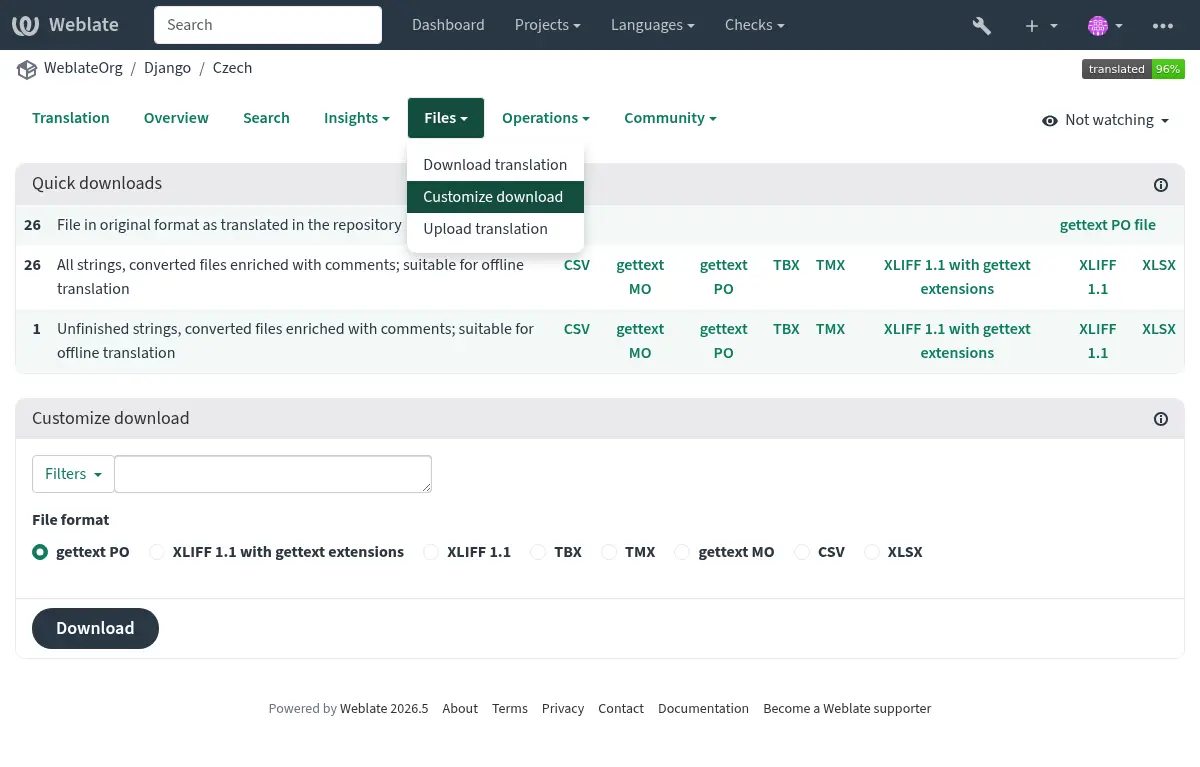
Pobieranie komponentów, kategorii lub projektów
Translation files for a component, category or project can be downloaded at once via the Files menu. The download is always served as a ZIP file, and you can choose original or converted formats similarly as in Pobieranie tłumaczeń.
Przesyłanie tłumaczeń
When you have made your changes, use Upload translation in the Files menu.
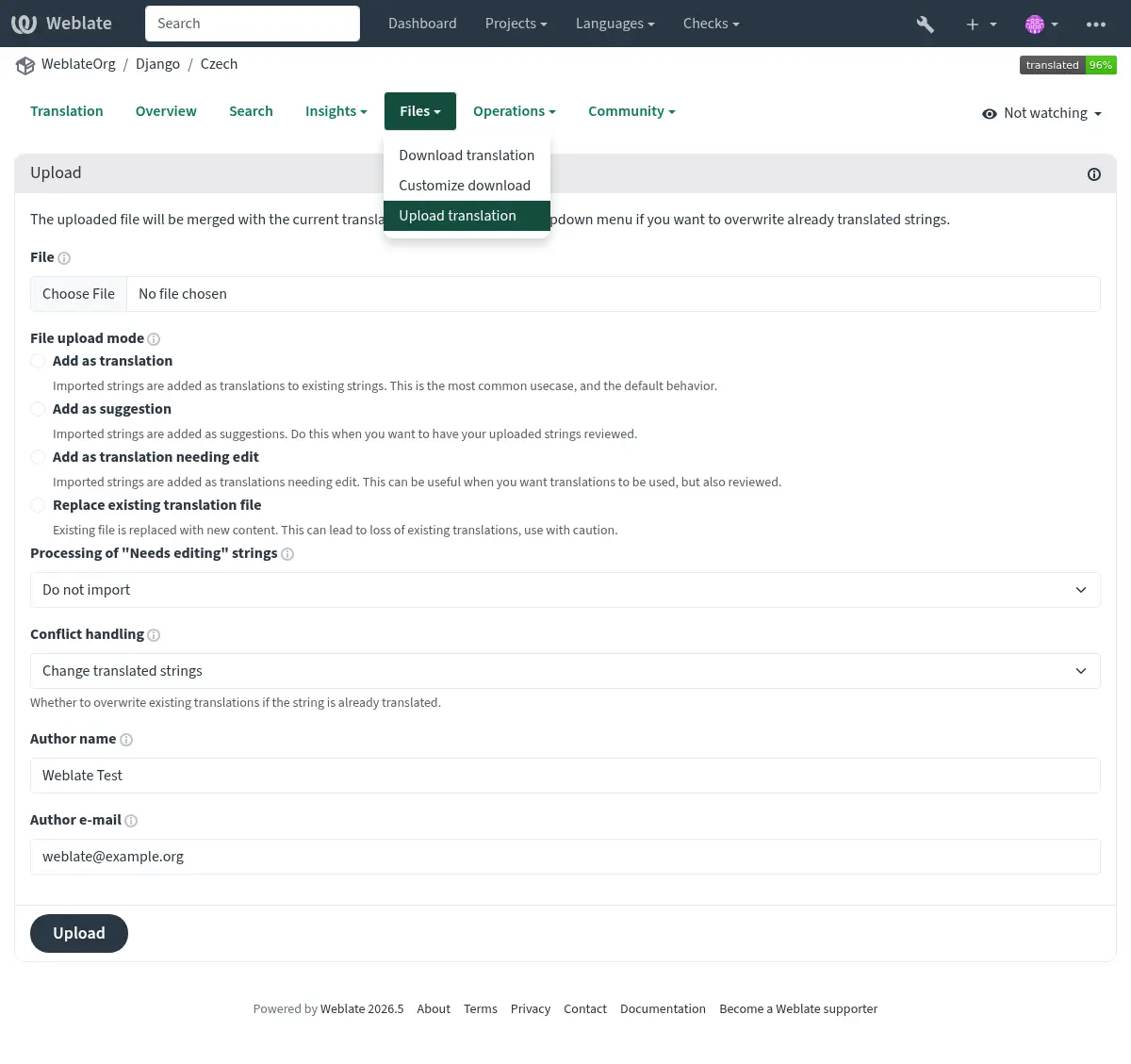
Obsługiwane formaty plików
Any file in a supported file format can be uploaded, but it is still recommended to use the same file format as the one used for translation, otherwise some features might not be translated properly.
Metody importu
These are the choices presented when uploading translation files:
- Dodaj jako tłumaczenie (
przetłumacz) Importowane ciągi są dodawane jako tłumaczenia do istniejących ciągów. Jest to najczęstszy przypadek użycia i domyślne zachowanie.
Only translations are used from the uploaded file and no additional content.
This option is available only if the user has the „Edit strings” permission.
- Dodaj jako sugestię (
suggest) Importowane ciągi są dodawane jako sugestie. Zrób to, gdy chcesz, aby przesłane ciągi zostały przejrzane.
Only translations are used from the uploaded file and no additional content.
This option is available only if the user has the „Add suggestion” permission.
- Add as approved translation (
approve) Importowane ciągi są dodawane jako zatwierdzone tłumaczenia. Zrób to po przejrzeniu tłumaczeń przed ich przesłaniem.
Only translations are used from the uploaded file and no additional content.
This option is available only if the user has the „Review strings” permission.
- Dodaj jako tłumaczenie wymagające edycji (
rozmyte) Importowane ciągi są dodawane jako tłumaczenia wymagające edycji. Może to być przydatne, gdy chcesz, aby tłumaczenia były używane, ale także przejrzane.
Only translations are used from the uploaded file and no additional content.
This option is available only if the user has the „Edit strings” permission.
- Zastąp istniejący plik tłumaczenia (
zamień) Istniejący plik zostanie zastąpiony nową treścią. Może to doprowadzić do utraty istniejących tłumaczeń, należy zachować ostrożność.
This option is available only if the user has the „Edit component settings” permission or „Add new string”, „Remove a string” and „Edit strings” permissions.
- Zaktualizuj ciągi źródłowe (
źródło) Updates source strings in bilingual translation file. This is similar to what Zaktualizuj pliki PO, aby dopasować POT (msgmerge) does.
This option is available only for some file formats and only if the user has the „Upload translations” permission.
- Dodaj nowe ciągi (
dodaj) Dodaje nowe ciągi do tłumaczenia. Pomija te, które już istnieją.
In case you want to both add new strings and update existing translations, upload the file second time with Add as translation.
Z przesłanego pliku używane są tylko źródło, tłumaczenie i klucz (kontekst).
This option is available only with Zarządzaj ciągami turned on and only if the user has the „Add new string” permission.
Obsługa konfliktów
Defines how to deal with uploaded strings which are already translated:
- Change only untranslated strings (
ignore) Ignore uploaded translations which are already translated.
- Change translated strings (
replace-translated) Zastąp istniejące tłumaczenia przesłanymi , oprócz tych zatwierdzonych.
- Change translated and approved strings (
replace-approved) Zastąp istniejące tłumaczenia przesłanymi , także te zatwierdzone.
Ciągi wymagające edycji
There is also an option for how to handle strings needing edit in the imported file. Such strings can be handle in one of the three following ways: „Do not import”, „Import as string needing edit”, or „Import as translated”.