Traducere continuă
Există o infrastructură care permite ca traducerea dumneavoastră să urmeze îndeaproape dezvoltarea. În acest fel, traducătorii pot lucra la traduceri pe tot parcursul timpului, în loc să lucreze la o cantitate uriașă de text nou chiar înainte de lansare.
Vezi și
Integrarea cu Weblate describes basic ways to integrate your development with Weblate. Code hosting integrations lists provider-specific setup steps for common code hosting sites.
Acesta este procesul:
Dezvoltatorii fac modificări și le transferă în depozitul VCS.
Optionally the translation files are updated, see Introducing new strings.
Weblate pulls changes from the VCS repository, parses translation files and updates its database, see Actualizarea depozitelor.
Traducătorii trimit traducerile folosind interfața web Weblate sau încarcă modificările offline.
Once the translators are finished, Weblate commits the changes to the local repository (see Angajări leneșe).
Changes are pushed back to the upstream repository (see Împingerea modificărilor din Weblate).
Sugestie
Upstream code hosting is not necessary, you can use Weblate with Fișiere locale where there is only the repository inside Weblate.
Actualizarea depozitelor
Ar trebui să configurați o modalitate de actualizare a depozitelor backend de la sursa acestora.
Use Cârlige notificare to integrate with the majority of common code hosting services, see Code hosting integrations. You must also Activează cârlige for this to work.
Declanșarea manuală a actualizării fie în gestionarea depozitului, fie folosind Weblate’s REST API sau Client Weblate
Activați
AUTO_UPDATEpentru a actualiza automat toate componentele de pe instanța WeblateExecute
updategit(with selection of project or--allto update all)
Ori de câte ori Weblate actualizează depozitul, vor fi declanșate addon-urile post-update, vezi Suplimente.
Evitarea conflictelor de fuziune
The merge conflicts from Weblate arise when same file was changed both in Weblate and outside it. Depending on the situation, there are several approaches that might help here:
Avoiding merge conflicts by changing translation files in Weblate only
Avoiding merge conflicts by locking Weblate while doing outside changes
Avoiding merge conflicts by changing translation files in Weblate only
Avoiding edits outside Weblate is easy with monolingual files — you can add new strings within Weblate and leave whole editing of the files there. For bilingual files, there is usually some kind of message extraction process to generate translatable files from the source code. In some cases, this can be split into two parts:
The extraction generates template (for example gettext POT is generated using xgettext).
Further process merges it into actual translations (the gettext PO files are updated using msgmerge).
You can perform the second step within Weblate and it will ensure that all pending changes are included before this operation.
Avoiding merge conflicts by locking Weblate while doing outside changes
Integrating Weblate into your updating process so that it flushes changes before updating the files outside Weblate can be achieved by using Weblate’s REST API to force Weblate to push all pending changes and lock the translation while you are doing changes on your side.
Scriptul pentru efectuarea actualizărilor poate arăta astfel:
# Lock Weblate translation
wlc lock
# Push changes from Weblate to upstream repository
wlc push
# Pull changes from upstream repository to your local copy
git pull
# Update translation files, this example is for Django
./manage.py makemessages --keep-pot -a
git commit -m 'Locale updates' -- locale
# Push changes to upstream repository
git push
# Tell Weblate to pull changes (not needed if Weblate follows your repo
# automatically)
wlc pull
# Unlock translations
wlc unlock
If you have multiple components sharing the same repository, you need to lock them all separately:
wlc lock foo/bar
wlc lock foo/baz
wlc lock foo/baj
Notă
The example uses Client Weblate, which needs configuration (API keys) to be able to control Weblate remotely. You can also achieve this using any HTTP client instead of Client Weblate, for example curl, see Weblate’s REST API.
Întreținere depozitar
The Repository maintenance view shows repository status for a project, component, or translation and lets privileged users run maintenance operations from the user interface.
The same actions can also be triggered using Weblate’s REST API or, for the supported subset, Client Weblate.
Availability of individual actions depends on permissions, the configured version control system, whether pushing is configured, and whether the selected object can be locked.
Acțiune |
What it does |
Typical use |
|---|---|---|
Commit |
Commits pending changes stored in Weblate to the local repository. |
Flush pending Weblate changes before doing repository work elsewhere. |
Push |
Pushes committed local repository changes to the configured upstream. |
Send committed translations upstream when automatic push is disabled or delayed. |
Update |
Fetches upstream changes and integrates them using the component’s configured Stil îmbinare. |
Bring Weblate in sync with upstream using the default integration strategy. |
Update with merge |
Fetches upstream changes and integrates them with an explicit merge. |
Override the default merge style for a single update. |
Update with rebase |
Fetches upstream changes and rebases local Weblate commits on top of upstream. |
Keep history linear when that matches your workflow. |
Update with merge without fast-forward |
Fetches upstream changes and creates an explicit merge commit even when a fast-forward would be possible. |
Preserve merge commits for auditing or branch-management reasons. |
Lock / Unlock |
Prevents or allows translators to make further changes in Weblate. |
Freeze translation changes while doing repository maintenance outside Weblate. |
Reset and discard |
Resets Weblate’s local repository to upstream and discards pending Weblate changes. |
Use when upstream should overwrite the local Weblate repository state. |
Reset and reapply |
Resets Weblate’s local repository to upstream while preserving pending translations. See Reset and reapply recovery behavior. |
Recover from diverged history while keeping pending Weblate translations. |
Cleanup |
Removes untracked files and stale branches from the local repository checkout. |
Clean up leftover files or stale repository state in Weblate’s checkout. |
Synchronize |
Forces Weblate to write all known translations back to the repository files. |
Repair cases where repository files became out of sync with the database state. |
Rescan |
Re-reads translation files from the local repository into Weblate. |
Import file changes after manual repository work or file creation. |
Reset and reapply recovery behavior
The Reset and reapply operation keeps pending translations from Weblate while resetting the local repository state to match upstream.
The operation can restore pending translations only when the target language files still exist after the reset or when Weblate can create them for the component, for example using a valid Șablon pentru traduceri noi.
If neither of these conditions is met, Weblate keeps the pending changes in its database and reports a recovery error instead of failing later with a generic parse error.
Avoiding merge conflicts by focusing on Git operations
Even when Weblate is the single source of the changes in the translation files, conflicts can appear when using Comasează comiteri Git add-on, Stil îmbinare is configured to Rebase, or you are squashing commits outside of Weblate (for example, when merging a pull request).
The reason for merge conflicts is different in this case - there are changes in Weblate which happened after you merged Weblate commits. This typically happens if merging is not automated and waits for days or weeks for a human to review them. Git is then sometimes no longer able to identify upstream changes as matching the Weblate ones and refuses to perform a rebase.
To approach this, you either need to minimize the amount of pending changes in Weblate when you merge a pull request, or avoid the conflicts completely by not squashing changes.
Here are few options how to avoid that:
Do not use neither Comasează comiteri Git nor squashing at merge time. This is the root cause why git doesn’t recognize changes after merging.
Let Weblate commit pending changes before merging. This will update the pull request with all its changes, and both repositories will be in sync.
Use the review features in Weblate (see Fluxuri de lucru de traducere) so that you can automatically merge GitHub pull requests after CI passes.
Use locking in Weblate to avoid changes while GitHub pull request is in review.
Vezi și
Code hosting notifications
Provider-specific app and webhook instructions for GitHub, GitLab, Bitbucket, Pagure, Azure Repos, Gitea, Forgejo, and Gitee are covered in Code hosting integrations.
Provider-specific notifications
These legacy anchors are kept for compatibility. Current provider-specific app and webhook setup is documented in Code hosting integrations.
Actualizarea automată a depozitelor în fiecare noapte
Weblate preia în mod automat depozitele la distanță în fiecare noapte pentru a îmbunătăți performanța la fuzionarea ulterioară a modificărilor. Opțional, puteți transforma acest lucru și în fuziuni nocturne, activând AUTO_UPDATE.
Împingerea modificărilor din Weblate
Each translation component can have a push URL set up (see URL de încărcare depozitar), and in that case Weblate will be able to push changes to the remote repository. Weblate can also be configured to automatically push changes on every commit, see Încarcă la comitere.
For the push options table and provider-specific pull, merge, and review request workflows, see Împingerea modificărilor din Weblate.
Vezi și
Consultați Accesarea depozitelor pentru configurarea cheilor SSH și Angajări leneșe pentru informații despre momentul în care Weblate decide să valideze modificările.
Branșe protejate
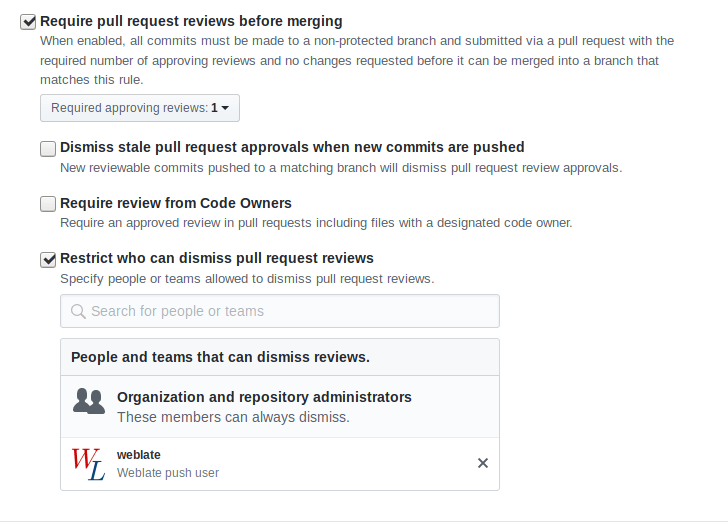
Dacă folosiți Weblate pe ramura protejată, îl puteți configura pentru a utiliza cereri de tragere și pentru a efectua o revizuire reală a traducerilor (ceea ce ar putea fi problematic pentru limbile pe care nu le cunoașteți). O abordare alternativă este de a renunța la această limitare pentru utilizatorul Weblate push.
De exemplu, pe GitHub, acest lucru se poate face în configurația depozitului:
Interacțiunea cu ceilalți
Weblate facilitează interacțiunea cu ceilalți folosind API-ul său.
Vezi și
Angajări leneșe
Comportamentul Weblate este de a grupa, dacă este posibil, comenzi de la același autor într-o singură comandă. Acest lucru reduce foarte mult numărul de comenzi, însă este posibil să fie necesar să-i spuneți în mod explicit să facă comenzi în cazul în care doriți să sincronizați depozitul VCS, de exemplu pentru fuziune (acest lucru este permis în mod implicit pentru grupul Managers, a se vedea List of privileges).
Modificările din acest mod sunt confirmate atunci când este îndeplinită oricare dintre următoarele condiții:
Altcineva modifică un șir deja modificat.
Are loc o fuziune din amonte.
Se solicită o confirmare explicită.
Se solicită descărcarea unui fișier.
Modificarea este mai veche decât perioada definită ca Vârsta modificărilor care urmează să fie comise pe Configurația componentei.
Sugestie
Se creează angajamente pentru fiecare componentă. Astfel, în cazul în care aveți multe componente, veți vedea în continuare o mulțime de comisioane. În acest caz, ați putea utiliza add-on-ul Comasează comiteri Git.
If you want to commit changes more frequently and without checking of age, you
can schedule a regular task to perform a commit. This can be done using
Periodic Tasks in Interfața de administrare Django. First create desired
Interval (for example 120 seconds). Then add new periodic task and
choose weblate.trans.tasks.commit_pending as Task with
{"hours": 0} as Keyword Arguments and desired interval.
Procesarea depozitului cu scripturi
Modalitatea de a personaliza modul în care Weblate interacționează cu depozitul este Suplimente. Consultați Executarea scripturilor din add-on pentru informații despre cum să executați scripturi externe prin intermediul add-ons.
Păstrarea traducerilor la fel în toate componentele
Odată ce aveți mai multe componente de traducere, ați putea dori să vă asigurați că aceleași șiruri de caractere au aceeași traducere. Acest lucru poate fi realizat la mai multe niveluri.
Propagarea traducerii
Cu Permite propagarea traducerii activat (ceea ce este implicit, vezi Configurația componentei), toate traducerile noi sunt efectuate automat în toate componentele cu șiruri de caractere corespunzătoare. Astfel de traduceri sunt creditate în mod corespunzător utilizatorului care traduce în mod curent în toate componentele.
Propagation preconditions:
All components have to reside in a single project (linking component is not enough).
Enable Permite propagarea traducerii to automatically reuse translations for matching strings.
Propagarea traducerii necesită ca cheia să se potrivească pentru formatele de traducere monolingve, așa că țineți cont de acest lucru atunci când creați chei de traducere.
The strings are propagated while translating, strings loaded from the repository are not propagated.
Sfat
This feature currently has limitations, and we want to make it more universal. Please share your feedback at https://github.com/WeblateOrg/weblate/issues/3166.
Verificarea consistenței
Verificarea Inconsecvent se declanșează ori de câte ori șirurile sunt diferite. Puteți utiliza acest lucru pentru a examina manual astfel de diferențe și pentru a alege traducerea corectă.
Traducere automată
Traducerea automată bazată pe diferite componente poate fi o modalitate de a sincroniza traducerile între componente. Puteți fie să o declanșați manual (a se vedea Traducere automată), fie să o faceți să se execute automat la actualizarea depozitului folosind un add-on (a se vedea Traducere automată).