Traducerea folosind Weblate
Thank you for your interest in translating with Weblate!
Generally, there are two most used modes of translation:
Project accepts direct translations
Project accepts the suggestions made by users.
Sometimes, anonymous suggestions are accepted as well.
There are more translation workflows detailed in Fluxuri de lucru de traducere.
Projects, or the components in them are either visible to everyone, or only to a certain group of translators.
Proiecte de traducere
Proiectele de traducere dețin componente conexe; resurse pentru același software, carte sau proiect.
Link-uri de traducere
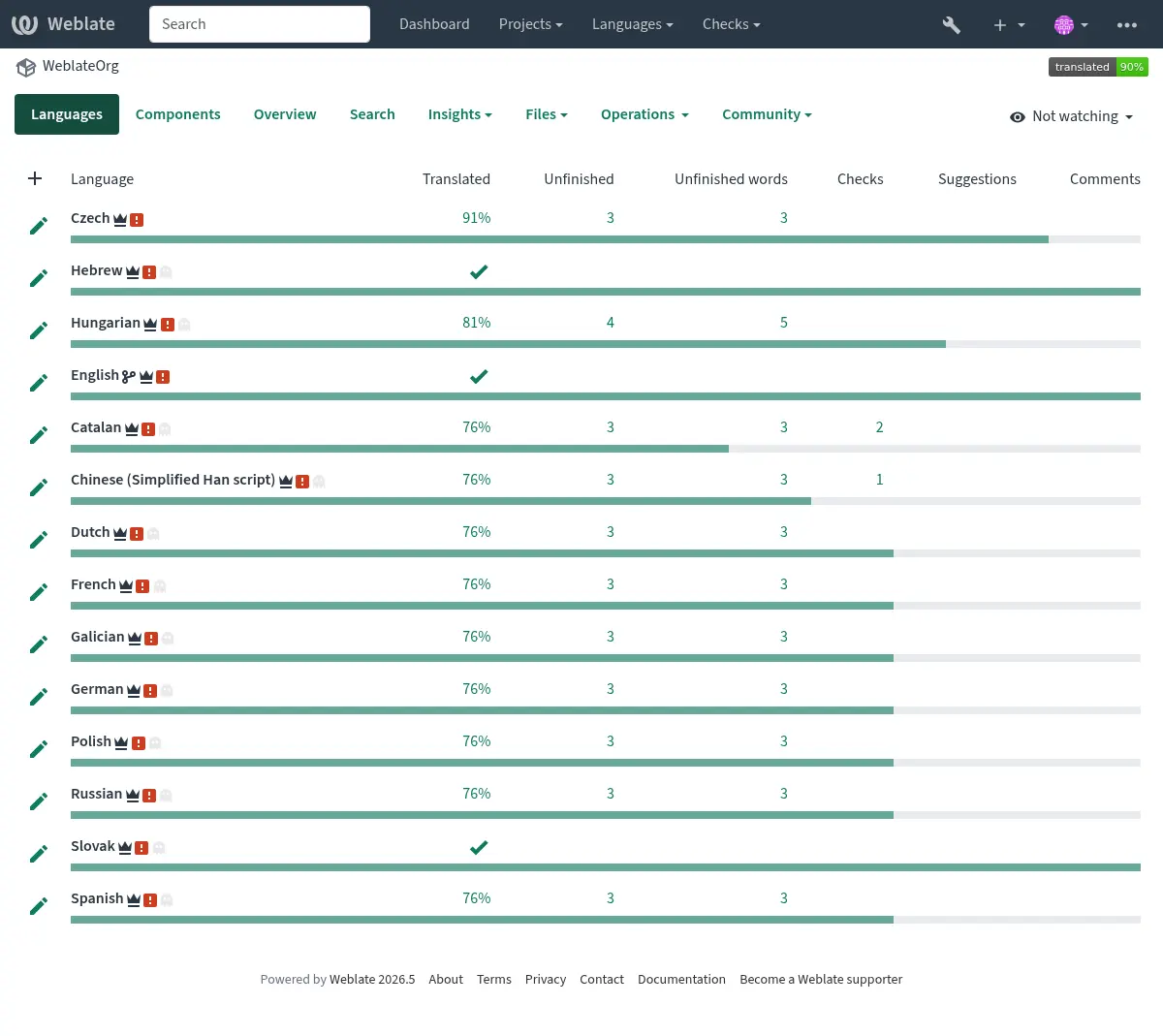
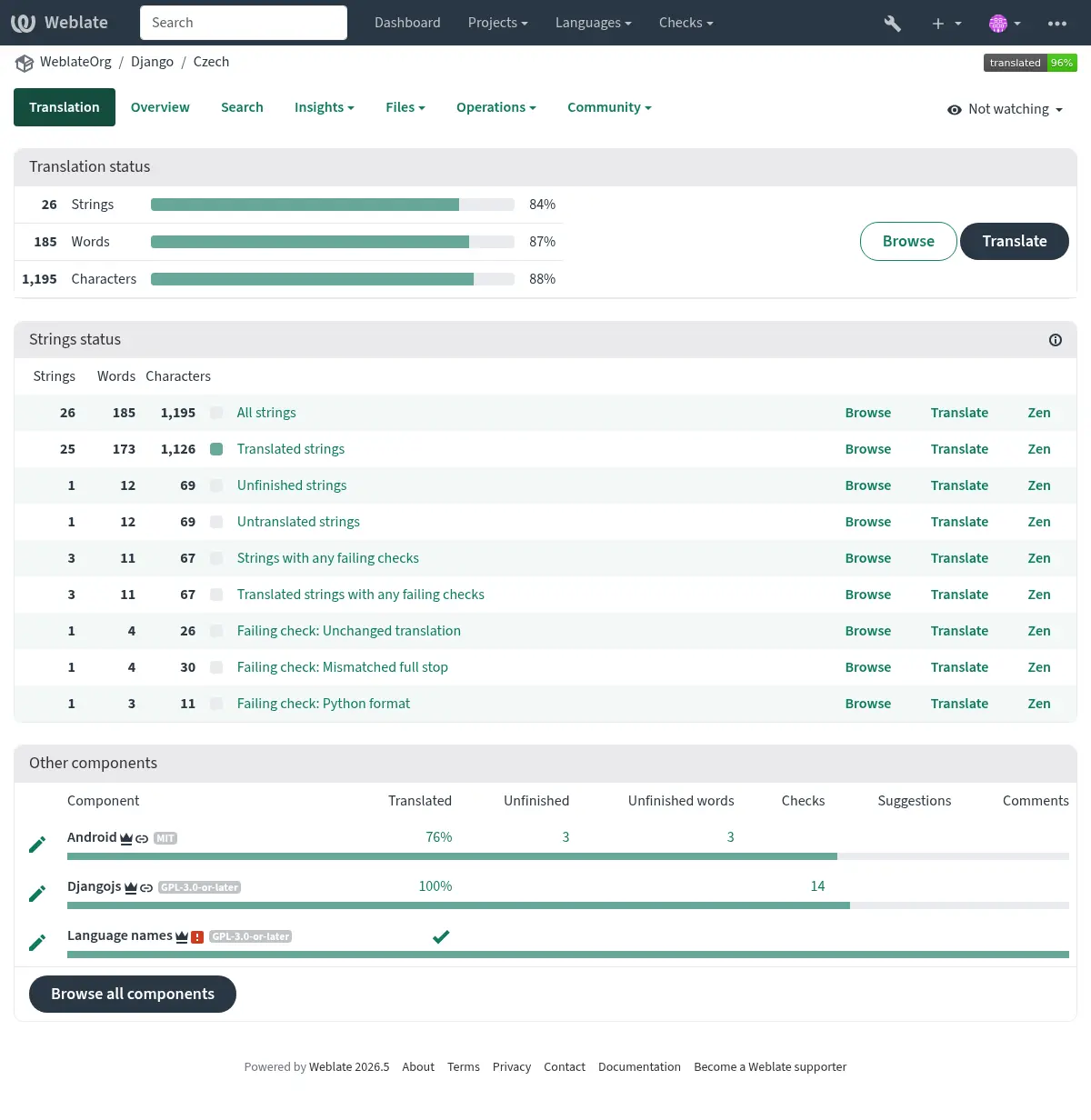
Having navigated to a component, a set of links lead to its actual translation. The translation is further divided into individual checks, like Untranslated strings or Unfinished strings. If the whole project is already translated without any errors, All strings is still available. Alternatively you can use the Search feature to find a specific string or term.
Sugestii
Notă
Permisiunile efective pot varia în funcție de configurația Weblate.
Anonymous users (by default) can only forward suggestions. Doing so is still available to signed-in users, in cases where uncertainty about a translation arises, prompting other translators to review it. Any user can clone an existing suggestion into the translation fields, including plural forms, and use it as the basis for a new suggestion or translation.
All suggestions are scanned on a daily basis to remove duplicates and those matching current translations.
If you have the Accept suggestions permission, you can bulk accept all suggestions from a specific user by clicking the account check icon next to their suggestion. This is useful for quickly processing suggestions from trusted contributors. Suggestions failing quality checks are skipped and remain for manual review.
Variante
Variants are used to group different-length variants of a string. The frontend of your project can then utilize different strings depending on the size of a screen or window.
Vezi și
Etichete
Etichetele sunt utilizate pentru a clasifica șirurile de caractere în cadrul unui proiect pentru a personaliza în continuare fluxul de lucru al localizării (de exemplu, pentru a defini categorii de șiruri de caractere).
Următoarele etichete sunt utilizate de Weblate:
- Tradus automat
String translated using Traducere automată.
- Sursa trebuie revizuită
String marked for review using Sursa șiruri de recenzii.
Vezi și
Traducerea
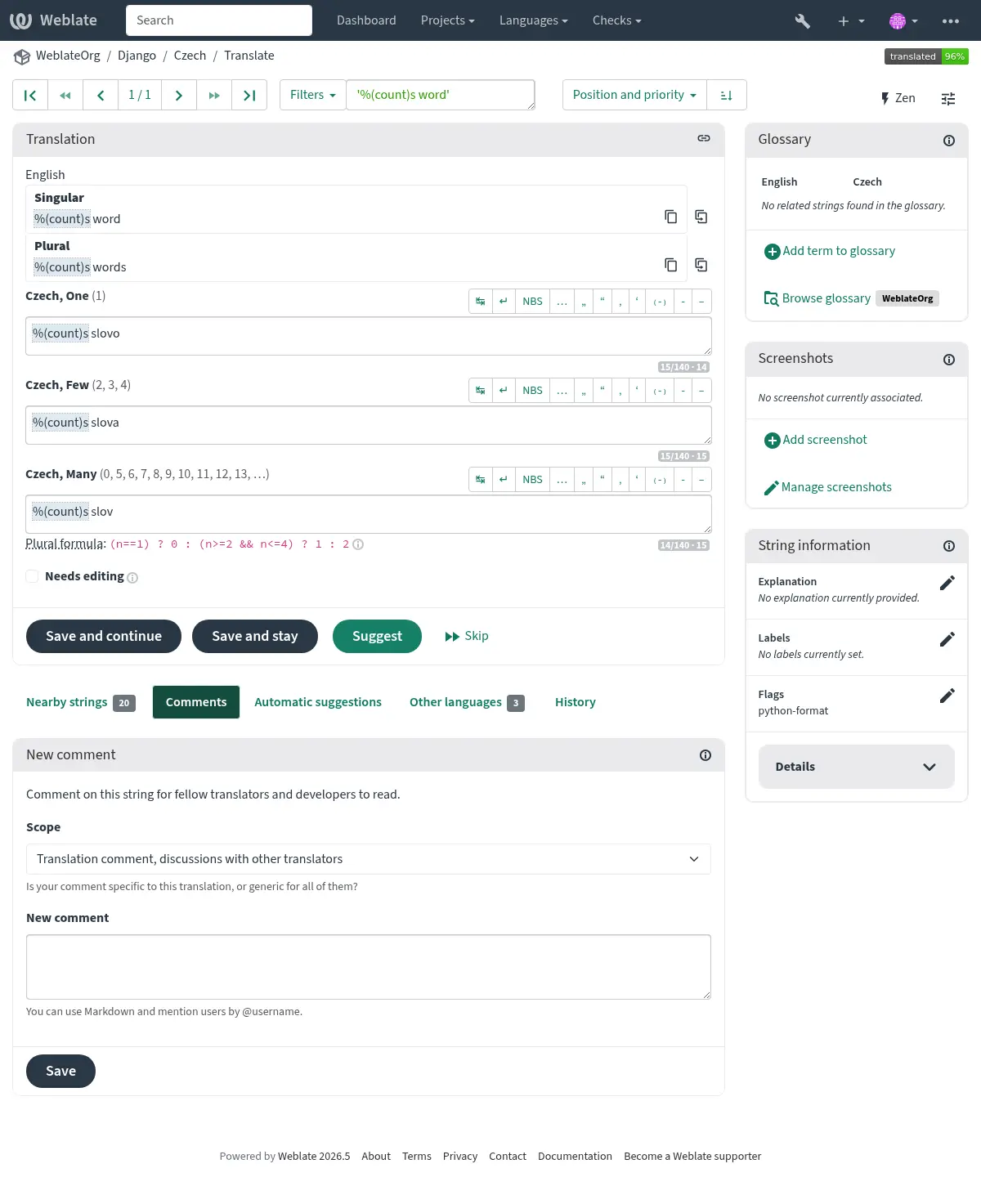
Pe pagina de traducere sunt afișate șirul sursă și o zonă de editare pentru traducerea acestuia. În cazul în care traducerea este la plural, sunt afișate mai multe șiruri sursă și zone de editare, fiecare fiind descrisă și etichetată în funcție de numărul de forme de plural pe care le are limba tradusă.
Toate caracterele speciale de spații albe sunt subliniate cu roșu și indicate cu simboluri gri. Mai mult de un spațiu ulterior este, de asemenea, subliniat cu roșu pentru a atenționa traducătorul asupra unei potențiale probleme de formatare.
Pe această pagină pot fi afișate diverse informații suplimentare, majoritatea provenind din codul sursă al proiectului (cum ar fi contextul, comentariile sau locul în care este utilizat mesajul). Câmpurile de traducere pentru orice limbă secundară selectată de traducători în preferințe vor fi afișate (a se vedea Limbi secundare) deasupra șirului sursă.
Below the translation, translators will find suggestions made by others, to be accepted (✓), accepted with changes (✏️), bulk accepted for a specific user (👤✓), cloned into the translation fields (📑) or deleted (🗑).
Pluraluri
Words changing form to account for their numeric designation are called plurals. Each language has its own definition of them. English, for example, supports one. In the singular definition of an example „car”, implicitly one car is referenced, in the plural definition of „cars”, two or more cars are referenced (or the concept of cars as a noun). Languages like, for example, Czech or Arabic have more forms of plurals, and their rules for plurals are different as well.
Weblate has full support for each of these forms, in each respective language. Each grammatical number is translated in a separate field for a pre-defined set of cardinal numbers specific to the translation language. The number of fields and how they are in turn used in the translated application or project, depends on the configured plural formula. Weblate shows the basic information and the Language Plural Rules by the Unicode Consortium is a more detailed description.
Vezi și
Traduceri alternative
Added in version 4.13.
Notă
În prezent, acest lucru este acceptat numai cu Fișier CSV multivaloare.
În cazul anumitor formate, este posibil să existe mai multe traduceri pentru un singur șir de caractere. Puteți adăuga mai multe traduceri alternative folosind meniul Tools. Toate traducerile alternative goale vor fi eliminate automat la salvare.
Scurtături de tastatură
Următoarele comenzi rapide de la tastatură pot fi utilizate în timpul traducerii:
Comenzi rapide de la tastatură |
Descriere |
|---|---|
? |
Open available keyboard shortcuts. |
Alt+Home |
Navigate to the first translation in the current search. |
Alt+End |
Navigate to the last translation in the current search. |
Alt+PageUp sau Ctrl +↑ sau Alt +↑ sau Cmd+↑ |
Navigate to the previous translation in the current search. |
Alt+PageDown sau Ctrl+↓ sau Alt+↓ sau Cmd+↓ |
Navighează la următoarea traducere din căutarea curentă. |
Ctrl+Enter sau Cmd+Enter |
Trimiteți formularul curent; este același lucru cu apăsarea Salvare și continuare în timpul editării traducerii. |
Ctrl+Shift+Enter sau Cmd+Shift+Enter |
Unmark translation as Needing edit and submit it. |
Alt+Enter sau Option+Enter |
Submit the string as a suggestion; this works the same as pressing Suggest while editing translation. |
Ctrl+E sau Cmd+E |
Focus on translation editor. |
Ctrl+U sau Cmd+U |
Focus on comment editor. |
Ctrl+M sau Cmd+M |
Afișează fila Sugestii automate, vezi Sugestii automate. |
Ctrl+1 to Ctrl+9 sau Cmd+1 la Cmd+9 |
Copies placeable of a given number from source string. |
Ctrl+M followed by 1 to 9 or Cmd+M followed by 1 to 9 |
Copy the machine translation of a given number to current translation. |
Ctrl+I followed by 1 to 9 or Cmd+I followed by 1 to 9 |
Ignorați un element din lista de verificări nereușite. |
Ctrl+J ori Cmd+J |
Afișează fila Nearby strings. |
Ctrl+S ori Cmd+S |
Focus on search field. |
Ctrl+O sau Cmd+O |
Copiază șirul sursă. |
Ctrl+Y ori Cmd+Y |
Activați caseta de selectare Necesită editare. |
→ |
Browse the next translation string. |
← |
Browse the previous translation string. |
Tastatura vizuală
A small visual keyboard row is shown just above the translation field. Its rows are specific to each language; it can be useful for local punctuation or characters that are hard to type by hand.
Simbolurile prezentate se împart în trei categorii:
Configurat de utilizator Caractere speciale definit în Profil utilizator
Per-language characters provided by Weblate (e.g. quotes or RTL-specific characters)
Caracterele configurate cu ajutorul
SPECIAL_CHARS
Contextul traducerii
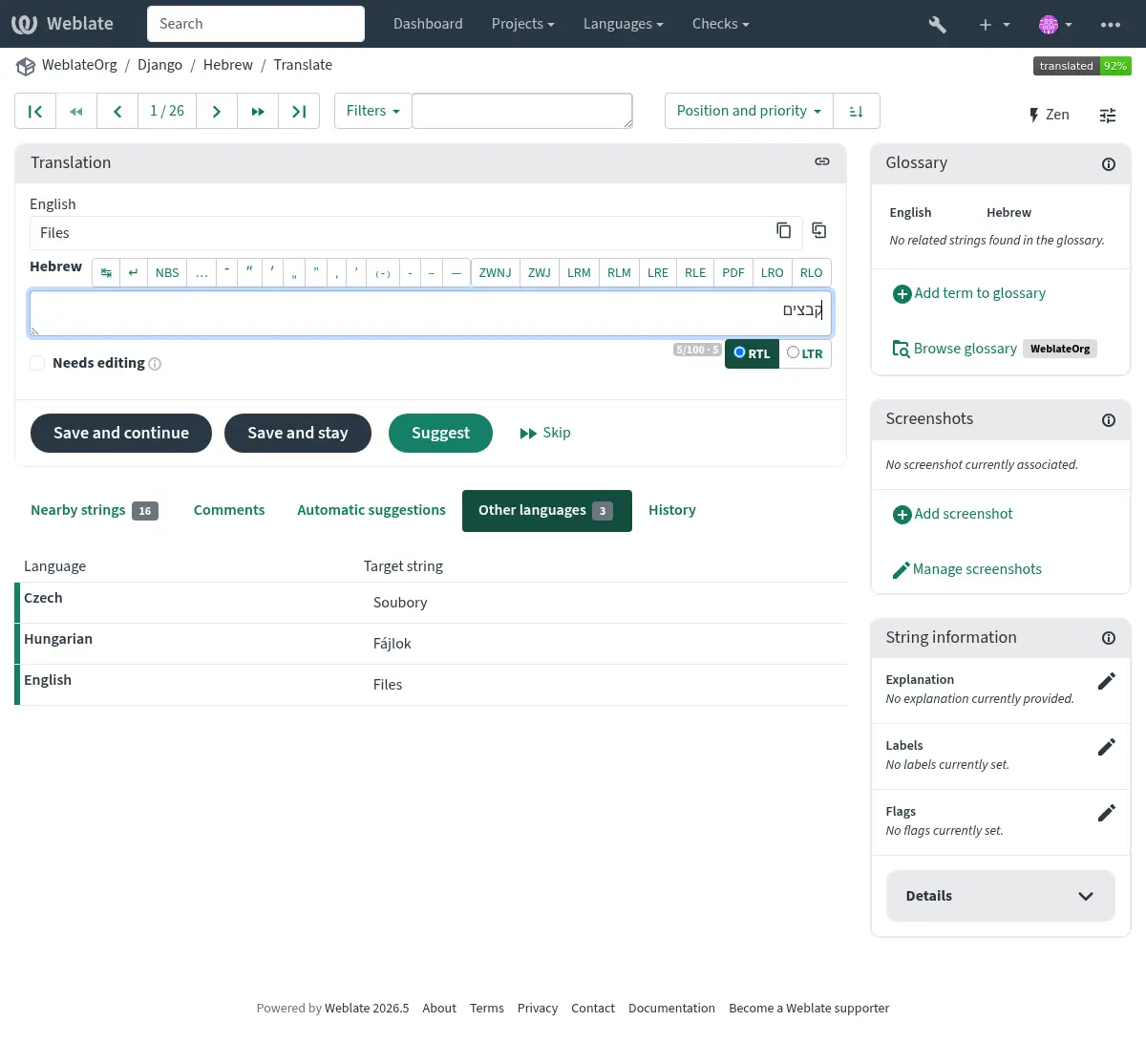
Această descriere contextuală oferă informații conexe despre șirul curent.
- Atributele șirurilor de caractere
Lucruri precum ID-ul mesajului, contextul (
msgctxt) sau locația în codul sursă.- Explicație
Further clarification can be provided in Weblate via Explicație.
- Capturi de ecran
Screenshots can be uploaded directly from this panel using Add screenshot, or managed elsewhere in Weblate to better inform translators of where and how the string is used. Source-language screenshots are shown for every translation of the string, while translation-specific screenshots are shown only for that translation; see Screenshots and visual context.
- Șiruri apropiate
Displays neighbouring strings from the translation file. These are usually also used in a similar context and prove useful in keeping the translation consistent.
- Alte apariții
În cazul în care un mesaj apare în mai multe locuri (de exemplu, mai multe componente), această filă le afișează pe toate dacă se constată că sunt inconsecvente (a se vedea Inconsecvent). Puteți alege pe care dintre ele să o utilizați.
- Memorie de traducere
Uită-te la șiruri similare traduse în trecut, vezi Memorie de traducere.
- Glosar
Afișează termenii din glosarul proiectului utilizați în mesajul curent.
- Istoric
Lista persoanelor care au modificat recent acest mesaj folosind Weblate.
- Proiect
Informații despre proiect, cum ar fi instrucțiuni pentru traducători sau un director sau un link către șirul din depozitul sistemului de control al versiunilor pe care îl folosește proiectul.
Dacă doriți linkuri directe, formatul de traducere trebuie să fie compatibil.
Istoricul traducerii
Every change is by default (unless turned-off in component settings) saved in the database, and can be reverted. Optionally, translations can also be reverted in the underlying version control system.
Lungimea șirului tradus
Weblate poate limita lungimea unei traduceri în mai multe moduri pentru a se asigura că șirul tradus nu este prea lung:
The default limitation for translation is ten times longer than the source string. This can be modified with
LIMIT_TRANSLATION_LENGTH_BY_SOURCE_LENGTH. If you are hitting this, it can also be caused by a monolingual translation being wrongly set up as a bilingual one, making Weblate mistaking the translation key for the actual source string. See Formate bilingve și monolingve for more info.Maximum length in characters defined by the translation file or flag, as per Lungime maximă a traducerii.
Maximal rendered size in pixels as defined by flags; see Dimensiune maximă a traducerii.
Sugestii automate
Pe baza configurației și a limbii traduse, Weblate oferă sugestii din mai multe instrumente de traducere automată și Memorie de traducere. Toate traducerile automate sunt disponibile într-o singură filă a fiecărei pagini de traducere.
You can also perform a concordance search on the Memorie de traducere.
Vezi și
Puteți găsi lista de instrumente acceptate în Sugestii automate.
Traducere automată
You can use automatic translation to bootstrap translation based on external sources. This tool is called Automatic translation accessible in the Operations menu, once you have selected a component and a language:
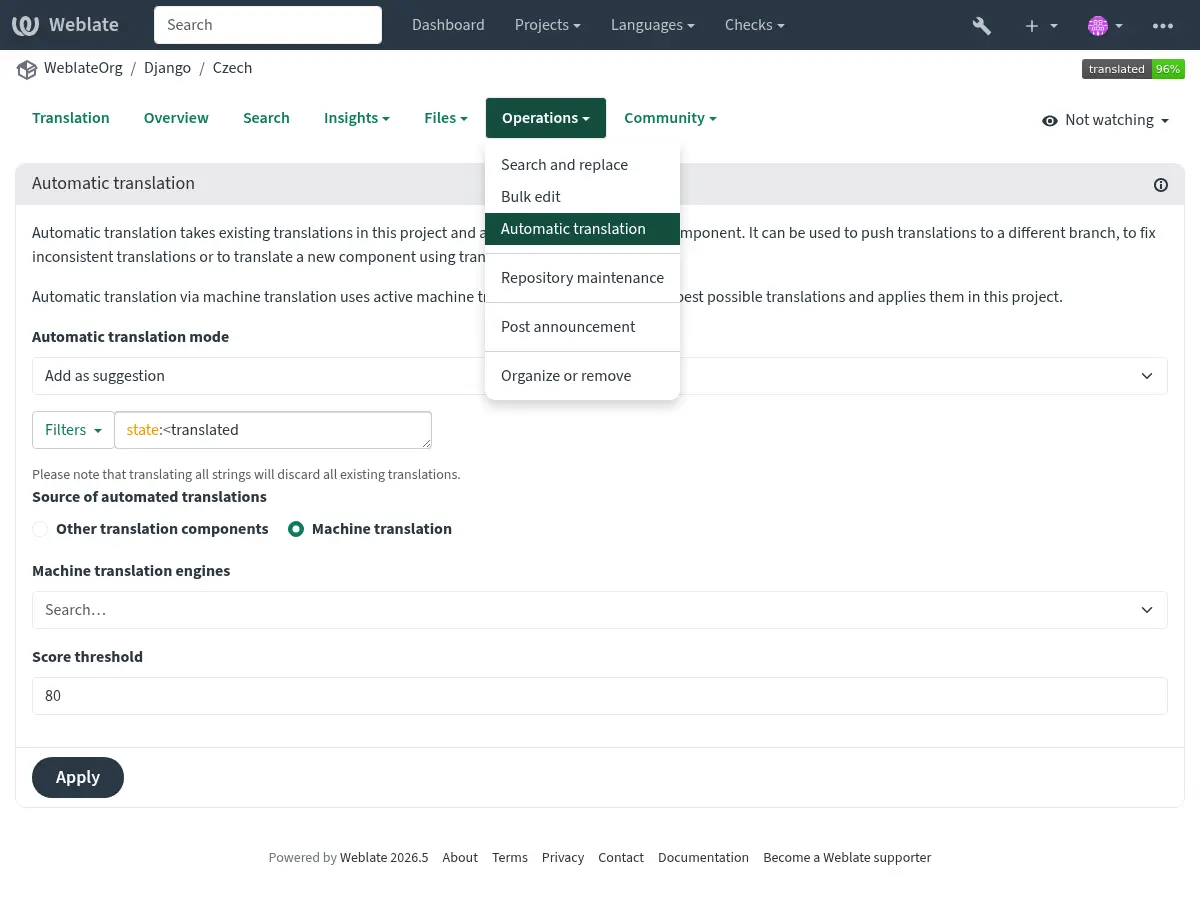
A similar operation Batch automatic translation is available if you have selected a project language, a component or a category.
Sunt posibile două moduri de funcționare:
Utilizarea altor componente Weblate ca sursă pentru traduceri.
Utilizarea serviciilor de traducere automată selectate cu traduceri care depășesc un anumit prag de calitate.
When using other components as the source, Weblate applies translations only when plural forms are compatible. If the source component uses different plural rules, pluralized strings are skipped and Weblate shows a warning, while single-form strings are still translated.
De asemenea, puteți alege ce șiruri de caractere trebuie să fie traduse automat.
Atenționare
Rețineți că acest lucru va suprascrie traducerile existente dacă este utilizat cu filtre largi, cum ar fi All strings.
Utile în mai multe situații, cum ar fi consolidarea traducerii între diferite componente (de exemplu, aplicația și site-ul său web) sau atunci când se creează o traducere pentru o nouă componentă utilizând traducerile existente (memorie de traducere).
Șirurile de caractere traduse automat sunt etichetate Automatically translated.
Limitarea ratei
To avoid abuse of the interface, rate limiting is applied to several operations like searching, sending contact forms, or translating. If affected by it, you are blocked for a certain period, until you can perform the operation again.
Default limits and fine-tuning are described in the administrative manual, see Limitarea ratei.
Caută și înlocuiește
Schimbați terminologia în mod eficient sau efectuați fixarea în bloc a șirurilor de caractere utilizând Cercetare și înlocuire din meniul Unelte.
Sugestie
Don’t worry about messing up the strings, as it is a two-step process. A preview of edited strings is shown before confirming the change.
Editare în masă
Bulk editing allows performing one operation for multiple strings. Define strings by searching for them and actions to perform on matching ones. Supported operations:
Change string state (for example to approve all unreviewed strings).
Ajustarea indicatoarelor de traducere (a se vedea Personalizarea comportamentului cu ajutorul stegulețelor)
Reglați etichetele șirurilor de caractere (a se vedea Șir de etichete)
Sugestie
This tool is called Bulk edit, accessible in the Tools menu of each project, component or translation.
Vezi și
Vedere Matrix
You can compare different languages efficiently using this view. It is available on every component page, from the Tools menu. First select all languages you want to compare, confirm your selection, then click on any translation to open and edit it.
The matrix view is also a very good starting point to find missing translations in different languages, and quickly add them from one view.
Modul Zen
This mode simplifies the layout and removes additional UI elements such as Nearby strings or the Glossary. It is available by clicking the Zen button on the top-right of the regular editor (translation of a string).
You can select the Zen editor as your default editor using the Preferințe tab on your Profil utilizator. You can also choose there between having translations listed Top to bottom or Side by side, depending on your personal preference.
Comentarii
Three types of comments can be posted:
for translations
for source strings
for reporting source string bugs when this functionality is turned on using Activează revizuiri sursă.
Choose the suitable type for the topic you want to discuss. Source string comments are in any event good for providing feedback on the original string, for example that it should be rephrased, or to ask questions about it.
Markdown syntax can be used in all comments, as well as mentioning other users by using
@username.Vezi și
Recepționarea feedback-ului șirului sursă
Sursa șiruri de recenzii
Activează revizuiri sursă