Code hosting integrations
Weblate integrates with code hosting sites in several separate places: repository access, incoming notifications, and pushing translations back. The exact setup depends on whether you use Hosted Weblate or run your own Weblate instance, and on whether Weblate should push directly or create pull requests.
Use this page as a provider-oriented checklist. The individual setting pages remain the canonical reference for setting syntax.
Setup overview
Grant Weblate access to the repository.
For Hosted Weblate, add the hosted weblate user where it is available, see Hosted Weblate üzerinden depolara erişmek.
For self-hosted Weblate, create a dedicated code hosting user and grant access using Weblate’s SSH key or an HTTPS token, see Kod barındırma sitelerindeki depolara erişmek (GitHub, GitLab, Bitbucket, Azure DevOps, …).
Configure Kaynak kod deposu so Weblate can clone the repository.
Configure incoming notifications so Weblate pulls changes soon after a push. The repository webhook or app must point to the matching Weblate hook URL, and the project must have Kancalar kullanılsın enabled.
Decide how Weblate should push translations back:
Use Git or Mercurial and Depo itme adresi to push directly.
Use a provider-specific VCS backend, such as GitHub or GitLab, to create pull or merge requests. These backends need API credentials in the Weblate settings.
Optionally set İtme işleminin yapılacağı dal when Weblate should push to a branch in the upstream repository instead of using a fork where supported.
Weblate üzerindeki değişiklikleri itmek
Each translation component can have a push URL set up (see Depo itme adresi), and in that case Weblate will be able to push changes to the remote repository. Weblate can also be configured to automatically push changes on every commit; this is enabled by default, see İşleme ile itme.
If you do not want changes to be pushed automatically, you can push manually
under Repository maintenance or using the API via
wlc push.
In case you do not want direct pushes by Weblate, there is support for GitHub çekme istekleri, GitLab birleştirme istekleri, Gitea çekme isteği, Pagure birleştirme istekleri, Azure DevOps sunucusu çekme isteği, or Gerrit review requests reviews. You can activate these by choosing GitHub, GitLab, Gitea, Gerrit, Azure DevOps, or Pagure as Sürüm denetimi sistemi in Bileşen yapılandırması.
Overall, following options are available with Git, Mercurial, GitHub, GitLab, Gitea, Pagure, Azure DevOps, Gerrit, Bitbucket Data Center and Bitbucket Cloud:
İstenilen kurulum |
|||
|---|---|---|---|
İtme yok |
empty |
empty |
|
Doğrudan itme |
SSH adresi |
empty |
|
Ayrı bir dala itilsin |
SSH adresi |
Dal adı |
|
İtme yok |
empty |
empty |
|
Doğrudan itme |
SSH adresi |
empty |
|
GitHub dalından çekme isteği |
empty |
empty |
|
GitHub dalına itme isteği |
SSH URL [1] |
Dal adı |
|
GitLab dalından birleştirme isteği |
empty |
empty |
|
GitLab dalından birleştirme isteği |
SSH URL [1] |
Dal adı |
|
Gitea dalından birleştirme isteği |
empty |
empty |
|
Gitea dalından birleştirme isteği |
SSH URL [1] |
Dal adı |
|
Pagure dalından birleştirme isteği |
empty |
empty |
|
Pagure dalından birleştirme isteği |
SSH URL [1] |
Dal adı |
|
Azure DevOps dalından çekme isteği |
empty |
empty |
|
Azure DevOps dalına itme isteği |
SSH URL [1] |
Dal adı |
|
Gerrit review |
SSH adresi |
Target branch name (optional) |
|
Daldan Bitbucket Data Center çekme isteği |
empty |
empty |
|
Daldan Bitbucket Data Center çekme isteği |
SSH URL [1] |
Dal adı |
|
Daldan Bitbucket Cloud sunucusu çekme isteği |
empty |
empty |
|
Daldan Bitbucket Cloud çekme isteği |
SSH URL [1] |
Dal adı |
GitHub
GitHub repository access
Weblate ile GitHub depolarına erişmek için iki ana yaklaşım vardır:
Option 1: HTTPS with personal access token
Use HTTPS authentication with a personal access token and your GitHub account. This works for both read-only access and read-write access.
Bu yaklaşımı kullanmak için:
Komut satırı kullanımı için bir erişim kodu oluşturmak bölümünde açıklandığı gibi bir kişisel erişim kodu oluşturun.
Include the token in your repository URL:
https://username:token@github.com/owner/repo.git.
This is suitable when you are starting with Weblate or working with a single repository.
Option 2: SSH with a dedicated user
For setups with multiple repositories, create a dedicated user for Weblate. This avoids GitHub’s limitation that each SSH key can only be used once per platform.
Bu yaklaşımı kullanmak için:
Create a dedicated GitHub user account, for example
weblate-bot.Add Weblate’s public SSH key to this user, see Weblate SSH anahtarı.
Grant this user access to all repositories you want to translate.
Use SSH URLs for your repositories:
git@github.com:owner/repo.git.
Bu yaklaşım, bu amaç için bir özel weblate kullanıcısı olan Hosted Weblate için de kullanılır.
Not
When using GitHub for pull requests, the İtme işleminin yapılacağı dal configuration affects the behavior: if not set, the project is forked and changes are pushed through a fork. If set, changes are pushed to the upstream repository and the chosen branch.
GitHub notifications
Weblate doğal GitHub desteği ile gelir.
If you are using Hosted Weblate, the recommended approach is to install the Weblate app. The app delivers GitHub notifications to Hosted Weblate, so you do not need to configure a separate Webhook in GitHub. However, it does not by itself grant Hosted Weblate write access to the repository. To push changes back, you still need to add the Hosted Weblate weblate GitHub user as a collaborator with write access, see Hosted Weblate üzerinden depolara erişmek.
If you are not using the app, add the Weblate webhook in the repository settings (Webhooks) to receive notifications on every push to a GitHub repository, as shown on the image below:
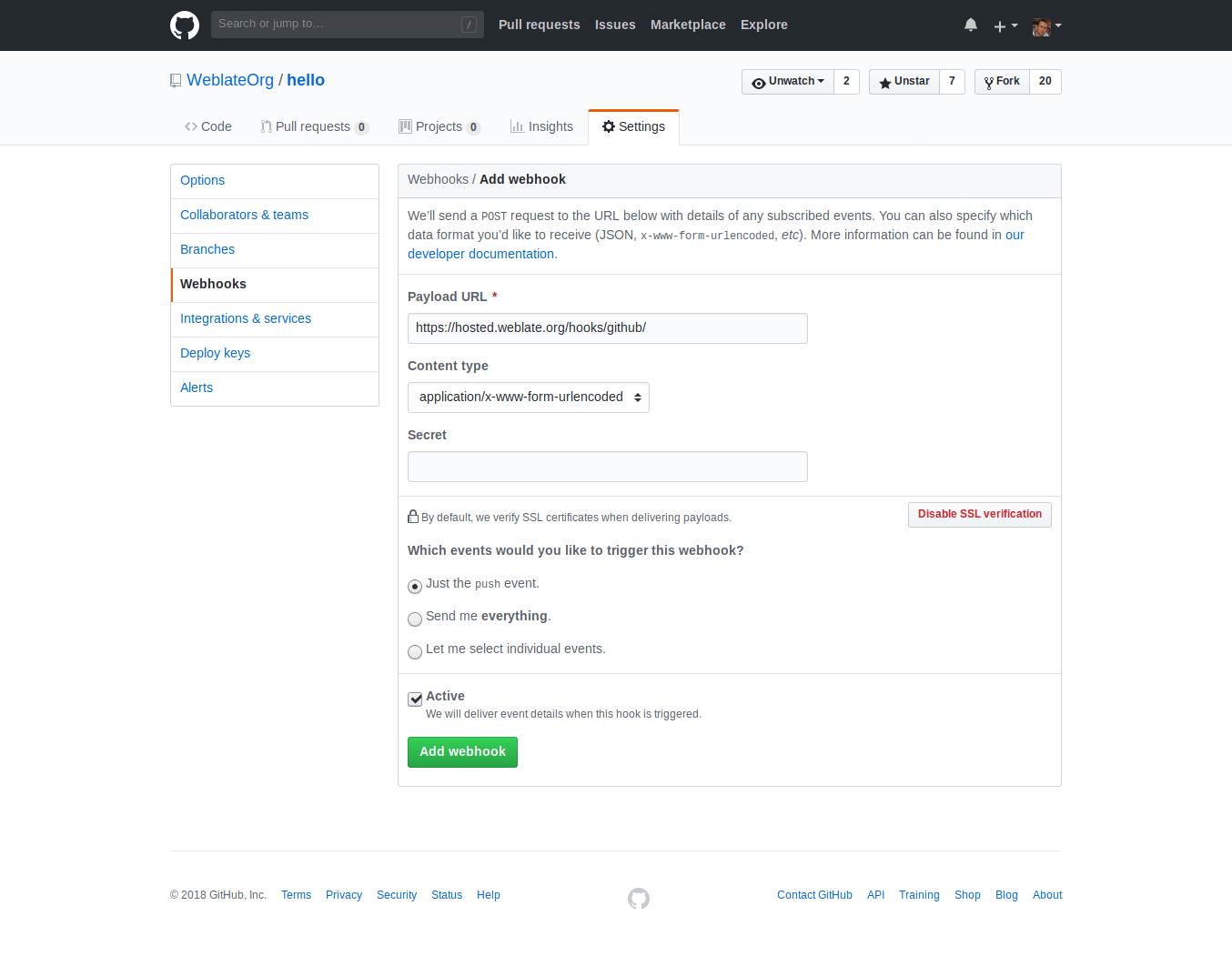
Yük adresi olarak Weblate adresinizin sonuna /hooks/github/ ekleyin. Örneğin Hosted Weblate hizmeti için https://hosted.weblate.org/hooks/github/ kullanabilirsiniz.
You can leave other values at default settings. Weblate can handle both content types and consumes just the push event.
Ayrıca bakınız
GitHub çekme istekleri
Bu yöntem, Git üzerine çeviri değişikliklerini doğrudan depoya itmek yerine GitHub API ile çekme istekleri olarak itmeyi sağlayan ince bir katman ekler.
Git pushes changes directly to a repository, while the GitHub backend creates pull requests. The latter is not needed for merely accessing Git repositories.
To create pull requests, select GitHub as
Sürüm denetimi sistemi and configure GITHUB_CREDENTIALS. For
GitHub.com, use
api.github.com as the API host. The token must allow Weblate to read and
write repository contents and create pull requests. If Weblate should fork
private repositories, the token might also need administration access.
GitLab
GitLab repository access
Access via SSH is possible, see SSH depoları, but if you need to access more than one repository, you will hit a GitLab limitation on allowed SSH key usage because each key can be used only once.
İtme işleminin yapılacağı dal ayarlanmamışsa, proje dallanır ve değişiklikler bir daldan itilir. Ayarlanmış ise, değişiklikler yukarı akış deposuna ve seçilen dala itilir.
Kişisel veya proje erişim kodları da kullanılabilir. Kod, değişiklikleri depoya gönderebilmek için write_repository kapsamına gerek duyar. Proje erişimi kodunda, itme için Developer rolü gerekir.
The URL needs to contain a username. For a personal access token, it is the
actual username:
https://user:personal_access_token@gitlab.com/example/example.git.
For project access tokens it can be a non-blank value:
https://example:project_access_token@gitlab.com/example/example.git.
Not
The rules for using project access tokens have changed between GitLab releases, the non-blank value is the current requirement, but older versions had different expectations (project name, bot user name). Check GitLab documentation matching your version if unsure.
GitLab notifications
Weblate has support for GitLab hooks. Add a project webhook with destination
to /hooks/gitlab/ URL on your Weblate installation, for example
https://hosted.weblate.org/hooks/gitlab/.
Sorun çözme
İnternet kancaları gönderilmişse GitLab internet kancası istek geçmişini denetleyin.
Yanıt yükünde, eşleşen bileşenler ile ilgili bilgiler bulunur.
Ayrıca bakınız
GitLab birleştirme istekleri
This adds a thin layer atop Git using the GitLab API to allow pushing translation changes as merge requests instead of pushing directly to the repository.
There is no need to use this to access Git repositories, ordinary Git works the same, the only difference is how pushing to a repository is handled. With Git changes are pushed directly to the repository, while the GitLab backend creates a merge request.
To create merge requests, select GitLab as
Sürüm denetimi sistemi and configure GITLAB_CREDENTIALS.
Gitea, Forgejo, and Codeberg
For Hosted Weblate repositories on Codeberg, add the hosted weblate user where write access is needed, see Hosted Weblate üzerinden depolara erişmek.
Gitea notifications
Weblate has support for Gitea webhooks. Add a Gitea Webhook for
Push events event with destination to /hooks/gitea/ URL on your
Weblate installation, for example https://hosted.weblate.org/hooks/gitea/.
This can be done in Webhooks under repository Settings.
Forgejo notifications
Weblate has support for Forgejo webhooks. Add a Forgejo Webhook
for Push events event with destination to /hooks/forgejo/ URL
on your Weblate installation, for example
https://hosted.weblate.org/hooks/forgejo/. This can be done in
Webhooks under repository Settings.
Gitea çekme isteği
Added in version 4.12.
This adds a thin layer atop Git using the Gitea API to allow pushing translation changes as pull requests instead of pushing directly to the repository.
There is no need to use this to access Git repositories, ordinary Git works the same, the only difference is how pushing to a repository is handled. With Git changes are pushed directly to the repository, while the Gitea backend creates pull requests.
To create pull requests, select Gitea as
Sürüm denetimi sistemi and configure GITEA_CREDENTIALS.
Bitbucket
Hosted Weblate has a dedicated weblate user for Bitbucket access, see Hosted Weblate üzerinden depolara erişmek.
To push directly, use Git or Mercurial with Depo itme adresi.
Bitbucket notifications
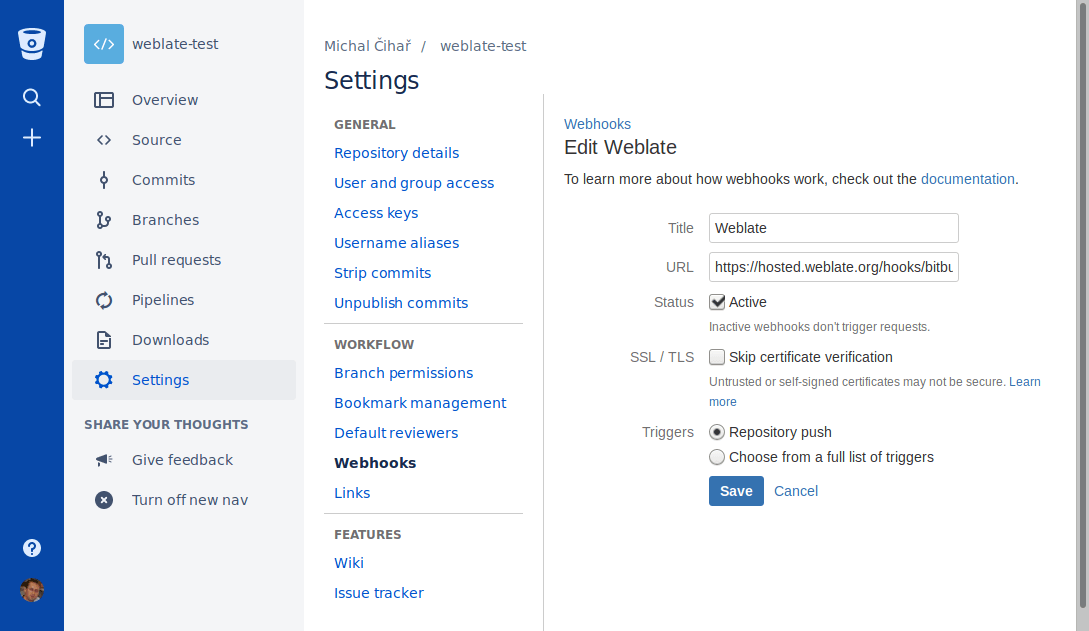
Weblate has support for Bitbucket webhooks. Add a webhook which triggers upon
repository push, with destination to /hooks/bitbucket/ URL on your Weblate
installation, for example https://hosted.weblate.org/hooks/bitbucket/.
Ayrıca bakınız
Bitbucket Data Center çekme istekleri
Added in version 4.16.
This adds a thin layer atop Git using the Bitbucket Data Center API to allow pushing translation changes as pull requests instead of pushing directly to the repository.
Uyarı
Bu yöntemde, Bitbucket Cloud API desteği yoktur.
There is no need to use this to access Git repositories, ordinary Git works the same, the only difference is how pushing to a repository is handled. With Git changes are pushed directly to the repository, while the Bitbucket Data Center backend creates a pull request.
To create pull requests, select Bitbucket Data Center as
Sürüm denetimi sistemi and configure BITBUCKETSERVER_CREDENTIALS.
Bitbucket Cloud sunucusu çekme isteği
Added in version 5.8.
This adds a thin layer atop Git using the Bitbucket Cloud API to allow pushing translation changes as pull requests instead of pushing directly to the repository.
Uyarı
Bu, Bitbucket Data Center API uygulamasından farklıdır.
There is no need to use this to access Git repositories, ordinary Git works the same, the only difference is how pushing to a repository is handled. With Git changes are pushed directly to the repository, while the Bitbucket Cloud backend creates a pull request.
To create pull requests, select Bitbucket Cloud as
Sürüm denetimi sistemi and configure BITBUCKETCLOUD_CREDENTIALS.
Azure DevOps
Azure Repos notifications
Weblate has support for Azure Repos webhooks. Add a webhook for
Code pushed event with destination to /hooks/azure/ URL on your
Weblate installation, for example https://hosted.weblate.org/hooks/azure/.
This can be done in Service hooks under Project
settings.
Azure DevOps sunucusu çekme isteği
Bu yöntem, Git üzerine çeviri değişikliklerini doğrudan depoya itmek yerine Azure DevOps API ile çekme istekleri olarak itmeyi sağlayan ince bir katman ekler.
Git pushes changes directly to a repository, while the Azure DevOps backend creates pull requests. The latter is not needed for merely accessing Git repositories.
To create pull requests, select Azure DevOps as
Sürüm denetimi sistemi and configure AZURE_DEVOPS_CREDENTIALS.
Pagure
Pagure notifications
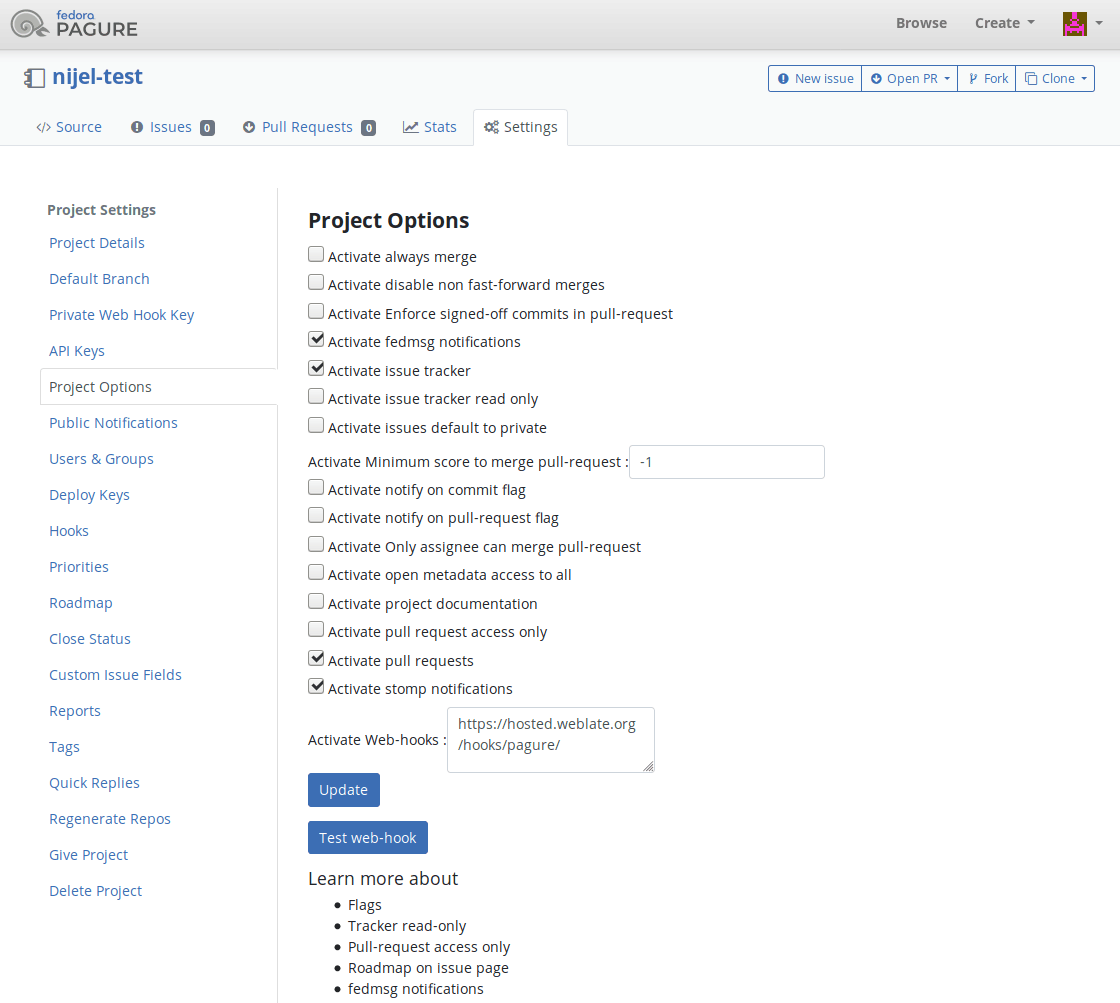
Weblate has support for Pagure hooks. Add a webhook with destination to
/hooks/pagure/ URL on your Weblate installation, for example
https://hosted.weblate.org/hooks/pagure/. This can be done in
Activate Web-hooks under Project options:
Ayrıca bakınız
Pagure birleştirme istekleri
Added in version 4.3.2.
This adds a thin layer atop Git using the Pagure API to allow pushing translation changes as merge requests instead of pushing directly to the repository.
There is no need to use this to access Git repositories, ordinary Git works the same, the only difference is how pushing to a repository is handled. With Git changes are pushed directly to the repository, while the Pagure backend creates a merge request.
To create merge requests, select Pagure as
Sürüm denetimi sistemi and configure PAGURE_CREDENTIALS.
Other workflows
Gitee notifications
Weblate has support for Gitee webhooks. Add a WebHook for
Push event with destination to /hooks/gitee/ URL on your
Weblate installation, for example https://hosted.weblate.org/hooks/gitee/.
This can be done in WebHooks under repository
Management.
Gerrit review requests
Gerrit support adds a thin layer atop Git using the git-review tool to allow pushing translation changes as Gerrit review requests, instead of pushing them directly to the repository.
The optional İtme işleminin yapılacağı dal setting selects the target branch for
the Gerrit review. Leave it empty to use Depo dalı. Use the short
branch name, such as main; Weblate and git-review push the review to
refs/for/<branch> automatically. Do not include Gerrit push options such as
%submit or %l=Code-Review+2 in the branch name.
The Gerrit documentation has the details on the configuration necessary to set up such repositories. There is no separate code hosting credential setting for this backend.
Docker credentials
For Docker installations, code hosting API credentials can also be provided through environment variables, see Kod barındırma siteleri kimlik doğrulama bilgileri.