Downloading and uploading translations
You can export files from a translation, make changes, and import them again. This allows working offline, and then merging changes back into the existing translation. This works even if it has been changed in the meantime.
Nota
Available options might be limited by access control settings.
Downloading translations
From the project or component dashboard, translatable files can be downloaded in the Files menu.
The first option is to download the file in the original format as it is stored in the repository. In this case, any pending changes in the translation are getting committed and the up-to-date file is yield without any conversions.
You can also download the translation converted into one of the widely used localization formats. The converted files will be enriched with data provided in Weblate; such as additional context, comments or flags.
Nota
Format conversion changes the localization file representation, but does
not translate between runtime message syntaxes such as ICU MessageFormat
and C printf formatting. Use application-specific tooling when consumers
need different placeholder syntaxes or a compiled resource format not
offered by Weblate.
Several file formats are available via the Files ↓ Customize download menu:
gettext PO (
po)XLIFF 1.1 con estensioni gettext (
xliff)XLIFF 1.1 (
xliff11)TermBase eXchange (
tbx)Translation Memory eXchange (
tmx)gettext MO (only available when translation is using gettext PO) (
mo)CSV (
csv)Excel Open XML (
xlsx)JSON (disponibile solo per traduzioni monolingua) (
json)File di struttura nidificata JSON (disponibile solo per traduzioni monolingue) (
json-nested)Android String Resource (disponibile solo per traduzioni monolingua) (
aresource)Stringhe iOS (disponibili solo per traduzioni monolingue) (
strings)
Suggerimento
The content available in the converted files differs based on file format features, you can find overview in Translation types capabilities.

Download di componenti, categorie o progetti
Translation files for a component, category or project can be downloaded at once via the Files menu. The download is always served as a ZIP file, and you can choose original or converted formats similarly as in Downloading translations.
Uploading translations
When you have made your changes, use Upload translation in the Files menu.

Supported file formats
Any file in a supported file format can be uploaded, but it is still recommended to use the same file format as the one used for translation, otherwise some features might not be translated properly.
Language checking
Weblate checks language metadata declared in uploaded files when the format provides it, including PO, XLIFF, Qt Linguist, and ARB files. Uploads declaring a different language are rejected. Known language aliases and variants sharing a base language are accepted, for example Portuguese and Brazilian Portuguese. Files without recognized language metadata can still be uploaded. Weblate does not infer the language from the filename or translated text.
Select Ignore language mismatch to upload a file despite a language mismatch. This does not bypass other upload checks or permissions. When updating source strings, Weblate checks the declared source language instead of the target language.
Import methods
These are the choices presented when uploading translation files:
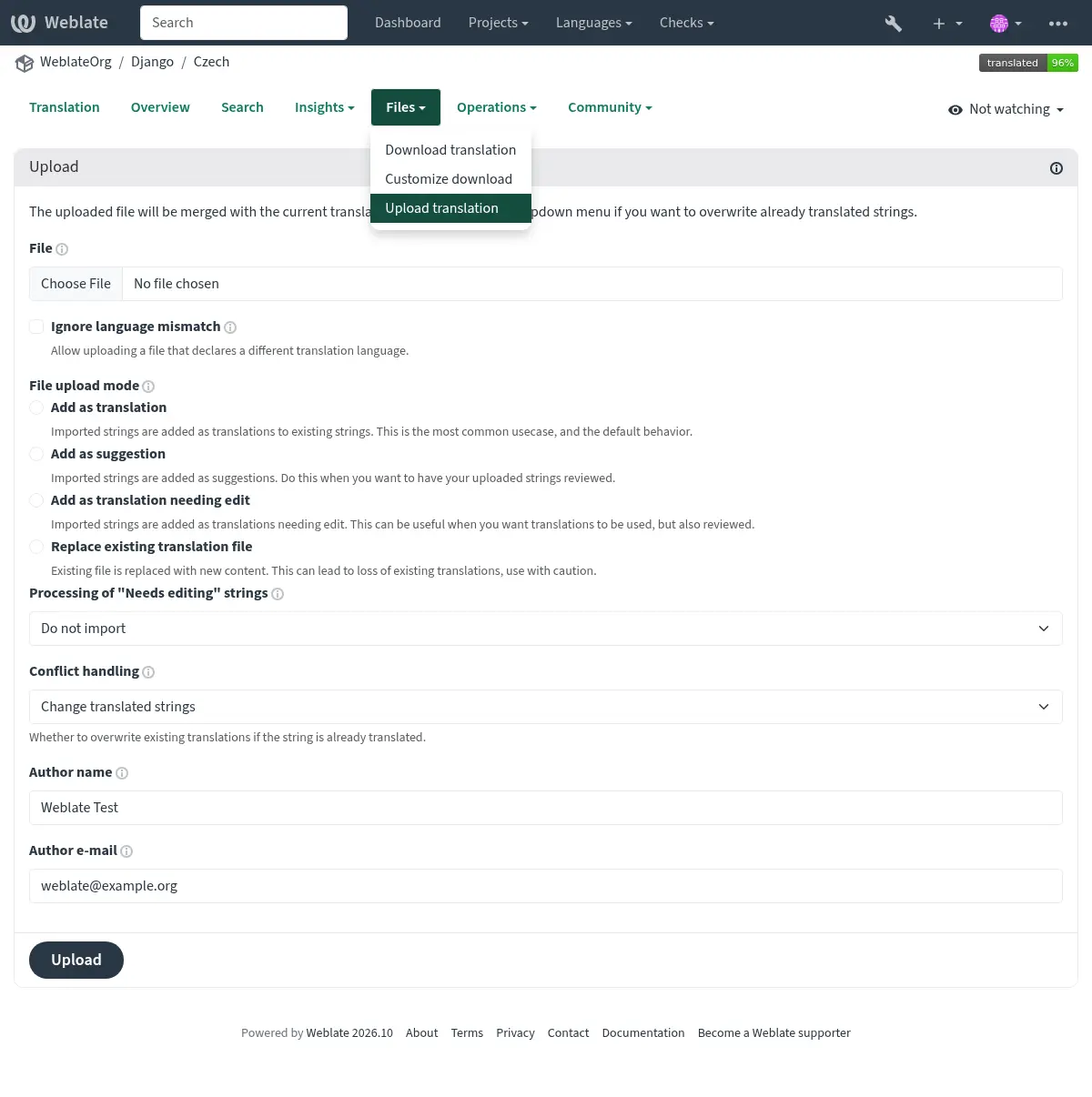
- Aggiungi come traduzione (
translate) Le stringhe importate vengono aggiunte come traduzioni alle stringhe esistenti. Questo è il caso d’uso più comune ed il comportamento predefinito.
Only translations are used from the uploaded file and no additional content.
This option is available only if the user has the «Edit strings» permission.
- Aggiungi come suggerimento (
suggest) Le stringhe importate vengono aggiunte come suggerimenti. Scegliere questa opzione quando si desidera rileggere le stringhe caricate.
Only translations are used from the uploaded file and no additional content.
This option is available only if the user has the «Add suggestion» permission.
- Aggiungi come traduzione approvata (
approve) Le stringhe importate vengono aggiunte come traduzioni approvate. Scegliere questa opzione quando le traduzioni sono state revisionate prima di caricarle.
Only translations are used from the uploaded file and no additional content.
This option is available only if the user has the «Review strings» permission.
- Aggiungi come traduzione che necessita modifica (
fuzzy) Le stringhe importate vengono aggiunte come traduzioni da modificare. Scegliere questa opzione quando si vuole che le traduzioni vengano utilizzate, ma anche revisionate.
Only translations are used from the uploaded file and no additional content.
This option is available only if the user has the «Edit strings» permission.
- Sostituisci file traduzione esistente (
replace) Il file esistente viene sostituito con il nuovo contenuto. Ciò può comportare la perdita delle traduzioni esistenti; usare con cautela.
This option is available only if the user has the «Edit component settings» permission or «Add new string», «Remove a string» and «Edit strings» permissions.
- Aggiorna stringhe sorgente (
source) Updates source strings in bilingual translation file. This is similar to what Aggiorna i file PO per adeguarli al file POT (msgmerge) does.
This option is available only for some file formats and only if the user has the «Upload translations» permission.
- Aggiungi nuove stringhe (
add) Aggiunge nuove stringhe alla traduzione. Salta quelle già esistenti.
In case you want to both add new strings and update existing translations, upload the file second time with Add as translation.
Dal file caricato vengono utilizzati solo la sorgente, la traduzione e la chiave (contesto).
This option is available only with Gestione stringhe turned on and only if the user has the «Add new string» permission.
Conflicts handling
Defines how to deal with uploaded strings which are already translated:
- Modifica solo le stringhe non tradotte (
ignore) Ignora le traduzioni caricate che sono già tradotte.
- Cambia le stringhe tradotte (
replace-translated) Sostituisci le traduzioni esistenti con quelle caricate, ma mantieni quelle approvate.
- Modificare le stringhe tradotte e approvate (
replace-approved) Sostituisci le traduzioni esistenti con quelle caricate, comprese quelle approvate.
Strings needing edit
There is also an option for how to handle strings needing edit in the imported file. Such strings can be handle in one of the three following ways: «Do not import», «Import as string needing edit», or «Import as translated».