自動建議
在 4.13 版的變更: Prior to Weblate 4.13, the services were configured in the 配置.
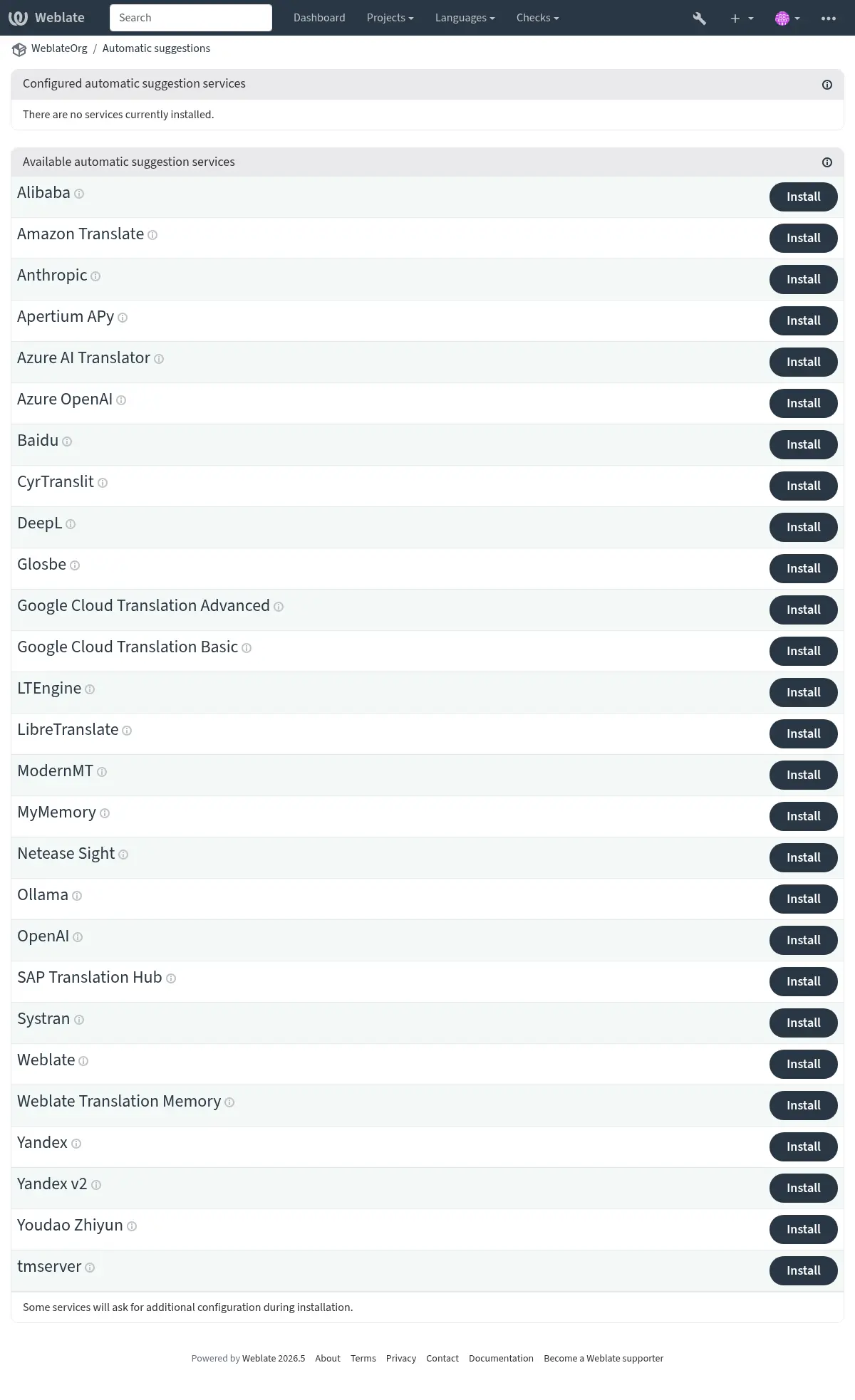
The support for several machine translation and translation memory services is built-in. Each service can be turned on by the administrator for whole site (under Automatic suggestions in 管理介面) or at the project settings:
備註
They come subject to their terms of use, so ensure you are allowed to use them how you want. Third-party services can receive source strings, translations, and related context from Weblate.
The services translate from the source language as configured at 組件配置, see 來源語言.
Per-project automatic suggestion can also be configured via the Weblate 的 REST API.
也參考
機器翻譯與翻譯記憶服務的優先級
Weblate 翻譯記憶 matches with 100% score take priority over machine translation services. If 100% match in translation memory is found, no machine translation is performed. If several 100% matches occur, the first one returned by the database is used.
Each machine translation service has a predefined maximum score it can produce. The use of installed translation services is ordered according to their maximum score. For each string with translation score lower than the service's maximum, the service is asked to produce a translation. Translations with a score exceeding the current one are accepted.
機器翻譯的來源字串。
在 5.11 版被加入.
The origin of source strings for all third-party services can be configured. This can be used to tweak the service to get the best results. Following choices are available:
LLM translation context
LLM-based automatic suggestion services receive additional context about each translated string, when available. This includes the string context or monolingual key, additional explanation, configured secondary-language translation, plural information, failing quality checks, and placeholder contents. The added metadata is used only to guide the generated suggestion; the returned translation still has to preserve the source placeholders and markup.
Alibaba
在 5.3 版被加入.
- 服務編號:
alibaba- Maximal score:
80
- 配置:
source_language來源語言選擇
可用的選擇:
auto-- 自動選擇source-- 組件來源語言secondary-- Secondary language defined in project or componentkey存取金鑰 ID
secret存取金鑰秘密
region區域 ID
Alibaba Translate is a neural machine translation service for translating text and it supports up to 214 language pairs.
也參考
Anthropic
在 5.16 版被加入.
- 服務編號:
anthropic- Maximal score:
90
- 進階功能:
- 配置:
source_language來源語言選擇
可用的選擇:
auto-- 自動選擇source-- 組件來源語言secondary-- Secondary language defined in project or componentbase_urlAnthropic API URL
Anthropic API 基本 URL。留空以使用預設 URL。
modelAnthropic 模型
可用的選擇:
claude-sonnet-4-5-- Claude Sonnet 4.5(推薦)claude-haiku-4-5-- Claude Haiku 4.5claude-opus-4-5-- Claude Opus 4.5custom-- 自訂模型persona翻譯者角色描述
描述翻譯者的角色描述,提高翻譯的準確性,比如:「您是名松鼠飼養員。」
style翻譯者風格
描述翻譯風格,如:「翻譯得口語化。」
keyAPI 金鑰
custom_model自訂模型名稱
只有在模型設定為「自訂模型」時才需要
max_tokens最大代幣數
Maximum number of tokens to generate in the response.
使用 Anthropic 的 Claude 模型執行翻譯。
The Anthropic API provides access to the Claude family of models, which are known for their strong reasoning and language capabilities. You need an API key from Anthropic to use this service.
Use persona and style fields to further fine-tune translations. These will be used in a prompt for Claude and allow you to change the style of the translations.
The service automatically uses 詞彙表, see Glossaries in automatic suggestion.
Apertium APy
- 服務編號:
apertium-apy- Maximal score:
88
- 配置:
source_language來源語言選擇
可用的選擇:
auto-- 自動選擇source-- 組件來源語言secondary-- Secondary language defined in project or componenturlAPI URL
開源原件機器翻譯平臺提供一組有限語言的翻譯。
使用 Apertium的推薦方式是執行您自己的 Apertium-APy 伺服器。
Amazon Translate
- 服務編號:
aws- Maximal score:
88
- 進階功能:
- 配置:
source_language來源語言選擇
可用的選擇:
auto-- 自動選擇source-- 組件來源語言secondary-- Secondary language defined in project or componentkey存取金鑰 ID
secretAPI 金鑰
region區域名稱
Amazon Translate is a neural machine translation service for translating text to and from English across a breadth of supported languages. The service requires the TranslateFullAccess Managed Policy.
The service automatically uses 詞彙表, see Glossaries in automatic suggestion.
Azure OpenAI
在 5.8 版被加入.
- 服務編號:
azure-openai- Maximal score:
90
- 進階功能:
- 配置:
source_language來源語言選擇
可用的選擇:
auto-- 自動選擇source-- 組件來源語言secondary-- Secondary language defined in project or componentbase_urlAPI URL
modelLLM 模型
persona翻譯者角色描述
描述翻譯者的角色描述,提高翻譯的準確性,比如:「您是名松鼠飼養員。」
style翻譯者風格
描述翻譯風格,如:「翻譯得口語化。」
keyAPI 金鑰
azure_endpointAzure OpenAI 端點 URL
實例的端點 URL,如:https://my-instance.openai.azure.com。
deploymentAzure OpenAI 部署
模型的唯一部署名稱。
Performs translation using OpenAI hosted on Azure.
也參考
Baidu
- 服務編號:
baidu- Maximal score:
90
- 配置:
source_language來源語言選擇
可用的選擇:
auto-- 自動選擇source-- 組件來源語言secondary-- Secondary language defined in project or componentkey用戶端 ID
secret用戶端秘密金鑰 (secret)
由百度提供的機器翻譯服務。
這項服務使用 API,並且您需要從百度獲得 ID 和 API 金鑰來使用它。
CyrTranslit
在 5.7 版被加入.
- 服務編號:
cyrtranslit- Maximal score:
100
- 配置:
source_language來源語言選擇
可用的選擇:
auto-- 自動選擇source-- 組件來源語言secondary-- Secondary language defined in project or component
使用 Cyrtranslit 函式庫的機器翻譯服務。
This service converts text between Cyrillic and Latin scripts for languages that have both scripts.
也參考
DeepL
- 服務編號:
deepl- Maximal score:
91
- 進階功能:
- 配置:
source_language來源語言選擇
可用的選擇:
auto-- 自動選擇source-- 組件來源語言secondary-- Secondary language defined in project or componenturlAPI URL
keyAPI 金鑰
formality正式程度
如果語言沒有特別指定是否為書面語,則使用指定的正式程度
context翻譯上下文
描述翻譯情境,提升翻譯準確性。
next_gen使用下一代模型
偏好使用下一代大語言模型,而非經典機器翻譯模型。
DeepL 是付費服務,提供一些語言的良好機器翻譯。您需要購買 DeepL API 訂閱,或者您可以使用傳統的 DeepL Pro (classic) 計劃。
API URL to use with the DeepL service. At the time of writing, there is the v1 API as well as a free and a paid version of the v2 API.
https://api.deepl.com/v2/(Weblate 預設)Is meant for API usage on the paid plan, and the subscription is usage-based.
https://api-free.deepl.com/v2/Is meant for API usage on the free plan, and the subscription is usage-based.
https://api.deepl.com/v1/Is meant for CAT tools and is usable with a per-user subscription.
備註
此前 Weblate 被 DeepL 分類為計算機輔助翻譯工具,因此應該使用 v1 API,但現在應該使用 v2 API。這樣預設為 v2,在您有現有的計算機輔助翻譯工具訂閱,並想要 Weblate 使用它的情況下,可以將其變更為 v1。
Weblate supports DeepL formality, it will choose matching one based on the
language (for example, there is de@formal and de@informal).
The translation context can optionally be specified to improve translations quality. Read more on that in DeepL translation context documentation.
The service automatically uses 詞彙表, see Glossaries in automatic suggestion.
Glosbe
- 服務編號:
glosbe- Maximal score:
90
- 配置:
source_language來源語言選擇
可用的選擇:
auto-- 自動選擇source-- 組件來源語言secondary-- Secondary language defined in project or component
幾乎每一種活語言的免費字典與翻譯服務。
The API is gratis to use, but usage of the translations is subject to the license of the used data source. There is a limit of calls that may be done from one IP in a set period of time, to prevent abuse.
也參考
Google Cloud Translation Basic
- 服務編號:
google-translate- Maximal score:
90
- 配置:
source_language來源語言選擇
可用的選擇:
auto-- 自動選擇source-- 組件來源語言secondary-- Secondary language defined in project or componentkeyAPI 金鑰
Machine translation service provided by the Google Cloud services.
This service uses the Google Translation API v2, and you need to obtain an API key and turn on billing in the Google API console.
也參考
Google Cloud Translation Advanced
- 服務編號:
google-translate-api-v3- Maximal score:
90
- 進階功能:
- 配置:
source_language來源語言選擇
可用的選擇:
auto-- 自動選擇source-- 組件來源語言secondary-- Secondary language defined in project or componentcredentialsGoogle 翻譯服務帳號資訊
輸入服務帳號的 JSON 金鑰。
projectGoogle 翻譯專案
輸入您 Google Cloud 專案的數字或字母 ID。
locationGoogle Translate 位置
選擇您用在 Google Cloud 專案,或者是位置最靠近您的 Google Cloud Translation 區域。
bucket_nameGoogle Storage Bucket 名稱
請輸入用來儲存詞彙表檔案的 Google Cloud Storage bucket 名稱。
Machine translation service provided by the Google Cloud services.
This service uses the Google Translation API v3 and you need credentials in JSON format to access it.
In order to use this service, you first need to go through the following steps:
Optionally, you can configure the service to use 詞彙表 by setting up a Bucket:
IBM Watson Language Translator
在 5.13.1 版被移除: This service was withdrawn by vendor as of 10 December 2024.
LibreTranslate
在 4.7.1 版被加入.
- 服務編號:
libretranslate- Maximal score:
89
- 配置:
source_language來源語言選擇
可用的選擇:
auto-- 自動選擇source-- 組件來源語言secondary-- Secondary language defined in project or componenturlAPI URL
keyAPI 金鑰
LibreTranslate is a free and open-source service for machine translations. The public instance requires an API key, but LibreTranslate can be self-hosted and there are several mirrors available to use the API for free.
https://libretranslate.com/(官方公開服務)Requires an API key to use outside of the website.
LTEngine
在 5.17.1 版被加入.
- 服務編號:
ltengine- Maximal score:
89
- 配置:
source_language來源語言選擇
可用的選擇:
auto-- 自動選擇source-- 組件來源語言secondary-- Secondary language defined in project or componenturlAPI URL
keyAPI 金鑰
LTEngine provides a local LibreTranslate-compatible API backed by large language models. For many Weblate installations, native LLM services such as Ollama can be a better fit because Weblate can send translation context directly to the model. Use LTEngine when you specifically want its local translation engine or future LTEngine translation improvements.
Azure AI Translator
- 服務編號:
microsoft-translator- Maximal score:
90
- 進階功能:
- 配置:
source_language來源語言選擇
可用的選擇:
auto-- 自動選擇source-- 組件來源語言secondary-- Secondary language defined in project or componentkeyAPI 金鑰
base_url應用程式基礎 URL
可用的選擇:
api.cognitive.microsofttranslator.com-- 全球(不分區)api-apc.cognitive.microsofttranslator.com-- 亞太api-eur.cognitive.microsofttranslator.com-- 歐洲api-nam.cognitive.microsofttranslator.com-- 北美api.translator.azure.cn-- 中國api.cognitive.microsofttranslator.us-- Azure 美國政府雲端服務endpoint_url身分驗證服務 URL
可以使用下方的區域欄位指定區域性或多服務。
可用的選擇:
api.cognitive.microsoft.com-- 全球api.cognitive.azure.cn-- 中國api.cognitive.microsoft.us-- Azure 美國政府雲端服務region身分驗證服務區域
category類別
指定自訂的系統分類 ID(而非通用 ID)來使用。
由 Microsoft 在 Azure 門戶提供的機器翻譯服務,作為 Cognitive Services 的一種。
Weblate 實施了 Translator API V3.
The service automatically uses 詞彙表 via dynamic dictionary, see Glossaries in automatic suggestion.
Translator Text API V2
您用於Translator API V2 的金鑰可以用於 API 3。
Translator Text API V3
You need to register at Azure portal and use the key you obtain there.
With new Azure keys, you also need to set region to locale of your service.
You can also specify a custom category to use custom translator.
提示
對於 Azure 中國,請使用您的 Azure Portal 的端點。
ModernMT
在 4.2 版被加入.
- 服務編號:
modernmt- Maximal score:
90
- 進階功能:
- 配置:
source_language來源語言選擇
可用的選擇:
auto-- 自動選擇source-- 組件來源語言secondary-- Secondary language defined in project or componenturlAPI URL
keyAPI 金鑰
context_vector情境向量
「記憶 ID:權重」的逗號分隔清單。範例:1234:0.123,4567:0.456
The service automatically uses 詞彙表, see Glossaries in automatic suggestion.
也參考
MyMemory
- 服務編號:
mymemory- Maximal score:
100
- 配置:
source_language來源語言選擇
可用的選擇:
auto-- 自動選擇source-- 組件來源語言secondary-- Secondary language defined in project or componentemail聯絡電子郵件
username使用者名稱
keyAPI 金鑰
使用機器翻譯的巨量翻譯記憶庫。
Free, anonymous usage is currently limited to 100 requests/day, or to 1000
requests/day when you provide a contact e-mail address in email.
You can also ask them for more.
也參考
Netease Sight
- 服務編號:
netease-sight- Maximal score:
90
- 配置:
source_language來源語言選擇
可用的選擇:
auto-- 自動選擇source-- 組件來源語言secondary-- Secondary language defined in project or componentkey用戶端 ID
secret用戶端秘密金鑰 (secret)
網易提供的機器翻譯服務。
這項服務使用 API,兵器額您需要從網易得到金鑰和密碼。
Ollama
在 5.15 版被加入.
- 服務編號:
ollama- Maximal score:
90
- 進階功能:
- 配置:
source_language來源語言選擇
可用的選擇:
auto-- 自動選擇source-- 組件來源語言secondary-- Secondary language defined in project or componentbase_urlAPI URL
Ollama API 的基礎 URL,預設值為 localhost,連線埠 11434。
modelOllama 模型
在 Ollama 模型目錄中描述的模型名稱。
persona翻譯者角色描述
描述翻譯者的角色描述,提高翻譯的準確性,比如:「您是名松鼠飼養員。」
style翻譯者風格
描述翻譯風格,如:「翻譯得口語化。」
Performs translation using Ollama models.
The Ollama API allows for the use of open source models for translations either locally installed or remotely accessed via the Ollama service. Note that before configuring your models, you should have Ollama installed and downloaded the models you wish to use.
Use persona and style fields to further fine-tune translations. These will be used in a prompt for Ollama and allow you to change the style of the translations.
The service automatically uses 詞彙表, see Glossaries in automatic suggestion.
也參考
OpenAI
在 5.3 版被加入.
- 服務編號:
openai- Maximal score:
90
- 進階功能:
- 配置:
source_language來源語言選擇
可用的選擇:
auto-- 自動選擇source-- 組件來源語言secondary-- Secondary language defined in project or componentbase_urlOpenAI API 基礎 URL
OpenAI API 的基礎 URL(如果不是使用 OpenAI 預設的 URL)
modelOpenAI 模型
可用的選擇:
auto-- 自動選擇gpt-5-nano-- GPT-5-nanogpt-5-mini-- GPT-5-minigpt-5.2-- GPT-5.2gpt-5.1-- GPT-5.1gpt-5-- GPT-5gpt-4.1-nano-- GPT-4.1-nanogpt-4.1-mini-- GPT-4.1-minigpt-4.1-- GPT-4.1gpt-4o-mini-- GPT-4o minigpt-4o-- GPT-4oo3-mini-- o3-minio3-- o3o1-mini-- o1-minio1-- o1o1-pro-- o1-procustom-- 自訂模型persona翻譯者角色描述
描述翻譯者的角色描述,提高翻譯的準確性,比如:「您是名松鼠飼養員。」
style翻譯者風格
描述翻譯風格,如:「翻譯得口語化。」
keyAPI 金鑰
custom_model自訂模型名稱
只有在模型設定為「自訂模型」時才需要
使用 OpenAI 執行翻譯。
The OpenAI API is powered by a diverse set of models with different capabilities and price points. Automatic selection chooses the best model available, but you might want to choose a specific model that matches your needs.
Use persona and style fields to further fine-tune translations. These will be used in a prompt for OpenAI and allow you to change the style of the translations.
The service automatically uses 詞彙表, see Glossaries in automatic suggestion.
在 5.7 版的變更: Support for custom model and base URL was added.
SAP Translation Hub
- 服務編號:
sap-translation-hub- Maximal score:
100
- 配置:
source_language來源語言選擇
可用的選擇:
auto-- 自動選擇source-- 組件來源語言secondary-- Secondary language defined in project or componenturlAPI URL
keyAPI 金鑰
usernameSAP 使用者名稱
passwordSAP 密碼
enable_mt啟用機器翻譯
domain翻譯領域
翻譯領域的 ID,例如 BC。若未指定領域,這個方法會在所有可用領域中搜尋翻譯。
SAP 提供的機器翻譯服務。
You need to have a SAP account (and the SAP Translation Hub enabled in the SAP Cloud Platform) to use this service.
You can also configure whether to also use machine translation services, in addition to the term database.
備註
To access the Sandbox API, you need to set url
and key.
為了存取正式環境的 API,您需要設定 url, username 與 password。
Systran
- 服務編號:
systran- Maximal score:
90
- 配置:
source_language來源語言選擇
可用的選擇:
auto-- 自動選擇source-- 組件來源語言secondary-- Secondary language defined in project or componentkeyAPI 金鑰
Systran 提供的機器翻譯服務。
This service uses an API, and you need to obtain API key at <https://translate.systran.net/en/account>.
tmserver
- 服務編號:
tmserver- Maximal score:
100
- 配置:
source_language來源語言選擇
可用的選擇:
auto-- 自動選擇source-- 組件來源語言secondary-- Secondary language defined in project or componenturlAPI URL
You can run your own translation memory server by using a tmserver protocol.
The original tmserver was bundled with the translate-toolkit.
amaGama server is an enhanced version of tmserver.
備註
There currently does not seem to be a maintained server for this.
Weblate
- 服務編號:
weblate- Maximal score:
100
- 配置:
This service has no configuration.
Weblate machine translation service can provide translations based on the exact matches of a string in the currently existing strings in a Translated, Approved, or Read-only states inside Weblate.
Weblate 翻譯記憶
- 服務編號:
weblate-translation-memory- Maximal score:
100
- 配置:
This service has no configuration.
Use 翻譯記憶 as a machine translation service. Any string that has been translated before (or uploaded to the translation memory) can be translated in this way. This suggestion source works with fuzzy matching.
備註
Recreating 翻譯記憶 reduces capabilities of this TM source.
Yandex
- 服務編號:
yandex- Maximal score:
90
- 配置:
source_language來源語言選擇
可用的選擇:
auto-- 自動選擇source-- 組件來源語言secondary-- Secondary language defined in project or componentkeyAPI 金鑰
Yandex 提供的機器翻譯服務。
這項服務使用翻譯 API,您需要從 Yandex 得到 API 金鑰。
Yandex v2
在 5.1 版被加入.
- 服務編號:
yandex-v2- Maximal score:
90
- 配置:
source_language來源語言選擇
可用的選擇:
auto-- 自動選擇source-- 組件來源語言secondary-- Secondary language defined in project or componentkeyAPI 金鑰
Yandex 提供的機器翻譯服務。
This service uses a Translation API, and you need to obtain an API key from Yandex Cloud.
Youdao Zhiyun
- 服務編號:
youdao-zhiyun- Maximal score:
90
- 配置:
source_language來源語言選擇
可用的選擇:
auto-- 自動選擇source-- 組件來源語言secondary-- Secondary language defined in project or componentkey用戶端 ID
secret用戶端秘密金鑰 (secret)
有道提供的機器翻譯服務。
這項服務使用 API,您需要從有道獲得 ID 和 API 金鑰。
自訂機器翻譯
You can also implement your own machine translation services using a few lines
of Python code. Place the code in a module Weblate can import (see
建立 Python 模組 or 自訂程式碼) and add fully qualified
class name to WEBLATE_MACHINERY.
"""
Machine translation example.

This example uses fictional http://example.com/ service to translate the
strings.
"""

from __future__ import annotations

from typing import TYPE_CHECKING

from weblate.machinery.base import MACHINERY_DEFAULT_THRESHOLD, MachineTranslation

if TYPE_CHECKING:
    from weblate.auth.models import User
    from weblate.machinery.base import DownloadTranslations
    from weblate.trans.models import Unit


class SampleTranslation(MachineTranslation):
    """Sample machine translation interface."""

    name = "Sample"

    def download_languages(self):
        """Return list of languages your machine translation supports."""
        response = self.request("get", "http://example.com/languages")
        return response.json()["languages"]

    def download_translations(
        self,
        source_language,
        target_language,
        text: str,
        unit: Unit | None,
        user: User | None,
        threshold: int = MACHINERY_DEFAULT_THRESHOLD,
    ) -> DownloadTranslations:
        """Return tuple with translations."""
        response = self.request(
            "get",
            "http://example.com/translate",
            params={
                "source_language": source_language,
                "target_language": target_language,
                "text": text,
            },
        )

        for translation in response.json()["translations"]:
            yield {
                "text": translation,
                "quality": 100,
                "service": self.name,
                "source": text,
            }