可選 Weblate 模組
可以獲得幾個可選的模組來配置您的設定。
Git 匯出器
使用 HTTP(S) 為您提供對底層 Git 儲存庫的唯讀存取。
安裝
將
weblate.gitexport新增到settings.py中安裝的 apps 中:INSTALLED_APPS += ("weblate.gitexport",)
通過安裝後遷移資料庫,將現有的儲存庫匯出:
weblate migrate
提示
Git exporter is turned on in our official Docker image. To turn it of, use:
WEBLATE_REMOVE_APPS=weblate.gitexport
使用
模組自動鉤入 Weblate,並且在 組件配置 中設定匯出儲存庫 URL。儲存庫在 Weblate URL 的 /git/ 部分下是可以存取的,例如 https://example.org/git/weblate/main/。
公共可用專案的儲存庫可以被複製而無需認證:
git clone 'https://example.org/git/weblate/main/'
Access to browse the repositories with restricted access (with Private
access control or when REQUIRE_LOGIN is enabled)
requires an API token which can be obtained in your
user profile:
git clone 'https://user:KEY@example.org/git/weblate/main/'
備註
Weblate serves the Git repository itself, but it does not serve Git LFS
objects. For repositories using Git LFS, clone from the upstream repository
and add Weblate as another remote. If you only need Git-tracked files, you
can clone from Weblate with GIT_LFS_SKIP_SMUDGE=1 to skip downloading
Git LFS objects.
提示
成員或 使用者 使用者群組與匿名使用者預設通過 存取儲存庫 和 超級使用者 角色存取公開專案。
帳單
這用在 Hosted Weblate 上來確定付費套餐,跟踪收據和使用限制。
安裝
1. Add weblate.billing to installed apps in
settings.py:
INSTALLED_APPS += ("weblate.billing",)
執行資料庫遷移,來可選地為模組安裝另外的資料庫結構:
weblate migrate
Billing plan creation and assignment
You first need to create a billing plan to activate billing. Navigate to the Administration section (represented by the wrench icon) and open the Tools screen. From there, proceed to the Django admin interface.
In the Django admin interface, locate the BILLING section and add a billing plan. For instance, you can add a Free plan with no cost.
If you wish to assign a billing plan to an existing project, this can also be done within the Django admin interface using the Customer billings option.
Lastly, the Django admin interface provides an Invoice option for logging your customer payments.
使用
安裝後您可以在管理介面控制帳單。允許了帳單的使用者將在他們的 使用者個人檔案 中得到新的 Billing 標籤。
帳單模組額外允許專案管理員在不是超級使用者的情況下去建立新的專案和組件(請參閱 新增翻譯專案和組件)。當後面的條件滿足是這是可能的:
帳單在其配置的限制下(任何過度的使用都會阻止新增專案/組件),並且被支付(如果價格為非零值的話)
使用者是現有的帶有帳單專案的管理員,或者使用者是帳單的所有者(當為使用者新增新的帳單,而允許匯入新的專案時,後者是必要的)。
在新增專案時,使用者在存取多個帳單的情況下,能夠選擇將專案記在哪個帳單上。
法律模組
這用在 Hosted Weblate 上,來提供所需的法律文件。它開始時提供空白文件,會希望您填充文件中後面的範本:
legal/documents/tos.html服務條款文件
legal/documents/privacy.html隱私權政策文件
legal/documents/summary.html服務條款與隱私政策的簡短概覽
On changing the terms of service documents, please adjust
LEGAL_TOS_DATE so that users are forced to agree with the updated
documents.
備註
Legal documents for the Hosted Weblate service operated by Weblate s.r.o. are available in this Git repository: <https://github.com/WeblateOrg/wllegal/tree/main/wllegal/templates/legal/documents>.
The bundled terms of service and related legal documents are specific to that service and are not intended for general use. They might still come in handy as a starting point if adjusted to meet your needs.
安裝
1. Add weblate.legal to installed apps in
settings.py:
INSTALLED_APPS += ("weblate.legal",)

# Optional:

# Social auth pipeline to confirm TOS upon registration/subsequent sign in
SOCIAL_AUTH_PIPELINE += ("weblate.legal.pipeline.tos_confirm",)

# Middleware to enforce TOS confirmation of signed in users
MIDDLEWARE += [
    "weblate.legal.middleware.RequireTOSMiddleware",
]
執行資料庫遷移,來可選地為模組安裝另外的資料庫結構:
weblate migrate
編輯
weblate/legal/templates/legal/資料夾中的而法律文件,與您的服務匹配。
提示
In Docker deployments, enable the legal module using
WEBLATE_LEGAL_INTEGRATION instead of editing
settings.py. Use tos-confirm to enable the legal module and
terms of service confirmation enforcement, or wllegal to additionally
load the hosted legal document templates used by services operated by
Weblate s.r.o. These templates are not intended for general use. To provide
your own templates in Docker, place them in
/app/data/python/customize/templates/legal/documents, see
取代標誌與其它靜態檔案.
使用
安裝並編輯後,法律文件顯示在 Weblate UI 中。
頭像
頭像在伺服器端下載並快取,來減少對預設服務的網站的洩露。通過為其配置的電子郵件位址來取回頭像的內建支援,可以使用 ENABLE_AVATARS 來關閉。
Weblate 目前支援:
在地化 CDN
The JavaScript 在地化 CDN and Translation files CDN add-ons
write files to LOCALIZE_CDN_PATH; Weblate does not serve them.
Configure the web server or CDN serving LOCALIZE_CDN_URL as a
public, read-only static file host.
Treat every published CDN file as public. The add-on specific UUID in the URL is not an access-control mechanism. Do not enable CDN add-ons for components that contain private strings, unreleased product text, customer data, internal URLs, API examples, repository paths, translator comments, or file-format metadata that should not be exposed.
The Translation files CDN add-on publishes raw translation files in formats supported by Weblate. Some formats can be interpreted by browsers or other clients as HTML, SVG, XML, JavaScript, YAML, or application-specific configuration. Serve the CDN from a dedicated domain that is separate from Weblate and from the application consuming the translations. Do not share authentication cookies with the CDN domain.
Recommended server configuration:
Serve only the directory configured by
LOCALIZE_CDN_PATH; do not expose Weblate repositories, backups, media, configuration, or the whole data directory.Disable directory listing.
Use HTTPS and make the CDN host read-only from the web server.
Send X-Content-Type-Options with
nosniff.Configure conservative MIME types. Serve unknown translation formats as text/plain or application/octet-stream; only serve
weblate.jsas JavaScript.For raw translation formats that are not intended to be rendered in a browser, consider adding Content-Disposition with
attachment.Configure
Access-Control-Allow-Originonly for sites that need browser access to the files.Set cache lifetimes that match your update expectations, and purge CDN caches when stale translations must disappear quickly.
The following nginx snippet serves only the configured CDN directory and applies conservative defaults for raw translation files:
#
# nginx configuration for the Weblate localization CDN
#
# You will want to change:
#
# - server_name to match the host configured in LOCALIZE_CDN_URL
# - root to match LOCALIZE_CDN_PATH
# - Access-Control-Allow-Origin to the sites that need browser access
# - TLS configuration if HTTPS is not terminated before nginx
#
server {
    listen 80;
    server_name cdn.example.com;

    # LOCALIZE_CDN_PATH
    root /home/weblate/data/l10n-cdn;

    autoindex off;
    disable_symlinks on;

    location = / {
        return 404;
    }

    # The JavaScript localization add-on publishes this loader.
    location ~ "^/[0-9a-f]{32}/weblate\.js$" {
        try_files $uri =404;

        types {
            application/javascript js;
        }
        default_type application/javascript;

        add_header X-Content-Type-Options nosniff always;
        # add_header Access-Control-Allow-Origin "https://www.example.com" always;

        expires 1h;
    }

    # Other CDN files are translation files. Serve them conservatively so raw
    # formats are not interpreted as active browser content.
    location / {
        try_files $uri =404;

        types {
        }
        default_type text/plain;

        add_header X-Content-Type-Options nosniff always;
        add_header Content-Disposition "attachment" always;
        # add_header Access-Control-Allow-Origin "https://www.example.com" always;

        expires 1h;
    }
}
簽署 GnuPG 的 Git 承諾
所有的承諾可以由 Weblate 時間的 GnuPG 金鑰簽署。
Turn on
WEBLATE_GPG_IDENTITY. (Weblate will generate a GnuPG key when needed and will use it to sign all translation commits.)這個特性需要安裝 GnuPG 2.1 或更新版。
您可以在
DATA_DIR中找到金鑰,而公鑰顯示在“關於”頁面上: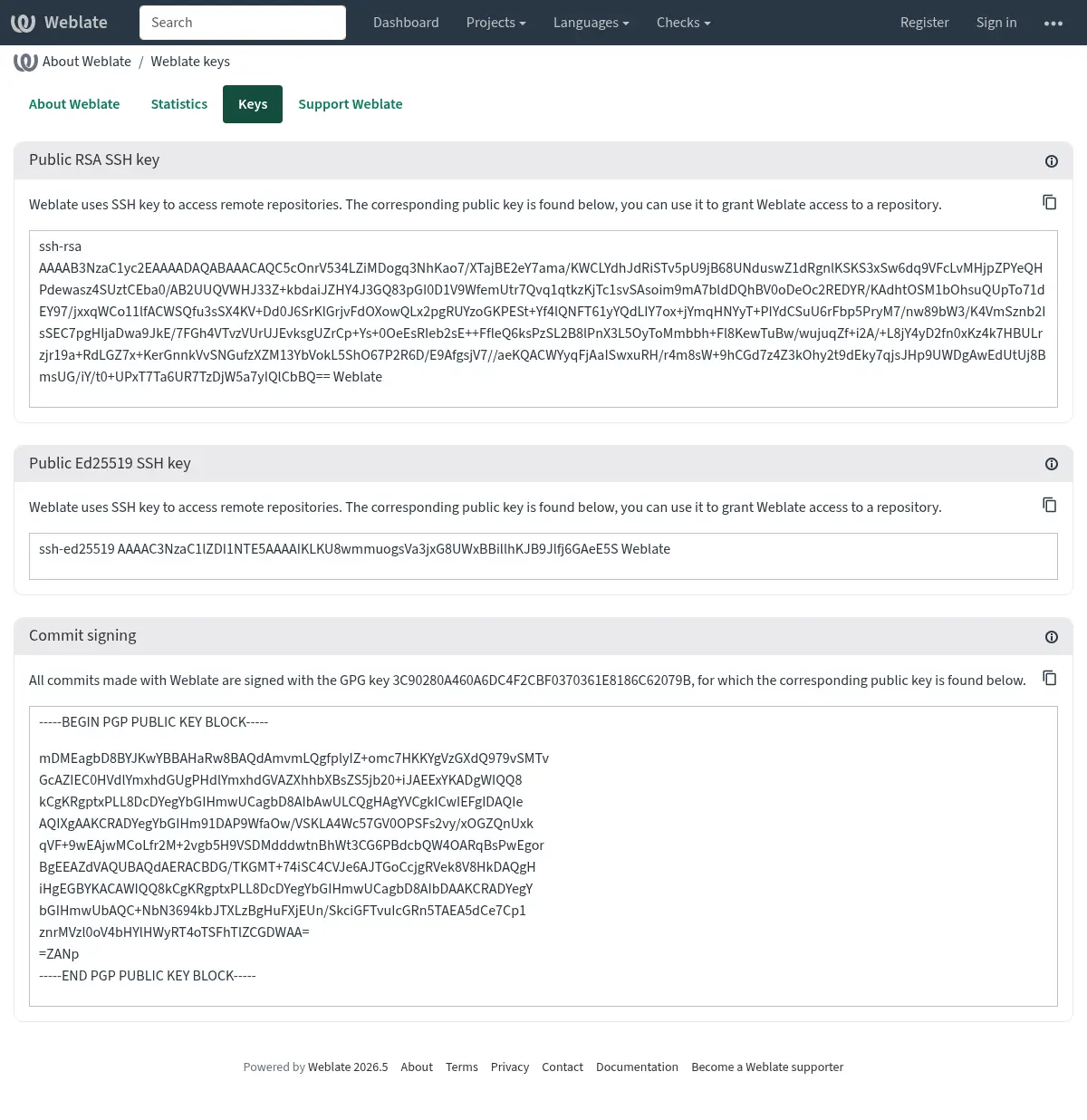
Alternatively you can also import existing keys into Weblate, just set
HOME=$DATA_DIR/homewhen invoking gpg.
提示
The key material is cached by Weblate for a long period. In case you let
Weblate generate a key with WEBLATE_GPG_IDENTITY and then import
key with the same identity to use an existing key, purging redis cache is
recommended to see the effect of such change.
備註
When sharing DATA_DIR between multiple hosts, please follow instructions
at https://wiki.gnupg.org/NFS to make GnuPG signing work reliably.
速率限制
在 4.6 版的變更: The rate limiting no longer applies to signed in superusers.
Weblate 的一些操作受到速率限制。在 RATELIMIT_WINDOW 的秒數內最多允許 RATELIMIT_ATTEMPTS 次數的嘗試。然後阻止使用者 RATELIMIT_LOCKOUT 時間。還有指定範圍的設定,例如 RATELIMIT_CONTACT_ATTEMPTS 或 RATELIMIT_TRANSLATE_ATTEMPTS。下面的表格是可用範圍的完整清單。
後面的操作受到速率限制:
名稱 |
範圍 |
允許的嘗試 |
速率限制視窗 |
鎖定時間 |
|---|---|---|---|---|
註冊 |
|
5 |
300 |
600 |
將消息發送給管理員 |
|
2 |
300 |
600 |
Password authentication on sign-in |
|
5 |
300 |
600 |
第二要素身分驗證 |
|
5 |
300 |
600 |
網站範圍的搜尋 |
|
6 |
60 |
60 |
正在翻譯 |
|
30 |
60 |
600 |
新增至詞彙表 |
|
30 |
60 |
600 |
Starting translation into a new language |
|
2 |
300 |
600 |
建立新專案 |
|
5 |
600 |
600 |
The rate limiting is based on sessions when user is signed in and on IP address if not.
If a user fails to sign in AUTH_LOCK_ATTEMPTS times, password authentication will be turned off on the account until having gone through the process of having its password reset.
這個設定也可被使用在 Docker 容器中,透過新增 WEBLATE_ 前綴字在設定名稱前。如: RATELIMIT_ATTEMPTS 可使用 WEBLATE_RATELIMIT_ATTEMPTS。
API 具有另外的速率限制設定,請參閱 API 速率限制。