Access control
Weblate comes with a fine-grained privilege system to assign user permissions for the whole instance with predefined roles, or by assigning one or more groups of permissions to users for everything, or individual projects, components, glossaries, and so on.
Project access control
Note
Projects running the gratis Libre plan on Hosted Weblate are always Public. You can switch to the paid plan if you want to restrict access to your project.
Limit user access to individual projects by selecting a different Access control setting. The available options are:
- Public
Visible to everybody.
Any authenticated user can contribute.
VCS repository might be exposed to everybody.
Choose this for open-source projects, or when your Weblate instance is private or locked-down.
- Protected
Visible to everybody.
Only chosen users can contribute.
Only chosen users can access VCS repository.
Choose this to gain visibility, but still have control over who can contribute.
- Private
Visible only to chosen users.
Only chosen users can contribute.
Only chosen users can access VCS repository.
Choose this for projects that should not be exposed publicly at all.
- Custom
Visible only to chosen users.
Only chosen users can contribute.
Only chosen users can access VCS repository.
Not available on Hosted Weblate.
You will have to set up all the permissions using Site-wide access control.
Choose this on your own Weblate instance if you want to define access in a specific, finely customizable way.
Access control can be changed in the Access tab of the configuration (Operations ↓ Settings) of each respective project.
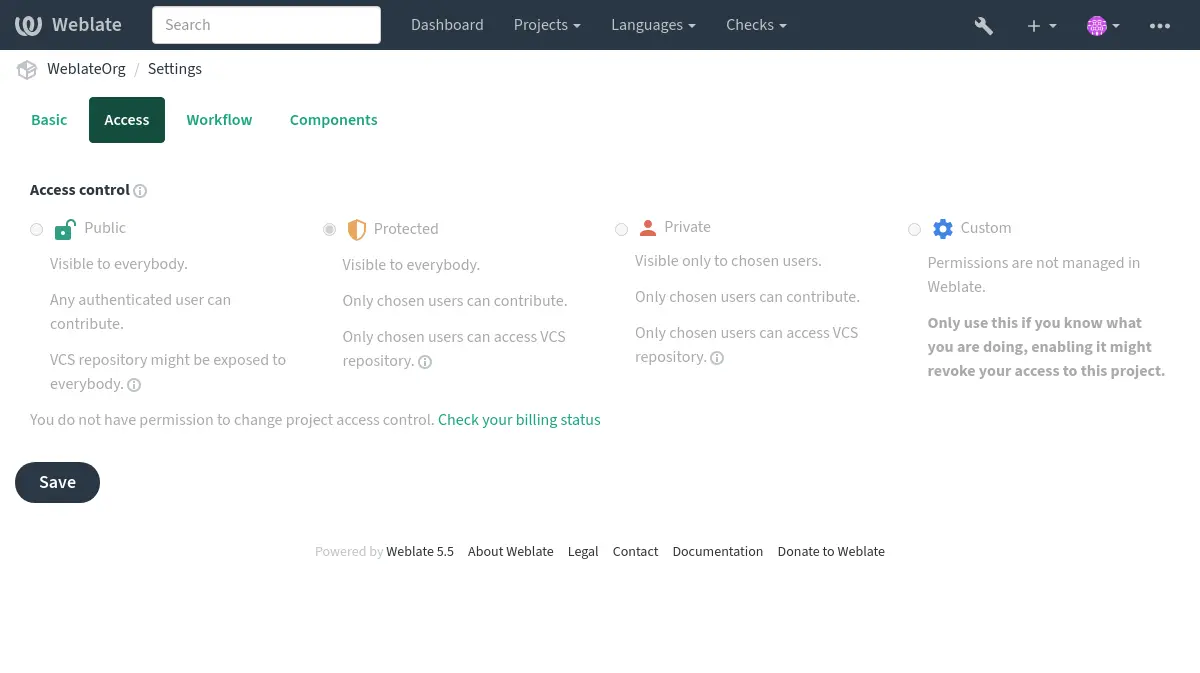
The default can also be changed by setting DEFAULT_ACCESS_CONTROL.
Note
Even Private project statistics are counted into the site-wide statistics and language summary. This does not reveal project names or any other info.
Note
Instance administrators can modify the default permission sets available to users in Public, Protected, and Private projects by using custom settings.
See also
Workspace access control
Workspace-scoped teams are documented in Workspace access control.
Managing per-project access control
For Public, Protected and Private projects:
Granting users Manage project access (see List of privileges) allows them to assign other users in Public, Protected and Private (but not Custom) projects via adding them to teams.
These are the default teams provided with Weblate; teams can be added or modified by users with sufficient privileges:
- Administration
All available permissions for the project.
- Review
Approve translations in a review.
Available only if review workflow is on.
For Protected and Private projects only:
- Translate
Translate the project and upload translations made offline.
- Sources
Edit source strings (if allowed in the project settings) and source-string info.
- Languages
Manage translated languages (add or remove translations).
- Glossary
Manage glossary (add, remove, and upload entries).
- Memory
Manage translation memory.
- Screenshots
Manage screenshots (add, remove, and associate them to source strings).
- Automatic translation
Can use automatic translation.
- VCS
Manage VCS and access the exported repository.
- Billing
Access billing info and settings (see Billing).
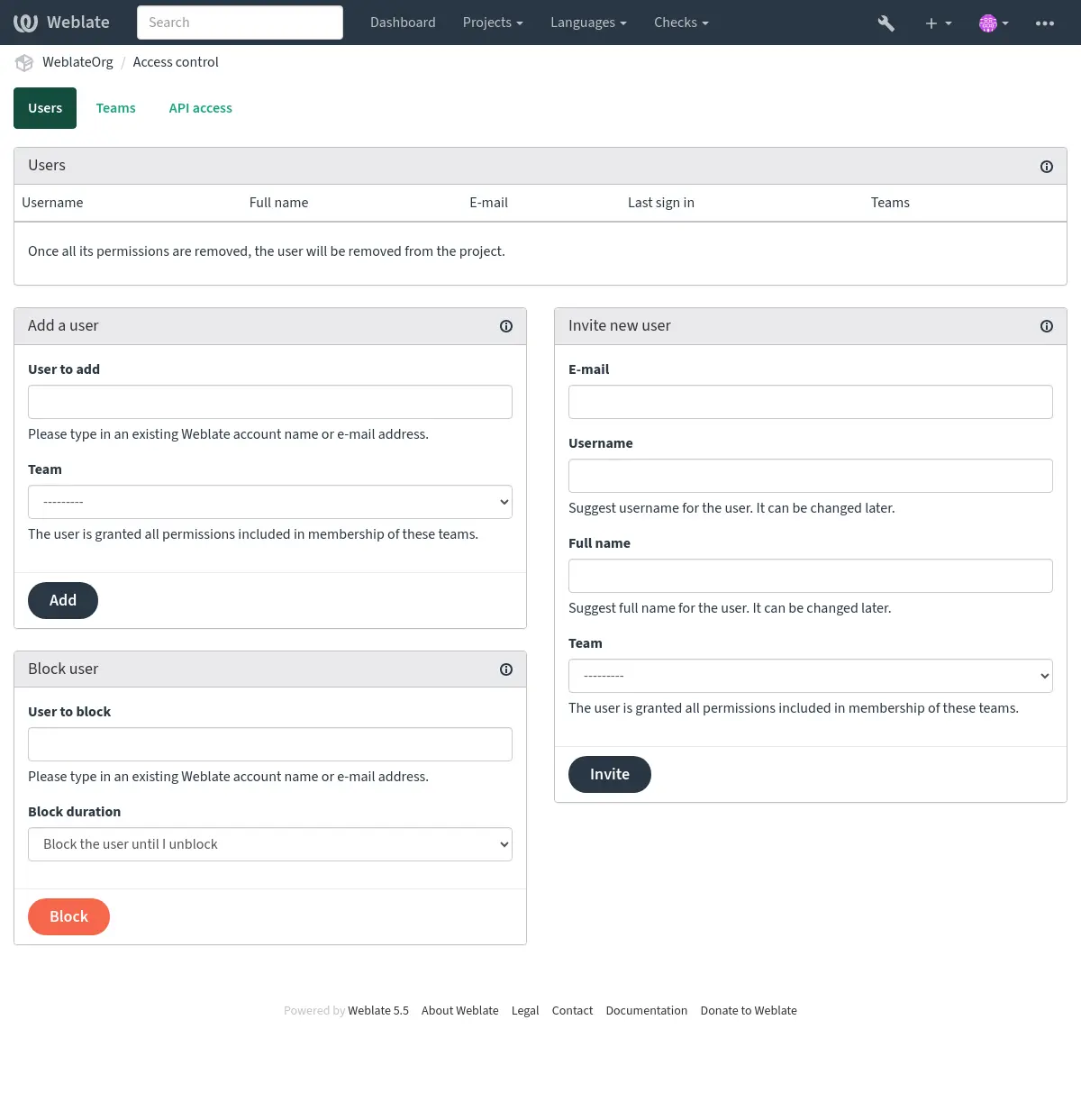
These features are available on the Access control page in the project’s menu Operations ↓ Users.
Hint
You can limit teams to languages or components, and assign them designated access roles (see List of privileges).
Team administrators
Added in version 4.15.
Each team can have team administrators, who can add and remove users within the team.
This is useful in case you want to build self-governed teams.
Inviting new users
Adding existing users will send them invitation to confirm. With
REGISTRATION_OPEN the administrator can also invite new users using
e-mail. Invited users have to complete the registration process to get access
to the project.
It is not required to have any site-wide privileges in order to do so, access management permission on the project’s scope (e.g. a membership in the Administration team) would be sufficient.
Hint
If the invited user missed the validity of the invitation, a new invitation has to be created.
The same kind of invitations are available site-wide from the management interface on the Users tab. Both project administrators and site administrators can also invite multiple users at once by pasting whitespace-separated e-mail addresses. All invitations created in one bulk action use the selected team, and site-wide bulk invites also apply the selected superuser flag.
Site-wide user management is controlled by the global user.edit
permission. Unlike project access management, this is a trusted administrative
permission which allows editing user accounts across the whole instance,
including assigning site-wide teams and granting superuser status to the
managed account, even the caller’s own account.
Bulk invitations are processed individually. Invalid addresses and addresses with an already pending invitation are skipped while valid invitations are still created and sent.
Changed in version 5.0: Weblate now does not automatically create accounts or add users to the teams. This is only done after confirmation from the user.
Blocking users
Added in version 4.7.
If users misbehave in your project, you can block them from contributing. With the relevant permissions blocked, users can still see the project, but won’t be able to contribute.
Cleaning up user contributions
When blocking spam or abusive accounts, project administrators can also clean up the user’s existing contributions in that project. Use Operations ↓ Users, block the user, and select the cleanup actions in the block form. For users who are already blocked, use Clean up user contributions in the blocked users list.
The available cleanup actions are:
Revert user edits reverts the latest editable translations by the user.
Reject user suggestions rejects pending suggestions by the user.
Delete user comments deletes comments by the user.
Site administrators with the site-wide user.edit permission can perform
the same bulk cleanup across all projects from the
management interface on the Users
tab. Open the user’s profile, select the Edit tab, and use
Contribution cleanup.
Per-project permission management
You can set your projects to Protected or Private (see Project access control), and manage users access per-project.
By default this prevents Weblate from granting access provided by Users and Viewers default teams due to these teams’ own configuration. This doesn’t prevent you from granting permissions to those projects site-wide by altering default teams, creating a new one, or creating additional custom settings for individual component as described in Site-wide access control below.
One of the main benefits of managing permissions through the Weblate user interface is that you can delegate it to other users without giving them the superuser privilege. In order to do so, add them to the Administration team of the project.
This project-scoped delegation is separate from the site-wide user.edit
permission. Membership in a project Administration team allows managing
access only for that project, while user.edit grants site-wide user
management in the Weblate UI and API and should be assigned only to fully
trusted site administrators.
Per-project access tokens
Added in version 4.10.
You can define project-scoped access tokens in API access tab. The API tokens can have expiry date set, and their permissions can be customized by team memberships same as with users.
Site-wide access control
Note
This feature is unavailable on Hosted Weblate.
The permission system is based on roles defining a set of permissions, and teams linking roles to users and translations, read Users, roles, teams, and permissions for more details.
The most powerful features of the Weblate’s access control system can be configured in the Management interface. You can use it to manage permissions of any project. You don’t necessarily have to switch it to Custom access control to utilize it. However you must have superuser privileges in order to use it.
If you are not interested in details of implementation, and just want to create a simple-enough configuration based on the defaults, or don’t have a site-wide access to the whole Weblate installation (like on Hosted Weblate), please refer to the Managing per-project access control section.
Site-wide permission management
To manage permissions for a whole instance at once, add users to appropriate default teams:
Users (this is done by default by the automatic team assignment).
Reviewers (if you are using review workflow with dedicated reviewers).
Managers (if you want to delegate most of the management operations to somebody else).
You should keep all projects configured as Public (see Project access control), otherwise the site-wide permissions provided by membership in the Users and Reviewers teams won’t have any effect.
You may also grant some additional permissions of your choice to the default teams. For example, you may want to give a permission to manage screenshots to all the Users.
You can define some new custom teams as well. If you want to keep managing your permissions site-wide for these teams, choose an appropriate value for the Project selection (e.g. All projects or All public projects).
Custom permissions for languages, components or projects
You can create your own dedicated teams to manage permissions for distinct objects such as languages, components, and projects. Although these teams can only grant additional privileges, you can’t revoke any permission granted by site-wide or per-project teams by adding another custom team.
Example:
Restricting translation to Czech to a selected set of translators, (while keeping translations to other languages public):
Remove the permission to translate Czech from all users. In the default configuration this can be done by altering the Users default team.
Group Users¶ Language selection
As defined
Languages
All but Czech
Add a dedicated team for Czech translators.
Group Czech translators¶ Roles
Power users
Project selection
All public projects
Language selection
As defined
Languages
Czech
Add users you wish to give the permissions to into this team.
Management permissions this way is powerful, but can be quite a tedious job. You can only delegate it to other users by granting them Superuser status.
Users, roles, teams, and permissions
The authentication models consist of several objects:
- Permission
Individual permission defined by Weblate. Permissions cannot be assigned to users, only through assignment of roles.
- Role
A role defines a set of permissions (and can be reused in several places).
- User
A user can belong to several teams.
- Group
Groups connect roles and users with authentication objects (projects, languages, components, and component lists).
Note
A team can have no roles assigned to it, in that case access to browse the project by anyone is assumed (see below).
Project-browsing access
A user has to be a member of a team linked to the project, or any component inside that project. Having membership is enough, no specific permissions are needed to browse the project (this is used in the default Viewers team, see List of teams).
Component-browsing access
Granting browsing access to a user in one project gives it access to any component with derived browsing permissions. With Restricted access on, access to components (or component lists) are granted explicitly.
Scope of teams
The scope of the permission assigned by the roles in the teams are applied by the following rules:
If the team specifies any Component list, all the permissions given to members of that team are granted for all the components in the component lists attached to the team, and an access with no additional permissions is granted for all the projects these components are in. Components and Projects are ignored.
Using huge component lists might have a performance impact, please consider giving access via projects instead.
If the team specifies any Components, all the permissions given to the members of that team are granted for all the components attached to the team, and an access with no additional permissions is granted for all the projects these components are in. Projects are ignored.
Otherwise, if the team specifies any Projects, either by directly listing them or by having Projects selection set to a value like All public projects, all those permissions are applied to all the projects, which effectively grants the same permissions to access all projects unrestricted components.
The restrictions imposed by a team’s Languages are applied separately, when it’s verified if a user has access to perform certain actions. Namely, it’s applied only to actions directly related to the translation process itself like reviewing, saving translations, adding suggestions, etc.
Individual team memberships can further limit these permissions to selected languages. Leaving the per-member language limit empty applies no additional limit beyond the team language selection. The same language limit can be set when inviting new users to a project team. When a per-member language limit is set, the membership grants only permissions that can be evaluated for one of those languages. Project-wide, component-wide and global permissions from that team are not granted for that member.
Hint
Use Language selection or Project selection to automate inclusion of all languages or projects.
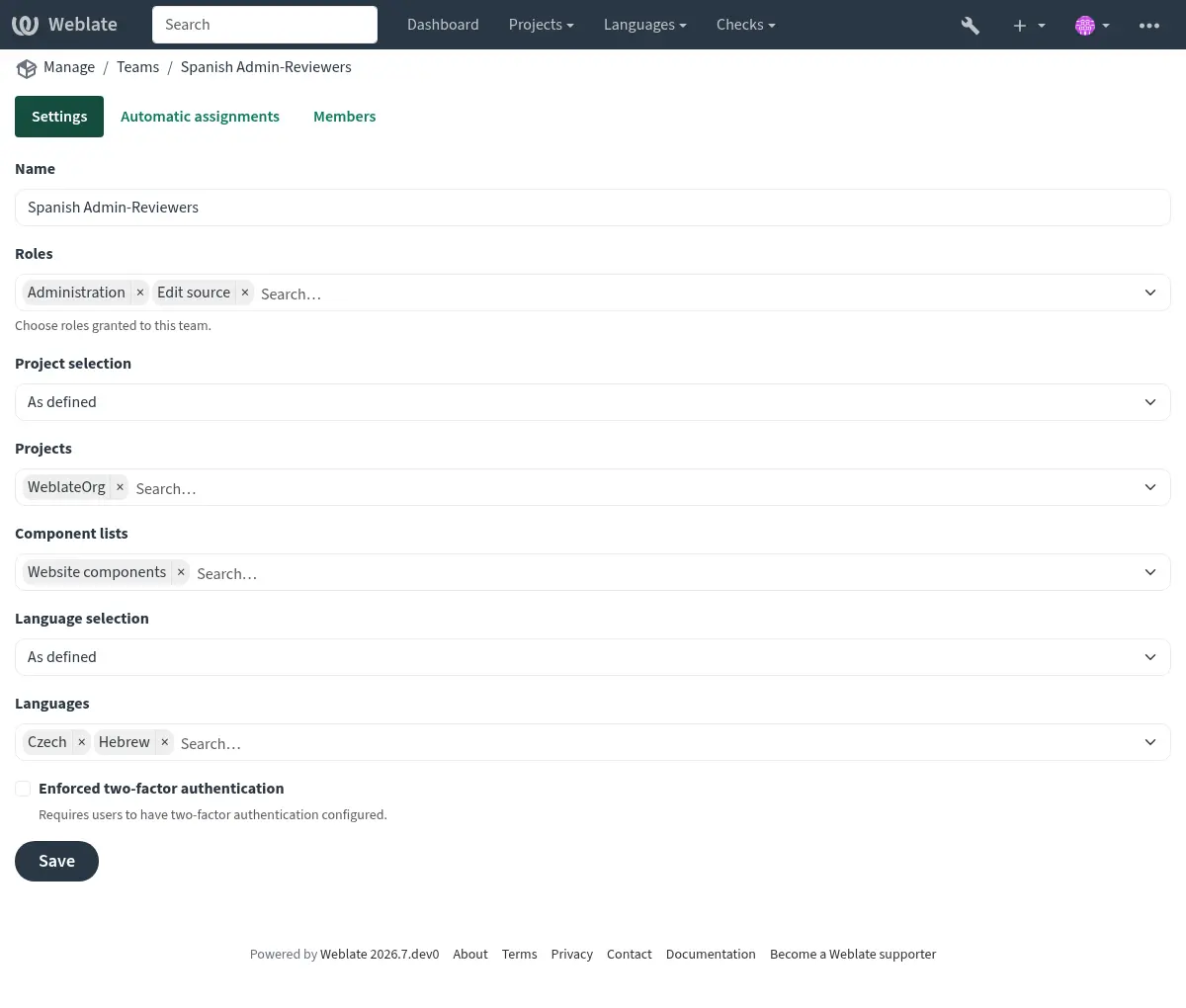
Example:
A project
foowith the components:foo/barandfoo/baz, with reviewing and management rights, in the following team:
Group Spanish Admin-Reviewers¶ Roles
Review strings, Manage repository
Components
foo/bar
Languages
Spanish
Members of that team will have these permissions (assuming the default role settings):
General (browsing) access to the whole project
fooincluding both components in it:foo/barandfoo/baz.Review strings in
foo/barSpanish translation (not elsewhere).Manage VCS for the whole
foo/barrepository e.g. commit pending changes made by translators for all languages.
Automatic team assignments
While editing the Team, you can specify Automatic assignments, which is a list of regular expressions used to automatically assign newly created users to a team based on their e-mail addresses. This assignment only happens upon account creation.
The most common use-case for the feature is to assign all new users to some
default team. This behavior is used for the default Users and Guest teams
(see List of teams). Use regular expression ^.*$ to match all users.
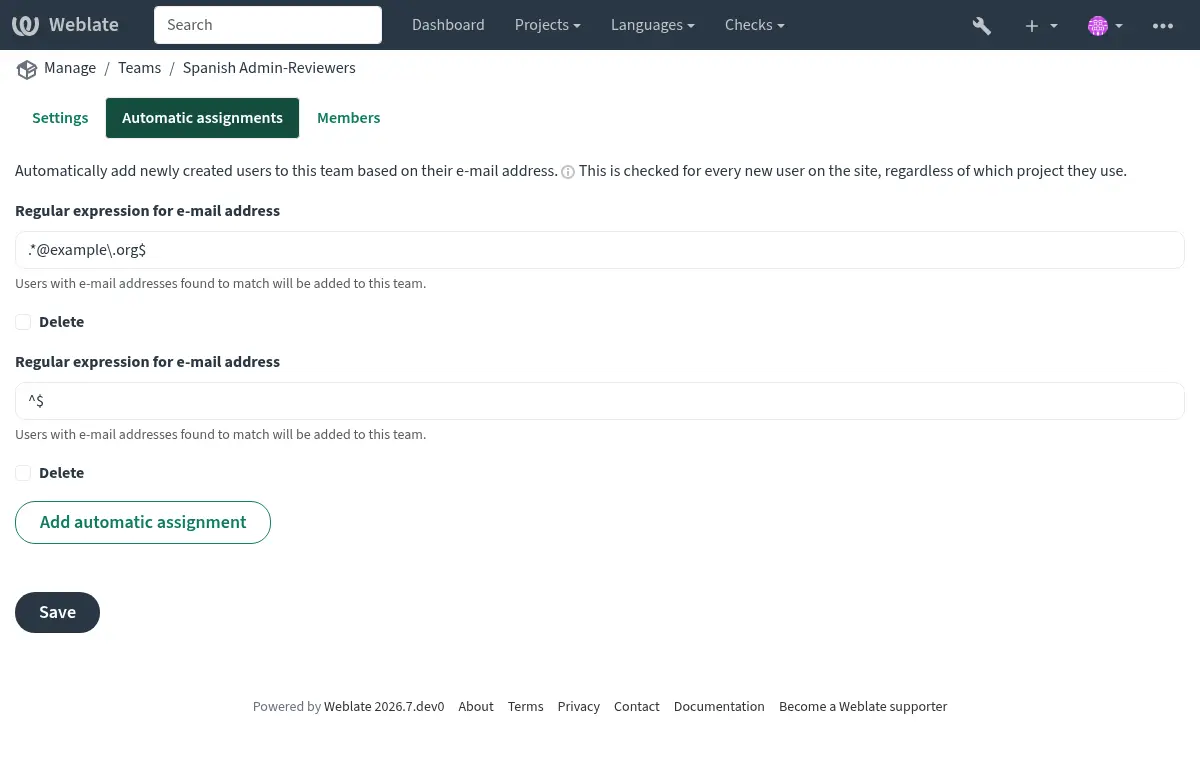
Another use-case for this option might be to
give some additional privileges to employees of your company by default.
Assuming all of them use corporate e-mail addresses on your domain, this can
be accomplished with an expression like ^.*@mycompany.com.
Note
Automatic team assignment to Users and Viewers is always recreated
when upgrading from one Weblate version to another. If you want to turn it off, set the regular expression to
^$ (which won’t match anything).
Note
Bulk inviting through the user interface creates invitations. Existing users still have to confirm the invitation before they become team members.
Default teams and roles
After installation, a default set of teams is created (see List of teams).
These roles and teams are created upon installation. The built-in roles are always kept up to date by the database migration when upgrading. You can’t actually change them, please define a new role if you want to define your own set of permissions.
List of privileges
Scope |
Permission |
Built-in roles |
|---|---|---|
Changes |
Download changes |
Administration |
Comments |
Post comment |
Administration |
Edit source |
||
Power user |
||
Translation coordinator |
||
Review strings |
||
Translate |
||
Delete comment |
Administration |
|
Resolve comment |
Administration |
|
Translation coordinator |
||
Review strings |
||
Component |
Edit component settings |
Administration |
Lock component, preventing translations |
Administration |
|
Manage repository |
||
Glossary |
Add glossary entry |
Administration |
Manage glossary |
||
Power user |
||
Translation coordinator |
||
Add glossary terminology |
Administration |
|
Manage glossary |
||
Translation coordinator |
||
Edit glossary entry |
Administration |
|
Manage glossary |
||
Power user |
||
Translation coordinator |
||
Delete glossary entry |
Administration |
|
Manage glossary |
||
Power user |
||
Translation coordinator |
||
Upload glossary entries |
Administration |
|
Manage glossary |
||
Power user |
||
Translation coordinator |
||
Automatic suggestions |
Use automatic suggestions |
Administration |
Edit source |
||
Power user |
||
Translation coordinator |
||
Review strings |
||
Translate |
||
Translation memory |
Edit translation memory |
Administration |
Manage translation memory |
||
Delete translation memory |
Administration |
|
Manage translation memory |
||
Projects |
Edit project settings |
Administration |
Manage project access |
Administration |
|
Reports |
Download reports |
Administration |
Screenshots |
Add screenshot |
Administration |
Translation coordinator |
||
Manage screenshots |
||
Edit screenshot |
Administration |
|
Translation coordinator |
||
Manage screenshots |
||
Delete screenshot |
Administration |
|
Translation coordinator |
||
Manage screenshots |
||
Source strings |
Edit additional string info |
Administration |
Edit source |
||
Strings |
Add new string |
Administration |
Remove a string |
Administration |
|
Dismiss failing check |
Administration |
|
Edit source |
||
Power user |
||
Translation coordinator |
||
Review strings |
||
Translate |
||
Edit strings |
Administration |
|
Edit source |
||
Power user |
||
Translation coordinator |
||
Review strings |
||
Translate |
||
Review strings |
Administration |
|
Translation coordinator |
||
Review strings |
||
Bulk edit strings |
Administration |
|
Bulk editing |
||
Edit string when suggestions are enforced |
Administration |
|
Translation coordinator |
||
Review strings |
||
Edit source strings |
Administration |
|
Edit source |
||
Power user |
||
Translation coordinator |
||
Suggestions |
Accept suggestion |
Administration |
Edit source |
||
Power user |
||
Translation coordinator |
||
Review strings |
||
Translate |
||
Add suggestion |
Administration |
|
Edit source |
||
Add suggestion |
||
Power user |
||
Translation coordinator |
||
Review strings |
||
Translate |
||
Delete suggestion |
Administration |
|
Power user |
||
Translation coordinator |
||
Vote on suggestion |
Administration |
|
Edit source |
||
Power user |
||
Translation coordinator |
||
Review strings |
||
Translate |
||
Translations |
Add language for translation |
Administration |
Power user |
||
Translation coordinator |
||
Manage languages |
||
Perform automatic translation |
Administration |
|
Automatic translation |
||
Delete existing translation |
Administration |
|
Manage languages |
||
Download translation file |
Administration |
|
Edit source |
||
Access repository |
||
Power user |
||
Translation coordinator |
||
Review strings |
||
Translate |
||
Manage languages |
||
Add several languages for translation |
Administration |
|
Manage languages |
||
Uploads |
Define author of uploaded translation |
Administration |
Overwrite existing strings with upload |
Administration |
|
Edit source |
||
Power user |
||
Translation coordinator |
||
Review strings |
||
Translate |
||
Upload translations |
Administration |
|
Edit source |
||
Power user |
||
Translation coordinator |
||
Review strings |
||
Translate |
||
VCS |
Access the internal repository |
Administration |
Access repository |
||
Power user |
||
Translation coordinator |
||
Manage repository |
||
Commit changes to the internal repository |
Administration |
|
Manage repository |
||
Push change from the internal repository |
Administration |
|
Manage repository |
||
Reset changes in the internal repository |
Administration |
|
Manage repository |
||
View upstream repository location |
Administration |
|
Access repository |
||
Power user |
||
Translation coordinator |
||
Manage repository |
||
Update the internal repository |
Administration |
|
Manage repository |
||
Announcements |
Post announcements |
Administration |
Translation coordinator |
||
Delete announcements |
Administration |
|
Translation coordinator |
||
Workspaces |
Edit workspace settings |
Workspace administration |
Add projects to workspace |
Workspace administration |
|
Add workspace projects |
||
Manage workspace access |
Workspace administration |
|
Site wide privileges |
Use management interface |
|
Manage site configuration |
||
Add new projects |
Add new projects |
|
Add new workspaces |
Add new projects |
|
Add language definitions |
||
Manage language definitions |
||
Manage teams |
||
View team info |
||
Manage users |
||
View user info |
||
Manage roles |
||
View role info |
||
Manage announcements |
||
Manage translation memory |
||
Manage machinery |
||
Manage component lists |
||
Manage billing |
||
Manage site-wide add-ons |
Note
Site-wide privileges are not granted to any default role. These are powerful and quite close to the Superuser status. Most of them affect all projects in your Weblate installation.
List of built-in roles
Administration |
|
Edit source |
|
Add suggestion |
|
Access repository |
|
Manage glossary |
|
Power user |
|
Translation coordinator |
|
Review strings |
|
Translate |
|
Manage languages |
|
Bulk editing |
|
Automatic translation |
|
Manage translation memory |
|
Manage screenshots |
|
Manage repository |
|
Workspace administration |
|
Add workspace projects |
|
Add new projects |
|
List of teams
The following teams are created upon installation (or after executing
setupgroups) and you are free to modify them. The migration will,
however, re-create them if you delete or rename them.
- Guests
Defines permissions for non-authenticated users.
This team only contains anonymous users (see
ANONYMOUS_USER_NAME).Remove roles from this team to limit permissions for non-authenticated users.
Default roles: Add suggestion, Access repository
- Viewers
This role ensures the visibility of public projects to all users. By default, all users are members of this team.
By default, automatic team assignment makes all new accounts members of this team when they join.
Default roles: none
- Users
Default team for all users.
By default, automatic team assignment makes all new accounts members of this team when they join.
Default roles: Power user
- Reviewers
Group for reviewers (see Translation workflows).
Default roles: Review strings
- Managers
Group for administrators.
Default roles: Administration
- Project creators
Added in version 5.1.
Users who can create new projects.
Default roles: Add new projects
Warning
Never remove the predefined Weblate teams and users, as that can lead to unexpected problems! If you have no use for them, simply remove all their privileges instead.
Additional access restrictions
If you want to use your Weblate installation in a less public manner, i.e. allow
new users on an invitational basis only, it can be done by configuring Weblate
in such a way that only known users have an access to it. In order to do so, you can set
REGISTRATION_OPEN to False to prevent registrations of any new
users, and set REQUIRE_LOGIN to True to require signing in to access
all the site pages. This is basically the way to lock your Weblate installation.
Additionally, changing DEFAULT_ACCESS_CONTROL to 100 will make
all newly created projects private, requiring explicit access to be granted.
Hint
You can use built-in Inviting new users to add new users.
Expiration of user accounts
Each account can have an expiry set. After the expiration, the account will be automatically disabled. This is used for Per-project access tokens, but can be utilized for regular users as well.