Translation projects
Translation organization
Weblate organizes translatable VCS content of project/components into a tree-like structure. You can additionally organize components within a project using categories.
The bottom level object is Project configuration, which should hold all translations belonging together (for example translation of an application in several versions and/or accompanying documentation).
The middle level is optionally created by Category. The categories can be nested to achieve more complex structure.
On the level above, Component configuration, which is actually the component to translate, you define the VCS repository to use, and the mask of files to translate.
Above Component configuration there are individual translations, handled automatically by Weblate as translation files (which match File mask defined in Component configuration) appear in the VCS repository.
Weblate supports a wide range of translation formats (both bilingual and monolingual ones) supported by Translate Toolkit, see Localization file formats.
Note
You can share cloned VCS repositories using Weblate internal URLs. Using this feature is highly recommended when you have many components sharing the same VCS. It improves performance and decreases required disk space.
Adding translation projects and components
Based on your permissions, new translation projects and components can be created. It is always permitted for users with the Add new projects permission, and if your instance uses billing (e.g. like https://hosted.weblate.org/ see Billing), you can also create those based on your plans allowance from the user account that manages billing. Projects can also be created in a workspace by users who have the Add projects to workspace permission in that workspace. Creating a project without selecting a workspace requires the site-wide Add new projects permission. See Project creation and moves for details.
Hint
To grant every user permission to create new projects create new Automatic team assignments for the Project creators team.
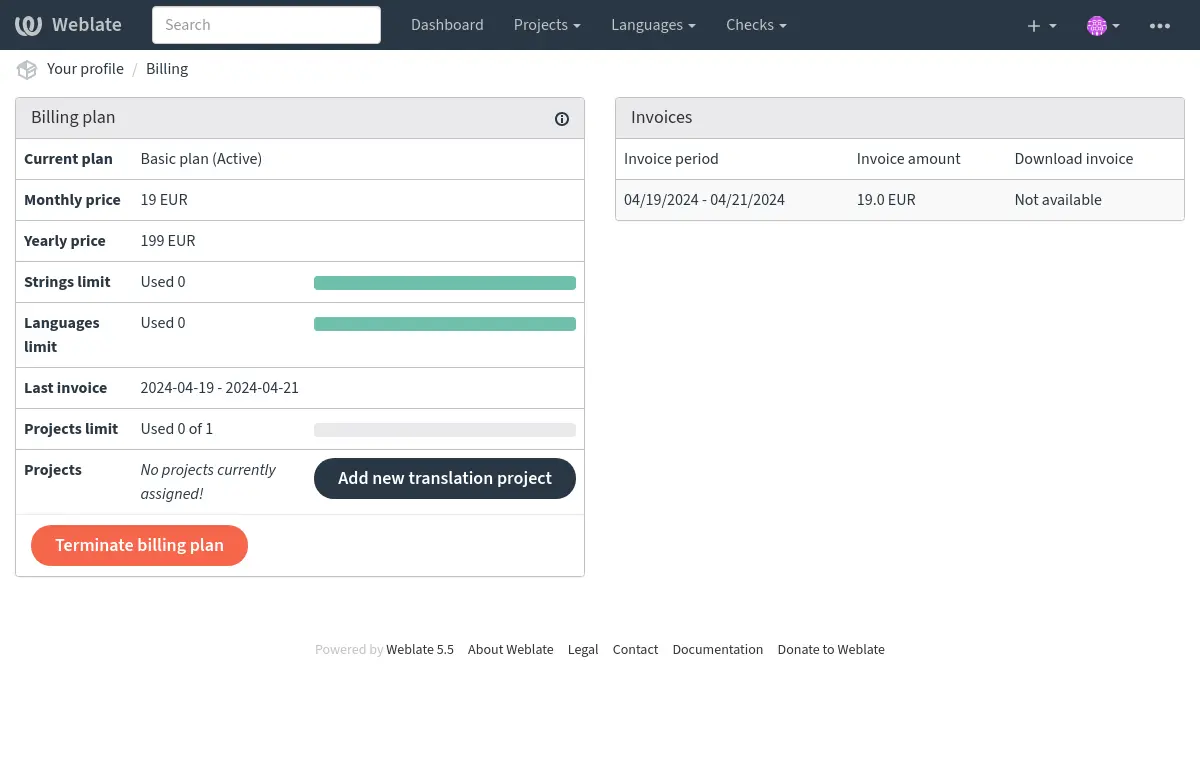
You can view your current billing plan on a separate page:
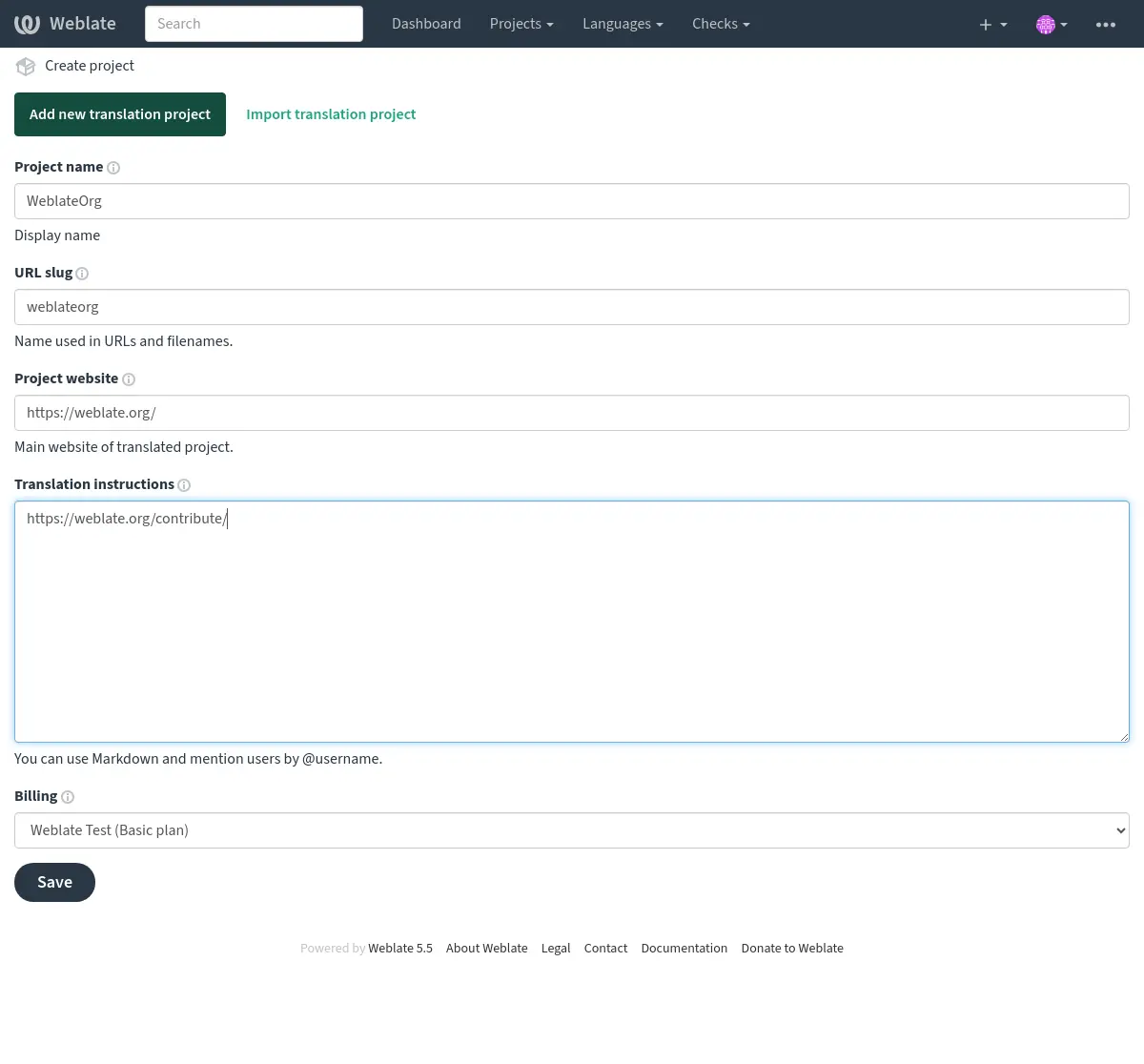
The project creation can be initiated from there, or using the menu in the navigation bar, filling in basic info about the translation project to complete addition of it:
After creating the project, you are taken directly to the project page:
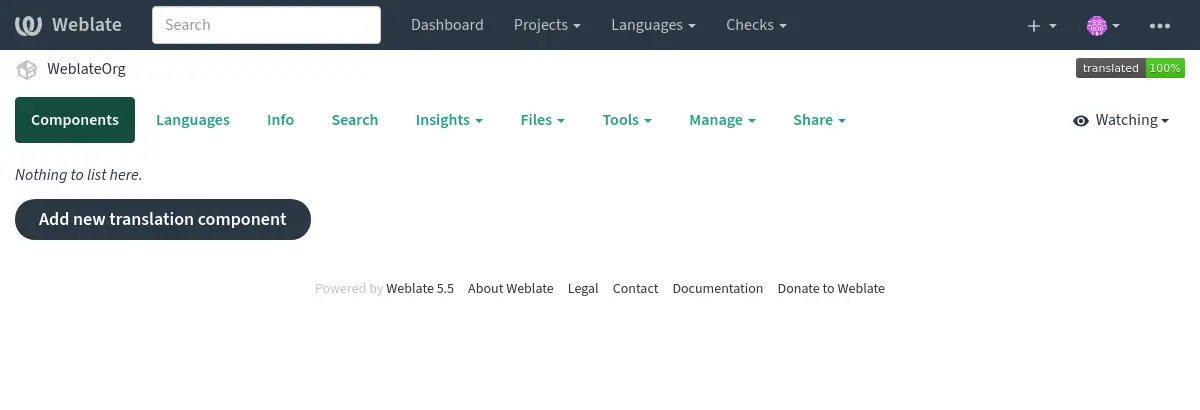
Creating a new translation component can be initiated via a single click there. The process of creating a component is multi-staged and automatically detects most translation parameters. There are several approaches to creating component:
- From version control
Creates component from remote version control repository.
- From existing component
Creates additional component to existing one by choosing different files.
- Additional branch
Creates additional component to existing one, just for different branch.
- Upload translations files
Upload translation files to Weblate in case you do not have version control or do not want to integrate it with Weblate. You can later update the content using the web interface or Weblate’s REST API.
- Translate document
Upload single document or translation file and translate that.
- Start from scratch
Create blank translation project and add strings manually.
Once you have existing translation components, you can also easily add new ones for additional files or branches using same repository.
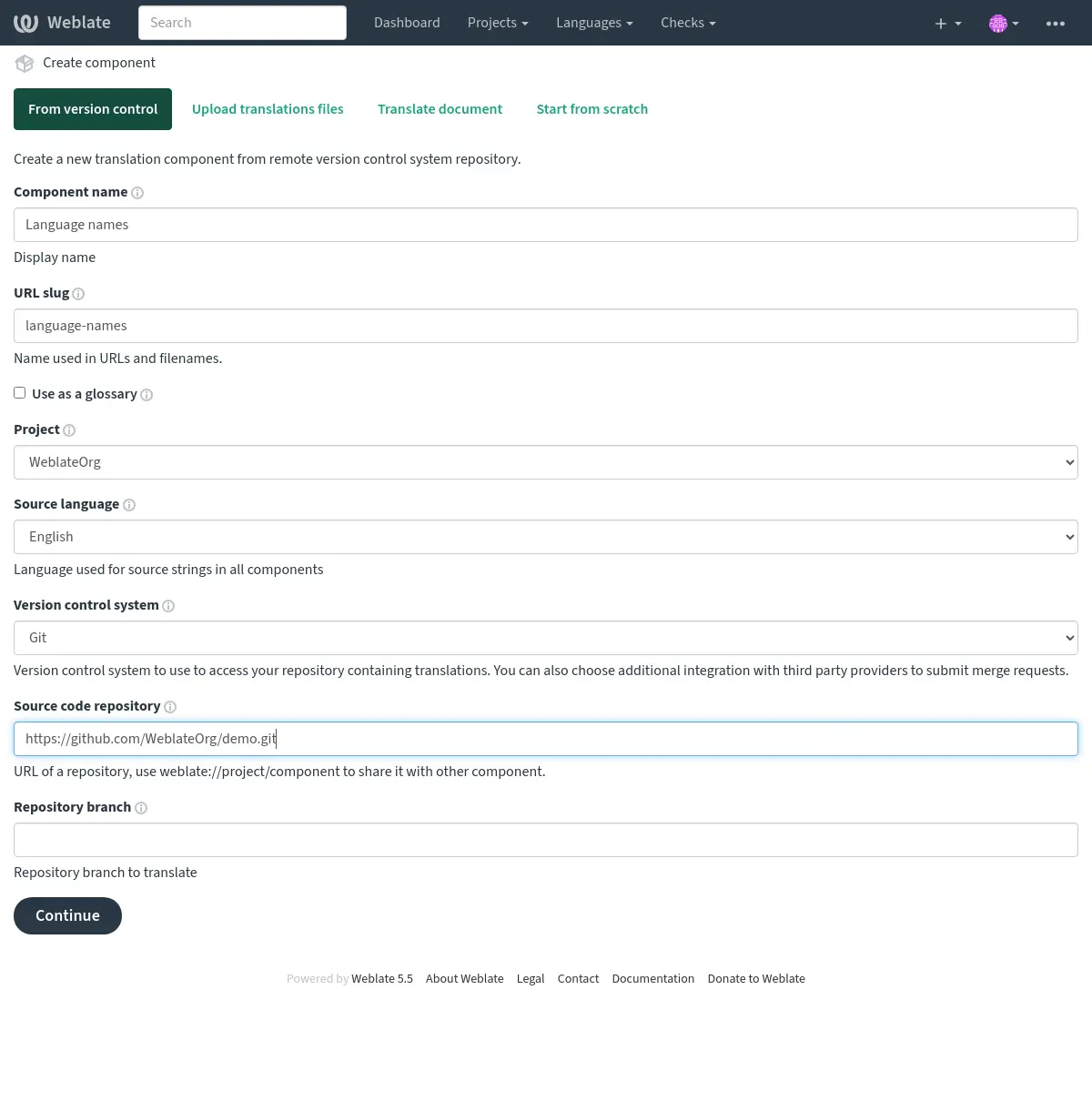
First you need to fill in name and repository location:
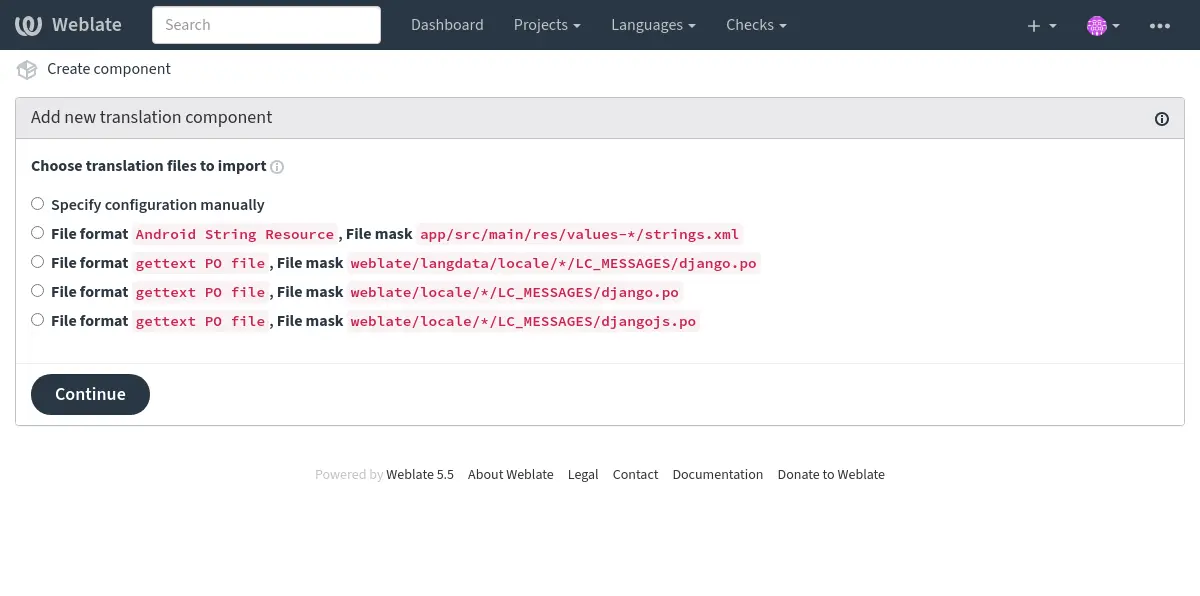
On the next page, you are presented with a list of discovered translatable resources:
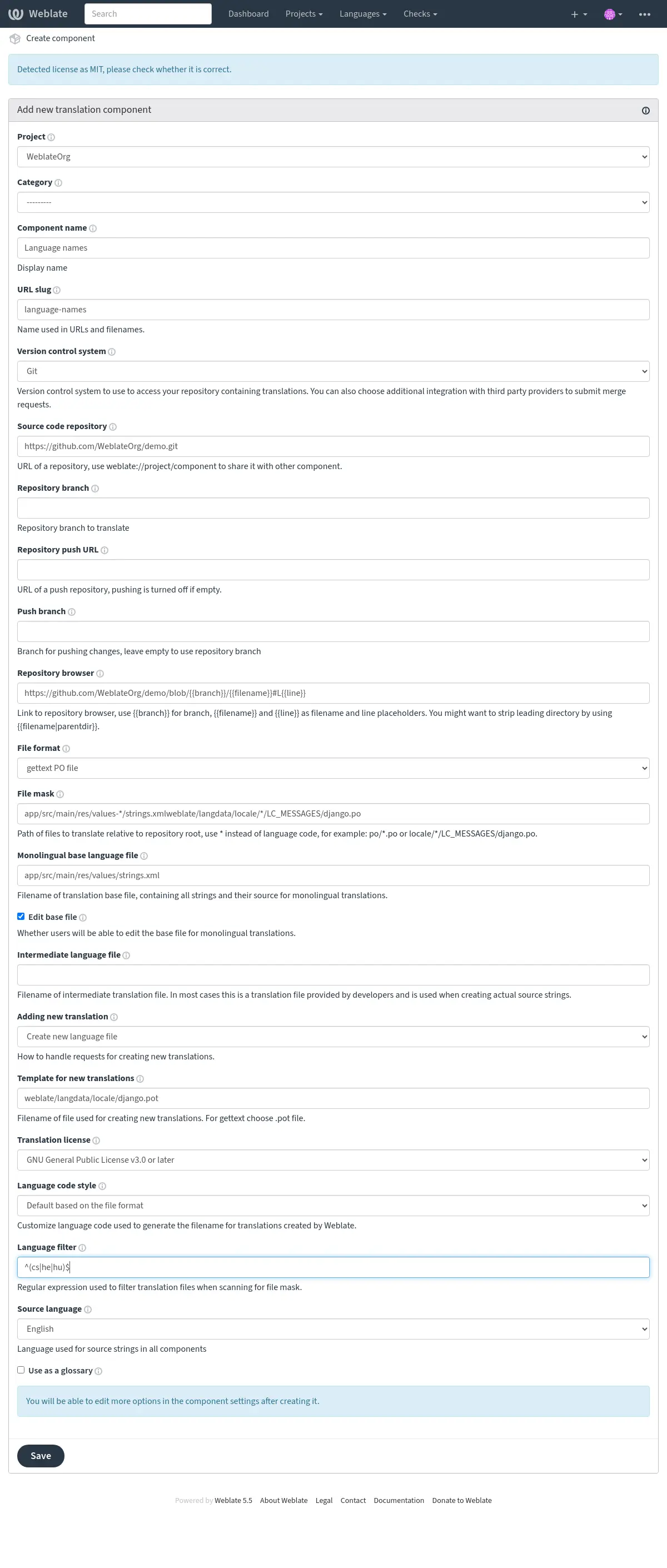
As a last step, you review the translation component info and fill in optional details:
Project configuration
Create a translation project and then add a new component for translation in it. The project is like a shelf, in which real translations are stacked. All components in the same project share suggestions and their dictionary; the translations are also automatically propagated through all components in a single project (unless turned off in the component configuration), see Translation Memory.
See also
These basic attributes set up and inform translators of a project:
Project name
Verbose project name, used to display the project name.
See also
URL slug
Project name suitable for URLs.
Project website
URL where translators can find more info about the project.
This is a required parameter unless turned off by WEBSITE_REQUIRED.
Translation instructions
Text describing localization process in the project, and any other information useful for translators. Markdown can be used for text formatting or inserting links.
Translation license
Default translation license for components in this project.
See also
Contributor license agreement
Default contributor license agreement for components in this project. Markdown can be used for text formatting or inserting links.
Use workspace translation memory
Whether to use translation memory shared by projects in the same workspace, see Translation-memory scopes for more details. The workspace has to allow workspace translation memory as well.
Contribute to workspace translation memory
Whether to contribute translations to the translation memory shared by projects in the same workspace. The workspace has to allow contribution as well.
Note
This option is unavailable on Hosted Weblate, it is toggled together with Use workspace translation memory.
Autoclean translation memory
Added in version 5.13.
Whether to replace older automatically created translation memory entries when a translation becomes active.
Matching is based on the same source string, component, context, and source/target language pair. Uploaded translation memory files are not affected.
Access control
Configure per project access control, see Project access control for more details.
The default value can be changed by DEFAULT_ACCESS_CONTROL.
Enforced two-factor authentication
Added in version 5.7.
Enforce Two-factor authentication for all contributors. Users won’t be allowed to perform any operations within the project without having it configured.
Enable reviews
Enable review workflow for translations, see Dedicated reviewers.
Enable source reviews
Enable review workflow for source strings, see Source strings reviews.
Translation quality filter
Added in version 5.13.
The commit policy determines which translations are included when committing changes to the version control system. This setting is available at the project level and supports the following options:
Commit all translations regardless of quality: All translations will be committed, including those marked as needing editing or not reviewed.
Skip translations marked as needing editing: Only translations that don’t have the «needs editing», «needs rewriting» or «needs checking» state will be committed.
Only include approved translations: Only translations that have been approved by a reviewer will be committed. This option requires Enable reviews to be enabled.
Enable hooks
Whether unauthenticated Notification hooks are to be used for this repository.
Language aliases
Define language codes mapping when importing translations into Weblate. Use this when language codes are inconsistent in your repositories and you want to get a consistent view in Weblate or in case you want to use non-standard naming of your translation files.
The typical use case might be mapping American English to English: en_US:en
Multiple mappings to be separated by comma: en_GB:en,en_US:en
Using non standard code: ia_FOO:ia
Hint
The language codes are mapped when matching the translation files and the matches are case sensitive, so ensure you use the source language codes in same form as used in the filenames.
Adding new translation
Default behavior for requests to create new translations in components in this project.
Language code style
Default language code style for translations created by Weblate in components in this project.
See also
Secondary language
Added in version 5.11.
Additional language to show together with the source language while translating.
Optionally, it can be also used as a source for the machine translation.
Translation flags
Added in version 5.11.
Customization of quality checks and other Weblate behavior, see Customizing behavior using flags.
Workspace, project, component, and translation flags are merged.
See also
Commit, add, delete, merge, add-on, and merge request messages
Default commit and merge request message templates for components in this project.
The default values can be changed by DEFAULT_ADD_MESSAGE,
DEFAULT_ADDON_MESSAGE, DEFAULT_COMMIT_MESSAGE,
DEFAULT_DELETE_MESSAGE, DEFAULT_MERGE_MESSAGE,
DEFAULT_PULL_MESSAGE.
The built-in defaults follow Conventional Commits and include Weblate links where available. Use Restore site default next to a message editor to restore the current installation default for that message; for inherited values, this also disables inheritance for that message.
See also
Component configuration
A component is a grouping of something for translation. You enter a VCS repository location and file mask for which files you want translated, and Weblate automatically fetches from this VCS, and finds all matching translatable files.
See also
You can find some examples of typical configurations in the Localization file formats.
Note
It is recommended to keep translation components to a reasonable size - split the translation by anything that makes sense in your case (individual apps or add-ons, book chapters or websites).
Weblate easily handles translations with 10000s of strings, but it is harder to split work and coordinate among translators with such large translation components.
Should the language definition for a translation be missing, an empty definition is created and named as «cs_CZ (generated)». You should adjust the definition and report this back to the Weblate authors, so that the missing languages can be included in next release.
The component contains all important parameters for working with the VCS, and for getting translations out of it:
Component name
Verbose component name, used to display the component name.
Component slug
Component name suitable for URLs.
Component project
Project configuration where the component belongs.
Version control system
VCS to use, see Version control integration for details.
See also
Source code repository
VCS repository used to pull changes.
See also
See Accessing repositories for more details on specifying URLs.
Hint
This can either be a real VCS URL or weblate://project/component
indicating that the repository should be shared with another component.
See Weblate internal URLs for more details.
Repository push URL
Repository URL used for pushing. The behavior of this depends on Version control system, and this is in more detail covered in Pushing changes from Weblate.
For linked repositories, this is not used and setting from linked component applies.
See also
See Accessing repositories for more details on how to specify a repository URL and Pushing changes from Weblate for more details on pushing changes from Weblate.
Repository browser
URL of repository browser used to display source files (location of used messages). When empty, no such links will be generated. You can use Template markup.
For example on GitHub, use something like:
https://github.com/WeblateOrg/hello/blob/{{branch}}/{{filename}}#L{{line}}
In case your paths are relative to different folder (path contains ..), you
might want to strip leading directory by parentdir filter (see
Template markup):
https://github.com/WeblateOrg/hello/blob/{{branch}}/{{filename|parentdir}}#L{{line}}
See also
Exported repository URL
URL where changes made by Weblate are exported. This is important when Continuous localization is not used, or when there is a need to manually merge changes. You can use Git exporter to automate this for Git repositories.
Repository branch
Which branch to checkout from the VCS, and where to look for translations.
For linked repositories using Weblate internal URLs, this setting is controlled by the linked component that owns the repository. Linked child components use the value from that component.
Push branch
Branch for pushing changes, leave empty to use Repository branch.
For linked repositories using Weblate internal URLs, this setting is controlled by the linked component that owns the repository. Linked child components use the value from that component.
Note
This setting is ignored for Mercurial and Subversion.
For Gerrit, this selects the target branch for the review request. Leave it
empty to review against Repository branch. Use the short branch name,
not refs/heads/<branch> or refs/for/<branch>. Gerrit push options
can be appended after % in either setting, for example
main%topic=l10n; Gerrit interprets them as the configured Weblate Gerrit
account.
See also
File mask
Mask of files to translate, including path. It should include one «*» replacing language code (see Language definitions for info on how this is processed). In case your repository contains more than one translation file (e.g. more gettext domains), you need to create a component for each of them.
For example po/*.po or locale/*/LC_MESSAGES/django.po.
In case your filename contains special characters such as [, ], these need
to be escaped as [[] or []].
Screenshot file mask
This feature allows the discovery and updating of screenshots through screenshot file masks, using paths from the VCS repository. This operates at the component level and necessitates the use of an asterisk «*» to replace the screenshot file name.
Allowed formats are WebP, JPEG, PNG, APNG and GIF.
Note:
The file mask and screenshot file mask are not related. Configure them separately.
It is a manual job to link a discovered screenshot in a component to a specific translation key.
For example:
Let’s assume your VCS repository has a structure like this:
component_A
└── docs
    ├── image1.png
    └── image2.jpg
For component_A, you want to allow discovery and updates of PNG screenshots.
You’d set the screenshot file mask for component_A as component_A/docs/*.png.
This means any PNG images under docs in component_A can be discovered and updated.
So, if you want to update image1.png, the new screenshot you provide should be named image1.png,
matching the existing filename, and stored under component_A/docs/.
For Android projects using Fastlane metadata, a source-language screenshot mask
can point to the metadata screenshot folder, for example
fastlane/metadata/android/en-US/images/phoneScreenshots/*.png. Weblate will
discover matching screenshots on repository update. The discovered screenshots
still need to be associated with source strings in the screenshot management
interface; use OCR or source string search there to assign them in bulk.
Monolingual base language file
Base file containing string definitions for Project and component creation.
Edit base file
Whether to allow editing strings in the Monolingual base language file.
Intermediate language file
Intermediate language file for Project and component creation. In most cases this is a translation file provided by developers and is used when creating actual source strings.
When set, the source strings are based on this file, but all other languages are based on Monolingual base language file. In case the string is not translated into the source language, translating to other languages is prohibited. This provides Quality gateway for the source strings.
The intermediate file can match an existing language file. While it is configured as intermediate, Weblate does not list it as a regular language in the component language list. Clearing this setting makes the file appear as a regular language again on the next component scan.
Target strings can become read-only while the intermediate file is configured. This happens for strings where the matching source string in the Monolingual base language file is not translated yet.
Template for new translations
Base file used to generate new translations.
Keep this field empty for most of the monoligual formats. Those are typically able to start from an empty file.
Choose
.potfile with GNU gettext PO files.Choose blank file without translations, if you have one.
Choose Monolingual base language file for monolingual formats that need a full set of keys present.
Choose Monolingual base language file for document translations.
Choose any translation file for others.
Template file can be the same as the base file in most cases.
Hint
In many monolingual formats Weblate starts with empty file by default. Use this in case you want to have all strings present with empty value when creating new translation.
File format
Translation file format, see also Localization file formats.
File format parameters
Parameters used to configure how translation files are processed, see also File format parameters.
Source string bug reporting address
Email address used for reporting upstream bugs. This address will also receive notification about any source string comments made in Weblate.
With the GNU gettext PO (Portable Object) format, this address is also saved by Weblate in the Report-Msgid-Bugs-To header of the file.
Do not show glossary matches
Hides the glossary panel and its matches in the translation editor for this component. When enabled, glossary suggestions for this component are not computed, and the Glossary panel (including its “Add term to glossary” action) is hidden in the editor.
Note
Glossary self-references are always excluded from matches even when this option is disabled.
See also
Allow translation propagation
You can turn off propagation of translations to this component from other components within same project. This really depends on what you are translating, sometimes it’s desirable to have make use of a translation more than once.
It’s usually a good idea to turn this off for monolingual translations, unless you are using the same IDs across the whole project.
The default value can be changed by DEFAULT_TRANSLATION_PROPAGATION.
Enable suggestions
Whether translation suggestions are accepted for this component.
See also
Suggestion voting
Turns on vote casting for suggestions, see Suggestion voting.
See also
Automatically accept suggestions
Automatically accept voted suggestions, see Suggestion voting.
See also
Translation flags
Customization of quality checks and other Weblate behavior, see Customizing behavior using flags.
Workspace, project, component, and translation flags are merged.
See also
Enforced checks
List of checks which can not be dismissed.
See also
Translation license
License of the translation (does not need to be the same as the source code license).
See also
Contributor license agreement
Contributor license agreement which needs to be approved before a user can translate this component.
Markdown can be used for text formatting or inserting links.
See also
Adding new translation
How to handle requests for creation of new languages. Available options:
- Contact maintainers
User can select desired language and the project maintainers will receive a notification about this. It is up to them to add (or not) the language to the repository.
- Point to translation instructions URL
User is presented a link to page which describes process of starting new translations. Use this in case more formal process is desired (for example forming a team of people before starting actual translation).
- Create new language file
User can select language and Weblate automatically creates the file for it and translation can begin.
- Disable adding new translations
There will be no option for user to start new translation.
Hint
The project admins can add new translations even if it is disabled here when it is possible (either Template for new translations or the file format supports starting from an empty file).
Manage strings
Added in version 4.5.
Configures whether users in Weblate will be allowed to add new strings and remove existing ones. Adjust this to match your localization workflow - how the new strings are supposed to be introduced.
For bilingual formats, the strings are typically extracted from the source code (for example by using xgettext) and adding new strings in Weblate should be disabled (they would be discarded next time you update the translation files). In Weblate you can manage strings for every translation and it does not enforce the strings in all translations to be consistent.
For monolingual formats, the strings are managed only on source language and are automatically added or removed in the translations. The strings appear in the translation files once they are translated.
Hint
You might want to turn on Edit base file together with Manage strings for monolingual formats.
Language code style
Customize language code used to generate the filename for translations created by Weblate.
Note
Weblate recognizes any of the language codes when parsing translation files, following settings only influences how new files are created.
- Default based on the file format
Dependent on file format, for most of them POSIX is used.
- POSIX style using underscore as a separator
Typically used by gettext and related tools, produces language codes like
pt_BR.- POSIX style using underscore as a separator, lower cased
Typically used by gettext and related tools, produces language codes like
pt_BR.- POSIX style using underscore as a separator, including country code
POSIX style language code including the country code even when not necessary (for example
cs_CZ).- POSIX style using underscore as a separator, including country code, lower cased
POSIX style language code including the country code even when not necessary (lowercase) (for example
cs_cz).- BCP style using hyphen as a separator
Typically used on web platforms, produces language codes like
pt-BR.- BCP style using hyphen as a separator, including country code
BCP style language code including the country code even when not necessary (for example
cs-CZ).- BCP style using hyphen as a separator, legacy language codes
Uses legacy codes for Chinese and BCP style notation.
- BCP style using hyphen as a separator, lower cased
BCP style notation, all in lower case (for example
cs-cz).- Apple App Store metadata style
Style suitable for uploading metadata to Apple App Store.
- Google Play metadata style
Style suitable for uploading metadata to Google Play Store.
- Android style
Only used in Android apps, produces language codes like
pt-rBR.- Linux style
Locales as used by Linux, uses legacy codes for Chinese and POSIX style notation.
- Linux style, lower cased
Locales as used by Linux, uses legacy codes for Chinese and POSIX style notation. Lower cased.
Merge style
You can configure how updates from the upstream repository are handled. The actual implementation depends on VCS, see Version control integration.
- Rebase
Rebases Weblate commits on top of upstream repository on update. This provides clean history without extra merge commits.
Rebasing can cause you trouble in case of complicated merges, so carefully consider whether or not you want to enable them.
You might need to enable force pushing by choosing Git with force push as Version control system, especially when pushing to a different branch.
- Merge
Upstream repository changes are merged into Weblate one. This setting utilizes fast-forward when possible. This is the safest way, but might produce a lot of merge commits.
- Merge without fast-forward
Upstream repository changes are merged into Weblate one with doing a merge commit every time (even when fast-forward would be possible). Every Weblate change will appear as a merge commit in Weblate repository.
The default value can be changed by DEFAULT_MERGE_STYLE.
Commit, add, delete, merge, add-on, and merge request messages
Message used when committing a translation, see Template markup.
The default value can be changed by DEFAULT_ADD_MESSAGE,
DEFAULT_ADDON_MESSAGE, DEFAULT_COMMIT_MESSAGE,
DEFAULT_DELETE_MESSAGE, DEFAULT_MERGE_MESSAGE,
DEFAULT_PULL_MESSAGE.
The built-in defaults follow Conventional Commits and include Weblate links where available. Use Restore site default next to a message editor to restore the current installation default for that message; for inherited values, this also disables inheritance for that message.
See also
Push on commit
Whether committed changes should be automatically pushed to the upstream repository. When enabled, the push is initiated once Weblate commits changes to its underlying repository (see Lazy commits). To actually enable pushing Repository push URL has to be configured as well.
For linked repositories using Weblate internal URLs, this setting is controlled by the linked component that owns the repository. Linked child components use the value from that component.
Age of changes to commit
Sets how old (in hours) changes have to be before they are committed by
background task or the commit_pending management command. All
changes in a component are committed once there is at least one change
older than this period.
For linked repositories using Weblate internal URLs, this setting is controlled by the linked component that owns the repository. Linked child components use the value from that component.
The default value can be changed by COMMIT_PENDING_HOURS.
Hint
There are other situations where pending changes might be committed, see Lazy commits.
Lock on error
Locks the component (and linked components, see Weblate internal URLs) upon the first failed push or merge into its upstream repository, or pull from it. This avoids adding another conflicts, which would have to be resolved manually.
The component will be automatically unlocked once there are no repository errors left.
For linked repositories using Weblate internal URLs, this setting is controlled by the linked component that owns the repository. Linked child components use the value from that component.
Source language
Language used for source strings. Change this if you are translating from something else than English.
Hint
In case you are translating bilingual files from English, but want to be able to do fixes in the English translation as well, choose English (Developer) as a source language to avoid conflict between the name of the source language and the existing translation.
For monolingual translations, you can use intermediate translation in this case, see Intermediate language file.
Language filter
Regular expression used to filter the translation when scanning for file mask. It can be used to limit the list of languages managed by Weblate.
Note
You need to list language codes as they appear in the filename.
Some examples of filtering:
Filter description |
Regular expression |
|---|---|
Selected languages only |
|
Exclude languages |
|
Filter two letter codes only |
|
Exclude non language files |
|
Include all files (default) |
|
Key filter
Added in version 5.8.
A regular expression that is used to filter units by their keys. It displays only those units whose keys match the regular expression that was set as the value of this field.
Some examples of filtering:
Filter description |
Regular expression |
|---|---|
Selected keys only |
|
Exclude app store changelogs |
|
Filter prefixed strings |
|
Note
This filter is only available for components with monolingual file formats.
Variants regular expression
Regular expression used to determine the variants of a string, see String variants.
Note
Most of the fields can be edited by project owners or administrators, in the Weblate interface.
Secondary language
Added in version 5.11.
Additional language to show together with the source language while translating.
Optionally, it can be also used as a source for the machine translation.
Note
This setting can be inherited from the project.
Priority
Components with higher priority are offered first to translators.
Changed in version 4.15: This now also affects ordering of matched glossary terms.
Restricted access
Note
On Hosted Weblate, this requires a billing plan which permits private projects.
By default the component is visible to anybody who has access to the project, even if the person can not perform any changes in the component. This makes it easier to keep translation consistency within the project.
Restricting access at a component, or component-list level takes over access permission to a component, regardless of project-level permissions. You will have to grant access to it explicitly. This can be done through granting access to a new user group and putting users in it, or using the default custom or private access control groups.
The default value can be changed in DEFAULT_RESTRICTED_COMPONENT.
Hint
This applies to project admins as well — please ensure you will not loose access to the component after toggling the status.
Use as a glossary
Added in version 4.5.
Allows using this component as a glossary. Use when you want to manage terminology separately from normal translations.
Glossaries are best for:
Ensuring consistent use of terms (e.g., UI labels, product names).
Sharing preferred translations across multiple components or projects.
Supporting translators with definitions and context.
Note
Glossaries are not for regular translations—they are for managing terms only.
You can configure how it will be listed using Glossary color.
The glossary will be accessible in all projects defined by Share in projects.
It is recommended to enable Manage strings on glossaries in order to allow adding new words to them.
See also
Glossary color
Color used when displaying terms from this glossary. Useful to distinguish glossaries when using more of them.
See also
Category
Categories are there to give structure to components within a project. You can nest them to achieve a more complex structure.
Category settings
Categories can override the same inherited settings as projects and components, including translation license, contributor agreement, adding new translations, secondary language, translation flags, and commit messages.
Nested categories inherit from their parent category by default. Top-level categories inherit from the project. Components in a category inherit from that category by default.
Template markup
Weblate uses simple markup language in several places where text rendering is needed. It is based on The Django template language, so it can be quite powerful.
Currently it is used in:
Commit message formatting, see Component configuration
- Several add-ons
The following variables are available in the component templates:
{{ language_code }}Language code
{{ language_name }}Language name
{{ component_name }}Component name
{{ component_slug }}Component slug
{{ project_name }}Project name
{{ project_slug }}Project slug
{{ url }}Translation URL
{{ filename }}Translation filename
{{ stats }}Translation stats, this has further attributes, examples below.
{{ stats.all }}Total strings count
{{ stats.fuzzy }}Count of strings needing review
{{ stats.fuzzy_percent }}Percent of strings needing review
{{ stats.translated }}Translated strings count
{{ stats.translated_percent }}Translated strings percent
{{ stats.allchecks }}Number of strings with failing checks
{{ stats.allchecks_percent }}Percent of strings with failing checks
{{ author }}Author of current commit, available only in the commit scope.
{{ addon_name }}Name of currently executed add-on, available only in the add-on commit message.
The following variables are available in the repository browser or editor templates:
{{branch}}current branch
{{line}}line in file
{{filename}}filename, you can also strip leading parts using the
parentdirfilter, for example{{filename|parentdir}}
Hint
In some places additional variables can be available, see Component discovery.
You can combine them with filters:
{{ component|title }}
You can use conditions:
{% if stats.translated_percent > 80 %}Well translated!{% endif %}
There is additional tag available for replacing characters:
{% replace component "-" " " %}
You can combine it with filters:
{% replace component|capfirst "-" " " %}
There are also additional filter to manipulate with filenames:
Directory of a file: {{ filename|dirname }}
File without extension: {{ filename|stripext }}
File in parent dir: {{ filename|parentdir }}
It can be used multiple times: {{ filename|parentdir|parentdir }}
…and other Django template features.
Importing speed
Fetching VCS repository and importing translations to Weblate can be a lengthy process, depending on size of your translations. Here are some tips:
Optimize configuration
The default configuration is useful for testing and debugging Weblate, while for a production setup, you should do some adjustments. Many of them have quite a big impact on performance. Please check Production setup for more details, especially:
Configure Celery for executing background tasks (see Background tasks using Celery)
Check resource limits
If you are importing huge translations or repositories, you might be hit by resource limitations of your server.
Check the amount of free memory, having translation files cached by the operating system will greatly improve performance.
Disk operations might be bottleneck if there is a lot of strings to process—the disk is pushed by both Weblate and the database.
Additional CPU cores might help improve performance of background tasks (see Background tasks using Celery).
Disable unneeded checks
Some quality checks can be quite expensive, and if not needed,
can save you some time during import if omitted. See CHECK_LIST for
info on configuration.
Automatic creation of components
In case your project has dozen of translation files (e.g. for different
gettext domains, or parts of Android apps), you might want to import them
automatically. This can either be achieved from the command-line by using
import_project or import_json, or by installing the
Component discovery add-on.
To use the add-on, you first need to create a component for one translation file (choose the one that is the least likely to be renamed or removed in future), and install the add-on on this component.
For the management commands, you need to create a project which will contain all
components and then run import_project or
import_json.
See also