Automatic suggestions
Changed in version 4.13: Prior to Weblate 4.13, the services were configured in the Configuration.
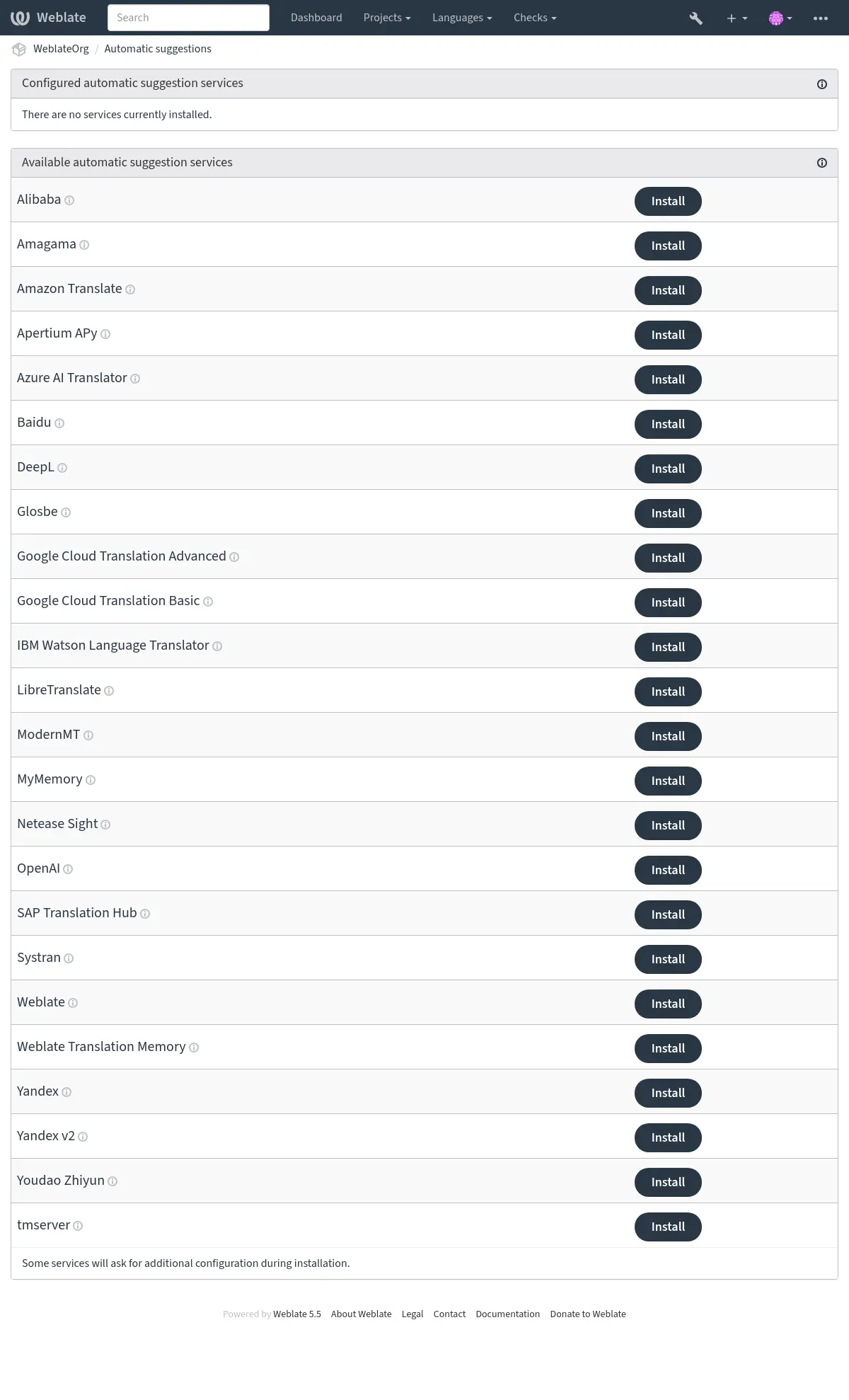
The support for several machine translation and translation memory services is built-in. You can install a service more than once with different settings. An administrator can configure installations for the whole site under Automatic suggestions in Management interface. Workspace administrators can configure installations for their workspace, and project administrators can configure them for a project:
Note
They come subject to their terms of use, so ensure you are allowed to use them how you want. Third-party services can receive source strings, translations, and related context from Weblate.
The services translate from the source language as configured at Component configuration, see Source language.
Installations from the site, workspace, and project are combined for a project. You can exclude an inherited installation, or all inherited installations of one service, in workspace or project settings. Pausing an installation keeps its configuration for later use.
Every installation has a numeric ID and can have an optional slug. Select one
installation in automatic translation, Automation, or AI review with
service:id or service:slug. A bare service name is accepted when only
one active installation of that service applies to the project. A non-empty
slug must be unique among all installations visible to a project, including
inherited installations. Separate projects can use the same slug. Saved slug
selectors follow the installation currently using that slug. Services without
configuration settings can be installed once per scope and must not overlap
with enabled inherited installations. Exclude an inherited installation before
enabling another one in a lower scope. Each scope can contain up to 20
installations, including paused ones.
For install_machinery --update, specify a unique --slug or --id
when more than one site installation of a service exists.
Automatic suggestion installations can also be configured via the Weblate’s REST API.
See also
Priority of machine translation and translation memory services
Weblate Translation Memory matches with 100% score take priority over machine translation services. If 100% match in translation memory is found, no machine translation is performed. If several 100% matches occur, the first one returned by the database is used.
Each machine translation service has a predefined maximum score it can produce. The use of installed translation services is ordered according to their maximum score. For each string with translation score lower than the service’s maximum, the service is asked to produce a translation. Translations with a score exceeding the current one are accepted.
For explicit ordering and a separate score threshold for each service, use Apply translation memory before machine translation. This workflow completes one translation pass before selecting the strings for the next service.
Source strings for the machine translation
Added in version 5.11.
The origin of source strings for all third-party services can be configured. This can be used to tweak the service to get the best results. Following choices are available:
- Automatic selection
Chooses the best source language automatically.
This is the default behavior.
- Component source language
Uses the component source language.
This was the behavior before the 5.11 release.
- Secondary language defined in project or component
Use project Secondary language or component Secondary language.
Falls back to the automatic selection of the source language if the secondary language not configured.
LLM translation context
LLM-based automatic suggestion services receive additional context about each translated string, when available. This includes the string context or monolingual key, additional explanation, configured secondary-language translation, plural information, failing quality checks, and placeholder contents. Matching glossary entries are passed with their explanations and selected flags, so duplicate glossary terms can be disambiguated.
You can add target-language-specific instructions in Language-specific instructions using a JSON object mapping language codes to text. Language codes have to exist in Weblate and are matched exactly; whitespace is not ignored. Each instruction can contain up to 1000 characters. Weblate first looks for the exact target language code and then falls back to the base language code.
The added metadata is used only to guide the generated suggestion; the returned translation still has to preserve the source placeholders and markup. Weblate also sends a short previous chat exchange to LLM services to demonstrate the expected JSON response format. The exchange uses bundled translated examples when available for the source and target language pair, or language-neutral formatting examples otherwise. Existing translations for the same target language can be appended as additional examples.
Alibaba
Added in version 5.3.
- Service ID:
alibaba- Maximum score:
80
- Configuration:
source_languageSource language selection
Available choices:
auto– Automatic selectionsource– Component source languagesecondary– Secondary language defined in project or componentkeyAccess key ID
secretAccess key secret
regionRegion ID
Alibaba Translate is a neural machine translation service for translating text and it supports up to 214 language pairs.
See also
Anthropic
Added in version 5.16.
- Service ID:
anthropic- Maximum score:
90
- Advanced features:
- Configuration:
source_languageSource language selection
Available choices:
auto– Automatic selectionsource– Component source languagesecondary– Secondary language defined in project or componentbase_urlAnthropic API URL
Base URL of the Anthropic API. Leave empty to use the default URL.
modelAnthropic model
Available choices:
claude-haiku-4-5– Claude Haiku 4.5claude-sonnet-5– Claude Sonnet 5claude-opus-5– Claude Opus 5claude-fable-5-1– Claude Fable 5.1claude-opus-4-8– Claude Opus 4.8claude-fable-5– Claude Fable 5custom– Custom modelpersonaTranslator persona
Describe the translator’s role or expertise. For example: “You are an experienced medical translator.”
styleTranslation style
Describe the desired translation style. For example: “Use informal language.”
language_instructionsLanguage-specific instructions
Enter a JSON object mapping target language codes recognized by Weblate to additional translation instructions. Each instruction can contain up to 1000 characters. For example: {«de»: «Use formal address.»}
keyAPI key
custom_modelCustom model name
Required when ‘Custom model’ is selected. Enter the model identifier used by the API.
max_tokensMax tokens
Maximum number of tokens in the generated response.
Performs translation using Anthropic’s Claude models.
The Anthropic API provides access to the Claude family of models, which are known for their strong reasoning and language capabilities. You need an API key from Anthropic to use this service.
The model choices favor current generally available Claude models. Previously offered models remain selectable while Anthropic continues to support them.
Use persona and style fields to further fine-tune translations. These will be used in a prompt for Claude and allow you to change the style of the translations.
The service automatically uses Glossary, see Glossaries in automatic suggestion.
Apertium APy
- Service ID:
apertium-apy- Maximum score:
88
- Configuration:
source_languageSource language selection
Available choices:
auto– Automatic selectionsource– Component source languagesecondary– Secondary language defined in project or componenturlAPI URL
A libre software machine translation platform providing translations to a limited set of languages.
The recommended way to use Apertium is to run your own Apertium-APy server.
Amazon Translate
- Service ID:
aws- Maximum score:
88
- Advanced features:
- Configuration:
source_languageSource language selection
Available choices:
auto– Automatic selectionsource– Component source languagesecondary– Secondary language defined in project or componentkeyAccess key ID
secretAPI secret key
regionRegion name
formalityFormality
Available choices:
empty value – Default
FORMAL– FormalINFORMAL– InformalbrevityBrevity
Prefer shorter translations when supported.
Available choices:
empty value – Default
ON– EnabledprofanityProfanity
Mask profane words in translated text.
Available choices:
empty value – Default
MASK– Mask profanity
Amazon Translate is a neural machine translation service for translating text to and from English across a breadth of supported languages. The service requires the TranslateFullAccess Managed Policy.
The service automatically uses Glossary, see Glossaries in automatic suggestion.
Azure OpenAI
Added in version 5.8.
- Service ID:
azure-openai- Maximum score:
90
- Advanced features:
- Configuration:
source_languageSource language selection
Available choices:
auto– Automatic selectionsource– Component source languagesecondary– Secondary language defined in project or componentbase_urlAPI URL
modelLLM model
personaTranslator persona
Describe the translator’s role or expertise. For example: “You are an experienced medical translator.”
styleTranslation style
Describe the desired translation style. For example: “Use informal language.”
language_instructionsLanguage-specific instructions
Enter a JSON object mapping target language codes recognized by Weblate to additional translation instructions. Each instruction can contain up to 1000 characters. For example: {«de»: «Use formal address.»}
keyAPI key
azure_endpointAzure OpenAI endpoint URL
Endpoint URL of the instance, e.g: https://my-instance.openai.azure.com.
deploymentAzure OpenAI deployment
The model’s unique deployment name.
Performs translation using OpenAI hosted on Azure.
See also
Baidu
- Service ID:
baidu- Maximum score:
90
- Configuration:
source_languageSource language selection
Available choices:
auto– Automatic selectionsource– Component source languagesecondary– Secondary language defined in project or componentkeyClient ID
secretClient secret
Machine translation service provided by Baidu.
This service uses an API and you need to obtain an ID and API key from Baidu to use it.
See also
CyrTranslit
Added in version 5.7.
- Service ID:
cyrtranslit- Maximum score:
100
- Configuration:
source_languageSource language selection
Available choices:
auto– Automatic selectionsource– Component source languagesecondary– Secondary language defined in project or component
Machine translation service using the Cyrtranslit library.
This service converts text between Cyrillic and Latin scripts for languages that have both scripts.
See also
DeepL
- Service ID:
deepl- Maximum score:
91
- Advanced features:
- Configuration:
source_languageSource language selection
Available choices:
auto– Automatic selectionsource– Component source languagesecondary– Secondary language defined in project or componenturlAPI URL
keyAPI key
formalityFormality
Uses the specified formality if language is not specified as (in)formal
contextTranslation context
Describe the context of the translation to improve the accuracy of the translation.
next_genUse next-gen model
Prefer next-gen LLM over classic machine translation model.
DeepL is a paid service providing good machine translation for a few languages. You need to purchase DeepL API subscription.
API URL to use with the DeepL service. Configure the base endpoint without an API
version; Weblate selects the appropriate DeepL API version for each request.
For a legacy subscription requiring API v1, configure
https://api.deepl.com/v1/ instead.
Changed in version 2026.9.1: Support for explicitly configured DeepL API v1 endpoints has been restored.
https://api.deepl.com/(default in Weblate)Is meant for API usage on the paid plan, and the subscription is usage-based.
https://api-free.deepl.com/Is meant for API usage on the free plan, and the subscription is usage-based.
Weblate supports DeepL formality, it will choose matching one based on the
language (for example, there is de@formal and de@informal).
The translation context can optionally be specified to improve translations quality. Read more on that in DeepL translation context documentation.
The service automatically uses Glossary, see Glossaries in automatic suggestion. Glossary integration is not available with API v1.
Rephrasing existing translations
When a string is already translated, Weblate can send the stored target text to the
DeepL Write API /v2/write/rephrase endpoint and show the improved text as an
additional machine translation suggestion.
This requires a DeepL API Pro subscription using https://api.deepl.com/.
Rephrasing is skipped when using the free API endpoint.
Only languages supported by the DeepL Write API are eligible. The stored translation is sent as plain text, without the XML placeholder handling used for DeepL translation. Rephrase suggestions use a slightly lower score than DeepL translations so automatic translation keeps preferring the translate result. Successful rephrases are cached; this still performs an extra API request on cache miss and may increase API usage and billing.
eTranslation
- Service ID:
etranslation- Maximum score:
90
- Configuration:
source_languageSource language selection
Available choices:
auto– Automatic selectionsource– Component source languagesecondary– Secondary language defined in project or componentkeyApplication name
secretPassword
domainDefault language domain
Available choices:
GEN– General Text (GEN)SPD– EU Formal Language (SPD)ECB– Finance (ECB)ECJ– European Court of Justice (ECJ)IPO– EIP Case Law (Intellectual Property) (IPO)_OTHER– Other domain codeother_domainOther domain code
Enter a domain code from eTranslation when selecting Other domain code.
component_domainsComponent language domains
JSON object mapping full component paths to domain codes, for example {«my-project/privacy-policy»: «SPD»}.
Register an application with the European Commission to obtain its application
name and password, then configure eTranslation in Automatic
suggestions. The credentials are sent with HTTP Basic authentication. The
default language domain is GEN (General Text). Select one of the documented
domains by name, or select Other domain code to enter a code returned
by eTranslation. The service’s domains endpoint supplies available domain codes
and their supported language pairs. The API also lists QE (Quality
Estimation) and NER, but their use as translation domains is not described
in the domain documentation.
Use Component language domains to select a different domain for individual components. Enter a JSON object whose keys are full component paths, including category segments where applicable. Use the domain codes shown in parentheses in the Default language domain choices:
{"my-project/privacy-policy": "SPD"}
Components absent from the mapping use Default language domain. The mapping belongs to the eTranslation service configuration, not to component settings. Project-level service configuration overrides the site-wide service configuration as it does for other suggestion services. Suggestions show the domain used for each translation.
eTranslation returns text through an asynchronous callback. Set
SITE_DOMAIN to the publicly reachable domain and enable HTTPS so
the callback URL is accessible from eTranslation. All Weblate application
processes must share the configured cache. Weblate waits up to 15 seconds for
each text suggestion; a later callback cannot populate that suggestion.
Text snippets longer than 5,000 characters are skipped.
Glosbe
- Service ID:
glosbe- Maximum score:
90
- Configuration:
source_languageSource language selection
Available choices:
auto– Automatic selectionsource– Component source languagesecondary– Secondary language defined in project or component
Free dictionary and translation memory for almost every living language.
The API is gratis to use, but usage of the translations is subject to the license of the used data source. There is a limit of calls that may be done from one IP in a set period of time, to prevent abuse.
See also
Google Cloud Translation Basic
- Service ID:
google-translate- Maximum score:
90
- Configuration:
source_languageSource language selection
Available choices:
auto– Automatic selectionsource– Component source languagesecondary– Secondary language defined in project or componentkeyAPI key
Machine translation service provided by the Google Cloud services.
This service uses the Google Translation API v2, and you need to obtain an API key and turn on billing in the Google API console.
See also
Google Cloud Translation Advanced
- Service ID:
google-translate-api-v3- Maximum score:
90
- Advanced features:
- Configuration:
source_languageSource language selection
Available choices:
auto– Automatic selectionsource– Component source languagesecondary– Secondary language defined in project or componentcredentialsGoogle Translate service account info
Enter a JSON key for the service account.
projectGoogle Translate project
Enter the numeric or alphanumeric ID of your Google Cloud project.
locationGoogle Translate location
Choose a Google Cloud Translation region that is used for the Google Cloud project or is closest to you.
bucket_nameGoogle Storage Bucket name
Enter the name of the Google Cloud Storage bucket that is used to store the Glossary files.
Machine translation service provided by the Google Cloud services.
This service uses the Google Translation API v3 and you need credentials in JSON format to access it.
In order to use this service, you first need to go through the following steps:
Optionally, you can configure the service to use Glossary by setting up a Bucket:
IBM Watson Language Translator
Removed in version 5.13.1: This service was withdrawn by vendor as of 10 December 2024.
LibreTranslate
Added in version 4.7.1.
- Service ID:
libretranslate- Maximum score:
89
- Configuration:
source_languageSource language selection
Available choices:
auto– Automatic selectionsource– Component source languagesecondary– Secondary language defined in project or componenturlAPI URL
keyAPI key
LibreTranslate is a free and open-source service for machine translations. The public instance requires an API key, but LibreTranslate can be self-hosted and there are several mirrors available to use the API for free.
https://libretranslate.com/(official public instance)Requires an API key to use outside of the website.
LTEngine
Added in version 5.17.1.
- Service ID:
ltengine- Maximum score:
89
- Configuration:
source_languageSource language selection
Available choices:
auto– Automatic selectionsource– Component source languagesecondary– Secondary language defined in project or componenturlAPI URL
keyAPI key
LTEngine provides a local LibreTranslate-compatible API backed by large language models. For many Weblate installations, native LLM services such as Ollama can be a better fit because Weblate can send translation context directly to the model. Use LTEngine when you specifically want its local translation engine or future LTEngine translation improvements.
Azure AI Translator
- Service ID:
microsoft-translator- Maximum score:
90
- Advanced features:
- Configuration:
source_languageSource language selection
Available choices:
auto– Automatic selectionsource– Component source languagesecondary– Secondary language defined in project or componentkeyAPI key
base_urlApplication base URL
Available choices:
api.cognitive.microsofttranslator.com– Global (non-regional)api-apc.cognitive.microsofttranslator.com– Asia Pacificapi-eur.cognitive.microsofttranslator.com– Europeapi-nam.cognitive.microsofttranslator.com– North Americaapi.translator.azure.cn– Chinaapi.cognitive.microsofttranslator.us– Azure US Government cloudendpoint_urlAuthentication service URL
Regional or multi-service can be specified using region field below.
Available choices:
api.cognitive.microsoft.com– Globalapi.cognitive.azure.cn– Chinaapi.cognitive.microsoft.us– Azure US Government cloudregionAuthentication service region
categoryCategory
Specify a customized system category ID to use it instead of general one.
Machine translation service provided by Microsoft in Azure portal as one of Cognitive Services.
Weblate implements Translator API V3.
The service automatically uses Glossary via dynamic dictionary, see Glossaries in automatic suggestion.
Translator Text API V2
The key you use with Translator API V2 can be used with API 3.
Translator Text API V3
You need to register at Azure portal and use the key you obtain there.
With new Azure keys, you also need to set region to locale of your service.
You can also specify a custom category to use custom translator.
Hint
For Azure China, please use your endpoint from the Azure Portal.
Mistral
Added in version 2026.7.
- Service ID:
mistral- Maximum score:
90
- Advanced features:
- Configuration:
source_languageSource language selection
Available choices:
auto– Automatic selectionsource– Component source languagesecondary– Secondary language defined in project or componentbase_urlMistral API base URL
Base URL of the Mistral API, if it differs from the Mistral default URL
modelMistral model
With ‘Automatic selection’, Weblate selects the first model available through the API from its predefined preference list.
Available choices:
auto– Automatic selectionmistral-small-latest– Mistral Small 4ministral-14b-latest– Ministral 3 14Bministral-8b-latest– Ministral 3 8Bministral-3b-latest– Ministral 3 3Bmistral-large-latest– Mistral Large 3mistral-medium-latest– Mistral Medium 3.5custom– Custom modelpersonaTranslator persona
Describe the translator’s role or expertise. For example: “You are an experienced medical translator.”
styleTranslation style
Describe the desired translation style. For example: “Use informal language.”
language_instructionsLanguage-specific instructions
Enter a JSON object mapping target language codes recognized by Weblate to additional translation instructions. Each instruction can contain up to 1000 characters. For example: {«de»: «Use formal address.»}
keyAPI key
custom_modelCustom model name
Required when ‘Custom model’ is selected. Enter the model identifier used by the API.
Automatic and predefined model selection queries the service model-listing endpoint. Automatic selection prefers general-purpose models that balance translation quality, response time, and price, trying other available models in the displayed order. Choose Custom model when using a compatible gateway that does not provide model discovery; Weblate sends the configured model identifier directly to the chat endpoint.
ModernMT
Added in version 4.2.
- Service ID:
modernmt- Maximum score:
90
- Advanced features:
- Configuration:
source_languageSource language selection
Available choices:
auto– Automatic selectionsource– Component source languagesecondary– Secondary language defined in project or componenturlAPI URL
keyAPI key
context_vectorContext vector
Comma-separated list of memory IDs:weight. e.g: 1234:0.123,4567:0.456
The service automatically uses Glossary, see Glossaries in automatic suggestion.
See also
MyMemory
- Service ID:
mymemory- Maximum score:
100
- Configuration:
source_languageSource language selection
Available choices:
auto– Automatic selectionsource– Component source languagesecondary– Secondary language defined in project or componentemailContact e-mail
usernameUsername
keyAPI key
Huge translation memory with machine translation.
Free, anonymous usage is currently limited to 100 requests/day, or to 1000
requests/day when you provide a contact e-mail address in email.
You can also ask them for more.
See also
Netease Sight
- Service ID:
netease-sight- Maximum score:
90
- Configuration:
source_languageSource language selection
Available choices:
auto– Automatic selectionsource– Component source languagesecondary– Secondary language defined in project or componentkeyClient ID
secretClient secret
Machine translation service provided by NetEase.
This service uses an API, and you need to obtain key and secret from NetEase.
See also
Ollama
Added in version 5.15.
- Service ID:
ollama- Maximum score:
90
- Advanced features:
- Configuration:
source_languageSource language selection
Available choices:
auto– Automatic selectionsource– Component source languagesecondary– Secondary language defined in project or componentbase_urlAPI URL
Base URL of the Ollama API, reachable from the Weblate server. The default is http://localhost:11434; localhost refers to the environment where Weblate runs.
modelOllama model
Name of the model described in Ollama catalogue.
personaTranslator persona
Describe the translator’s role or expertise. For example: “You are an experienced medical translator.”
styleTranslation style
Describe the desired translation style. For example: “Use informal language.”
language_instructionsLanguage-specific instructions
Enter a JSON object mapping target language codes recognized by Weblate to additional translation instructions. Each instruction can contain up to 1000 characters. For example: {«de»: «Use formal address.»}
Performs translation using Ollama models.
The Ollama API allows for the use of open source models for translations either locally installed or remotely accessed via the Ollama service. Note that before configuring your models, you should have Ollama installed and downloaded the models you wish to use.
Use persona and style fields to further fine-tune translations. These will be used in a prompt for Ollama and allow you to change the style of the translations.
The service automatically uses Glossary, see Glossaries in automatic suggestion.
See also
OpenAI
Added in version 5.3.
- Service ID:
openai- Maximum score:
90
- Advanced features:
- Configuration:
source_languageSource language selection
Available choices:
auto– Automatic selectionsource– Component source languagesecondary– Secondary language defined in project or componentbase_urlOpenAI API base URL
Base URL of the OpenAI API, if it differs from the OpenAI default URL
modelOpenAI model
With ‘Automatic selection’, Weblate selects the first model available through the API from its predefined preference list.
Available choices:
auto– Automatic selectiongpt-5.6-luna– GPT-5.6 Lunagpt-5.4-mini– GPT-5.4 minigpt-5-mini– GPT-5 minigpt-5.4-nano– GPT-5.4 nanogpt-5-nano– GPT-5 nanogpt-5.6-terra– GPT-5.6 Terragpt-5.4– GPT-5.4gpt-5– GPT-5gpt-5.6– GPT-5.6 Solgpt-5.5– GPT-5.5gpt-4.1-mini– GPT-4.1 minigpt-4o-mini– GPT-4o minigpt-4.1-nano– GPT-4.1 nanogpt-4.1– GPT-4.1gpt-4o– GPT-4ogpt-4-turbo– GPT-4 Turbogpt-4– GPT-4gpt-3.5-turbo– GPT-3.5 Turbocustom– Custom modelpersonaTranslator persona
Describe the translator’s role or expertise. For example: “You are an experienced medical translator.”
styleTranslation style
Describe the desired translation style. For example: “Use informal language.”
language_instructionsLanguage-specific instructions
Enter a JSON object mapping target language codes recognized by Weblate to additional translation instructions. Each instruction can contain up to 1000 characters. For example: {«de»: «Use formal address.»}
keyAPI key
custom_modelCustom model name
Required when ‘Custom model’ is selected. Enter the model identifier used by the API.
Performs translation using OpenAI.
The OpenAI API is powered by a diverse set of models with different capabilities and price points. Automatic selection chooses the best model available, but you might want to choose a specific model that matches your needs.
Automatic and predefined model selection queries the service model-listing endpoint. Automatic selection prefers current general-purpose models that balance translation quality, response time, and price, using older GPT models only as compatibility fallbacks. Choose Custom model when using an OpenAI-compatible gateway that does not provide model discovery; Weblate sends the configured model identifier directly to the chat completions endpoint.
Use persona and style fields to further fine-tune translations. These will be used in a prompt for OpenAI and allow you to change the style of the translations.
The service automatically uses Glossary, see Glossaries in automatic suggestion.
Changed in version 5.7: Support for custom model and base URL was added.
See also
SAP Translation Hub
- Service ID:
sap-translation-hub- Maximum score:
100
- Configuration:
source_languageSource language selection
Available choices:
auto– Automatic selectionsource– Component source languagesecondary– Secondary language defined in project or componenturlAPI URL
keyAPI key
usernameSAP username
passwordSAP password
enable_mtEnable machine translation
domainTranslation domain
The ID of a translation domain, for example, BC. If you do not specify a domain, the method searches for translations in all available domains.
Machine translation service provided by SAP.
You need to have a SAP account (and the SAP Translation Hub enabled in the SAP Cloud Platform) to use this service.
You can also configure whether to also use machine translation services, in addition to the term database.
Note
To access the Sandbox API, you need to set url
and key.
To access the productive API, you need to set url, username and password.
Systran
- Service ID:
systran- Maximum score:
90
- Configuration:
source_languageSource language selection
Available choices:
auto– Automatic selectionsource– Component source languagesecondary– Secondary language defined in project or componentkeyAPI key
Machine translation service provided by Systran.
This service uses an API, and you need to obtain API key at <https://translate.systran.net/en/account>.
tmserver
- Service ID:
tmserver- Maximum score:
100
- Configuration:
source_languageSource language selection
Available choices:
auto– Automatic selectionsource– Component source languagesecondary– Secondary language defined in project or componenturlAPI URL
You can run your own translation memory server by using a tmserver protocol.
The original tmserver was bundled with the translate-toolkit.
amaGama server is an enhanced version of tmserver.
Note
There currently does not seem to be a maintained server for this.
Weblate
- Service ID:
weblate- Maximum score:
100
- Configuration:
This service has no configuration.
Weblate machine translation service can provide translations based on the exact matches of a string in the currently existing strings in a Translated, Approved, or Read-only states inside Weblate.
Weblate Translation Memory
- Service ID:
weblate-translation-memory- Maximum score:
100
- Configuration:
This service has no configuration.
Use Translation Memory as a machine translation service. Any string that has been translated before (or uploaded to the translation memory) can be translated in this way. This suggestion source works with fuzzy matching.
Note
Recreating Translation Memory reduces capabilities of this TM source.
Yandex
- Service ID:
yandex- Maximum score:
90
- Configuration:
source_languageSource language selection
Available choices:
auto– Automatic selectionsource– Component source languagesecondary– Secondary language defined in project or componentkeyAPI key
Machine translation service provided by Yandex.
This service uses a Translation API, and you need to obtain an API key from Yandex.
See also
Yandex v2
Added in version 5.1.
- Service ID:
yandex-v2- Maximum score:
90
- Configuration:
source_languageSource language selection
Available choices:
auto– Automatic selectionsource– Component source languagesecondary– Secondary language defined in project or componentkeyAPI key
Machine translation service provided by Yandex.
This service uses a Translation API, and you need to obtain an API key from Yandex Cloud.
See also
Youdao Zhiyun
- Service ID:
youdao-zhiyun- Maximum score:
90
- Configuration:
source_languageSource language selection
Available choices:
auto– Automatic selectionsource– Component source languagesecondary– Secondary language defined in project or componentkeyClient ID
secretClient secret
Machine translation service provided by Youdao.
This service uses an API, and you need to obtain an ID and an API key from Youdao.
Custom machine translation
You can also implement your own machine translation services using a few lines
of Python code. Place the code in a module Weblate can import (see
Creating a Python module or Customizing code) and add fully qualified
class name to WEBLATE_MACHINERY.
"""
Machine translation example.

This example uses fictional http://example.com/ service to translate the
strings.
"""

from __future__ import annotations

from typing import TYPE_CHECKING

from weblate.machinery.base import MACHINERY_DEFAULT_THRESHOLD, MachineTranslation

if TYPE_CHECKING:
    from weblate.auth.models import User
    from weblate.machinery.base import DownloadTranslations
    from weblate.trans.models import Unit


class SampleTranslation(MachineTranslation):
    """Sample machine translation interface."""

    name = "Sample"

    def download_languages(self) -> list[str]:
        """Return list of languages your machine translation supports."""
        response = self.request("get", "http://example.com/languages")
        return response.json()["languages"]

    def download_translations(
        self,
        source_language: str,
        target_language: str,
        text: str,
        unit: Unit | None,
        user: User | None,
        threshold: int = MACHINERY_DEFAULT_THRESHOLD,
    ) -> DownloadTranslations:
        """Return tuple with translations."""
        response = self.request(
            "get",
            "http://example.com/translate",
            params={
                "source_language": source_language,
                "target_language": target_language,
                "text": text,
            },
        )

        for translation in response.json()["translations"]:
            yield {
                "text": translation,
                "quality": 100,
                "service": self.name,
                "source": text,
            }