Memória de tradução
O Weblate vem com uma memória de tradução integrada que consiste em:
Memória de tradução importada manualmente (consulte Interface de usuário).
Traduções armazenadas automaticamente realizadas em Weblate (dependendo dos Escopos de memória de tradução).
Traduções anteriores importadas automaticamente.
O conteúdo da memória de tradução pode ser aplicado ao texto de diversas maneiras:
O usuário pode aceitar sugestões a partir da guia Sugestões automáticas enquanto edita o texto.
The selected strings can be processed using Tradução automática from the Operations menu.
O complemento Tradução automática pode aplicar automaticamente alterações nos textos novos e existentes.
Para dicas de instalação, consulte Weblate Translation Memory, que é ativado por padrão.
Escopos de memória de tradução
Os escopos de memória de tradução garantem a privacidade de diferentes projetos e usuários. O compartilhamento de traduções também está disponível.
Nota
When upgrading from older Weblate releases, existing translation-memory entries are converted to scopes by a periodic Celery background task. Until this backfill finishes, existing entries can be temporarily unavailable in suggestions and memory management views. Keep Celery running after the upgrade so the periodic task can start or resume the migration. Site administrators can monitor the backfill and duplicate-entry consolidation in Administration > Performance report.
Memória de tradução importada
Importar dados de memória de tradução arbitrários usando o comando import_memory torna o conteúdo da memória disponível para todos os usuários e projetos.
Memória de tradução por usuário
Armazena todas as traduções do usuário automaticamente na memória de tradução pessoal de cada respectivo usuário.
The default value for new users is automatically adjusted based on the Limpar memória de tradução automaticamente configuration. If automatic cleanup is enabled, this is disabled by default to prevent reintroducing inconsistent translations.
Memória de tradução por projeto
Todas as traduções dentro de um projeto são automaticamente armazenadas em uma memória de tradução de projeto disponível apenas para este projeto.
Entries attributed to an existing restricted component are only available to users who can access that component. This also applies when project memory is downloaded or accessed using the REST API.
Legacy entries which can not be attributed to a current component use the project access rules. This can happen when the component path has changed or the component has been removed.
Workspace translation memory
Projects in the same workspace can share translation memory without enabling the global shared translation memory. Workspace translation memory has to be enabled both in the workspace settings and in the individual project workflow settings.
Entries attributed to an existing restricted component are only available to users who can access that component, even when they can access another project in the workspace. Unattributed legacy entries use the workspace access rules.
Status da memória de tradução
Adicionado na versão 5.13.
Translation memory entries can have two different statuses: active and pending. Pending entries are included in suggestions, but with a quality penalty applied. Depending on the configured score threshold, the penalty can exclude even exact matches from suggestions and automatic translation. Entries imported from translation memory files are stored as active. If Limpar memória de tradução automaticamente is enabled, matching pending entries are removed when a translation becomes active.
Limpar memória de tradução automaticamente
Adicionado na versão 5.13.
When enabled for a project, Weblate replaces older automatically created translation memory entries when a translation becomes active:
With Habilitar revisões enabled, cleanup happens when the translation is approved.
Without review, cleanup happens as soon as the translation reaches the translated state.
For the same source string, component, context, and source/target language pair, Weblate removes matching non-file entries from translation memory, including entries with a different target text. This applies across personal, project, and shared translation memory scopes. The current translation is then stored again as an active entry in the scopes that are enabled for that change.
Entries imported from external translation memory files are not cleaned up automatically. Entries with a different context are kept.
In the Docker container this can be configured using WEBLATE_DEFAULT_AUTOCLEAN_TM.
Nota
Enabling automatic cleanup also changes the default for new user profiles to not contribute to personal translation memory. This prevents reintroducing inconsistent translations that were supposed to be cleaned up.
Ver também
Gerenciando memória de tradução
Interface de usuário
Translation memory can be managed from several places in the Weblate UI:
Open the user menu and choose Translation memory to manage your personal translation memory.
Open a project and choose Translation memory from the project menu to manage translation memory for that project.
Open a workspace and choose Operations ↓ Translation memory to manage automatically created translation memory for that workspace. Editing the workspace is required.
Open Administration and choose Translation memory to manage uploaded translation memory for the whole Weblate instance.
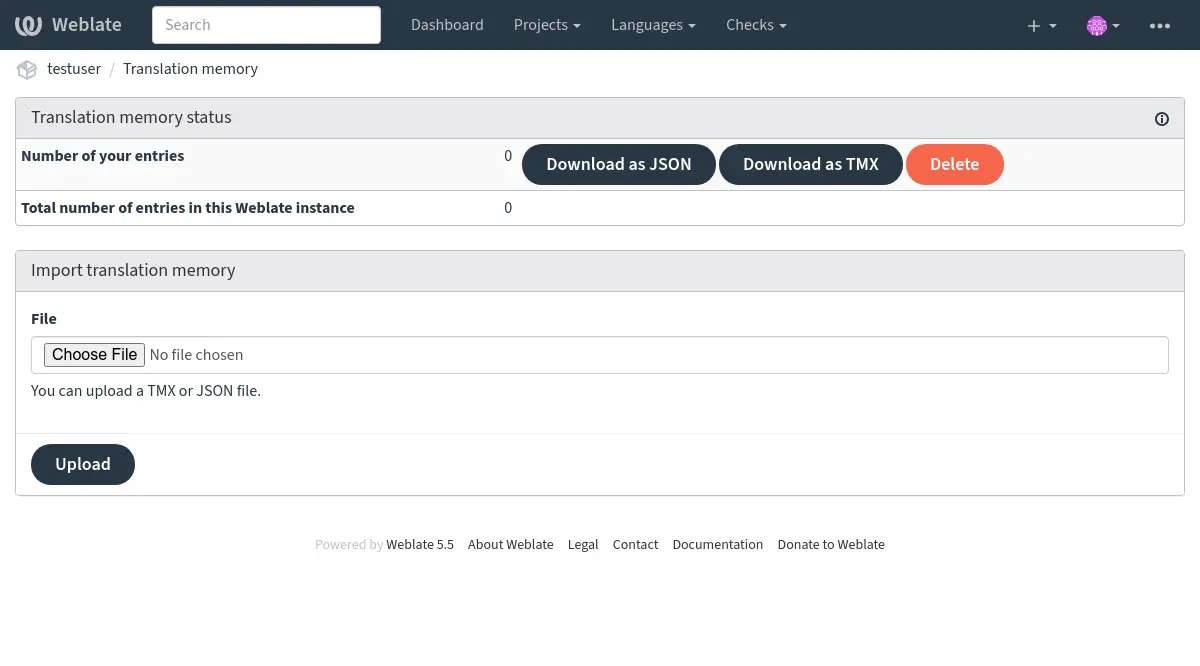
The translation memory page shows entry counts for the selected scope. Depending on the scope, it also lists entries by origin, component, or language pair. The listed entries can be downloaded as JSON or TMX. Users with the required permissions can delete entries, and the project view can rebuild translation memory for the whole project or for individual components from the current translations.
Removing a component preserves its automatically created translation memory by
default. Because the component access rule no longer exists after removal, the
retained entries use the access rules of their remaining translation-memory
scope. To remove those entries together with a component, select
Delete translation memory created from this component in the
removal form. Category removal offers the equivalent option for every component
in the category and its nested categories. This removes attributed entries and
legacy entries matching the current component path. It does not infer paths
used before a component or category rename or move. Such unmatched entries can
be deleted by origin in the project or workspace translation memory management,
or using the REST API. The REST API accepts the delete_memory boolean in the
request body or query string for component and category removal. Personal and
uploaded entries are preserved.
The project view also shows whether shared translation memory and autoclean translation memory are enabled for the project, with a link to the project workflow settings when the user can edit the project.
The workspace view can rebuild all currently contributing projects or an individual contributing component. It manages workspace-scoped automatic entries only. Translation-memory files cannot be uploaded into a workspace scope.
Translation memory files can be imported on the same page. Uploaded files are processed during the request, stored as active, and added to the selected scope:
Personal uploads are available in your personal translation memory.
Project uploads are available in the selected project’s translation memory.
Administration uploads are available as uploaded shared entries for the whole Weblate instance.
Dica
Translation memories in various formats can be imported into Weblate. The TMX format is provided for interoperability with other tools. All supported formats are TMX, JSON, XLIFF, PO, and CSV.
Source and target languages must be selected when uploading XLIFF, PO, or CSV files if the language information is not provided by the file itself.
Ver também
You can search translation memory while editing strings from the Sugestões automáticas tab.
Interface administrativa
Administrative users have additional translation memory management controls. In Administration > Translation memory, the page lists uploaded shared entries, shared entries, and total entries for the Weblate instance. Depending on permissions, it can import uploaded shared memory, delete uploaded entries, and download uploaded, shared, or all entries as JSON or TMX.
Adicionado na versão 4.12.
The project translation memory view also allows rebuilding parts of or the entire project translation memory. Automatically generated entries for the selected component or project are deleted, and the memory is populated again from the current translations in the background. Entries imported from files are preserved.
Interface de gerenciamento
Vários comandos de gerenciamento podem manipular o conteúdo da memória de tradução. Eles operam na memória de tradução como um todo, sem filtragem por escopos (a menos que solicitado por parâmetros):
dump_memoryExporta a memória para JSON
import_memoryImporta arquivos TMX ou JSON para a memória de tradução
cleanup_memoryRemove todas as entradas com status pendente da memória de tradução
Adicionado na versão 4.14.
A API do Weblate abrange a memória de tradução. Isso permite a manipulação automatizada para diferentes fins ou com base em eventos no ciclo de tradução.