翻译服务
在 4.13 版本发生变更: 在 Weblate 4.13 之前,这些服务是在 配置 中配置的。
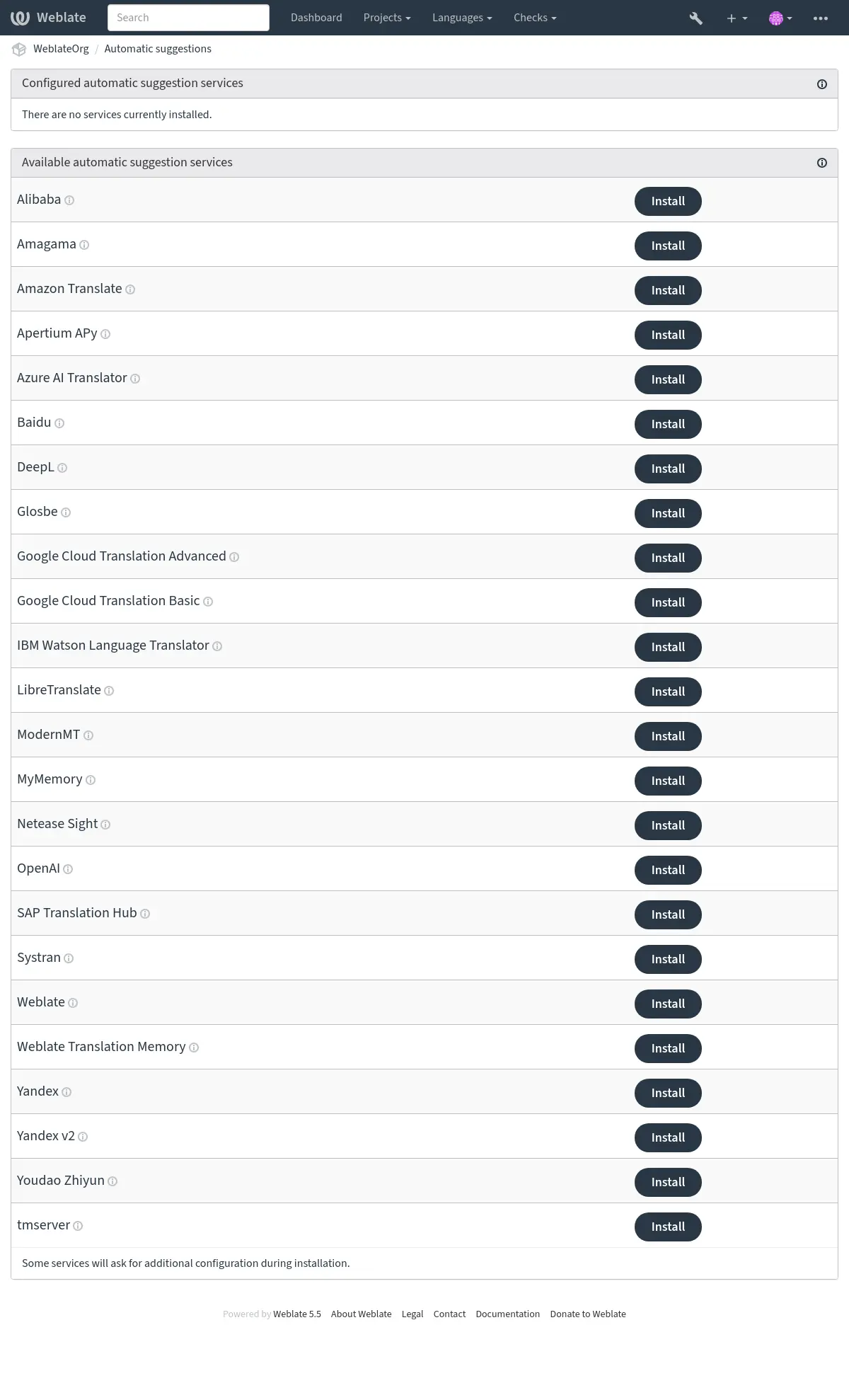
内置了对几种机器翻译和翻译记忆库服务的支持。可以用不同设置多次安装一个服务。管理员可在 管理界面 中的 翻译服务 下配置整个站点的安装。工作区管理员可配置工作区安装,项目管理员可为项目进行配置:
备注
它们受到其使用条款的约束,所以确保你被允许以你想要的方式使用它们。第三方服务可从 Weblate 接收源字符串、翻译、和相关的上下文。
Installations from the site, workspace, and project are combined for a project. You can exclude an inherited installation, or all inherited installations of one service, in workspace or project settings. Pausing an installation keeps its configuration for later use.
Every installation has a numeric ID and can have an optional slug. Select one
installation in automatic translation, Automation, or AI review with
service:id or service:slug. A bare service name is accepted when only
one active installation of that service applies to the project. A non-empty
slug must be unique among all installations visible to a project, including
inherited installations. Separate projects can use the same slug. Saved slug
selectors follow the installation currently using that slug. Services without
configuration settings can be installed once per scope and must not overlap
with enabled inherited installations. Exclude an inherited installation before
enabling another one in a lower scope. Each scope can contain up to 20
installations, including paused ones.
For install_machinery --update, specify a unique --slug or --id
when more than one site installation of a service exists.
也可通过 Weblate 的 REST API 配置翻译服务安装。
Configured translation services provide suggestions in the Automatic suggestions tab of the translation editor and can be selected for 自动翻译.
参见
机器翻译和翻译记忆库服务的优先级
匹配度达 100% 的 Weblate 翻译记忆库 的优先级高于机器翻译服务。如果翻译记忆库中找到 100% 匹配的条目,那么将不会执行机器翻译。如果有几条 100% 匹配的条目,系统会使用数据库返回的第一个条目。
每个机器翻译服务都有一个预定义的可以生成的最高分。系统按照它们的最高分确定使用安装的翻译服务的顺序。如果字符串译文的分低于机器翻译服务的最高分,那么将请求该服务生成翻译。如果译文得分超过当前得分,那么系统将接受该译文。
For explicit ordering and a separate score threshold for each service, use 在机器翻译前应用翻译记忆库. This workflow completes one translation pass before selecting the strings for the next service.
机器翻译的源字符串
Added in version 5.11.
可以配置所有第三方服务的源字符串来源。这可以用来微调服务获得最好结果。有以下选项可用:
LLM 翻译上下文
当有额外上下文可用时,基于 LLM 的翻译服务会接收每个待翻译字符串的相关内容。这包括字符串上下文或单语键、额外说明、已配置的源语言/第二语言翻译、复数信息、未通过的质量检查以及占位符内容。匹配的术语表词条会连同其说明和选定的标志一并发送,以便区分重复的术语表词汇。
在 特定语言的操作指南 中,你可以传入一个 JSON 对象(格式为语言代码到提示词文本的映射),从而为不同的目标语言单独配置提示词。输入的语言代码必须严格匹配 Weblate 系统中已注册的语言代号(且对空格敏感)。每条提示词最多可包含 1000 个字符。构建 Prompt 时,Weblate 会优先匹配完整的目标语言代码,若未命中则会自动降级回退至基础语言代码(如由 zh_CN 回退至 zh)。
追加的元数据仅用于引导生成翻译建议,返回的译文仍必须保留源文本中的占位符和标记。Weblate 还会向 LLM 服务发送一小段先前的对话,示范预期返回的 JSON 回应格式。如果系统预置了当前语言组合(如“中译英”)的翻译示例,就会直接使用;否则会使用与语言无关的格式化范例。也可以附加同一目标语言的既有译文作为额外范例。
Alibaba
Added in version 5.3.
- 服务 ID:
alibaba- 最高分:
80
- 配置:
source_language源语言选择
可用选项:
auto-- 自动选择source-- 部件源语言secondary-- 项目或部件中定义的第二语言key访问密钥 ID
secret访问密钥 secret
region区域 ID
Alibaba Translate 是神经机器文本翻译服务,支持多达 214 个语言对。
参见
Anthropic
Added in version 5.16.
- 服务 ID:
anthropic- 最高分:
90
- 高级功能:
- 配置:
source_language源语言选择
可用选项:
auto-- 自动选择source-- 部件源语言secondary-- 项目或部件中定义的第二语言base_urlAnthropic API URL
Anthropic API 的基础 URL。留空使用默认 URL。
modelAnthropic 模型
可用选项:
claude-haiku-4-5-- Claude Haiku 4.5claude-sonnet-5-- Claude Sonnet 5claude-opus-5-- Claude Opus 5claude-fable-5-1-- Claude Fable 5.1claude-opus-4-8-- Claude Opus 4.8claude-fable-5-- Claude Fable 5custom-- 定制模型persona译者人格面貌
描述译者的角色或专长。比如:“你是一名有经验的医学翻译。”
style翻译风格
请描述期望的翻译风格。例如:“使用口语化语言。”
language_instructions特定语言的操作指南
Enter a JSON object mapping target language codes recognized by Weblate to additional translation instructions. Each instruction can contain up to 1000 characters. For example: {"de": "Use formal address."}
keyAPI 密钥
custom_model自定义模型名称
选择“自定义模型”时必需。输入 API 使用的模型标识符。
max_tokens最大令牌数
所生成响应中令牌的最大数量。
用 Anthropic 的 Claude 模型执行翻译。
Anthropic API 提供对 Claude 模型家族的访问,它们以强大的推理和语言能力闻名。需要来自 Anthropic 的 API key 来使用这个服务。
The model choices favor current generally available Claude models. Previously offered models remain selectable while Anthropic continues to support them.
使用 persona 和 style 字段进一步微调翻译。这些将被用于 Claude 的提示并允许你更改翻译的风格。
Apertium APy
- 服务 ID:
apertium-apy- 最高分:
88
- 配置:
source_language源语言选择
可用选项:
auto-- 自动选择source-- 部件源语言secondary-- 项目或部件中定义的第二语言urlAPI 网址
一个自由软件机器翻译平台,提供有限语言的翻译。
使用 Apertium的推荐方式是运行您自己的 Apertium-APy 服务器。
Amazon 翻译
- 服务 ID:
aws- 最高分:
88
- 高级功能:
- 配置:
source_language源语言选择
可用选项:
auto-- 自动选择source-- 部件源语言secondary-- 项目或部件中定义的第二语言key访问密钥 ID
secretAPI 密钥
region区域名
formality正式程度
可用选项:
empty value -- Default
FORMAL-- FormalINFORMAL-- Informalbrevity简短
如果支持则首选较短的译文。
可用选项:
empty value -- Default
ON-- 已开启profanity脏话
在翻译文本中遮盖污言秽语。
可用选项:
empty value -- Default
MASK-- Mask profanity
Amazon Translate 是神经机器翻译服务,用于将英语与广泛支持的语言进行互译。此服务需要 TranslateFullAccess 受管政策。
Azure OpenAI
Added in version 5.8.
- 服务 ID:
azure-openai- 最高分:
90
- 高级功能:
- 配置:
source_language源语言选择
可用选项:
auto-- 自动选择source-- 部件源语言secondary-- 项目或部件中定义的第二语言base_urlAPI 网址
model大语言模型
persona译者人格面貌
描述译者的角色或专长。比如:“你是一名有经验的医学翻译。”
style翻译风格
请描述期望的翻译风格。例如:“使用口语化语言。”
language_instructions特定语言的操作指南
Enter a JSON object mapping target language codes recognized by Weblate to additional translation instructions. Each instruction can contain up to 1000 characters. For example: {"de": "Use formal address."}
keyAPI 密钥
azure_endpointAzure OpenAI 端点网址
实例的端点 URL,如:https://my-instance.openai.azure.com。
deploymentAzure OpenAI 部署
模型的唯一部署名。
使用托管在 Azure 上的 OpenAI 执行翻译。
参见
百度
- 服务 ID:
baidu- 最高分:
90
- 配置:
source_language源语言选择
可用选项:
auto-- 自动选择source-- 部件源语言secondary-- 项目或部件中定义的第二语言key客户 ID
secret客户端 secret
由百度提供的机器翻译服务。
这项服务使用 API,并且您需要从百度获得 ID 和 API 密钥来使用它。
参见
CyrTranslit
Added in version 5.7.
- 服务 ID:
cyrtranslit- 最高分:
100
- 配置:
source_language源语言选择
可用选项:
auto-- 自动选择source-- 部件源语言secondary-- 项目或部件中定义的第二语言
使用 Cyrtranslit 库的机器翻译服务。
此服务为同时包含西里尔和拉丁字母表的语言在两种字母表间转换文本。
DeepL
- 服务 ID:
deepl- 最高分:
91
- 高级功能:
- 配置:
source_language源语言选择
可用选项:
auto-- 自动选择source-- 部件源语言secondary-- 项目或部件中定义的第二语言urlAPI 网址
keyAPI 密钥
formality正式程度
如果未指定语言为(非)正式,则使用指定的正式程度
context翻译上下文
描述翻译上下文改进翻译准确性。
next_gen使用下一代模型
优先选择下一代 LLM 而非经典机器翻译模型。
DeepL 是付费服务,提供一些语言的良好机器翻译。您需要购买 DeepL API 订阅。
API URL to use with the DeepL service. Configure the base endpoint without an API
version; Weblate selects the appropriate DeepL API version for each request.
For a legacy subscription requiring API v1, configure
https://api.deepl.com/v1/ instead.
在 2026.9.1 版本发生变更: Support for explicitly configured DeepL API v1 endpoints has been restored.
https://api.deepl.com/(Weblate 默认值)用于付费计划的 API 用量,订阅是基于用量的。
https://api-free.deepl.com/用于免费计划的 API 用量,订阅是基于用量的。
Weblate 支持 DeepL 正式程度功能,它将根据语言选择匹配的变体(例如,有 de@formal 和 de@informal)。
可指定翻译上下文来改进翻译质量(可选)。要阅读这方面的更多信息,请访问 DeepL 翻译上下文的文档。
修改现有译文表述方式
When a string is already translated, Weblate can send the stored target text to the
DeepL Write API /v2/write/rephrase endpoint and show the improved text as an
additional machine translation suggestion.
This requires a DeepL API Pro subscription using https://api.deepl.com/.
Rephrasing is skipped when using the free API endpoint.
Only languages supported by the DeepL Write API are eligible. The stored translation is sent as plain text, without the XML placeholder handling used for DeepL translation. Rephrase suggestions use a slightly lower score than DeepL translations so automatic translation keeps preferring the translate result. Successful rephrases are cached; this still performs an extra API request on cache miss and may increase API usage and billing.
eTranslation
- 服务 ID:
etranslation- 最高分:
90
- 配置:
source_language源语言选择
可用选项:
auto-- 自动选择source-- 部件源语言secondary-- 项目或部件中定义的第二语言key应用程序名
secret密码
domain默认语言域
可用选项:
GEN-- General Text (GEN)SPD-- EU Formal Language (SPD)ECB-- Finance (ECB)ECJ-- European Court of Justice (ECJ)IPO-- EIP Case Law (Intellectual Property) (IPO)_OTHER-- Other domain codeother_domain其他域代码
选择其他域名码时输入一个来自 eTranslation 的域名码。
component_domains部件语言域
映射完整部件路径到域名码的 JSON 对象,比如 {"my-project/privacy-policy": "SPD"}。
Register an application with the European Commission to obtain its application
name and password, then configure eTranslation in Automatic
suggestions. The credentials are sent with HTTP Basic authentication. The
default language domain is GEN (General Text). Select one of the documented
domains by name, or select Other domain code to enter a code returned
by eTranslation. The service's domains endpoint supplies available domain codes
and their supported language pairs. The API also lists QE (Quality
Estimation) and NER, but their use as translation domains is not described
in the domain documentation.
Use Component language domains to select a different domain for individual components. Enter a JSON object whose keys are full component paths, including category segments where applicable. Use the domain codes shown in parentheses in the Default language domain choices:
{"my-project/privacy-policy": "SPD"}
Components absent from the mapping use Default language domain. The mapping belongs to the eTranslation service configuration, not to component settings. Project-level service configuration overrides the site-wide service configuration as it does for other suggestion services. Suggestions show the domain used for each translation.
eTranslation returns text through an asynchronous callback. Set
SITE_DOMAIN to the publicly reachable domain and enable HTTPS so
the callback URL is accessible from eTranslation. All Weblate application
processes must share the configured cache. Weblate waits up to 15 seconds for
each text suggestion; a later callback cannot populate that suggestion.
Text snippets longer than 5,000 characters are skipped.
Glosbe
- 服务 ID:
glosbe- 最高分:
90
- 配置:
source_language源语言选择
可用选项:
auto-- 自动选择source-- 部件源语言secondary-- 项目或部件中定义的第二语言
几乎所有现存语言的免费词典和翻译记忆库。
其 API 可免费使用,但翻译的使用受到所用数据源许可证的约束。为防止滥用,在一段时间内,可以从一个 IP 进行的调用是有限制的。
参见
Google Cloud 翻译基础版
- 服务 ID:
google-translate- 最高分:
90
- 配置:
source_language源语言选择
可用选项:
auto-- 自动选择source-- 部件源语言secondary-- 项目或部件中定义的第二语言keyAPI 密钥
Google 云服务提供的机器翻译服务。
这项服务使用了 Google Translation API v2,您需要得到 API 密钥,并在 Google API 控制台打开记费。
参见
Google Cloud 翻译高级版
- 服务 ID:
google-translate-api-v3- 最高分:
90
- 高级功能:
- 配置:
source_language源语言选择
可用选项:
auto-- 自动选择source-- 部件源语言secondary-- 项目或部件中定义的第二语言credentialsGoogle 翻译服务账户信息
输入服务账户的 JSON 密钥。
projectGoogle 翻译项目
输入您 Google Cloud 项目的数字或字母 ID。
locationGoogle 翻译位置
选择用于该 Google Cloud 项目或离你最近的 Google Cloud 翻译区域。
bucket_nameGoogle 存储桶名称
输入用于存储术语表文件的 Google 云存储桶名称。
Google 云服务提供的机器翻译服务。
这项服务使用 Google 翻译 API v3,您需要 JSON 格式的凭证来访问它。
要使用此服务,你需要先经历下列步骤:
你也可以建立存储桶来配置 术语表 要使用的服务(非必须):
IBM Watson Language Translator
Removed in version 5.13.1: 厂商自 2024 年 12 月 10 日起停止提供本服务。
LibreTranslate
Added in version 4.7.1.
- 服务 ID:
libretranslate- 最高分:
89
- 配置:
source_language源语言选择
可用选项:
auto-- 自动选择source-- 部件源语言secondary-- 项目或部件中定义的第二语言urlAPI 网址
keyAPI 密钥
LibreTranslate 是一项自由开源的机器翻译服务。公共实例需要 API 密钥,但 LibreTranslate 可以自托管,并且有几个镜像可以免费使用 API。
https://libretranslate.com/(官方公开实例)需要一个API密钥才能在该网站之外使用。
LTEngine
Added in version 5.17.1.
- 服务 ID:
ltengine- 最高分:
89
- 配置:
source_language源语言选择
可用选项:
auto-- 自动选择source-- 部件源语言secondary-- 项目或部件中定义的第二语言urlAPI 网址
keyAPI 密钥
LTEngine 提供由大语言模型支持的兼容 LibreTranslate 的本地 API。对于大量 Weblate 安装,原生LLM 服务如 Ollama 可能更合适,因为 Weblate 可以直接发送翻译上下文到模型。当你特别想要 LTEngine 本地翻译引擎或未来的 LTEngine 翻译改进时使用 LTEngine。
Azure AI 翻译工具
- 服务 ID:
microsoft-translator- 最高分:
90
- 高级功能:
- 配置:
source_language源语言选择
可用选项:
auto-- 自动选择source-- 部件源语言secondary-- 项目或部件中定义的第二语言keyAPI 密钥
base_url应用程序基础 URL
可用选项:
api.cognitive.microsofttranslator.com-- 全球(非区域)api-apc.cognitive.microsofttranslator.com-- 亚太api-eur.cognitive.microsofttranslator.com-- 欧洲api-nam.cognitive.microsofttranslator.com-- 北美api.translator.azure.cn-- 中国api.cognitive.microsofttranslator.us-- Azure 美国政府云endpoint_url身份认证服务 URL
可使用下方的区域字段指定区域或多服务。
可用选项:
api.cognitive.microsoft.com-- 全球api.cognitive.azure.cn-- 中国api.cognitive.microsoft.us-- Azure 美国政府云region认证服务区域
category类别
指定一个自定义的系统类别 ID 进行使用,而不是使用通用的。
由微软在 Azure 门户提供的机器翻译服务,是认知服务的一种。
Weblate 使用了 Translator API V3。
此服务通过 dynamic dictionary 自动使用 术语表,见 翻译服务中的术语表。
Translator Text API V2
您在 Translator API V2 使用的密钥可以在 API 3 中使用。
Translator Text API V3
您需要在 Azure 门户注册,并使用得到的密钥。您还需要将新的 Azure 密钥的 region 设置为您服务的语言环境。
您也可以指定自定义类别来使用 custom translator.
提示
对于中国区 Azure,请使用您 Azure 门户的端点。
Mistral
Added in version 2026.7.
- 服务 ID:
mistral- 最高分:
90
- 高级功能:
- 配置:
source_language源语言选择
可用选项:
auto-- 自动选择source-- 部件源语言secondary-- 项目或部件中定义的第二语言base_urlMistral API 基础 URL
Mistral API 的基础 URL,如果它与 Mistral 默认 URL 不同
modelMistral 模型
开启 “自动选择” 后,Weblate 从预定义偏好列表选中通过该 API 获得的第一个模型。
可用选项:
auto-- 自动选择mistral-small-latest-- Mistral Small 4ministral-14b-latest-- Ministral 3 14Bministral-8b-latest-- Ministral 3 8Bministral-3b-latest-- Ministral 3 3Bmistral-large-latest-- Mistral Large 3mistral-medium-latest-- Mistral Medium 3.5custom-- 定制模型persona译者人格面貌
描述译者的角色或专长。比如:“你是一名有经验的医学翻译。”
style翻译风格
请描述期望的翻译风格。例如:“使用口语化语言。”
language_instructions特定语言的操作指南
Enter a JSON object mapping target language codes recognized by Weblate to additional translation instructions. Each instruction can contain up to 1000 characters. For example: {"de": "Use formal address."}
keyAPI 密钥
custom_model自定义模型名称
选择“自定义模型”时必需。输入 API 使用的模型标识符。
Automatic and predefined model selection queries the service model-listing endpoint. Automatic selection prefers general-purpose models that balance translation quality, response time, and price, trying other available models in the displayed order. Choose Custom model when using a compatible gateway that does not provide model discovery; Weblate sends the configured model identifier directly to the chat endpoint.
ModernMT
Added in version 4.2.
- 服务 ID:
modernmt- 最高分:
90
- 高级功能:
- 配置:
source_language源语言选择
可用选项:
auto-- 自动选择source-- 部件源语言secondary-- 项目或部件中定义的第二语言urlAPI 网址
keyAPI 密钥
context_vector上下文向量
英文逗号分隔的列表,分别表示记忆 ID 和权重。形如 1234:0.123,4567:0.456
参见
MyMemory
- 服务 ID:
mymemory- 最高分:
100
- 配置:
source_language源语言选择
可用选项:
auto-- 自动选择source-- 部件源语言secondary-- 项目或部件中定义的第二语言email联系邮箱
username用户名
keyAPI 密钥
使用机器翻译的巨量翻译记忆库。
自由匿名使用,当前限制为 100 个请求/天,或者在 email 中提供电子邮箱联系地址时限制为 1000 个请求/天。您还可以向他们请求更多。
参见
网易见外
- 服务 ID:
netease-sight- 最高分:
90
- 配置:
source_language源语言选择
可用选项:
auto-- 自动选择source-- 部件源语言secondary-- 项目或部件中定义的第二语言key客户 ID
secret客户端 secret
网易提供的机器翻译服务。
这项服务使用 API,您需要从网易获取密钥和密码。
参见
Ollama
Added in version 5.15.
- 服务 ID:
ollama- 最高分:
90
- 高级功能:
- 配置:
source_language源语言选择
可用选项:
auto-- 自动选择source-- 部件源语言secondary-- 项目或部件中定义的第二语言base_urlAPI 网址
可以从 Weblate 服务器访问的 Ollama API 的基 URL。默认为 http://localhost:11434;localhost 指的是 Weblate 运行的环境。
modelOllama 模型
Olllama 目录中描述的模型名称。
persona译者人格面貌
描述译者的角色或专长。比如:“你是一名有经验的医学翻译。”
style翻译风格
请描述期望的翻译风格。例如:“使用口语化语言。”
language_instructions特定语言的操作指南
Enter a JSON object mapping target language codes recognized by Weblate to additional translation instructions. Each instruction can contain up to 1000 characters. For example: {"de": "Use formal address."}
用 Ollama 模型执行翻译。
Ollama API 允许使用本地安装的开源模型或通过 Ollama 服务远程访问的开源模型进行翻译。注意配置模型前,应当 安装了 Ollama 并下载了希望使用的模型。
使用 persona 和 style 字段进一步微调翻译。这些将被用于 Ollama 的提示并允许你更改翻译的风格。
参见
OpenAI
Added in version 5.3.
- 服务 ID:
openai- 最高分:
90
- 高级功能:
- 配置:
source_language源语言选择
可用选项:
auto-- 自动选择source-- 部件源语言secondary-- 项目或部件中定义的第二语言base_urlOpenAI API 基础 URL
OpenAI API 的基础 URL,如果它与 OpenAI 默认 URL 不同
modelOpenAI 模型
开启 “自动选择” 后,Weblate 从预定义偏好列表选中通过该 API 获得的第一个模型。
可用选项:
auto-- 自动选择gpt-5.6-luna-- GPT-5.6 Lunagpt-5.4-mini-- GPT-5.4 minigpt-5-mini-- GPT-5 minigpt-5.4-nano-- GPT-5.4 nanogpt-5-nano-- GPT-5 nanogpt-5.6-terra-- GPT-5.6 Terragpt-5.4-- GPT-5.4gpt-5-- GPT-5gpt-5.6-- GPT-5.6 Solgpt-5.5-- GPT-5.5gpt-4.1-mini-- GPT-4.1 minigpt-4o-mini-- GPT-4o minigpt-4.1-nano-- GPT-4.1 nanogpt-4.1-- GPT-4.1gpt-4o-- GPT-4ogpt-4-turbo-- GPT-4 Turbogpt-4-- GPT-4gpt-3.5-turbo-- GPT-3.5 Turbocustom-- 定制模型persona译者人格面貌
描述译者的角色或专长。比如:“你是一名有经验的医学翻译。”
style翻译风格
请描述期望的翻译风格。例如:“使用口语化语言。”
language_instructions特定语言的操作指南
Enter a JSON object mapping target language codes recognized by Weblate to additional translation instructions. Each instruction can contain up to 1000 characters. For example: {"de": "Use formal address."}
keyAPI 密钥
custom_model自定义模型名称
选择“自定义模型”时必需。输入 API 使用的模型标识符。
使用 OpenAI 进行翻译。
OpenAI API 由多元模型集驱动,这些模型的能力和定价各不相同。自动选择会选择最佳可用模型,但你或许想要选择匹配你需求的特定模型。
Automatic and predefined model selection queries the service model-listing endpoint. Automatic selection prefers current general-purpose models that balance translation quality, response time, and price, using older GPT models only as compatibility fallbacks. Choose Custom model when using an OpenAI-compatible gateway that does not provide model discovery; Weblate sends the configured model identifier directly to the chat completions endpoint.
使用 persona 和 style 字段进一步微调翻译。这些将被用于 OpenAI 的 prompt 并允许你更改翻译的风格。
在 5.7 版本发生变更: 新增支持自定义模型和基础 URL。
SAP 翻译中心
- 服务 ID:
sap-translation-hub- 最高分:
100
- 配置:
source_language源语言选择
可用选项:
auto-- 自动选择source-- 部件源语言secondary-- 项目或部件中定义的第二语言urlAPI 网址
keyAPI 密钥
usernameSAP 用户名
passwordSAP 密码
enable_mt启用机器翻译
domain翻译域
翻译域的 ID,例如 BC。如果您不指定域,该方法会搜索所有可用域中的翻译。
SAP 提供的机器翻译服务。
你需要有 SAP 账户(且 SAP 云平台 中 SAP 翻译中心 已启用)来使用这项服务。
除了术语数据库,你还可以配置是否使用机器翻译服务。
备注
要访问 Sandbox API,您需要设置 url 和 key.
要访问生产性 API,你需要设置 url、username 和 password.
Systran
- 服务 ID:
systran- 最高分:
90
- 配置:
source_language源语言选择
可用选项:
auto-- 自动选择source-- 部件源语言secondary-- 项目或部件中定义的第二语言keyAPI 密钥
Systran 提供的机器翻译服务。
这项服务使用 API,您需要从 <https://translate.systran.net/en/account> 获取 API 密钥。
tmserver
- 服务 ID:
tmserver- 最高分:
100
- 配置:
source_language源语言选择
可用选项:
auto-- 自动选择source-- 部件源语言secondary-- 项目或部件中定义的第二语言urlAPI 网址
使用 tmserver 协议你可以运行自己的翻译记忆库服务器。
原始的 tmserver 和 translate-toolkit 捆绑在一起。
amaGama 服务器是增强版 tmserver。
备注
目前似乎没有针对这个的受维护的服务器。
Weblate
- 服务 ID:
weblate- 最高分:
100
- 配置:
此服务无配置。
基于 Weblate 内 已翻译、已核准 或 只读 状态 下当前现有字符串中一条字符串的精准匹配,Weblate 机器翻译服务可以提供翻译。
Weblate 翻译记忆库
- 服务 ID:
weblate-translation-memory- 最高分:
100
- 配置:
此服务无配置。
使用 翻译记忆库 作为机器翻译服务。任何过去翻译过的字符串(或上传到翻译记忆库)都可以用这种方式翻译。此建议源可用于模糊匹配。
备注
重新创建 翻译记忆库 会降低此机器翻译服务的能力。
Yandex
- 服务 ID:
yandex- 最高分:
90
- 配置:
source_language源语言选择
可用选项:
auto-- 自动选择source-- 部件源语言secondary-- 项目或部件中定义的第二语言keyAPI 密钥
Yandex 提供的机器翻译服务。
这项服务使用翻译 API,您需要从 Yandex 得到 API 密钥。
Yandex v2
Added in version 5.1.
- 服务 ID:
yandex-v2- 最高分:
90
- 配置:
source_language源语言选择
可用选项:
auto-- 自动选择source-- 部件源语言secondary-- 项目或部件中定义的第二语言keyAPI 密钥
Yandex 提供的机器翻译服务。
这项服务使用翻译 API,您需要从 Yandex Cloud 得到 API 密钥。
有道智云
- 服务 ID:
youdao-zhiyun- 最高分:
90
- 配置:
source_language源语言选择
可用选项:
auto-- 自动选择source-- 部件源语言secondary-- 项目或部件中定义的第二语言key客户 ID
secret客户端 secret
有道提供的机器翻译服务。
这项服务使用 API,您需要从有道获得 ID 和 API 密钥。
参见
定制化的机器翻译
你也可以用几行 Python 代码实现自己的机器翻译服务。将代码放在 Weblate 可导入的模块中(见:建立 Python 模块 或 自定义代码)并添加完全合格的类名称到 WEBLATE_MACHINERY。
"""
Machine translation example.

This example uses fictional http://example.com/ service to translate the
strings.
"""

from __future__ import annotations

from typing import TYPE_CHECKING

from weblate.machinery.base import MACHINERY_DEFAULT_THRESHOLD, MachineTranslation

if TYPE_CHECKING:
    from weblate.auth.models import User
    from weblate.machinery.base import DownloadTranslations
    from weblate.trans.models import Unit


class SampleTranslation(MachineTranslation):
    """Sample machine translation interface."""

    name = "Sample"

    def download_languages(self) -> list[str]:
        """Return list of languages your machine translation supports."""
        response = self.request("get", "http://example.com/languages")
        return response.json()["languages"]

    def download_translations(
        self,
        source_language: str,
        target_language: str,
        text: str,
        unit: Unit | None,
        user: User | None,
        threshold: int = MACHINERY_DEFAULT_THRESHOLD,
    ) -> DownloadTranslations:
        """Return tuple with translations."""
        response = self.request(
            "get",
            "http://example.com/translate",
            params={
                "source_language": source_language,
                "target_language": target_language,
                "text": text,
            },
        )

        for translation in response.json()["translations"]:
            yield {
                "text": translation,
                "quality": 100,
                "service": self.name,
                "source": text,
            }