翻译部件诊断
为任何给定的翻译部件在 Weblate 配置或翻译项目中显示错误。还提供了如何将找到的问题定位的指南。
当前覆盖后面的内容:
翻译文件中重复的源字符串
翻译中重复的语言
仓库中的合并、更新或推送失败
解析翻译文件中的错误
账单限制(请参见 账单)
仓库包含太多的外发或丢失的提交
缺少许可证
运行附加组件时的错误(见 附加组件)
Unavailable AI evaluation services and recommendations to configure 所有质量评估 when an LLM service is available
配置错误的单语或双语翻译。
损坏 部件配置
失效链接
未使用的屏幕截图
歧义语言代码
在部件设置中未使用的新基础
用于链接部件的重复的文件掩码
冲突合并请求仓库设置
部件似乎未使用(可通过
UNUSED_ALERT_DAYS配置)未使用的术语表语言
Disabled string management in local glossaries or glossaries containing terminology
警报每天更新,或在相关变化时更新(例如,当 部件配置 被改变或当仓库被更新)。
可使用 WEBSITE_ALERTS_ENABLED 禁用项目网站可用性检查,如果禁用 Weblate 将不再生成无法连接的项目网站的警报。
Alerts are listed on each respective component page as Diagnostics.
Add-on error diagnostics link to the responsible installation's Configuration page for users who can manage it, including add-ons inherited from a category, project, or site configuration. For AI quality evaluation, an unavailable service produces an error diagnostic; provider request failures remain in the add-on activity log.
Project and workspace diagnostics overviews
Signed-in users can open the Diagnostics tab on project and workspace pages. The overview is loaded when opened and groups alerts of the same type instead of repeating them for every component.
The project overview shows project-wide findings once and lists the components affected by component-specific findings:

The workspace overview groups project-wide findings by project and identifies components using both the project and component name:

Each finding lists up to 20 affected projects or components. Additional affected objects are shown as a count. Follow a component link to see the complete diagnostic details or dismiss a diagnostic on the component page.
The summary can be filtered by active or dismissed state, severity, category, or whether the signed-in user can act on the diagnostic. Components shared into a project are listed only in the diagnostics of their owning project.
如果没有,部件会清除所有当前检查。一旦解决了底层状况,警告将消失。
Information and warning alerts are used for guidance on improving community localization. They make the Diagnostics tab visible, but they do not indicate a component problem in listings.
Dismissal is available for selected diagnostics, regardless of severity. Maintainers can dismiss warnings about unused components and glossary languages when these are intentionally retained. Suspected monolingual or bilingual file-format misconfiguration can also be dismissed when the configuration is correct. Operational failures and required configuration must still be resolved.
Dismissed diagnostics record who dismissed them, when they were dismissed, and an optional reason. A dismissal is automatically reopened when the diagnostic details or the configuration relevant to that diagnostic changes. Dismissal and reopening are both recorded in the component change history.
Unused-component dismissals persist through daily checks and reopen if
UNUSED_ALERT_DAYS changes. Set this setting to 0 to disable the check
site-wide. If activity resolves the diagnostic, a later period of inactivity
can generate a new diagnostic. Unused glossary language dismissals reopen when
the affected languages change. File-format diagnostic dismissals reopen when
the relevant format, format parameters, base file, or source language changes.
Warning and error notifications are sent only to subscribed project maintainers who have permission to act on the diagnostic. Informational recommendations do not send unsolicited notifications.
Custom alerts can override
BaseAlert.get_dismissal_context(component, details) to include stable,
JSON-serializable configuration or diagnostic inputs. Changing the returned
context reopens a dismissed alert. Incidental values such as evaluation time
should not be included.
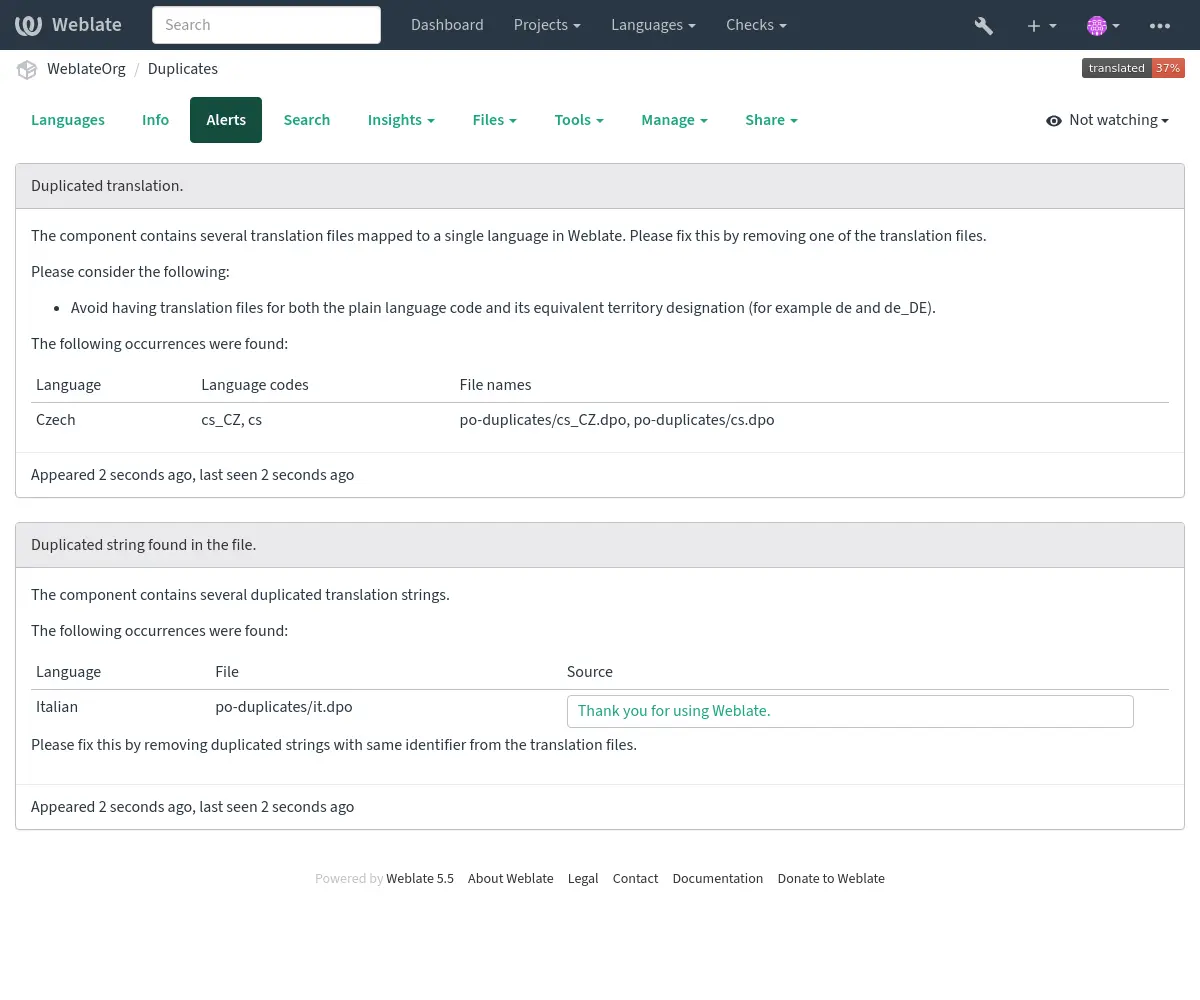
包含重复的字符串和语言的部件如下所示:
有冲突的仓库设置
当多个 Git 部件被配置为推送到相同仓库和推送分支而这些部件均不从那个分支进行拉取时显示此警告。这包括拉取或合并请求工作流以及直接推送到单独推送分支。这样的设置可以覆盖共享分支。
要解决这个问题,要么为每个部件配置不同的 Push branch,要么用 weblate://project/component 仓库 URL 在不同部件间共享一个仓库。
参见