Prevodilački projekti
Prevodilačka organizacija
Weblate organizes translatable VCS content of project/components into a tree-like structure. You can additionally organize components within a project using categories.
The bottom level object is Konfiguracija projekta, which should hold all translations belonging together (for example translation of an application in several versions and/or accompanying documentation).
The middle level is optionally created by Kategorija. The categories can be nested to achieve more complex structure.
On the level above, Konfiguracija komponente, which is actually the component to translate, you define the VCS repository to use, and the mask of files to translate.
Above Konfiguracija komponente there are individual translations, handled automatically by Weblate as translation files (which match Maska datoteke defined in Konfiguracija komponente) appear in the VCS repository.
Weblate supports a wide range of translation formats (both bilingual and monolingual ones) supported by Translate Toolkit, see Localization file formats.
Napomena
You can share cloned VCS repositories using Weblate interni URL-ovi. Using this feature is highly recommended when you have many components sharing the same VCS. It improves performance and decreases required disk space.
Adding translation projects and components
Based on your permissions, new translation projects and components can be created. It is always permitted for users with the Add new projects permission, and if your instance uses billing (e.g. like https://hosted.weblate.org/ see Naplata), you can also create those based on your plans allowance from the user account that manages billing. Projects can also be created in a workspace by users who have the Add projects to workspace permission in that workspace. Creating a project without selecting a workspace requires the site-wide Add new projects permission. See Project creation and moves for details.
Savjet
To grant every user permission to create new projects create new Automatska dodjeljivanja timu for the Project creators team.
Svoj trenutačni plan naplate možeš pogledati na zasebnoj stranici:
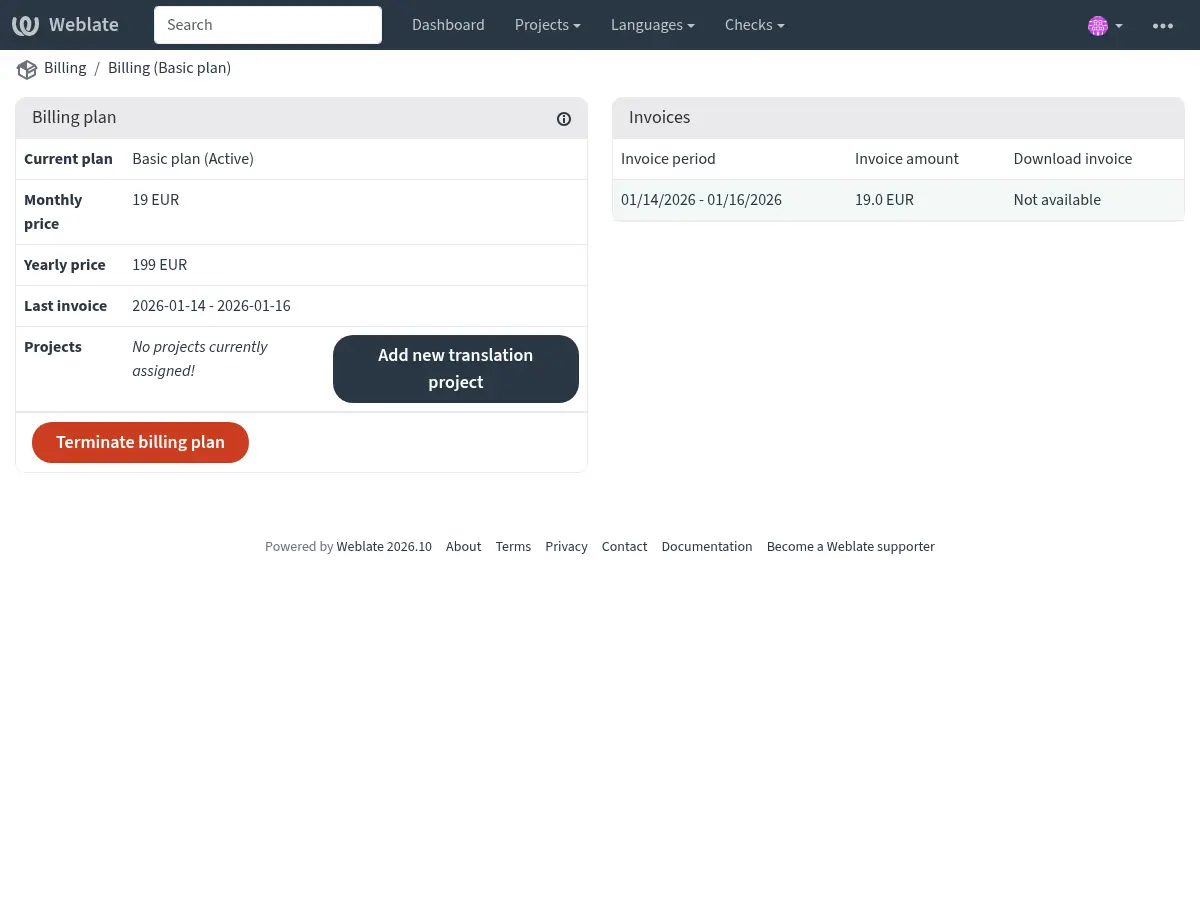
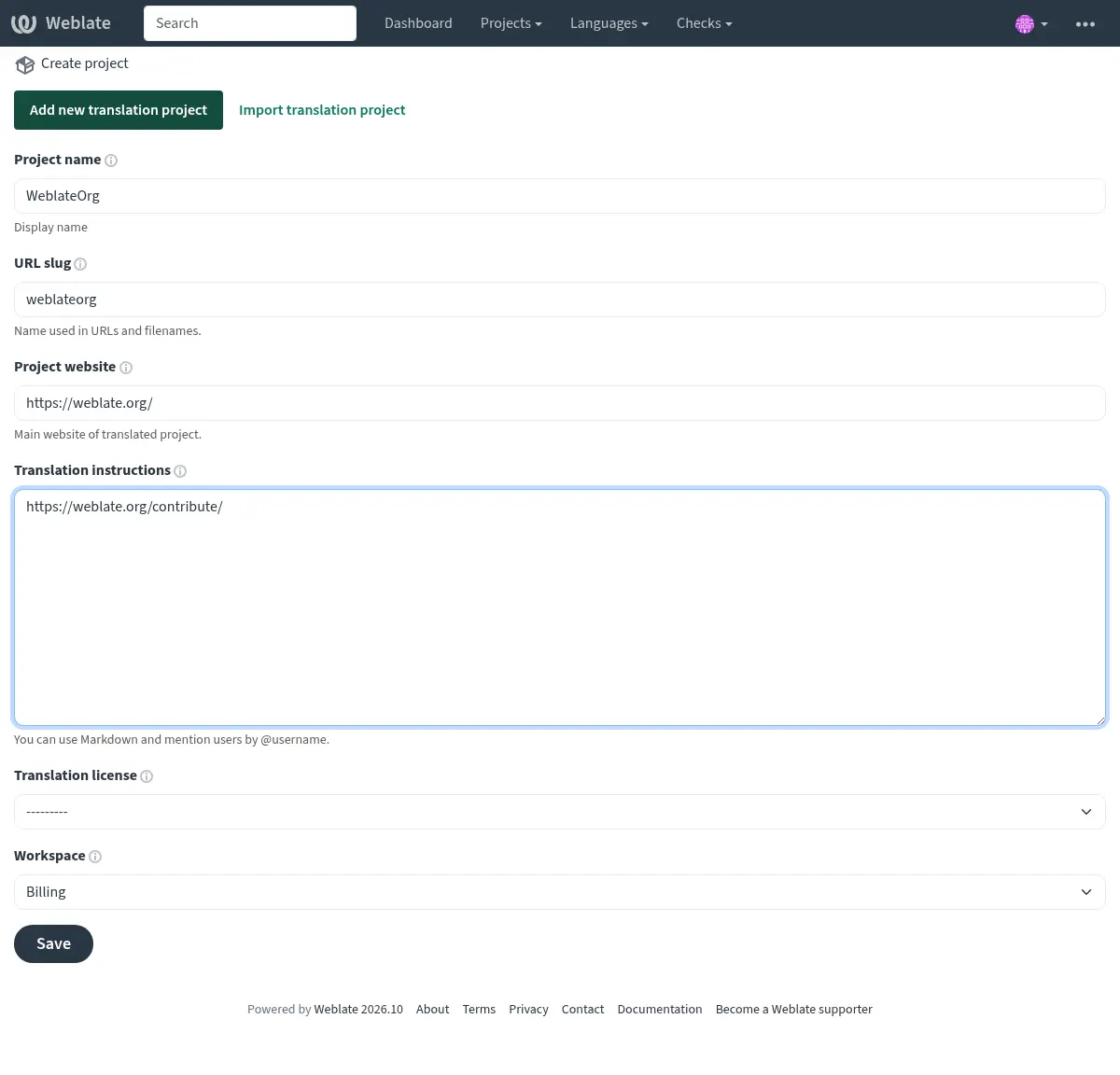
The project creation can be initiated from there, or using the menu in the navigation bar, filling in basic info about the translation project to complete addition of it:
After creating the project, you are taken directly to the project page:
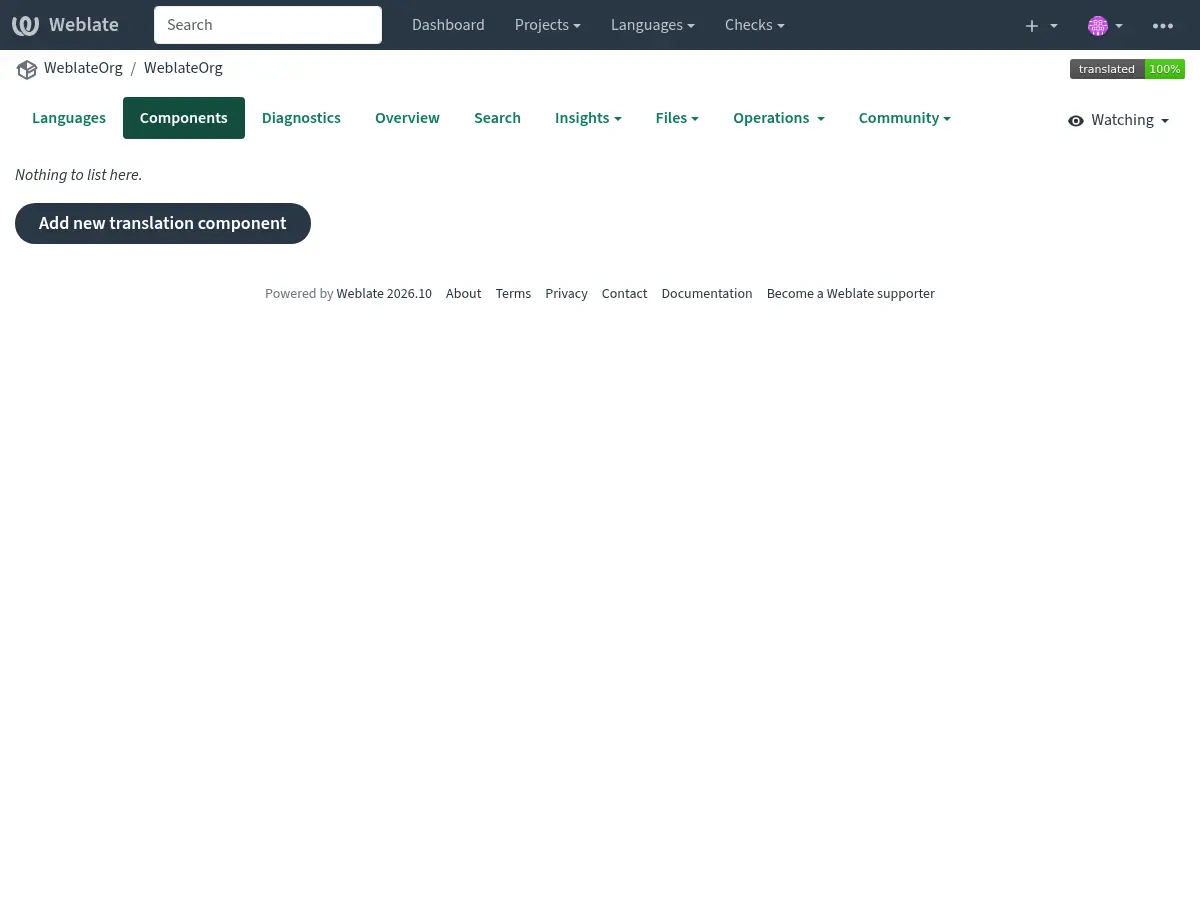
Creating a new translation component can be initiated via a single click there. The process of creating a component is multi-staged and automatically detects most translation parameters. There are several approaches to creating component:
- Iz kontrole verzija
Stvara komponentu iz eksternog repozitorija kontrole verzija.
- Iz postojeće komponente
Stvara dodatnu komponentu postojećoj komponenti biranjem drugačijih datoteka.
- Dodatna grana
Stvara dodatnu komponentu postojećoj komponenti, ali za jednu drugu granu.
- Prenesi prevodilačke datoteke
Upload translation files to Weblate in case you do not have version control or do not want to integrate it with Weblate. You can later update the content using the web interface or Weblateov REST API.
- Prevedi dokument
Upload single document or translation file and translate that.
- Počni ispočetka
Stvori prazan prevodilački projekt i ručno dodaj izraze.
Once you have existing translation components, you can also easily add new ones for additional files or branches using same repository.
First you need to fill in name and repository location:
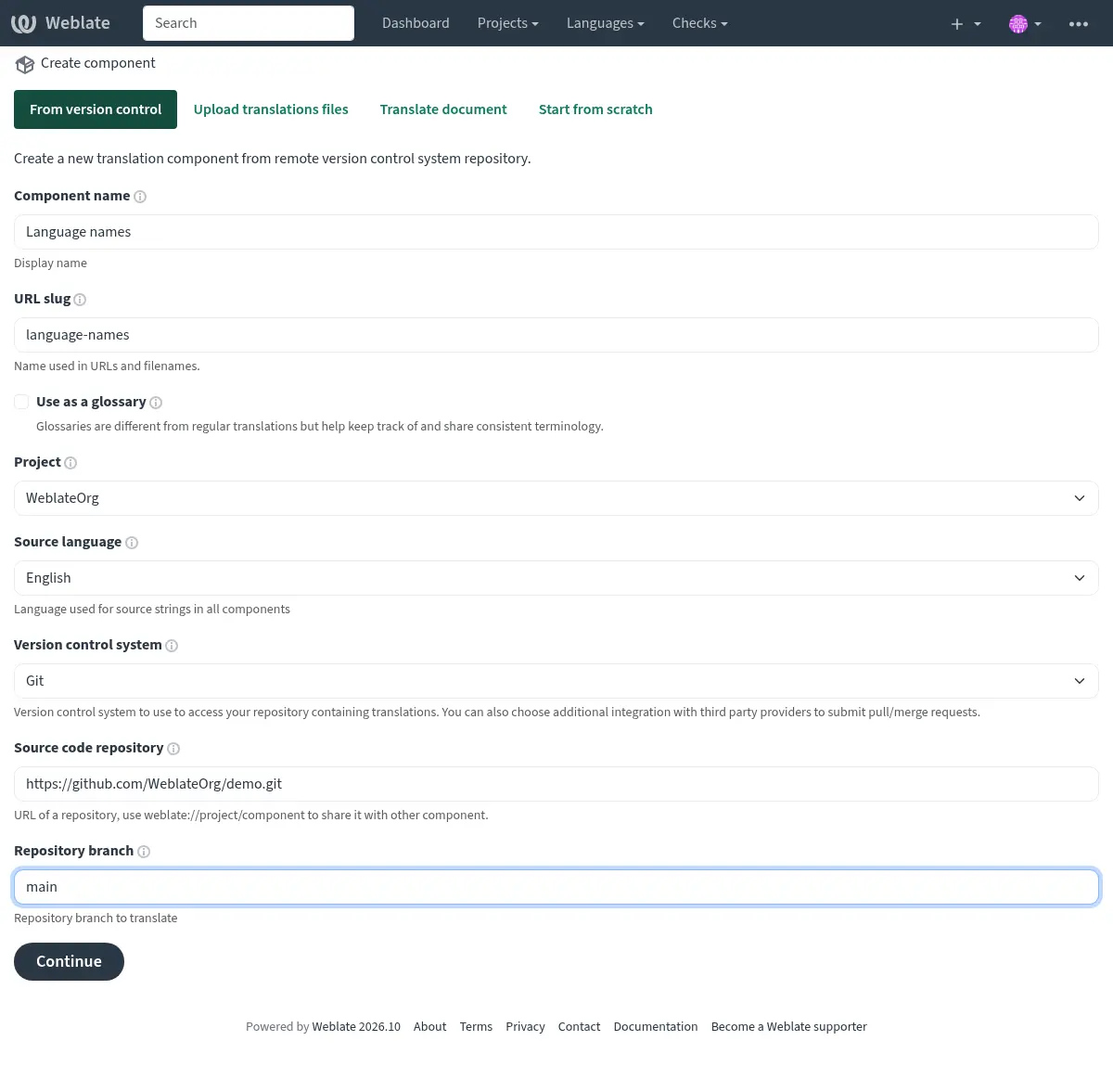
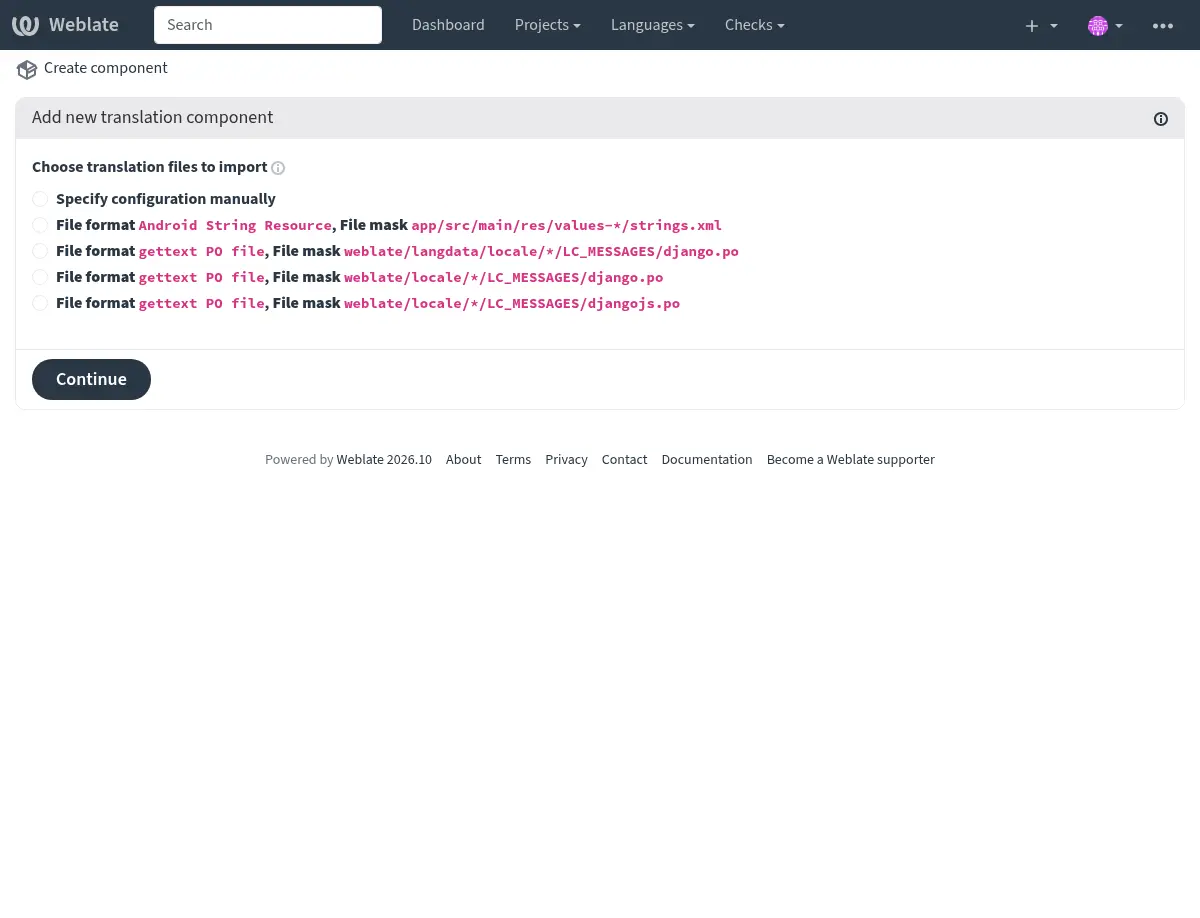
On the next page, you are presented with a list of discovered translatable resources:
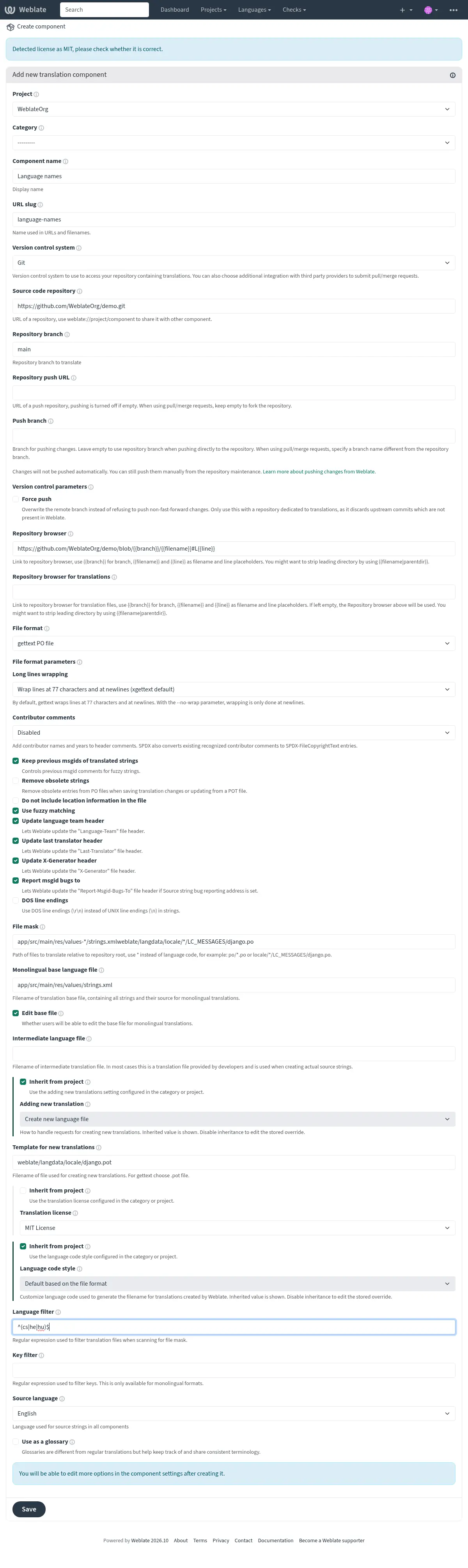
As a last step, you review the translation component info and fill in optional details:
Više informacija
Konfiguracija projekta
Create a translation project and then add a new component for translation in it. The project is like a shelf, in which real translations are stacked. All components in the same project share suggestions and their dictionary; the translations are also automatically propagated through all components in a single project (unless turned off in the component configuration), see Prevodilačka memorija.
Više informacija
These basic attributes set up and inform translators of a project:
Ime projekta
Opširno ime projekta, koristi se za prikaz imena projekta.
Više informacija
URL identifikator
Prikladno ime projekta za URL-ove.
Web-stranica projekta
URL na kojem prevoditelji mogu pronaći više informacija o projektu.
Ovo je obavezan parametar ukoliko nije isključen postavkom WEBSITE_REQUIRED.
Upute za prevođenje
Tekst koji opisuje proces lokalizacije u projektu i sve druge korisne informacije za prevoditelje. Markdown se može koristiti za formatiranje teksta ili umetanje poveznica.
Good translation instructions explain how contributors should submit translations, what review they should expect, how they can report problems with source strings, and where translations can be tested or when they are released.
Licenca prijevoda
Default translation license for components in this project.
Više informacija
Licencni ugovor za doprinositelje
Default contributor license agreement for components in this project. Markdown can be used for text formatting or inserting links.
Više informacija
Use workspace translation memory
Whether to use translation memory shared by projects in the same workspace, see Translation-memory scopes for more details. The workspace has to allow workspace translation memory as well.
Contribute to workspace translation memory
Whether to contribute translations to the translation memory shared by projects in the same workspace. The workspace has to allow contribution as well.
Napomena
This option is unavailable on Hosted Weblate, it is toggled together with Use workspace translation memory.
Automatski očisti prevodilačku memoriju
Added in version 5.13.
Whether to replace older automatically created translation memory entries when a translation becomes active.
Matching is based on the same source string, component, context, and source/target language pair. Uploaded translation memory files are not affected.
Više informacija
Kontrola pristupa
Configure per project access control, see Kontrola pristupa projektu for more details.
The default value can be changed by DEFAULT_ACCESS_CONTROL.
Public sharing
Allow anonymous access to the project’s engage pages and rendered status widgets. This setting applies to Private and Custom projects; Public and Protected projects are always publicly shareable.
Public sharing exposes project and component names, including restricted components, together with translation statistics, languages, and progress. It does not grant access to project pages, translations, repositories, or the API.
Changing this setting has no immediate effect while the project is Public or Protected, but the stored value is retained and applies if the project is later changed to Private or Custom. Sitemaps for project, component, and translation pages only include pages that are directly accessible anonymously. Engage sitemaps follow the public sharing setting.
Changing this setting requires the Manage project access permission. The status widget configuration page continues to use normal project access control.
When REQUIRE_LOGIN is enabled, PUBLIC_ENGAGE must also be
enabled for anonymous access to engage pages and sitemaps.
Nametnuta dvofaktorska autentifikacija
Added in version 5.7.
Enforce Dvofaktorska autentifikacija for all contributors. Users won’t be allowed to perform any operations within the project without having it configured.
Aktiviraj preglede
Aktiviraj radni tok pregleda za prijevode, pogledaj Određeni pregledatelji.
Više informacija
Aktiviraj preglede izvora
Aktiviraj radni tok pregleda za izvorne izraze, pogledaj Pregledi izvornih izraza.
Više informacija
Filtar za kvalitetu prijevoda
Added in version 5.13.
The commit policy determines which translations are included when committing changes to the version control system. This setting is available at the project level and supports the following options:
Commit all translations regardless of quality: All translations will be committed, including those marked as needing editing or not reviewed.
Skip translations marked as needing editing: Only translations that don’t have the „needs editing”, „needs rewriting” or „needs checking” state will be committed.
Only include approved translations: Only translations that have been approved by a reviewer will be committed. This option requires Aktiviraj preglede to be enabled.
The approved-only policy applies only to translations with reviews enabled. Languages with reviews disabled through Prilagođavanje radnog toka commit all translations, including those marked as needing editing. Source strings follow the same rule using Aktiviraj preglede izvora.
Components linked to a repository in another project follow their own project’s commit policy.
If the editor shows “Only approved translations are written to the translation file.” or “Approval is required before this translation can be written to the translation file.”, the quality filter prevents writing the translation to the file until it is approved. This notice does not confirm that your current edit was saved; resolve any validation errors before leaving the editor. The project policy description qualifies this as “For languages with reviews enabled, only approved translations are written to the translation file.” Having permission to approve translations does not automatically approve your edits.
For a language that does not use reviews, open its page in the project and choose Settings. Enable Customize translation workflow for this language in this project, then turn Enable reviews off. This requires permission to edit project settings. See Prilagođavanje radnog toka. With the approved-only policy, this makes all translation states eligible for writing to files for that language, including those needing editing.
If reviews are needed, users with both review and bulk-edit permissions can use Skupno uređivanje to approve existing translations they have reviewed. Eligibility for writing to a translation file does not mean the change is immediately committed or pushed; see Lazy commits and Prenesi pri spremanju izmjene.
Aktiviraj petlje
Whether unauthenticated Pokretači obavijesti are to be used for this repository.
Aliasi jezika
Define language codes mapping when importing translations into Weblate. Use this when language codes are inconsistent in your repositories and you want to get a consistent view in Weblate or in case you want to use non-standard naming of your translation files.
The typical use case might be mapping American English to English: en_US:en
Multiple mappings to be separated by comma: en_GB:en,en_US:en
Using non standard code: ia_FOO:ia
Savjet
The language codes are mapped when matching the translation files and the matches are case sensitive, so ensure you use the source language codes in same form as used in the filenames.
Više informacija
Dodavanje novog prijevoda
Default behavior for requests to create new translations in components in this project.
Više informacija
Stil jezičnog koda
Default language code style for translations created by Weblate in components in this project.
Više informacija
Sekundarni jezik
Added in version 5.11.
Dodatni jezik koji će se prikazivati zajedno s izvornim jezikom prilikom prevođenja.
Optionally, it can be also used as a source for the machine translation.
Više informacija
Prevodilačke oznake
Added in version 5.11.
Customization of quality checks and other Weblate behavior, see Customizing behavior using flags.
Workspace, project, component, and translation flags are merged.
Više informacija
Commit, add, delete, merge, add-on, and merge request messages
Default commit and merge request message templates for components in this project.
The default values can be changed by DEFAULT_ADD_MESSAGE,
DEFAULT_ADDON_MESSAGE, DEFAULT_COMMIT_MESSAGE,
DEFAULT_DELETE_MESSAGE, DEFAULT_MERGE_MESSAGE,
DEFAULT_PULL_MESSAGE.
The built-in defaults follow Conventional Commits and include Weblate links where available. Use Restore site default next to a message editor to restore the current installation default for that message; for inherited values, this also disables inheritance for that message.
Više informacija
Konfiguracija komponente
A component is a grouping of something for translation. You enter a VCS repository location and file mask for which files you want translated, and Weblate automatically fetches from this VCS, and finds all matching translatable files.
Više informacija
You can find some examples of typical configurations in the Localization file formats.
Napomena
It is recommended to keep translation components to a reasonable size - split the translation by anything that makes sense in your case (individual apps or add-ons, book chapters or websites).
Weblate easily handles translations with 10000s of strings, but it is harder to split work and coordinate among translators with such large translation components.
Should the language definition for a translation be missing, an empty definition is created and named as „cs_CZ (generated)”. You should adjust the definition and report this back to the Weblate authors, so that the missing languages can be included in next release.
The component contains all important parameters for working with the VCS, and for getting translations out of it:
Ime komponente
Verbose component name, used to display the component name.
Identifikator komponente
Ime komponente prikladno za URL-ove.
Projekt komponente
Konfiguracija projekta where the component belongs.
Sustav za kontrolu verzija
VCS to use, see Integracija kontrole verzija for details.
Više informacija
Version control parameters
Parameters tuning how Weblate interacts with the repository, for example whether to force push or to open pull requests. Only parameters applicable to the selected Sustav za kontrolu verzija are shown, see also Version control parameters.
Napomena
The settings form silently drops parameters which do not apply to the
selected version control system, but the REST API rejects them. When
changing Sustav za kontrolu verzija over the API, clear or replace vcs_params
in the same request. The same applies to
Parametri formata datoteke and Format datoteke.
Repozitorij izvornog koda
VCS repository used to pull changes.
Više informacija
See Pristup repozitorijima for more details on specifying URLs.
Savjet
This can either be a real VCS URL or weblate://project/component
indicating that the repository should be shared with another component.
See Weblate interni URL-ovi for more details.
URL repozitorija za prijenos
Repository URL used for pushing. The behavior of this depends on Sustav za kontrolu verzija, and this is in more detail covered in Pushing changes from Weblate.
For linked repositories, this is not used and setting from linked component applies.
Više informacija
See Pristup repozitorijima for more details on how to specify a repository URL and Pushing changes from Weblate for more details on pushing changes from Weblate.
Preglednik repozitorija
URL of repository browser used to display source files (location of used messages). When empty, no such links will be generated. You can use Označavanje u predlošcima.
Naprimjer na GitHubu, koristi nešto poput: https://github.com/WeblateOrg/hello/blob/{{branch}}/{{filename}}#L{{line}}
In case your paths are relative to different folder (path contains ..), you
might want to strip leading directory by parentdir filter (see
Označavanje u predlošcima):
https://github.com/WeblateOrg/hello/blob/{{branch}}/{{filename|parentdir}}#L{{line}}
Više informacija
Repository browser for translations
URL of repository browser used to display translation files. When empty, the Preglednik repozitorija URL will be used as a fallback. This is useful when source-code files and translation files are hosted in different repositories. It applies to all translation files, including source-language, intermediate, template, and target files. You can use Označavanje u predlošcima.
For example on GitHub, use something like:
https://github.com/WeblateOrg/translations/blob/{{branch}}/{{filename}}#L{{line}}
Više informacija
URL izvezenog repozitorija
URL where changes made by Weblate are exported. This is important when Kontinuirana lokalizacija is not used, or when there is a need to manually merge changes. You can use Git exporter to automate this for Git repositories.
Grana repozitorija
Which branch to checkout from the VCS, and where to look for translations.
For linked repositories using Weblate interni URL-ovi, this setting is controlled by the linked component that owns the repository. Linked child components use the value from that component.
Prenesi granu
Branch for pushing changes, leave empty to use Grana repozitorija.
For linked repositories using Weblate interni URL-ovi, this setting is controlled by the linked component that owns the repository. Linked child components use the value from that component.
Napomena
This setting is ignored for Mercurial and Subversion.
For Gerrit, this selects the target branch for the review request. Leave it
empty to review against Grana repozitorija. Use the short branch name,
not refs/heads/<branch> or refs/for/<branch>. Gerrit push options
can be appended after % in either setting, for example
main%topic=l10n; Gerrit interprets them as the configured Weblate Gerrit
account.
Više informacija
Maska datoteke
Mask of files to translate, including path. It should include one „*” replacing language code (see Definicije jezika for info on how this is processed). In case your repository contains more than one translation file (e.g. more gettext domains), you need to create a component for each of them.
Na primjer po/*.po ili locale/*/LC_MESSAGES/django.po.
In case your filename contains special characters such as [, ], these need
to be escaped as [[] or []].
Maska snimke ekrana
This feature allows the discovery and updating of screenshots through screenshot file masks, using paths from the VCS repository. This operates at the component level and necessitates the use of an asterisk „*” to replace the screenshot file name.
Dozvoljeni formati su WebP, JPEG, PNG, APNG i GIF.
Napomena:
The file mask and screenshot file mask are not related. Configure them separately.
It is a manual job to link a discovered screenshot in a component to a specific translation key.
For example:
Let’s assume your VCS repository has a structure like this:
component_A
└── docs
    ├── image1.png
    └── image2.jpg
For component_A, you want to allow discovery and updates of PNG screenshots.
You’d set the screenshot file mask for component_A as component_A/docs/*.png.
This means any PNG images under docs in component_A can be discovered and updated.
So, if you want to update image1.png, the new screenshot you provide should be named image1.png,
matching the existing filename, and stored under component_A/docs/.
For Android projects using Fastlane metadata, a source-language screenshot mask
can point to the metadata screenshot folder, for example
fastlane/metadata/android/en-US/images/phoneScreenshots/*.png. Weblate will
discover matching screenshots on repository update. The discovered screenshots
still need to be associated with source strings in the screenshot management
interface; use OCR or source string search there to assign them in bulk.
Jednojezična datoteka osnovnog jezika
Base file containing string definitions for Project and component creation.
Uredi osnovnu datoteku
Da li dopustiti uređivanje izraza u Jednojezična datoteka osnovnog jezika.
Datoteka posrednog jezika
Međujezična datoteka za Project and component creation. U većini slučajeva ovo je prevodilačka datoteka koju pružaju programeri i koristi se pri stvaranju stvarnih izvornih izraza.
Kada je postavljeno, izvorni izrazi se temelje na ovoj datoteci, ali svi ostali jezici se temelje na Jednojezična datoteka osnovnog jezika. U slučaju da izraz nije preveden na izvorni jezik, prevođenje na druge jezike je zabranjeno. To omogućuje Sustav za provjeru kvalitete izvornih izraza.
The intermediate file can match an existing language file. While it is configured as intermediate, Weblate does not list it as a regular language in the component language list. Clearing this setting makes the file appear as a regular language again on the next component scan.
Target strings can become read-only while the intermediate file is configured. This happens for strings where the matching source string in the Jednojezična datoteka osnovnog jezika is not translated yet.
Predložak za nove prijevode
Osnovna datoteka za generiranje novih prijevoda.
Keep this field empty for most of the monoligual formats. Those are typically able to start from an empty file.
Odaberi
.potdatoteku s GNU gettext PO datotekama.Ako imaš, odaberi praznu datoteku bez prijevoda.
Choose Jednojezična datoteka osnovnog jezika for monolingual formats that need a full set of keys present.
Odaberi Jednojezična datoteka osnovnog jezika za prijevode dokumenta.
Odaberi bilo koju prevodilačku datoteku za druge.
Datoteka predloška u većini slučajeva može biti ista kao osnovna datoteka.
Savjet
In many monolingual formats Weblate starts with empty file by default. Use this in case you want to have all strings present with empty value when creating new translation.
Format datoteke
Format prevodilačke datoteke, pogledaj Localization file formats.
Parametri formata datoteke
Parameters used to configure how translation files are processed, see also Parametri formata datoteke.
Adresa za prijavu grešaka u izvornom izrazu
Email address used for reporting upstream bugs. This address will also receive notification about any source string comments made in Weblate.
With the GNU gettext PO (Portable Object) format, this address is also saved by Weblate in the Report-Msgid-Bugs-To header of the file.
Ne prikazuj podudaranja s glosarom
Hides the glossary panel and its matches in the translation editor for this component. When enabled, glossary suggestions for this component are not computed, and the Glossary panel (including its “Add term to glossary” action) is hidden in the editor.
Napomena
Glossary self-references are always excluded from matches even when this option is disabled.
Više informacija
Doprinesi prevodilačkoj memoriji projekta
Controls whether translations from this component are added to the project translation memory.
Više informacija
Dopusti dijeljenje prijevoda
You can turn off propagation of translations to this component from other components within same project. This really depends on what you are translating, sometimes it’s desirable to have make use of a translation more than once.
It’s usually a good idea to turn this off for monolingual translations, unless you are using the same IDs across the whole project.
The default value can be changed by DEFAULT_TRANSLATION_PROPAGATION.
Više informacija
Omogući prijedloge
Da li se prihvaćaju prijedlozi prijevoda za ovu komponentu.
Više informacija
Glasanje za prijedlog
Uključuje glasanja za prijedloge, pogledaj Glasanje za prijedlog.
Više informacija
Automatski prihvati prijedloge
Automatski prihvati izglasane prijedloge, pogledaj Glasanje za prijedlog.
Više informacija
Prevodilačke oznake
Customization of quality checks and other Weblate behavior, see Customizing behavior using flags.
Workspace, project, component, and translation flags are merged.
Više informacija
Obavezne provjere
Popis provjera koje se ne mogu odbaciti.
This setting can be inherited from the workspace, project, or category (see Settings inheritance). When a new enforced check is inherited, existing failing translations are reverted to the Needs editing state in the background.
Više informacija
Licenca prijevoda
License of the translation (does not need to be the same as the source code license).
Više informacija
Licencni ugovor za doprinositelje
Licencni ugovor za doprinositelje koji se mora prihvatiti prije nego što korisnik može prevesti ovu komponentu.
Markdown can be used for text formatting or inserting links.
Više informacija
Dodavanje novog prijevoda
Kako postupati sa zahtjevima za stvaranje novih jezika. Dostupne opcije:
- Obrati se održavateljima
User can select desired language and the project maintainers will receive a notification about this. It is up to them to add (or not) the language to the repository.
- Odredi URL s uputama za prijevod
User is presented a link to page which describes process of starting new translations. Use this in case more formal process is desired (for example forming a team of people before starting actual translation).
- Stvori novu jezičnu datoteku
User can select language and Weblate automatically creates the file for it and translation can begin.
- Create existing project languages; contact maintainers for new languages
Users can create translations for languages already used as target languages in another non-glossary component in the project. Other languages are requested from maintainers, who approve them by creating the first target translation. See Limiting translation languages for eligibility and API behavior.
- Deaktiviraj dodavanje novih prijevoda
There will be no option for user to start new translation.
Savjet
The project admins can add new translations even if it is disabled here when it is possible (either Predložak za nove prijevode or the file format supports starting from an empty file).
Upravljaj izrazima
Added in version 4.5.
Configures whether users in Weblate will be allowed to add new strings and remove existing ones. It also enables editing source strings and keys in supported formats. Adjust this to match your localization workflow — how strings are introduced and maintained.
For bilingual formats, the strings are typically extracted from the source code (for example by using xgettext) and adding new strings in Weblate should be disabled (they would be discarded next time you update the translation files). In Weblate you can manage strings for every translation and it does not enforce the strings in all translations to be consistent.
For monolingual formats, the strings are managed only on source language and are automatically added or removed in the translations. The strings appear in the translation files once they are translated.
Savjet
You might want to turn on Uredi osnovnu datoteku together with Manage strings for monolingual formats.
Stil jezičnog koda
Prilagodi jezični kod koji se koristi za generiranje imena datoteke za prijevode koji su stvoreni s Weblateom.
Napomena
Weblate recognizes any of the language codes when parsing translation files, following settings only influences how new files are created.
- Standard na osnovi datotečnog formata
Ovisno o formatu datoteka, za većinu se koristi POSIX.
- POSIX stil koristeći podvlaku kao znak razdvajanja
Obično ga koristi gettext i srodni alati, stvara jezične kodove poput
hr_HR.- POSIX stil koristeći podvlaku kao znak razdvajanja, mala slova
Obično ga koristi gettext i srodni alati, stvara jezične kodove poput
hr_HR.- POSIX stil koristeći podvlaku kao znak razdvajanja, uključujući kôd zemlje
POSIX stil koda jezika uključujući kôd zemlje čak i kada nije potreban (na primjer
hr_HR).- POSIX stil koristeći podvlaku kao znak razdvajanja, uključujući kôd zemlje, mala slova
POSIX stil koda jezika uključujući kôd zemlje čak i kada nije potreban (mala slova) (na primjer
hr_hr).- BCP stil koristeći crticu kao znak razdvajanja
Obično ga koriste web platforme, stvara jezične kodove poput
hr-HR.- BCP stil koristeći crticu kao znak razdvajanja, uključujući kôd zemlje
BCP stil koda jezika uključujući kôd zemlje čak i kada nije potreban (na primjer
hr-HR).- BCP stil koristeći crticu kao znak razdvajanja, stari kodovi jezika
Uses legacy codes for Chinese and BCP style notation.
- BCP stil koristeći crticu kao znak razdvajanja, mala slova
BCP stil notacije, sve malim slovima (na primjer
hr-hr).- Apple App Store stil metapodataka
Prikladni stil za prijenos metapodataka u Apple App Store.
- Google Play stil metapodataka
Prikladni stil za prijenos metapodataka u Google Play Store.
- Android stil
Koristi se samo u Android aplikacijama, stvara jezične kodove poput
pt-rBR.- Linux stil
Locales as used by Linux, uses legacy codes for Chinese and POSIX style notation.
- Linux stil, mala slova
Locales as used by Linux, uses legacy codes for Chinese and POSIX style notation. Lower cased.
Stil sjedinjavanja
You can configure how updates from the upstream repository are handled. The actual implementation depends on VCS, see Integracija kontrole verzija.
- Presloži
Rebases Weblate commits on top of upstream repository on update. This provides clean history without extra merge commits.
Rebasing can cause you trouble in case of complicated merges, so carefully consider whether or not you want to enable them.
You might need to turn on force pushing in Version control parameters, especially when pushing to a different branch.
- Sjedini
Upstream repository changes are merged into Weblate one. This setting utilizes fast-forward when possible. This is the safest way, but might produce a lot of merge commits.
- Sjedini bez funkcije fast-forward
Upstream repository changes are merged into Weblate one with doing a merge commit every time (even when fast-forward would be possible). Every Weblate change will appear as a merge commit in Weblate repository.
The default value can be changed by DEFAULT_MERGE_STYLE.
Commit, add, delete, merge, add-on, and merge request messages
Message used when committing a translation, see Označavanje u predlošcima.
The default value can be changed by DEFAULT_ADD_MESSAGE,
DEFAULT_ADDON_MESSAGE, DEFAULT_COMMIT_MESSAGE,
DEFAULT_DELETE_MESSAGE, DEFAULT_MERGE_MESSAGE,
DEFAULT_PULL_MESSAGE.
The built-in defaults follow Conventional Commits and include Weblate links where available. Use Restore site default next to a message editor to restore the current installation default for that message; for inherited values, this also disables inheritance for that message.
Više informacija
Prenesi pri spremanju izmjene
Whether committed changes should be automatically pushed to the upstream repository. When enabled, the push is initiated once Weblate commits changes to its underlying repository (see Lazy commits). To actually enable pushing Repository push URL has to be configured as well.
For linked repositories using Weblate interni URL-ovi, this setting is controlled by the linked component that owns the repository. Linked child components use the value from that component.
Starost promjena koje želiš spremiti
Sets how old (in hours) changes have to be before they are committed by
background task or the commit_pending management command. All
changes in a component are committed once there is at least one change
older than this period.
For linked repositories using Weblate interni URL-ovi, this setting is controlled by the linked component that owns the repository. Linked child components use the value from that component.
The default value can be changed by COMMIT_PENDING_HOURS.
Savjet
There are other situations where pending changes might be committed, see Lazy commits.
Zaključaj kad dođe do greške
Locks the component (and linked components, see Weblate interni URL-ovi) upon the first failed push or merge into its upstream repository, or pull from it. This avoids adding another conflicts, which would have to be resolved manually.
The component will be automatically unlocked once there are no repository errors left.
For linked repositories using Weblate interni URL-ovi, this setting is controlled by the linked component that owns the repository. Linked child components use the value from that component.
Izvorni jezik
Jezik koji se koristi za izvorne izraze. Promijeni ovo ako prevodiš iz jednog drugog jezika koji nije engleski.
Savjet
In case you are translating bilingual files from English, but want to be able to do fixes in the English translation as well, choose English (Developer) as a source language to avoid conflict between the name of the source language and the existing translation.
For monolingual translations, you can use intermediate translation in this case, see Datoteka posrednog jezika.
Filtar jezika
Regular expression used to filter the translation when scanning for file mask. It can be used to limit the list of languages managed by Weblate.
The filter also applies when creating a new translation file. In this case, it checks the language code generated according to Stil jezičnog koda.
Napomena
Moraš navesti jezične kodove kako se pojavljuju u imenu datoteke.
Neki primjeri filtriranja:
Opis filtra |
Regularni izraz |
|---|---|
Samo odabrani jezici |
|
Isključi jezike |
|
Filtriraj samo dvoslovne kodove |
|
Isključi nejezične datoteke |
|
Uključi sve datoteke (standardno) |
|
Više informacija
Filtar ključeva
Added in version 5.8.
A regular expression that is used to filter units by their keys. It displays only those units whose keys match the regular expression that was set as the value of this field.
Neki primjeri filtriranja:
Opis filtra |
Regularni izraz |
|---|---|
Selected keys only |
|
Exclude app store changelogs |
|
Filter prefixed strings |
|
Napomena
This filter is only available for components with monolingual file formats.
Varijante regularnog izraza
Regularni izraz koji se koristi za određivanje varijanti izraza, pogledaj String variants.
Napomena
Most of the fields can be edited by project owners or administrators, in the Weblate interface.
Sekundarni jezik
Added in version 5.11.
Dodatni jezik koji će se prikazivati zajedno s izvornim jezikom prilikom prevođenja.
Optionally, it can be also used as a source for the machine translation.
Napomena
This setting can be inherited from the project.
Više informacija
Prioritet
Prevodiocima se najprije predlažu komponente s višim prioritetom.
Promijenjeno u verziji 4.15: Ovo sada također utječe na redoslijed poklapajućih izraza glosara.
Ograničen pristup
Napomena
On Hosted Weblate, this requires a billing plan which permits private projects.
By default the component is visible to anybody who has access to the project, even if the person can not perform any changes in the component. This makes it easier to keep translation consistency within the project.
Restricting access at a component, or component-list level takes over access permission to a component, regardless of project-level permissions. You will have to grant access to it explicitly. This can be done through granting access to a new user group and putting users in it, or using the default custom or private access control groups.
The default value can be changed in DEFAULT_RESTRICTED_COMPONENT.
Restricted access controls direct access to component pages, translations, files, APIs, and translation memory. It is not an isolation boundary for administrative capabilities whose documented scope includes the component. For example, project backups contain all project components, and project- or category-level add-ons process restricted components in their configured scope. Component add-ons can also use cross-component inputs documented by the add-on. Grant the corresponding management permissions only to users trusted with these effects. See Opseg timova and Dodaci.
Savjet
This applies to project admins as well — please ensure you will not lose access to the component after toggling the status.
Restricted components do not contribute new entries to Dijeljena prevodilačka memorija. Project and workspace translation memory entries attributed to an existing restricted component follow the component restriction. Unattributed legacy entries follow the access rules of their translation memory scope. On Hosted Weblate, shared translation memory and restricted components can not be enabled in the same project.
Koristi kao glosar
Added in version 4.5.
Allows using this component as a glossary. Use when you want to manage terminology separately from normal translations.
Glossaries are best for:
Ensuring consistent use of terms (e.g., UI labels, product names).
Sharing preferred translations across multiple components or projects.
Supporting translators with definitions and context.
Napomena
Glossaries are not for regular translations—they are for managing terms only.
Weblate automatically adds missing glossary languages for languages used in the project. See Language files and synchronization for details.
You can configure how it will be listed using Boja glosara.
The glossary will be accessible in all projects defined by Dijeli u projektima.
It is recommended to enable Upravljaj izrazima on glossaries in order to allow adding new words to them.
Više informacija
Boja glosara
Color used when displaying terms from this glossary. Useful to distinguish glossaries when using more of them.
Više informacija
Kategorija
Categories are there to give structure to components within a project. You can nest them to achieve a more complex structure.
Category settings
Categories can override the same inherited settings as projects and components, including translation license, contributor agreement, adding new translations, secondary language, translation flags, and commit messages.
Nested categories inherit from their parent category by default. Top-level categories inherit from the project. Components in a category inherit from that category by default.
Više informacija
Označavanje u predlošcima
Weblate koristi jednostavan jezik označavanja na nekoliko mjesta za prikaz teksta. Temelji se na The Django template language, stoga može biti vrlo moćan.
Trenutačno se koristi u:
Commit message formatting, see Konfiguracija komponente
- Nekoliko dodataka
The following variables are available in the component templates:
{{ language_code }}Kod jezika
{{ language_name }}Ime jezika
{{ component_name }}Ime komponente
{{ component_slug }}Identifikator komponente
{{ project_name }}Ime projekta
{{ project_slug }}URL identifikator projekta
{{ url }}URL prijevoda
{{ filename }}Ime datoteke prijevoda
{{ stats }}Statistika prijevoda. Sadrži dodatne atribute. Primjeri u nastavku.
{{ stats.all }}Ukupni broj izraza
{{ stats.fuzzy }}Broj izraza koji se moraju pregledati
{{ stats.fuzzy_percent }}Postatak izraza koji se moraju pregledati
{{ stats.translated }}Broj prevedenih izraza
{{ stats.translated_percent }}Postatak prevedenih izraza
{{ stats.allchecks }}Broj izraza s neuspjelim provjerama
{{ stats.allchecks_percent }}Postotak izraza s neuspjelim provjerama
{{ author }}Author of current commit, available only in the commit scope.
{{ addon_name }}Name of currently executed add-on, available only in the add-on commit message.
The Statistics generator additionally
supports a collection of languages and their statistics in component mode.
Use the json or python filter to serialize template values into JSON or
Python literals, including the necessary quoting and escaping.
The following variables are available in the repository browser or editor templates:
{{branch}}trenutačna grana
{{line}}redak u datoteci
{{filename}}filename, you can also strip leading parts using the
parentdirfilter, for example{{filename|parentdir}}
Savjet
In some places additional variables can be available, see Otkrivanje komponenti.
You can combine them with filters:
{{ component|title }}
You can use conditions:
{% if stats.translated_percent > 80 %}Well translated!{% endif %}
There is additional tag available for replacing characters:
{% replace component "-" " " %}
You can combine it with filters:
{% replace component|capfirst "-" " " %}
There are also additional filter to manipulate with filenames:
Directory of a file: {{ filename|dirname }}
File without extension: {{ filename|stripext }}
File in parent dir: {{ filename|parentdir }}
It can be used multiple times: {{ filename|parentdir|parentdir }}
…and other Django template features.
Brzina uvoza
Fetching VCS repository and importing translations to Weblate can be a lengthy process, depending on size of your translations. Here are some tips:
Optimiraj konfiguraciju
The default configuration is useful for testing and debugging Weblate, while for a production setup, you should do some adjustments. Many of them have quite a big impact on performance. Please check Production setup for more details, especially:
Configure Celery for executing background tasks (see Background tasks using Celery)
Check resource limits
If you are importing huge translations or repositories, you might be hit by resource limitations of your server.
Check the amount of free memory, having translation files cached by the operating system will greatly improve performance.
Disk operations might be bottleneck if there is a lot of strings to process—the disk is pushed by both Weblate and the database.
Additional CPU cores might help improve performance of background tasks (see Background tasks using Celery).
Onemogući nepotrebne provjere
Some quality checks can be quite expensive, and if not needed,
can save you some time during import if omitted. See CHECK_LIST for
info on configuration.
Automatsko stvaranje komponenata
In case your project has dozen of translation files (e.g. for different
gettext domains, or parts of Android apps), you might want to import them
automatically. This can either be achieved from the command-line by using
import_project or import_json, or by installing the
Otkrivanje komponenti add-on.
To use the add-on, you first need to create a component for one translation file (choose the one that is the least likely to be renamed or removed in future), and install the add-on on this component.
For the management commands, you need to create a project which will contain all
components and then run import_project or
import_json.
Više informacija