Radni tokovi za prevođenje
Using Weblate raises quality, reduces manual work, and brings everyone involved in the localization process closer to each other. It is up to you to decide how many of Weblate features you want to make use of.
The following is not a complete list of ways to configure Weblate. You can base other workflows on the examples listed here.
Prilagođavanje radnog toka
In addition to configuration at Konfiguracija projekta and Konfiguracija komponente (as Aktiviraj preglede, Omogući prijedloge, Glasanje za prijedlog, and Automatski prihvati prijedloge), the translation workflow can be customized per language.
Site-wide workflow customization can be done while Mijenjanje definicija jezika.
Per-project customization can be done on each language page of the project.
Review and suggestion settings can be overridden, the only limitation is that Aktiviraj preglede needs to be turned on and can only be disabled in the per-language customization.
Primjenjuje se prva postojeća postavka:
Prilagodba jezika projekta
Prilagodba jezika
Postavke projekta/komponente
Napomena
Please be careful when using site-wide override as that applies to all projects (unless they have own overrides for a given language).
Custom source language
Select Source language in a project’s language workflow settings to translate from another language in the same project. For example, you can translate a regional language variant from its parent language. Leave the selection empty to use the component’s source language.
The selected language’s translation is displayed as the source in the editor and used for translation checks, automatic translation, and translation memory. The original source strings and file identifiers remain unchanged.
Changing a parent translation marks its translated children as needing editing. Children are read-only while their parent is untranslated or needs editing, including when reviews are disabled. A parent that is translated (waiting for review) or approved permits editing. This restriction also applies through multiple levels of parent languages. Languages cannot depend on themselves or form a cycle.
If a component lacks the selected language or a matching string, its children are read-only until that source becomes available. Weblate preserves their translations and the configured source language; it does not fall back to the component source. Clearing the setting or selecting the component source language restores the canonical source. Moving a component applies the destination project’s workflow settings. Changing workflow settings updates affected strings before returning; on large projects, this can delay translation edits.
Languages selected as custom sources cannot be deleted until these workflow settings are cleared or changed to another language.
This setting can only be configured per project and language. Existing intermediate language configuration continues to control the component source.
Workflow changes affect new translation-memory updates. Previously stored source and target pairs remain subject to the existing translation-memory retention and cleanup settings. A missing source does not create an active memory entry.
Limiting translation languages
Several settings can limit translation languages. They address different stages of the translation lifecycle and can be combined:
- Control requests for languages that do not exist yet
Configure Dodavanje novog prijevoda at workspace, project, category, or component level. Categories and components can inherit this setting; see Settings inheritance. You can let users contact maintainers, point them to translation instructions, create the language file automatically, or disable adding new translations.
Project admins can still add a translation when Weblate can create its file. For components that do not inherit the project setting, change Dodavanje novog prijevoda individually or automate the changes using
PATCH /api/components/(string:project)/(string:component)/.To allow existing project languages while requesting approval for new ones, select Create existing project languages; contact maintainers for new languages. A language qualifies when any non-glossary component in the project has a target translation for it, even with no translated strings. Source-only languages and glossary translations do not qualify. This applies across categories, including shared components and components the contributor cannot access.
Maintainers approve a language by creating its first target translation. Removing the last qualifying translation removes eligibility. Component overrides that allow unrestricted language creation can also introduce an eligible language. Project and category submissions use the languages present at the start of the operation, so component processing order does not affect the result.
Project and category submissions modify only components owned by that project or category. To add a language to a shared component, use its own language creation page; the owning project’s eligibility and permissions apply there.
The REST translation creation endpoint returns HTTP 403 for languages requiring approval; submit these requests through the web interface. The permission to add several languages does not bypass this policy. Maintainers and trusted add-ons retain their existing creation permissions, and repository file discovery is unaffected.
Disabling new translations controls user requests. It does not stop discovery of translation files added to the repository or automatic glossary language synchronization.
- Limit which translation files Weblate discovers or creates
Configure Filtar jezika on each component. For example,
^(de|en|fr)$limits the component to translation files whose language code isde,en, orfr. The filter applies while scanning the component file mask and when creating a new translation file; it does not change permissions for translations that are already present.Language filters are configured per component, with no project-wide language allowlist. To apply a filter across many components, automate the changes using
PATCH /api/components/(string:project)/(string:component)/.- Grant translation access only for selected languages
Use language-scoped teams when different users should be able to translate different languages. A team can only grant permissions, so remove any broader translation permission that would otherwise apply to the same users.
- Restrict direct editing of an existing language
Open the language settings in the project, enable Customize translation workflow for this language in this project, and turn on Restrict direct editing.
Users with the Edit string when suggestions are enforced permission can continue editing directly. Other users can add suggestions when Turn on suggestions is enabled. Turn off suggestions as well to make the language editable only by privileged users.
The restriction can also be configured site-wide while Mijenjanje definicija jezika. A project-language customization takes precedence over the site-wide language setting.
- Use suggestion voting
Turn on Suggestion voting to let users vote on suggestions. Voting alone does not restrict direct editing. A positive Automatically accept suggestions threshold also requires users without the Edit string when suggestions are enforced permission to submit suggestions. Use Restrict direct editing when this restriction should not depend on automatic acceptance.
Više informacija
Pristup prijevodu
The access control is not discussed in detail as a whole in the workflows, as most of its options can be applied to any workflow. Please consult the respective documentation on how to manage access to translations.
In the following chapters, any user means a user who has access to the translation. It can be any authenticated user if the project is public, or a user with Translate permission to the project.
Translation states
Each translated string can be in one of the following states:
- Neprevedeno
Translation is empty, it might or not be stored in the file, depending on the file format.
- Treba urediti
Translation needs editing, this is usually the result of fuzzy matching or translator action. Depending on the file format it might be marked as needing edit (for example as it gets a
fuzzyflag in the gettext file).- Treba prepraviti
Translation needs to be rewritten because of a source string change.
- Treba provjeriti
State used for source/template strings that need developer review. It is typically set for new source strings imported from the VCS when the Source edit addon is enabled, or when a source string is reported for checking.
- Translated / Waiting for review
Translation is made. The translated state is shown as „Waiting for review” if reviews are enabled.
- Odobreno
Translation has been approved in the review. It can no longer be changed by translators, but only by reviewers. Translators can only add suggestions to it.
This state is only available when reviews are enabled.
- Samo-za-čitanje
String is read-only as a result of having
read-onlyflag, being a non-editable source string, or marked such in the translation file.- Prijedlozi
Suggestions are stored in Weblate only and not in the translation file.
The states are represented in the translation files when possible.
Savjet
If the file format you use does not support storing states, you might want to use the Označi nepromijenjene prijevode s oznakom „Treba preraditi” add-on to flag unchanged strings as needing rewriting.
Napomena
The Filtar za kvalitetu prijevoda determines which translation states are stored in the file.
Više informacija
Izravni prijevod
The most common setup for smaller teams, where anybody can translate directly. This is also the default setup in Weblate.
Any user can edit translations.
Suggestions are optional ways to suggest changes, when translators are not sure about the change.
Postavka |
Vrijednost |
Napomena |
|---|---|---|
Aktiviraj preglede |
isključeno |
Konfigurirano na razini projekta. |
Omogući prijedloge |
uključeno |
Korisno za korisnike kako bi mogli predložiti kada nisu sigurni. |
Glasanje za prijedlog |
isključeno |
|
Automatski prihvati prijedloge |
0 |
|
Grupa prevoditelja |
Korisnici |
Ili`Prevedi` s per-project access control. |
Grupa pregledatelja |
Bez podataka |
Ne koristi se. |
Pregled suradnika
Ovaj radni tok omogućuje da svatko može dodati prijedlog, koji moraju odobriti dodatni članovi prije nego što se prihvati kao prijevod.
Svaki korisnik može dodati prijedloge.
Svaki korisnik može glasati za prijedloge.
Prijedlozi postaju prijevodi kada dobiju unaprijed određeni broj glasova.
Postavka |
Vrijednost |
Napomena |
|---|---|---|
Aktiviraj preglede |
isključeno |
Konfigurirano na razini projekta. |
Omogući prijedloge |
uključeno |
|
Glasanje za prijedlog |
uključeno |
|
Automatski prihvati prijedloge |
2 |
Možeš postaviti višu vrijednost kako bi zahtijevao/la preglede od više suradnika. |
Grupa prevoditelja |
Korisnici |
Ili`Prevedi` s per-project access control. |
Grupa pregledatelja |
Bez podataka |
Ne koristi se, svi prevoditelji pregledavaju. |
Određeni pregledatelji
S određenim pregledateljima postoje dvije grupe korisnika: jedna koja može predlagati prijevode i druga koja ih može pregledati te osigurati dosljednost i kvalitetu prijevoda.
Svaki korisnik može uređivati neodobrene prijevode.
Pregledatelj može odobriti / odbiti izraze.
Pregledatelj može uređivati sve prijevode (uključujući odobrene).
Prijedlozi se također mogu koristiti za predlaganje promjena za odobrene izraze.
Postavka |
Vrijednost |
Napomena |
|---|---|---|
Aktiviraj preglede |
uključeno |
Konfigurirano na razini projekta. |
Omogući prijedloge |
uključeno |
Korisno za korisnike kako bi mogli predložiti kada nisu sigurni. |
Glasanje za prijedlog |
isključeno |
|
Automatski prihvati prijedloge |
0 |
|
Grupa prevoditelja |
Korisnici |
Ili`Prevedi` s per-project access control. |
Grupa pregledatelja |
Pregledatelji |
Ili Pregledaj s per-project access control. |
Uključivanje pregleda
Pregledi se mogu uključiti u konfiguraciji projekta u podstranici Radni tok u postavkama projekta (nalazi se u izborniku Operacije → Postavke):
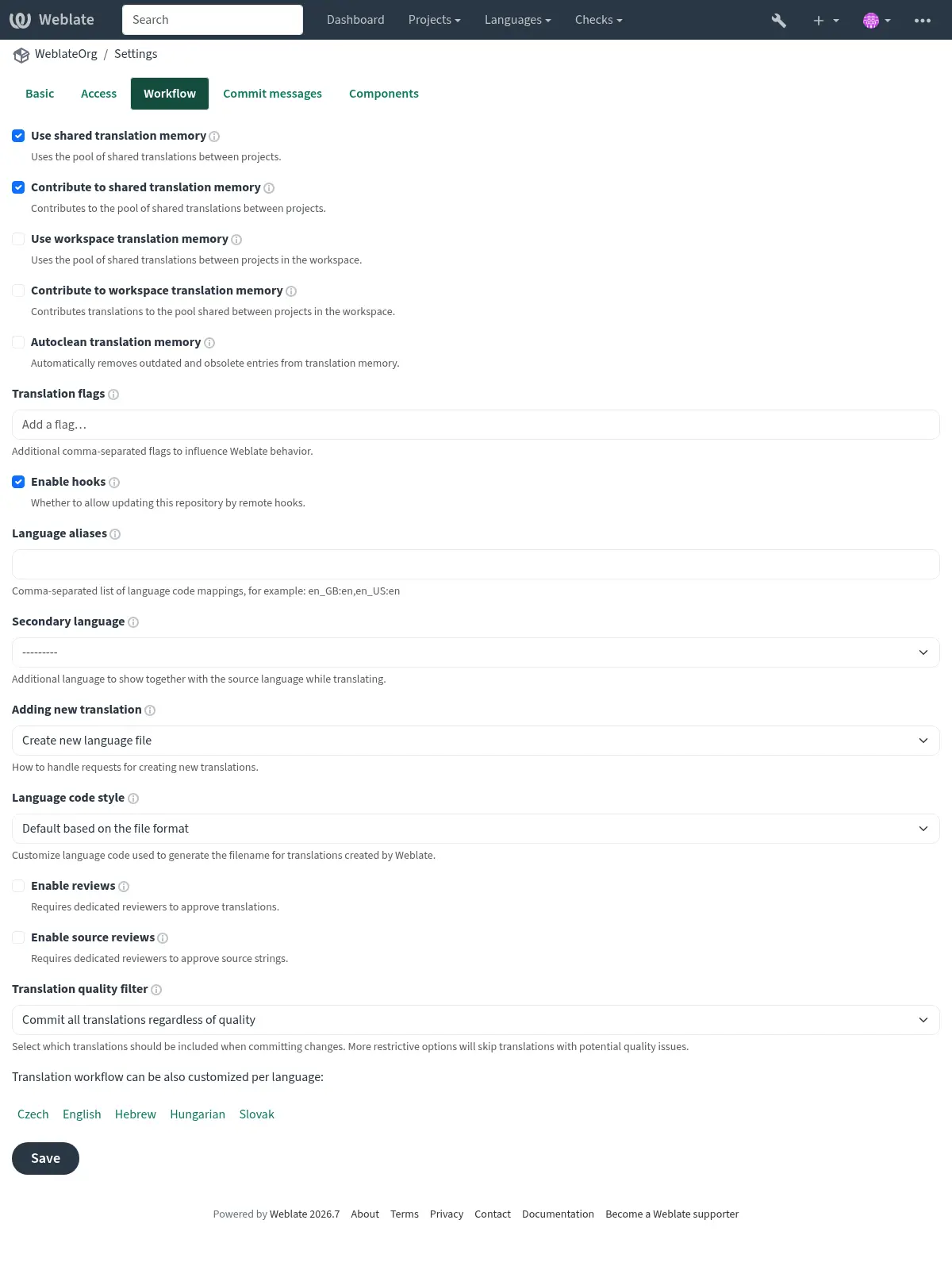
Per-language reviews
To require review only for selected languages, first turn on Aktiviraj preglede for the whole project. Then open each project language page that should use different behavior, enable Customize translation workflow for this language in this project, and turn Enable reviews off for languages that should not require review.
Reviewers also need review access for the same language. Add them to a team whose roles include Review strings, and limit that team or the user membership to the language they should review. See Upravljanje kontrole pristupa projektima and Globalna kontrola pristupa for language-scoped access setup.
If approval buttons are not visible, check both parts of the setup: reviews have to be enabled for that translation, and the signed-in user has to have review permission for that language.
Machine translation and LLM workflows
Machine translation services, including large language model (LLM) services, can assist human translators or generate translations for them to edit or approve. Choose a workflow based on when humans should check the generated text and when it should reach the repository.
First, configure the services under Automatic suggestions in the project settings or site administration; see Automatski prijedlozi. For LLM services, see LLM translation context for the context and instructions used to guide translation.
To process strings in bulk, run Automatsko prevođenje, select
Machine translation as the source, and choose the services to use.
For ongoing automation, configure the
Automatsko prevođenje add-on on the component with
the same source and desired mode. Use the query state:empty to fill empty
translations without replacing existing human work; see Pretraživanje izraza.
Human translation assisted by services
Use this workflow when translators should choose when to use machine translation for each string.
Translators consult the Automatski prijedlozi tab in the editor, choose a service result, edit it as needed, and save the translation. These service results are distinct from stored suggestions awaiting acceptance: a human decides what to save. This workflow does not require the Automatic translation add-on and can be combined with Određeni pregledatelji.
Service translation with human editing
Use this workflow to fill translations automatically and let humans improve them directly.
Select Add as translation as the automatic translation mode.
Turn off Aktiviraj preglede and allow translators to edit directly, as in the direct translation workflow.
Set Filtar za kvalitetu prijevoda to Commit all translations regardless of quality.
The service output becomes a translation that humans can edit in the usual editor. It can be committed to the repository without human approval.
For machine drafts that should remain visibly unfinished, choose Add as „Needing edit” instead. Humans edit these drafts and clear the Needs editing state when finished. To keep unfinished drafts out of repository commits, set Filtar za kvalitetu prijevoda to Skip translations marked as needing editing.
Service suggestions with human acceptance
Use this workflow when humans should check service output before it becomes a translation.
Select Add as suggestion as the automatic translation mode.
Turn on Omogući prijedloge, turn off Glasanje za prijedlog, and set Automatski prihvati prijedloge to
0.Leave Aktiviraj preglede off for a single acceptance step. Give the people checking suggestions permission to accept them; see Upravljanje kontrole pristupa projektima.
Humans check the stored suggestions and accept suitable ones, or edit the proposed text before saving a translation. Suggestions are stored only in Weblate and do not enter translation files until accepted as translations. Accepting a suggestion is separate from approving a translation in the dedicated review workflow.
Service translation with review and a quality gateway
Use this workflow when humans should edit machine translations in Weblate, but only reviewer-approved translations should reach the repository.
Select Add as translation as the automatic translation mode.
Turn on Aktiviraj preglede and assign translators and reviewers as described in Određeni pregledatelji.
Set Filtar za kvalitetu prijevoda to Only include approved translations.
Generated translations appear as Waiting for review. Translators can edit them, and reviewers check and approve the finished translations. Only after approval are these translations eligible for repository commits. Translators can suggest further changes to approved strings, while reviewers can edit them directly.
Enabling reviews alone does not keep unapproved translations out of commits. The translation quality filter provides that gateway. Keep reviews enabled for every language that should follow this workflow; check any workflow customization overrides.
AI-assisted quality evaluation
Use the Evaluacija kvalitete umjetne inteligencije add-on to check existing human or machine translations for accuracy, fluency, terminology, style, and formatting. It records quality checks without editing translations or approving them.
Configure an LLM service under Automatic suggestions, then install AI quality evaluation and select the Evaluation service. Choose a query to limit the translations evaluated. Run the add-on manually, choose an Evaluation frequency, or enable evaluation after translation changes or repository updates. Installation does not run evaluation. See the add-on documentation for provider costs and the data sent to the service.
Translators and reviewers can inspect the findings in the editor or search for
checks such as check:ai_accuracy. Correct the translation or ignore a finding
when appropriate. Combine this with Određeni pregledatelji when human approval is
required; AI evaluation does not replace approval or change the translation
quality filter used for repository commits.
The component’s Diagnostics recommends the add-on when an LLM service is configured. If the selected service becomes unavailable, an error diagnostic links maintainers to the installed add-on’s configuration.
Reusing existing translations
Use existing translations to bootstrap a new language or component, then have humans adapt matches and fill the remaining gaps.
Run Automatsko prevođenje with Other translation components
as the source, or select the Prevodilačka memorija service under
Machine translation. Choose whether matches become translations,
drafts needing editing, or suggestions using the modes described above. Use
state:empty to preserve existing translations. The
Automatsko prevođenje add-on can apply this reuse
automatically as strings arrive.
For ongoing consistency, Translation propagation can copy edits to matching strings across components in the same project. Propagation happens while translating; it does not copy translations merely loaded from the repository. See Keeping translations same across components for its requirements and for checks that help humans resolve differences.
Sustav za provjeru kvalitete izvornih izraza
The original source language strings usually come from developers, since they write the code and provide the initial strings. However, developers are often not native speakers of the source language and do not provide the desired quality of the source strings. The intermediate translation can help you address this - there is an additional quality gateway for the strings between developers and translators.
By setting the Datoteka posrednog jezika, this file is used for translating
strings to the source language by translators/editors while it is owned by the
developers (often using arbitrary languages such as en_devel). Once this
stage is done, strings are available for translations to target languages,
based on what is now a polished source language stored in the
Jednojezična datoteka osnovnog jezika.
Konsolidacija izraza pomoću sekundarnog jezika
When Datoteka posrednog jezika cannot be used to consolidate the strings, you can choose one of the translations to act as a secondary language. The language can be configured in a project (Sekundarni jezik) or in a component (Sekundarni jezik). It is then shown to the translators while translating (see Sekundarni jezici) and can be optionally used as a source for machine translations (see Izvorni izrazi za strojno prevođenje).
This setup can be useful with mixed language source strings and consolidating them into a single translation, which is then used as a baseline for other work.
Pregledi izvornih izraza
With Aktiviraj preglede izvora enabled, the review process can be applied for source strings. Once enabled, users can report issues with source strings. The actual process depends on whether bilingual or monolingual formats are in use.
For monolingual formats, source string review functions similarly to Određeni pregledatelji — once an issue with a source string is reported, the source string is marked as Needs editing.
Bilingual formats do not allow direct editing of source strings (these are typically extracted directly from the source code). In this case, a Source needs review label is attached to strings reported by translators. You should review such strings and either edit them in the source code, or remove the label.
Više informacija