検査と修正
自動修正のカスタマイズ
標準の自動修正に、独自の修正も追加できます。AUTOFIX_LIST 内に記述します。
自動修正は強力ですが、翻訳を破壊することもあります; 記述するときには注意が必要です。
翻訳内のすべての文字列 foo を bar に置き換える自動修正の例:
from weblate.trans.autofixes.base import AutoFix


class ReplaceFooWithBar(AutoFix):
    """Replace foo with bar."""

    # Might be localized using gettext_lazy
    name = "Foobar"

    def fix_single_target(self, target, source, unit):
        if "foo" in target:
            return target.replace("foo", "bar"), True
        return target, False
独自の自動修正を組み込むには、AUTOFIX_LIST 内で Python クラスへの完全修飾パスを指定します。参照: 品質検査、アドオン、自動提案、自動修正のカスタマイズ。
フラグを使用した動作の設定
フラグを使用して、Weblate の動作を詳細に設定できます。フラグは翻訳者に視覚的なフィードバックを提供し、翻訳の改善を支援します。フラグは以下の情報から集めます。
原文追加フラグ:
ファイル形式から抽出された文字列ごとのフラグについては、現地語化ファイル フォーマット を参照してください。
翻訳フラグ(現在のところ、原文がバイリンガルの場合、またはモノリンガルのテンプレート編集が無効になっている場合の
read-onlyフラグのみ)。ファイル形式固有のフラグ。
フラグはコンマで区切られます。パラメータを持つ場合はコロンで区切られます。文字列内にスペースや特殊文字を含める場合は、引用符を使用することができます。例:
placeholders:"special:value":"other value", regex:.*
一重引用符と二重引用符の両方を使用でき、特殊文字はバックスラッシュを使用してエスケープされます。
placeholders:"quoted \"string\"":'single \'quoted\''
placeholders:r"^#*"
Markdown ドキュメントの見出しが、翻訳によって変更されていないことを検証するための検査です。例えば、### Index が # Indice に翻訳されている場合、この検査は失敗として検出されます。
placeholders:r"\]\([^h].*?\)"
内部リンクが翻訳されていないことを確認する(例: [test](../checks) が [test](../chequeos) とならないようにする)。
上位レベルで設定されたフラグは、discard:NAME 構文を使用して無効化できます。例えば、コンポーネントに safe-html が設定されている場合、文字列フラグに discard:safe-html を追加することで、その文字列に対してはこのフラグを除外できます。
現在、使用可能なフラグ一覧:
read-only文字列は翻訳禁止であり Weblate で編集させない。参照: 翻訳禁止の文字列。
terminology用語集 で使用します。文字列を用語集のすべての言語にコピーし、すべての翻訳で一貫して使用できるようにします。また、
read-onlyとの組み合わせでも有用であり、製品名などにも使用できます。priority:N文字列の優先度。優先度の高い文字列が翻訳のために先に表示されます。デフォルトの優先度は 100 で、文字列の優先度が高いほど、翻訳のために早く提示されます。
max-length:N文字列の最大長を N 文字に制限する。参照: 翻訳の最大文字数。
xml-textテキストを XML ドキュメントとして扱う、関連項目: XML 構文 および XML マークアップ。
font-family:NAMEレンダリングの検査に使用するフォントファミリーを定義する。参照: フォントの管理。
font-weight:WEIGHTレンダリングの検査に使用するフォントの太さを定義する。参照: フォントの管理。
font-size:SIZEレンダリングの検査に使用するフォントサイズを定義する。参照: フォントの管理。
font-spacing:SPACINGレンダリングの検査に使用する文字間隔を定義する。参照: フォントの管理。
icu-flags:FLAGSICU MessageFormat の品質検査の動作をカスタマイズするためのフラグを定義します。
icu-tag-prefix:PREFIXICU MessageFormat の品質検査用の XML タグに必要な接頭辞を設定します。
placeholders:NAME:NAME2:...翻訳にはプレースホルダー文字列が必要です。参照: プレースホルダー。
replacements:FROM:TO:FROM2:TO2...テキストがパラメータとなる検査(例 翻訳の文字の最大サイズ または 翻訳の最大文字数)をするときに行う置換。一般的な使用方法は、プレースホルダーに長いテキストが入ってもスペースに収まるか確認することです。例:
replacements:%s:"John Doe"。variants:SOURCEこの文字列を、原文と一致する文字列の別表記としてマークします。参照: 文字列の別表記。
regex:REGEX翻訳文が一致するべき正規表現。参照: 正規表現。
discard:NAME上位レベルで定義されたフラグを除外します。
forbidden用語集で、使ってはいけない訳語を示します。参照: 使用を禁止する訳語。
strict-same未翻訳の翻訳文 が組み込みの単語例外を使用しないように改良。
strict-format複数形が単一の値の場合でも、フォーマットの検査を強制します。参照: 書式指定文字列。
case-insensitive検査において、大文字と小文字を区別しないように設定します。現在は、プレースホルダー 品質検査のみに影響します。
bbcode-textTreat a text as an Bulletin Board Code (BBCode) document, affects 未翻訳の翻訳文. Enables the BBCode マークアップ quality check.
check-glossaryEnables the 用語集に従っていない quality check.
fluent-partsEnables the Fluent パーツ quality check.
fluent-referencesEnables the Fluent 参照 quality check.
fluent-target-inner-htmlEnables the Fluent 翻訳内部の HTML quality check.
fluent-target-syntaxEnables the Fluent 翻訳構文 quality check.
angularjs-formatEnables the AngularJS 補間文字列 quality check.
automattic-components-formatEnables the Automattic コンポーネント フォーマット quality check.
c-formatEnables the C 言語形式 quality check.
c-sharp-formatEnables the C# 形式 quality check.
csharp-formatEnables the C# 形式 quality check.
es-formatEnables the ECMAScript テンプレート リテラル quality check.
i18next-interpolationEnables the i18next 補間 quality check.
icu-message-formatEnables the ICU MessageFormat and ICU MessageFormat 構文 quality checks.
java-printf-formatEnables the Java 形式 quality check.
java-formatEnables the Java MessageFormat quality check.
auto-java-messageformatTreat a text as conditional Java MessageFormat, enabling Java MessageFormat only when the source contains Java MessageFormat placeholders. Enables the Java MessageFormat quality check.
javascript-formatEnables the JavaScript 形式 quality check.
laravel-formatEnables the Laravel 形式 quality check.
lua-formatEnables the Lua 形式 quality check.
object-pascal-formatEnables the Object Pascal 形式 quality check.
objc-formatEnables the Objective‑C 形式 quality check.
percent-placeholdersEnables the パーセントのプレースホルダー quality check.
perl-brace-formatEnables the Perl ブレース形式 quality check.
perl-formatEnables the Perl 形式 quality check.
php-formatEnables the PHP 形式 quality check.
python-brace-formatEnables the Python ブレース形式 quality check.
python-formatEnables the Python 形式 quality check.
qt-formatEnables the Qt 形式 quality check.
qt-plural-formatEnables the Qt 複数形式 quality check.
ruby-formatEnables the Ruby 形式 quality check.
scheme-formatEnables the Scheme 形式 quality check.
vue-formatEnables the Vue I18n 形式 quality check.
rst-textTreat a text as an reStructuredText document, affects 未翻訳の翻訳文. Enables the reStructuredText の不整合 and reStructuredText 構文エラー quality checks.
md-textTreat a text as a Markdown document, and provide Markdown syntax highlighting on the translation text area. Enables the Markdown のリンク, Markdown の参照 and Markdown 構文 quality checks.
max-lengthEnables the 翻訳の最大文字数 quality check.
max-sizeEnables the 翻訳の文字の最大サイズ quality check.
placeholdersEnables the プレースホルダー quality check.
regexEnables the 正規表現 quality check.
safe-htmlEnables the 安全でない HTML quality check.
auto-safe-htmlTreat a text as conditional HTML, enabling 安全でない HTML only for plain text or source strings that contain standard HTML markup or valid custom elements. This is useful for extended Markdown variants such as MDX, where angle-bracket syntax may not be HTML. Enables the 安全でない HTML quality check.
urlThe string should consist of only a URL. Enables the URL quality check.
fluent-source-inner-htmlEnables the Fluent ソース内部の HTML quality check.
fluent-source-syntaxEnables the Fluent ソース構文 quality check.
ignore-all-checksすべての品質検査を除外する。
ignore-bbcodeBBCode マークアップ の品質検査を除外する。
ignore-xml-chars-around-tagsSkip the XML タグの前後の文字 quality check.
ignore-duplicate重複単語の連続 の品質検査を除外する。
ignore-check-glossary用語集に従っていない の品質検査を除外する。
ignore-double-space連続スペース の品質検査を除外する。
ignore-fluent-partsFluent パーツ の品質検査を除外する。
ignore-fluent-referencesFluent 参照 の品質検査を除外する。
ignore-fluent-target-inner-htmlFluent 翻訳内部の HTML の品質検査を除外する。
ignore-fluent-target-syntaxFluent 翻訳構文 の品質検査を除外する。
ignore-angularjs-formatAngularJS 補間文字列 の品質検査を除外する。
ignore-automattic-components-formatAutomattic コンポーネント フォーマット の品質検査を除外する。
ignore-c-formatC 言語形式 の品質検査を除外する。
ignore-c-sharp-formatC# 形式 の品質検査を除外する。
ignore-es-formatECMAScript テンプレート リテラル の品質検査を除外する。
ignore-i18next-interpolationi18next 補間 の品質検査を除外する。
ignore-icu-message-formatICU MessageFormat の品質検査を除外する。
ignore-java-printf-formatJava 形式 の品質検査を除外する。
ignore-java-formatJava MessageFormat の品質検査を除外する。
ignore-javascript-formatJavaScript 形式 の品質検査を除外する。
ignore-laravel-formatSkip the Laravel 形式 quality check.
ignore-lua-formatLua 形式 の品質検査を除外する。
ignore-object-pascal-formatObject Pascal 形式 の品質検査を除外する。
ignore-objc-formatSkip the Objective‑C 形式 quality check.
ignore-percent-placeholdersパーセントのプレースホルダー の品質検査を除外する。
ignore-perl-brace-formatPerl ブレース形式 の品質検査を除外する。
ignore-perl-formatPerl 形式 の品質検査を除外する。
ignore-php-formatPHP 形式 の品質検査を除外する。
ignore-python-brace-formatPython ブレース形式 の品質検査を除外する。
ignore-python-formatPython 形式 の品質検査を除外する。
ignore-qt-formatQt 形式 の品質検査を除外する。
ignore-qt-plural-formatQt 複数形式 の品質検査を除外する。
ignore-ruby-formatRuby 形式 の品質検査を除外する。
ignore-scheme-formatScheme 形式 の品質検査を除外する。
ignore-vue-formatVue I18n 形式 の品質検査を除外する。
ignore-translated過去に翻訳済み の品質検査を除外する。
ignore-inconsistent一貫性の欠如 の品質検査を除外する。
ignore-rst-referencesreStructuredText の不整合 の品質検査を除外する。
ignore-kashidaKashida 文字の使用 の品質検査を除外する。
ignore-md-linkMarkdown のリンク の品質検査を除外する。
ignore-md-reflinkMarkdown の参照 の品質検査を除外する。
ignore-md-syntaxMarkdown 構文 の品質検査を除外する。
ignore-max-length翻訳の最大文字数 の品質検査を除外する。
ignore-max-size翻訳の文字の最大サイズ の品質検査を除外する。
ignore-escaped-newline\n の不一致 の品質検査を除外する。
ignore-end-colonコロンの不一致 の品質検査を除外する。
ignore-end-ellipsis省略記号の不一致 の品質検査を除外する。
ignore-end-exclamation感嘆符の不一致 の品質検査を除外する。
ignore-end-stop終止符の不一致 の品質検査を除外する。
ignore-end-interrobang感嘆符疑問符の不一致 の品質検査を除外する。
ignore-end-question疑問符の不一致 の品質検査を除外する。
ignore-end-semicolonセミコロンの不一致 の品質検査を除外する。
ignore-newline-count改行数の不一致 の品質検査を除外する。
ignore-plurals複数形の不足 の品質検査を除外する。
ignore-multiple-capitalSkip the 複数の大文字 quality check.
ignore-kabyle-charactersカビーレ語の非標準文字 の品質検査を除外する。
ignore-placeholdersプレースホルダー の品質検査を除外する。
ignore-prohibited-initial-character禁止されている頭文字 の品質検査を除外する。
ignore-punctuation-spacing句読点のスペース の品質検査を除外する。
ignore-regex正規表現 の品質検査を除外する。
ignore-rst-syntaxreStructuredText 構文エラー の品質検査を除外する。
ignore-reused他で使用された翻訳 の品質検査を除外する。
ignore-same-plurals同一の複数形 の品質検査を除外する。
ignore-begin-newline文頭の改行 の品質検査を除外する。
ignore-begin-space先頭の空白 の品質検査を除外する。
ignore-end-newline文末の改行 の品質検査を除外する。
ignore-end-space文末の空白 の品質検査を除外する。
ignore-same未翻訳の翻訳文 の品質検査を除外する。
ignore-safe-html安全でない HTML の品質検査を除外する。
ignore-urlURL の品質検査を除外する。
ignore-xml-tagsXML マークアップ の品質検査を除外する。
ignore-xml-invalidXML 構文 の品質検査を除外する。
ignore-zero-width-spaceゼロ幅スペース の品質検査を除外する。
ignore-ellipsis省略記号 の品質検査を除外する。
ignore-fluent-source-inner-htmlFluent ソース内部の HTML の品質検査を除外する。
ignore-fluent-source-syntaxFluent ソース構文 の品質検査を除外する。
ignore-icu-message-formatICU MessageFormat 構文 の品質検査を除外する。
ignore-long-untranslated長期間未翻訳 の品質検査を除外する。
ignore-multiple-failures複数言語での検査不合格 の品質検査を除外する。
ignore-unnamed-format複数の無名変数 の品質検査を除外する。
ignore-optional-plural複数形の書式になっていない の品質検査を除外する。
注釈
基本的に、規則は名前に ignore-* という識別子がすべての検査に対して付いているため、独自の検査項目にも使用できます。
このフラグは、コンポーネント構成 、原文ごとの設定、および翻訳ファイル自体(例: GNU gettext)の両方で認識されます。
原文の記載位置ベースのフラグ
一部のフラグは、文字列の位置に基づいてデフォルトで付与されます。つまり、文字列の使用される場所に応じて、特定の検査が自動的に有効になります。
rst-text: このフラグは、ファイルの拡張子が.rstの reStructuredText ファイル内の文字列に対して、自動的に付与されます。md-text: This flag is automatically added to strings in Markdown and MDX files, if location extension is.md,.markdown, or.mdx.
検査の強制
強制検査は無効化できず、該当する文字列には 要修正 のフラグが付与されます(参照: 翻訳文の状態)。この仕組みにより、翻訳者が検査を回避することはできません。
ヒント
検査の強制を有効にしても、検査が自動的に有効とはなりません。一部の検査は、対応するフラグを文字列やコンポーネントに設定することが必要になります。
この機能は、書式指定文字列 のように使用時に重大な問題を引き起こす可能性がある検査に対して使用するのが最適です。一方で、未翻訳の翻訳文 のようなスタイル検査には向きません。これは状況によっては検査を無視すべき場合もあるためです。
翻訳品質フィルタ を使用することで、要修正とフラグが付与された文字列をバージョン管理へのコミット対象から除外できます。
フォントの管理
ヒント
Weblate にアップロードしたフォントは、 翻訳の文字の最大サイズ 検査のためだけに使用します。Weblate のユーザーインターフェイスには影響しません。
表示したテキストのサイズの計算に使用する 翻訳の文字の最大サイズ 検査は、フォントを Weblate に読み込み、翻訳フラグ(参照: フラグを使用した動作の設定)を使用して選択することが必要です。
翻訳プロジェクトの 操作 メニュー下の フォント にあるフォント管理ツールは、フォントのアップロードと管理のためのインターフェイスを提供します。TrueTypeとOpenTypeフォントがアップロードできるので、フォントグループを設定して検査で使用してください。
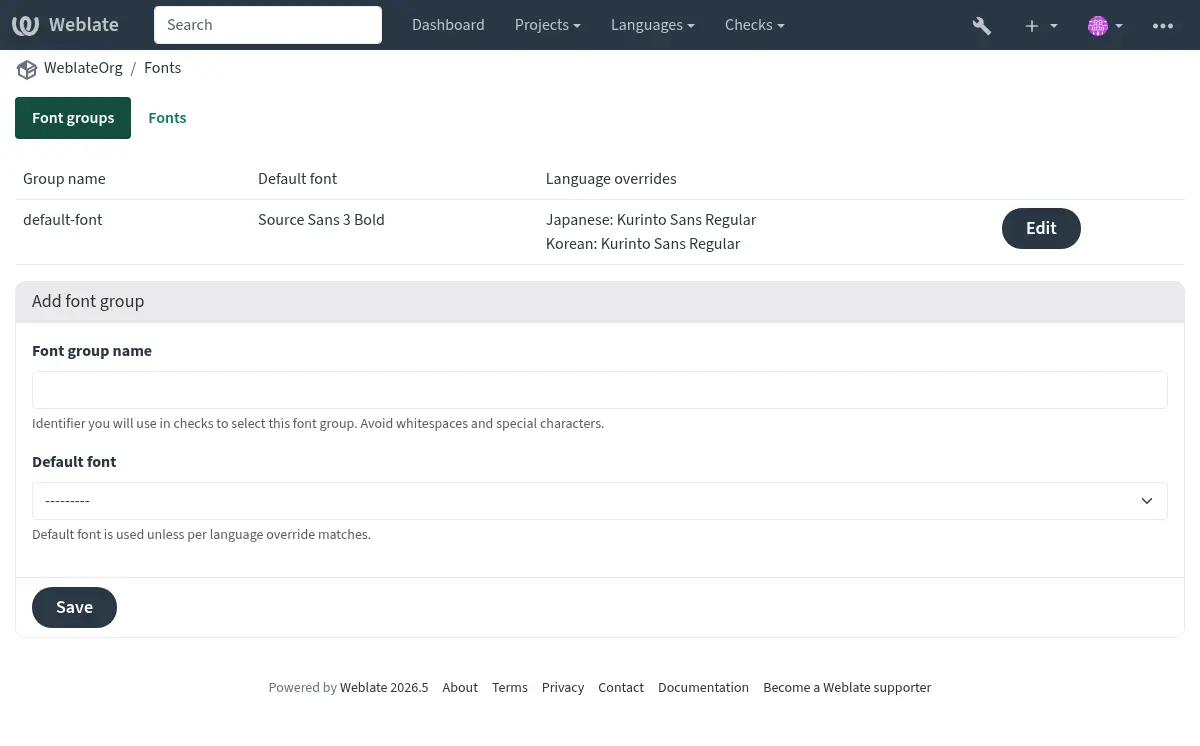
フォントグループを使用すると、言語ごとに異なるフォントを定義できます。通常、ラテン言語以外で必要です:
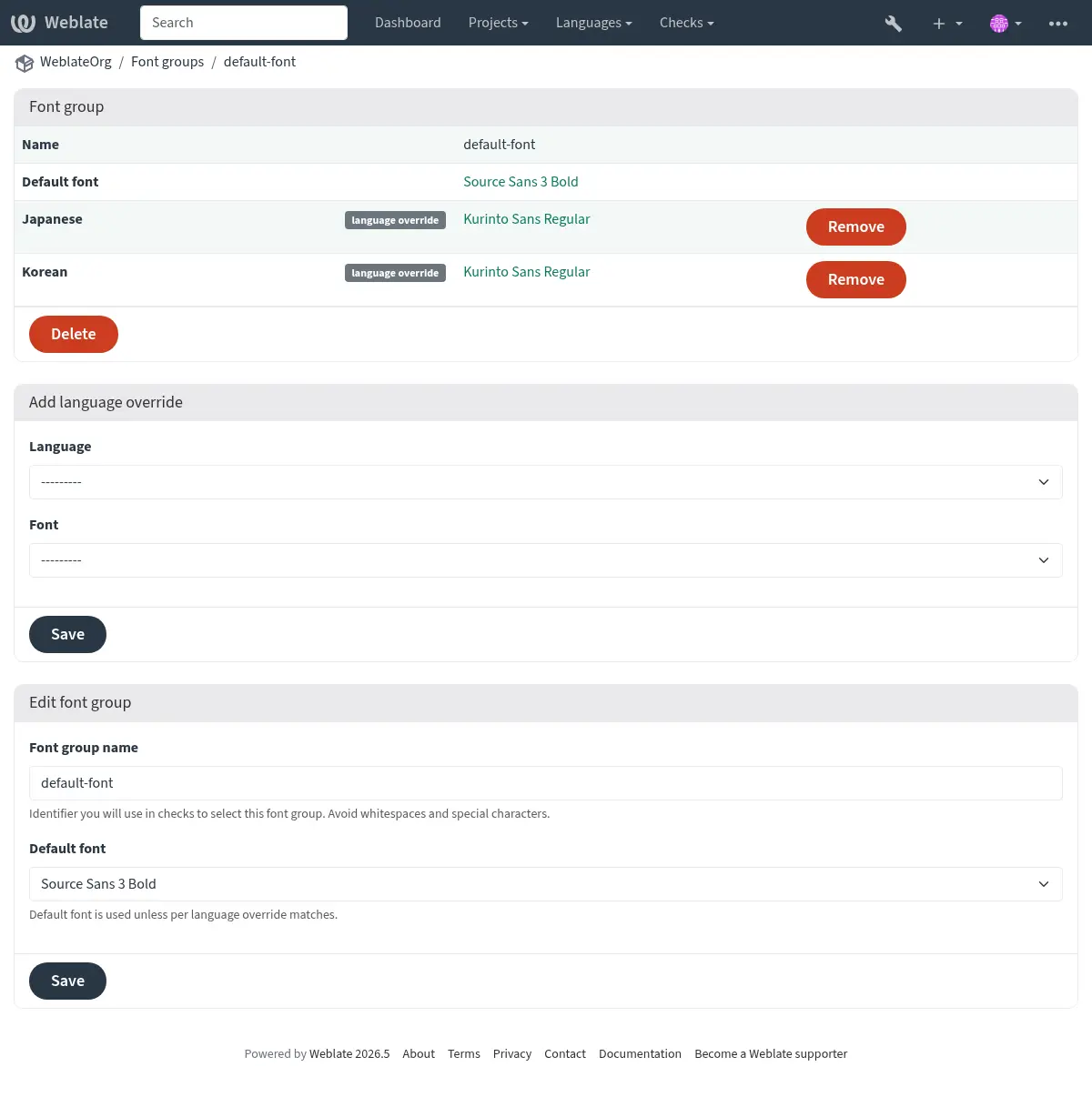
フォントグループは名前で識別されます。検査の定義で簡単に使用できるように、名前には空白文字や特殊文字を含めることはできません。
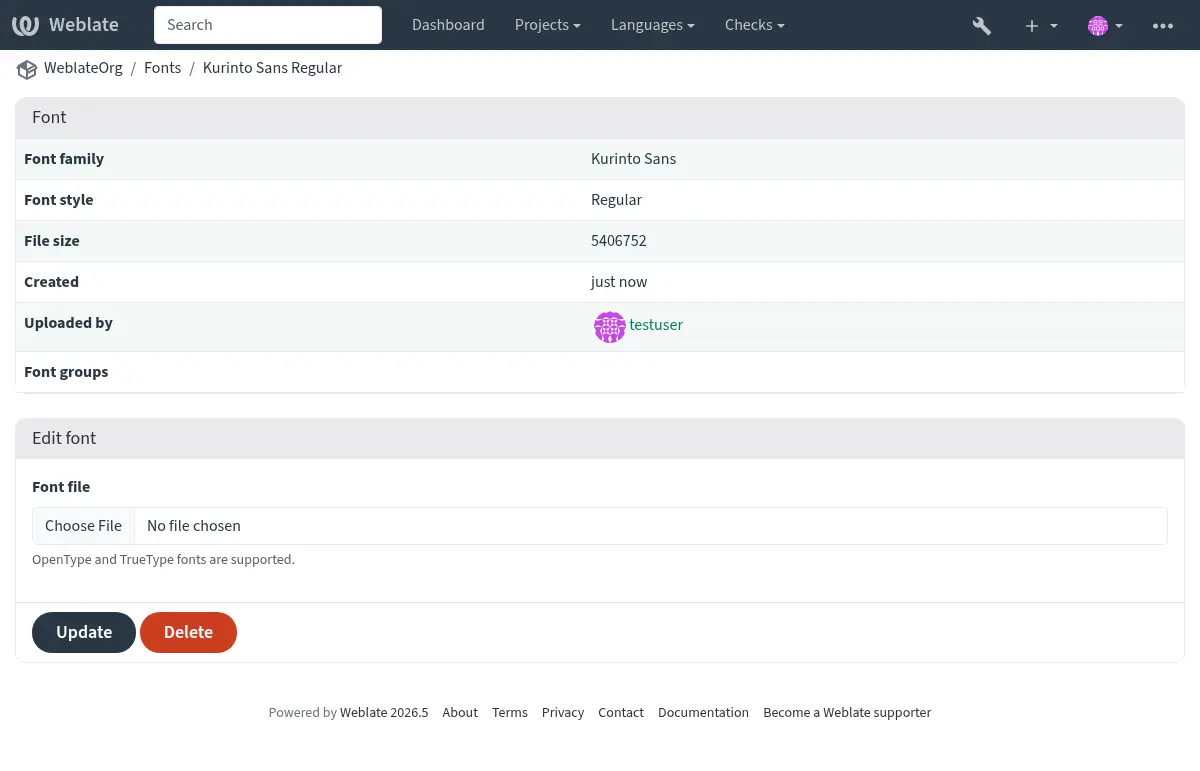
Font-family and style are automatically recognized after uploading them:
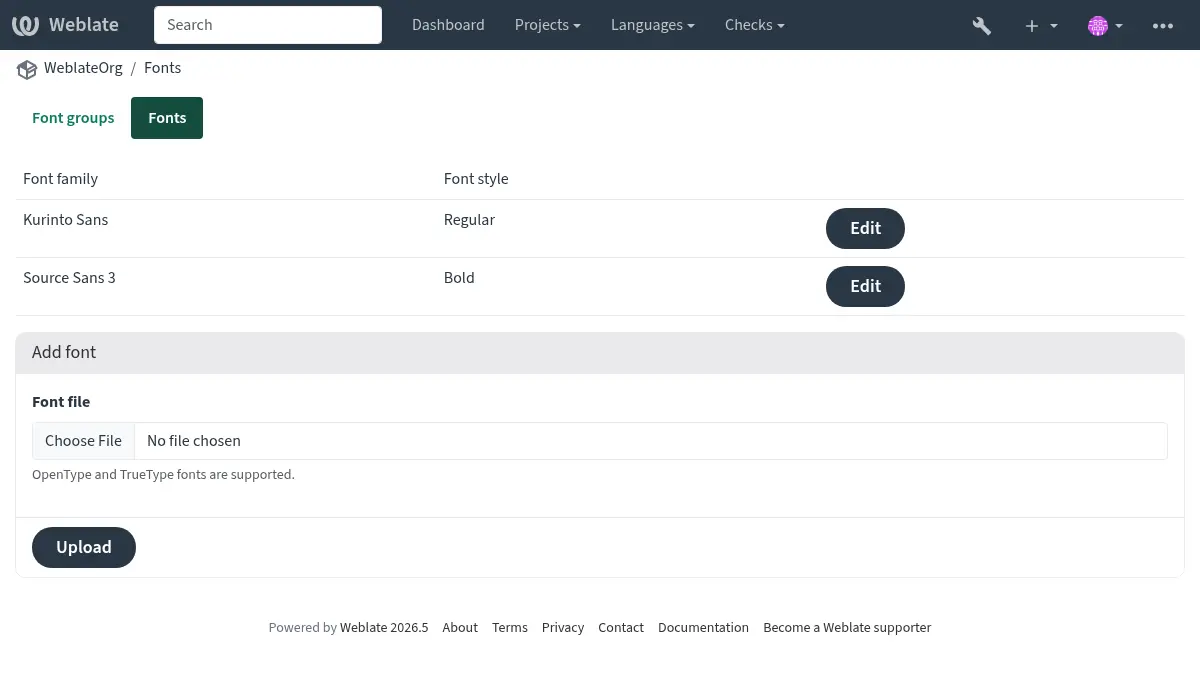
Weblate に登録できる複数のフォントの設定:
文字列の長さを確認するためにフォントを使用するには、適切なフラグ(参照 フラグを使用した動作の設定)を渡します。設定が必要な項目:
max-size:500/max-size:300:5最大幅をピクセル単位で設定し、オプションで最大行数を設定します(単語の折り返しが適用されます)。
font-family:ubuntu使用するフォントグループの識別子の設定。
font-size:22フォントサイズをピクセル単位で設定。
独自の検査項目の作成
幅広い品質検査を搭載していますが(参照: 品質検査)、検査したい項目をすべて網羅しているとは限りません。実行する検査の内容は、CHECK_LIST で設定できます。また、独自の検査も追加できます。
weblate.checks.Check をサブクラス化する
複数の属性を設定する。
check(コードで複数形を扱う場合)またはcheck_singleメソッド(これはあなたに代わって実行)を実装する。
複数の例:
独自の検査項目を組み込むには、CHECK_LIST に Python クラスへの完全修飾パスを指定します。参照: 品質検査、アドオン、自動提案、自動修正のカスタマイズ。
翻訳テキストに「foo」が含まれていないかの確認
これは非常に単純な検査であり、翻訳に文字列「foo」を含まないかの検査をするだけです。
"""Simple quality check example."""

from django.utils.translation import gettext_lazy

from weblate.checks.base import TargetCheck


class FooCheck(TargetCheck):
    # Used as identifier for check, should be unique
    # Has to be shorter than 50 characters
    check_id = "foo"

    # Short name used to display failing check
    # Might be localized using gettext_lazy
    name = "Foo check"

    # Description for failing check
    description = gettext_lazy("Your translation is foo")

    # Real check code
    def check_single(self, source, target, unit):
        return "foo" in target
チェコ語の翻訳文の複数形が異なっているかの確認
言語情報を使用して、チェコ語の 2 つの複数形が同じでないことを検査します。
"""Quality check example for Czech plurals."""

from django.utils.translation import gettext_lazy

from weblate.checks.base import TargetCheck


class PluralCzechCheck(TargetCheck):
    # Used as identifier for check, should be unique
    # Has to be shorter than 50 characters
    check_id = "foo"

    # Short name used to display failing check
    # Might be localized using gettext_lazy
    name = "Foo check"

    # Description for failing check
    description = gettext_lazy("Your translation is foo")

    # Real check code
    def check_target_unit(self, sources, targets, unit):
        if unit.translation.language.is_base({"cs"}):
            return targets[1] == targets[2]
        return False

    def check_single(self, source, target, unit) -> bool:
        """We don't check target strings here."""
        return False