翻訳メモリ
Weblate に内蔵されている、翻訳メモリの項目:
手動でインポートした翻訳メモリ(参照: ユーザー インターフェイス)。
Weblate が自動的に保存した翻訳(翻訳メモリの使用範囲 による)。
自動的にインポートされた過去の翻訳。
翻訳メモリ内の語彙を文字列に適用する方法:
ユーザーが、文字列の編集中に 自動提案 タブから提案を受け入れる。
選択した文字列を、Operations メニューから 自動翻訳 を使用して処理する。
自動翻訳 アドオンを使用して、新規および既存の文字列に変更を自動的に適用する。
インストール時の設定は、Weblate 翻訳メモリ を参照してください。翻訳メモリはデフォルトで有効です。
翻訳メモリの使用範囲
翻訳メモリの使用範囲では、異なるプロジェクトやユーザーのプライバシーを保護します。翻訳の共有も利用可能です。
インポートした翻訳メモリ
import_memory コマンドを使用して、必要な翻訳メモリのデータをインポートすると、すべてのユーザーとプロジェクトがメモリの情報を使用できるようになります。
ユーザーごとの翻訳メモリ
すべてのユーザーがした翻訳を、各ユーザーの個人翻訳メモリに自動保存します。
新規ユーザーのデフォルト値は、翻訳メモリの自動整理 の設定に基づいて自動的に調整されます。自動クリーンアップが有効な場合、不整合な翻訳が再び取り込まれるのを防ぐため、これはデフォルトで無効になります。
プロジェクトごとの翻訳メモリ
プロジェクト内のすべての翻訳を、このプロジェクトでのみ使用可能なプロジェクト翻訳メモリに自動保存します。
翻訳メモリの状態
Added in version 5.13.
Translation memory entries can have two different statuses: active and pending. Pending entries are included in suggestions, but with a quality penalty applied. If 翻訳メモリの自動整理 is enabled, matching pending entries are removed when a translation becomes active.
翻訳メモリの自動整理
Added in version 5.13.
When enabled for a project, Weblate replaces older automatically created translation memory entries when a translation becomes active:
With 査読の有効化 enabled, cleanup happens when the translation is approved.
Without review, cleanup happens as soon as the translation reaches the translated state.
For the same source string, component, context, and source/target language pair, Weblate removes matching non-file entries from translation memory, including entries with a different target text. This applies across personal, project, and shared translation memory scopes. The current translation is then stored again as an active entry in the scopes that are enabled for that change.
Entries imported from external translation memory files are not cleaned up automatically. Entries with a different context are kept.
Docker コンテナでは、 WEBLATE_DEFAULT_AUTOCLEAN_TM を使用して設定します。
注釈
自動クリーンアップを有効にすると、新しいユーザー プロファイルのデフォルト設定も、個人用翻訳メモリに貢献しないように変更されます。これにより、クリーンアップ対象だった不整合な翻訳が再び取り込まれるのを防ぎます。
参考
翻訳メモリの管理
ユーザー インターフェイス
Translation memory can be managed from several places in the Weblate UI:
Open the user menu and choose Translation memory to manage your personal translation memory.
Open a project and choose Translation memory from the project menu to manage translation memory for that project.
Open Administration and choose Translation memory to manage uploaded translation memory for the whole Weblate instance.
The translation memory page shows entry counts for the selected scope. Depending on the scope, it also lists entries by origin, component, or language pair. The listed entries can be downloaded as JSON or TMX. Users with the required permissions can delete entries, and the project view can rebuild translation memory for the whole project or for individual components from the current translations.
The project view also shows whether shared translation memory and autoclean translation memory are enabled for the project, with a link to the project workflow settings when the user can edit the project.
Translation memory files can be imported on the same page. Uploaded files are stored in the selected scope:
Personal uploads are available in your personal translation memory.
Project uploads are available in the selected project's translation memory.
Administration uploads are available as uploaded shared entries for the whole Weblate instance.
ヒント
Translation memories in various formats can be imported into Weblate. The TMX format is provided for interoperability with other tools. All supported formats are TMX, JSON, XLIFF, PO, and CSV.
Source and target languages must be selected when uploading XLIFF, PO, or CSV files if the language information is not provided by the file itself.
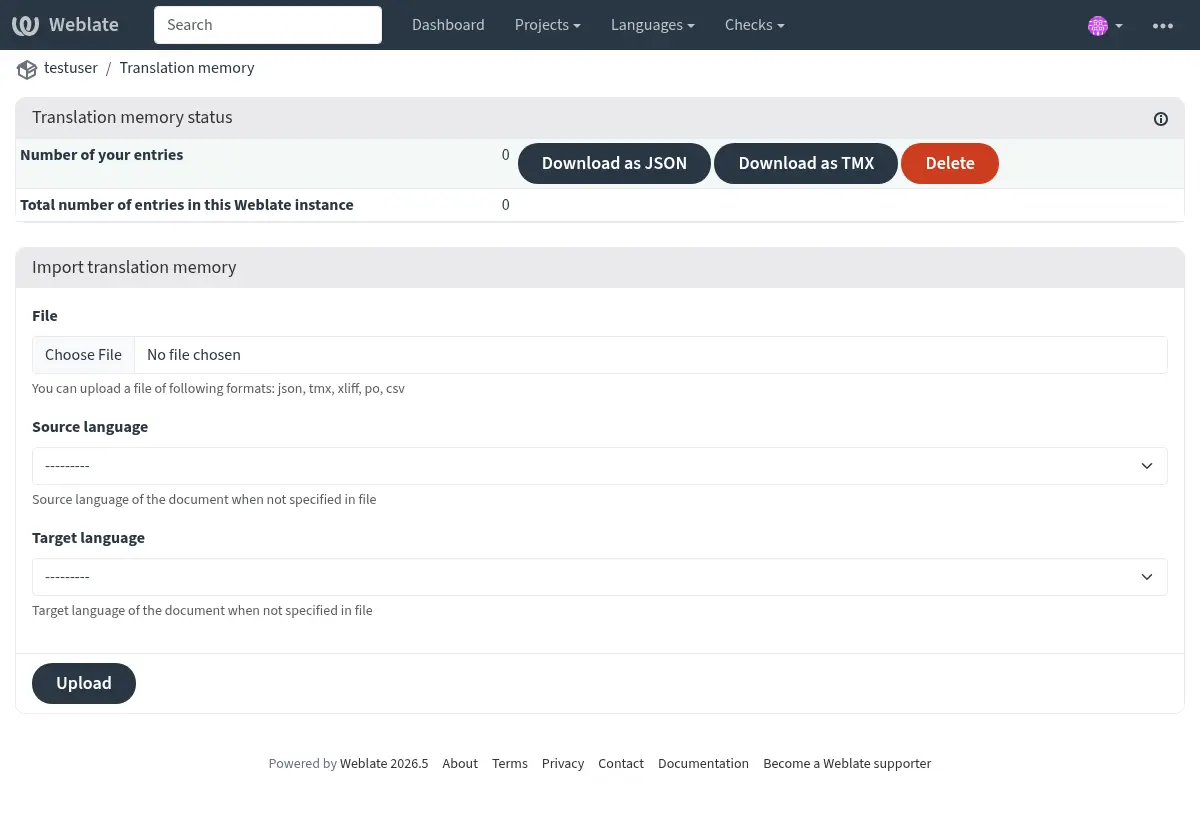
You can search translation memory while editing strings from the 自動提案 tab.
管理画面
Administrative users have additional translation memory management controls. In Administration > Translation memory, the page lists uploaded shared entries, shared entries, and total entries for the Weblate instance. Depending on permissions, it can import uploaded shared memory, delete uploaded entries, and download uploaded, shared, or all entries as JSON or TMX.
Added in version 4.12.
The project translation memory view also allows rebuilding parts of or the entire project translation memory. Existing entries for the selected component or project are deleted, and the memory is populated again from the current translations in the background.
管理画面
翻訳メモリの内容を操作するための管理コマンドは複数あります。管理コマンドは翻訳メモリ全体を操作し、使用範囲は制限されません(パラメータで指定しない限り) :
dump_memory翻訳メモリを JSON にエクスポート。
import_memoryTMX または JSON ファイルを翻訳メモリにインポート。
cleanup_memory翻訳メモリから、保留状態のすべてのエントリを削除します。
Added in version 4.14.
Weblate API には翻訳メモリが含まれています。このため、さまざまな目的や翻訳サイクルのイベントに基づいて操作を自動化することができます。