நுழைவு கட்டுப்பாடு
வலைபெயர்ப்பு முழு நிகழ்விற்கும் பயனர் அனுமதிகளை முன் வரையறுக்கப்பட்ட பாத்திரங்களுடன் ஒதுக்க அல்லது ஒரு அல்லது அதற்கு மேற்பட்ட குழுக்களின் அனுமதிகளை பயனர்களுக்கு ஒதுக்குவதன் மூலம், அல்லது தனிப்பட்ட திட்டங்கள், கூறுகள், சொற்களஞ்சியங்கள் மற்றும் பலவற்றைக் குறிக்கிறது.
திட்ட அணுகல் கட்டுப்பாடு
Note
Projects running the gratis Libre plan on Hosted Weblate are always Public. You can switch to the paid plan if you want to restrict access to your project.
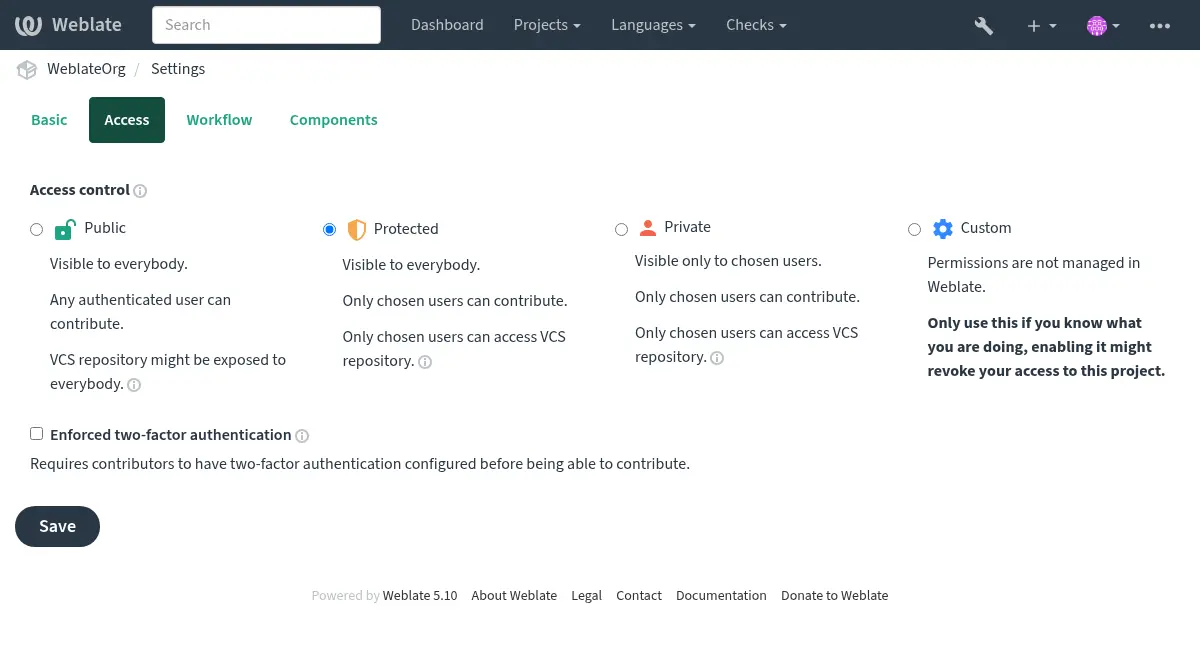
Limit user access to individual projects by selecting a different நுழைவு கட்டுப்பாடு setting. The available options are:
- Public
அனைவருக்கும் தெரியும் படி.
அங்கீகரிக்கப்பட்ட எந்தவொரு பயனரும் பங்களிக்க முடியும்.
வி.சி.எச் களஞ்சியம் எல்லோருக்கும் வெளிப்படும்.
** திறந்த மூல திட்டங்களுக்கு இதைத் தேர்வுசெய்க, அல்லது உங்கள் வலைபெயர்ப்பு நிகழ்வு தனிப்பட்டதாகவோ அல்லது பூட்டப்பட்டதாகவோ இருக்கும்போது. **
- Protected
அனைவருக்கும் தெரியும் படி.
தேர்ந்தெடுக்கப்பட்ட பயனாளர்கள் மட்டும் பங்குபெறலாம்.
தேர்ந்தெடுக்கப்பட்ட பயனாளர்கள் மட்டும் வி.சி.எச் களஞ்சியத்தை பயன்படுத்தலாம்.
** தெரிவுநிலையைப் பெற இதைத் தேர்வுசெய்க, ஆனால் யார் பங்களிக்க முடியும் என்பதில் இன்னும் கட்டுப்பாடு உள்ளது. **
- Private
தேர்ந்தெடுக்கப்பட்ட பயனர்களுக்கு மட்டுமே தெரியும்.
தேர்ந்தெடுக்கப்பட்ட பயனாளர்கள் மட்டும் பங்குபெறலாம்.
தேர்ந்தெடுக்கப்பட்ட பயனாளர்கள் மட்டும் வி.சி.எச் களஞ்சியத்தை பயன்படுத்தலாம்.
** பகிரங்கமாக அம்பலப்படுத்தக் கூடாத திட்டங்களுக்கு இதைத் தேர்வுசெய்க. **
- Custom
தேர்ந்தெடுக்கப்பட்ட பயனர்களுக்கு மட்டுமே தெரியும்.
தேர்ந்தெடுக்கப்பட்ட பயனாளர்கள் மட்டும் பங்குபெறலாம்.
தேர்ந்தெடுக்கப்பட்ட பயனாளர்கள் மட்டும் வி.சி.எச் களஞ்சியத்தை பயன்படுத்தலாம்.
புரவலன் செய்யப்பட்ட வலைபெயர்ப்பில் கிடைக்கவில்லை.
You will have to set up all the permissions using வலைதளம்-முழுதும் அணுகல் கட்டுப்பாடு.
** ஒரு குறிப்பிட்ட, நேர்த்தியான தனிப்பயனாக்கக்கூடிய வழியில் அணுகலை நீங்கள் வரையறுக்க விரும்பினால் இதை உங்கள் சொந்த வலைபெயர்ப்பு நிகழ்வைத் தேர்வுசெய்க. **
அணுகல்கட்டுப்பாடு என்பது ஒவ்வொரு திட்டப்பணியின் உள்ளமைவின் (manage ↓ settings) access தாவலில் மாற்றப்படலாம்.
The default can also be changed by setting DEFAULT_ACCESS_CONTROL.
Note
தனியார் திட்ட புள்ளிவிவரங்கள் கூட தள அளவிலான புள்ளிவிவரங்கள் மற்றும் மொழி சுருக்கத்தில் கணக்கிடப்படுகின்றன. இது திட்ட பெயர்கள் அல்லது வேறு எந்த தகவலையும் வெளிப்படுத்தாது.
Note
Instance administrators can modify the default permission sets available to users in Public, Protected, and Private projects by using custom settings.
See also
ஒரு திட்டத்திற்கான அணுகல் கட்டுப்பாட்டை நிர்வகித்தல்
பொது, பாதுகாக்கப்பட்ட மற்றும் தனியார் திட்டங்களுக்கு:
Granting users Manage project access (see சலுகைகளின் பட்டியல்) allows them to assign other users in Public, Protected and Private (but not Custom) projects via adding them to teams.
வலைபெயர்ப்பு வழங்கப்பட்ட இயல்புநிலை அணிகள் இவை; போதுமான சலுகைகளைக் கொண்ட பயனர்களால் அணிகளைச் சேர்க்கலாம் அல்லது மாற்றலாம்:
- நிர்வாகம்
திட்டத்திற்கு கிடைக்கக்கூடிய அனைத்து அனுமதிகளும்.
- விமர்சனம்
மதிப்பாய்வில் மொழிபெயர்ப்புகளை அங்கீகரிக்கவும்.
Available only if review workflow is on.
பாதுகாக்கப்பட்ட மற்றும் தனியார் திட்டங்களுக்கு மட்டும்:
- மொழிபெயர்
திட்டத்தை மொழிபெயர்த்து, ஆஃப்லைனில் உருவாக்கப்பட்ட மொழிபெயர்ப்புகளைப் பதிவேற்றவும்.
- ஆதாரங்கள்
Edit source strings (if allowed in the project settings) and source-string info.
- மொழிகள்
மொழிபெயர்க்கப்பட்ட மொழிகளை நிர்வகிக்கவும் (மொழிபெயர்ப்புகளைச் சேர்க்கவும் அல்லது அகற்றவும்).
- சொற்களஞ்சியம்
சொற்களஞ்சியத்தை நிர்வகிக்கவும் (உள்ளீடுகளைச் சேர்க்கவும், அகற்றவும், பதிவேற்றவும்).
- நினைவகம்
மொழிபெயர்ப்பு நினைவகத்தை நிர்வகிக்கவும்.
- ச்கிரீன் சாட்கள்
திரை சாட்களை நிர்வகிக்கவும் (அவற்றை மூல சரங்களுடன் சேர்க்கவும், அகற்றவும், இணைக்கவும்).
- தானியங்கி மொழிபெயர்ப்பு
தானியங்கி மொழிபெயர்ப்பைப் பயன்படுத்தலாம்.
- Vcs
வி.சி.க்களை நிர்வகிக்கவும், ஏற்றுமதி செய்யப்பட்ட களஞ்சியத்தை அணுகவும்.
- பட்டியலிடல்
Access billing info and settings (see பட்டியலிடல்).
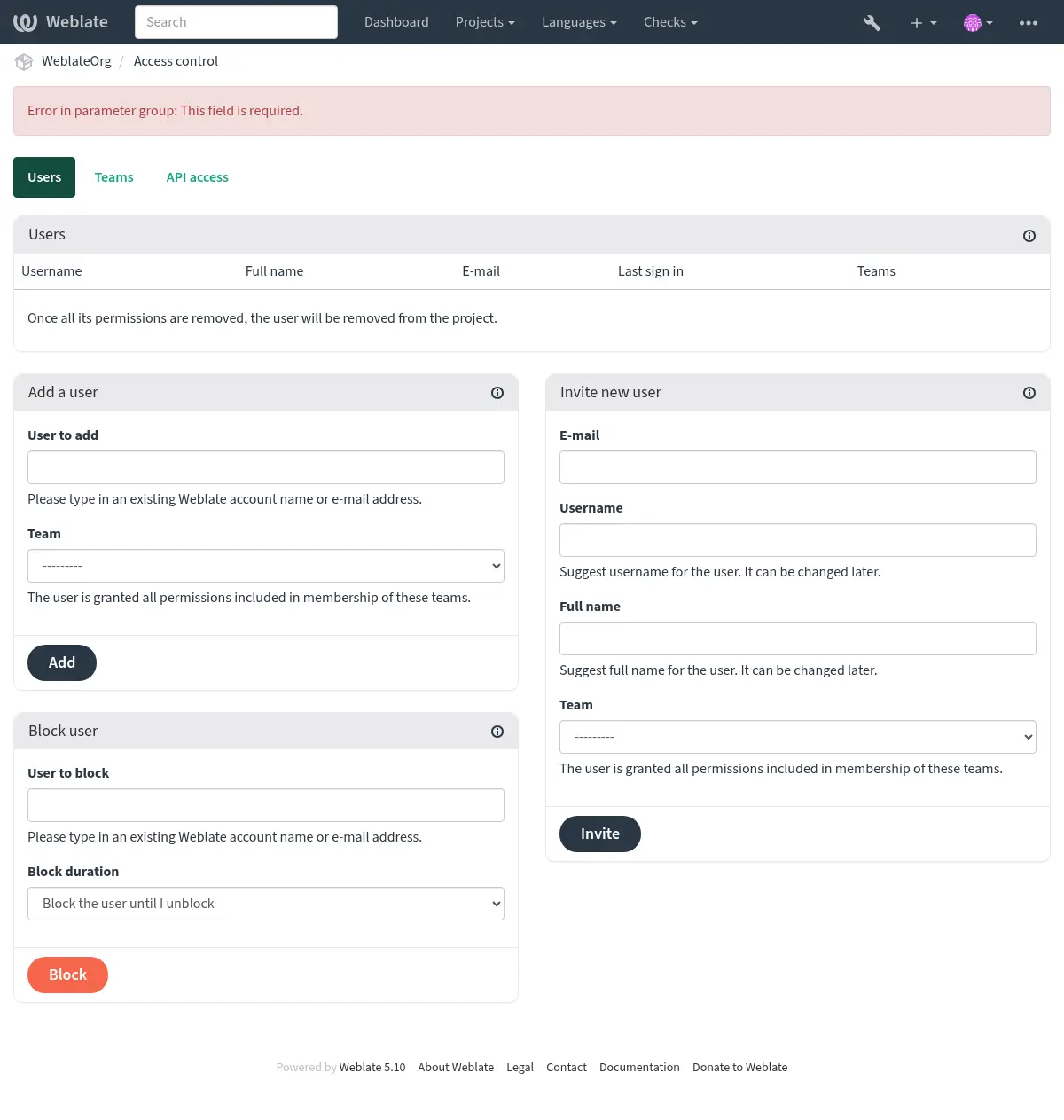
These features are available on the Access control page in the project’s menu Manage ↓ Users.
Hint
You can limit teams to languages or components, and assign them designated access roles (see சலுகைகளின் பட்டியல்).
நிர்வாக குழு
Added in version 4.15.
ஒவ்வொரு அணியிலும் குழு நிர்வாகி இருக்க முடியும், அவர்கள் அணியில் உள்ள பயனர்களைச் சேர்த்து அகற்றலாம். நீங்கள் சுயராச்ய அணிகளை உருவாக்க விரும்பினால் இது பயனுள்ளதாக இருக்கும்.
புதிய பயனர்களை அழைக்கிறது
Adding existing users will send them invitation to confirm. With
REGISTRATION_OPEN the administrator can also invite new users using
e-mail. Invited users have to complete the registration process to get access
to the project.
அவ்வாறு செய்ய எந்த தள அளவிலான சலுகைகளும் இருக்க தேவையில்லை, திட்டத்தின் நோக்கத்தில் அணுகல் மேலாண்மை இசைவு (எ.கா. நிர்வாகம் குழுவில் ஒரு உறுப்பினர்) போதுமானதாக இருக்கும்.
Hint
அழைக்கப்பட்ட பயனர் அழைப்பின் செல்லுபடியை தவறவிட்டால், ஒரு புதிய அழைப்பிதழ் உருவாக்கப்பட வேண்டும்.
The same kind of invitations are available site-wide from the management interface on the Users tab.
Changed in version 5.0: வலைபெயர்ப்பு இப்போது தானாக கணக்குகளை உருவாக்காது அல்லது பயனர்களை அணிகளில் சேர்க்காது. இது பயனரிடமிருந்து உறுதிப்படுத்தப்பட்ட பின்னரே செய்யப்படுகிறது.
பயனர்களைத் தடுக்கும்
Added in version 4.7.
உங்கள் திட்டத்தில் பயனர்கள் தவறாக நடந்து கொண்டால், அவற்றை பங்களிப்பதைத் தடுக்கலாம். தொடர்புடைய அனுமதிகள் தடுக்கப்பட்டதால், பயனர்கள் இன்னும் திட்டத்தைக் காணலாம், ஆனால் பங்களிக்க முடியாது.
திட்ட இசைவு மேலாண்மை
You can set your projects to Protected or Private (see திட்ட அணுகல் கட்டுப்பாடு), and manage users access per-project.
By default this prevents Weblate from granting access provided by Users and Viewers default teams due to these teams’ own configuration. This doesn’t prevent you from granting permissions to those projects site-wide by altering default teams, creating a new one, or creating additional custom settings for individual component as described in வலைதளம்-முழுதும் அணுகல் கட்டுப்பாடு below.
வலைபெயர்ப்பு பயனர் இடைமுகத்தின் மூலம் அனுமதிகளை நிர்வகிப்பதன் முக்கிய நன்மைகளில் ஒன்று, மற்ற பயனர்களுக்கு சூப்பர் யூசர் சலுகையை வழங்காமல் அதை நீங்கள் ஒப்படைக்க முடியும். அவ்வாறு செய்ய, அவற்றை திட்டத்தின் நிர்வாகம் குழுவில் சேர்.
வலைதளம்-முழுதும் அணுகல் கட்டுப்பாடு
Note
புரவலன் செய்யப்பட்ட வலைபெயர்ப்பில் இந்த நற்பொருத்தம் கிடைக்காது.
The permission system is based on roles defining a set of permissions, and teams linking roles to users and translations, read பயனர்கள், பாத்திரங்கள், அணிகள் மற்றும் அனுமதிகள் for more details.
The most powerful features of the Weblate’s access control system can be configured in the மேலாண்மை இடைமுகம். You can use it to manage permissions of any project. You don’t necessarily have to switch it to Custom access control to utilize it. However you must have superuser privileges in order to use it.
If you are not interested in details of implementation, and just want to create a simple-enough configuration based on the defaults, or don’t have a site-wide access to the whole Weblate installation (like on Hosted Weblate), please refer to the ஒரு திட்டத்திற்கான அணுகல் கட்டுப்பாட்டை நிர்வகித்தல் section.
தள அளவிலான இசைவு மேலாண்மை
To manage permissions for a whole instance at once, add users to appropriate default teams:
Users (this is done by default by the automatic team assignment).
Reviewers (if you are using review workflow with dedicated reviewers).
மேலாளர்கள் (பெரும்பாலான மேலாண்மை நடவடிக்கைகளை நீங்கள் வேறு ஒருவருக்கு ஒப்படைக்க விரும்பினால்).
You should keep all projects configured as Public (see திட்ட அணுகல் கட்டுப்பாடு), otherwise the site-wide permissions provided by membership in the Users and Reviewers teams won’t have any effect.
You may also grant some additional permissions of your choice to the default teams. For example, you may want to give a permission to manage screenshots to all the Users.
You can define some new custom teams as well. If you want to keep managing your permissions site-wide for these teams, choose an appropriate value for the Project selection (e.g. All projects or All public projects).
மொழிகள், கூறுகள் அல்லது திட்டங்களுக்கான தனிப்பயன் அனுமதிகள்
மொழிகள், கூறுகள் மற்றும் திட்டங்கள் போன்ற தனித்துவமான பொருள்களுக்கான அனுமதிகளை நிர்வகிக்க உங்கள் சொந்த அர்ப்பணிப்பு குழுக்களை உருவாக்கலாம். இந்த அணிகள் கூடுதல் சலுகைகளை மட்டுமே வழங்க முடியும் என்றாலும், மற்றொரு தனிப்பயன் குழுவைச் சேர்ப்பதன் மூலம் தள அளவிலான அல்லது ஒவ்வொரு திட்ட அணிகளால் வழங்கப்படும் எந்த அனுமதியையும் நீங்கள் திரும்பப் பெற முடியாது.
உதாரணமாக:
தேர்ந்தெடுக்கப்பட்ட மொழிபெயர்ப்பாளர்களுக்கு செக் க்கு மொழிபெயர்ப்பைக் கட்டுப்படுத்துதல், (பிற மொழிகளுக்கு மொழிபெயர்ப்புகளை பொதுவில் வைத்திருக்கும் போது):
Remove the permission to translate Czech from all users. In the default configuration this can be done by altering the Users default team.
குழு பயனர்கள்¶ மொழி தேர்வு
வரையறுக்கப்பட்டபடி
மொழிகள்
செக் தவிர
செக் மொழிபெயர்ப்பாளர்களுக்கு ஒரு பிரத்யேக குழுவைச் சேர்.
குழு செக் மொழிபெயர்ப்பாளர்கள்¶ பாத்திரங்கள்
சக்தி பயனர்கள்
திட்ட தேர்வு
அனைத்து பொது திட்டங்களும்
மொழி தேர்வு
வரையறுக்கப்பட்டபடி
மொழிகள்
செக்
இந்த குழுவில் நீங்கள் அனுமதிகளை வழங்க விரும்பும் பயனர்களைச் சேர்.
இந்த வழியில் மேலாண்மை அனுமதிகள் சக்திவாய்ந்தவை, ஆனால் இது மிகவும் கடினமான வேலையாக இருக்கும். சூப்பர் யூசர் அந்தச்தை வழங்குவதன் மூலம் மற்ற பயனர்களுக்கு மட்டுமே நீங்கள் அதை ஒப்படைக்க முடியும்.
பயனர்கள், பாத்திரங்கள், அணிகள் மற்றும் அனுமதிகள்
அங்கீகார மாதிரிகள் பல பொருள்களைக் கொண்டுள்ளன:
- அனுமதி
வலைபெயர்ப்பு வரையறுக்கப்பட்ட தனிப்பட்ட இசைவு. பயனர்களுக்கு அனுமதிகளை ஒதுக்க முடியாது, பாத்திரங்களை ஒதுக்குவதன் மூலம் மட்டுமே.
- பங்கு
ஒரு பங்கு அனுமதிகளின் தொகுப்பை வரையறுக்கிறது (மேலும் பல இடங்களில் மீண்டும் பயன்படுத்தப்படலாம்).
- பயனர்
ஒரு பயனர் பல அணிகளைச் சேர்ந்தவர்.
- குழு
குழுக்கள் பாத்திரங்களையும் பயனர்களையும் அங்கீகார பொருள்கள் (திட்டங்கள், மொழிகள், கூறுகள் மற்றும் கூறு பட்டியல்கள்) உடன் இணைக்கின்றன.
Note
ஒரு குழுவுக்கு எந்த பாத்திரங்களும் இருக்க முடியாது, அவ்வாறான நிலையில் யாராலும் திட்டத்தை உலாவக்கூடிய அணுகல் கருதப்படுகிறது (கீழே காண்க).
திட்ட உலாவல் அணுகல்
A user has to be a member of a team linked to the project, or any component inside that project. Having membership is enough, no specific permissions are needed to browse the project (this is used in the default Viewers team, see அணிகளின் பட்டியல்).
கூறு-உலாவல் அணுகல்
Granting browsing access to a user in one project gives it access to any component with derived browsing permissions. With தடைசெய்யப்பட்ட அணுகல் on, access to components (or component lists) are granted explicitly.
அணிகளின் நோக்கம்
அணிகளில் பாத்திரங்களால் ஒதுக்கப்பட்ட அனுமதியின் நோக்கம் பின்வரும் விதிகளால் பயன்படுத்தப்படுகிறது:
If the team specifies any Component list, all the permissions given to members of that team are granted for all the components in the component lists attached to the team, and an access with no additional permissions is granted for all the projects these components are in. Components and Projects are ignored.
பெரிய கூறு பட்டியல்களைப் பயன்படுத்துவது செயல்திறன் தாக்கத்தை ஏற்படுத்தக்கூடும், அதற்கு பதிலாக திட்டங்கள் வழியாக அணுகலை வழங்குவதைக் கவனியுங்கள்.
If the team specifies any Components, all the permissions given to the members of that team are granted for all the components attached to the team, and an access with no additional permissions is granted for all the projects these components are in. Projects are ignored.
Otherwise, if the team specifies any Projects, either by directly listing them or by having Projects selection set to a value like All public projects, all those permissions are applied to all the projects, which effectively grants the same permissions to access all projects unrestricted components.
The restrictions imposed by a team’s Languages are applied separately, when it’s verified if a user has an access to perform certain actions. Namely, it’s applied only to actions directly related to the translation process itself like reviewing, saving translations, adding suggestions, etc.
Hint
Use Language selection or Project selection to automate inclusion of all languages or projects.
உதாரணமாக:
கூறுகளுடன் `` ஃபூ`` ஒரு திட்டம்: `` ஃபூ/பார்`` மற்றும் `` ஃபூ/பாச்``, மறுபரிசீலனை மற்றும் மேலாண்மை உரிமைகளுடன், பின்வரும் குழுவில்:
குழு ச்பானிச் நிர்வாக மதிப்பாய்வு செய்பவர்கள்¶ பாத்திரங்கள்
மதிப்பாய்வு சரங்களை,` களஞ்சியத்தை நிர்வகி`
கூறுகள்
foo/bar
மொழிகள்
ச்பானிச்
அந்த அணியின் உறுப்பினர்களுக்கு இந்த அனுமதிகள் இருக்கும் (இயல்புநிலை பங்கு அமைப்புகளை கருதி):
பொது (உலாவல்) முழு திட்டத்திற்கும் அணுகல் `` ஃபூ`` அதில் உள்ள இரண்டு கூறுகளும்: `` ஃபூ/பார்`` மற்றும் `` ஃபூ/பாச்``.
`` foo/bar`` ச்பானிச் மொழிபெயர்ப்பில் (வேறு இடங்களில் இல்லை) சரங்களை மதிப்பாய்வு செய்யவும்.
முழு `` foo/bar`` களஞ்சியத்திற்கு vc களை நிர்வகி. எல்லா மொழிகளுக்கும் மொழிபெயர்ப்பாளர்களால் செய்யப்படும் நிலுவையில் உள்ள மாற்றங்களைச் செய்யுங்கள்.
தானியங்கி குழு பணிகள்
While editing the Team, you can specify Automatic assignments, which is a list of regular expressions used to automatically assign newly created users to a team based on their e-mail addresses. This assignment only happens upon account creation.
The most common use-case for the feature is to assign all new users to some
default team. This behavior is used for the default Users and Guest teams
(see அணிகளின் பட்டியல்). Use regular expression ^.*$ to match all users.
இந்த விருப்பத்திற்கான மற்றொரு பயன்பாட்டு வழக்கு இயல்புநிலையாக உங்கள் நிறுவனத்தின் ஊழியர்களுக்கு சில கூடுதல் சலுகைகளை வழங்குவதாகும். அவர்கள் அனைவரும் உங்கள் டொமைனில் கார்ப்பரேட் மின்னஞ்சல் முகவரிகளைப் பயன்படுத்துகிறார்கள் என்று கருதினால், இதை ^.*@mycompany.com போன்ற வெளிப்பாட்டுடன் நிறைவேற்ற முடியும்.
Note
Automatic team assignment to Users and Viewers is always recreated
when upgrading from one Weblate version to another. If you want to turn it off, set the regular expression to
^$ (which won’t match anything).
Note
As for now, there is no way to bulk-add already existing users to some team via the user interface. For that, you may resort to using the REST API.
இயல்புநிலை அணிகள் மற்றும் பாத்திரங்கள்
After installation, a default set of teams is created (see அணிகளின் பட்டியல்).
இந்த பாத்திரங்கள் மற்றும் அணிகள் நிறுவலின் போது உருவாக்கப்படுகின்றன. உள்ளமைக்கப்பட்ட பாத்திரங்கள் மேம்படுத்தும்போது தரவுத்தள இடம்பெயர்வு மூலம் எப்போதும் புதுப்பித்த நிலையில் வைக்கப்படுகின்றன. நீங்கள் உண்மையில் அவற்றை மாற்ற முடியாது, உங்கள் சொந்த அனுமதிகளை வரையறுக்க விரும்பினால் புதிய பாத்திரத்தை வரையறுக்கவும்.
சலுகைகளின் பட்டியல்
வாய்ப்பு |
இசைவு |
உள்ளமைக்கப்பட்ட பணிகள் |
|---|---|---|
Billing (see பட்டியலிடல்) |
பட்டியலிடல் தகவலைக் காண்க |
Administration, Billing |
மாற்றங்கள் |
மாற்றங்களை பதிவிறக்கவும் |
Administration |
கருத்துகள் |
கருத்து தெரிவிக்கவும் |
Administration, Edit source, Power user, Review strings, Translate |
கருத்தை நீக்கு |
Administration |
|
கருத்தைத் தீர்க்கவும் |
Administration, Review strings |
|
கூறு |
கூறு அமைப்புகளைத் திருத்தவும் |
Administration |
பூட்டு கூறு, மொழிபெயர்ப்புகளைத் தடுக்கும் |
Administration, Manage repository |
|
சொற்களஞ்சியம் |
சொற்களஞ்சிய நுழைவு சேர் |
Administration, Manage glossary, Power user |
சொற்களஞ்சிய சொற்களைச் சேர்க்கவும் |
Administration, Manage glossary |
|
சொற்களஞ்சிய நுழைவைத் திருத்து |
Administration, Manage glossary, Power user |
|
சொற்களஞ்சிய நுழைவை நீக்கு |
Administration, Manage glossary, Power user |
|
சொற்களஞ்சிய உள்ளீடுகளை பதிவேற்றவும் |
Administration, Manage glossary, Power user |
|
தானியங்கி பரிந்துரைகள் |
தானியங்கி பரிந்துரைகளைப் பயன்படுத்து |
Administration, Edit source, Power user, Review strings, Translate |
மொழிபெயர்ப்பு நினைவகம் |
மொழிபெயர்ப்பு நினைவகத்தைத் திருத்தவும் |
Administration, Manage translation memory |
மொழிபெயர்ப்பு நினைவகத்தை நீக்கு |
Administration, Manage translation memory |
|
திட்டங்கள் |
திட்ட அமைப்புகளைத் திருத்தவும் |
Administration |
திட்ட அணுகலை நிர்வகி |
Administration |
|
அறிக்கைகள் |
அறிக்கைகளைப் பதிவிறக்குங்கள் |
Administration |
திரைக்காட்சிகள் |
திரை காட்சி சேர் |
Administration, Manage screenshots |
திரை சாட்டைத் திருத்து |
Administration, Manage screenshots |
|
ச்கிரீன்சாட்டை நீக்கு |
Administration, Manage screenshots |
|
மூல சரங்கள் |
கூடுதல் சரம் தகவலைத் திருத்தவும் |
Administration, Edit source |
சரங்கள் |
புதிய சரம் சேர் |
Administration |
ஒரு சரத்தை அகற்றவும் |
Administration |
|
தோல்வியுற்ற சோதனையை நிராகரிக்கவும் |
Administration, Edit source, Power user, Review strings, Translate |
|
சரங்களைத் திருத்தவும் |
Administration, Edit source, Power user, Review strings, Translate |
|
சரங்களை மதிப்பாய்வு செய்யவும் |
Administration, Review strings |
|
பரிந்துரைகள் செயல்படுத்தப்படும்போது சரத்தைத் திருத்தவும் |
Administration, Review strings |
|
மூல சரங்களைத் திருத்தவும் |
Administration, Edit source, Power user |
|
பரிந்துரைகள் |
ஆலோசனையை ஏற்றுக்கொள்ளுங்கள் |
Administration, Edit source, Power user, Review strings, Translate |
ஆலோசனையைச் சேர் |
Administration, Edit source, Add suggestion, Power user, Review strings, Translate |
|
ஆலோசனையை நீக்கு |
Administration, Power user |
|
ஆலோசனையின் பேரில் வாக்களிக்கவும் |
Administration, Edit source, Power user, Review strings, Translate |
|
மொழிபெயர்ப்புகள் |
மொழிபெயர்ப்புக்கு மொழியைச் சேர் |
Administration, Power user, Manage languages |
தானியங்கி மொழிபெயர்ப்பைச் செய்யுங்கள் |
Administration, Automatic translation |
|
இருக்கும் மொழிபெயர்ப்பை நீக்கு |
Administration, Manage languages |
|
மொழிபெயர்ப்பு கோப்பைப் பதிவிறக்கவும் |
Administration, Edit source, Access repository, Power user, Review strings, Translate, Manage languages |
|
மொழிபெயர்ப்புக்கு பல மொழிகளைச் சேர் |
Administration, Manage languages |
|
பதிவேற்றங்கள் |
பதிவேற்றிய மொழிபெயர்ப்பின் ஆசிரியரை வரையறுக்கவும் |
Administration |
பதிவேற்றத்துடன் இருக்கும் சரங்களை மேலெழுதவும் |
Administration, Edit source, Power user, Review strings, Translate |
|
மொழிபெயர்ப்புகளைப் பதிவேற்றவும் |
Administration, Edit source, Power user, Review strings, Translate |
|
வி.சி.எச் |
உள் களஞ்சியத்தை அணுகவும் |
Administration, Access repository, Power user, Manage repository |
உள் களஞ்சியத்தில் மாற்றங்களைச் செய்யுங்கள் |
Administration, Manage repository |
|
உள் களஞ்சியத்திலிருந்து மாற்றத்தை தள்ளுங்கள் |
Administration, Manage repository |
|
உள் களஞ்சியத்தில் மாற்றங்களை மீட்டமை |
Administration, Manage repository |
|
மேலோடை களஞ்சிய இருப்பிடத்தைக் காண்க |
Administration, Access repository, Power user, Manage repository |
|
உள் களஞ்சியத்தைப் புதுப்பிக்கவும் |
Administration, Manage repository |
|
தளம் பரந்த சலுகைகள் |
மேலாண்மை இடைமுகத்தைப் பயன்படுத்து |
|
புதிய திட்டங்களைச் சேர் |
Add new projects |
|
மொழி வரையறைகளைச் சேர் |
||
மொழி வரையறைகளை நிர்வகி |
||
அணிகளை நிர்வகி |
||
பயனர்களை நிர்வகி |
||
பாத்திரங்களை நிர்வகி |
||
அறிவிப்புகளை நிர்வகி |
||
மொழிபெயர்ப்பு நினைவகத்தை நிர்வகி |
||
இயந்திரங்களை நிர்வகி |
||
கூறு பட்டியல்களை நிர்வகி |
||
பட்டியலிடல் நிர்வகிக்கவும் |
||
தள அளவிலான துணை நிரல்களை நிர்வகிக்கவும் |
Note
எந்தவொரு இயல்புநிலை பாத்திரத்திற்கும் தள அளவிலான சலுகைகள் வழங்கப்படவில்லை. இவை சக்திவாய்ந்தவை மற்றும் சூப்பர் யூசர் நிலைக்கு மிகவும் நெருக்கமானவை. அவற்றில் பெரும்பாலானவை உங்கள் வலைபெயர்ப்பு நிறுவலில் உள்ள அனைத்து திட்டங்களையும் பாதிக்கின்றன.
உள்ளமைக்கப்பட்ட பாத்திரங்களின் பட்டியல்
நிர்வாகம் |
|
மூலத்தைத் திருத்து |
|
ஆலோசனையைச் சேர் |
|
களஞ்சியத்தை அணுகவும் |
|
சொற்களஞ்சியத்தை நிர்வகி |
|
ஆற்றல் பயனர் |
|
சரங்களை மதிப்பாய்வு செய் |
|
மொழிபெயர் |
|
மொழிகளை நிர்வகி |
|
தானியங்கி மொழிபெயர்ப்பு |
|
மொழிபெயர்ப்பு நினைவகத்தை நிர்வகி |
|
திரைபிடிப்புகளை நிர்வகி |
|
களஞ்சியத்தை நிர்வகி |
|
பட்டியலிடல் |
|
புதிய திட்டங்களைச் சேர் |
|
அணிகளின் பட்டியல்
The following teams are created upon installation (or after executing
setupgroups) and you are free to modify them. The migration will,
however, re-create them if you delete or rename them.
- விருந்தினர்கள்
அங்கீகரிக்கப்படாத பயனர்களுக்கான அனுமதிகளை வரையறுக்கிறது.
This team only contains anonymous users (see
ANONYMOUS_USER_NAME).அங்கீகரிக்கப்படாத பயனர்களுக்கான அனுமதிகளைக் கட்டுப்படுத்த இந்த குழுவிலிருந்து பாத்திரங்களை அகற்று.
இயல்புநிலை பாத்திரங்கள்: ஆலோசனையைச் சேர்,` களஞ்சியத்தை அணுகவும்`
- பார்வையாளர்கள்
இந்த பங்கு அனைத்து பயனர்களுக்கும் பொது திட்டங்களின் தெரிவுநிலையை உறுதி செய்கிறது. இயல்பாக, அனைத்து பயனர்களும் இந்த அணியின் உறுப்பினர்கள்.
By default, automatic team assignment makes all new accounts members of this team when they join.
இயல்புநிலை பாத்திரங்கள்: எதுவுமில்லை
- பயனர்கள்
அனைத்து பயனர்களுக்கும் இயல்புநிலை குழு.
By default, automatic team assignment makes all new accounts members of this team when they join.
இயல்புநிலை பாத்திரங்கள்: சக்தி பயனர்
- விமர்சகர்கள்
Group for reviewers (see மொழிபெயர்ப்பு பணிப்பாய்வு).
இயல்புநிலை பாத்திரங்கள்: மதிப்பாய்வு சரங்களை
- மேலாளர்கள்
நிர்வாகிகளுக்கான குழு.
இயல்புநிலை பாத்திரங்கள்: நிர்வாகம்
- திட்ட படைப்பாளர்கள்
Added in version 5.1.
புதிய திட்டங்களை உருவாக்கக்கூடிய பயனர்கள்.
இயல்புநிலை பாத்திரங்கள்: புதிய திட்டங்களைச் சேர்க்கவும்
Warning
முன் வரையறுக்கப்பட்ட வலைபெயர்ப்பு அணிகள் மற்றும் பயனர்களை ஒருபோதும் அகற்ற வேண்டாம், ஏனெனில் இது எதிர்பாராத சிக்கல்களுக்கு வழிவகுக்கும்! அவற்றில் உங்களுக்கு எந்தப் பயனும் இல்லை என்றால், அதற்கு பதிலாக அவர்களின் எல்லா சலுகைகளையும் அகற்றவும்.
கூடுதல் அணுகல் கட்டுப்பாடுகள்
If you want to use your Weblate installation in a less public manner, i.e. allow
new users on an invitational basis only, it can be done by configuring Weblate
in such a way that only known users have an access to it. In order to do so, you can set
REGISTRATION_OPEN to False to prevent registrations of any new
users, and set REQUIRE_LOGIN to /.* to require signing in to access
all the site pages. This is basically the way to lock your Weblate installation.
Hint
You can use built-in புதிய பயனர்களை அழைக்கிறது to add new users.