மொழிபெயர்ப்புகளை நிர்வகித்தல்
புதிய சரங்களைச் சேர்ப்பது
New strings can be made available for translation when they appear in the base file, called புதிய மொழிபெயர்ப்புகளுக்கான வார்ப்புரு (see கூறு உள்ளமைவு). If your file format doesn't require such a file, as is the case with most monolingual translation flows, you can start with empty files.
Weblate can add new strings to existing files for most of the file formats. You can also specify Context for bilingual formats to distinguish same strings used in different context. Auto-adjust context when an identical string already exists. can be used to automatically adjust Context by adding a numeric suffix in case such a string already exist in the translation.
See also
புதிய மொழிபெயர்ப்புகளைச் சேர்த்தல்
New languages can be added right away when requested by a user in Weblate, or a notification will be sent to project admins for approval and manual addition. This can be done using புதிய மொழிபெயர்ப்பைச் சேர்ப்பது in கூறு உள்ளமைவு.
Some formats expect to start with an empty file and only translated strings to be included (for example ஆண்ட்ராய்டு string resources), while others expect to have all keys present (for example குனு கெட்டெக்ச்ட் போ (சிறிய பொருள்)). The document-based formats (for example opendocument format) start with a copy of the source document and all strings marked as needing editing. In some situations this really doesn't depend on the format, but rather on the framework you use to handle the translation (for example with சேஎச்ஓஎன் கோப்புகள்).
When you specify புதிய மொழிபெயர்ப்புகளுக்கான வார்ப்புரு in கூறு உள்ளமைவு, Weblate uses this file to start new translations. Any existing translations is removed from the file when doing so.
When புதிய மொழிபெயர்ப்புகளுக்கான வார்ப்புரு is empty and the file format supports it, an empty file is created where new strings are added once they are translated.
The மொழி குறியீடு நடை allows you to customize language code used in generated filenames. Additionally, any mappings defined in மொழி வேறுபெயர்கள் are applied in reverse.
See also
புதிய மொழிபெயர்ப்பைச் சேர்ப்பது, புதிய மொழிபெயர்ப்புகளுக்கான வார்ப்புரு, மொழி குறியீடு நடை, மொழி குறியீடு, மொழி வேறுபெயர்கள், மொழி குறியீடுகளை பாகுபடுத்துதல்
Note
இணைக்கப்பட்ட தொலைநிலைக் களஞ்சியத்தில் நீங்கள் ஒரு மொழிக் கோப்பைச் சேர்த்தால், வலைபெயர்ப்பு உள்ளக களஞ்சியத்தைப் புதுப்பிக்கும்போது அந்தந்த மொழிபெயர்ப்பு கூறுகளில் சேர்க்கப்படும்.
More info on the repository update settings can be found on the களஞ்சியங்களை புதுப்பித்தல்.
தற்போதுள்ள மொழிபெயர்ப்புகளை நீக்குதல்
Languages, components, or the projects they are in, can be removed (deleted from Weblate and remote repository if used) from the menu Manage ↓ Removal of each project, component, or language.
Initiating the Removal action shows the list of components to be removed. You have to enter the object's slug to confirm the removal. The slug is the project's, language's, or component's pathname as it can be seen in the URL.
நீங்கள் சில குறிப்பிட்ட சரங்களை அகற்ற விரும்பினால், பின்வரும் வழிகள் உள்ளன:
மூலக் கோப்பில் கைமுறையாக. வலைபெயர்ப்புடின் களஞ்சிய புதுப்பிப்பில் அவை மொழிபெயர்ப்பு திட்டத்திலிருந்தும் அகற்றப்படும்.
Added in version 4.5.
In Weblate’s UI via button Tools ↓ Remove while editing the string. This has differences between file formats, see: சரங்களை நிர்வகி
Note
இணைக்கப்பட்ட தொலைநிலைக் களஞ்சியத்தில் உள்ள ஒரு மொழிக் கோப்பை நீங்கள் நீக்கினால், வலைபெயர்ப்பு உள்ளக களஞ்சியத்தைப் புதுப்பிக்கும்போது அந்தந்த மொழிபெயர்ப்பு கூறுகளிலிருந்து அகற்றப்படும்.
More info on the repository update settings can be found on the களஞ்சியங்களை புதுப்பித்தல்.
சர வகைகள்
பல சரங்களை ஒன்றாக தொகுக்க மாறுபாடுகள் பயனுள்ளதாக இருக்கும், இதனால் மொழிபெயர்ப்பாளர்கள் சரத்தின் அனைத்து வகைகளையும் ஒரே இடத்தில் பார்க்க முடியும்.
Hint
சுருக்கங்கள் (சுருக்கப்பட்ட வடிவங்கள், சுருக்கங்கள்) மாறுபாடுகளுக்கு ஒரு நல்ல எடுத்துக்காட்டு.
தானியங்கி விசை அடிப்படையிலான வகைகள்
You can define regular expression to group the strings based on the key of monolingual translations in the கூறு உள்ளமைவு:
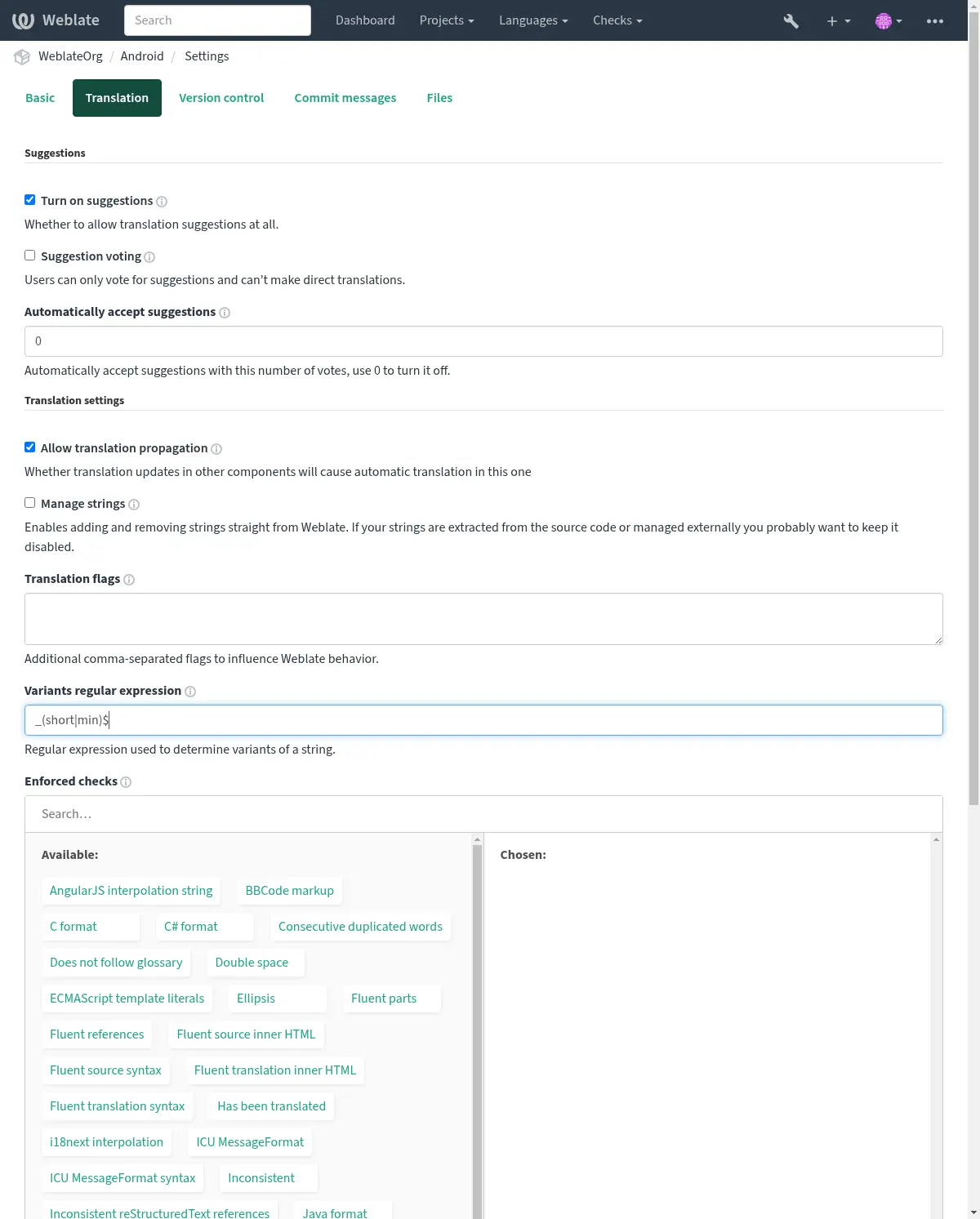
In case the Key matches the expression, the matching part is removed to generate root key of the variant. Then all the strings with the same root key become part of a single variant group, also including the string with the key exactly matching the root key.
பின்வரும் அட்டவணை சில பயன்பாட்டு எடுத்துக்காட்டுகளை பட்டியலிடுகிறது:
வழக்கு பயன்படுத்து |
வழக்கமான வெளிப்பாடு மாறுபாடு |
பொருத்தமான மொழிபெயர்ப்பு விசைகள் |
|---|---|---|
பின்னொட்டு அடையாளம் |
|
"மாதம்சோர்ட்", "மாதம்மின்", "மாதம்". |
இன்லைன் அடையாளம் |
|
'டயல்#s.key', 'டயல்#m.key', 'டயல்.கீ'. |
கையேடு வகைகள்
Added in version 4.5.
'வேரியண்ட்:சோர்ச்' கொடியைப் பயன்படுத்தி குறிப்பிட்ட சரங்களை கைமுறையாக இணைக்கலாம். குழு சரங்களுக்கு தானாகவே விசைகள் இல்லாத இருமொழி மொழிபெயர்ப்புகளுக்கு அல்லது விசைகள் பொருந்தாத குழு சரங்களுக்கு இது பயனுள்ளதாக இருக்கும், ஆனால் மொழிபெயர்க்கும் போது ஒன்றாக கருத்தில் கொள்ளப்பட வேண்டும்.
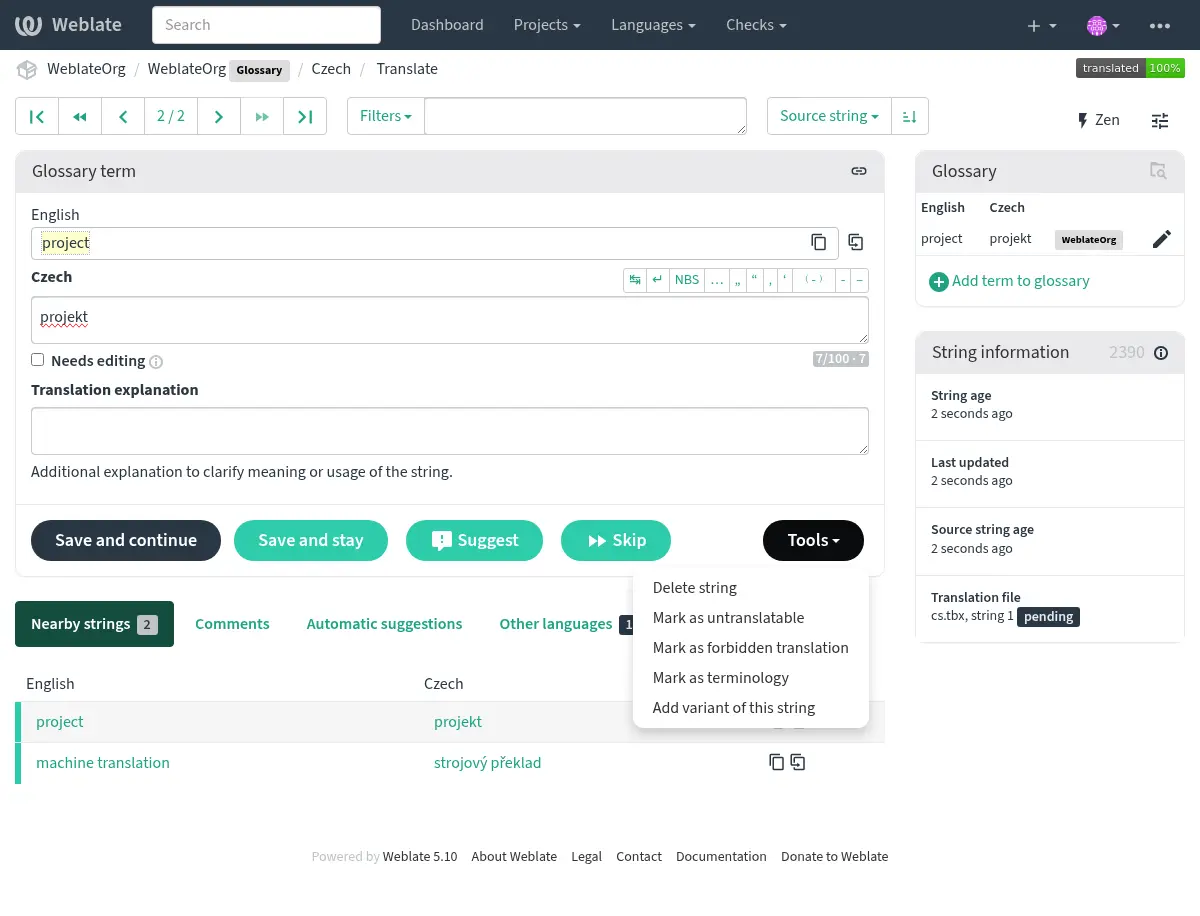
The additional variant for a string can also be added using the Tools while translating (when சரங்களை நிர்வகி is turned on):
Note
வேரியண்ட் மூல சரம் அதிகபட்சம் 768 எழுத்துக்கள் நீளமாக இருக்க வேண்டும். mysql தரவுத்தளத்துடன் பொருந்தக்கூடிய தன்மை காரணமாக இது ஒரு தொழில்நுட்ப வரம்பு ஆகும்.
மொழிபெயர்க்கும் போது மாறுபாடுகள்
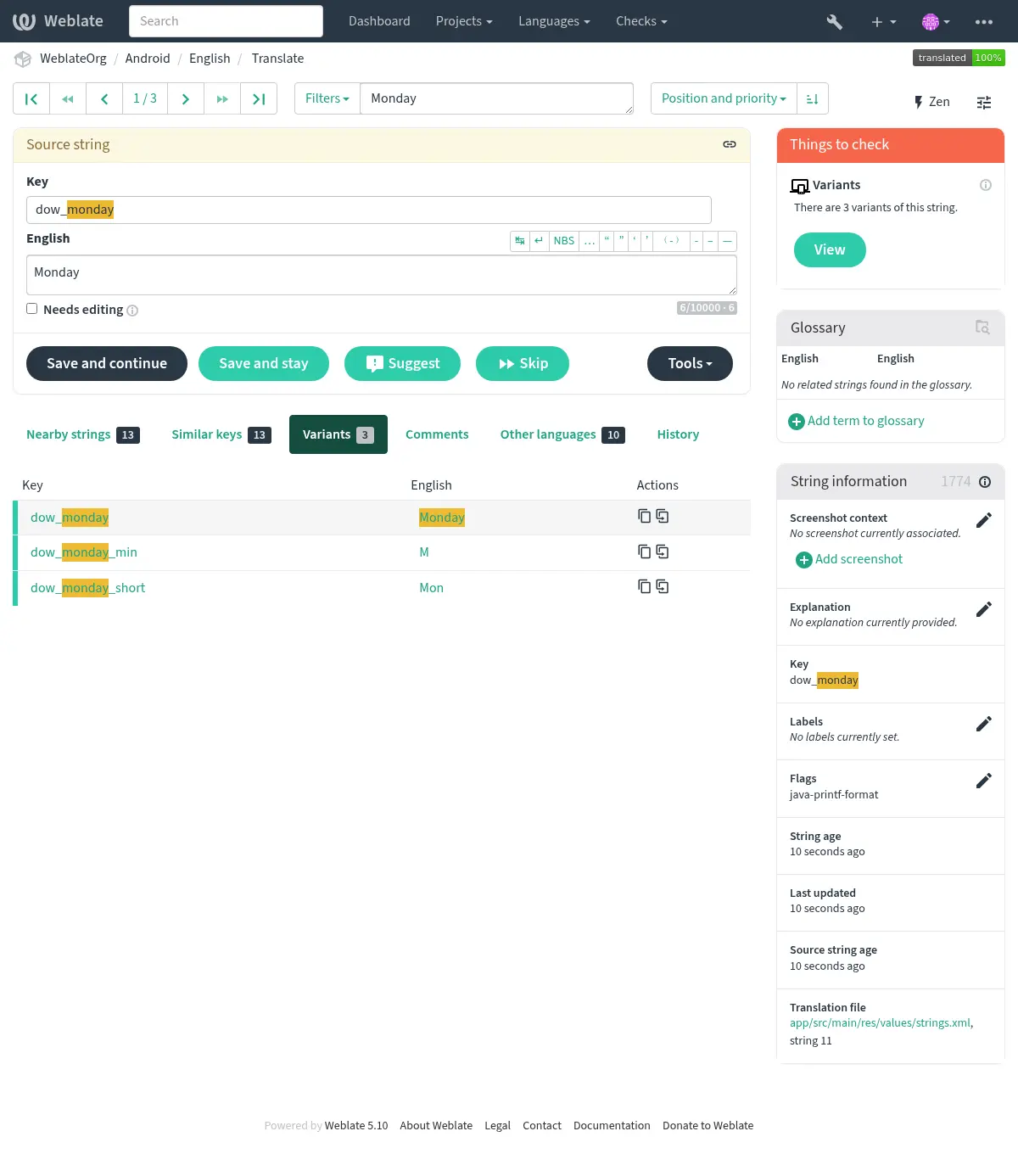
மொழிபெயர்க்கும் போது மாறுபாடு பின்னர் வகைப்படுத்தப்படுகிறது:
சரம் சிட்டைகள்
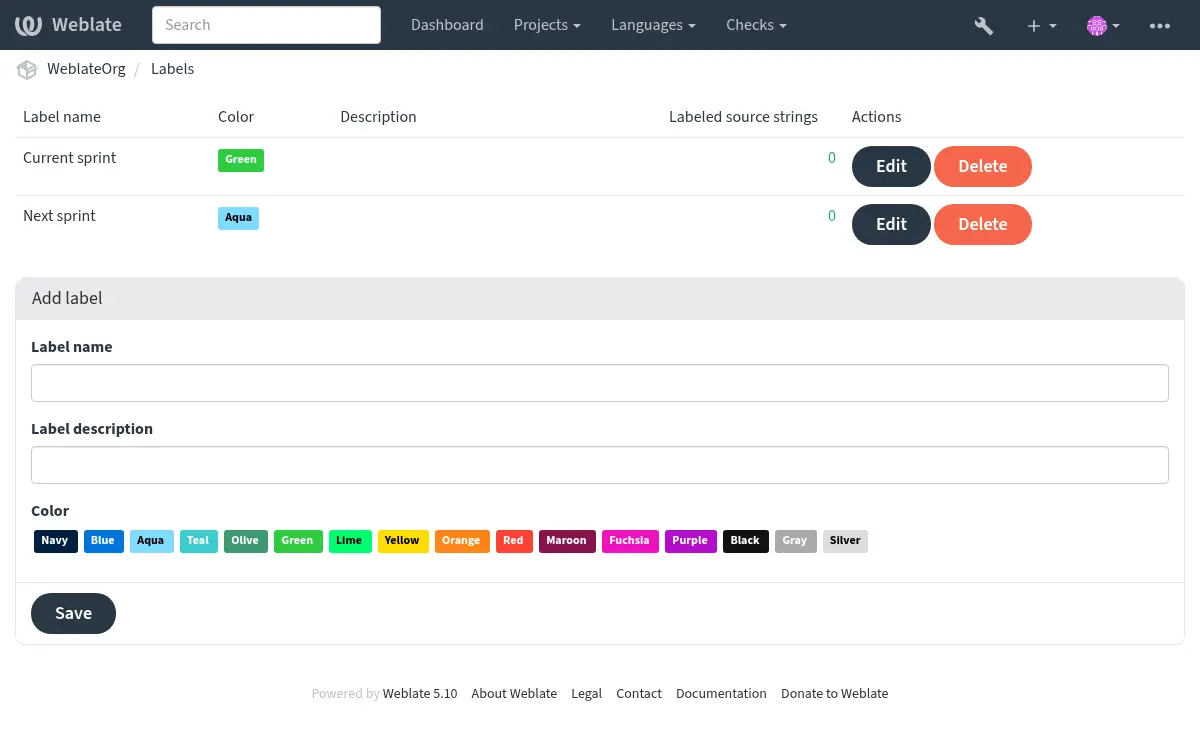
திட்ட உள்ளமைவில் உரை மற்றும் வண்ணத்தால் கூறு மொழிபெயர்ப்பு சரங்களை வகைகளாகப் பிரிக்கவும்.
Hint
Labels can be assigned to units in மூல சரங்கள் குறித்த கூடுதல் செய்தி by bulk editing, or using the மொத்த திருத்து add-on.