உள்ளமைவு வழிமுறைகள்
வலைபெயர்ப்பு நிறுவுகிறது
உங்கள் அமைப்பு மற்றும் அனுபவத்தைப் பொறுத்து, உங்களுக்கான பொருத்தமான நிறுவல் முறையைத் தேர்வுசெய்க:
டோக்கரைப் பயன்படுத்தி நிறுவுதல், recommended for production setups.
மெய்நிகர்என்.வி நிறுவல், விளைவாக்கம் அமைப்புகளுக்கு பரிந்துரைக்கப்படுகிறது:
மூலங்களிலிருந்து நிறுவுகிறது, recommended for development.
கட்டிடக்கலை கண்ணோட்டம்
- வலை சேவையகம்
Handling incoming HTTP requests, நிலையான கோப்புகளை வழங்குதல்.
- செலரி தொழிலாளர்கள்
செலரியைப் பயன்படுத்தி பின்னணி பணிகள் are executed here.
உங்கள் பணிச்சுமையைப் பொறுத்து, நீங்கள் தொழிலாளர்களின் எண்ணிக்கையைத் தனிப்பயனாக்க விரும்பலாம்.
வெப்ளேட்டை கிடைமட்டமாக அளவிடும்போது அர்ப்பணிப்பு முனையைப் பயன்படுத்தவும்.
- WSGI சேவையகம்
பயனர்களுக்கு வலைப்பக்கங்களை வழங்கும் WSGI சேவையகம்.
வெப்ளேட்டை கிடைமட்டமாக அளவிடும்போது அர்ப்பணிப்பு முனையைப் பயன்படுத்தவும்.
- தரவுத்தளம்
PostgreSQL database server for storing all the content, see வலைபெயர்ப்புடுக்கான தரவுத்தள அமைப்பு.
நூற்றுக்கணக்கான மில்லியன் புரவலன் செய்யப்பட்ட சொற்களைக் கொண்ட தளங்களுக்கு அர்ப்பணிக்கப்பட்ட தரவுத்தள முனையைப் பயன்படுத்தவும்.
- ரெடிச்
Redis server for cache and tasks queue, see செலரியைப் பயன்படுத்தி பின்னணி பணிகள்.
வெப்ளேட்டை கிடைமட்டமாக அளவிடும்போது அர்ப்பணிப்பு முனையைப் பயன்படுத்தவும்.
- கோப்பு முறைமை
பகஅ களஞ்சியங்களை சேமிப்பதற்கான கோப்பு முறைமை சேமிப்பு மற்றும் பதிவேற்றிய பயனர் தரவை. இது அனைத்து செயல்முறைகளாலும் பகிரப்படுகிறது.
வெப்ளேட்டை கிடைமட்டமாக அளவிடும்போது பிணைய சேமிப்பகத்தைப் பயன்படுத்தவும்.
- மின்னஞ்சல் சேவையகம்
SMTP server for outgoing e-mail, see வெளிச்செல்லும் மின்னஞ்சலை உள்ளமைத்தல். It can be provided externally.
Hint
டோக்கரைப் பயன்படுத்தி நிறுவுதல் includes postgresql and redis, making the installation easier.
மென்பொருள் தேவைகள்
இயக்க முறைமை
வலைபெயர்ப்பு லினக்ச், ஃப்ரீ.பி.எச்.டி மற்றும் மேகோச் ஆகியவற்றில் வேலை செய்வதாக அறியப்படுகிறது. அமைப்புகள் போன்ற பிற யூனிக்ச் பெரும்பாலும் வேலை செய்யும்.
வலைபெயர்ப்பு சாளரங்களில் ஆதரிக்கப்படவில்லை. ஆனால் அது இன்னும் வேலை செய்யலாம் மற்றும் திட்டுகள் மகிழ்ச்சியுடன் ஏற்றுக்கொள்ளப்படுகின்றன.
See also
கட்டிடக்கலை கண்ணோட்டம் describes overall Weblate architecture and required services.
பைதான் சார்புநிலைகள்
Weblate is written in Python and supports Python
3.11 or newer. You can install dependencies using pip or from your
distribution packages, full list is available in requirements.txt.
மிகவும் குறிப்பிடத்தக்க சார்புகள்:
- சாங்கோ
- செலரி
- கருவித்தொகுப்பை மொழிபெயர்க்கவும்
- மொழிபெயர்ப்பு-கண்டுபிடிப்பாளர்
- பைதான் சமூக ஏற்பு
- சாங்கோ ஓய்வு கட்டமைப்பு
Optional dependency specifier |
பைதான் தொகுப்புகள் |
வலைபெயர்ப்பு நற்பொருத்தம் |
|---|---|---|
|
||
|
||
|
||
|
||
|
||
|
கூகிள் முகில் மொழிபெயர்ப்பு மேம்பட்டது with சொற்களஞ்சியம் support |
|
|
||
|
||
|
MySQL or MariaDB, see வலைபெயர்ப்புடுக்கான தரவுத்தள அமைப்பு |
|
|
||
|
PostgreSQL, see வலைபெயர்ப்புடுக்கான தரவுத்தள அமைப்பு |
|
|
||
|
SAML 2 ஐடிபியை வெப்லேட்டில் ஒருங்கிணைத்தல் |
|
|
வலைபெயர்ப்பு ஒருங்கிணைப்பு புரவலன் செய்யப்பட்டது |
|
|
வலைபெயர்ப்பு ஒருங்கிணைப்பு புரவலன் செய்யப்பட்டது |
|
|
வெப்லேட்டுக்கான WSGI சேவையகம் |
|
|
pip ஐப் பயன்படுத்தி நிறுவும் போது, நிறுவும் போது விரும்பிய அம்சங்களை நேரடியாகக் குறிப்பிடலாம்:
uv pip install "weblate[Postgres,Amazon,SAML]"
அல்லது அனைத்து விருப்ப அம்சங்களுடனும் நீங்கள் வலைபெயர்ப்பு நிறுவலாம்:
uv pip install "weblate[all]"
அல்லது எந்த விருப்ப அம்சங்களும் இல்லாமல் நீங்கள் வலைபெயர்ப்பை நிறுவலாம்:
uv pip install weblate
பிற கணினி தேவைகள்
கணினியில் பின்வரும் சார்புகள் நிறுவப்பட வேண்டும்:
Git- பாங்கோ, கெய்ரோ மற்றும் தொடர்புடைய தலைப்பு கோப்புகள் மற்றும் கோப்செக்ட் உள்நோக்கி தரவு
https://cairographics.org/, https://www.gtk.org/docs/architecture/pango, see பாங்கோ மற்றும் கெய்ரோ
- `` git-review`` (கெரிட் ஆதரவுக்கு விரும்பினால்)
- `` git-svn`` (கீழ்ப்படிதல் ஆதரவுக்கு விருப்பமானது)
tesseract(needed only if tesserocr binary wheels are not available for your system)- `` உரிமதாரர்`` (கூறுகளை உருவாக்கும்போது உரிமத்தைக் கண்டறிய விரும்பினால்)
உருவாக்க நேர சார்புகள்
To build some of the பைதான் சார்புநிலைகள் you might need to install their
dependencies. This depends on how you install them, so please consult
individual packages for documentation. You won't need those if using prebuilt
Wheels while installing using pip or when you use distribution packages.
பாங்கோ மற்றும் கெய்ரோ
Weblate uses Pango and Cairo for rendering bitmap widgets (see மொழிபெயர்ப்பை ஊக்குவித்தல்) and rendering checks (see எழுத்துருக்களை நிர்வகித்தல்). To properly install Python bindings for those you need to install system libraries first - you need both Cairo and Pango, which in turn need GLib. All those should be installed with development files and GObject introspection data.
வன்பொருள் தேவைகள்
வலைபெயர்ப்பு எந்த சமகால வன்பொருளிலும் சிக்கல்கள் இல்லாமல் இயங்க வேண்டும், பின்வருபவை ஒரு ஓச்டில் வெப்லேட்டை இயக்க தேவையான குறைந்தபட்ச உள்ளமைவு (வெப்ளேட், தரவுத்தளம் மற்றும் வலை சேவையகம்):
3 சிபி ரேம்
2 சிபியு கோர்கள்
1 சிபி சேமிப்பு இடம்
Note
வலைபெயர்ப்பு நிறுவுவதற்கான உண்மையான தேவைகள் அதில் நிர்வகிக்கப்படும் மொழிபெயர்ப்புகளின் அளவின் அடிப்படையில் பெரிதும் வேறுபடுகின்றன.
நினைவக பயன்பாடு
அதிக நினைவகம் சிறந்தது - இது அனைத்து நிலைகளிலும் (கோப்பு முறைமை, தரவுத்தளம் மற்றும் வெப்லேட்) தேக்குவதற்கு பயன்படுத்தப்படுகிறது. நூற்றுக்கணக்கான மொழிபெயர்ப்பு கூறுகளுக்கு, குறைந்தது 4 சிபி ரேம் பரிந்துரைக்கப்படுகிறது.
Hint
For systems with less memory than recommended, ஒற்றை-செயல்முறை செலரி அமைப்பு is recommended.
சிபியு பயன்பாடு
பல ஒரே நேரத்தில் பயனர்கள் தேவையான சிபியு கோர்களின் அளவை அதிகரிக்கின்றனர்.
சேமிப்பக பயன்பாடு
வழக்கமான தரவுத்தள சேமிப்பக பயன்பாடு 1 மில்லியன் புரவலன் செய்யப்பட்ட சொற்களுக்கு 300 எம்பி ஆகும்.
நகலி செய்யப்பட்ட களஞ்சியங்களுக்குத் தேவையான சேமிப்பக இடம் மாறுபடும், ஆனால் வலைபெயர்ப்பு ஆழமற்ற குளோன்களைச் செய்வதன் மூலம் அவற்றின் அளவை குறைவாக வைத்திருக்க முயற்சிக்கிறது.
முனைகள்
For small and medium-sized sites (millions of hosted words), all Weblate components (see கட்டிடக்கலை கண்ணோட்டம்) can be run on a single node.
When you grow to hundreds of millions of hosted words, it is recommended to have a dedicated node for database (see வலைபெயர்ப்புடுக்கான தரவுத்தள அமைப்பு).
வெளியீட்டு கையொப்பங்களை சரிபார்க்கிறது
வலைபெயர்ப்பு வெளியீடு கையெழுத்துக்கடை கையொப்பங்கள் ஐப் பயன்படுத்தி கிரிப்டோகிராஃபிக் முறையில் கையொப்பமிடப்பட்டது. கையொப்பங்கள் அறிவிலிமைய வெளியீட்டில் இணைக்கப்பட்டுள்ளன.
கைகடை தொகுப்பு ஐப் பயன்படுத்தி சரிபார்ப்பைச் செய்யலாம். பின்வரும் எடுத்துக்காட்டு 5.4 வெளியீட்டின் கையொப்பத்தை சரிபார்க்கிறது:
sigstore verify github \
   --cert-identity https://github.com/WeblateOrg/weblate/.github/workflows/setup.yml@refs/tags/weblate-5.4 \
   --bundle Weblate-5.4-py3-none-any.whl.sigstore \
   Weblate-5.4-py3-none-any.whl
கோப்பு முறைமை அனுமதிகள்
The Weblate process needs to be able to read and write to the directory where
it keeps data - DATA_DIR. All files within this directory should be
owned and writable by the user running all Weblate processes (typically WSGI and Celery, see சேவையகம் இயங்கும் and செலரியைப் பயன்படுத்தி பின்னணி பணிகள்).
The default configuration places them in the same tree as the Weblate sources, however
you might prefer to move these to a better location such as:
/var/lib/weblate.
வலைபெயர்ப்பு இந்த கோப்பகங்களை தானாக உருவாக்க முயற்சிக்கிறது, ஆனால் அவ்வாறு செய்ய அனுமதிகள் இல்லாதபோது அது தோல்வியடையும்.
You should also take care when running மேலாண்மை கட்டளைகள், as they should be ran under the same user as Weblate itself is running, otherwise permissions on some files might be wrong.
In the Docker container, all files in the /app/data volume have to be
owned by the weblate user inside the container (UID 1000).
See also
வலைபெயர்ப்புடுக்கான தரவுத்தள அமைப்பு
போச்ட்கிரெச்.கியூ.எல் தரவுத்தள சேவையகத்துடன் வலைபெயர்ப்பை இயக்க பரிந்துரைக்கப்படுகிறது.
PostgreSQL 13 and higher is supported. PostgreSQL 15 or newer is recommended.
mysql மற்றும் மரியாடிபி is supported, but not recommended for new installs.
Note
வேறு எந்த தரவுத்தள சேவையகங்களும் தற்போது ஆதரிக்கப்படவில்லை, ஆனால் பிற சாங்கோ உதவி தரவுத்தளங்களுக்கான உதவி செயல்படுத்த முடியும்.
See also
சக்திவாய்ந்த தரவுத்தள இயந்திரத்தைப் பயன்படுத்து, Databases, பிற தரவுத்தளங்களிலிருந்து postgresql க்கு இடம்பெயர்கிறது
தரவுத்தள இணைப்புகள்
In the default configuration, each Weblate process keeps a persistent
connection to the database. Persistent connections improve Weblate
responsiveness, but might require more resources for the database server.
Please consult CONN_MAX_AGE and
Persistent connections for more info.
வலைபெயர்ப்புடுக்கு குறைந்தபட்சம் பின்வரும் இணைப்புகள் தேவை:
\((4 \times \mathit{nCPUs}) + 2\) for Celery processes
\(\mathit{nCPUs} + 1\) for WSGI workers
இந்த ஆவணத்தில் வழங்கப்பட்ட கப்பல்துறை கொள்கலன் இயல்புநிலை மற்றும் எடுத்துக்காட்டு உள்ளமைவுகளுக்கு இது பொருந்தும், ஆனால் நீங்கள் wsgi தொழிலாளர்களின் அளவைத் தனிப்பயனாக்கியவுடன் அல்லது செலரியின் இணையான தன்மையை சரிசெய்யும்போது எண்கள் மாறும்.
தரவுத்தள இணைப்புகளின் எண்ணிக்கையின் உண்மையான வரம்பு பின்வரும் சூழ்நிலைகளுக்கு கணக்கில் அதிகமாக இருக்க வேண்டும்:
மேலாண்மை கட்டளைகள் need their connection as well.
வழக்கு செயல்முறை கொல்லப்பட்டால் (எடுத்துக்காட்டாக oom கில்லரால்), இது நேரம் முடிவடையும் வரை இருக்கும் இணைப்பைத் தடுக்கலாம்.
postgresql
போச்ட்கிரெச்யூல் பொதுவாக சாங்கோ அடிப்படையிலான தளங்களுக்கு சிறந்த தேர்வாகும். இது சாங்கோ தரவுத்தள அடுக்கை செயல்படுத்த பயன்படுத்தப்படும் குறிப்பு தரவுத்தளம்.
Note
வலைபெயர்ப்பு டிரிகிராம் நீட்டிப்பைப் பயன்படுத்துகிறது, இது சில சந்தர்ப்பங்களில் தனித்தனியாக நிறுவப்பட வேண்டும். `` postgresql-contrib`` அல்லது இதேபோல் பெயரிடப்பட்ட தொகுப்பைத் தேடுங்கள்.
See also
postgresql இல் ஒரு தரவுத்தளத்தை உருவாக்குதல்
ஒரு தனி தரவுத்தளத்தில் வலைபெயர்ப்பு இயக்குவது பொதுவாக ஒரு நல்ல யோசனையாகும், மேலும் பயனர் கணக்கைப் பிரிக்கவும்:
# If PostgreSQL was not installed before, set the main password
sudo -u postgres psql postgres -c "\password postgres"

# Create a database user called "weblate"
sudo -u postgres createuser --superuser --pwprompt weblate

# Create the database "weblate" owned by "weblate"
sudo -u postgres createdb -E UTF8 -O weblate weblate
Hint
போச்ட்கிரெச்க்யூலில் வலைபெயர்ப்பு பயனரை ஒரு சூப்பர் யூசராக மாற்ற நீங்கள் விரும்பவில்லை என்றால், நீங்கள் அதை தவிர்க்கலாம். அவ்வாறான நிலையில், ச்கீமா வலைபெயர்ப்பில் ஒரு போச்ட்கிரெச்க்யூல் சூப்பர் யூசராக சில இடம்பெயர்வு படிகளை கைமுறையாக செய்ய வேண்டும்:
CREATE EXTENSION IF NOT EXISTS pg_trgm;
CREATE EXTENSION IF NOT EXISTS btree_gin;
போச்ட்கிரெச்க்யூல் பயன்படுத்த வலைபெயர்ப்பு கட்டமைத்தல்
The settings.py snippet for PostgreSQL:
DATABASES = {
    "default": {
        # Database engine
        "ENGINE": "django.db.backends.postgresql",
        # Database name
        "NAME": "weblate",
        # Database user
        "USER": "weblate",
        # Configures name of the PostgreSQL role to alter during the database migration
        # "ALTER_ROLE": "weblate",
        # Database password
        "PASSWORD": "password",
        # Set to empty string for localhost
        "HOST": "database.example.com",
        # Set to empty string for default
        "PORT": "",
        # Persistent connections
        "CONN_MAX_AGE": None,
        "CONN_HEALTH_CHECKS": True,
    }
}
The database migration performs ALTER ROLE on the database role used
by Weblate. In most cases, the name of the role matches the username. In more
complex setups the role name is different from the username, and you will get an error
about non-existing role during the database migration
(psycopg2.errors.UndefinedObject: role "weblate@hostname" does not exist).
This is known to happen with Azure Database for PostgreSQL, but it's not
limited to this environment. Please set ALTER_ROLE to change the name of the
role Weblate should alter during the database migration.
See also
mysql மற்றும் மரியாடிபி
Warning
While MySQL and MariaDB support is still maintained in Weblate, our primary focus is PostgreSQL. It is recommended to use PostgreSQL for new installs, and to migrate existing installs to PostgreSQL, see பிற தரவுத்தளங்களிலிருந்து postgresql க்கு இடம்பெயர்கிறது.
Some Weblate features will perform better with postgresql. This includes searching and translation memory, which both utilize full-text features in the database and PostgreSQL implementation is superior.
Weblate can be also used with MySQL or MariaDB, please see MySQL notes and MariaDB notes for caveats using Django with those. Because of the limitations it is recommended to use postgresql for new installations.
Weblate requires MySQL at least 8 or MariaDB at least 10.5.
வலைபெயர்ப்புடுக்கு பின்வரும் உள்ளமைவு பரிந்துரைக்கப்படுகிறது:
அதிக யூனிகோட் விமானங்களின் பிரதிநிதித்துவத்தை அனுமதிக்க `` utf8mb4`` சார்செட்டைப் பயன்படுத்து (எடுத்துக்காட்டாக ஈமோசிகள்).
உரை புலங்களில் நீண்ட குறியீடுகளை அனுமதிக்க `` innodb_large_prefix`` உடன் சேவையகத்தை உள்ளமைக்கவும்.
தனிமைப்படுத்தும் அளவை `` கம்யூட் `` க்கு அமைக்கவும்.
sql பயன்முறையை `` strict_trans_tables`` க்கு அமைக்க வேண்டும்.
mysql 8.x, மரியாடிபி 10.5.x அல்லது புதியது நியாயமான இயல்புநிலை உள்ளமைவைக் கொண்டுள்ளன, இதனால் சேவையக முறுக்குதல் தேவையில்லை, தேவையான அனைத்தையும் கிளையன்ட் பக்கத்தில் உள்ளமைக்க முடியும்.
Below is an example /etc/my.cnf.d/server.cnf for a server with 8 GB of
RAM. These settings should be sufficient for most installs. MySQL and MariaDB
have tunables that will increase the performance of your server that are
considered not necessary unless you are planning on having large numbers of
concurrent users accessing the system. See the various vendors documentation on
those details.
`` innodb_file_per_table`` அமைப்பு சரியாக அமைக்கப்பட்டிருப்பதை நிறுவும் போது சிக்கல்களைக் குறைப்பது முற்றிலும் முக்கியமானது, மேலும் உங்கள் வலைபெயர்ப்பு நிறுவலைத் தொடங்குவதற்கு முன்பு mysql/mariadb மறுதொடக்கம் செய்யப்பட்டது.
[mysqld]
character-set-server = utf8mb4
character-set-client = utf8mb4
collation-server = utf8mb4_unicode_ci

datadir=/var/lib/mysql

log-error=/var/log/mariadb/mariadb.log

innodb_large_prefix=1
innodb_file_format=Barracuda
innodb_file_per_table=1
innodb_buffer_pool_size=2G
sql_mode=STRICT_TRANS_TABLES
Hint
நீங்கள் #1071 ஐப் பெறுகிறீர்கள் என்றால் - குறிப்பிட்ட விசை மிக நீளமாக இருந்தது; அதிகபட்ச விசை நீளம் 767 பைட்டுகள்` பிழை, மேலே உள்ள `` இன்னோடிபி அமைப்புகளைச் சேர்த்து உங்கள் உள்ளமைவைப் புதுப்பித்து உங்கள் நிறுவலை மறுதொடக்கம் செய்யுங்கள்.
Hint
In case you are getting #2006 - MySQL server has gone away error,
configuring CONN_MAX_AGE might help.
See also
mysql/mariadb ஐப் பயன்படுத்த வலைபெயர்ப்பு கட்டமைத்தல்
The settings.py snippet for MySQL and MariaDB:
DATABASES = {
    "default": {
        # Database engine
        "ENGINE": "django.db.backends.mysql",
        # Database name
        "NAME": "weblate",
        # Database user
        "USER": "weblate",
        # Database password
        "PASSWORD": "password",
        # Set to empty string for localhost
        "HOST": "127.0.0.1",
        # Set to empty string for default
        "PORT": "3306",
        # In case you wish to use additional
        # connection options
        "OPTIONS": {},
    }
}
நீங்கள் நிறுவலைத் தொடங்குவதற்கு முன்பு mysql அல்லது mariadb இல் `` வலைபெயர்ப்பு` பயனர் கணக்கையும் உருவாக்க வேண்டும். அதை அடைய கீழே உள்ள கட்டளைகளைப் பயன்படுத்து:
GRANT ALL ON weblate.* to 'weblate'@'localhost' IDENTIFIED BY 'password';
FLUSH PRIVILEGES;
See also
பிற உள்ளமைவுகள்
வெளிச்செல்லும் மின்னஞ்சலை உள்ளமைத்தல்
வலைபெயர்ப்பு பல்வேறு சந்தர்ப்பங்களில் மின்னஞ்சல்களை அனுப்புகிறது - கணக்கு செயல்படுத்தலுக்காகவும், பயனர்களால் கட்டமைக்கப்பட்ட பல்வேறு அறிவிப்புகளுக்காகவும். இதற்காக இதற்கு ஒரு smtp சேவையகத்திற்கான அணுகல் தேவை.
The mail server setup is configured using these settings:
EMAIL_HOST, EMAIL_HOST_PASSWORD,
EMAIL_USE_TLS, EMAIL_USE_SSL,
EMAIL_HOST_USER and EMAIL_PORT. Their
names are quite self-explanatory, but you can find more info in the
Django documentation.
Hint
In case you get error about not supported authentication (for example
SMTP AUTH extension not supported by server), it is most likely caused
by using insecure connection and server refuses to authenticate this way.
Try enabling EMAIL_USE_TLS in such case.
தலைகீழ் ப்ராக்சிக்கு பின்னால் இயங்குகிறது
Several features in Weblate rely on being able to get client IP address. This includes வீதத்தைக் கட்டுப்படுத்துதல், ச்பேம் பாதுகாப்பு or தணிக்கை பதிவு.
WSGI கையாளுபவரால் அமைக்கப்பட்ட `` ரிமோட்_ஆட்.டி.ஆர்`` இலிருந்து ஐபி முகவரியை வலைபெயர்ப்பு பாகுபடுத்துகிறது. இது காலியாக இருக்கலாம் (WSGI க்கு சாக்கெட் பயன்படுத்தும் போது) அல்லது தலைகீழ் பதிலாள் முகவரியைக் கொண்டிருக்கலாம், எனவே வெப்லேட்டுக்கு கிளையன்ட் ஐபி முகவரியுடன் கூடுதல் HTTP தலைப்பு தேவை.
Enabling IP_BEHIND_REVERSE_PROXY might be enough for the most usual
setups, but you might need to adjust IP_PROXY_HEADER and
IP_PROXY_OFFSET as well (use WEBLATE_IP_PROXY_HEADER and
WEBLATE_IP_PROXY_OFFSET in the Docker container).
Hint
இந்த உள்ளமைவை இயல்பாக இயக்க முடியாது, ஏனெனில் இது சரியாக உள்ளமைக்கப்பட்ட தலைகீழ் பதிலாள் இல்லாத நிறுவல்களில் ஐபி முகவரி ச்பூஃபிங்கை அனுமதிக்கும்.
Another thing to take care of is the Host header. It should match
to whatever is configured as SITE_DOMAIN. Additional configuration
might be needed in your reverse proxy (for example use ProxyPreserveHost On
for Apache or proxy_set_header Host $host; with nginx).
See also
ச்பேம் பாதுகாப்பு,
வீதத்தைக் கட்டுப்படுத்துதல்,
தணிக்கை பதிவு,
nginx மற்றும் uwsgi க்கான மாதிரி உள்ளமைவு,
Nginx மற்றும் kunicorn க்கான மாதிரி உள்ளமைவு,
அப்பாச்சிக்கான மாதிரி உள்ளமைவு,
அப்பாச்சி மற்றும் துப்பாக்கிக்காரனுக்கான மாதிரி உள்ளமைவு,
IP_BEHIND_REVERSE_PROXY,
IP_PROXY_HEADER,
IP_PROXY_OFFSET,
SECURE_PROXY_SSL_HEADER,
WEBLATE_IP_PROXY_HEADER,
WEBLATE_IP_PROXY_OFFSET
http பதிலாள்
Weblate does execute VCS commands and those accept proxy configuration from
environment. The recommended approach is to define proxy settings in
settings.py:
import os

os.environ["http_proxy"] = "http://proxy.example.com:8080"
os.environ["HTTPS_PROXY"] = "http://proxy.example.com:8080"
See also
உள்ளமைவை சரிசெய்தல்
See also
Copy weblate/settings_example.py to weblate/settings.py and
adjust it to match your setup. You will probably want to adjust the following
options:
ADMINS
ஏதேனும் தவறு நடந்தால் அறிவிப்புகளைப் பெற தள நிர்வாகிகளின் பட்டியல், எடுத்துக்காட்டாக தோல்வியுற்ற இணைப்புகள் அல்லது சாங்கோ பிழைகள் குறித்த அறிவிப்புகள்.
Contact form sends e-mail on these as well unless
ADMINS_CONTACTis configured.
ALLOWED_HOSTS
உங்கள் தளம் பணி செய்ய வேண்டிய ஓச்ட்களை பட்டியலிட இதை அமைக்க வேண்டும். உதாரணத்திற்கு:
ALLOWED_HOSTS = ["demo.weblate.org"]மாற்றாக நீங்கள் வைல்டு கார்டைச் சேர்க்கலாம்:
ALLOWED_HOSTS = ["*"]
SESSION_ENGINE
Configure how your sessions will be stored. In case you keep the default database backend engine, you should schedule: weblate clearsessions to remove stale session data from the database.
If you are using Redis as cache (see தற்காலிக சேமிப்பை இயக்கவும்) it is recommended to use it for sessions as well:
SESSION_ENGINE = "django.contrib.sessions.backends.cache"See also
DATABASES
தரவுத்தள சேவையகத்துடன் இணைப்பு, மேலும் விவரங்களுக்கு சாங்கோவின் ஆவணங்களை சரிபார்க்கவும்.
DEBUG
எந்த விளைவாக்கம் சேவையகத்திற்கும் இதை முடக்கு. பிழைத்திருத்த பயன்முறையில், சாங்கோ பயனர்களுக்கு பிழை ஏற்பட்டால் பின்னடைவுகளைக் காண்பிப்பார், நீங்கள் அதை முடக்கும்போது, ஒரு மின்னஞ்சலுக்கு `` நிர்வாகிகள்`` க்கு பிழைகள் அனுப்பப்படும் (மேலே காண்க).
இந்த விசயத்தில் சாங்கோ உள்நாட்டில் அதிகமான தகவல்களை சேமித்து வைப்பதால், பிழைத்திருத்த பயன்முறையும் வலைபெயர்ப்பைக் குறைக்கிறது.
See also
DEFAULT_FROM_EMAIL
வெளிச்செல்லும் மின்னஞ்சலுக்கான மின்னஞ்சல் அனுப்புநர் முகவரி, எடுத்துக்காட்டாக பதிவு மின்னஞ்சல்.
See also
SECRET_KEY
Key used by Django to sign some info in cookies, see சாங்கோ ரகசிய விசை for more info.
See also
SERVER_EMAIL
நிர்வாகிக்கு மின்னஞ்சல்களை அனுப்புவதற்கு அனுப்புநர் முகவரியாக பயன்படுத்தப்படும் மின்னஞ்சல், எடுத்துக்காட்டாக தோல்வியுற்ற இணைப்புகள் குறித்த அறிவிப்புகள்.
See also
தரவுத்தளத்தை நிரப்புதல்
After your configuration is ready, you can run
migrate to create the database structure. Now you should be
able to create translation projects using the admin interface.
Once you are done, you should also check the Performance report in the admin interface, which will give you hints of potential non optimal configuration on your site.
See also
விளைவாக்கம் அமைப்பு
விளைவாக்கம் அமைப்பிற்கு நீங்கள் பின்வரும் பிரிவுகளில் விவரிக்கப்பட்டுள்ள மாற்றங்களைச் செய்ய வேண்டும். மிக முக்கியமான அமைப்புகள் ஒரு எச்சரிக்கையைத் தூண்டும், இது ஒரு சூப்பர் யூசராக கையொப்பமிடப்பட்டால் மேல் பட்டியில் ஒரு ஆச்சரியக் குறியால் குறிக்கப்படுகிறது:
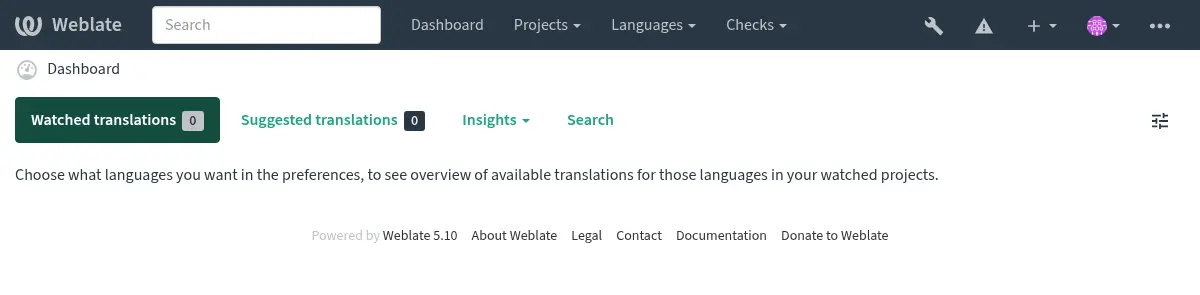
சாங்கோவால் தூண்டப்பட்ட சோதனைகளை ஆய்வு செய்யவும் பரிந்துரைக்கப்படுகிறது (அவை அனைத்தையும் நீங்கள் சரிசெய்ய தேவையில்லை என்றாலும்):
weblate check --deploy
You can also review the very same checklist at செயல்திறன் அறிக்கை in the மேலாண்மை இடைமுகம்.
See also
பிழைத்திருத்த பயன்முறையை முடக்கு
Disable Django's debug mode (DEBUG) by:
DEBUG = False
பிழைத்திருத்த பயன்முறையில், சாங்கோ செயல்படுத்தப்பட்ட அனைத்து வினவல்களையும் சேமித்து வைத்து, பயனர்களின் பிழைகளின் பின்னடைவைக் காட்டுகிறது, இது விளைவாக்கம் அமைப்பில் விரும்பவில்லை.
See also
நிர்வாகிகளை ஒழுங்காக உள்ளமைக்கவும்
Set the correct admin addresses to the ADMINS setting to defining who will receive
e-mails in case something goes wrong on the server, for example:
ADMINS = (("Your Name", "your_email@example.com"),)
See also
சரியான தள களத்தை அமைக்கவும்
Adjust site name and domain in the admin interface, otherwise links in RSS or
registration e-mails will not work. This is configured using
SITE_DOMAIN which should contain site domain name.
Changed in version 4.2: Prior to the 4.2 release the Django sites framework was used instead, please see The “sites” framework.
http களை சரியாக உள்ளமைக்கவும்
It is strongly recommended to run Weblate using the encrypted HTTPS protocol.
After enabling it, you should set ENABLE_HTTPS in the settings:
ENABLE_HTTPS = True
Hint
You might want to set up HSTS as well, see SSL/HTTPS for more details.
ஒழுங்காக அமைக்கவும் secure_hsts_seconds
If your site is served over SSL, you have to consider setting a value for SECURE_HSTS_SECONDS
in the settings.py to enable HTTP Strict Transport Security.
By default it's set to 0 as shown below.
SECURE_HSTS_SECONDS = 0
If set to a non-zero integer value, the django.middleware.security.SecurityMiddleware
sets the HTTP Strict Transport Security header on all responses that do not already have it.
Warning
Setting this incorrectly can irreversibly (for some time) break your site. Read the HTTP Strict Transport Security documentation first.
சக்திவாய்ந்த தரவுத்தள இயந்திரத்தைப் பயன்படுத்து
Please use PostgreSQL for a production environment, see வலைபெயர்ப்புடுக்கான தரவுத்தள அமைப்பு for more info.
தரவுத்தள சேவையகத்தை இயக்க அருகிலுள்ள இருப்பிடத்தைப் பயன்படுத்து, இல்லையெனில் பிணையம்கிங் செயல்திறன் அல்லது நம்பகத்தன்மை உங்கள் வலைபெயர்ப்பு அனுபவத்தை அழிக்கக்கூடும்.
Check the database server performance or tweak its configuration, for example using PGTune.
தற்காலிக சேமிப்பை இயக்கவும்
முடிந்தால், `` தற்காலிக சேமிப்பு` உள்ளமைவு மாறியை சரிசெய்வதன் மூலம் சாங்கோவிலிருந்து ரெடிசைப் பயன்படுத்து, எடுத்துக்காட்டாக:
CACHES = {
    "default": {
        "BACKEND": "django_redis.cache.RedisCache",
        "LOCATION": "redis://127.0.0.1:6379/0",
        # If redis is running on same host as Weblate, you might
        # want to use unix sockets instead:
        # 'LOCATION': 'unix:///var/run/redis/redis.sock?db=0',
        "OPTIONS": {
            "CLIENT_CLASS": "django_redis.client.DefaultClient",
            "PARSER_CLASS": "redis.connection.HiredisParser",
        },
    }
}
Hint
In case you change Redis settings for the cache, you might need to adjust them for Celery as well, see செலரியைப் பயன்படுத்தி பின்னணி பணிகள்.
See also
அவதார் கேச்சிங்
சாங்கோவை கேச்சிங் செய்வதோடு கூடுதலாக, வலைபெயர்ப்பு அவதாரங்களின் தேக்ககத்தை செய்கிறது. இந்த நோக்கத்திற்காக தனி, கோப்பு உதவி தற்காலிக சேமிப்பைப் பயன்படுத்த பரிந்துரைக்கப்படுகிறது:
CACHES = {
    "default": {
        # Default caching backend setup, see above
        "BACKEND": "django_redis.cache.RedisCache",
        "LOCATION": "unix:///var/run/redis/redis.sock?db=0",
        "OPTIONS": {
            "CLIENT_CLASS": "django_redis.client.DefaultClient",
            "PARSER_CLASS": "redis.connection.HiredisParser",
        },
    },
    "avatar": {
        "BACKEND": "django.core.cache.backends.filebased.FileBasedCache",
        "LOCATION": os.path.join(DATA_DIR, "avatar-cache"),
        "TIMEOUT": 604800,
        "OPTIONS": {
            "MAX_ENTRIES": 1000,
        },
    },
}
மின்னஞ்சல் அனுப்புதல் உள்ளமைக்கவும்
Weblate needs to send out e-mails on several occasions, and these e-mails should
have a correct sender address, please configure SERVER_EMAIL and
DEFAULT_FROM_EMAIL to match your environment, for example:
SERVER_EMAIL = "admin@example.org"
DEFAULT_FROM_EMAIL = "weblate@example.org"
Note
To disable sending e-mails by Weblate set EMAIL_BACKEND
to django.core.mail.backends.dummy.EmailBackend.
இது பதிவு அல்லது கடவுச்சொல் மீட்டமைப்பு மின்னஞ்சல்கள் உட்பட அனைத்து * மின்னஞ்சல் விநியோகத்தையும் முடக்கும்.
அனுமதிக்கப்பட்ட ஓச்ட்கள் அமைவு
Django requires ALLOWED_HOSTS to hold a list of domain names
your site is allowed to serve, leaving it empty will block any requests.
In case this is not configured to match your HTTP server, you will get errors
like Invalid HTTP_HOST header: '1.1.1.1'. You may need to add '1.1.1.1'
to ALLOWED_HOSTS.
Hint
On Docker container, this is available as WEBLATE_ALLOWED_HOSTS.
சாங்கோ ரகசிய விசை
The SECRET_KEY setting is used by Django to sign cookies, and you should
really generate your own value rather than using the one from the example setup.
You can generate a new key using weblate-generate-secret-key shipped with Weblate.
See also
பராமரிப்பு பணிகளை இயக்குகிறது
For optimal performance, it is good idea to run some maintenance tasks in the background. This is automatically done by செலரியைப் பயன்படுத்தி பின்னணி பணிகள் and covers following tasks:
உள்ளமைவு சுகாதார சோதனை (மணிநேரம்).
Committing pending changes (hourly), see சோம்பேறி கம்யூச் and
commit_pending.கூறு விழிப்பூட்டல்களை புதுப்பித்தல் (தினசரி).
Update remote branches (nightly), see
AUTO_UPDATE.Translation memory backup to JSON (daily), see
dump_memory.Fulltext and database maintenance tasks (daily and weekly tasks), see
cleanuptrans.
கணினி இடங்கள் மற்றும் குறியாக்கம்
கணினி இடங்கள் யுடிஎஃப் -8 திறமையானவர்களுடன் கட்டமைக்கப்பட வேண்டும். பெரும்பாலான லினக்ச் விநியோகங்களில் இது இயல்புநிலை அமைப்பாகும். உங்கள் கணினியில் இது இல்லை என்றால், தயவுசெய்து இடங்களை utf-8 மாறுபாட்டிற்கு மாற்றவும்.
For example by editing /etc/default/locale and setting there
LANG="C.UTF-8".
சில சந்தர்ப்பங்களில் தனிப்பட்ட சேவைகள் இடங்களுக்கு தனித்தனி உள்ளமைவைக் கொண்டுள்ளன. இது வழங்கல் மற்றும் வலை சேவையகங்களுக்கு இடையில் மாறுபடும், எனவே அதற்காக உங்கள் வலை சேவையக தொகுப்புகளின் ஆவணங்களை சரிபார்க்கவும்.
Apache on Ubuntu uses /etc/apache2/envvars:
export LANG='en_US.UTF-8'
export LC_ALL='en_US.UTF-8'
Apache on CentOS uses /etc/sysconfig/httpd (or
/opt/rh/httpd24/root/etc/sysconfig/httpd):
LANG='en_US.UTF-8'
கிளையன்ட் சொத்துக்களை சுருக்கவும்
வலைபெயர்ப்பு சாவாச்கிரிப்ட் மற்றும் சிஎச்எச் கோப்புகளுடன் வருகிறது. செயல்திறன் காரணங்களுக்காக ஒரு வாடிக்கையாளருக்கு அனுப்புவதற்கு முன்பு அவற்றை சுருக்குவது நல்லது. இயல்புநிலை உள்ளமைவில் இது சிறிய மேல்நிலை செலவில் பறக்கும்போது செய்யப்படுகிறது. பெரிய நிறுவல்களில், இணைப்பில்லாத சுருக்க பயன்முறையை இயக்க பரிந்துரைக்கப்படுகிறது. இது உள்ளமைவில் செய்யப்பட வேண்டும் மற்றும் ஒவ்வொரு வலைபெயர்ப்பு மேம்படுத்தலிலும் சுருக்கத்தைத் தூண்ட வேண்டும்.
The configuration switch is simple by enabling
django.conf.settings.COMPRESS_OFFLINE and configuring
django.conf.settings.COMPRESS_OFFLINE_CONTEXT (the latter is
already included in the example configuration):
COMPRESS_OFFLINE = True
ஒவ்வொரு வரிசையிலும் தற்போதைய பதிப்போடு பொருந்தக்கூடிய கோப்புகளை சுருக்க வேண்டும்:
weblate compress
Hint
அதிகாரப்பூர்வ கப்பல்துறை படம் இந்த அம்சத்தை ஏற்கனவே இயக்கியுள்ளது.
சேவையகம் இயங்கும்
Hint
In case you are not experienced with services described below, you might want to try டோக்கரைப் பயன்படுத்தி நிறுவுதல்.
வலைபெயர்ப்பை இயக்க உங்களுக்கு பல சேவைகள் தேவைப்படும், பரிந்துரைக்கப்பட்ட அமைப்பு பின்வருமாறு:
Database server (see வலைபெயர்ப்புடுக்கான தரவுத்தள அமைப்பு)
Cache server (see தற்காலிக சேமிப்பை இயக்கவும்)
Frontend web server for static files and SSL termination (see நிலையான கோப்புகளை வழங்குதல்)
WSGI server for dynamic content (see nginx மற்றும் uwsgi க்கான மாதிரி உள்ளமைவு)
Celery for executing background tasks (see செலரியைப் பயன்படுத்தி பின்னணி பணிகள்)
Note
சேவைகளுக்கு இடையில் சில சார்புகள் உள்ளன, எடுத்துக்காட்டாக செலரி அல்லது யு.டபிள்யூ.எச்.சி.ஐ செயல்முறைகளைத் தொடங்கும்போது கேச் மற்றும் தரவுத்தளம் இயங்க வேண்டும்.
In most cases, you will run all services on single (virtual) server, but in
case your installation is heavy loaded, you can split up the services. The only
limitation on this is that Celery and Wsgi servers need access to
DATA_DIR.
Note
The WSGI process has to be executed under the same user the Celery
process, otherwise files in the DATA_DIR will be stored with
mixed ownership, leading to runtime issues.
See also கோப்பு முறைமை அனுமதிகள் and செலரியைப் பயன்படுத்தி பின்னணி பணிகள்.
வலை சேவையகத்தை இயக்குகிறது
வெப்லேட்டை இயக்குவது வேறு எந்த சாங்கோ அடிப்படையிலான நிரலையும் இயக்குவதில் இருந்து வேறுபட்டதல்ல. சாங்கோ வழக்கமாக WSGI அல்லது FCGI ஆக செயல்படுத்தப்படுகிறது (கீழே உள்ள வெவ்வேறு வலை வீரர்களுக்கான எடுத்துக்காட்டுகளைப் பார்க்கவும்).
சோதனை நோக்கங்களுக்காக, நீங்கள் சாங்கோவில் உள்ளமைக்கப்பட்ட வலை சேவையகத்தைப் பயன்படுத்தலாம்:
weblate runserver
Warning
DO NOT USE THIS SERVER IN A PRODUCTION SETTING. It has not gone through
security audits or performance tests. See also Django documentation on
runserver.
Hint
The Django built-in server serves static files only with DEBUG
enabled as it is intended for development only. For production use, please
see WSGI setups in nginx மற்றும் uwsgi க்கான மாதிரி உள்ளமைவு, அப்பாச்சிக்கான மாதிரி உள்ளமைவு, அப்பாச்சி மற்றும் துப்பாக்கிக்காரனுக்கான மாதிரி உள்ளமைவு, and
நிலையான கோப்புகளை வழங்குதல்.
நிலையான கோப்புகளை வழங்குதல்
Django needs to collect its static files in a single directory. To do so,
execute weblate collectstatic --noinput. This will copy the static
files into a directory specified by the STATIC_ROOT setting (this defaults to
a static directory inside CACHE_DIR).
உங்கள் வலை சேவையகத்திலிருந்து நிலையான கோப்புகளை நேரடியாக வழங்க பரிந்துரைக்கப்படுகிறது, பின்வரும் பாதைகளுக்கு நீங்கள் அதைப் பயன்படுத்த வேண்டும்:
/static/Serves static files for Weblate and the admin interface (from defined by
STATIC_ROOT)./media/பயனர் மீடியா பதிவேற்றங்களுக்கு பயன்படுத்தப்படுகிறது (எ.கா. திரை சாட்கள்).
/favicon.icoShould be rewritten to rewrite a rule to serve
/static/favicon.ico.
உள்ளடக்க பாதுகாப்பு கொள்கை
The default Weblate configuration enables weblate.middleware.SecurityMiddleware
middleware which sets security related HTTP headers like Content-Security-Policy
or X-XSS-Protection. These are by default set up to work with Weblate and its
configuration, but this might need customization for your environment.
Nginx மற்றும் kunicorn க்கான மாதிரி உள்ளமைவு
The following configuration runs Weblate using Gunicorn under the NGINX webserver
(also available as weblate/examples/weblate.nginx.gunicorn.conf):
#
# nginx configuration for Weblate
#
# You will want to change:
#
# - server_name
# - change /home/weblate/weblate-env to location where Weblate virtualenv is placed
# - change /home/weblate/data to match your DATA_DIR
# - change /home/weblate/data/cache to match your CACHE_DIR
# - change python3.12 to match your Python version
# - change weblate user to match your Weblate user
#
server {
    listen 80;
    server_name weblate;
    # Not used
    root /var/www/html;

    location ~ ^/favicon.ico$ {
        # CACHE_DIR/static/favicon.ico
        alias /home/weblate/data/cache/static/favicon.ico;
        expires 30d;
    }

    location /static/ {
        # CACHE_DIR/static/
        alias /home/weblate/data/cache/static/;
        expires 30d;
    }

    location /media/ {
        # DATA_DIR/media/
        alias /home/weblate/data/media/;
        expires 30d;
    }

    location / {
        proxy_set_header X-Forwarded-For $proxy_add_x_forwarded_for;
        proxy_set_header X-Forwarded-Proto $scheme;
        proxy_set_header Host $http_host;
        proxy_pass http://unix:/run/gunicorn.sock;
        proxy_read_timeout 3600;
    }
}
nginx மற்றும் uwsgi க்கான மாதிரி உள்ளமைவு
To run production webserver, use the WSGI wrapper installed with Weblate (in
virtual env case it is installed as
~/weblate-env/lib/python3.9/site-packages/weblate/wsgi.py). Don't
forget to set the Python search path to your virtualenv as well (for example
using virtualenv = /home/user/weblate-env in uWSGI).
பின்வரும் உள்ளமைவு nginx வெப்சர்வரின் கீழ் uwsgi ஆக வலைபெயர்ப்பு இயக்குகிறது.
Configuration for NGINX (also available as weblate/examples/weblate.nginx.conf):
#
# nginx configuration for Weblate
#
# You will want to change:
#
# - server_name
# - change /home/weblate/weblate-env to location where Weblate virtualenv is placed
# - change /home/weblate/data to match your DATA_DIR
# - change /home/weblate/data/cache to match your CACHE_DIR
# - change python3.12 to match your Python version
# - change weblate user to match your Weblate user
#
server {
    listen 80;
    server_name weblate;
    # Not used
    root /var/www/html;

    location ~ ^/favicon.ico$ {
        # CACHE_DIR/static/favicon.ico
        alias /home/weblate/data/cache/static/favicon.ico;
        expires 30d;
    }

    location /static/ {
        # CACHE_DIR/static/
        alias /home/weblate/data/cache/static/;
        expires 30d;
    }

    location /media/ {
        # DATA_DIR/media/
        alias /home/weblate/data/media/;
        expires 30d;
    }

    location / {
        include uwsgi_params;
        # Needed for long running operations in admin interface
        uwsgi_read_timeout 3600;
        # Adjust based to uwsgi configuration:
        uwsgi_pass unix:///run/uwsgi/app/weblate/socket;
        # uwsgi_pass 127.0.0.1:8080;
    }
}
Configuration for uWSGI (also available as weblate/examples/weblate.uwsgi.ini):
#
# uWSGI configuration for Weblate
#
# You will want to change:
#
# - change /home/weblate/weblate-env to location where Weblate virtualenv is placed
# - change /home/weblate/data to match your DATA_DIR
# - change python3.12 to match your Python version
# - change weblate user to match your Weblate user
#
[uwsgi]
plugins       = python3
master        = true
protocol      = uwsgi
socket        = 127.0.0.1:8080
wsgi-file     = /home/weblate/weblate-env/lib/python3.12/site-packages/weblate/wsgi.py

# Add path to Weblate checkout if you did not install
# Weblate by pip
# python-path   = /path/to/weblate

# In case you're using virtualenv uncomment this:
virtualenv = /home/weblate/weblate-env

# Needed for OAuth/OpenID
buffer-size   = 8192

# Reload when consuming too much of memory
reload-on-rss = 250

# Increase number of workers for heavily loaded sites
workers       = 8

# Enable threads for Sentry error submission
enable-threads = true

# Child processes do not need file descriptors
close-on-exec = true

# Avoid default 0000 umask
umask = 0022

# Run as weblate user
uid = weblate
gid = weblate

# Enable harakiri mode (kill requests after some time)
# harakiri = 3600
# harakiri-verbose = true

# Enable uWSGI stats server
# stats = :1717
# stats-http = true

# Do not log some errors caused by client disconnects
ignore-sigpipe = true
ignore-write-errors = true
disable-write-exception = true
See also
அப்பாச்சிக்கான மாதிரி உள்ளமைவு
வலைபெயர்ப்புடுடன் wsgi ஐப் பயன்படுத்தும் போது முன்னுரிமை mpm ஐப் பயன்படுத்த பரிந்துரைக்கப்படுகிறது.
The following configuration runs Weblate as WSGI, you need to have enabled
mod_wsgi (available as weblate/examples/apache.conf):
#
# VirtualHost for Weblate
#
# You will want to change:
#
# - ServerAdmin and ServerName
# - change /home/weblate/weblate-env to location where Weblate virtualenv is placed
# - change /home/weblate/data to match your DATA_DIR
# - change /home/weblate/data/cache to match your CACHE_DIR
# - change python3.12 to match Python version mod-wsgi is compiled for
# - change weblate user to match your Weblate user
#
<VirtualHost *:80>
    ServerAdmin admin@weblate.example.org
    ServerName weblate.example.org

    # CACHE_DIR/static/favicon.ico
    Alias /favicon.ico /home/weblate/data/cache/static/favicon.ico

    # CACHE_DIR/static/
    Alias /static/ /home/weblate/data/cache/static/
    <Directory /home/weblate/data/cache/static/>
        Require all granted
    </Directory>

    # DATA_DIR/media/
    Alias /media/ /home/weblate/data/media/
    <Directory /home/weblate/data/media/>
        Require all granted
    </Directory>

    # Path to your Weblate virtualenv
    WSGIDaemonProcess weblate python-home=/home/weblate/weblate-env user=weblate request-timeout=600
    WSGIProcessGroup weblate
    WSGIApplicationGroup %{GLOBAL}

    WSGIScriptAlias / /home/weblate/weblate-env/lib/python3.12/site-packages/weblate/wsgi.py process-group=weblate
    WSGIPassAuthorization On

    <Directory /home/weblate/weblate-env/lib/python3.12/site-packages/weblate/>
        <Files wsgi.py>
        Require all granted
        </Files>
    </Directory>

</VirtualHost>
Note
வலைபெயர்ப்புடுக்கு பைதான் 3 தேவைப்படுகிறது, எனவே நீங்கள் modwsgi இன் பைதான் 3 மாறுபாட்டை இயக்குகிறீர்கள் என்பதை உறுதிப்படுத்தவும். வழக்கமாக இது ஒரு தனி தொகுப்பாக கிடைக்கிறது, எடுத்துக்காட்டாக `` libapache2-mod-wsgi-py3``.
வலைபெயர்ப்பு நிறுவ பொருந்தக்கூடிய பைதான் பதிப்பைப் பயன்படுத்து.
அப்பாச்சி மற்றும் துப்பாக்கிக்காரனுக்கான மாதிரி உள்ளமைவு
The following configuration runs Weblate in Gunicorn and Apache 2.4
(available as weblate/examples/apache.gunicorn.conf):
#
# VirtualHost for Weblate using gunicorn on localhost:8000
#
# You will want to change:
#
# - ServerAdmin and ServerName
# - change /home/weblate/weblate-env to location where Weblate virtualenv is placed
# - change /home/weblate/data to match your DATA_DIR
# - change /home/weblate/data/cache to match your CACHE_DIR
# - change weblate user to match your Weblate user
#
<VirtualHost *:443>
    ServerAdmin admin@weblate.example.org
    ServerName weblate.example.org

    # CACHE_DIR/static/favicon.ico
    Alias /favicon.ico /home/weblate/data/cache/static/favicon.ico

    # CACHE_DIR/static/
    Alias /static/ /home/weblate/data/cache/static/
    <Directory /home/weblate/data/cache/static/>
        Require all granted
    </Directory>

    # DATA_DIR/media/
    Alias /media/ /home/weblate/data/media/
    <Directory /home/weblate/data/media/>
        Require all granted
    </Directory>

    SSLEngine on
    SSLCertificateFile /etc/apache2/ssl/https_cert.cert
    SSLCertificateKeyFile /etc/apache2/ssl/https_key.pem
    SSLProxyEngine On

    ProxyPass /favicon.ico !
    ProxyPass /static/ !
    ProxyPass /media/ !

    ProxyPass / http://localhost:8000/
    ProxyPassReverse / http://localhost:8000/
    ProxyPreserveHost On
</VirtualHost>
குனிகார்னைத் தொடங்க மாதிரி உள்ளமைவு
Weblate has wsgi optional dependency (see பைதான் சார்புநிலைகள்) that will install everything you need to run Gunicorn. When installing Weblate you can specify it as:
uv pip install Weblate[all,wsgi]
Once you have Gunicorn installed, you can run it. This is usually done at the system level. The following examples show starting via systemd:
[Unit]
Description=gunicorn socket

[Socket]
ListenStream=/run/gunicorn.sock

[Install]
WantedBy=sockets.target
[Unit]
Description=gunicorn daemon
Requires=gunicorn.socket
After=network.target

[Service]
User=weblate
Group=weblate
WorkingDirectory=/home/weblate/weblate-env/
Environment="DJANGO_SETTINGS_MODULE=weblate.settings"
ExecStart=/home/weblate/weblate-env/bin/gunicorn \
    --preload \
    --timeout 3600 \
    --graceful-timeout 3600 \
    --worker-class=gthread \
    --workers=2 \
    --threads=16 \
    --bind unix:/run/gunicorn.sock \
    weblate.wsgi:application

[Install]
WantedBy=multi-user.target
See also
பாதையின் கீழ் வலைபெயர்ப்பு இயங்குகிறது
வலைபெயர்ப்புடுடன் wsgi ஐப் பயன்படுத்தும் போது முன்னுரிமை mpm ஐப் பயன்படுத்த பரிந்துரைக்கப்படுகிறது.
A sample Apache configuration to serve Weblate under /weblate. Again using
mod_wsgi (also available as weblate/examples/apache-path.conf):
# Copyright © Michal Čihař <michal@weblate.org>
#
# SPDX-License-Identifier: GPL-3.0-or-later

#
# VirtualHost for Weblate, running under /weblate path
#
# You will want to change:
#
# - ServerAdmin and ServerName
# - change /home/weblate/weblate-env to location where Weblate virtualenv is placed
# - change /home/weblate/data to match your DATA_DIR
# - change /home/weblate/data/cache to match your CACHE_DIR
# - change python3.12 to match Python version mod-wsgi is compiled for
# - change weblate user to match your Weblate user
#
<VirtualHost *:80>
    ServerAdmin admin@weblate.example.org
    ServerName weblate.example.org

    # CACHE_DIR/static/favicon.ico
    Alias /weblate/favicon.ico /home/weblate/data/cache/static/favicon.ico

    # CACHE_DIR/static/
    Alias /weblate/static/ /home/weblate/data/cache/static/
    <Directory /home/weblate/data/cache/static/>
        Require all granted
    </Directory>

    # DATA_DIR/media/
    Alias /weblate/media/ /home/weblate/data/media/
    <Directory /home/weblate/data/media/>
        Require all granted
    </Directory>

    # Path to your Weblate virtualenv
    WSGIDaemonProcess weblate python-home=/home/weblate/weblate-env user=weblate request-timeout=600
    WSGIProcessGroup weblate
    WSGIApplicationGroup %{GLOBAL}

    WSGIScriptAlias /weblate /home/weblate/weblate-env/lib/python3.12/site-packages/weblate/wsgi.py process-group=weblate
    WSGIPassAuthorization On

    <Directory /home/weblate/weblate-env/lib/python3.12/site-packages/weblate/>
        <Files wsgi.py>
        Require all granted
        </Files>
    </Directory>

</VirtualHost>
Additionally, you will have to adjust weblate/settings.py:
URL_PREFIX = "/weblate"
செலரியைப் பயன்படுத்தி பின்னணி பணிகள்
வழக்கமான மற்றும் பின்னணி பணிகளை இயக்க வலைபெயர்ப்பு செலரி பயன்படுத்துகிறது. இவற்றை இயக்கும் ஒரு செலரி சேவையை நீங்கள் இயக்க வேண்டும். எடுத்துக்காட்டாக, பின்வரும் செயல்பாடுகளைக் கையாள்வதற்கு இது பொறுப்பு (இந்த பட்டியல் முழுமையடையவில்லை):
Receiving webhooks from external services (see அறிவிப்பு கொக்கிகள்).
Running regular maintenance tasks such as backups, cleanups, daily add-ons, or updates (see காப்புப்பிரதி மற்றும் வலைபெயர்ப்பு நகரும்,
BACKGROUND_TASKS, துணை நிரல்கள்).Running தானியங்கி மொழிபெயர்ப்பு.
டைசச்ட் அறிவிப்புகளை அனுப்புகிறது.
wsgi செயல்முறையிலிருந்து விலையுயர்ந்த செயல்பாடுகளை ஏற்றுதல்.
Committing pending changes (see சோம்பேறி கம்யூச்).
ரெடிசை பின்தளத்தில் பயன்படுத்தும் ஒரு பொதுவான அமைப்பு இப்படி தெரிகிறது:
CELERY_TASK_ALWAYS_EAGER = False
CELERY_BROKER_URL = "redis://localhost:6379"
CELERY_RESULT_BACKEND = CELERY_BROKER_URL
See also
பணிகளைச் செயலாக்குவதற்கும் திட்டமிடப்பட்ட பணிகளைத் தொடங்குவதற்கும் நீங்கள் செலரி தொழிலாளியைத் தொடங்க வேண்டும், இதை நேரடியாக கட்டளை வரியில் செய்ய முடியும் (இது பிழைத்திருத்தம் அல்லது வளரும் போது பெரும்பாலும் பயனுள்ளதாக இருக்கும்):
./weblate/examples/celery start
./weblate/examples/celery stop
Note
The Celery process has to be executed under the same user as the WSGI
process, otherwise files in the DATA_DIR will be stored with
mixed ownership, leading to runtime issues.
See also கோப்பு முறைமை அனுமதிகள் and சேவையகம் இயங்கும்.
ஆர்வமுள்ள பயன்முறையைப் பயன்படுத்தி wsgi இல் செலரி பணிகளை செயல்படுத்துதல்
Note
இது வலை இடைமுகத்தில் கடுமையான செயல்திறன் தாக்கத்தை ஏற்படுத்தும், மேலும் வழக்கமான தூண்டுதலைப் பொறுத்து அம்சங்களை உடைக்கும் (எடுத்துக்காட்டாக நிலுவையில் உள்ள மாற்றங்கள், டைசச்ட் அறிவிப்புகள் அல்லது காப்புப்பிரதிகள்).
வளர்ச்சிக்கு, நீங்கள் ஆர்வமுள்ள உள்ளமைவைப் பயன்படுத்த விரும்பலாம், இது எல்லா பணிகளையும் செயலாக்குகிறது:
CELERY_TASK_ALWAYS_EAGER = True
CELERY_BROKER_URL = "memory://"
CELERY_TASK_EAGER_PROPAGATES = True
கணினி சேவையாக செலரியை இயக்குகிறது
Most likely you will want to run Celery as a daemon and that is covered by
Daemonization. For the most common Linux setup using
systemd, you can use the example files shipped in the examples folder
listed below.
Systemd unit to be placed as /etc/systemd/system/celery-weblate.service:
[Unit]
Description=Celery Service (Weblate)
After=network.target

[Service]
Type=forking
User=weblate
Group=weblate
EnvironmentFile=/etc/default/celery-weblate
WorkingDirectory=/home/weblate
RuntimeDirectory=celery
RuntimeDirectoryPreserve=restart
LogsDirectory=celery
ExecStart=/bin/sh -c '${CELERY_BIN} multi start ${CELERYD_NODES} \
  -A ${CELERY_APP} --pidfile=${CELERYD_PID_FILE} \
  --logfile=${CELERYD_LOG_FILE} --loglevel=${CELERYD_LOG_LEVEL} ${CELERYD_OPTS}'
ExecStop=/bin/sh -c '${CELERY_BIN} multi stopwait ${CELERYD_NODES} \
  --pidfile=${CELERYD_PID_FILE}'
ExecReload=/bin/sh -c '${CELERY_BIN} multi restart ${CELERYD_NODES} \
  -A ${CELERY_APP} --pidfile=${CELERYD_PID_FILE} \
  --logfile=${CELERYD_LOG_FILE} --loglevel=${CELERYD_LOG_LEVEL} ${CELERYD_OPTS}'

[Install]
WantedBy=multi-user.target
Environment configuration to be placed as /etc/default/celery-weblate:
# Name of nodes to start
CELERYD_NODES="celery notify memory backup translate"

# Absolute or relative path to the 'celery' command:
CELERY_BIN="/home/weblate/weblate-env/bin/celery"

# App instance to use
# comment out this line if you don't use an app
CELERY_APP="weblate.utils"

# Extra command-line arguments to the worker,
# increase concurrency if you get weblate.E019
CELERYD_OPTS="--beat:celery --queues:celery=celery --prefetch-multiplier:celery=4 \
    --queues:notify=notify --prefetch-multiplier:notify=10 \
    --queues:memory=memory --prefetch-multiplier:memory=10 \
    --queues:translate=translate --prefetch-multiplier:translate=4 \
    --concurrency:backup=1 --queues:backup=backup  --prefetch-multiplier:backup=2"

# Logging configuration
# - %n will be replaced with the first part of the nodename.
# - %I will be replaced with the current child process index
#   and is important when using the prefork pool to avoid race conditions.
CELERYD_PID_FILE="/run/celery/weblate-%n.pid"
CELERYD_LOG_FILE="/var/log/celery/weblate-%n%I.log"
CELERYD_LOG_LEVEL="INFO"
Additional configuration to rotate Celery logs using logrotate to be
placed as /etc/logrotate.d/celery:
# Copyright © Michal Čihař <michal@weblate.org>
#
# SPDX-License-Identifier: GPL-3.0-or-later

/var/log/celery/*.log {
        weekly
        missingok
        rotate 12
        compress
        notifempty
}
செலரி துடிப்பைப் பயன்படுத்தி அவ்வப்போது பணிகள்
திட்டமிடப்பட்ட பணிகளுக்கான உள்ளமைக்கப்பட்ட அமைப்புடன் வலைபெயர்ப்பு வருகிறது. பணி அட்டவணை தரவுத்தளத்தில் சேமிக்கப்படுகிறது மற்றும் செலரி பீட் டீமனால் பணிகள் செயல்படுத்தப்படுகின்றன.
Hint
You can define additional tasks in settings.py, for example see
சோம்பேறி கம்யூச்.
செலரி நிலையை கண்காணித்தல்
You can find current length of the Celery task queues in the
மேலாண்மை இடைமுகம் or you can use celery_queues on the
command-line. In case the queue will get too long, you will also get
configuration error in the admin interface.
Warning
The Celery errors are by default only logged into Celery log and are not visible to user. In case you want to have overview on such failures, it is recommended to configure பிழை அறிக்கைகளை சேகரித்தல் மற்றும் செயல்திறனைக் கண்காணித்தல்.
ஒற்றை-செயல்முறை செலரி அமைப்பு
உங்களிடம் மிகக் குறைந்த நினைவகம் இருந்தால், நீங்கள் வலைபெயர்ப்பு செயல்முறைகளின் எண்ணிக்கையை குறைக்க விரும்பலாம். அனைத்து செலரி பணிகளையும் ஒரே செயல்பாட்டில் பயன்படுத்தலாம்:
celery --app=weblate.utils worker --beat --queues=celery,notify,memory,translate,backup --pool=solo
An installation using Docker can be configured to use a single-process Celery setup by setting CELERY_SINGLE_PROCESS.
Warning
இது வலைபெயர்ப்பில் குறிப்பிடத்தக்க செயல்திறன் தாக்கத்தை ஏற்படுத்தும்.
வலைபெயர்ப்பு கண்காணித்தல்
வலைபெயர்ப்பு எளிய சுகாதார சோதனைகளில் பயன்படுத்தப்பட வேண்டிய /எல்த்ச்/ முகவரி ஐ வழங்குகிறது, எடுத்துக்காட்டாக குபெர்னெட்சைப் பயன்படுத்துகிறது. இந்த முகவரி ஐப் பயன்படுத்தி கப்பல்துறை கொள்கலன் உள்ளமைக்கப்பட்ட சுகாதார சோதனை உள்ளது.
For monitoring metrics of Weblate you can use GET /api/metrics/ API endpoint.
பிழை அறிக்கைகளை சேகரித்தல் மற்றும் செயல்திறனைக் கண்காணித்தல்
வலைபெயர்ப்பு, வேறு எந்த மென்பொருளையும் போல, தோல்வியடையும். பயனுள்ள தோல்வி நிலைகளை சேகரிக்க, இதுபோன்ற தகவல்களை சேகரிக்க மூன்றாம் தரப்பு சேவைகளைப் பயன்படுத்த பரிந்துரைக்கிறோம். செலரி பணிகளில் தோல்வியுற்றால் இது மிகவும் பயனுள்ளதாக இருக்கும், இல்லையெனில் பதிவுகளுக்கு பிழையை மட்டுமே புகாரளிக்கும், மேலும் அவை குறித்து உங்களுக்கு அறிவிக்கப்படாது. வலைபெயர்ப்பு பின்வரும் சேவைகளுக்கு ஆதரவைக் கொண்டுள்ளது:
அனுப்பப்பட்ட
Weblate has built-in support for Sentry. To use
it, it's enough to set SENTRY_DSN in the settings.py:
SENTRY_DSN = "https://id@your.sentry.example.com/"
Sentry can be also used to monitor performance of Weblate by collecting traces
and profiles for defined percentage of operations. This can be configured using
SENTRY_TRACES_SAMPLE_RATE and SENTRY_PROFILES_SAMPLE_RATE.
ரவல்பார்
Weblate has built-in support for Rollbar. To use it, it's enough to follow instructions for Rollbar notifier for Python.
In short, you need to adjust settings.py:
# Add rollbar as last middleware:
MIDDLEWARE = [
    # … other middleware classes …
    "rollbar.contrib.django.middleware.RollbarNotifierMiddleware",
]

# Configure client access
ROLLBAR = {
    "access_token": "POST_SERVER_ITEM_ACCESS_TOKEN",
    "environment": "development" if DEBUG else "production",
    "branch": "main",
    "root": "/absolute/path/to/code/root",
}
மற்ற அனைத்தும் தானாகவே ஒருங்கிணைக்கப்படுகின்றன, நீங்கள் இப்போது சேவையகம் மற்றும் கிளையன்ட் பக்க பிழைகள் இரண்டையும் சேகரிப்பீர்கள்.
Note
பிழை பதிவு செய்வதில் விதிவிலக்குகளும் அடங்கும், ஆனால் ஒரு சிக்கலைக் குறிக்கலாம் - பதிவேற்றிய கோப்பின் பாகுபடுத்தல் போன்றவை.
கிரேலாக் பதிவு மேலாண்மை
Added in version 5.9.
கெல்ஃப் டி.சி.பி நெறிமுறையைப் பயன்படுத்தி பதிவு செய்ய வலைபெயர்ப்பு கட்டமைக்கப்படலாம். இது கிரேலாக் ஒருங்கிணைப்புக்காக உருவாக்கப்பட்டது, ஆனால் எந்தவொரு இணக்கமான பதிவு தளத்திலும் பயன்படுத்தலாம்.
The configuration boilerplate is included in மாதிரி உள்ளமைவு, for
Docker this can be configured using WEBLATE_LOG_GELF_HOST.
வலைபெயர்ப்பு மற்றொரு சேவையகத்திற்கு இடம்பெயர்கிறது
வலைபெயர்ப்பு மற்றொரு சேவையகத்திற்கு இடம்பெயர்வது மிகவும் எளிதாக இருக்க வேண்டும், இருப்பினும் இது சில இடங்களில் தரவை சேமிக்கிறது, அதை நீங்கள் கவனமாக இடம்பெயர வேண்டும். இடம்பெயர்வுக்கு வலைபெயர்ப்பு செய்வதை நிறுத்துவதே சிறந்த அணுகுமுறை.
இடம்பெயரும் தரவுத்தளம்
Depending on your database backend, you might have several options to migrate the database. The most straightforward approach is to use database native tools, as they are usually the most effective (e.g. mysqldump or pg_dump). Alternatively you can use replication in case your database supports it.
See also
Migrating between databases described in பிற தரவுத்தளங்களிலிருந்து postgresql க்கு இடம்பெயர்கிறது.
வி.சி.எச் களஞ்சியங்களை இடம்பெயர்கிறது
The VCS repositories stored under DATA_DIR need to be migrated as
well. You can simply copy them or use rsync to do the migration
more effectively.
மற்ற குறிப்புகள்
மற்ற சேவைகளை நகர்த்த மறக்காதீர்கள் வலைபெயர்ப்பு ரெடிச், கிரான் வேலைகள் அல்லது தனிப்பயன் அங்கீகார பின்தளத்தில் பயன்படுத்தியிருக்கலாம்.