காப்புப்பிரதி மற்றும் வலைபெயர்ப்பு நகரும்
திட்ட நிலை காப்புப்பிரதிகள்
Added in version 4.14.
Warning
postgresql அல்லது mariadb 10.5+ ஐ ஒரு தரவுத்தளமாகப் பயன்படுத்தும்போது மட்டுமே காப்புப்பிரதிகளை மீட்டெடுப்பது ஆதரிக்கப்படுகிறது.
திட்டமானது வலைபெயர்ப்பு (திட்டம், கூறுகள், மொழிபெயர்ப்புகள், சரம் கருத்துகள், பரிந்துரைகள் அல்லது சோதனைகள்) இலிருந்து அனைத்து மொழிபெயர்ப்பு உள்ளடக்கத்தையும் காப்புப்பிரதி செய்கிறது. ஒரு திட்டத்தை மற்றொரு வலைபெயர்ப்பு நிகழ்வுக்கு மாற்றுவதற்கு இது பொருத்தமானது.
You can perform a project backup in Manage ↓ Backups. The backup can be restored when creating a project (see மொழிபெயர்ப்பு திட்டங்கள் மற்றும் கூறுகளைச் சேர்ப்பது).
காப்புப்பிரதிகளில் தற்போது அணுகல் கட்டுப்பாட்டு செய்தி மற்றும் வரலாறு இல்லை.
கருத்துகள் மற்றும் பரிந்துரைகள் அவற்றை உருவாக்கிய பயனரின் பயனர்பெயருடன் காப்புப் பிரதி எடுக்கப்படுகின்றன. இறக்குமதி செய்தவுடன் இது பொருந்தக்கூடிய பயனருக்கு ஒதுக்கப்படுகிறது. அத்தகைய பயனர்பெயர் கொண்ட பயனரும் இல்லை என்றால், அது அநாமதேய பயனருக்கு ஒதுக்கப்படுகிறது.
The generated backups are kept on the server as configured by
PROJECT_BACKUP_KEEP_DAYS and PROJECT_BACKUP_KEEP_COUNT
(it defaults to keep at most 3 backups for 30 days).
Use the generated file to import project when மொழிபெயர்ப்பு திட்டங்கள் மற்றும் கூறுகளைச் சேர்ப்பது or in import_projectbackup.
Note
Restoring of the backup might fail if the restoring server has different set
of மொழி வரையறைகள் or different configuration of
SIMPLIFY_LANGUAGES. The restore will tell you which language
codes could not be processed and you can then add missing language
definitions manually.
போர்க்பேக்கப் பயன்படுத்தி தானியங்கி காப்புப்பிரதி
Weblate has built-in support for creating service backups using BorgBackup. Borg creates space-effective encrypted backups which can be safely stored in the cloud. The backups can be controlled in the management interface from the Backups tab.
Changed in version 4.4.1: postgresql மற்றும் mysql/mariadb தரவுத்தளங்கள் இரண்டும் தானியங்கி காப்புப்பிரதிகளில் சேர்க்கப்பட்டுள்ளன.
போர்க் பயன்படுத்தும் காப்புப்பிரதிகள் அதிகரிக்கும் மற்றும் காப்புப்பிரதிகளைப் பின்பற்றுவதற்காக வலைபெயர்ப்பு கட்டமைக்கப்பட்டுள்ளது:
14 நாட்களுக்கு முன்பு நாள்தோறும் காப்புப்பிரதிகள்
8 வாரங்களுக்கு முன்பு வாராந்திர காப்புப்பிரதிகள்
6 மாதங்களுக்கு முன்பு மாதாந்திர காப்புப்பிரதிகள்
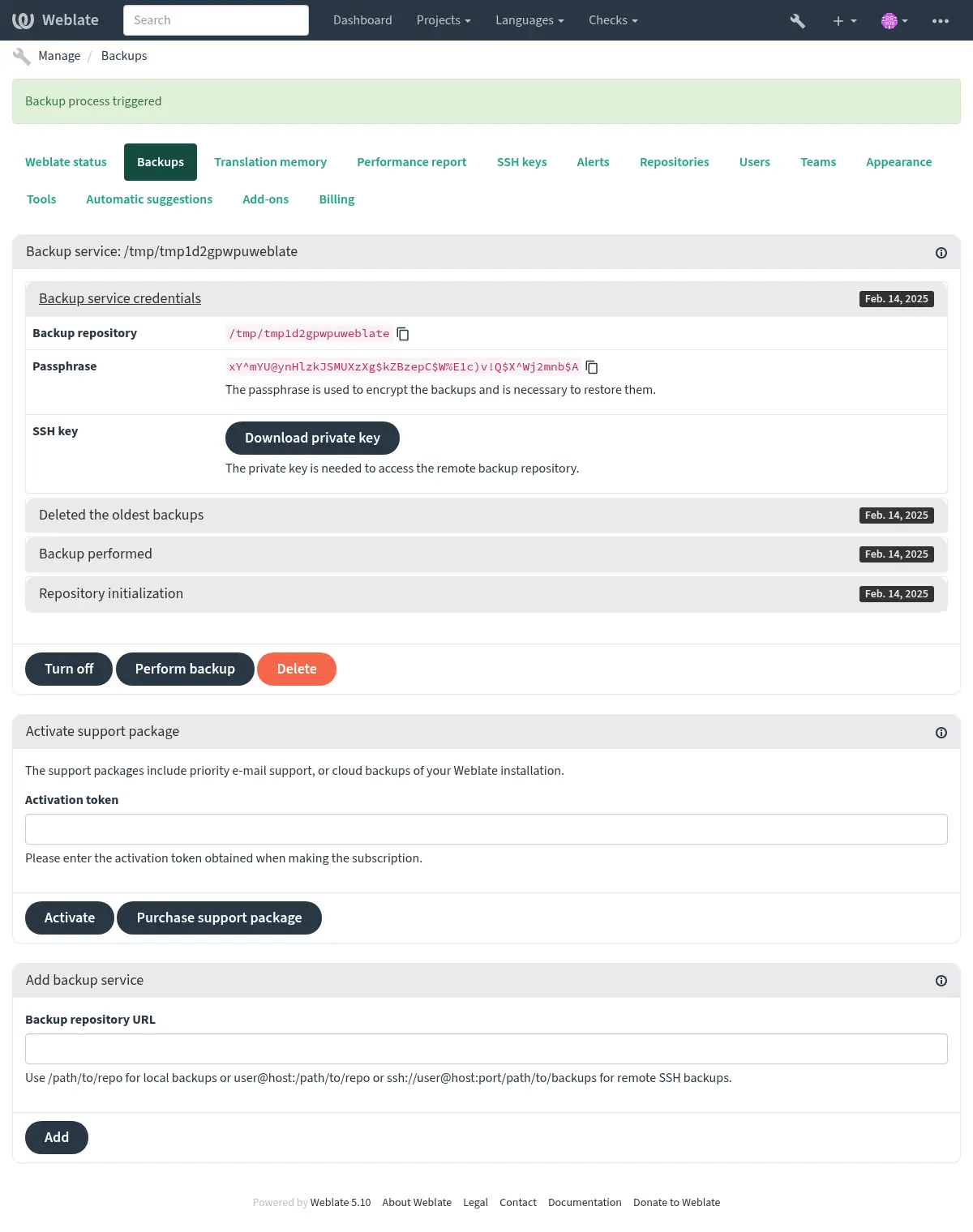
போர்க் குறியாக்க விசை
போர்க்பேக்அப் மறைகுறியாக்கப்பட்ட காப்புப்பிரதிகளை உருவாக்குகிறது, மேலும் அவற்றை பாச்ஃபிரேச் இல்லாமல் மீட்டெடுக்க முடியாது. புதிய காப்புப்பிரதி சேவையைச் சேர்க்கும்போது கடவுச்சொல் உருவாக்கப்படுகிறது, மேலும் நீங்கள் அதை நகலெடுத்து பாதுகாப்பான இடத்தில் வைத்திருக்க வேண்டும்.
If you are using வழங்கப்பட்ட காப்புப்பிரதி சேமிப்பு, please backup your private SSH key too, as it’s used to access your backups.
See also
காப்புப்பிரதியைத் தனிப்பயனாக்குதல்
The database backup can be configured via
DATABASE_BACKUP.The backup creation can be customized using
BORG_EXTRA_ARGS.
வழங்கப்பட்ட காப்புப்பிரதி சேமிப்பு
The easiest way of backing up your Weblate instance is purchasing the backup service at weblate.org. This is how you get it running:
https://weblate.org/support/#backup இல் காப்பு சேவையை வாங்கவும்.
Enter the obtained key in the management interface, see ஆதரவை ஒருங்கிணைத்தல்.
வலைபெயர்ப்பு முகில் சேவையுடன் இணைகிறது மற்றும் காப்புப்பிரதிகளுக்கான அணுகல் தகவலைப் பெறுகிறது.
Turn on the new backup configuration from the Backups tab.
Backup your Borg credentials to be able to restore the backups, see போர்க் குறியாக்க விசை.
Hint
எல்லாவற்றையும் இயக்குவதற்கான கையேடு படி உங்கள் பாதுகாப்பிற்காக உள்ளது. உங்கள் அனுமதியின்றி பதிவு செயல்முறை மூலம் பெறப்பட்ட காப்பு களஞ்சியத்திற்கு எந்த தரவு அனுப்பப்படவில்லை.
தனிப்பயன் காப்புப்பிரதி சேமிப்பகத்தைப் பயன்படுத்துதல்
காப்புப்பிரதிகளுக்கு உங்கள் சொந்த சேமிப்பிடத்தையும் பயன்படுத்தலாம். தொலைநிலை இலக்கில் காப்புப்பிரதிகளை சேமிக்க பாஓடு பயன்படுத்தப்படலாம், இலக்கு சேவையகம் போர்க்பேக்அப் நிறுவப்பட்டிருக்க வேண்டும்.
See also
General in the Borg documentation
உள்ளக கோப்பு முறைமை
It is recommended to specify the absolute path for the local backup, for example /path/to/backup. The directory has to be writable by the user running Weblate (see கோப்பு முறைமை அனுமதிகள்). If it doesn't exist, Weblate attempts to create it but needs the appropriate permissions to do so.
Hint
டோக்கரில் வலைபெயர்ப்பு இயக்கும்போது, காப்புப்பிரதி இருப்பிடம் வலைபெயர்ப்பு கொள்கலனில் இருந்து ஒரு தொகுதியாக வெளிப்படும் என்பதை உறுதிப்படுத்தவும். இல்லையெனில், காப்புப்பிரதிகள் டோக்கரால் அது இருக்கும் கொள்கலனை மறுதொடக்கம் செய்தவுடன் நிராகரிக்கப்படும்.
One option is to place backups into an existing volume, for example
/app/data/borgbackup. This is an existing volume in the container.
You can also add a new container for the backups in the Docker Compose file
for example by using /borgbackup:
services:
  weblate:
    volumes:
      - /home/weblate/data:/app/data
      - /home/weblate/borgbackup:/borgbackup
காப்புப்பிரதிகள் சேமிக்கப்படும் அடைவு uid 1000 க்கு சொந்தமானதாக இருக்க வேண்டும், இல்லையெனில் வலைபெயர்ப்பு அங்கு காப்புப்பிரதிகளை எழுத முடியாது.
தொலைநிலை காப்புப்பிரதிகள்
தொலைதூர காப்புப்பிரதிகளை உருவாக்க, நீங்கள் போர்க்பேக்அப் ஐ மற்றொரு சேவையகத்தில் நிறுவ வேண்டும், இது வலைபெயர்ப்பு பாஓடு விசையைப் பயன்படுத்தி பாஓடு வழியாக உங்கள் வலைபெயர்ப்பு வரிசைப்படுத்தலுக்கு அணுகக்கூடியது:
உங்கள் காப்புப்பிரதிகள் சேமிக்கப்படும் சேவையகத்தைத் தயாரிக்கவும்.
அதில் பாஓடு சேவையகத்தை நிறுவவும் (பெரும்பாலான லினக்ச் விநியோகங்களுடன் இயல்புநிலையாக அதைப் பெறுவீர்கள்).
Install BorgBackup on that server; most Linux distributions have packages available (see Installation).
ஏற்கனவே உள்ள பயனரைத் தேர்வுசெய்க அல்லது காப்புப்பிரதி எடுக்கப் பயன்படுத்தப்படும் புதிய பயனரை உருவாக்கவும்.
Add Weblate SSH key to the user so that Weblate can SSH to the server without a password (see பாஓடு விசை வலைபெயர்ப்பு).
வலைபெயர்ப்பில் காப்புப்பிரதி இருப்பிடத்தை `` பயனர்@ஓச்ட்:/பாதை/க்கு/காப்புப்பிரதிகள்` அல்லது `` எச்.எச்.எச்: // பயனர்@ஓச்ட்: போர்ட்/பாதை/முதல்/காப்புப்பிரதிகள்`.
Hint
வழங்கப்பட்ட காப்புப்பிரதி சேமிப்பு provides you automated remote காப்புப்பிரதிகள் without any effort.
See also
போர்க்பேக்அப்பில் இருந்து மீட்டமைத்தல்
உங்கள் காப்பு களஞ்சியத்திற்கான அணுகலை மீட்டெடுத்து, உங்கள் காப்புப்பிரதி பாச்ஃபிரேசைத் தயாரிக்கவும்.
`` போர்க் பட்டியல் களஞ்சியத்தை` ஐப் பயன்படுத்தி சேவையகத்தில் உள்ள அனைத்து காப்புப்பிரதிகளையும் பட்டியலிடுங்கள்.
`` போர்க் சாறு களஞ்சியத்தைப் பயன்படுத்தி தற்போதைய கோப்பகத்திற்கு விரும்பிய காப்புப்பிரதியை மீட்டெடுக்கவும்.
Restore the database from the SQL dump placed in the
backupdirectory in the Weblate data dir (see காப்புப்பிரதிகளுக்கான தரவை கொட்டியது).Copy the Weblate configuration (
backups/settings.py, see காப்புப்பிரதிகளுக்கான தரவை கொட்டியது) to the correct location, see உள்ளமைவை சரிசெய்தல்.When using Docker container, the settings file is already included in the container and you should restore the original environment variables. The
environment.ymlfile might help you with this (see காப்புப்பிரதிகளுக்கான தரவை கொட்டியது).Copy the whole restored data dir to the location configured by
DATA_DIR.When using Docker container place the data into the data volume, see கப்பல்துறை கொள்கலன் தொகுதிகள்.
Please ensure the files have correct ownership and permissions, see கோப்பு முறைமை அனுமதிகள்.
போர்க் அமர்வு இப்படி தோன்றலாம்:
$ borg list /tmp/xxx
Enter passphrase for key /tmp/xxx:
2019-09-26T14:56:08 Thu, 2019-09-26 14:56:08 [de0e0f13643635d5090e9896bdaceb92a023050749ad3f3350e788f1a65576a5]
$ borg extract /tmp/xxx::2019-09-26T14:56:08
Enter passphrase for key /tmp/xxx:
See also
கையேடு காப்புப்பிரதி
நீங்கள் சேமிக்க விரும்புவதைப் பொறுத்து, ஒவ்வொரு இடத்திலும் உள்ள கடைகளை வலைபெயர்ப்பு செய்யும் தரவு வகையை காப்புப் பிரதி எடுக்கவும்.
Hint
If you are doing the manual backups, you might want to
silence Weblate's warning about a lack of backups by adding weblate.I028 to
SILENCED_SYSTEM_CHECKS in settings.py or
WEBLATE_SILENCED_SYSTEM_CHECKS for Docker.
SILENCED_SYSTEM_CHECKS.append("weblate.I028")
தரவுத்தளம்
உண்மையான சேமிப்பக இருப்பிடம் உங்கள் தரவுத்தள அமைப்பைப் பொறுத்தது.
Hint
தரவுத்தளம் மிக முக்கியமான சேமிப்பகமாகும். உங்கள் தரவுத்தளத்தின் வழக்கமான காப்புப்பிரதிகளை அமைக்கவும். தரவுத்தளம் இல்லாமல், அனைத்து மொழிபெயர்ப்புகளும் இல்லாமல் போய்விட்டன.
சொந்த தரவுத்தள காப்புப்பிரதி
The recommended approach is to save a dump of the database using database-native tools such as pg_dump or mysqldump. It usually performs better than Django backup, and it restores complete tables with all their data.
You can restore this backup in a newer Weblate release, it will perform all the
necessary migrations when running in migrate. Please consult
வலைபெயர்ப்பு மேம்படுத்தும் on more detailed info on how to upgrade between versions.
சாங்கோ தரவுத்தள காப்புப்பிரதி
Alternatively, you can back up your database using Django's dumpdata
command. That way the backup is database agnostic and can be used in case you
want to change the database backend.
Prior to restoring the database you need to be running exactly the same Weblate
version the backup was made on. This is necessary as the database structure does
change between releases and you would end up corrupting the data in some way.
After installing the same version, run all database migrations using
migrate.
Afterwards some entries will already be created in the database and you will have them in the database backup as well. The recommended approach is to delete such entries manually using the management shell (see மேலாண்மை கட்டளைகளைத் தூண்டுதல்):
weblate shell
>>> from weblate.auth.models import User
>>> User.objects.get(username='anonymous').delete()
கோப்புகள்
If you have enough backup space, simply back up the whole DATA_DIR. This
is a safe bet even if it includes some files you don't want.
The following sections describe what you should back up and what you
can skip in detail.
காப்புப்பிரதிகளுக்கான தரவை கொட்டியது
Changed in version 4.7: The environment dump was added as environment.yml to help in
restoring in the Docker environments.
Stored in DATA_DIR /backups.
Weblate dumps various data here, and you can include these files for more complete backups. The files are updated daily (requires a running Celery beats server, see செலரியைப் பயன்படுத்தி பின்னணி பணிகள்). Currently, this includes:
Weblate settings as
settings.py(there is also expanded version insettings-expanded.py).PostgreSQL database backup as
database.sql.Environment dump as
environment.yml.
The database backups are saved as plain text by default, but they can also be compressed
or entirely skipped using DATABASE_BACKUP.
தரவுத்தள காப்புப்பிரதியை மீட்டெடுக்க, தரவுத்தள கருவிகளைப் பயன்படுத்தி அதை ஏற்றவும், எடுத்துக்காட்டாக:
psql --file=database.sql weblate
பதிப்பு கட்டுப்பாட்டு களஞ்சியங்கள்
Stored in DATA_DIR /vcs.
The version control repositories contain a copy of your upstream repositories with Weblate changes. If you have கமிட் மீது தள்ளுங்கள் enabled for all your translation components, all Weblate changes are included upstream. No need to back up the repositories on the Weblate side as they can be cloned again from the upstream location with no data loss.
பாஓடு மற்றும் gpg விசைகள்
Stored in DATA_DIR /ssh and DATA_DIR /home.
நீங்கள் வலைபெயர்ப்பு உருவாக்கிய பாஓடு அல்லது gpg விசைகளைப் பயன்படுத்துகிறீர்கள் என்றால், நீங்கள் இந்த இடங்களை காப்புப் பிரதி எடுக்க வேண்டும். இல்லையெனில் நீங்கள் தனிப்பட்ட விசைகளை இழப்பீர்கள், மேலும் நீங்கள் புதியவற்றை மீண்டும் உருவாக்க வேண்டும்.
பயனர் பதிவேற்றிய கோப்புகள்
Stored in DATA_DIR /media.
You should back up all user uploaded files (e.g. சரங்களுக்கான காட்சி சூழல்).
செலரி பணிகள்
செலரி பணி வரிசையில் சில தகவல்கள் இருக்கலாம், ஆனால் பொதுவாக காப்புப்பிரதிக்கு தேவையில்லை. மொழிபெயர்ப்பு நினைவகத்திற்கு இன்னும் செயலாக்கப்படாத புதுப்பிப்புகளை நீங்கள் இழப்பீர்கள். எப்படியாவது மறுசீரமைப்பின் மீது ஃபுல் டெக்ச்ட் அல்லது களஞ்சிய புதுப்பிப்பை செய்ய பரிந்துரைக்கப்படுகிறது, எனவே இவற்றை இழப்பதில் எந்த பிரச்சனையும் இல்லை.
See also
கையேடு காப்புப்பிரதிக்கான கட்டளை-வரி
ஒரு cron வேலையைப் பயன்படுத்தி, நாள்தோறும் அடிப்படையில் செயல்படுத்த ஒரு பாச் கட்டளையை அமைக்கலாம், எடுத்துக்காட்டாக:
$ tar -Jcf ~/backup/weblate-backup-$(date -u +%Y-%m-%d_%H%M%S).xz backups vcs ssh home media fonts secret
கோப்புறைகள் மற்றும் கோப்புகளின் பட்டியலை உங்கள் தேவைகளுக்கு ஏற்ப சரிசெய்யலாம். மொழிபெயர்ப்பு நினைவகத்தை சேமிப்பதைத் தவிர்க்க (காப்புப்பிரதிகள் கோப்புறையில்), நீங்கள் பயன்படுத்தலாம்:
$ tar -Jcf ~/backup/weblate-backup-$(date -u +%Y-%m-%d_%H%M%S).xz backups/database.sql backups/settings.py vcs ssh home media fonts secret
கையேடு காப்புப்பிரதியை மீட்டமைத்தல்
நீங்கள் காப்புப் பிரதி எடுத்த எல்லா தரவையும் மீட்டெடுக்கவும்.
Update all repositories using
updategit.weblate updategit --all
ஒரு வலைபெயர்ப்பு நிறுவலை நகர்த்தவும்
மேலே உள்ள காப்புப்பிரதி மற்றும் மறுசீரமைப்பு வழிமுறைகளைப் பின்பற்றுவதன் மூலம் உங்கள் நிறுவலை வேறு அமைப்புக்கு மாற்றவும்.