விருப்ப வலைபெயர்ப்பு தொகுதிகள்
உங்கள் அமைப்பிற்கு பல விருப்ப தொகுதிகள் கிடைக்கின்றன.
அறிவிலி ஏற்றுமதியாளர்
http (கள்) ஐப் பயன்படுத்தி அடிப்படை அறிவிலி களஞ்சியத்தை படிக்க மட்டும் அணுகலை வழங்குகிறது.
நிறுவல்
Add
weblate.gitexportto installed apps insettings.py:INSTALLED_APPS += ("weblate.gitexport",)
நிறுவிய பின் உங்கள் தரவுத்தளத்தை இடம்பெயர்வதன் மூலம் ஏற்கனவே இருக்கும் களஞ்சியங்களை ஏற்றுமதி செய்யுங்கள்:
weblate migrate
Hint
எங்கள் அதிகாரப்பூர்வ கப்பல்துறை படத்தில் அறிவிலி ஏற்றுமதியாளர் இயக்கப்பட்டார். அதை இயக்க, பயன்படுத்த:
WEBLATE_REMOVE_APPS=weblate.gitexport
பயன்பாடு
The module automatically hooks into Weblate and sets the exported repository URL in
the கூறு உள்ளமைவு.
The repositories are accessible under the /git/ part of the Weblate URL, for example
https://example.org/git/weblate/main/.
பொதுவில் கிடைக்கக்கூடிய திட்டங்களுக்கான களஞ்சியங்கள் ஏற்பு இல்லாமல் நகலி செய்யப்படலாம்:
git clone 'https://example.org/git/weblate/main/'
Access to browse the repositories with restricted access (with Private
access control or when REQUIRE_LOGIN is enabled)
requires an API token which can be obtained in your
user profile:
git clone 'https://user:KEY@example.org/git/weblate/main/'
Hint
By default members or Users group and anonymous user have access to the repositories for public projects via Access repository and Power user roles.
பட்டியலிடல்
இது ஓச்ட் செய்யப்பட்ட வலைபெயர்ப்பு பட்டியலிடல் திட்டங்களை வரையறுக்க, விலைப்பட்டியல் மற்றும் பயன்பாட்டு வரம்புகளைக் கண்காணிக்க பயன்படுத்தப்படுகிறது.
நிறுவல்
1. Add weblate.billing to installed apps in
settings.py:
INSTALLED_APPS += ("weblate.billing",)
தொகுதிக்கு கூடுதல் தரவுத்தள கட்டமைப்புகளை விருப்பமாக நிறுவ தரவுத்தள இடம்பெயர்வை இயக்கவும்:
weblate migrate
பட்டியலிடல் திட்ட உருவாக்கம் மற்றும் பணி
பில்லிங்கை செயல்படுத்த நீங்கள் முதலில் ஒரு பட்டியலிடல் திட்டத்தை உருவாக்க வேண்டும். நிர்வாகம் பிரிவுக்கு (குறடு ஐகானால் குறிப்பிடப்படுகிறது) செல்லவும் மற்றும்` கருவிகள்` திரையைத் திறக்கவும். அங்கிருந்து, சாங்கோ நிர்வாக இடைமுகத்திற்கு தொடரவும்.
சாங்கோ நிர்வாக இடைமுகத்தில், பில்லிங் பிரிவைக் கண்டுபிடித்து பட்டியலிடல் திட்டத்தைச் சேர்க்கவும். உதாரணமாக, நீங்கள் எந்த செலவும் இல்லாமல் இலவச திட்டத்தை சேர்க்கலாம்.
ஏற்கனவே உள்ள திட்டத்திற்கு ஒரு பட்டியலிடல் திட்டத்தை ஒதுக்க விரும்பினால், வாடிக்கையாளர் பில்லிங்ச் விருப்பத்தைப் பயன்படுத்தி` சாங்கோ நிர்வாக இடைமுகம்` க்குள் இதைச் செய்யலாம்.
கடைசியாக, உங்கள் வாடிக்கையாளர் கொடுப்பனவுகளை பதிவு செய்வதற்கான சாங்கோ நிர்வாக இடைமுகம் ஒரு` விலைப்பட்டியல்` விருப்பத்தை வழங்குகிறது.
பயன்பாடு
After installation you can control billing in the admin interface. Users with billing enabled will get new Billing tab in their பயனர் சுயவிவரம்.
The billing module additionally allows project admins to create new projects and components without being superusers (see மொழிபெயர்ப்பு திட்டங்கள் மற்றும் கூறுகளைச் சேர்ப்பது). This is possible when following conditions are met:
பட்டியலிடல் அதன் கட்டமைக்கப்பட்ட வரம்புகளில் உள்ளது (திட்ட/கூறு உருவாக்கத்தைத் தடுப்பதில் எந்தவொரு அதிகப்படியான பயன்பாடுகளும்) மற்றும் செலுத்தப்பட்டவை (அதன் விலை பூச்சியமற்றதாக இருந்தால்)
பயனர் பில்லிங்குடன் இருக்கும் திட்டத்தின் நிர்வாகி அல்லது பயனர் பில்லிங்கின் உரிமையாளராக உள்ளார் (பயனர்களுக்கு புதிய திட்டங்களை இறக்குமதி செய்ய புதிய பில்லிங்கை உருவாக்கும்போது பிந்தையது அவசியம்).
திட்டத்தை உருவாக்கிய பயனர், அவற்றில் அதிகமானவற்றை அணுகினால், திட்டத்திற்கு எந்த பட்டியலிடல் வசூலிக்கப்பட வேண்டும் என்பதை தேர்வு செய்ய முடியும்.
சட்டரீதியான
This is used on Hosted Weblate to provide required legal documents. It comes provided with blank documents, and you are expected to fill out the following templates in the documents:
legal/documents/tos.htmlபணி ஆவணத்தின் விதிமுறைகள்
legal/documents/privacy.htmlதனியுரிமை கொள்கை ஆவணம்
legal/documents/summary.htmlபணி விதிமுறைகள் மற்றும் தனியுரிமைக் கொள்கையின் குறுகிய கண்ணோட்டம்
On changing the terms of service documents, please adjust
LEGAL_TOS_DATE so that users are forced to agree with the updated
documents.
Note
புரவலன் செய்யப்பட்ட வலைபெயர்ப்பு சேவைக்கான சட்ட ஆவணங்கள் இந்த அறிவிலி களஞ்சியத்தில் <https://github.com/weblateorg/wllegal/tree/main/wllegal/templates/legal/documents> இல் கிடைக்கின்றன.
பெரும்பாலும் இவை உங்களுக்கு நேரடியாகப் பயன்படுத்தப்படாது, ஆனால் உங்கள் தேவைகளைப் நிறைவு செய்ய சரிசெய்யப்பட்டால் ஒரு தொடக்க புள்ளியாக கைக்கு வரக்கூடும்.
நிறுவல்
1. Add weblate.legal to installed apps in
settings.py:
INSTALLED_APPS += ("weblate.legal",)

# Optional:

# Social auth pipeline to confirm TOS upon registration/subsequent sign in
SOCIAL_AUTH_PIPELINE += ("weblate.legal.pipeline.tos_confirm",)

# Middleware to enforce TOS confirmation of signed in users
MIDDLEWARE += [
    "weblate.legal.middleware.RequireTOSMiddleware",
]
தொகுதிக்கு கூடுதல் தரவுத்தள கட்டமைப்புகளை விருப்பமாக நிறுவ தரவுத்தள இடம்பெயர்வை இயக்கவும்:
weblate migrate
Edit the legal documents in the
weblate/legal/templates/legal/folder to match your service.
பயன்பாடு
நிறுவல் மற்றும் திருத்திய பின், சட்ட ஆவணங்கள் வலைபெயர்ப்பு இடைமுகம் இல் காட்டப்பட்டுள்ளன.
அவதாரங்கள்
Avatars are downloaded and cached server-side to reduce information leaks to the sites serving them
by default. The built-in support for fetching avatars from e-mails addresses configured for it can be
turned off using ENABLE_AVATARS.
வலைபெயர்ப்பு தற்போது ஆதரிக்கிறது:
See also
ச்பேம் பாதுகாப்பு
You can protect against spamming by users by using the Akismet service.
அகிச்மெட் பைதான் தொகுதியை நிறுவவும் (இது ஏற்கனவே அதிகாரப்பூர்வ கப்பல்துறை படத்தில் சேர்க்கப்பட்டுள்ளது).
அகிச்மெட் பநிஇ விசையைப் பெறுங்கள்.
Store it as
AKISMET_API_KEYorWEBLATE_AKISMET_API_KEYin Docker.
சரிபார்க்க பின்வரும் உள்ளடக்கம் சரிபார்க்க அகிச்மெட்டுக்கு அனுப்பப்படுகிறது:
அங்கீகரிக்கப்படாத பயனர்களிடமிருந்து பரிந்துரைகள்
திட்டம் மற்றும் கூறு விளக்கங்கள் மற்றும் இணைப்புகள்
Note
This (among other things) relies on IP address of the client, please see தலைகீழ் ப்ராக்சிக்கு பின்னால் இயங்குகிறது for properly configuring that.
கையொப்பமிடும் அறிவிலி க்னப் உடன் கம்யூட்
எல்லா கமிட்டுகளையும் வலைபெயர்ப்பு நிகழ்வின் gnupg விசையால் கையொப்பமிடலாம்.
Turn on
WEBLATE_GPG_IDENTITY. (Weblate will generate a GnuPG key when needed and will use it to sign all translation commits.)இந்த அம்சத்திற்கு gnupg 2.1 அல்லது புதிய நிறுவப்பட்ட தேவை.
You can find the key in the
DATA_DIRand the public key is shown on the "About" page: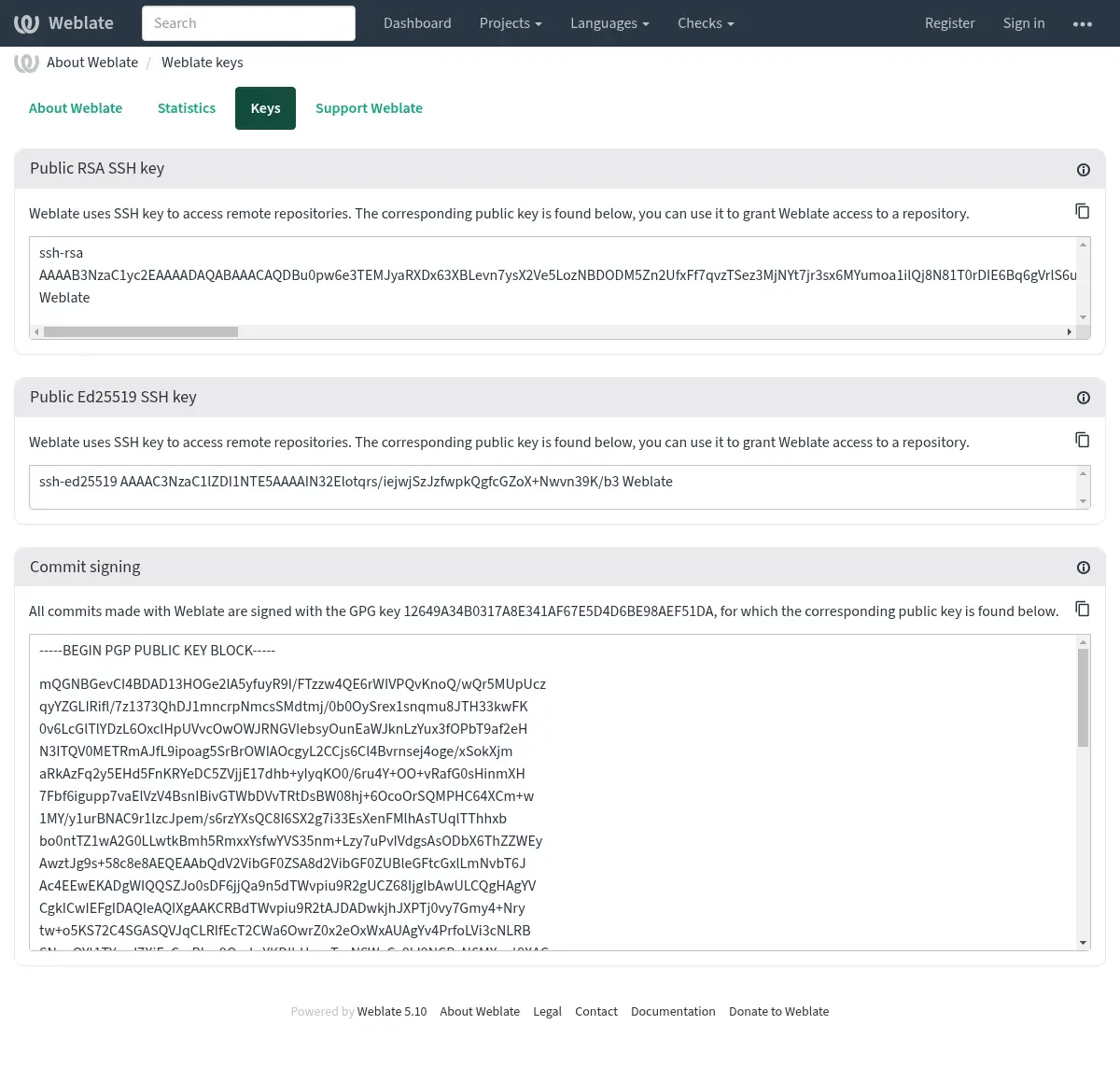
Alternatively you can also import existing keys into Weblate, just set
HOME=$DATA_DIR/homewhen invoking gpg.
Hint
The key material is cached by Weblate for a long period. In case you let
Weblate generate a key with WEBLATE_GPG_IDENTITY and then import
key with the same identity to use an existing key, purging redis cache is
recommended to see the effect of such change.
Note
When sharing DATA_DIR between multiple hosts, please follow instructions
at https://wiki.gnupg.org/NFS to make GnuPG signing work reliably.
See also
வீதத்தைக் கட்டுப்படுத்துதல்
Changed in version 4.6: சூப்பர் யூசர்களில் கையொப்பமிடப்பட்ட விகிதத்தைக் கட்டுப்படுத்தும் விகிதம் இனி பொருந்தாது.
Several operations in Weblate are rate limited. At most
RATELIMIT_ATTEMPTS attempts are allowed within RATELIMIT_WINDOW seconds.
The user is then blocked for RATELIMIT_LOCKOUT. There are also settings specific to scopes, for example RATELIMIT_CONTACT_ATTEMPTS or RATELIMIT_TRANSLATE_ATTEMPTS. The table below is a full list of available scopes.
பின்வரும் செயல்பாடுகள் விகிதத்தைக் கட்டுப்படுத்துவதற்கு உட்பட்டவை:
பெயர் |
வாய்ப்பு |
அனுமதிக்கப்பட்ட முயற்சிகள் |
ராடலிமிட் சாளரம் |
கதவடைப்பு காலம் |
|---|---|---|---|---|
பதிவு |
|
5 |
300 |
600 |
நிர்வாகிகளுக்கு செய்தி அனுப்புகிறது |
|
2 |
300 |
600 |
உள்நுழைவில் கடவுச்சொல் ஏற்பு |
|
5 |
300 |
600 |
தள அளவிலான தேடல் |
|
6 |
60 |
60 |
மொழிபெயர் |
|
30 |
60 |
600 |
சொற்களஞ்சியத்தில் சேர்க்கிறது |
|
30 |
60 |
600 |
புதிய மொழியில் மொழிபெயர்ப்பைத் தொடங்குதல் |
|
2 |
300 |
600 |
புதிய திட்டத்தை உருவாக்குதல் |
|
5 |
600 |
600 |
பயனர் கையொப்பமிடப்படும்போது மற்றும் ஐபி முகவரியில் இல்லையென்றால் வீதத்தைக் கட்டுப்படுத்துவது அமர்வுகளை அடிப்படையாகக் கொண்டது.
If a user fails to sign in AUTH_LOCK_ATTEMPTS times, password authentication will be turned off on the account until having gone through the process of having its password reset.
The settings can be also applied in the Docker container by adding WEBLATE_ prefix to the setting name, for example RATELIMIT_ATTEMPTS becomes WEBLATE_RATELIMIT_ATTEMPTS.
The API has separate rate limiting settings, see பநிஇ வீதத்தைக் கட்டுப்படுத்துதல்.
ஃபெடோரா செய்தியிடல் ஒருங்கிணைப்பு
வலைபெயர்ப்பில் நடக்கும் அனைத்து மாற்றங்களுக்கும் ஃபெடோரா செய்தி amqp- அடிப்படையிலான வெளியீட்டாளர். இதைப் பயன்படுத்தி வலைபெயர்ப்பில் நடக்கும் மாற்றங்கள் குறித்து கூடுதல் சேவைகளை நீங்கள் இணைக்கலாம்.
ஃபெடோரா செய்தியிடல் ஒருங்கிணைப்பு ஒரு தனி பைதான் தொகுதியாக கிடைக்கிறது `` வலைபெயர்ப்பு-ஃபெடோரா-மெசேசிங்``. அமைவு வழிமுறைகளுக்கு <https://github.com/weblateorg/fedora_messaging/> ஐப் பார்க்கவும்.
See also