代码托管集成
Weblate integrates with code hosting sites in several separate places: repository access, incoming notifications, and pushing translations back. The exact setup depends on whether you use Hosted Weblate or run your own Weblate instance, and on whether Weblate should push directly or create pull requests.
Use this page as a provider-oriented checklist. The individual setting pages remain the canonical reference for setting syntax.
设置概况
授予 Weblate 访问该仓库的权限。
对 Hosted Weblate,在可用的地方添加 hosted weblate 用户,见 从 Hosted Weblate 访问仓库。
For self-hosted Weblate, create a dedicated code hosting user and grant access using Weblate's SSH key or an HTTPS token, see 访问代码托管站点(GitHub, GitLab, Bitbucket, Azure DevOps, ...)上的仓库.
配置 源代码仓库 让 Weblate 可以克隆该仓库。
Configure incoming notifications so Weblate pulls changes soon after a push. The repository webhook or app must point to the matching Weblate hook URL, and the project must have 启用钩子 enabled.
Decide how Weblate should push translations back:
Optionally set 推送分支 when Weblate should push to a branch in the upstream repository instead of using a fork where supported.
推送 Weblate 的更改
每个翻译部件可以设置一个推送 URL(请参见 仓库推送 URL),如果是那样, Weblate 能够将更改推送到远程仓库。Weblate 还可以配置在每次提交时自动推送更改(这默认开启,请参见 提交时推送)。
If you do not want changes to be pushed automatically, you can push manually
under Repository maintenance or using the API via
wlc push.
如果不想要 Weblate 直接推送,系统也支持 GitHub 拉取请求、GitLab 合并请求、Gitea 拉取请求、 Pagure 合并请求、Azure DevOps 拉取请求 或 Gerrit review requests 审核。您可以通过在 部件配置 中选择 GitHub、GitLab、Gitea、Gerrit、Azure DevOps 或 Pagure 作为 版本控制系统 来激活这些。
整体上,Git、Mercurial、GitHub、GitLab、Gitea、Pagure、Azure DevOps、Gerrit、Bitbucket 数据中心和 Bitbucket 云提供以下选项:
需要的设置 |
|||
|---|---|---|---|
不推送 |
空 |
空 |
|
直接推送 |
SSH URL |
空 |
|
推送到单独的分支 |
SSH URL |
分支名称 |
|
不推送 |
空 |
空 |
|
直接推送 |
SSH URL |
空 |
|
来自派生的 GitHub 拉取请求 |
空 |
空 |
|
来自分支的 GitHub 拉取请求 |
SSH URL [1] |
分支名称 |
|
来自派生的 GitLab 合并请求 |
空 |
空 |
|
来自分支的 GitLab 合并请求 |
SSH URL [1] |
分支名称 |
|
来自派生的 Gitea 合并请求 |
空 |
空 |
|
来自分支的 Gitea 合并请求 |
SSH URL [1] |
分支名称 |
|
来自派生的 Pargue 合并请求 |
空 |
空 |
|
来自分支的 Pagure 合并请求 |
SSH URL [1] |
分支名称 |
|
来自派生的 Azure DevOps 拉取请求 |
空 |
空 |
|
来自分支的 Azure DevOps 拉取请求 |
SSH URL [1] |
分支名称 |
|
Gerrit 审核 |
SSH URL |
目标分支名(可选) |
|
来自分叉的 BitBucket 数据中心拉取请求 |
空 |
空 |
|
来自分支的 Bitbucket 数据中心拉取请求 |
SSH URL [1] |
分支名称 |
|
来自派生的 Bitbucket Cloud 拉取请求 |
空 |
空 |
|
来自分支的 Bitbucket Cloud 拉取请求 |
SSH URL [1] |
分支名称 |
GitHub
GitHub 仓库访问
通过 Weblate 访问 GitHub 访问主要有两种方法:
选项 1: HTTPS 加个人访问令牌
通过个人访问令牌和 GitHub 账户使用 HTTPS 身份认证。这对只读访问和读写访问均适用。
要使用这种方式:
按照 创建用于命令行使用的访问令牌 所述创建个人访问令牌。
在仓库 URL 中包括令牌:
https://username:token@github.com/owner/repo.git。
这适合刚开始使用 Weblate 或只有单个仓库的情况。
选项 2: SSH 加专门用户
对于多仓库设置,为 Weblate 创建专门用户。这避免 GitHub 每枚 SSH 密钥每个平台只能用一次的限制。
要使用这种方式:
创建专门的 GitHub 用户账户,如
weblate-bot。添加 Weblate 的 SSH 公钥到这个用户,见 Weblate SSH 密钥。
授予该用户访问所有你想翻译的仓库的权限。
对仓库使用 SSH URL:
git@github.com:owner/repo.git。
此方式同样用于 Hosted Weblate,Hosted Weblate 有专门的 weblate 用户用于此目的。
备注
将 GitHub 用于拉取请求时,推送分支 配置影响行为:如未设置,项目将被分叉,更改通过分叉推送。如已设置,更改将推送到上游仓库和选择的分支。
GitHub 通知
Weblate 自带对 GitHub 的原生支持。
如果你在使用 Hosted Weblate,推荐的方法是安装 Weblate 应用。该应用向 Hosted Weblate 发送 GitHub 通知,这样您就无需在 GitHub 中单独配置 Webhook 。不过,应用不会自行授予将仓库的写入权限授予 Hosted Weblate 。要将更改推送回去, 你还是需要把 Hosted Weblate weblate GitHub 用户添加为拥有写入权限的协作者,见 从 Hosted Weblate 访问仓库。
如果没在使用该应用,请在仓库设置中添加 Weblate webhook (Webhooks) 接收到 Github 仓库的每个推送的通知,如下方图片显示的那样:
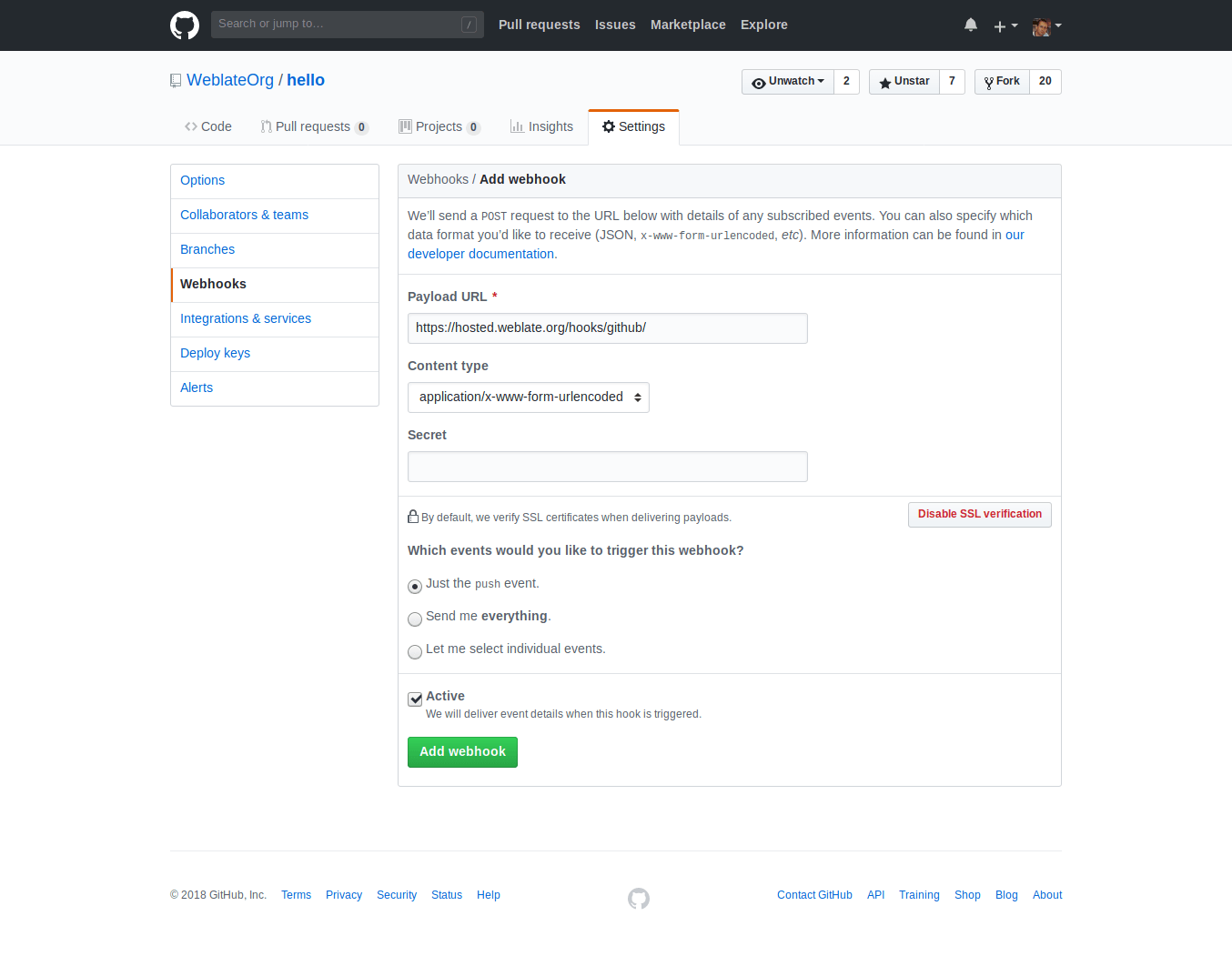
Payload URL 由附加 /hooks/github/ 的 Weblate URL 所组成。比如,Hosted Weblate 服务的 URL 为 https://hosted.weblate.org/hooks/github/.
可以将其他值保留为默认设置。Weblate 可以处理两种内容类型,并只消费 push 事件。
GitHub 拉取请求
这在 Git 顶部添加了一个薄层,使用 GitHub API 允许将翻译更改作为拉取请求推送,而不是直接推送到仓库。
Git 将更改直接推送到仓库,而 GitHub 后端创建拉取请求。仅访问 Git 仓库不需要后者。
To create pull requests, select GitHub as
版本控制系统 and configure GITHUB_CREDENTIALS. For
GitHub.com, use
api.github.com as the API host. The token must allow Weblate to read and
write repository contents and create pull requests. If Weblate should fork
private repositories, the token might also need administration access.
GitLab
GitLab 仓库访问
可以通过 SSH 访问,请参阅 SSH 仓库,但如果您需要访问多个仓库,您将遇到 GitLab 对允许的 SSH 密钥使用的限制,因为每个密钥只能使用一次。
如果 推送分支 未设置,则项目将被分叉并通过分叉推送更改。如果已设置,更改将推送到上游仓库和选择的分支。
也可以使用个人或项目访问令牌。要能推送更改到仓库,令牌需要 write_repository 范围。项目访问令牌需要 Developer 角色进行推送。
URL 需要包含用户名。对个人访问令牌,它是实际用户名 : https://user:personal_access_token@gitlab.com/example/example.git ;对项目访问令牌,可以是非空白值 : https://example:project_access_token@gitlab.com/example/example.git 。
备注
不同的 GitLab 版本使用项目访问令牌的规则各异。非空白值是当前要求,但较老版本有不同预期(项目名、bot 用户名)。如不确定请查看匹配你版本的 GitLab 文档。
GitLab 通知
Weblate 支持 GitLab hooks,添加项目的 webhook,目的地为你的 Weblate 安装上的 /hooks/gitlab/ URL,例如 https://hosted.weblate.org/hooks/gitlab/ 。
故障排除
如果 webhooks 被交付,检查 GitLab webhook request history.
响应载荷包含匹配部件的信息。
GitLab 合并请求
这使用 GitLab API 在 Git 上添加了一个薄层,以允许将翻译更改作为合并请求推送,而不是直接推送到仓库。
不需要使用它来访问 Git 仓库,普通的 Git 工作方式相同,唯一的区别是如何处理推送到仓库。使用 Git 将更改直接推送到仓库,而 GitLab 后端创建合并请求。
To create merge requests, select GitLab as
版本控制系统 and configure GITLAB_CREDENTIALS.
Gitea, Forgejo, and Codeberg
For Hosted Weblate repositories on Codeberg, add the hosted weblate user where write access is needed, see 从 Hosted Weblate 访问仓库.
Gitea 通知
Weblate 已经支持 Gitea webhooks,为 Push events 事件添加 Gitea Webhook,目的地为你的 Weblate 安装上的 /hooks/gitea/ URL,例如 https://hosted.weblate.org/hooks/gitea/。这可以在 Settings 之下的 Webhooks 中完成。
Forgejo 通知
Weblate 支持 Forgejo webhooks,在你的 Weblate 安装上添加含目的地 Push events 事件的 Forgejo Webhook 到 /hooks/forgejo/ URL ,如 https://hosted.weblate.org/hooks/forgejo/。可以在仓库 设置 下的 Webhooks 中完成此配置。
Gitea 拉取请求
Added in version 4.12.
This adds a thin layer atop Git using the Gitea API to allow pushing translation changes as pull requests instead of pushing directly to the repository.
There is no need to use this to access Git repositories, ordinary Git works the same, the only difference is how pushing to a repository is handled. With Git changes are pushed directly to the repository, while the Gitea backend creates pull requests.
To create pull requests, select Gitea as
版本控制系统 and configure GITEA_CREDENTIALS.
Bitbucket
Hosted Weblate has a dedicated weblate user for Bitbucket access, see 从 Hosted Weblate 访问仓库.
To push directly, use Git or Mercurial with 仓库推送 URL.
Bitbucket notifications
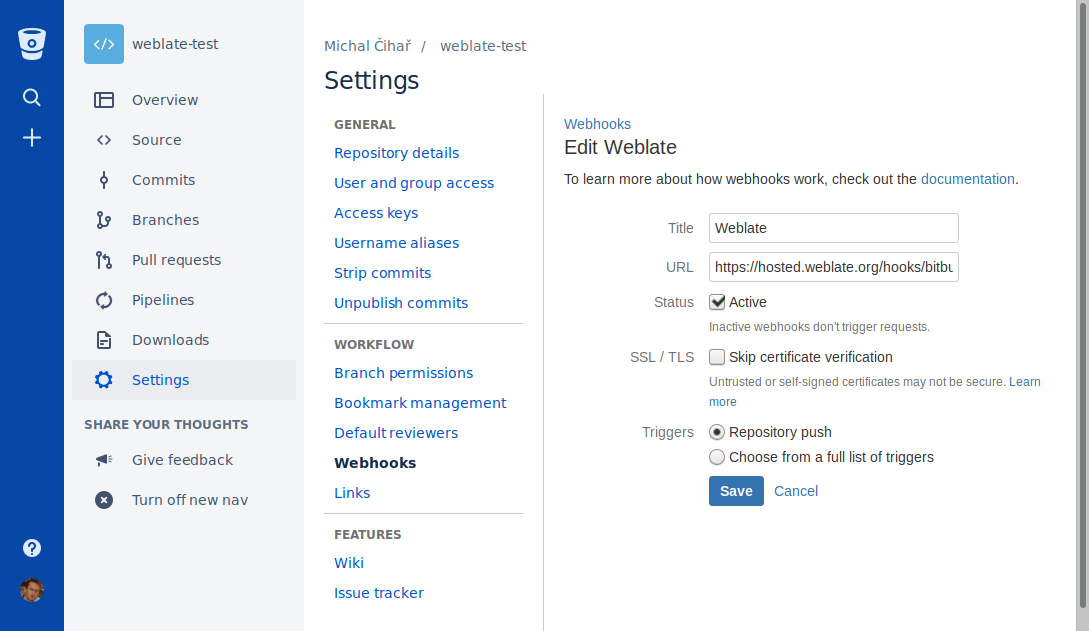
Weblate has support for Bitbucket webhooks. Add a webhook which triggers upon
repository push, with destination to /hooks/bitbucket/ URL on your Weblate
installation, for example https://hosted.weblate.org/hooks/bitbucket/.
Bitbucket 数据中心拉取请求
Added in version 4.16.
This adds a thin layer atop Git using the Bitbucket Data Center API to allow pushing translation changes as pull requests instead of pushing directly to the repository.
警告
这不支持 Bitbucket Cloud API。
There is no need to use this to access Git repositories, ordinary Git works the same, the only difference is how pushing to a repository is handled. With Git changes are pushed directly to the repository, while the Bitbucket Data Center backend creates a pull request.
To create pull requests, select Bitbucket Data Center as
版本控制系统 and configure BITBUCKETSERVER_CREDENTIALS.
Bitbucket Cloud 拉取请求
Added in version 5.8.
This adds a thin layer atop Git using the Bitbucket Cloud API to allow pushing translation changes as pull requests instead of pushing directly to the repository.
警告
这和 BitBucket 数据中心 API 不同。
There is no need to use this to access Git repositories, ordinary Git works the same, the only difference is how pushing to a repository is handled. With Git changes are pushed directly to the repository, while the Bitbucket Cloud backend creates a pull request.
To create pull requests, select Bitbucket Cloud as
版本控制系统 and configure BITBUCKETCLOUD_CREDENTIALS.
Azure DevOps
Azure Repos notifications
Weblate has support for Azure Repos webhooks. Add a webhook for
Code pushed event with destination to /hooks/azure/ URL on your
Weblate installation, for example https://hosted.weblate.org/hooks/azure/.
This can be done in Service hooks under Project
settings.
Azure DevOps 拉取请求
这在 Git 顶部添加了一个薄层,使用 Azure DevOps API 允许将翻译更改作为拉取请求推送,而不是直接推送到仓库。
Git pushes changes directly to a repository, while the Azure DevOps backend creates pull requests. The latter is not needed for merely accessing Git repositories.
To create pull requests, select Azure DevOps as
版本控制系统 and configure AZURE_DEVOPS_CREDENTIALS.
Pagure
Pagure notifications
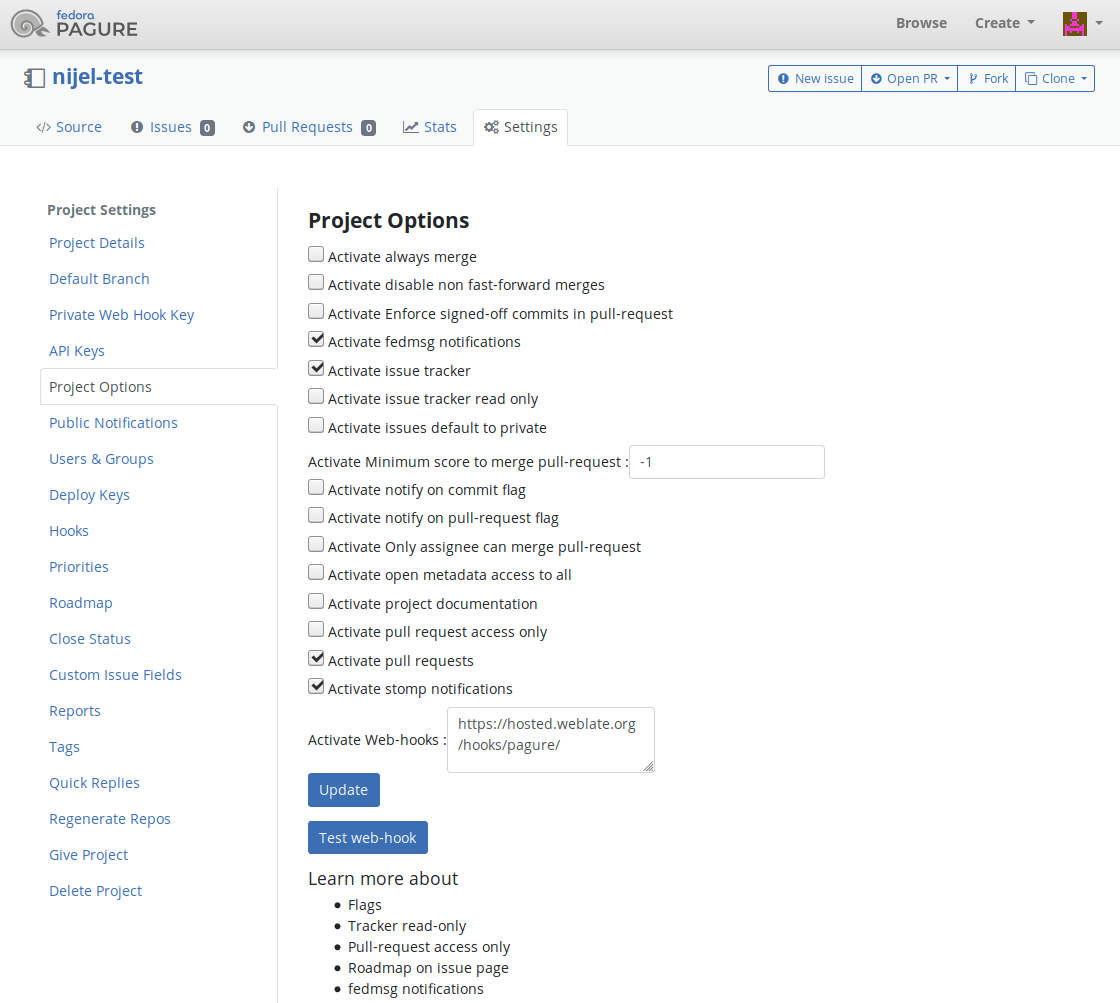
Weblate has support for Pagure hooks. Add a webhook with destination to
/hooks/pagure/ URL on your Weblate installation, for example
https://hosted.weblate.org/hooks/pagure/. This can be done in
Activate Web-hooks under Project options:
Pagure 合并请求
Added in version 4.3.2.
This adds a thin layer atop Git using the Pagure API to allow pushing translation changes as merge requests instead of pushing directly to the repository.
There is no need to use this to access Git repositories, ordinary Git works the same, the only difference is how pushing to a repository is handled. With Git changes are pushed directly to the repository, while the Pagure backend creates a merge request.
To create merge requests, select Pagure as
版本控制系统 and configure PAGURE_CREDENTIALS.
Other workflows
Gitee notifications
Weblate has support for Gitee webhooks. Add a WebHook for
Push event with destination to /hooks/gitee/ URL on your
Weblate installation, for example https://hosted.weblate.org/hooks/gitee/.
This can be done in WebHooks under repository
Management.
Gerrit review requests
Gerrit support adds a thin layer atop Git using the git-review tool to allow pushing translation changes as Gerrit review requests, instead of pushing them directly to the repository.
The optional 推送分支 setting selects the target branch for
the Gerrit review. Leave it empty to use 仓库分支. Use the short
branch name, such as main; Weblate and git-review push the review to
refs/for/<branch> automatically. Do not include Gerrit push options such as
%submit or %l=Code-Review+2 in the branch name.
The Gerrit documentation has the details on the configuration necessary to set up such repositories. There is no separate code hosting credential setting for this backend.
Docker credentials
For Docker installations, code hosting API credentials can also be provided through environment variables, see 代码托管站点凭据.