可选的 Weblate 模块
可以获得几个可选的模块来配置您的设置。
Git 导出器
使用 HTTP(S) 为您提供对底层 Git 仓库的只读访问。
安装
将
weblate.gitexport添加到settings.py中安装的 apps 中:INSTALLED_APPS += ("weblate.gitexport",)
通过安装后迁移数据库,将现有的仓库导出:
weblate migrate
提示
Git 导出器在我们的官方 Docker 映像中处于开启状态。要关闭它,使用:
WEBLATE_REMOVE_APPS=weblate.gitexport
用法
模块自动钩入 Weblate,并且在 部件配置 中设置导出仓库 URL。仓库在 Weblate URL的 /git/ 部分下是可以访问的,例如 https://example.org/git/weblate/main/。
公共可用项目的仓库可以被克隆而无需认证:
git clone 'https://example.org/git/weblate/main/'
受限浏览仓库的权限(对于 私密 访问控制 项目或者当开启 REQUIRE_LOGIN 时)需要可在 用户个人资料 获得的 API 令牌:
git clone 'https://user:KEY@example.org/git/weblate/main/'
备注
Weblate 自行提供 Git 仓库,但它不提供 Git LFS 对象。对使用 Git LFS 的仓库,从上游仓库克隆并将 Weblate 添加为另一个远端。如果只需要 Git-tracked 文件,可以使用 GIT_LFS_SKIP_SMUDGE=1 参数从 Weblate 克隆跳过下载 Git LFS 对象。
提示
成员或 用户 群组与匿名用户默认通过 访问仓库 和 高级用户 角色访问公开项目。
账单
这在 Hosted Weblate 上用于确定付费套餐、跟踪发票和使用限制。
安装
1. Add weblate.billing to installed apps in
settings.py:
INSTALLED_APPS += ("weblate.billing",)
运行数据库迁移,来可选地为模块安装另外的数据库结构:
weblate migrate
付费套餐创建和分配
首先,你需要创建一个付费套餐来激活账单。导航至 管理 部分(扳手图标),并打开 工具 屏。从这里,继续转到 Django 管理界面。
在 Django 管理界面中,定位 账单 部分并添加付费套餐。比如,你可以零成本地添加 免费 套餐。
如果你希望将一个付费套餐分配到一个现有项目,也可以使用 定制付费 选项在 Django 管理界面 内实现它。
最后,Django 管理界面 提供 发票 选项用于记录你的客户付款。
用法
安装后您可以在管理界面控制账单。启用了账单模块的用户将在他们的 用户个人资料 中看到新的 账单 选项卡。
账单模块额外允许项目管理员不是超级用户的情况下去新建新的项目和部件(请参见 添加翻译项目和部件)。当后面的条件满足是这是可能的:
账单在其配置的限制下(任何过度的使用都会阻止新建项目/部件),并且被支付(如果价格为非零值的话)
用户是现有的带有账单项目的管理员,或者用户是账单的所有者(当为用户新建新的账单,而允许导入新的项目时,后者是必要的)。
在新建项目时,用户在访问多个账单的情况下,能够选择将项目记在哪个账单上。
法律组件
这用在 Hosted Weblate 上,来提供所需的法律文件。它开始时提供空白文档,会希望您填充文档中后面的模板:
legal/documents/tos.html服务条款文档
legal/documents/privacy.html隐私政策文档
legal/documents/summary.html服务条款与隐私政策的简短概况
更改服务条款文档时,请调整 LEGAL_TOS_DATE 迫使用户接受更新的文档。
备注
可以在这个 Git 仓库 <https://github.com/WeblateOrg/wllegal/tree/main/wllegal/templates/legal/documents> 中获取 Weblate s.r.o. 运营的 Hosted Weblate 的法律文件。
捆绑的服务条款和相关法律文档仅针对该服务,不用于一般用途。但如果进行调整来满足你的需求,它们作为起点仍然可能派得上用处。
安装
1. Add weblate.legal to installed apps in
settings.py:
INSTALLED_APPS += ("weblate.legal",)

# Optional:

# Social auth pipeline to confirm TOS upon registration/subsequent sign in
SOCIAL_AUTH_PIPELINE += ("weblate.legal.pipeline.tos_confirm",)

# Middleware to enforce TOS confirmation of signed in users
MIDDLEWARE += [
    "weblate.legal.middleware.RequireTOSMiddleware",
]
运行数据库迁移,来可选地为模块安装另外的数据库结构:
weblate migrate
编辑
weblate/legal/templates/legal/文件夹中的而法律文件,与您的服务匹配。
提示
在 Docker 部署中,用 WEBLATE_LEGAL_INTEGRATION 开启法律模块而不是编辑 settings.py。用 tos-confirm 启用法律模块和服务条款确认强制,或者用 wllegal 额外加载Weblate s.r.o. 运营服务使用的托管的法律文档模板。这些模板不用于一般用途。要在 Docker 中提供自己的模板,请将它们放在 /app/data/python/customize/templates/legal/documents 中, 见 替换标志和其他静态文件。
用法
安装并编辑后,法律文件显示在 Weblate 界面中。
头像
头像在服务器端下载并缓存,来减少对默认服务的网站的泄露。通过为其配置的电子邮箱地址来取回头像的内建支持,可以使用 ENABLE_AVATARS 来关闭。
当前的 Weblate 支持:
语言本地化内容分发网络
The JavaScript 本地化 CDN and Translation files CDN add-ons
write files to LOCALIZE_CDN_PATH; Weblate does not serve them.
Configure the web server or CDN serving LOCALIZE_CDN_URL as a
public, read-only static file host.
Treat every published CDN file as public. The add-on specific UUID in the URL is not an access-control mechanism. Do not enable CDN add-ons for components that contain private strings, unreleased product text, customer data, internal URLs, API examples, repository paths, translator comments, or file-format metadata that should not be exposed.
The Translation files CDN add-on publishes raw translation files in formats supported by Weblate. Some formats can be interpreted by browsers or other clients as HTML, SVG, XML, JavaScript, YAML, or application-specific configuration. Serve the CDN from a dedicated domain that is separate from Weblate and from the application consuming the translations. Do not share authentication cookies with the CDN domain.
Recommended server configuration:
Serve only the directory configured by
LOCALIZE_CDN_PATH; do not expose Weblate repositories, backups, media, configuration, or the whole data directory.Disable directory listing.
Use HTTPS and make the CDN host read-only from the web server.
Send X-Content-Type-Options with
nosniff.Configure conservative MIME types. Serve unknown translation formats as text/plain or application/octet-stream; only serve
weblate.jsas JavaScript.For raw translation formats that are not intended to be rendered in a browser, consider adding Content-Disposition with
attachment.Configure
Access-Control-Allow-Originonly for sites that need browser access to the files.Set cache lifetimes that match your update expectations, and purge CDN caches when stale translations must disappear quickly.
The following nginx snippet serves only the configured CDN directory and applies conservative defaults for raw translation files:
#
# nginx configuration for the Weblate localization CDN
#
# You will want to change:
#
# - server_name to match the host configured in LOCALIZE_CDN_URL
# - root to match LOCALIZE_CDN_PATH
# - Access-Control-Allow-Origin to the sites that need browser access
# - TLS configuration if HTTPS is not terminated before nginx
#
server {
    listen 80;
    server_name cdn.example.com;

    # LOCALIZE_CDN_PATH
    root /home/weblate/data/l10n-cdn;

    autoindex off;
    disable_symlinks on;

    location = / {
        return 404;
    }

    # The JavaScript localization add-on publishes this loader.
    location ~ "^/[0-9a-f]{32}/weblate\.js$" {
        try_files $uri =404;

        types {
            application/javascript js;
        }
        default_type application/javascript;

        add_header X-Content-Type-Options nosniff always;
        # add_header Access-Control-Allow-Origin "https://www.example.com" always;

        expires 1h;
    }

    # Other CDN files are translation files. Serve them conservatively so raw
    # formats are not interpreted as active browser content.
    location / {
        try_files $uri =404;

        types {
        }
        default_type text/plain;

        add_header X-Content-Type-Options nosniff always;
        add_header Content-Disposition "attachment" always;
        # add_header Access-Control-Allow-Origin "https://www.example.com" always;

        expires 1h;
    }
}
使用 GnuPG 为 Git 提交签名
所有的提交均可由 Weblate 实例的 GnuPG 密钥为其签名。
开启
WEBLATE_GPG_IDENTITY。(Weblate 将在需要时生成一个 GnuPG 密钥,并使用它为所有的翻译提交签名。)此功能需要安装 GnuPG 2.1 或更新版本。
您可以在
DATA_DIR中找到密钥,公钥显示在“关于”页面上: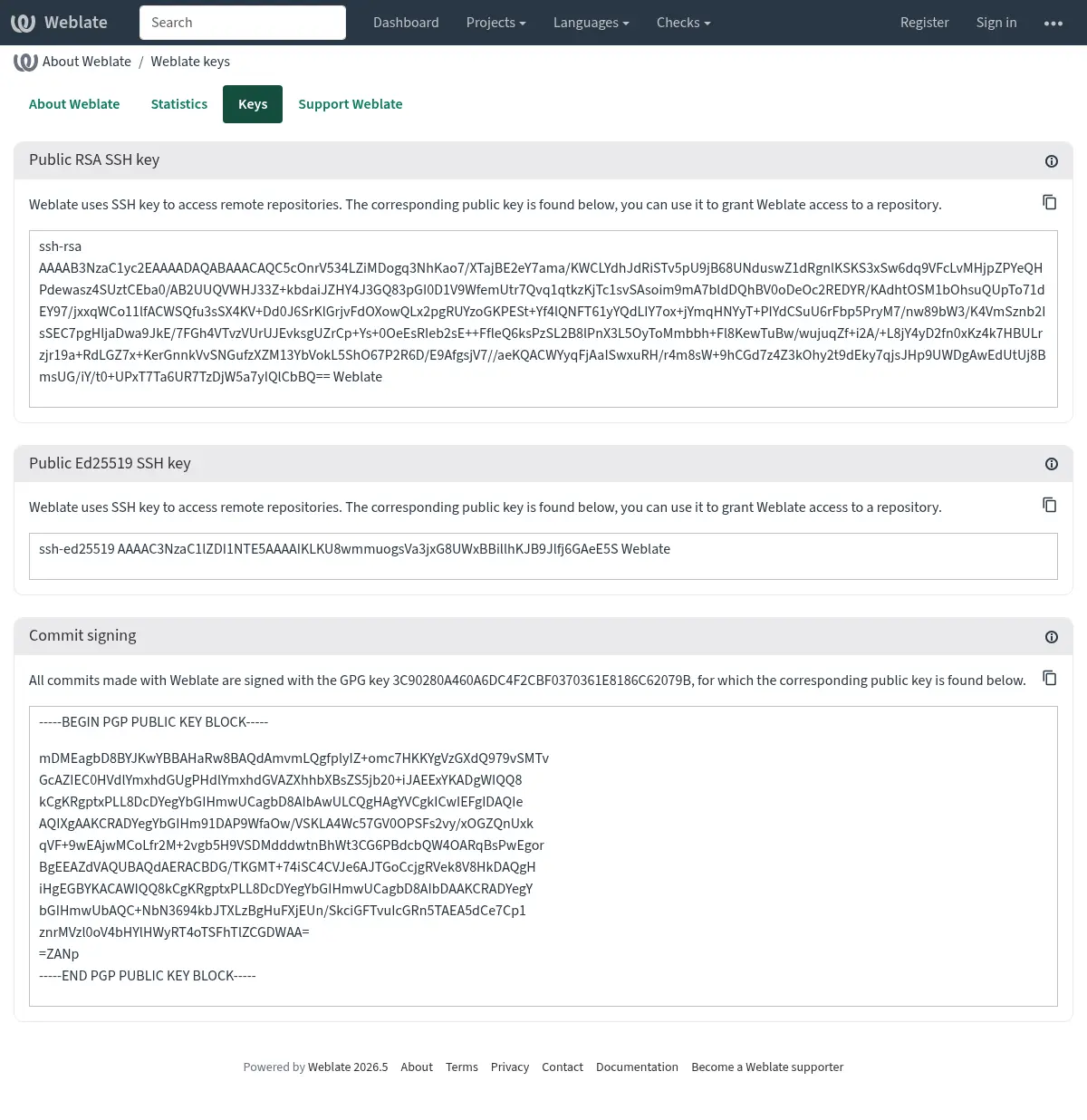
另外您还可以将现有的密钥导入 Weblate 中,当调用 pgp 时只设置
HOME=$DATA_DIR/home。
提示
Weblate 会将关键材料缓存很长一段时间。如果你通过 WEBLATE_GPG_IDENTITY 让 Weblate 生成一个密钥,接着用相同身份导入密钥来使用现有密钥的话,建议清空 redis 缓存来查看此类更改的效果。
备注
在多个主机间共享 DATA_DIR 时,请遵照 https://wiki.gnupg.org/NFS 指示让 GnuPG 签名可靠地工作。
频次限制
在 4.6 版本发生变更: 速率限制不再适用于已登录的超级用户。
Weblate 的一些操作受到频次限制。在 RATELIMIT_WINDOW 的秒数内最多允许 RATELIMIT_ATTEMPTS 次数的尝试。然后阻止用户 RATELIMIT_LOCKOUT 时间。还有指定范围的设置,例如 RATELIMIT_CONTACT_ATTEMPTS 或 RATELIMIT_TRANSLATE_ATTEMPTS。下面的表格是可用范围的完整列表。
后面的操作受到频次限制:
名称 |
范围 |
允许的尝试 |
频次限制窗口 |
锁定时间 |
|---|---|---|---|---|
注册 |
|
5 |
300 |
600 |
将消息发送给管理员 |
|
2 |
300 |
600 |
登录时的密码验证 |
|
5 |
300 |
600 |
第二因素身份认证 |
|
5 |
300 |
600 |
网站范围的搜索 |
|
6 |
60 |
60 |
翻译 |
|
30 |
60 |
600 |
添加到术语表 |
|
30 |
60 |
600 |
开始翻译到一种新语言 |
|
2 |
300 |
600 |
创建新项目 |
|
5 |
600 |
600 |
速率限制的依据在用户登录时为会话,在未登录时为 IP 地址。
如果用户没能在 AUTH_LOCK_ATTEMPTS 的次数内登录,那么账户的密码验证将关闭,直到完成了重置密码过程为止。
这些设置也可以在 Docker 容器中应用,在设置名称中添加 WEBLATE_ 前缀 例如 RATELIMIT_ATTEMPTS 变成 WEBLATE_RATELIMIT_ATTEMPTS。
API 具有另外的速率限制设置,请参见 API 频次限制。