翻譯進度報告
Reporting features give insight into translation progress over a given period. A summary of contributions to any given component over time is provided. The reporting tool is found in the Insights menu of the dashboard, workspace, project, category, or translation component:
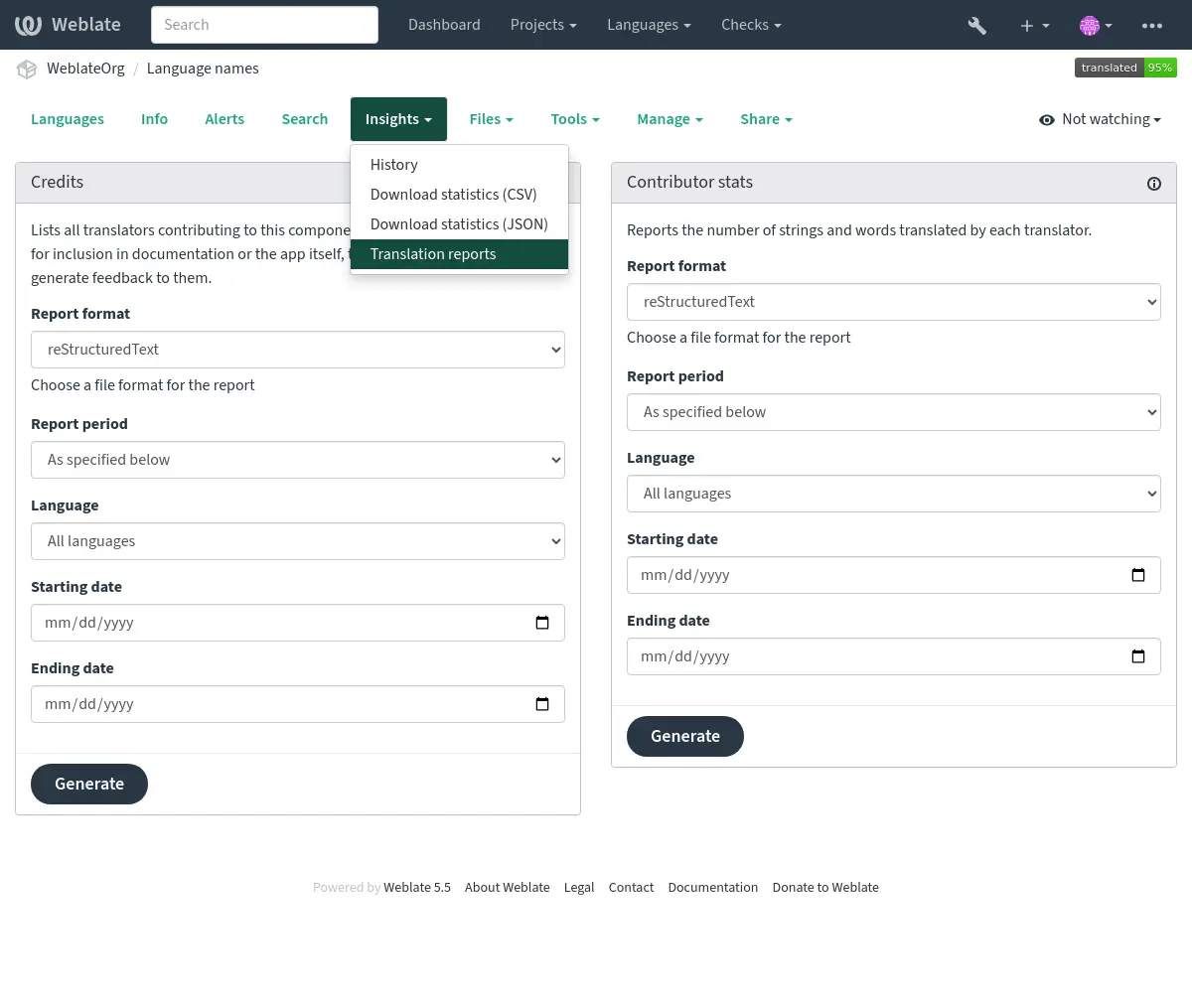
Reports are generated in the background. Weblate shows the generation progress
and opens the stored report when it is ready. Previously generated reports remain
available on the same page according to REPORT_EXPIRY.

Several reporting tools are available on this page, all of which can produce output in HTML, reStructuredText or JSON. The first two formats are suitable for embedding statistics into existing documentation, while JSON is useful for further processing of the data.
You can choose predefined periods or enter a custom date range. In that case, the contributions are counted at midnight – that means that it includes the starting date and excludes the ending date. You can sort the contributors in the output by their join date or the number of strings they have translated, in either ascending or descending order.
單字數
提示
Number of words is a metric widely used in Indo-European languages, but might not have a well-defined behavior for some Asian languages.
A word is any sequence of characters (letters, numerics, special characters) between whitespace (spaces, tabs, newlines). In the example string below, the word count is 9.
I've just realized that they have 5 %(color)s cats.
For plural strings, the number of words is counted as the sum of words for all plural forms.
For Chinese, Japanese, or Korean languages, the number of words is the number of CJK characters plus the number of words in non-CJK characters.
翻譯者聲譽
Generates a document usable for crediting translators — sorted by language and lists all contributors for a given language:
* Czech

    * John Doe <john@example.com> (5)
    * Jane Doe <jane@example.com> (1)

* Dutch

   * Jane Doe <jane@example.com> (42)
提示
The number in parenthesis indicates the number of contributions in given period.
貢獻者統計
產生根據翻譯者姓名的已翻譯詞與字串的數量:
======================================== ======================================== ======================================== ======================== ======================== ======================== ======================== ======================== ======================== ======================== ======================== ======================== ======================== ======================== ======================== ======================== ======================== ======================== ======================== ======================== ======================== ======================== ======================== ======================== ======================== ======================== ========================
Name                                     Email                                    Date joined                              Count total              Edits total              Source words total       Source chars total       Target words total       Target chars total       Count new                Edits new                Source words new         Source chars new         Target words new         Target chars new         Count approved           Edits approved           Source words approved    Source chars approved    Target words approved    Target chars approved    Count edited             Edits edited             Source words edited      Source chars edited      Target words edited      Target chars edited
======================================== ======================================== ======================================== ======================== ======================== ======================== ======================== ======================== ======================== ======================== ======================== ======================== ======================== ======================== ======================== ======================== ======================== ======================== ======================== ======================== ======================== ======================== ======================== ======================== ======================== ======================== ========================
John Done                                john@example.com                         2025-03-13T14:08:02.681269+00:00                                1                        3                       24                        3                       21                        1                        3                       24                        3                       21                        0                        0                        0                        0                        0                        0                        0                        0                        0                        0                        0                        0                        0                        0
Jane Done                                jane@example.com                         2025-03-01T11:00:00.000000+00:00                                2                        5                       25                        4                       28                        2                        3                       24                        3                       21                        0                        0                        0                        0                        0                        0                        0                        0                        0                        0                        0                        0                        0                        0
======================================== ======================================== ======================================== ======================== ======================== ======================== ======================== ======================== ======================== ======================== ======================== ======================== ======================== ======================== ======================== ======================== ======================== ======================== ======================== ======================== ======================== ======================== ======================== ======================== ======================== ======================== ========================
This can be useful if you pay your translators based on the amount of work done; it gives you various stats of translators’ work.
By default, repeated changes by the same translator on the same string are counted once for each stats variant in the selected report period. Choose All changes in the counting mode if you need every edit or approval to be counted separately.
All stats are available in four variants:
- Total
Overall number of all edited strings.
- New
Amount of newly translated strings which didn't have a translation before.
- Approved
Amount of strings approved in the review workflow (see 專門的檢閱者).
- Edited
Amount of edited strings which had a translation before.
The following metrics are available for each:
- Count
字串的數量。
- Edits
Amount of edited characters in the string, measured in Damerau–Levenshtein distance.
- Source words
來源字串中的單字數量。
- Source characters
來源字串中的字元數量。
- Target words
Amount of words in the translated string.
- Target characters
Amount of characters in the translated string.
翻譯者的加入日期也會被包含在報告中。
Use source-word metrics when comparing work across target languages, because the source text is shared while translated word counts differ by language.
成本估算
Estimates translation costs for the selected scope from source-word counts. It classifies strings as repetitions, exact translation memory matches, fuzzy translation memory matches, strings needing editing, or new strings, and then applies the configured rate percentage for each category.
The estimate uses Weblate translation memory matches and does not contact
external machine translation services. The base rate is the price per source
word. Category rates are percentages of that base rate; for example, 50
charges half of the base rate and 0 excludes that category from the total.
Translator work analysis
Estimates realistic daily translator throughput from change history. It reports the median, average, 75th percentile, and 90th percentile for translated strings and source words. Minimum and maximum daily changes and maximum source words can be used to exclude incomplete work days, automated changes, and obvious outliers.