版本控制整合
Weblate 目前支援 Git ( 並擴展至 GitHub 拉取請求、GitLab 合併請求、Gitea 拉取請求、Gerrit 檢閱請求、Subversion、Bitbucket Cloud 拉取請求、Bitbucket Data Center pull requests 與 Azure DevOps 拉取請求) 與 Mercurial 作為版本控制後端。
For provider-specific setup steps that combine repository access, incoming notifications, and pushing translations back, see Code-hosting integrations.
存取儲存庫
Weblate 必須存取您要使用的 VCS 儲存庫。使用公開的儲存庫,您只需輸入正確的 URL(例如 https://github.com/WeblateOrg/weblate.git ),但對於私人儲存庫或推送 URL,設定更複雜並且需要身分驗證。
從 Hosted Weblate 存取儲存庫
備註
This section applies only to Hosted Weblate (hosted.weblate.org). If you are running your own self-hosted Weblate instance, please see the next section instead.
For GitHub repositories on Hosted Weblate, use the Hosted Weblate app from Weblate's Connect GitHub account flow whenever possible. The App grants repository access, receives incoming notifications, pushes translation branches, and creates pull requests without inviting the Hosted Weblate weblate user. See GitHub 儲存庫存取 for the full setup.
For direct SSH access outside the GitHub App workflow, and for Bitbucket,
Codeberg, and GitLab repositories, Hosted Weblate has a dedicated push user
(with the username weblate, e-mail hosted@weblate.org, and a
name or profile description Weblate push user).
提示
There can be more Weblate users on the platforms, designated for other Weblate instances.
Searching by e-mail hosted@weblate.org is recommended to find the correct
user for Hosted Weblate.
You need to add this user as a collaborator and give it appropriate permissions to your repository (read-only is okay for cloning, write is required for pushing). Depending on the service and your organization’s settings, this happens immediately, or requires confirmation on the Weblate side.
The weblate user on GitHub accepts invitations automatically within five minutes when you intentionally use direct SSH access there. Manual processing might be needed on the other services, so please be patient.
For this direct SSH-user setup, once the weblate user is added to
your repository, you can configure 原始碼儲存庫 and
儲存庫推送 URL using the SSH protocol, for example
git@example.com:group/project.git.
Accessing repositories on code-hosting sites (GitHub, GitLab, Bitbucket, Azure DevOps, ...)
備註
This section applies to self-hosted Weblate instances. If you are using Hosted Weblate (hosted.weblate.org), see 從 Hosted Weblate 存取儲存庫 instead.
For self-hosted Weblate, a single private repository is often easiest to set up using an HTTPS repository URL with an access token, see Code-hosting integrations.
For multiple repositories, create a dedicated code-hosting user associated with a Weblate SSH key (see Weblate SSH 金鑰). This way you associate Weblate SSH key with a single user, because platforms frequently enforce single use of an SSH key. Grant this user access to the repositories, and use SSH URLs to access them (see SSH 儲存庫).
SSH 儲存庫
One common method to access private repositories is based on SSH. Authorize the public Weblate SSH key (see Weblate SSH 金鑰) to access the upstream repository this way.
警告
On GitHub, each key can only be used once, see GitHub 儲存庫存取 and 從 Hosted Weblate 存取儲存庫.
Weblate also stores the host key fingerprint upon first connection, and fails to connect to the host should it be changed later (see 驗證 SSH 主機金鑰).
如需調整,請從 Weblate 管理介面進行:
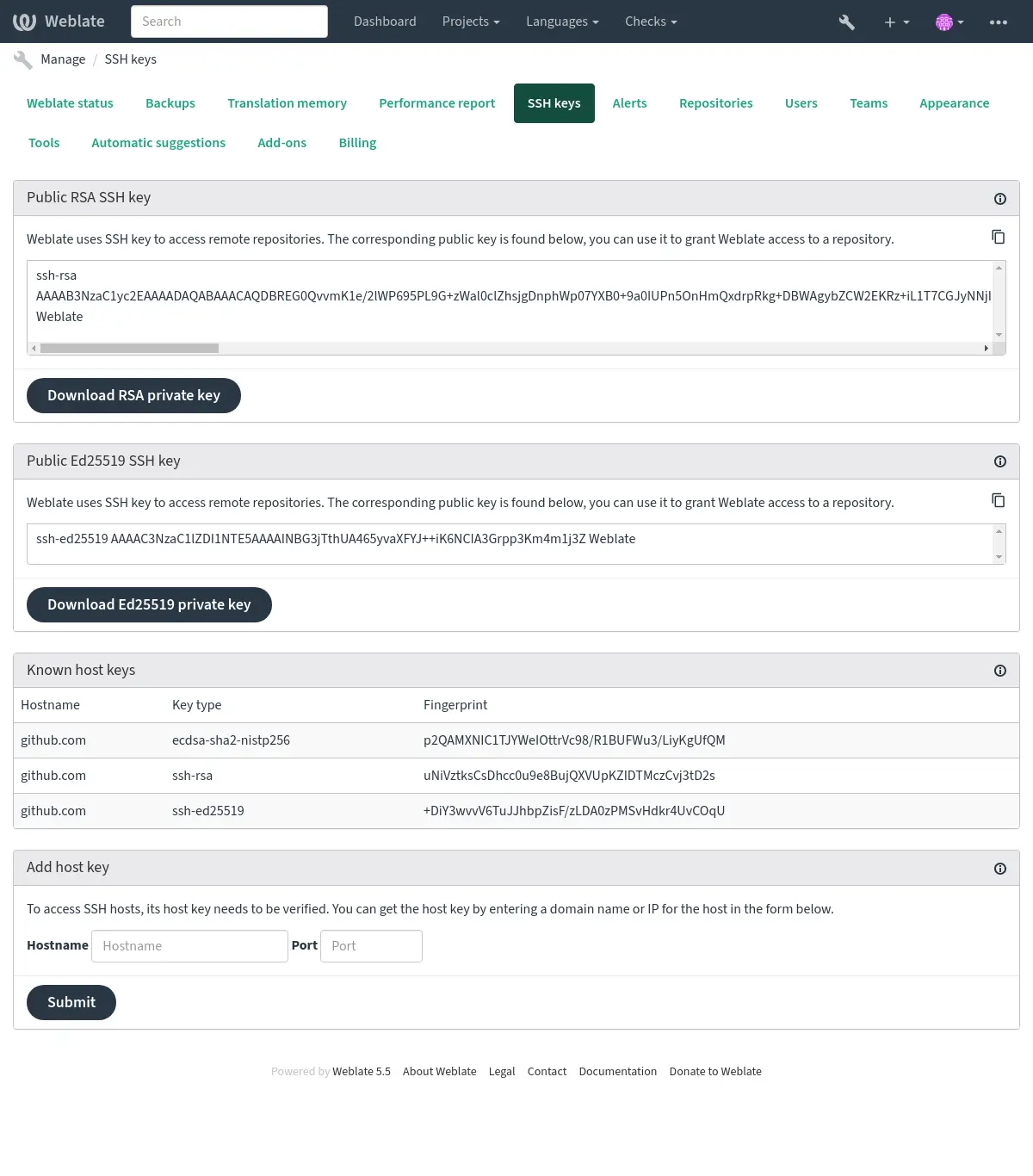
Weblate SSH 金鑰
在 4.17 版的變更: Weblate 現在同時產生 RSA 與 Ed25519 SSH 金鑰。對於新設定建議使用 Ed25519。
Weblate 公鑰對瀏覽 關於 頁面的所有使用者可見。
Admins can generate or display the public key currently used by Weblate in the connection (from SSH keys) on the admin interface landing page.
備註
The corresponding private SSH key can not currently have a password, so ensure it is well protected.
提示
Make a backup of the generated private Weblate SSH key.
驗證 SSH 主機金鑰
Weblate 在首次存取時自動儲存 SSH 主機金鑰,並記住它們以備將來使用。
In case you want to verify the key fingerprint before connecting to the
repository, add the SSH host keys of the servers you are going to access in
Add host key, from the same section of the admin interface. Enter
the hostname you are going to access (e.g. gitlab.com), and press
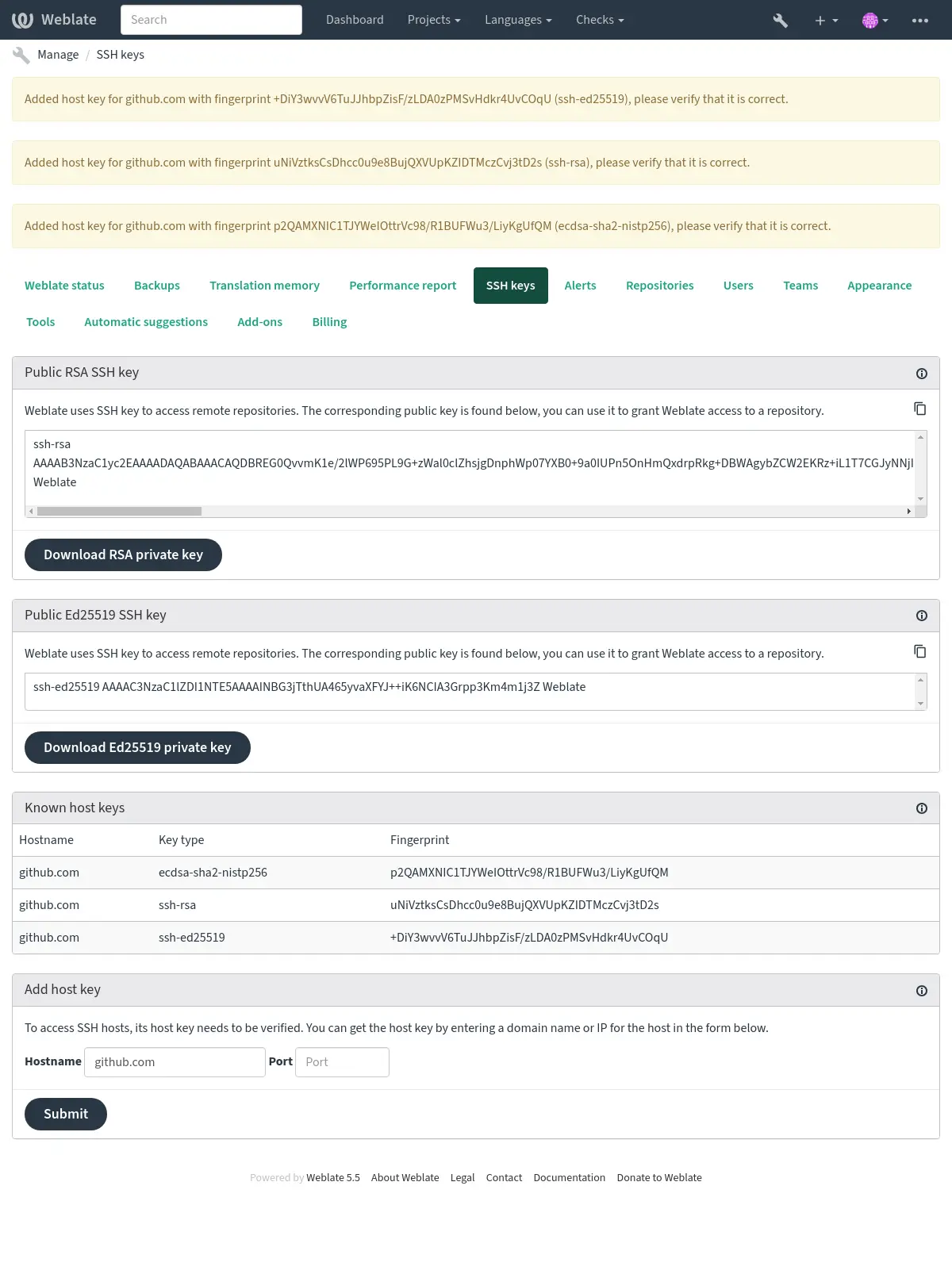
Submit. Verify its fingerprint matches the server you added.
The added keys with fingerprints are shown in the confirmation message:
連線至舊式 SSH 伺服器
Recent OpenSSH releases (for example the one used in Weblate Docker container) disable RSA signatures using the SHA-1 hash algorithm by default. This change has been made as the SHA-1 hash algorithm is cryptographically broken, and it is possible to create chosen-prefix hash collisions for <USD$50K.
For most users, this change should be invisible and there is no need to replace ssh-rsa keys. OpenSSH has supported RFC8332 RSA/SHA-256/512 signatures since release 7.2 and existing ssh-rsa keys will automatically use the stronger algorithm where possible.
Incompatibility is more likely when connecting to older SSH implementations that have not been upgraded or have not closely tracked improvements in the SSH protocol. The SSH connection to such server will fail with:
no matching host key type found. Their offer: ssh-rsa
For these cases, it may be necessary to selectively re-enable RSA/SHA1 to allow
connection and/or user authentication via the HostkeyAlgorithms and
PubkeyAcceptedAlgorithms options. For example, the following stanza in
DATA_DIR/ssh/config will enable RSA/SHA1 for host and user
authentication for a single destination host:
Host legacy-host
   HostkeyAlgorithms +ssh-rsa
   PubkeyAcceptedAlgorithms +ssh-rsa
We recommend enabling RSA/SHA1 only as a stopgap measure until legacy implementations can be upgraded or reconfigured with another key type (such as ECDSA or Ed25519).
GitHub 儲存庫
詳細的 GitHub 儲存庫存取請參閱 GitHub 儲存庫存取。
GitLab 儲存庫
詳細的 GitLab 儲存庫存取請參閱 GitLab 儲存庫存取。
Weblate 內部 URL
Share one repository setup between different components by referring to its
placement as weblate://project/component in other (linked) components. This
way linked components use the VCS repository configuration of the
main (referenced) component.
警告
Removing main component also removes linked components.
Weblate automatically adjusts the repository URL when creating a component if it finds a component with a matching repository setup. You can override this in the last step of the component configuration.
使用這個的理由:
HTTPS 儲存庫
To access protected HTTPS repositories, include the username and password in the URL. Don't worry, Weblate will strip this info when the URL is shown to users (if even allowed to see the repository URL at all).
例如,加上身分驗證的 GitHub URL 可能長得像這樣: https://user:your_access_token@github.com/WeblateOrg/weblate.git。
In case you don't provide credentials in the URL and the repository requires it, Git will fail with an error:
fatal: could not read Username for 'https://github.com': terminal prompts disabled
在 5.10.2 版的變更: Weblate uses proactive authentication with Git 2.46.0 and newer when HTTP credentials are supplied.
This makes it possible to access Azure DevOps repositories and makes access to authenticated repositories faster.
備註
If your username or password contains special characters, those have to be
URL encoded, for example
https://user%40example.com:%24password%23@bitbucket.org/….
使用代理
如果您需要使用代理伺服器存取 HTTP/HTTPS VCS 儲存庫,請配置 VCS 以使用它。
這可以透過使用 http_proxy 、 https_proxy 與 all_proxy 環境變數來完成 (就像 cURL 說明文件 中描述的那樣) 或在 VCS 配置中執行它,例如:
git config --global http.proxy http://user:password@proxy.example.com:80
備註
The proxy configuration needs to be done under user running Weblate (see
also 檔案系統權限) and with HOME=$DATA_DIR/home (see
DATA_DIR), otherwise Git executed by Weblate will not use it.
也參考
Git
提示
Weblate 需要 Git 2.28 或更新版本。
也參考
請參閱 存取儲存庫 以取得關於如何存取不同類型儲存庫的資訊。
Git 強制推送
This behaves exactly like Git itself, the only difference being that it always force pushes. This is intended only in the case of using a separate repository for translations.
警告
請謹慎使用,因為這容易導致您的上游儲存庫遺失提交。
自訂 Git 配置
Weblate invokes all VCS commands with HOME=$DATA_DIR/home (see
DATA_DIR), therefore editing the user configuration needs to be done
in DATA_DIR/home/.git.
GitHub 拉取請求
詳細的 GitHub 拉取請求設定請參閱 GitHub 拉取請求。
GitLab 合併請求
詳細的 GitLab 合併請求設定請參閱 GitLab 合併請求。
Gitea 拉取請求
詳細的 Gitea 拉取請求設定請參閱 Gitea 拉取請求。
Bitbucket Data Center pull requests
Detailed Bitbucket Data Center pull request setup is covered in Bitbucket Data Center pull requests.
Bitbucket Cloud 拉取請求
Detailed Bitbucket Cloud pull request setup is covered in Bitbucket Cloud 拉取請求.
Pagure 合併請求
詳細的 Pagure 合併請求設定請參閱 Pagure 合併請求。
Gerrit
詳細的 Gerrit 檢閱請求設定請參閱 Gerrit 檢閱請求。
Azure DevOps 拉取請求
詳細的 Azure DevOps 拉取請求設定請參閱 Azure DevOps 拉取請求。
Mercurial
Mercurial 是另一個您可以直接在 Weblate 中使用的 VCS。
備註
它應該能與任何 Mercurial 版本配合使用,但命令列介面偶爾會出現不相容的變更破壞 Weblate 整合。
也參考
請參閱 存取儲存庫 以取得關於如何存取不同類型儲存庫的資訊。
Subversion
Weblate uses git-svn to interact with subversion repositories. It is a Perl script that lets subversion be used by a Git client, enabling users to maintain a full clone of the internal repository and commit locally.
備註
Weblate tries to detect Subversion repository layout automatically - it supports both direct URLs for branch or repositories with standard layout (branches/, tags/ and trunk/). More info about this is to be found in the git-svn documentation. If your repository does not have a standard layout and you encounter errors, try including the branch name in the repository URL and leaving branch empty.
Subversion 憑證
Weblate expects you to have accepted the certificate up-front (and your
credentials if needed). It will look to insert them into the DATA_DIR
directory. Accept the certificate by using svn once with the $HOME
environment variable set to the DATA_DIR:
# Use DATA_DIR as configured in Weblate settings.py, it is /app/data in the Docker
HOME=${DATA_DIR}/home svn co https://svn.example.com/example
也參考
本地檔案
提示
Underneath, this uses Git. It requires Git installed and allows you to switch to using Git natively with full history of your translations.
Weblate 也可以在沒有遠端 VCS 的情況下執行。透過上傳匯入初始翻譯。稍後您可以通過上傳取代個別檔案,或從 Weblate 直接新增翻譯字串 (目前僅對單語言翻譯可用)。
Weblate 在背景為您建立 Git 儲存庫並追蹤所有變更。如果您之後決定使用 VCS 儲存翻譯,其內建儲存庫可作為整合基礎。