கூறு பட்டியல்கள்
Specify multiple lists of components to appear as options on the user dashboard, from which users can pick one as their default view. See முகப்புப்பெட்டி to learn more.
Hint
டாச்போர்டில் வழங்கப்பட்ட ஒவ்வொரு கூறு பட்டியலுக்கும் ஒரு நிலை வழங்கப்படும்.
The names and content of component lists can be specified in the admin interface, in Component lists section. Each component list must have a name that is displayed to the user, and a slug representing it in the URL.
Hint
நிர்வாகி இடைமுகத்திலிருந்து அநாமதேய பயனர்களுக்கான முகப்பலகை அமைப்புகளை மாற்றவும், அங்கீகரிக்கப்படாத பயனர்களுக்கு முகப்பலகை வழங்கப்படுவதை மாற்றவும்.
தானியங்கி கூறு பட்டியல்கள்
Add components to the list automatically based on their slug by creating Automatic component list assignment rules.
பெரிய நிறுவல்களுக்கான கூறு பட்டியல்களைப் பராமரிக்க பயனுள்ளதாக இருக்கும், அல்லது உங்கள் வலைபெயர்ப்பு நிறுவலில் உள்ள அனைத்து கூறுகளையும் கொண்ட ஒரு கூறு பட்டியலைக் கொண்டிருக்க விரும்பினால்.
Hint
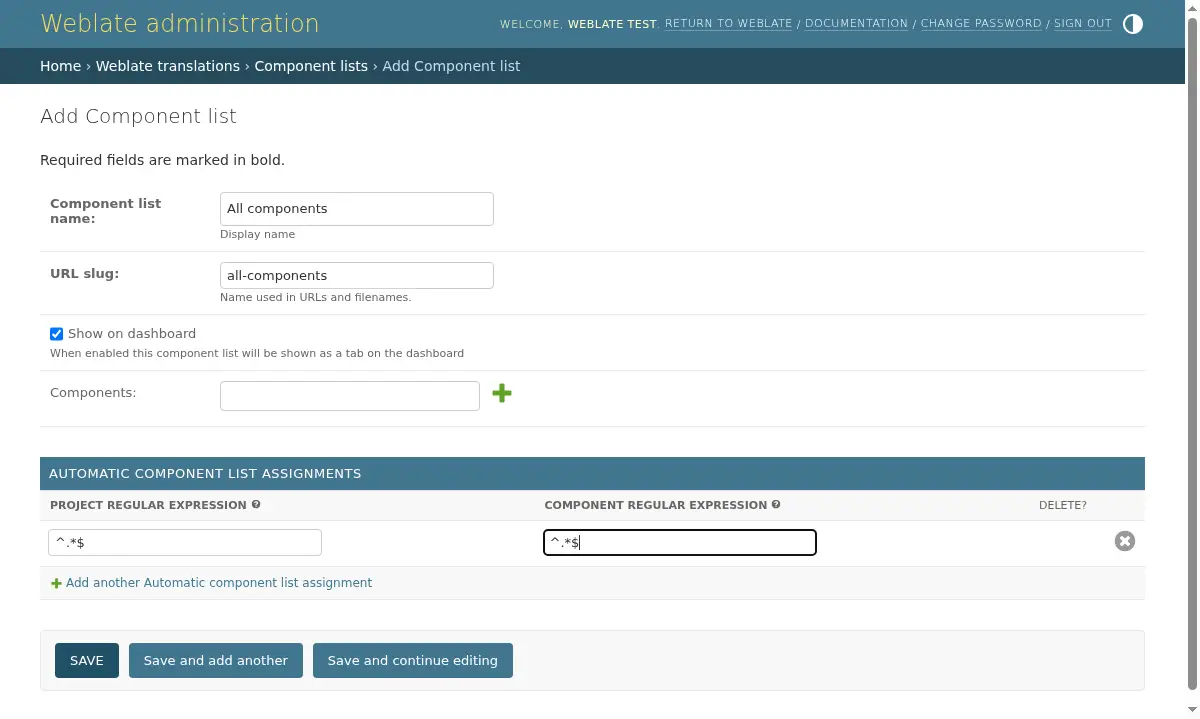
உங்கள் வலைபெயர்ப்பு நிறுவலின் அனைத்து கூறுகளையும் கொண்ட ஒரு கூறு பட்டியலை உருவாக்கவும்.
1. Define Automatic component list assignment with ^.*$ as regular expression
in both the project and the component fields, as shown on this image: