மொழிபெயர்ப்பு செயல்முறை
பரிந்துரை வாக்களிப்பு
Everyone can add suggestions by default, to be accepted by signed in users. Suggestion voting can be used to make use of a string when more than one signed-in user agrees, by setting up the கூறு உள்ளமைவு with Suggestion voting to turn on voting, and Automatically accept suggestions to set a threshold for accepted suggestions (this includes a vote from the user making the suggestion if it is cast).
Note
Once automatic acceptance is set up, normal users lose the privilege to directly save translations or accept suggestions. This can be overridden with the Edit string when suggestions are enforced permission.
You can combine these with access control into one of the following setups:
பயனர்கள் பரிந்துரைக்கிறார்கள் மற்றும் பரிந்துரைகளுக்கு வாக்களிக்கிறார்கள் மற்றும் ஒரு வரையறுக்கப்பட்ட குழு ஏற்றுக்கொள்ளப்பட்டதைக் கட்டுப்படுத்துகிறது. - வாக்களிப்பை இயக்கவும். - தானியங்கி ஏற்றுக்கொள்ளலை அணைக்கவும். - பயனர்கள் மொழிபெயர்ப்புகளைச் சேமிக்க விட வேண்டாம்.
வரையறுக்கப்பட்ட எண்ணிக்கை ஒப்புக் கொண்டவுடன் பயனர்கள் தானியங்கி ஏற்றுக்கொள்ளலுடன் பரிந்துரைகளுக்கு பரிந்துரைக்கிறார்கள் மற்றும் வாக்களிக்கிறார்கள். - வாக்களிப்பை இயக்கவும். - தானியங்கி ஏற்றுக்கொள்ள விரும்பிய எண்ணிக்கையிலான வாக்குகளை அமைக்கவும்.
பரிந்துரைகளுக்கு விருப்ப வாக்களிப்பு. .
மூல சரங்கள் குறித்த கூடுதல் செய்தி
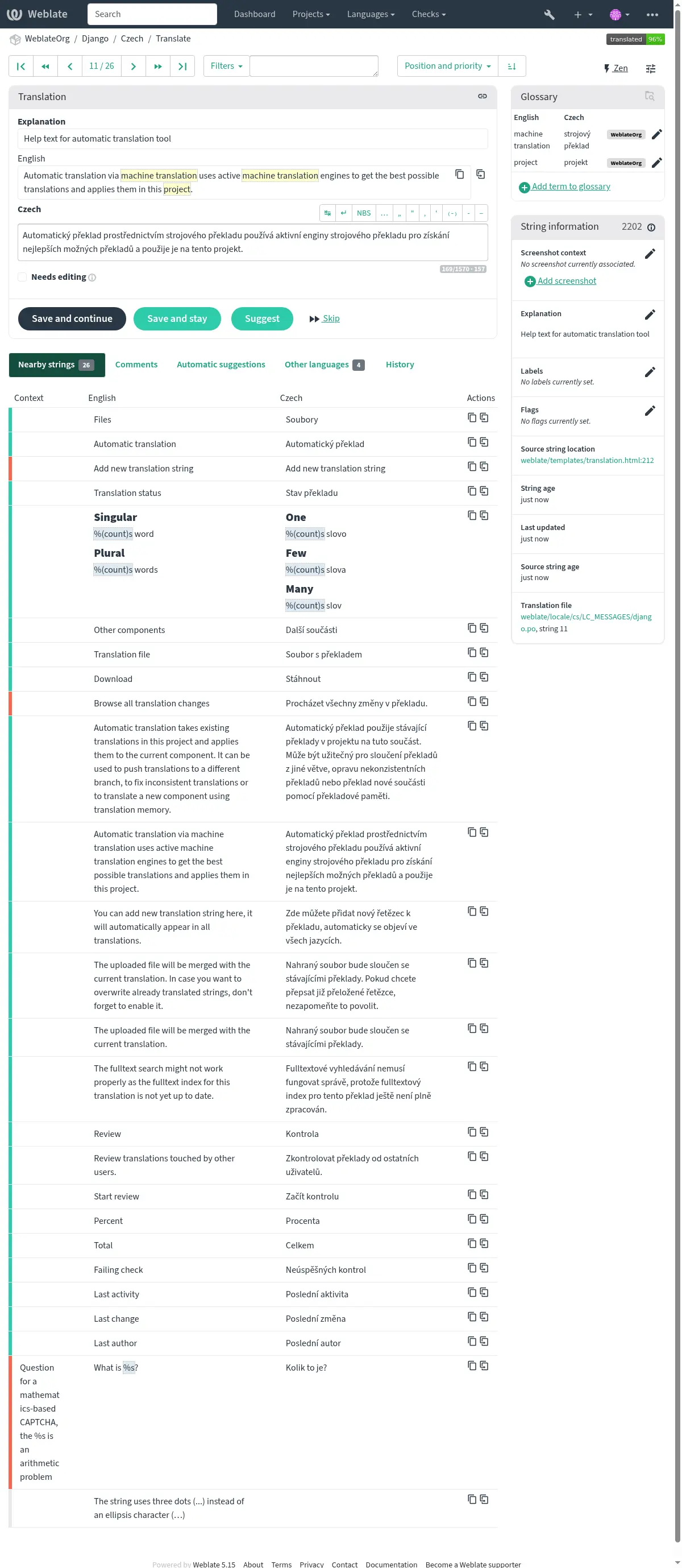
விளக்கங்கள், சரம் முன்னுரிமைகள், கொடிகள் மற்றும் காட்சி சூழல் உள்ளிட்ட சரங்களுக்கு கூடுதல் தகவலைச் சேர்ப்பதன் மூலம் மொழிபெயர்ப்பு செயல்முறையை மேம்படுத்தவும். அந்த தகவல்களில் சில மொழிபெயர்ப்பு கோப்புகளிலிருந்து பிரித்தெடுக்கப்படலாம், மேலும் சில கூடுதல் சரம் தகவலைத் திருத்துவதன் மூலம் சேர்க்கப்படலாம்:
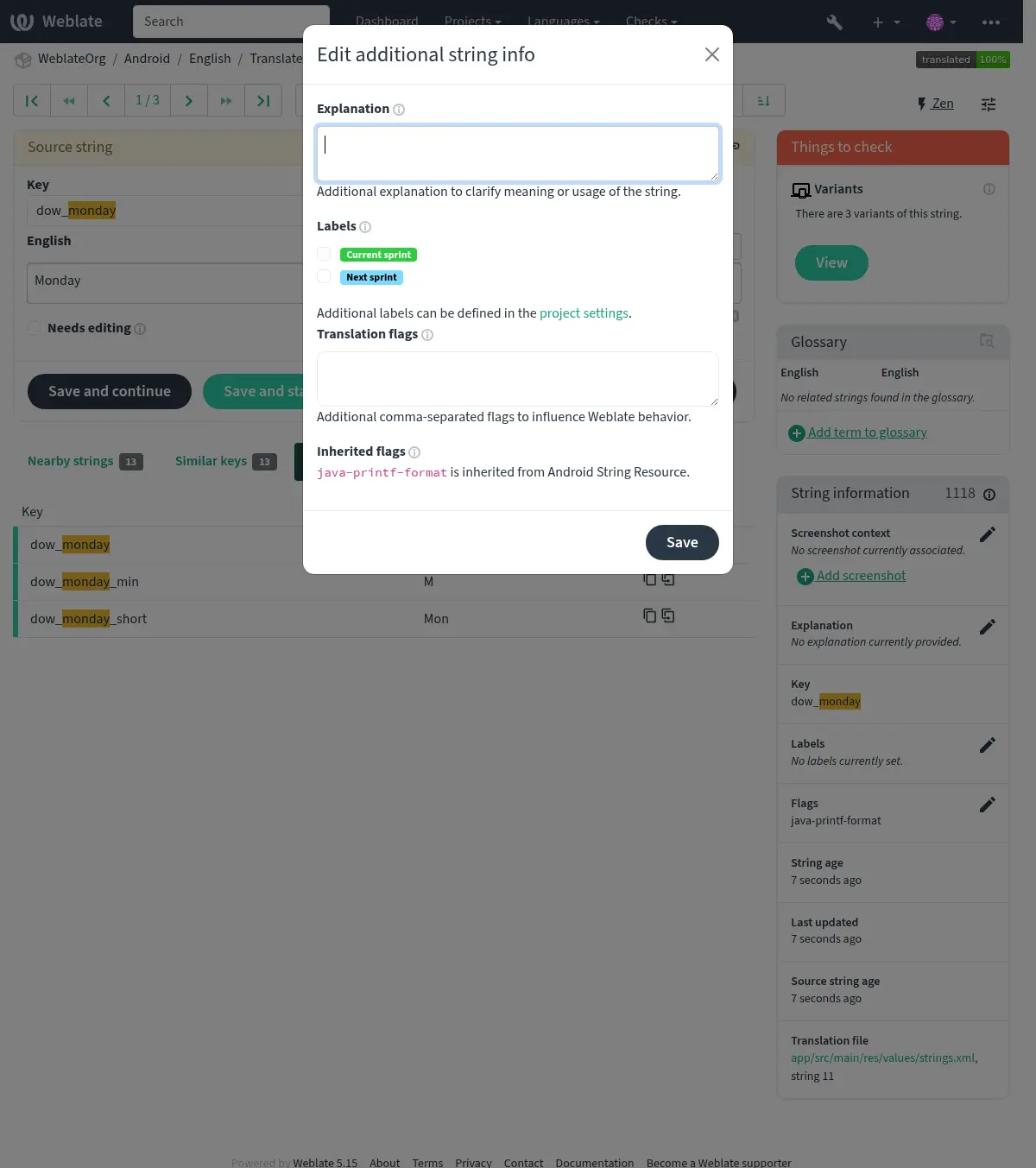
Access this directly from the translation interface by clicking the "Edit" icon next to Screenshot context or Flags.
See also
சரங்கள் முன்னுரிமை
String priority can be changed to offer higher priority strings for translation earlier by
using the priority flag.
Hint
மொழிபெயர்ப்பின் ஓட்டத்தை தர்க்கரீதியான முறையில் ஆர்டர் செய்ய இதைப் பயன்படுத்தலாம்.
See also
மொழிபெயர்ப்பு கொடிகள்
Customization of quality checks and other Weblate behavior, see கொடிகளைப் பயன்படுத்தி நடத்தை தனிப்பயனாக்குதல்.
The string flags are also inherited from the மொழிபெயர்ப்பு கொடிகள் at கூறு உள்ளமைவு and flags from the translation file (see உள்ளூராக்கல் கோப்பு வடிவங்கள்).
விளக்கம்
Changed in version 4.1: In previous versions this has been called Extra context.
Changed in version 4.18: ஒரு கோப்புடன் விளக்கத்தை ஒத்திசைப்பதற்கான உதவி அறிமுகப்படுத்தப்பட்டது.
மொழிபெயர்ப்பின் நோக்கம் அல்லது பயன்பாட்டை தெளிவுபடுத்த விளக்கத்தைப் பயன்படுத்து. இணைப்புகள் மற்றும் பிற மார்க்அப்பைச் சேர்க்க நீங்கள் மார்க் டவுனைப் பயன்படுத்தலாம்.
Some file formats support storing explanation within the file, see விளக்கம்.
Hint
Weblate can also display description present in the translation file for some formats, see மூல சரம் விளக்கம்.
சரங்களுக்கான காட்சி சூழல்
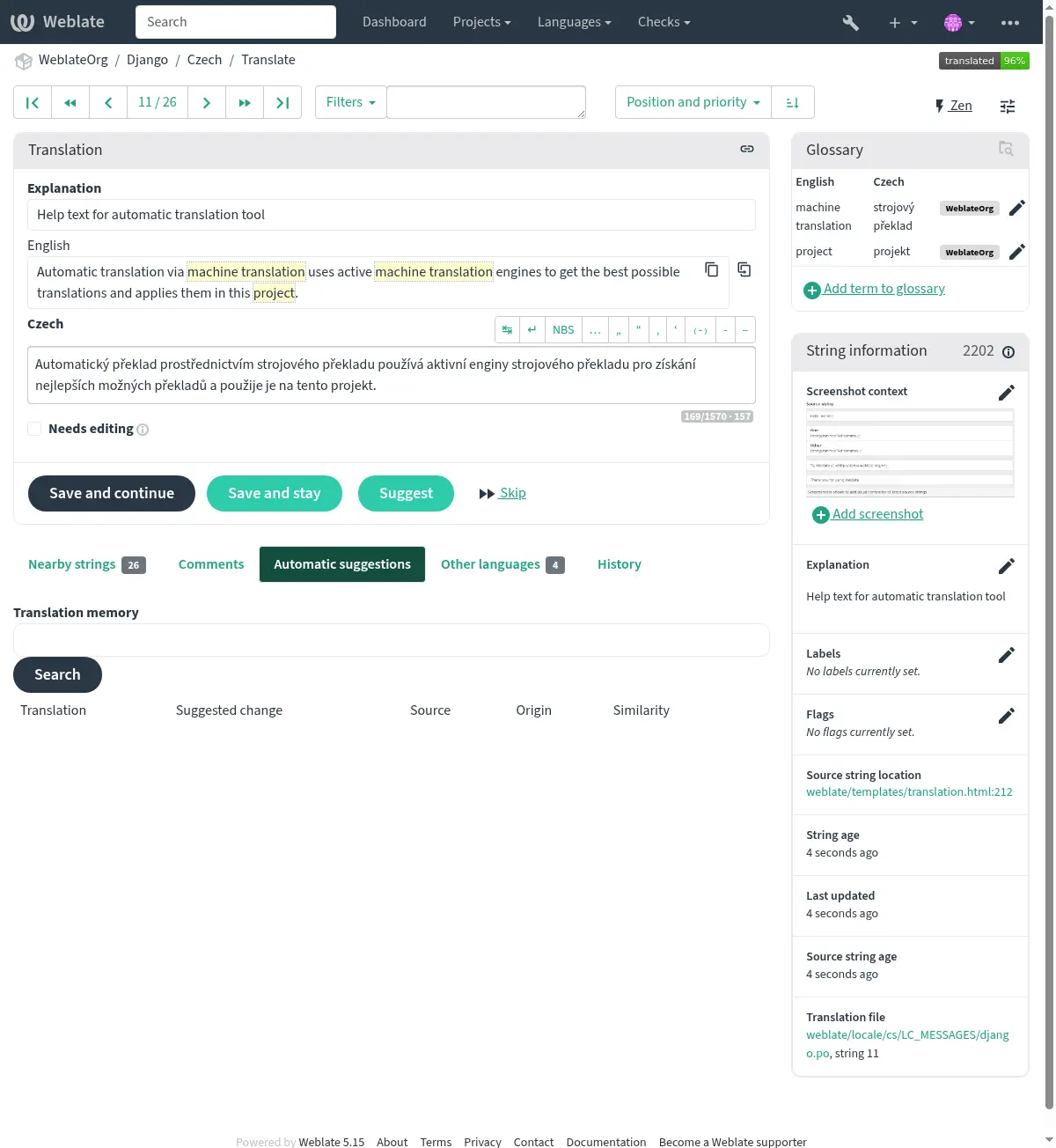
உங்கள் நிரலுக்குள் பயன்பாட்டில் கொடுக்கப்பட்ட மூல சரத்தை காட்டும் திரை சாட்டை பதிவேற்றலாம். இது எங்கு பயன்படுத்தப்படுகிறது, அது எவ்வாறு மொழிபெயர்க்கப்பட வேண்டும் என்பதைப் புரிந்துகொள்ள மொழிபெயர்ப்பாளர்கள் உதவுகிறார்கள்.
பதிவேற்றிய திரை காட்சி மொழிபெயர்ப்பு சூழல் பக்கப்பட்டியில் காட்டப்பட்டுள்ளது:
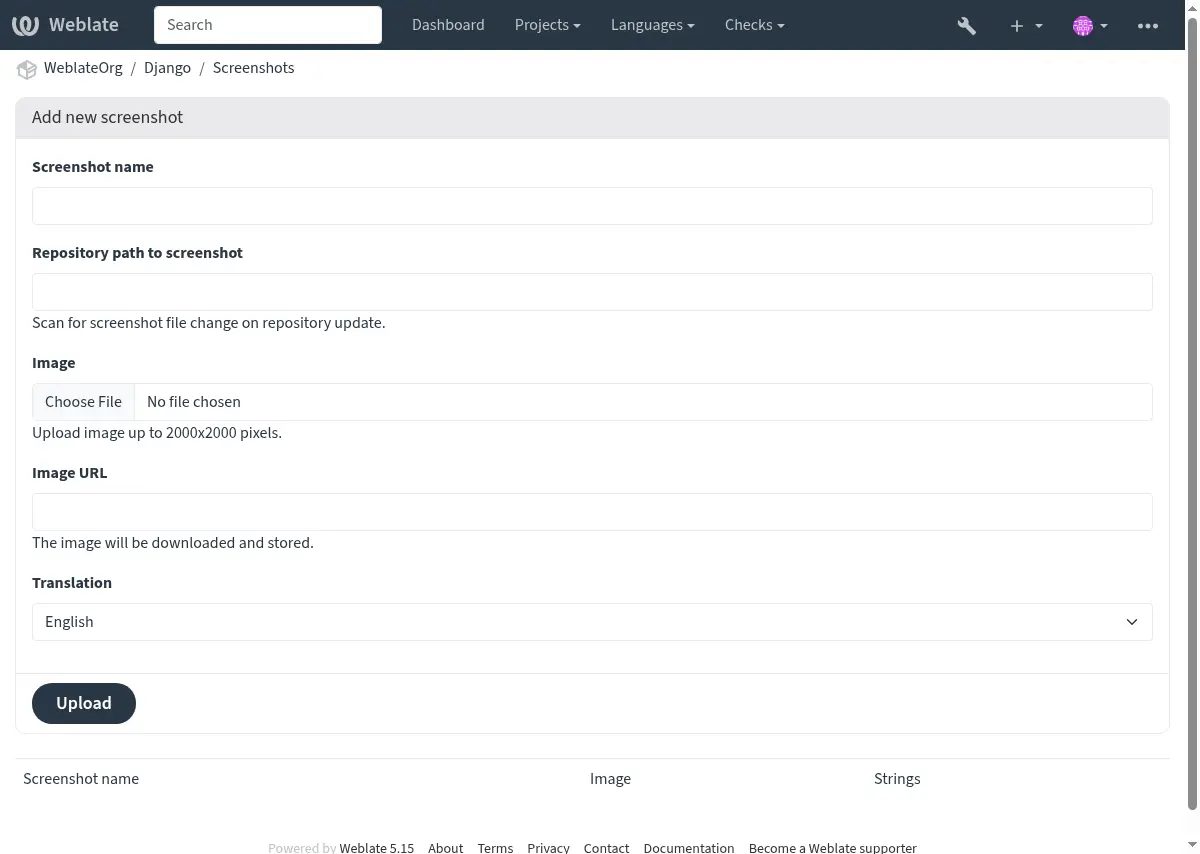
In addition to மூல சரங்கள் குறித்த கூடுதல் செய்தி, screenshots have a separate management interface under the Operations menu. Upload screenshots, assign them to source strings manually, or use optical character recognition (OCR) to do so by pressing the Automatically recognize button.
ஒரு திரை காட்சி பதிவேற்றப்பட்டதும், இந்த இடைமுகம் மேலாண்மை மற்றும் மூல சரம் சங்கத்தை கையாளுகிறது:
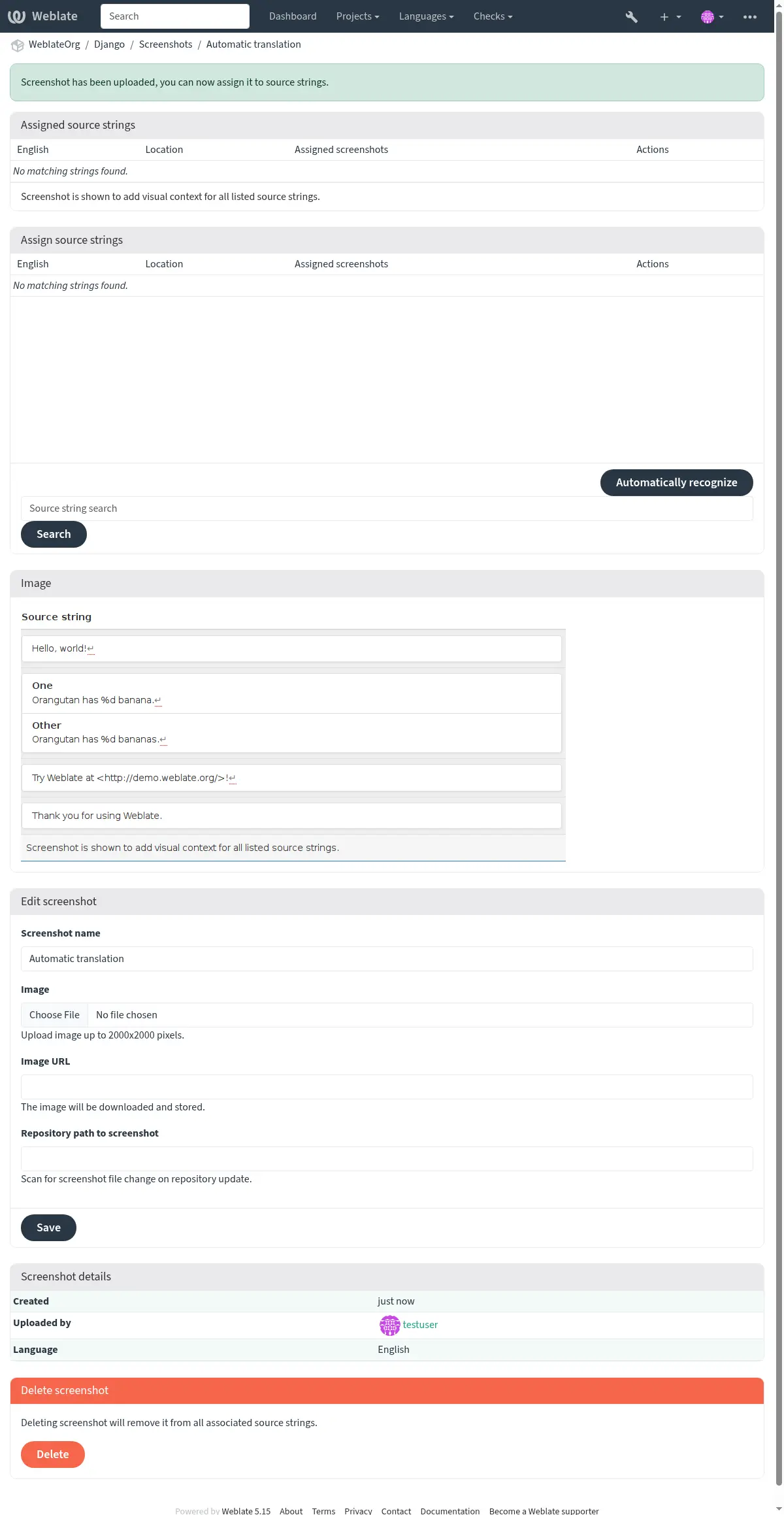
You can upload a screenshot from a local file or provide a URL to download an image
from an external source. URL-based uploads may be restricted based on the
ALLOWED_ASSET_DOMAINS setting, which controls which domains are trusted
for downloading external assets, and ALLOWED_ASSET_SIZE which
limits maximal size for the asset.
உங்கள் பதிப்பு கட்டுப்பாட்டு அமைப்பு (வி.சி.எச்) களஞ்சியத்திலிருந்து திரை சாட்களை நேரடியாக சேர்க்கலாம் அல்லது புதுப்பிக்கலாம்.
இந்த அம்சத்தை இயக்க, நீங்கள் ஒரு கூறுகளை உருவாக்கும்போது திரைக்காட்சி கோப்பு முகமூடியை அமைக்கலாம், இது களஞ்சியத்தில் புதுப்பிப்புகளுக்காக கண்காணிக்கப்படும், அல்லது திரை சாட்களை கைமுறையாக பதிவேற்றும்போது அவற்றைச் சேர்க்கலாம் அல்லது புதுப்பிக்கலாம்.
களஞ்சியம் புதுப்பிக்கப்படும் போது, கணினி தானாகவே மாற்றங்களுக்கு ச்கேன் செய்யும். களஞ்சியத்தில் இருக்கும் திரை சாட்கள் புதுப்பிக்கப்படும், மேலும் குறிப்பிட்ட திரைக்காட்சி கோப்பு முகமூடியுடன் பொருந்தக்கூடிய புதிய திரை சாட்கள் கூறுகளில் சேர்க்கப்படும்.
See also