மொழிபெயர்ப்புகளைப் பதிவிறக்குதல் மற்றும் பதிவேற்றுதல்
நீங்கள் ஒரு மொழிபெயர்ப்பிலிருந்து கோப்புகளை ஏற்றுமதி செய்யலாம், மாற்றங்களைச் செய்யலாம் மற்றும் அவற்றை மீண்டும் இறக்குமதி செய்யலாம். இது ஆஃப்லைனில் வேலை செய்ய அனுமதிக்கிறது, பின்னர் மாற்றங்களை மீண்டும் இருக்கும் மொழிபெயர்ப்பில் இணைப்பது. இதற்கிடையில் இது மாற்றப்பட்டாலும் இது வேலை செய்கிறது.
Note
Available options might be limited by access control settings.
மொழிபெயர்ப்புகளைப் பதிவிறக்குகிறது
From the project or component dashboard, translatable files can be downloaded in the Files menu.
முதல் விருப்பம் கோப்பை களஞ்சியத்தில் சேமித்து வைப்பதால் அசல் வடிவத்தில் பதிவிறக்கம் செய்வது. இந்த வழக்கில், மொழிபெயர்ப்பில் நிலுவையில் உள்ள எந்த மாற்றங்களும் உறுதியுடன் உள்ளன, மேலும் புதுப்பித்த கோப்பு எந்த மாற்றங்களும் இல்லாமல் மகசூல் ஆகும்.
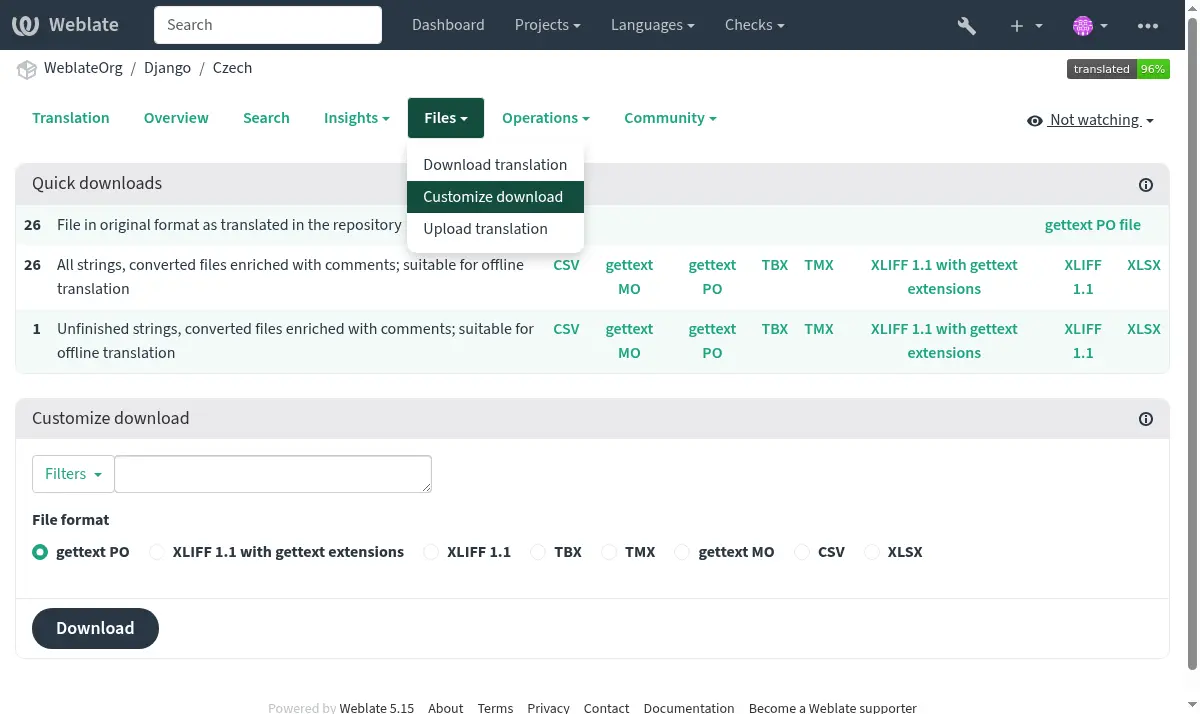
You can also download the translation converted into one of the widely used localization formats. The converted files will be enriched with data provided in Weblate; such as additional context, comments or flags. Several file formats are available via the Files ↓ Customize download menu:
gettext PO (
po)XLIFF 1.1 with gettext extensions (
xliff)XLIFF 1.1 (
xliff11)TermBase eXchange (
tbx)Translation Memory eXchange (
tmx)gettext MO (only available when translation is using gettext PO) (
mo)CSV (
csv)Excel Open XML (
xlsx)JSON (only available for monolingual translations) (
json)JSON nested structure file (only available for monolingual translations) (
json-nested)Android String Resource (only available for monolingual translations) (
aresource)iOS strings (only available for monolingual translations) (
strings)
Hint
The content available in the converted files differs based on file format features, you can find overview in மொழிபெயர்ப்பு வகைகள் திறன்கள்.
கூறுகள், பிரிவுகள் அல்லது திட்டங்களை பதிவிறக்குதல்
Translation files for a component, category or project can be downloaded at once via the Files menu. The download is always served as a ZIP file, and you can choose original or converted formats similarly as in மொழிபெயர்ப்புகளைப் பதிவிறக்குகிறது.
மொழிபெயர்ப்புகளை பதிவேற்றுகிறது
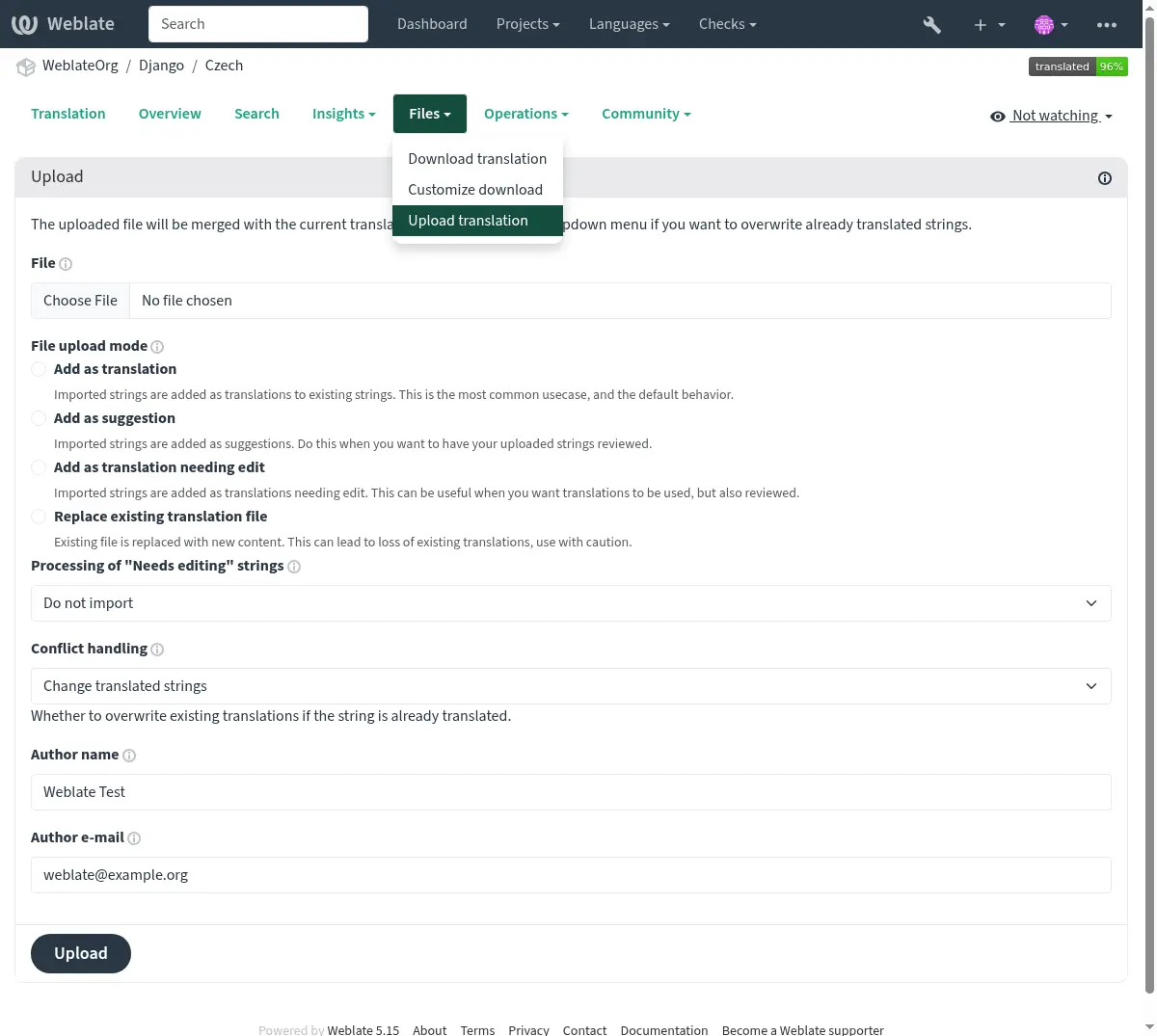
When you have made your changes, use Upload translation in the Files menu.
ஆதரிக்கப்படும் கோப்பு வடிவங்கள்
ஆதரிக்கப்பட்ட கோப்பு வடிவத்தில் உள்ள எந்தவொரு கோப்பையும் பதிவேற்றலாம், ஆனால் மொழிபெயர்ப்புக்கு பயன்படுத்தப்படும் அதே கோப்பு வடிவமைப்பைப் பயன்படுத்த இன்னும் பரிந்துரைக்கப்படுகிறது, இல்லையெனில் சில நற்பொருத்தங்கள் சரியாக மொழிபெயர்க்கப்படாது.
இறக்குமதி முறைகள்
மொழிபெயர்ப்பு கோப்புகளை பதிவேற்றும்போது வழங்கப்பட்ட தேர்வுகள் இவை:
- Add as translation (
translate) இறக்குமதி செய்யப்பட்ட சரங்கள் இருக்கும் சரத்திற்கு மொழிபெயர்ப்புகளாக சேர்க்கப்படுகின்றன. இது மிகவும் பொதுவான பயன்பாட்டு வழக்கு, மற்றும் இயல்புநிலை நடத்தை.
பதிவேற்றிய கோப்பிலிருந்து மொழிபெயர்ப்புகள் மட்டுமே பயன்படுத்தப்படுகின்றன மற்றும் கூடுதல் உள்ளடக்கம் இல்லை.
This option is available only if the user has the "Edit strings" permission.
- Add as suggestion (
suggest) இறக்குமதி செய்யப்பட்ட சரங்கள் பரிந்துரைகளாக சேர்க்கப்படுகின்றன. நீங்கள் பதிவேற்றிய சரங்களை மதிப்பாய்வு செய்ய விரும்பும் போது இதைச் செய்யுங்கள்.
பதிவேற்றிய கோப்பிலிருந்து மொழிபெயர்ப்புகள் மட்டுமே பயன்படுத்தப்படுகின்றன மற்றும் கூடுதல் உள்ளடக்கம் இல்லை.
This option is available only if the user has the "Add suggestion" permission.
- Add as approved translation (
approve) இறக்குமதி செய்யப்பட்ட சரங்கள் அங்கீகரிக்கப்பட்ட மொழிபெயர்ப்புகளாக சேர்க்கப்படுகின்றன. உங்கள் மொழிபெயர்ப்புகளை பதிவேற்றுவதற்கு முன் அவற்றை ஏற்கனவே மதிப்பாய்வு செய்தபோது இதைச் செய்யுங்கள்.
பதிவேற்றிய கோப்பிலிருந்து மொழிபெயர்ப்புகள் மட்டுமே பயன்படுத்தப்படுகின்றன மற்றும் கூடுதல் உள்ளடக்கம் இல்லை.
This option is available only if the user has the "Review strings" permission.
- Add as translation needing edit (
fuzzy) திருத்த வேண்டிய மொழிபெயர்ப்புகளாக இறக்குமதி செய்யப்பட்ட சரங்கள் சேர்க்கப்படுகின்றன. மொழிபெயர்ப்புகள் பயன்படுத்தப்பட வேண்டும் என்று நீங்கள் விரும்பும்போது இது பயனுள்ளதாக இருக்கும், ஆனால் மதிப்பாய்வு செய்யப்படுகிறது.
பதிவேற்றிய கோப்பிலிருந்து மொழிபெயர்ப்புகள் மட்டுமே பயன்படுத்தப்படுகின்றன மற்றும் கூடுதல் உள்ளடக்கம் இல்லை.
This option is available only if the user has the "Edit strings" permission.
- Replace existing translation file (
replace) தற்போதுள்ள கோப்பு புதிய உள்ளடக்கத்துடன் மாற்றப்படுகிறது. இது தற்போதுள்ள மொழிபெயர்ப்புகளை இழக்க வழிவகுக்கும், எச்சரிக்கையுடன் பயன்படுத்தலாம்.
This option is available only if the user has the "Edit component settings" permission or "Add new string", "Remove a string" and "Edit strings" permissions.
- Update source strings (
source) இருமொழி மொழிபெயர்ப்பு கோப்பில் மூல சரங்களை புதுப்பிக்கிறது. இது எதைப் போன்றது பானையுடன் பொருந்தக்கூடிய po கோப்புகளைப் புதுப்பிக்கவும் (msgmerge) செய்கிறது.
This option is available only for some file formats and only if the user has the "Upload translations" permission.
- Add new strings (
add) Adds new strings to the translation. It skips the ones which already exist.
In case you want to both add new strings and update existing translations, upload the file second time with Add as translation.
பதிவேற்றிய கோப்பிலிருந்து மூல, மொழிபெயர்ப்பு மற்றும் விசை (சூழல்) மட்டுமே பயன்படுத்தப்படுகின்றன.
This option is available only with சரங்களை நிர்வகி turned on and only if the user has the "Add new string" permission.
கையாளுதல்
ஏற்கனவே மொழிபெயர்க்கப்பட்ட பதிவேற்றப்பட்ட சரங்களை எவ்வாறு கையாள்வது என்பதை வரையறுக்கிறது:
- Change only untranslated strings (
ignore) ஏற்கனவே மொழிபெயர்க்கப்பட்ட பதிவேற்றிய மொழிபெயர்ப்புகளை புறக்கணிக்கவும்.
- Change translated strings (
replace-translated) ஏற்கனவே உள்ள மொழிபெயர்ப்புகளை பதிவேற்றியவற்றுடன் மாற்றவும், ஆனால் அங்கீகரிக்கப்பட்டவற்றை வைத்திருங்கள்.
- Change translated and approved strings (
replace-approved) அங்கீகரிக்கப்பட்டவை உட்பட பதிவேற்றியவற்றுடன் இருக்கும் மொழிபெயர்ப்புகளை மாற்றவும்.
திருத்து தேவைப்படும் சரங்கள்
இறக்குமதி செய்யப்பட்ட கோப்பில் திருத்து தேவைப்படும் சரங்களை எவ்வாறு கையாள்வது என்பதற்கான விருப்பமும் உள்ளது. இத்தகைய சரங்களை பின்வரும் மூன்று வழிகளில் ஒன்றில் கையாளலாம்: "இறக்குமதி செய்ய வேண்டாம்", "திருத்து தேவைப்படும் சரமாக இறக்குமதி செய்யுங்கள்" அல்லது "மொழிபெயர்க்கப்பட்டபடி இறக்குமதி".