பதிவு மற்றும் பயனர் சுயவிவரம்
பதிவு
எல்லோரும் திட்டங்களை உலாவலாம், மொழிபெயர்ப்புகளைக் காணலாம் அல்லது மொழிபெயர்ப்புகளை இயல்பாக பரிந்துரைக்கலாம். பதிவுசெய்யப்பட்ட பயனர்கள் மட்டுமே உண்மையில் மாற்றங்களைச் சேமிக்க அனுமதிக்கப்படுகிறார்கள், மேலும் செய்யப்பட்ட ஒவ்வொரு மொழிபெயர்ப்பிற்கும் வரவு வைக்கப்படுகிறார்கள்.
சில எளிய வழிமுறைகளைப் பின்பற்றி நீங்கள் பதிவு செய்யலாம்:
உங்கள் சான்றுகளுடன் பதிவு படிவத்தை நிரப்பவும்.
நீங்கள் பெறும் மின்னஞ்சலில் இணைப்பைப் பின்பற்றுவதன் மூலம் பதிவை செயல்படுத்தவும்.
உங்களுக்குத் தெரிந்த எந்த மொழிகளைத் தேர்வுசெய்ய உங்கள் சுயவிவரத்தை விருப்பமாக சரிசெய்யவும்.
முகப்புப்பெட்டி
நீங்கள் உள்நுழையும்போது, திட்டங்கள் மற்றும் கூறுகளின் கண்ணோட்டத்தையும், அவற்றின் மொழிபெயர்ப்பு முன்னேற்றத்தையும் காண்பீர்கள்.
நீங்கள் பார்க்கும் திட்டங்களின் கூறுகள் இயல்பாகவே காண்பிக்கப்படுகின்றன, மேலும் நீங்கள் விரும்பும் மொழிகளுடன் குறுக்கு-குறிப்பிடப்படுகின்றன.
Hint
வழிசெலுத்தல் தாவல்களைப் பயன்படுத்தி நீங்கள் வெவ்வேறு காட்சிகளுக்கு மாறலாம்.
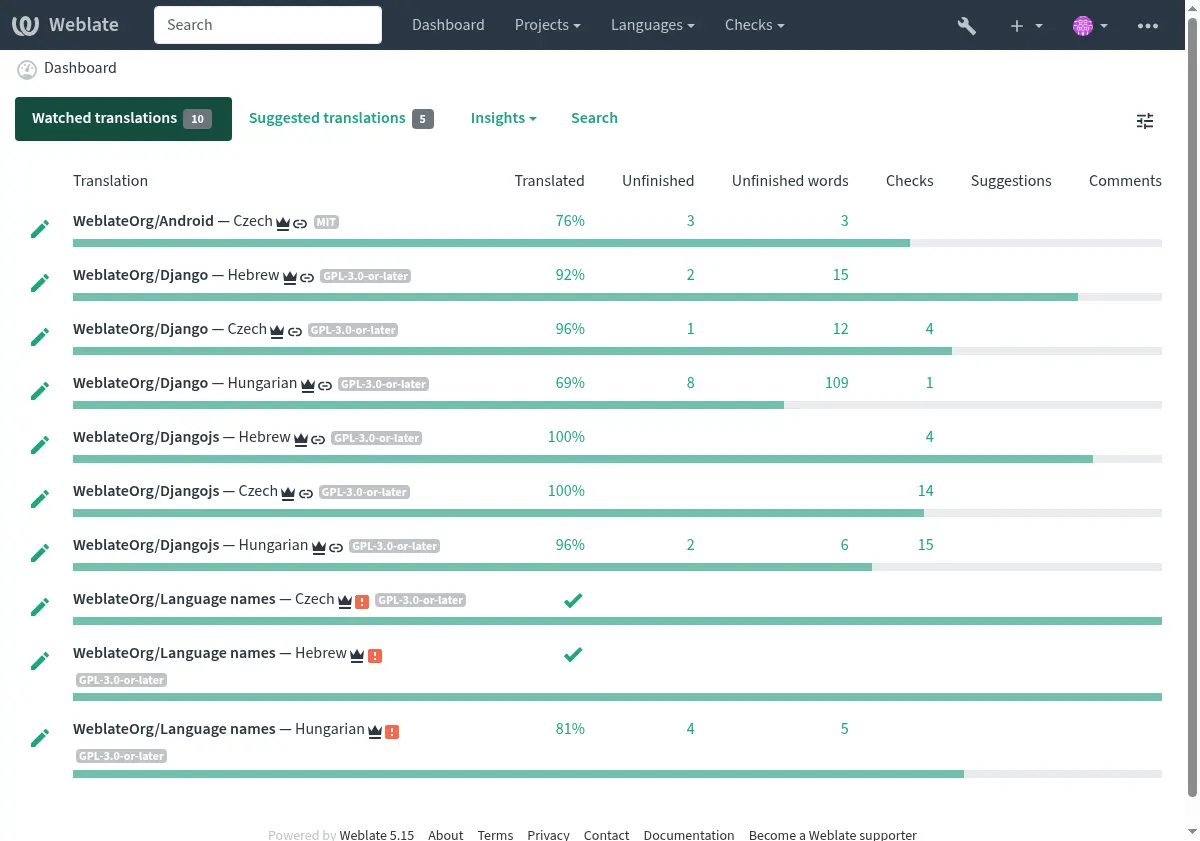
பட்டியலில் இந்த விருப்பங்கள் உள்ளன:
projects > browse all projects in the main menu showing translation status for each project on the வலைபெயர்ப்பு instance.
Selecting a language in the main menu Languages will show translation status of all projects, filtered by one of your primary languages.
watched translations in the dashboard will show translation status of only those projects you are watching, filtered by your primary languages.
In addition, the drop-down can also show any number of component lists, sets of project components preconfigured by the Weblate administrator, see கூறு பட்டியல்கள்.
You can configure your personal default dashboard view in the Preferences section of your user profile settings.
Note
When Weblate is configured for a single project using
SINGLE_PROJECT in the settings.py file (see உள்ளமைவு), the dashboard
will not be shown, as the user will be redirected to a single project or component instead.
பயனர் சுயவிவரம்
The user profile is accessible by clicking your user icon in the top-right of the top menu, then the Settings menu.
பயனர் சுயவிவரத்தில் உங்கள் விருப்பத்தேர்வுகள் உள்ளன. vcs கமிட்டுகளில் பெயர் மற்றும் மின்னஞ்சல் முகவரி பயன்படுத்தப்படுகிறது, எனவே இந்த தகவலை துல்லியமாக வைத்திருங்கள்.
Note
அனைத்து மொழித் தேர்வுகளும் தற்போது மொழிபெயர்க்கப்பட்ட மொழிகளை மட்டுமே வழங்குகின்றன.
Hint
பொத்தானைக் சொடுக்கு செய்வதன் மூலம் நீங்கள் மொழிபெயர்க்க விரும்பும் பிற மொழிகளைக் கோரவும் அல்லது சேர்.
மொழிகள்
இடைமுக மொழி
நீங்கள் இடைமுகம் ஐக் காட்ட விரும்பும் மொழியைத் தேர்வுசெய்க.
மொழிபெயர்க்கப்பட்ட மொழிகள்
நீங்கள் எந்த மொழிகளை மொழிபெயர்க்க விரும்புகிறீர்கள் என்பதைத் தேர்வுசெய்க, மேலும் அவை பார்த்த திட்டங்களின் முதன்மையான பக்கத்தில் வழங்கப்படும், இதனால் அந்த ஒவ்வொரு மொழிகளிலும் இந்த அனைத்து மொழிபெயர்ப்புகளையும் நீங்கள் எளிதாக அணுகலாம்.
இரண்டாம் நிலை மொழிகள்
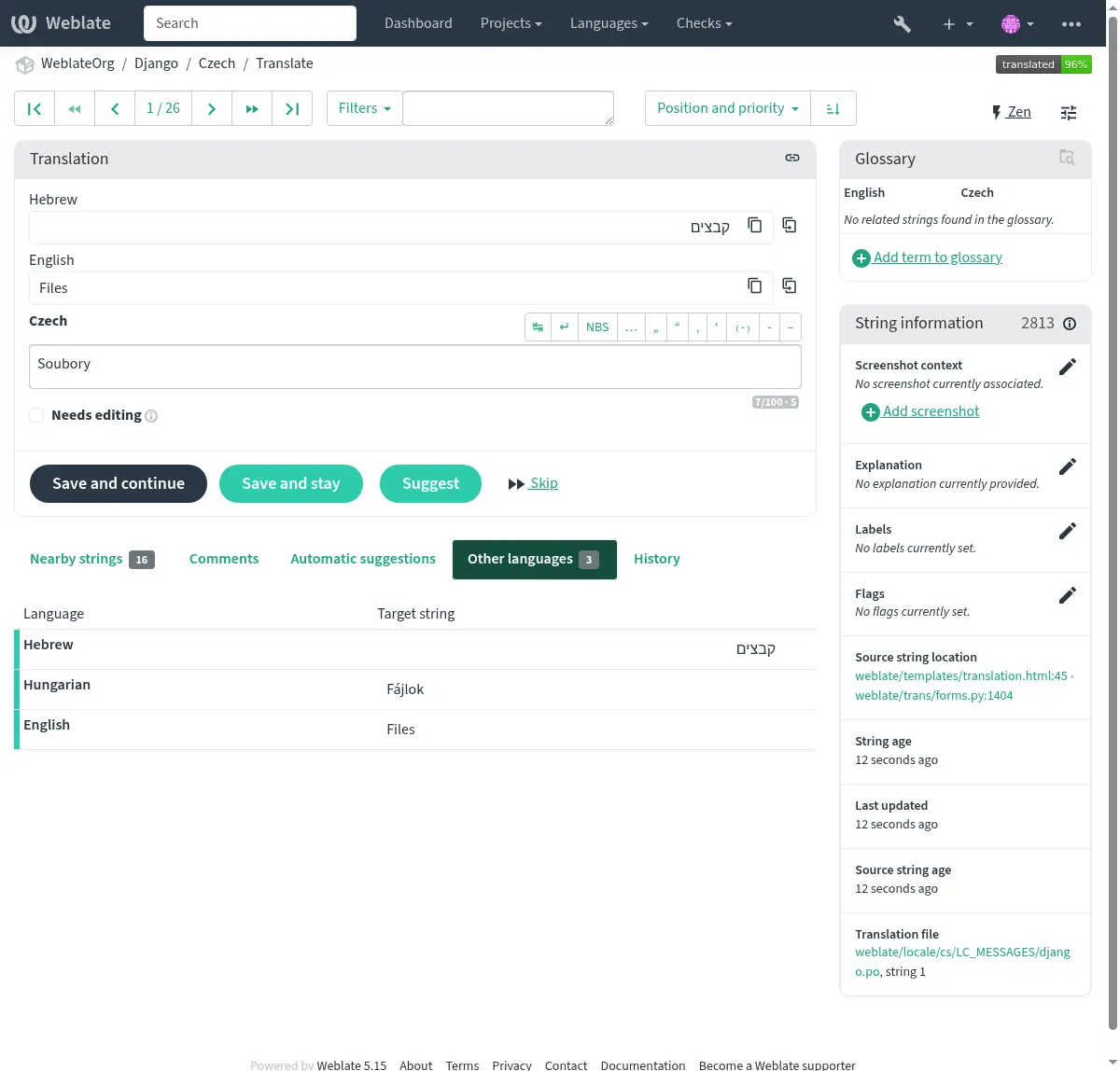
மொழிபெயர்க்கும் போது எந்த இரண்டாம் நிலை மொழிகள் உங்களுக்கு வழிகாட்டியாகக் காட்டப்படுகின்றன என்பதை நீங்கள் வரையறுக்கலாம். ஒரு உதாரணத்தை பின்வரும் படத்தில் காணலாம், அங்கு எபிரேய மொழி இரண்டாவதாக காட்டப்படுகிறது:
Hint
This can be also configured in the project (இரண்டாம் நிலை மொழி) or component (இரண்டாம் நிலை மொழி). In that case it can be used for இரண்டாம் நிலை மொழியைப் பயன்படுத்தி சரம் ஒருங்கிணைப்பு.
விருப்பத்தேர்வுகள்
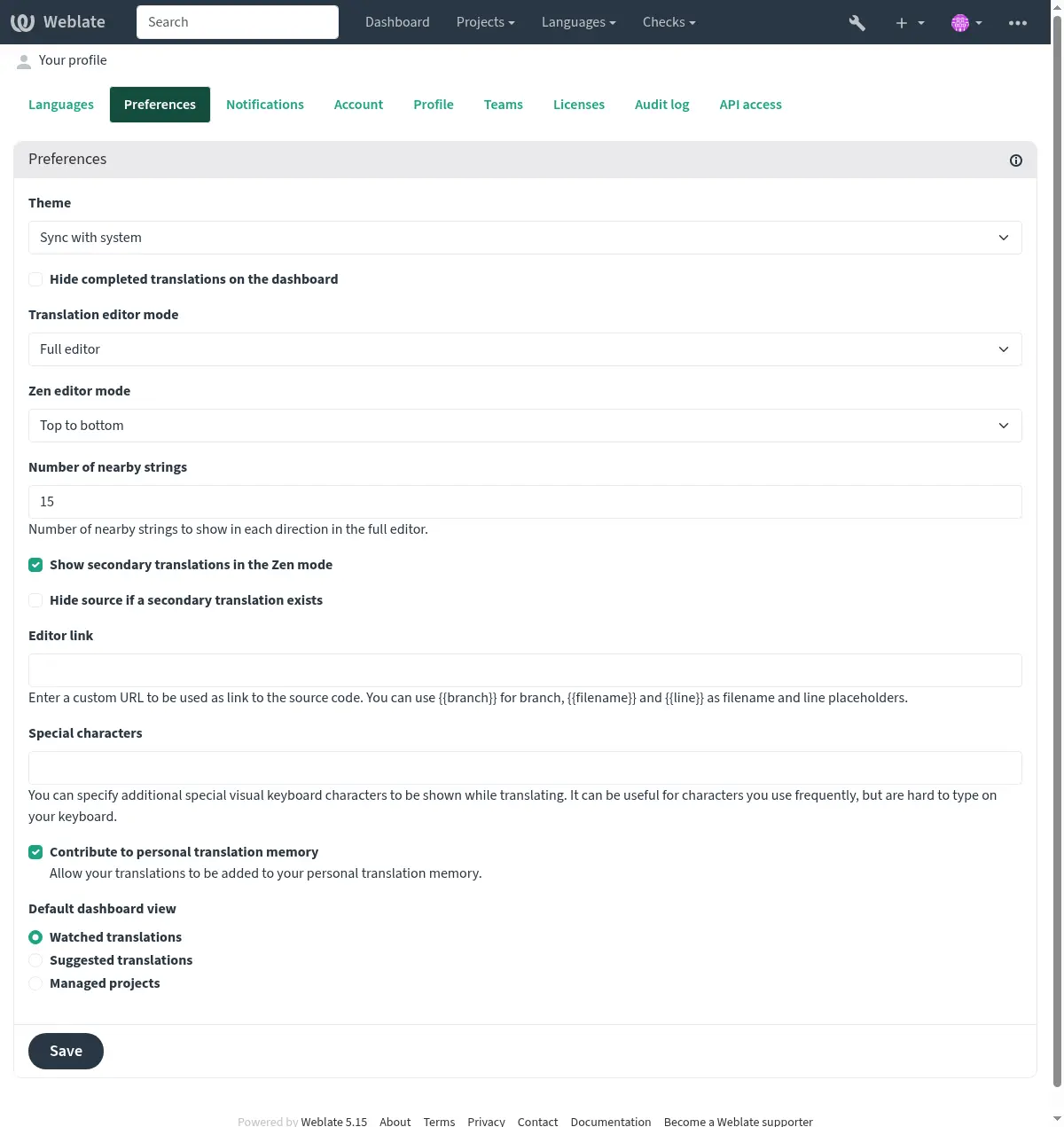
கருப்பொருள்
வலைபெயர்ப்பு இருண்ட அல்லது ஒளி கருப்பொருளுக்கான கணினி அமைப்புகளைப் பின்பற்றுகிறதா என்பதைத் தேர்வுசெய்க, அல்லது அவற்றில் ஒன்றை கைமுறையாகத் தேர்வுசெய்க.
இயல்புநிலை முகப்புப்பெட்டி பார்வை
On the Preferences tab, you can pick which of the available dashboard views to present by default. If you pick the Component list, you have to select which component list will be displayed from the Default component list drop-down.
See also
ஆசிரியர் இணைப்பு
A source code link is shown in the web-browser configured in the கூறு உள்ளமைவு by default.
Hint
By setting the Editor link, you use your local editor to open the VCS source code file of translated strings. You can use வார்ப்புரு மார்க்அப்.
வழக்கமாக editor://open/?file={{filename}}&line={{line}} போன்ற ஒன்று ஒரு நல்ல வழி.
See also
You can find more info on registering custom URL protocols for the editor in the Nette documentation.
சிறப்பு எழுத்துக்கள்
Additional special characters to include in the காட்சி விசைப்பலகை.
அறிவிப்புகள்
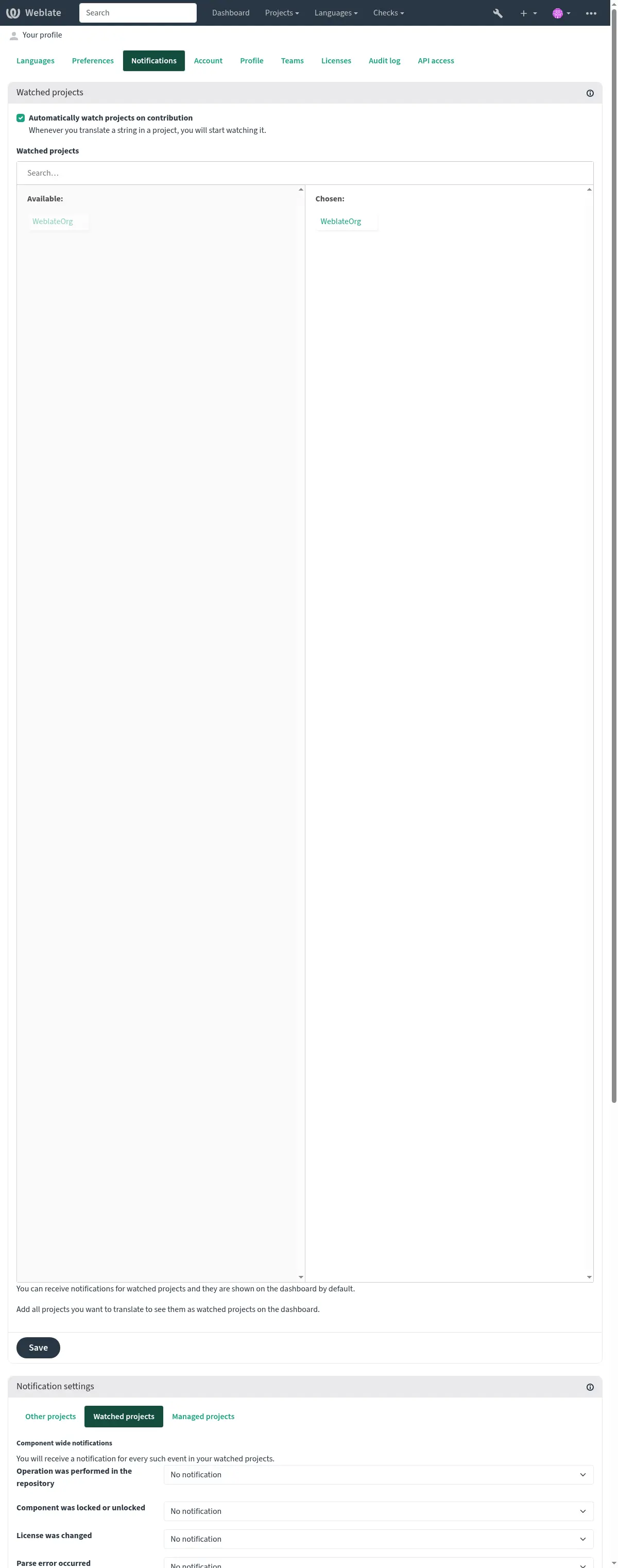
அறிவிப்புகள் தாவலில் இருந்து பல்வேறு அறிவிப்புகளுக்கு குழுசேரவும். பார்த்த அல்லது நிர்வகிக்கப்படும் திட்டங்கள் குறித்த தேர்ந்தெடுக்கப்பட்ட நிகழ்வுகளுக்கான அறிவிப்புகள் உங்களுக்கு மின்னஞ்சல் அனுப்பப்படும்.
சில அறிவிப்புகள் உங்கள் மொழிகளில் நிகழ்வுகளுக்கு மட்டுமே அனுப்பப்படுகின்றன (எடுத்துக்காட்டாக மொழிபெயர்க்க புதிய சரங்களைப் பற்றி), சில கூறு மட்டத்தில் தூண்டுகிறது (எடுத்துக்காட்டாக பிழைகளை ஒன்றிணைக்கவும்). அறிவிப்புகளின் இந்த இரண்டு குழுக்களும் அமைப்புகளில் பார்வைக்கு பிரிக்கப்படுகின்றன.
You can toggle notifications for watched projects and administered projects and it can be further tweaked (or muted) per project and component. Visit the component overview page and select appropriate choice from the Watching menu.
In case Automatically watch projects on contribution is enabled you
will automatically start watching projects upon translating a string. The
default value depends on DEFAULT_AUTO_WATCH.
Note
உங்கள் சொந்த செயல்களுக்கான அறிவிப்புகளை நீங்கள் பெற மாட்டீர்கள்.
Hint
அறிவிப்புகளை அனுப்புவது குறைவாகவே உள்ளது, நீங்கள் ஒரு நாளைக்கு 1000 மின்னஞ்சல்களுக்கு மேல் பெற மாட்டீர்கள். உங்களுக்கான மேலும் அறிவிப்புகள் நிராகரிக்கப்படும்.
கணக்கு
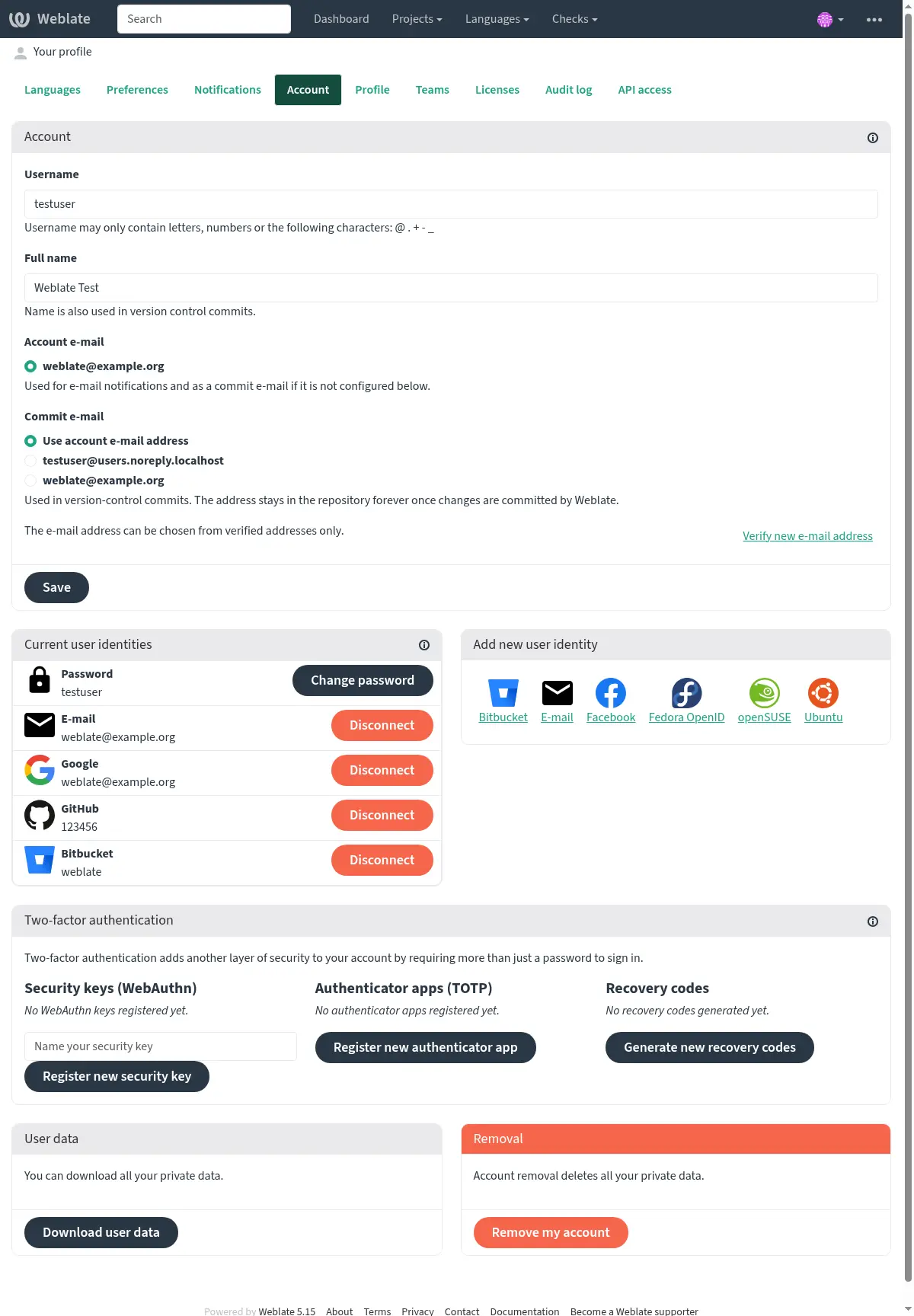
The Account tab lets you set up basic account details, connect various services you can use to sign in into Weblate, completely remove your account, or download your user data (see Weblate user data export).
The private commit e-mail will be used instead of your account e-mail in version
control commits. Use this to avoid leaking your real e-mail there. Be aware
that using different e-mail can disconnect your contributions on other servers
(for example your contributions will no longer link to your profile on GitHub).
The private e-mail can be turned on site-wide using
PRIVATE_COMMIT_EMAIL_OPT_IN.
Note
சேவைகளின் பட்டியல் உங்கள் வலைபெயர்ப்பு உள்ளமைவைப் பொறுத்தது, ஆனால் அறிவிலிஆய்வு, அறிவிலிமையம், கூகிள், பேச்புக் அல்லது பிட்பக்கெட் அல்லது பிற oauth 2.0 வழங்குநர்கள் போன்ற பிரபலமான தளங்களைச் சேர்க்கலாம்.
சுயவிவரம்
இந்த பக்கத்தில் உள்ள அனைத்து புலங்களும் விருப்பமானவை, எந்த நேரத்திலும் நீக்கப்படலாம், அவற்றை நிரப்புவதன் மூலம், உங்கள் பயனர் சுயவிவரம் தோன்றும் இடங்களில் இந்தத் தரவைப் பகிர நீங்கள் எங்களுக்கு ஒப்புதல் அளிக்கிறீர்கள்.
Avatar can be shown for each user (depending on ENABLE_AVATARS).
These images are obtained using https://gravatar.com/.
உரிமங்கள்
பநிஇ அணுகல்
உங்கள் பநிஇ அணுகல் கிள்ளாக்கை இங்கே பெறலாம் அல்லது மீட்டமைக்கலாம்.
தணிக்கை பதிவு
தணிக்கை பதிவு உங்கள் கணக்கில் நிகழ்த்தப்பட்ட செயல்களைக் கண்காணிக்கிறது. இது உங்கள் கணக்குடன் ஒவ்வொரு முக்கியமான செயலுக்கும் ஐபி முகவரி மற்றும் உலாவியை பதிவு செய்கிறது. முக்கியமான செயல்கள் முதன்மை மின்னஞ்சல் முகவரிக்கு அறிவிப்பைத் தூண்டுகின்றன.