翻译工作流
使用 Weblate 提升质量、减少人工作业并让参与到本地化过程中的每个人更靠近彼此。要使用多少 Weblate 功能的决定权在您。
以下不是配置 Weblate 方法的完整列表。您可以此处列出的示例为基础制定其他工作流程。
定制工作流程
你可以在 项目配置 和 部件配置 级别配置各种选项(如 启用审核、启用建议、建议投票 和 自动接受建议),也可以自定义每种语言的翻译工作流程。
可以在 更改语言定义 时自定义站点级别的工作流程。
可以在项目的每个语言页面内完成不同项目的自定义。
审核和建议设置可被覆盖,唯一的限制是需要打开 启用审核,且只能在每种语言的自定义中停用它。
首个现有设置适用于:
项目语言定制
语言定制
项目/部件设置
备注
请小心使用站点级覆盖,因其会应用到所有项目(除非项目自身为给定语言设置了覆盖)。
自定义源语言
Select Source language in a project's language workflow settings to translate from another language in the same project. For example, you can translate a regional language variant from its parent language. Leave the selection empty to use the component's source language.
The selected language's translation is displayed as the source in the editor and used for translation checks, automatic translation, and translation memory. The original source strings and file identifiers remain unchanged.
Changing a parent translation marks its translated children as needing editing. Children are read-only while their parent is untranslated or needs editing, including when reviews are disabled. A parent that is translated (waiting for review) or approved permits editing. This restriction also applies through multiple levels of parent languages. Languages cannot depend on themselves or form a cycle.
If a component lacks the selected language or a matching string, its children are read-only until that source becomes available. Weblate preserves their translations and the configured source language; it does not fall back to the component source. Clearing the setting or selecting the component source language restores the canonical source. Moving a component applies the destination project's workflow settings. Changing workflow settings updates affected strings before returning; on large projects, this can delay translation edits.
Languages selected as custom sources cannot be deleted until these workflow settings are cleared or changed to another language.
This setting can only be configured per project and language. Existing intermediate language configuration continues to control the component source.
Workflow changes affect new translation-memory updates. Previously stored source and target pairs remain subject to the existing translation-memory retention and cleanup settings. A missing source does not create an active memory entry.
限制翻译语言
Several settings can limit translation languages. They address different stages of the translation lifecycle and can be combined:
- Control requests for languages that do not exist yet
Configure 添加新语种 at workspace, project, category, or component level. Categories and components can inherit this setting; see 设置继承. You can let users contact maintainers, point them to translation instructions, create the language file automatically, or disable adding new translations.
Project admins can still add a translation when Weblate can create its file. For components that do not inherit the project setting, change 添加新语种 individually or automate the changes using
PATCH /api/components/(string:project)/(string:component)/.To allow existing project languages while requesting approval for new ones, select Create existing project languages; contact maintainers for new languages. A language qualifies when any non-glossary component in the project has a target translation for it, even with no translated strings. Source-only languages and glossary translations do not qualify. This applies across categories, including shared components and components the contributor cannot access.
Maintainers approve a language by creating its first target translation. Removing the last qualifying translation removes eligibility. Component overrides that allow unrestricted language creation can also introduce an eligible language. Project and category submissions use the languages present at the start of the operation, so component processing order does not affect the result.
Project and category submissions modify only components owned by that project or category. To add a language to a shared component, use its own language creation page; the owning project's eligibility and permissions apply there.
The REST translation creation endpoint returns HTTP 403 for languages requiring approval; submit these requests through the web interface. The permission to add several languages does not bypass this policy. Maintainers and trusted add-ons retain their existing creation permissions, and repository file discovery is unaffected.
Disabling new translations controls user requests. It does not stop discovery of translation files added to the repository or automatic glossary language synchronization.
- 限制 Weblate 发现或创建哪些翻译文件
Configure 语言筛选 on each component. For example,
^(de|en|fr)$limits the component to translation files whose language code isde,en, orfr. The filter applies while scanning the component file mask and when creating a new translation file; it does not change permissions for translations that are already present.Language filters are configured per component, with no project-wide language allowlist. To apply a filter across many components, automate the changes using
PATCH /api/components/(string:project)/(string:component)/.- 仅授予所选语言的翻译权限
Use language-scoped teams when different users should be able to translate different languages. A team can only grant permissions, so remove any broader translation permission that would otherwise apply to the same users.
- 限制直接编辑现有语言
Open the language settings in the project, enable Customize translation workflow for this language in this project, and turn on Restrict direct editing.
Users with the Edit string when suggestions are enforced permission can continue editing directly. Other users can add suggestions when Turn on suggestions is enabled. Turn off suggestions as well to make the language editable only by privileged users.
The restriction can also be configured site-wide while 更改语言定义. A project-language customization takes precedence over the site-wide language setting.
- 使用建议投票
Turn on Suggestion voting to let users vote on suggestions. Voting alone does not restrict direct editing. A positive Automatically accept suggestions threshold also requires users without the Edit string when suggestions are enforced permission to submit suggestions. Use Restrict direct editing when this restriction should not depend on automatic acceptance.
翻译访问
访问控制 并没有作为整体在工作流程中被详细讨论,因它的大多数选项都可以应用于任何工作流。请参考有关如何管理对翻译的访问的相关文档。
在以下各章中,任何用户 是指有权访问翻译的用户。如果项目是公开的,则可以是任何经过身份认证的用户,或者是对项目有 翻译 权限的用户。
翻译状态
每个已翻译的字符串可以处于以下状态之一:
- 未翻译
翻译是空的,取决于文件格式,翻译是否可能存储在文件中。
- 需要编辑
翻译需要编辑,这通常是模糊匹配或译者操作的结果。根据文件格式不同,它可能被标记为需要编辑(例如,当它在 gettext 文件中获得一个
fuzzy标记)。- 需要重写
因源字符串更改需要重写翻译。
- 需要检查
用于需要开发者审核的源/模板字符串的状态。通常在启用原文编辑附加组件或者在源字符串被报告需要检查时对从 VCS 导入的新的源字符串设置。
- 已翻译/待审核
进行了翻译。如果启用了审核则翻译状态显示为“等待审核”。
- 已核准
翻译已在审核中被批准。译者不能再更改它,只能由审核者更改。译者只能添加建议。
此状态仅在启用审核时可用。
- 只读
字符串只读的原因包括有
read-only标记、是不可编辑的源字符串,或者在翻译文件中被标为只读。- 建议
建议仅存储在 Weblate 中,而不存储在翻译文件中。
The states are represented in the translation files when possible. A state change only rewrites the file when the format can represent the change or when it makes pending content eligible for commit under the 翻译质量筛选器.
提示
如果您使用的文件格式不支持存储状态,您可能需要使用 将未更改的译文标记为“需要重写” 附加组件将未更改的字符串标记为需要重写。
备注
新增 翻译质量筛选器 确定在文件中保存哪些翻译状态。
直接翻译
这是小型团队最常用的设置,其中的任何人都可以直接翻译。这也是 Weblate 的默认设置。
任何用户 都可以编辑翻译。
当译者不确定更改时,建议是建议更改的可选方法。
设置 |
值 |
备注 |
|---|---|---|
启用审核 |
已关闭 |
在项目级别配置。 |
启用建议 |
已开启 |
用户可以在不确定时提出建议,这很有用。 |
建议投票 |
已关闭 |
|
自动接受建议 |
0 |
|
译者群组 |
用户 |
或者通过 每个项目的访问控制 进行 翻译。 |
审核者群组 |
不可用 |
未使用。 |
同行评审
使用此流程,任何人都可以添加建议,但需要其他多名成员的核准才能被接受为翻译。
任何用户 都可以添加建议。
任何用户 都可以对建议投票。
在获得预定数量的票数后,建议就会成为翻译。
设置 |
值 |
备注 |
|---|---|---|
启用审核 |
已关闭 |
在项目级别配置。 |
启用建议 |
已开启 |
|
建议投票 |
已开启 |
|
自动接受建议 |
2 |
您可以设置更高的值,以要求更多的同行评审。 |
译者群组 |
用户 |
或者通过 每个项目的访问控制 进行 翻译。 |
审核者群组 |
不可用 |
未使用,所有译者都审阅。 |
专门的审核者
有了专门的审核者,您就有了两组用户,一组可以提交翻译,另一组可以审核翻译,以确保翻译一致且质量良好。
任何用户 都可以编辑未批准的翻译。
审核者 可以批准/取消批准字符串。
审核者 可以编辑所有翻译(包括已核准的翻译)。
建议还可以用于建议更改已核准的字符串。
开启审核
可以在项目设置的 工作流 子页面中的项目配置中打开审核(位于 操作 → 设置 菜单中):
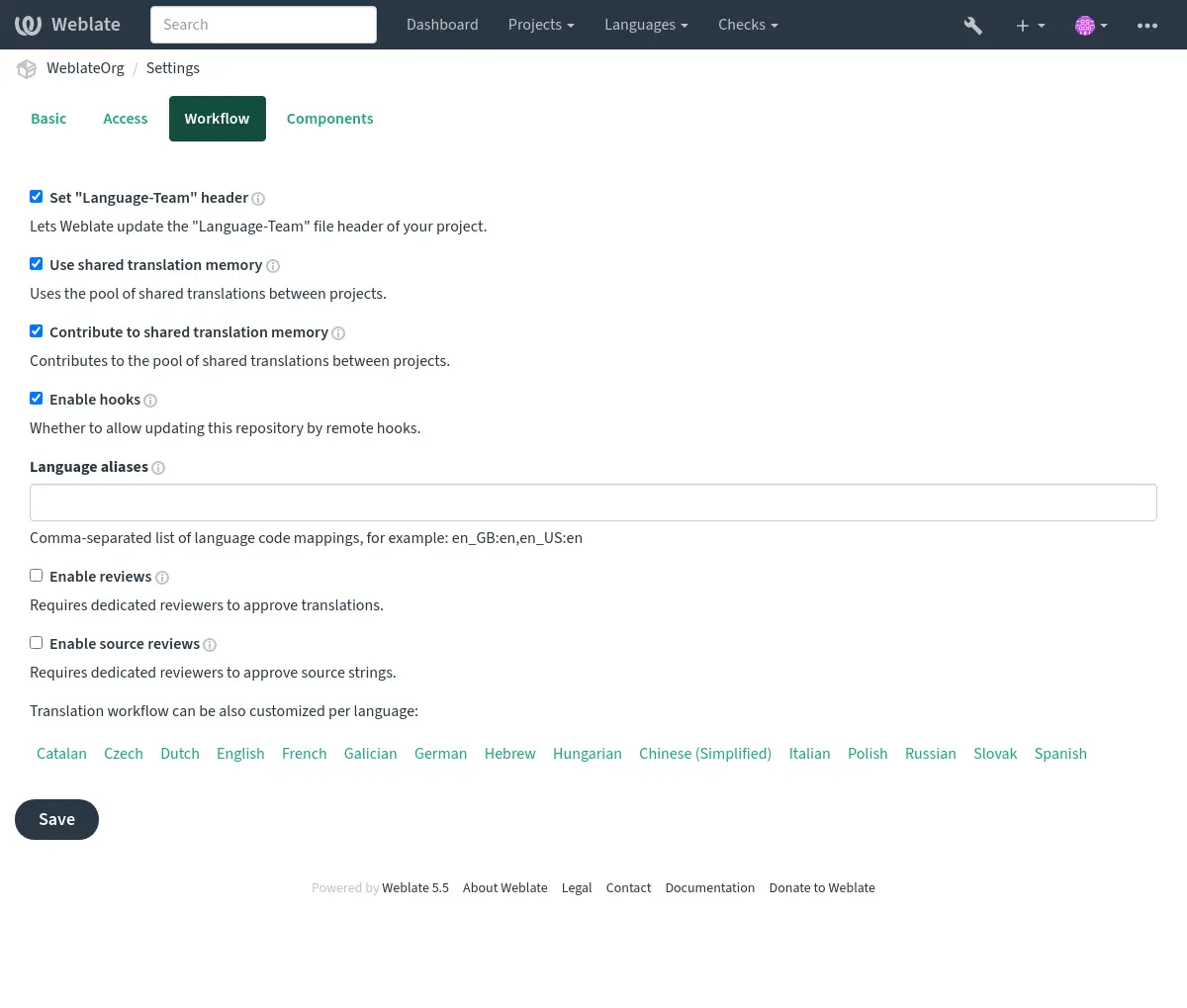
每种语言的审核
To require review only for selected languages, first turn on 启用审核 for the whole project. Then open each project language page that should use different behavior, enable Customize translation workflow for this language in this project, and turn Enable reviews off for languages that should not require review.
Reviewers also need review access for the same language. Add them to a team whose roles include Review strings, and limit that team or the user membership to the language they should review. See 管理每个项目的访问控制 and 全站访问控制 for language-scoped access setup.
If approval buttons are not visible, check both parts of the setup: reviews have to be enabled for that translation, and the signed-in user has to have review permission for that language.
机器翻译和 LLM 工作流
Machine translation services, including large language model (LLM) services, can assist human translators or generate translations for them to edit or approve. Choose a workflow based on when humans should check the generated text and when it should reach the repository.
First, configure the services under Translation services in the project settings or site administration; see Translation services. For LLM services, see LLM 翻译上下文 for the context and instructions used to guide translation.
To process strings in bulk, run 自动翻译, select
Machine translation as the source, and choose the services to use.
For ongoing automation, configure the
自动翻译 add-on on the component with
the same source and desired mode. Use the query state:empty to fill empty
translations without replacing existing human work; see 搜索字符串.
服务辅助的人工翻译
Use this workflow when translators should choose when to use machine translation for each string.
Translators consult the 自动建议 tab in the editor, choose a service result, edit it as needed, and save the translation. These service results are distinct from stored suggestions awaiting acceptance: a human decides what to save. This workflow does not require the Automatic translation add-on and can be combined with 专门的审核者.
含人工编辑的服务翻译
Use this workflow to fill translations automatically and let humans improve them directly.
The service output becomes a translation that humans can edit in the usual editor. It can be committed to the repository without human approval.
For machine drafts that should remain visibly unfinished, choose Add as "Needing edit" instead. Humans edit these drafts and clear the Needs editing state when finished. To keep unfinished drafts out of repository commits, set 翻译质量筛选器 to Skip translations marked as needing editing.
含人工接受的服务建议
Use this workflow when humans should check service output before it becomes a translation.
将 添加为建议 选为自动翻译模式。
Leave 启用审核 off for a single acceptance step. Give the people checking suggestions permission to accept them; see 管理每个项目的访问控制.
Humans check the stored suggestions and accept suitable ones, or edit the proposed text before saving a translation. Suggestions are stored only in Weblate and do not enter translation files until accepted as translations. Accepting a suggestion is separate from approving a translation in the dedicated review workflow.
含审核和质量门槛的服务翻译
Use this workflow when humans should edit machine translations in Weblate, but only reviewer-approved translations should reach the repository.
Generated translations appear as Waiting for review. Translators can edit them, and reviewers check and approve the finished translations. Only after approval are these translations eligible for repository commits. Translators can suggest further changes to approved strings, while reviewers can edit them directly.
Enabling reviews alone does not keep unapproved translations out of commits. The translation quality filter provides that gateway. Keep reviews enabled for every language that should follow this workflow; check any workflow customization overrides.
AI-assisted quality evaluation
Use the 所有质量评估 add-on to check existing human or machine translations for accuracy, fluency, terminology, style, and formatting. It records quality checks without editing translations or approving them.
Configure an LLM service under Translation services, then install AI quality evaluation and select the Evaluation service. Choose a query to limit the translations evaluated. Run the add-on manually, choose an Evaluation frequency, or enable evaluation after translation changes or repository updates. Installation does not run evaluation. See the add-on documentation for provider costs and the data sent to the service.
Translators and reviewers can inspect the findings in the editor or search for
checks such as check:ai_accuracy. Correct the translation or ignore a finding
when appropriate. Combine this with 专门的审核者 when human approval is
required; AI evaluation does not replace approval or change the translation
quality filter used for repository commits.
The component's Diagnostics recommends the add-on when an LLM service is configured. If the selected service becomes unavailable, an error diagnostic links maintainers to the installed add-on's configuration.
重用现有翻译
Use existing translations to bootstrap a new language or component, then have humans adapt matches and fill the remaining gaps.
Run 自动翻译 with Other translation components
as the source, or select the 翻译记忆库 service under
Machine translation. Choose whether matches become translations,
drafts needing editing, or suggestions using the modes described above. Use
state:empty to preserve existing translations. The
自动翻译 add-on can apply this reuse
automatically as strings arrive.
For ongoing consistency, 译文传播 can copy edits to matching strings across components in the same project. Propagation happens while translating; it does not copy translations merely loaded from the repository. See 跨部件保持翻译一致 for its requirements and for checks that help humans resolve differences.
源字符串质量把关
原始源语言字符串通常来自开发者,因为他们编写代码并提供初始字符串。但是,开发者通常并非源语言的母语者,并且提供的源字符串质量通常达不到预期标准。中间翻译可以帮助您解决这个问题——它在开发者和译者之间为字符串设置了额外的质量把关环节。
通过设置 中间语言文件,这个文件被翻译人员/编辑用来将字符串翻译到源语言,尽管其所有者是开发人员(通常使用任意语言,比如 en_devel)。一旦此阶段完成,以保存在 单语言译文模版语言文件 的打磨过的源语言为基础,字符串可用来翻译成目标语言。
使用第二语言进行字符串整合
当无法使用 中间语言文件 整合字符串时,您可以选择其中一种译文作为第二语言。可以在项目(第二语言)或部件(第二语言)中配置语言。然后在译者翻译时会显示该第二语言(见 第二语言),您也可以选择将其用作机器翻译的来源(见 机器翻译的源字符串)。
此设置对混合的语言源字符串非常有用,可以将它们整合为单一翻译,然后用作其他工作的基准。
源字符串审核
启用原文审核 可以对源字符串应用审核流程。启用后,用户可以报告源字符串中的问题。实际过程取决于使用的是双语还是单语格式。
对于单语言格式,源字符串审核功能与 专门的审核者 相似——一旦报告了源字符串的问题,源字符串就会被标记为 需要编辑。
双语格式不允许直接编辑源字符串(通常都是直接从源代码中提取源字符串)。在这种情况下,原文需要审核 标签会被附加到译者报告的字符串上。您应该复查此类字符串,然后要么编辑源代码,要么删除标签。