开始为 Weblate 贡献代码

要理解 Weblate 源代码,请查看 Weblate 源代码、Weblate 前端 和 Weblate 内部。

从代码库开始

想熟悉 Weblate 代码库,不如先试试对带有 good first issue 标签的那些 bug 下手。

欢迎你在无人请求的情况下开始处理这些问题。只要在相关 issue 中宣布一下,让别人知道有人正在处理它。

本地运行 Weblate

开始 Weblate 开发的最舒适的方法是按照 从源码安装。它将给您一个带有可编辑的 Weblate 源代码的 Python 环境。

  1. 克隆 Weblate 源码:

    git clone https://github.com/WeblateOrg/weblate.git
    cd weblate
    
  2. 安装 Weblate 和所有对开发有用的依赖项:

    uv sync --all-extras --dev
    
  3. 启动一台开发服务器:

    uv run weblate runserver
    
  4. 你可能还想启动 Celery 工作进程,这取决于你的配置:

    uv run ./weblate/examples/celery start
    
  5. 若要运行测试(更多细节请参见 Weblate 的本地测试):

    . scripts/test-database.sh
    uv run pytest
    

Development container for tests and lint

The development container prepares Python dependencies, PostgreSQL, Valkey, compiled translations, and static files for running tests and lint checks. It supports ordinary clones and linked Git worktrees. Each checkout has its own containers, network, database, virtual environment, and caches, with no published host ports in the default test profile. The optional application profile runs Weblate and workers for local QA with separate storage and dynamically allocated localhost ports.

Install Docker with the Compose plugin, Git, and Python 3.12 or newer on the host. For the command-line workflow, also install Node.js 20 or newer and the Dev Container CLI:

npm install --global @devcontainers/cli@0.89.0
./scripts/devcontainer up
./scripts/devcontainer doctor
./scripts/devcontainer exec -- uv run pytest weblate/lang/tests.py
./scripts/devcontainer exec -- uv run prek run --all-files

Alternatively, open the checkout in Visual Studio Code with its Dev Containers extension and select Dev Containers: Reopen in Container. Both workflows use .devcontainer/devcontainer.json and wait for bootstrap to finish. The CLI must be installed separately for the default backend of scripts/devcontainer. To use Docker Compose directly without Node.js or the Dev Container CLI, pass --backend compose before the command:

./scripts/devcontainer --backend compose up
./scripts/devcontainer --backend compose exec -- uv run pytest weblate/lang/tests.py

Both backends share the same test environment for a checkout. The Compose backend runs bootstrap on each up invocation. CI checks both backends on ARM Linux runners, including concurrent application QA in separate worktrees.

Bootstrap uses the frozen dependency lock and builds lxml and xmlsec from source, matching CI. Initial setup requires network access to download images and dependencies; lint hooks download their environments on first use. After changing dependencies, rerun:

./scripts/devcontainer bootstrap

Pytest creates and migrates its test database on first use and reuses it on subsequent runs. To recreate it after incompatible migration changes, pass --create-db to pytest. Existing host virtual environments and local weblate/settings.py are not used by the container.

For a separate task, create a worktree and start its environment:

git worktree add ../weblate-task -b task/example
cd ../weblate-task
./scripts/devcontainer up

The environment identifier is derived from the checkout's absolute path, so changing branches preserves the environment. Stop or destroy the environment before moving or deleting its checkout. Linked worktrees also mount the shared Git metadata directory at its original path; Git operations therefore affect the same repository as host Git operations. Other worktrees' sources are not mounted. Unset COMPOSE_PROJECT_NAME when using this workflow, and remove its assignments from .env files in the checkout, .devcontainer, and the directory from which you launch the tools. Initialization rejects these assignments because they can override the checkout-specific project name.

To stop containers while retaining their data, or explicitly delete their containers and volumes:

./scripts/devcontainer stop
./scripts/devcontainer destroy --yes

These commands only manage the current checkout's test environment. They do not remove its source files or the application environment started by rundev.sh. Tests run through ./rundev.sh test share this test environment, so stopping it affects both test launchers. Closing the IDE stops the entire checkout's Compose project, including application QA, while retaining its data. Launcher stop commands affect only their selected profile. Use --all before stop, logs, or destroy to manage both profiles in the checkout.

If setup fails, use ./scripts/devcontainer doctor to inspect the source paths, service connections, dependency consistency, and test assets. Service readiness checks have a timeout. Containers remain available for inspection; their logs can be read with docker compose:

docker compose -f .devcontainer/compose.yaml -f .devcontainer/compose.local.json logs

The generated .devcontainer/compose.local.json is ignored by Git and contains checkout-specific paths. Keep credentials and host configuration out of this file.

The shared development image includes native Chromium and its matching driver from the XtraDeb Ubuntu repository on ARM and amd64. These system packages are not version-pinned. To fetch browser updates, rebuild without the Docker build cache and recreate the test container:

./scripts/devcontainer --backend compose compose -- build --no-cache developer
./scripts/devcontainer --backend compose restart

To verify browser startup, page loading, and JavaScript execution, or run the existing Selenium suite with a required browser:

./scripts/devcontainer doctor --browser
./scripts/devcontainer browser-test
./rundev.sh browser-test -k test_login_form_accessibility
./rundev.sh browser-test --target weblate/trans/tests/test_selenium.py::SeleniumTests::test_js_unit_tests

browser-test prepares the isolated test environment, runs browser diagnostics, and sets CI_SELENIUM=1 so unavailable WebDriver fails instead of skipping. It prints pytest's test totals and skip reasons, preserving legitimate skips and pytest's exit status. Additional arguments are passed to pytest; repeat --target to select specific test paths or node IDs instead of the default Selenium module. doctor --browser checks the test profile through either launcher and reports installed browser and driver versions.

The image sets WEBLATE_TEST_CHROME_BINARY and WEBLATE_TEST_CHROMEDRIVER to the installed executable paths. These developer-only variables are shared by the diagnostic and Selenium tests, avoiding automatic browser downloads. Outside the image, leaving them unset preserves Selenium's default browser discovery. Use your own browser with the application profile's URL for exploratory QA.

Linux and WSL2 with a checkout in the Linux filesystem are the primary targets. macOS Docker Desktop and Codespaces use the same configuration, but are not covered by the Linux CI smoke test. Native Windows paths and remote Docker daemons are not supported by the host-path mounts.

在 Docker 中本地运行 Weblate

Install Docker with the Compose plugin, Git, and Python 3.12 or newer on the host. Start the development application with:

./rundev.sh

This is equivalent to ./scripts/devcontainer --profile app up. Both commands use the same launcher and Compose project as the test environment, without requiring Node.js or the Dev Container CLI for the application profile.

The launcher builds the development image, starts Weblate with supervised web and Celery workers, and prints the application and Maildev mailbox URLs when Weblate is ready. Sign in as admin with password admin. The installation starts empty; continue with 添加翻译项目和部件.

Docker assigns free HTTP ports bound to 127.0.0.1. Each worktree has its own application database, Valkey instance, data, virtual environment, home, and caches, separate from the test profile. SMTP, PostgreSQL, and Valkey ports are not published. Weblate uses the discovered application URL for generated links and authentication origins. To display the current URLs again:

./rundev.sh urls
./rundev.sh urls --json

To exercise real background workers through complete application journeys:

./rundev.sh application-test

This is also available as ./scripts/devcontainer application-test. It starts the application profile and uses its administrator API token to import a small component archive, save a translation, request a background commit, and inspect the committed Git file. It then checks the exported ZIP, eventual translation statistics in the API and rendered application page, translation memory, and a translation notification delivered to Maildev. Export generation itself is synchronous; its contents must reflect the completed background work.

A separate transaction check queues a real task before its fixture row is committed, waits for a retry, and verifies successful redelivery after commit. The suite requires non-eager Celery and the application's Valkey broker and Maildev. Polls have deadlines, worker task failures include their tracebacks, and failures print the application service logs. CI runs these journeys in both the Docker development job and concurrent isolated worktrees.

Each invocation creates a uniquely named celery-qa- project and notification recipient with an unusable password. These fixtures remain available for inspection, including after failure; the suite does not reset existing data. Remove these projects and users through the application when finished, or destroy --yes the disposable application environment.

Ports can change after containers are recreated or restarted. Use ./rundev.sh restart to restart and rediscover them; direct Docker restarts cannot initialize the application domain. Ordinary startup reuses unchanged containers. Application containers do not restart automatically after Docker restarts. When the image changes Python minor versions, startup recreates the application virtual environment and reinstalls dependencies. Application data is retained.

To access the application database from inside its container:

./rundev.sh exec -- weblate dbshell

The application service definitions are in dev-docker/docker-compose.yml and are included by the shared Compose configuration. Use the launchers to initialize paths and ports. For other Compose operations, use ./rundev.sh compose -- COMMAND (or existing shortcuts such as ./rundev.sh ps). Project-wide Compose commands can affect both profiles.

Existing development environments are not migrated automatically. Before updating from the old launcher, stop its containers with its ./rundev.sh stop command. If already updated, identify the old containers using docker ps and stop them explicitly. The new launcher leaves their databases, volumes, and dev-docker/data/ untouched and starts with fresh application data.

要执行测试,带 test 参数和 pytest 变量运行此脚本,比如只在 weblate.machine 中运行测试:

./rundev.sh test --exitfirst weblate/machine

The command automatically starts and bootstraps the development container using Docker Compose, without requiring the Dev Container CLI. It runs independently of the application and workers, with separate databases, virtual environments, and caches. Each invocation refreshes dependencies and test assets before running pytest.

要展示程序日志:

./rundev.sh logs

To stop only the application profile, retaining its data:

./rundev.sh stop

Use ./scripts/devcontainer stop to stop only tests. To stop or destroy both profiles, including their volumes when destroying:

./rundev.sh --all stop
./rundev.sh --all destroy --yes

Without --all, destroy --yes removes only the selected profile's containers and volumes. Other worktrees remain running.

警告

容器并不适合生产适用,因为牺牲了安全性来简化开发。

引导你的开发实例

您会想要使用 import_demo 来新建演示翻译,并且使用 createadmin 来创建一名管理用户。

如果也安装了 账单,可以使用 billing_demo 创建演示账单项目。

使用 PyCharm 为 Weblate 编写代码

PyCharm 是一个著名的 Python IDE,以下是一些指导准则,可以帮助你在其中设置你的 Weblate 项目。

考虑到你刚刚将 GitHub 仓库复制到一个文件夹中,只需使用 PyCharm 打开它。一旦 IDE 打开,第一步要做的是指定你想要使用的解释器:
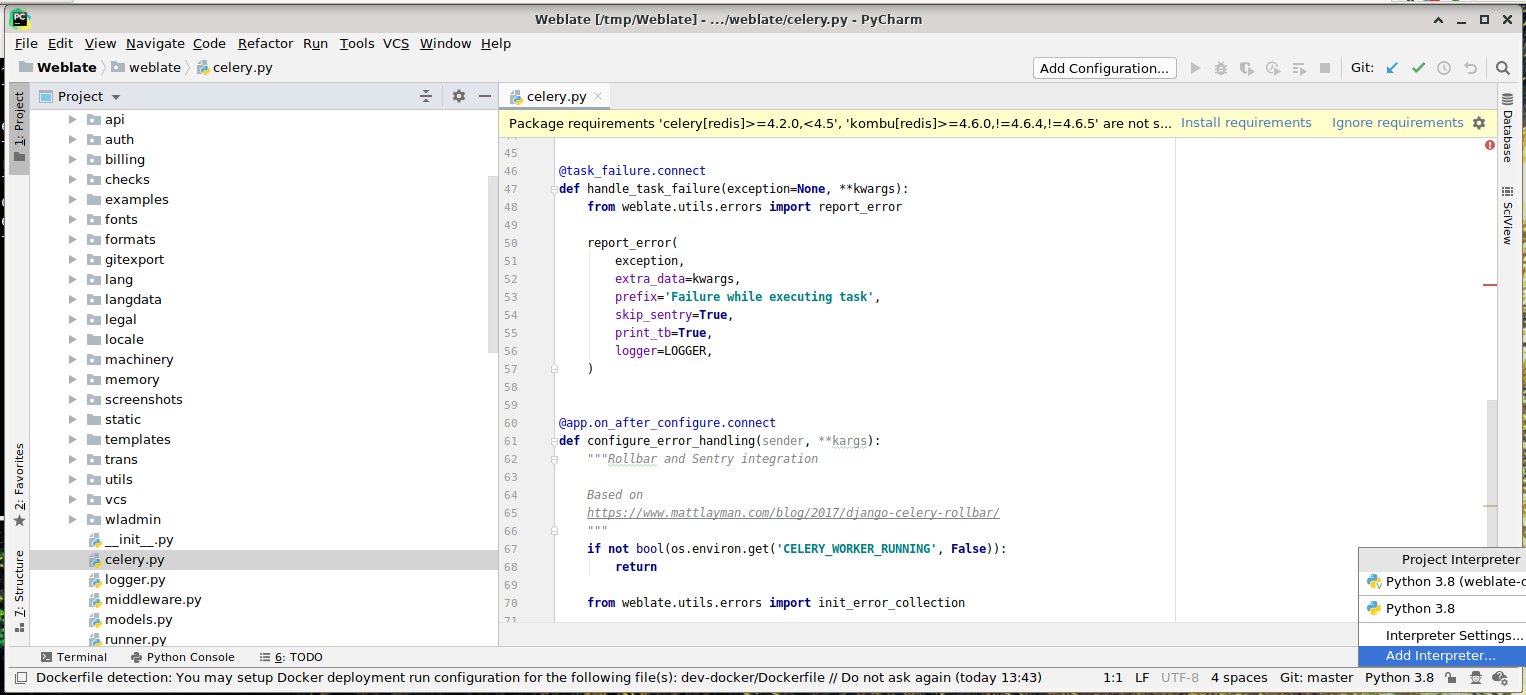
../_images/pycharm-1.png

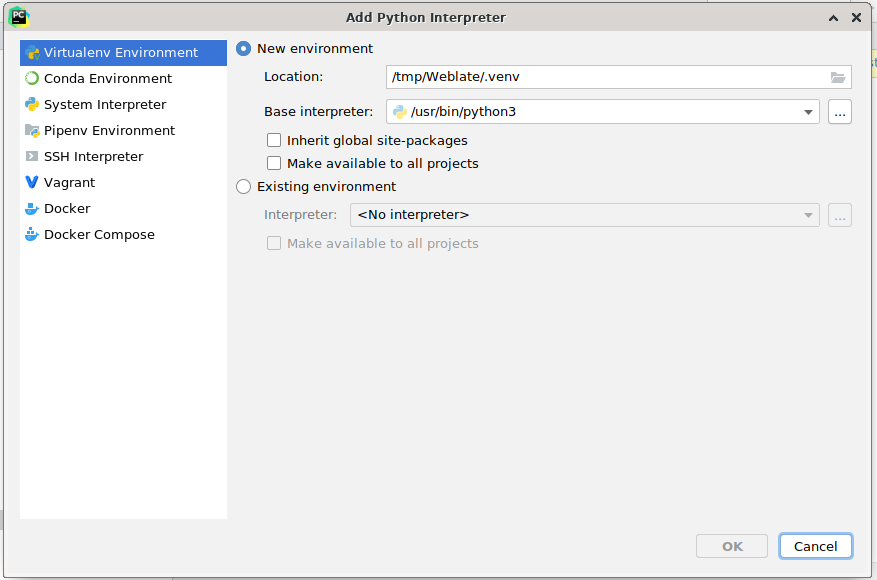
Select the .venv environment created by uv sync --all-extras --dev to match the command-line development setup. You can also let PyCharm create a Python environment for you, but the uv-managed environment is preferred:
../_images/pycharm-2.png

Don't forget to install the dependencies once the interpreter is set. When using the preferred uv-managed environment, run uv sync --all-extras --dev from the console.

第二步是设置正确的信息来在 PyCharm 中本地使用 Django:目的是能够立即触发 IDE 中的单元测试。为此,你需要指定该 Django 项目的根路径及其设置路径:
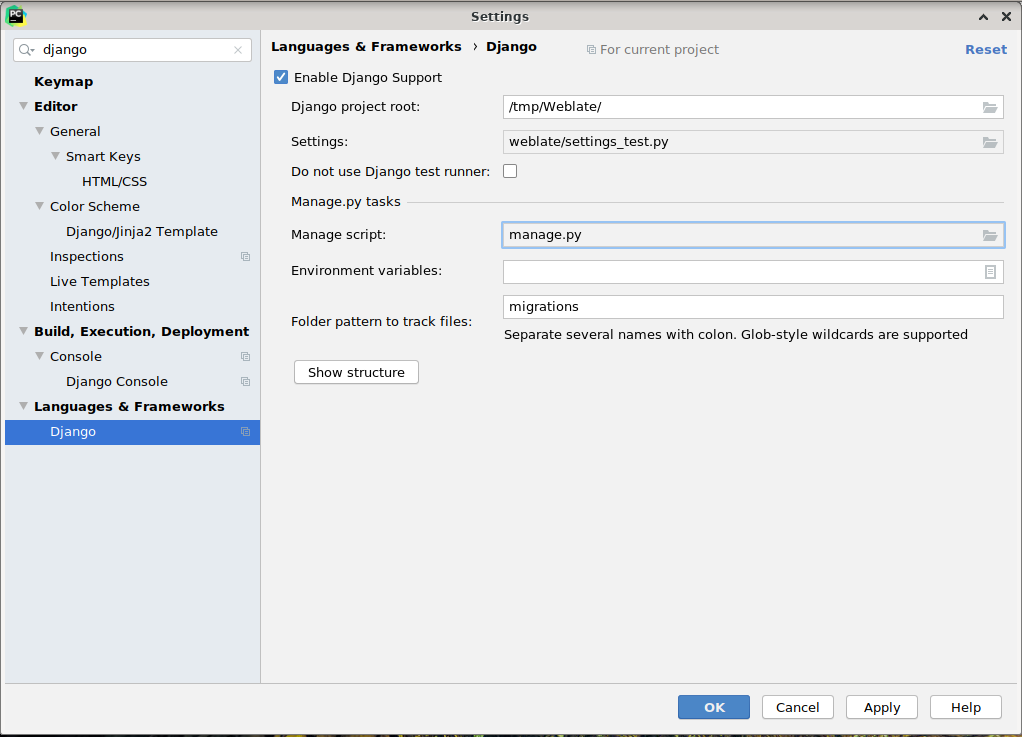
../_images/pycharm-3.png

请注意,Django project root 是仓库的实际根目录,而不是 Weblate 子目录。关于设置,你可以使用仓库中的 weblate/settings_test.py,您也可以创建自己的设置并将其设置在那里。

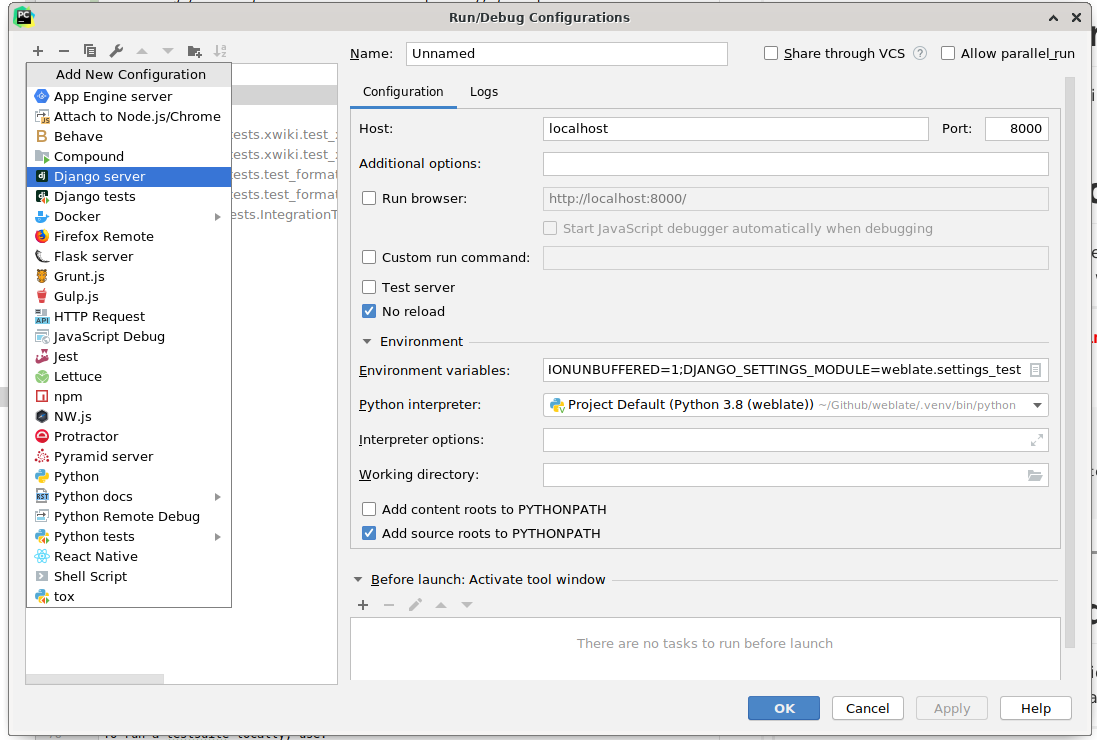
最后一步是运行服务器,并将断点放置在代码中而能够调试它。这通过新建新的 Django Server 配置来完成:

../_images/pycharm-4.png ../_images/pycharm-5.png

提示

小心被称为 No reload 的属性:如果你修改文件,它会阻止服务器被实时重新加载。这允许保留现有的调试器断点,而它们通常会在重新加载服务器时被丢弃。