代码托管集成
Weblate integrates with code-hosting sites in several separate places: repository access, incoming notifications, and pushing translations back. The exact setup depends on whether you use Hosted Weblate or run your own Weblate instance, and on whether Weblate should push directly or create pull or merge requests.
Use this page as a provider-oriented checklist. The individual setting pages remain the canonical reference for setting syntax.
设置概况
授予 Weblate 访问该仓库的权限。
For GitHub repositories on Hosted Weblate, use the Hosted Weblate app from Weblate's Connect GitHub account flow. The App gives Hosted Weblate repository access without inviting the hosted weblate user.
对其他的 Hosted Weblate 仓库和 GitHub 应用工作流之外的直接 SSH 推送,在可用的地方添加托管的 weblate 用户,见 从 Hosted Weblate 访问仓库。
对于自行托管的Weblate,建立一个专用代码托管用户,并使用Weblate的SSH密钥或使用一个HTTP令牌准许访问,参见 访问代码托管站点(GitHub, GitLab, Bitbucket, Azure DevOps, ...)上的仓库。
配置 源代码仓库 让 Weblate 可以克隆该仓库。
Configure incoming notifications so Weblate pulls changes soon after a push. The repository webhook or app must point to the matching Weblate hook URL, and the project must have 启用钩子 enabled.
决定Weblate应该如何推送译文回来:
Optionally set 推送分支 when Weblate should push to a branch in the upstream repository instead of using a fork where supported.
推送 Weblate 的更改
每个翻译部件可以设置一个推送 URL(请参见 仓库推送 URL),如果是那样, Weblate 能够将更改推送到远程仓库。Weblate 还可以配置在每次提交时自动推送更改(这默认开启,请参见 提交时推送)。
If you do not want changes to be pushed automatically, you can push manually
under Repository maintenance or using the API via
wlc push.
如果不想要 Weblate 直接推送,系统也支持 GitHub 拉取请求、GitLab 合并请求、Gitea 拉取请求、Pagure 合并请求、Azure DevOps 拉取请求 或 Gerrit 审核请求 审核。您可以通过在 部件配置 中选择 GitHub、GitLab、Gitea、Gerrit、Azure DevOps 或 Pagure 作为 版本控制系统 来激活这些。
整体上,Git、Mercurial、GitHub、GitLab、Gitea、Pagure、Azure DevOps、Gerrit、Bitbucket 数据中心和 Bitbucket 云提供以下选项:
需要的设置 |
|||
|---|---|---|---|
不推送 |
空 |
空 |
|
直接推送 |
SSH URL |
空 |
|
推送到单独的分支 |
SSH URL |
分支名称 |
|
不推送 |
空 |
空 |
|
直接推送 |
SSH URL |
空 |
|
来自派生的 GitHub 拉取请求 |
空 |
空 |
|
来自分支的 GitHub 拉取请求 |
SSH URL [1] |
分支名称 |
|
来自派生的 GitLab 合并请求 |
空 |
空 |
|
来自分支的 GitLab 合并请求 |
SSH URL [1] |
分支名称 |
|
来自派生的 Gitea 合并请求 |
空 |
空 |
|
来自分支的 Gitea 合并请求 |
SSH URL [1] |
分支名称 |
|
来自派生的 Pargue 合并请求 |
空 |
空 |
|
来自分支的 Pagure 合并请求 |
SSH URL [1] |
分支名称 |
|
来自派生的 Azure DevOps 拉取请求 |
空 |
空 |
|
来自分支的 Azure DevOps 拉取请求 |
SSH URL [1] |
分支名称 |
|
Gerrit 审核 |
SSH URL |
目标分支名(可选) |
|
来自分叉的 BitBucket 数据中心拉取请求 |
空 |
空 |
|
来自分支的 Bitbucket 数据中心拉取请求 |
SSH URL [1] |
分支名称 |
|
来自派生的 Bitbucket Cloud 拉取请求 |
空 |
空 |
|
来自分支的 Bitbucket Cloud 拉取请求 |
SSH URL [1] |
分支名称 |
GitHub
GitHub 仓库访问
Hosted Weblate GitHub 应用
On Hosted Weblate, the recommended setup is to connect the Hosted Weblate app from the Weblate workspace where your project lives. Use the Connect GitHub account flow, install the App on the GitHub user or organization that owns your repositories, grant it access to the repositories you want to translate, and import components from the connected GitHub account.
The App-backed workflow uses GitHub installation access tokens for cloning, pushing translation branches, creating pull requests, and receiving incoming notifications. You do not need to invite the Hosted Weblate weblate GitHub user or configure a separate repository webhook for components imported this way.
请仅当有意在 GitHub 应用工作流外配置直接 SSH 推送时使用 Hosted Weblate weblate GitHub 用户,见 从 Hosted Weblate 访问仓库。
HTTPS 加个人访问令牌
For a single private repository, HTTPS access with an access token is usually the simplest setup when the provider supports Git over HTTPS. Use the provider-required username and token in 源代码仓库.
Configure 仓库推送 URL only when Weblate should push changes directly or when the chosen workflow requires a push URL, see 推送 Weblate 的更改.
The token needs read access for cloning and write access for pushing. Provider-specific VCS backends that create pull or merge requests might require separate API credentials.
要使用这种方式:
按照 创建用于命令行使用的访问令牌 所述创建个人访问令牌。
在仓库 URL 中包括令牌:
https://username:token@github.com/owner/repo.git。
这适合刚开始使用 Weblate 或只有单个仓库的情况。
SSH 加专门用户
For setups with multiple repositories, use SSH access with a dedicated code
hosting user for Weblate. Add Weblate's public SSH key to that user, grant the
user access to the repositories, and use SSH URLs in 源代码仓库,
for example git@example.com:group/project.git.
Configure 仓库推送 URL only when Weblate should push changes directly or when the chosen workflow requires a push URL, see 推送 Weblate 的更改.
This also avoids provider restrictions on SSH key reuse. Some code hosting sites allow a public SSH key to be added only once, or only to a single user or deploy key entry. Keeping Weblate's SSH key on a dedicated user lets that user be granted access to multiple repositories without reusing the key in several places.
This keeps personal, project, or API access tokens out of repository URLs. Provider API credentials are still needed when using a provider-specific VCS backend to create pull or merge requests; those credentials are configured separately from the Git repository URL.
For GitHub, create a dedicated user, for example weblate-bot, and use
GitHub SSH URLs for your repositories, for example
git@github.com:owner/repo.git.
On Hosted Weblate, use this SSH-user workflow only for direct SSH pushes outside the recommended Hosted Weblate app workflow.
备注
将 GitHub 用于拉取请求时,推送分支 配置影响行为:如未设置,项目将被分叉,更改通过分叉推送。如已设置,更改将推送到上游仓库和选择的分支。
GitHub 通知
Weblate 自带对 GitHub 的原生支持。
如果你在用 Hosted Weblate,使用来自 Weblate 的 连接 GitHub 账户 流程的 Hosted Weblate 应用。它使用 GitHub App webhooks,因此你无需在 GitHub 中配置单独的 Webhook。从连接的 GitHub 账户导入的部件不邀请 Hosted Weblate weblate GitHub 用户,同样用该应用进行仓库访问和拉取请求。
The Hosted Weblate legacy app is kept for existing webhook-only setups. Use it only when you need the legacy app to deliver GitHub notifications to Hosted Weblate.
For self-hosted Weblate, register the GitHub App using the in-app registration flow described below. Weblate generates the App manifest, GitHub returns the credentials, and they are stored in the database - there is no settings-based configuration.
注册来自 Weblate 的 GitHub 应用
The fastest way to add the GitHub App is to let Weblate generate a GitHub App manifest with the correct permissions, events, and webhook URL pre-filled:
Sign in to Weblate with an account that has management access.
Open Manage → Code-hosting connections → Register Weblate GitHub App.
Fill in the form. The GitHub host defaults to
github.com; change it to your GitHub Enterprise hostname if needed. Leave Organization blank to register the App under your personal account, or enter an organization slug to register it under that org.Click Continue to GitHub and confirm on GitHub's Create GitHub App page (you can still rename the App there).
GitHub redirects back to Weblate, which exchanges the temporary code for the App ID, private key, webhook secret, and slug and stores them in the database. The Connect GitHub account button is available immediately afterwards.
The manifest requests the permissions and event subscriptions Weblate needs
(Contents and Pull requests read/write, Metadata read-only,
Organization administration read-only, Workflows read/write, and the
Installation, Meta and Push events), and sets the callback, setup
and per-app webhook URLs automatically, so no manual GitHub App
configuration is required. GitHub delivers the Installation and
Installation repositories events to all GitHub Apps by default.
GitHub only offers accounts where the signed-in GitHub user can install or request the app. If an organization is not shown during the install flow, check the user's organization role and the organization's GitHub App installation restrictions. On GitHub.com, public apps can be installed on other accounts; private apps can only be installed on the account that owns the app.
连接工作区
Connected GitHub accounts are bound to a Weblate workspace. A user with project administration rights for any project in a workspace can connect a GitHub account on that workspace. After connecting, every project in the workspace can import components from repositories the GitHub App installation has access to. For organization accounts, Weblate verifies that the install-time GitHub user can administer the organization installation.
Projects that are not in a workspace cannot connect a GitHub account through the GitHub App.
Components imported through the GitHub App flow use the dedicated GitHub (via Weblate GitHub app) VCS backend. The component settings UI keeps the repository URL read-only to prevent the App-issued credentials from being redirected to an unrelated repository.
应用的 Webhook URL
Each registered Weblate GitHub App has its own webhook URL containing an opaque token that uniquely identifies a single registered App:
https://weblate.example.com/hooks/integrations/<webhook_token>/
如果没在使用 GitHub 应用,请在仓库设置中添加 Weblate webhook (Webhooks) 接收到 Github 仓库的每个推送的通知,如下方图片显示的那样:
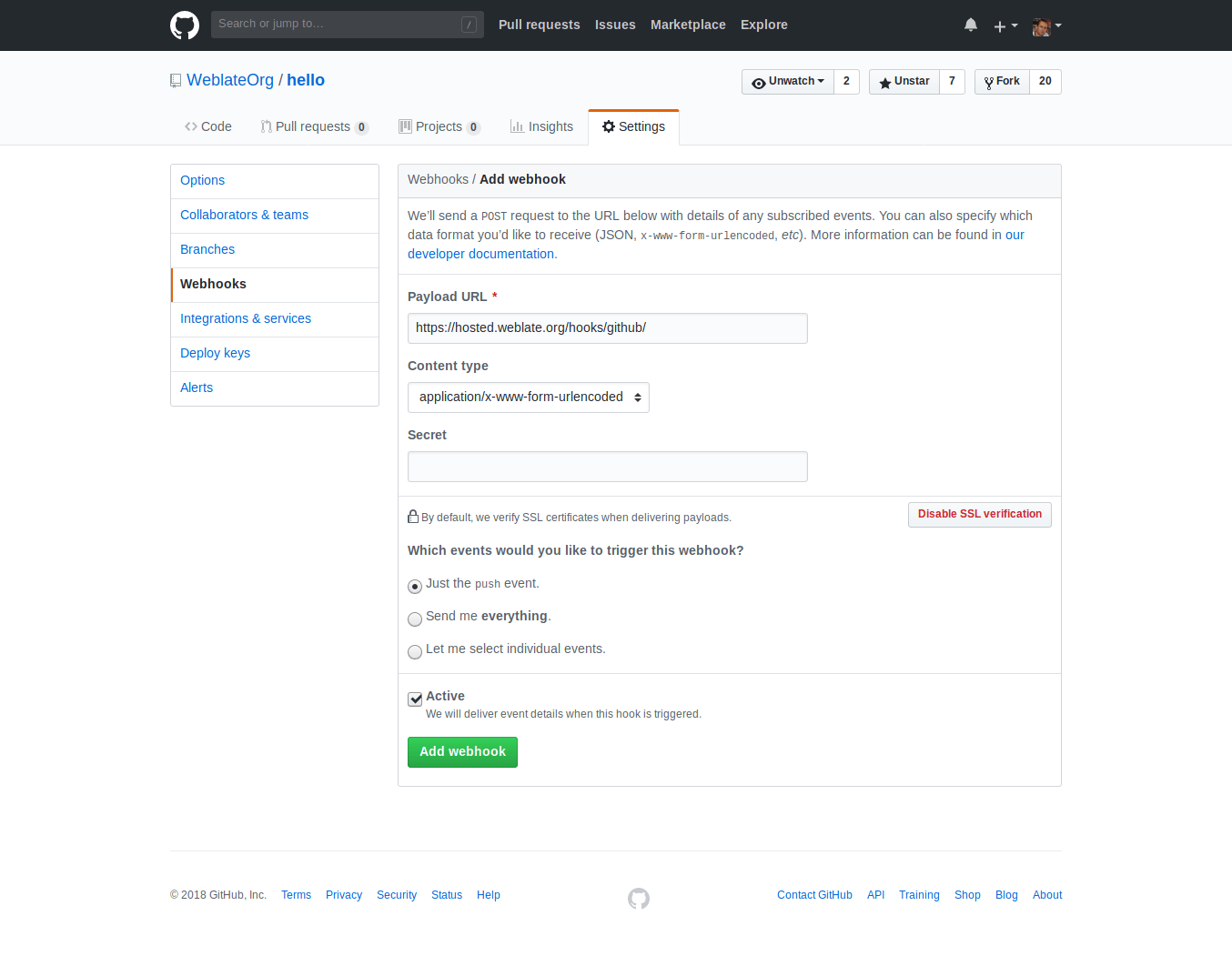
Payload URL 由附加 /hooks/github/ 的 Weblate URL 所组成。比如,Hosted Weblate 服务的 URL 为 https://hosted.weblate.org/hooks/github/.
可以将其他值保留为默认设置。Weblate 可以处理两种内容类型,并只消费 push 事件。
GitHub 拉取请求
这在 Git 顶部添加了一个薄层,使用 GitHub API 允许将翻译更改作为拉取请求推送,而不是直接推送到仓库。
Git 将更改直接推送到仓库,而 GitHub 后端创建拉取请求。仅访问 Git 仓库不需要后者。
To create pull requests, select GitHub as
版本控制系统 and configure GITHUB_CREDENTIALS. For
GitHub.com, use
api.github.com as the API host. The token must allow Weblate to read and
write repository contents and create pull requests. If Weblate should fork
private repositories, the token might also need administration access.
GitLab
GitLab 仓库访问
HTTPS 加个人或项目访问令牌
For a single private repository, HTTPS access with an access token is usually the simplest setup when the provider supports Git over HTTPS. Use the provider-required username and token in 源代码仓库.
Configure 仓库推送 URL only when Weblate should push changes directly or when the chosen workflow requires a push URL, see 推送 Weblate 的更改.
The token needs read access for cloning and write access for pushing. Provider-specific VCS backends that create pull or merge requests might require separate API credentials.
对于 GitLab,令牌需要 write_repository 作用域。项目访问令牌需要 Developer 角色进行推送。
URL 需要包含用户名。对个人访问令牌,它是实际用户名:https://user:personal_access_token@gitlab.com/example/example.git;对项目访问令牌,可以是非空白值:https://example:project_access_token@gitlab.com/example/example.git 。
备注
不同的 GitLab 版本使用项目访问令牌的规则各异。非空白值是当前要求,但较老版本有不同预期(项目名、bot 用户名)。如不确定请查看匹配你版本的 GitLab 文档。
SSH 加专门用户
For setups with multiple repositories, use SSH access with a dedicated code
hosting user for Weblate. Add Weblate's public SSH key to that user, grant the
user access to the repositories, and use SSH URLs in 源代码仓库,
for example git@example.com:group/project.git.
Configure 仓库推送 URL only when Weblate should push changes directly or when the chosen workflow requires a push URL, see 推送 Weblate 的更改.
This also avoids provider restrictions on SSH key reuse. Some code hosting sites allow a public SSH key to be added only once, or only to a single user or deploy key entry. Keeping Weblate's SSH key on a dedicated user lets that user be granted access to multiple repositories without reusing the key in several places.
This keeps personal, project, or API access tokens out of repository URLs. Provider API credentials are still needed when using a provider-specific VCS backend to create pull or merge requests; those credentials are configured separately from the Git repository URL.
For GitLab, create a dedicated user and use GitLab SSH URLs, for example
git@gitlab.com:group/project.git.
对于 GitLab 上的 Hosted Weblate 仓库,添加含必需的仓库权限的 hosted weblate 用户,见 从 Hosted Weblate 访问仓库。
GitLab 通知
Weblate 支持 GitLab hooks,添加项目的 webhook,目的地为你的 Weblate 安装上的 /hooks/gitlab/ URL,例如 https://hosted.weblate.org/hooks/gitlab/ 。
故障排除
如果 webhooks 被交付,检查 GitLab webhook request history.
响应载荷包含匹配部件的信息。
GitLab 合并请求
这使用 GitLab API 在 Git 上添加了一个薄层,以允许将翻译更改作为合并请求推送,而不是直接推送到仓库。
不需要使用它来访问 Git 仓库,普通的 Git 工作方式相同,唯一的区别是如何处理推送到仓库。使用 Git 将更改直接推送到仓库,而 GitLab 后端创建合并请求。
To create merge requests, select GitLab as
版本控制系统 and configure GITLAB_CREDENTIALS.
推送分支 配置影响 Weblate 开合并请求前推送更改的位置:如未设置,项目将被分叉,更改通过分叉推送。如已设置,更改将推送到上游仓库和选择的分支。
Gitea, Forgejo, and Codeberg
Gitea、Forgejo 和 Codeberg 仓库访问
HTTPS 加访问令牌
For a single private repository, HTTPS access with an access token is usually the simplest setup when the provider supports Git over HTTPS. Use the provider-required username and token in 源代码仓库.
Configure 仓库推送 URL only when Weblate should push changes directly or when the chosen workflow requires a push URL, see 推送 Weblate 的更改.
The token needs read access for cloning and write access for pushing. Provider-specific VCS backends that create pull or merge requests might require separate API credentials.
SSH 加专门用户
For setups with multiple repositories, use SSH access with a dedicated code
hosting user for Weblate. Add Weblate's public SSH key to that user, grant the
user access to the repositories, and use SSH URLs in 源代码仓库,
for example git@example.com:group/project.git.
Configure 仓库推送 URL only when Weblate should push changes directly or when the chosen workflow requires a push URL, see 推送 Weblate 的更改.
This also avoids provider restrictions on SSH key reuse. Some code hosting sites allow a public SSH key to be added only once, or only to a single user or deploy key entry. Keeping Weblate's SSH key on a dedicated user lets that user be granted access to multiple repositories without reusing the key in several places.
This keeps personal, project, or API access tokens out of repository URLs. Provider API credentials are still needed when using a provider-specific VCS backend to create pull or merge requests; those credentials are configured separately from the Git repository URL.
对于 Codeberg 上的 Hosted Weblate 仓库,添加含必需的仓库权限的 hosted weblate 用户,见 从 Hosted Weblate 访问仓库。
Gitea 通知
Weblate 已经支持 Gitea webhooks,为 Push events 事件添加 Gitea Webhook,目的地为你的 Weblate 安装上的 /hooks/gitea/ URL,例如 https://hosted.weblate.org/hooks/gitea/。这可以在 Settings 之下的 Webhooks 中完成。
Forgejo 通知
Weblate 支持 Forgejo webhooks,在你的 Weblate 安装上添加含目的地 Push events 事件的 Forgejo Webhook 到 /hooks/forgejo/ URL,如 https://hosted.weblate.org/hooks/forgejo/。可以在仓库 设置 下的 Webhooks 中完成此配置。
Gitea 拉取请求
Added in version 4.12.
这使用 Gitea API 在 Git 上添加了一个薄层,以允许将翻译更改作为拉取请求推送,而不是直接推送到仓库。
不需要使用它来访问 Git 仓库,普通的 Git 工作方式相同,唯一的区别是如何处理推送到仓库。使用 Git 将更改直接推送到仓库,而 Gitea 后端创建拉取请求。
To create pull requests, select Gitea as
版本控制系统 and configure GITEA_CREDENTIALS.
Bitbucket
Bitbucket 仓库访问
HTTPS 加访问令牌
For a single private repository, HTTPS access with an access token is usually the simplest setup when the provider supports Git over HTTPS. Use the provider-required username and token in 源代码仓库.
Configure 仓库推送 URL only when Weblate should push changes directly or when the chosen workflow requires a push URL, see 推送 Weblate 的更改.
The token needs read access for cloning and write access for pushing. Provider-specific VCS backends that create pull or merge requests might require separate API credentials.
SSH 加专门用户
For setups with multiple repositories, use SSH access with a dedicated code
hosting user for Weblate. Add Weblate's public SSH key to that user, grant the
user access to the repositories, and use SSH URLs in 源代码仓库,
for example git@example.com:group/project.git.
Configure 仓库推送 URL only when Weblate should push changes directly or when the chosen workflow requires a push URL, see 推送 Weblate 的更改.
This also avoids provider restrictions on SSH key reuse. Some code hosting sites allow a public SSH key to be added only once, or only to a single user or deploy key entry. Keeping Weblate's SSH key on a dedicated user lets that user be granted access to multiple repositories without reusing the key in several places.
This keeps personal, project, or API access tokens out of repository URLs. Provider API credentials are still needed when using a provider-specific VCS backend to create pull or merge requests; those credentials are configured separately from the Git repository URL.
对于 BitBucket 上的 Hosted Weblate 仓库,添加含必需的仓库权限的 hosted weblate 用户,见 从 Hosted Weblate 访问仓库。
Bitbucket 通知
Weblate 支持 Bitbucket webhooks。添加仓库推送时触发的 webhook,目的地为你的 Weblate 安装上的 /hooks/bitbucket/,例如 https://hosted.weblate.org/hooks/bitbucket/。

Bitbucket 数据中心拉取请求
Added in version 4.16.
这使用 Bitbucket 数据中心 API 在 Git 上添加了一个薄层,以允许将翻译更改作为拉取请求推送,而不是直接推送到仓库。
警告
这不支持 Bitbucket Cloud API。
不需要使用它来访问 Git 仓库,普通的 Git 工作方式相同,唯一的区别是如何处理推送到仓库。使用 Git 将更改直接推送到仓库,而 Bitbucket 数据中心 后端创建拉取请求。
要创建拉去请求,将 Bitbucket 数据中心 选为 版本控制系统 并配置 BITBUCKETSERVER_CREDENTIALS。
Bitbucket Cloud 拉取请求
Added in version 5.8.
这使用 Bitbucket Cloud API 在 Git 上添加了一个薄层,以允许将翻译更改作为拉取请求推送,而不是直接推送到仓库。
警告
这和 BitBucket 数据中心 API 不同。
不需要使用它来访问 Git 仓库,普通的 Git 工作方式相同,唯一的区别是如何处理推送到仓库。使用 Git 将更改直接推送到仓库,而 Bitbucket Cloud 后端创建拉取请求。
要创建拉取请求,将 Bitbucket Cloud 选为 版本控制系统 并配置 BITBUCKETCLOUD_CREDENTIALS。
Azure DevOps
Azure Repos 仓库访问
HTTPS 加访问令牌
For a single private repository, HTTPS access with an access token is usually the simplest setup when the provider supports Git over HTTPS. Use the provider-required username and token in 源代码仓库.
Configure 仓库推送 URL only when Weblate should push changes directly or when the chosen workflow requires a push URL, see 推送 Weblate 的更改.
The token needs read access for cloning and write access for pushing. Provider-specific VCS backends that create pull or merge requests might require separate API credentials.
Use the HTTPS clone URL shown by Azure Repos for the repository.
SSH 加专门用户
For setups with multiple repositories, use SSH access with a dedicated code
hosting user for Weblate. Add Weblate's public SSH key to that user, grant the
user access to the repositories, and use SSH URLs in 源代码仓库,
for example git@example.com:group/project.git.
Configure 仓库推送 URL only when Weblate should push changes directly or when the chosen workflow requires a push URL, see 推送 Weblate 的更改.
This also avoids provider restrictions on SSH key reuse. Some code hosting sites allow a public SSH key to be added only once, or only to a single user or deploy key entry. Keeping Weblate's SSH key on a dedicated user lets that user be granted access to multiple repositories without reusing the key in several places.
This keeps personal, project, or API access tokens out of repository URLs. Provider API credentials are still needed when using a provider-specific VCS backend to create pull or merge requests; those credentials are configured separately from the Git repository URL.
Use the SSH URL shown by Azure Repos for the repository.
Azure 仓库通知
Weblate 支持 Azure Repos web hooks。为 Code pushed 事件添加 webhook,目的地为你的 Weblate 安装上的 /hooks/azure/ URL,例如 https://hosted.weblate.org/hooks/azure/。这可以在 Project settings 之下的 Service hooks 中完成。
Azure DevOps 拉取请求
这在 Git 顶部添加了一个薄层,使用 Azure DevOps API 允许将翻译更改作为拉取请求推送,而不是直接推送到仓库。
Git 将更改直接推送到仓库,而 Azure DevOps 后端创建拉取请求。仅访问 Git 仓库不需要后者。
To create pull requests, select Azure DevOps as
版本控制系统 and configure AZURE_DEVOPS_CREDENTIALS.
Pagure
Pagure 仓库访问
HTTPS 加访问令牌
For a single private repository, HTTPS access with an access token is usually the simplest setup when the provider supports Git over HTTPS. Use the provider-required username and token in 源代码仓库.
Configure 仓库推送 URL only when Weblate should push changes directly or when the chosen workflow requires a push URL, see 推送 Weblate 的更改.
The token needs read access for cloning and write access for pushing. Provider-specific VCS backends that create pull or merge requests might require separate API credentials.
SSH 加专门用户
For setups with multiple repositories, use SSH access with a dedicated code
hosting user for Weblate. Add Weblate's public SSH key to that user, grant the
user access to the repositories, and use SSH URLs in 源代码仓库,
for example git@example.com:group/project.git.
Configure 仓库推送 URL only when Weblate should push changes directly or when the chosen workflow requires a push URL, see 推送 Weblate 的更改.
This also avoids provider restrictions on SSH key reuse. Some code hosting sites allow a public SSH key to be added only once, or only to a single user or deploy key entry. Keeping Weblate's SSH key on a dedicated user lets that user be granted access to multiple repositories without reusing the key in several places.
This keeps personal, project, or API access tokens out of repository URLs. Provider API credentials are still needed when using a provider-specific VCS backend to create pull or merge requests; those credentials are configured separately from the Git repository URL.
Pagure 通知
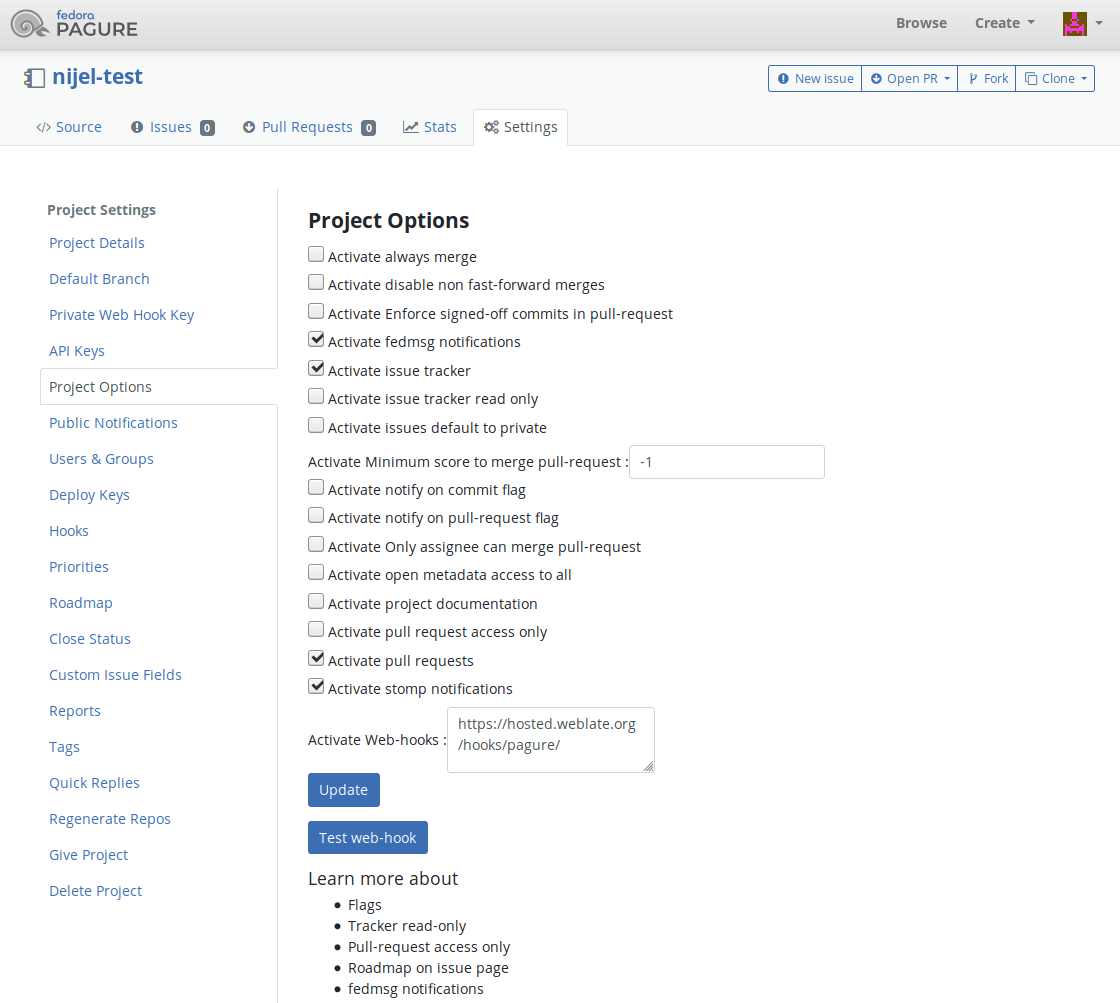
Weblate 已经支持 Pagure hooks。添加项目的 webhook,目的地为你的 Weblate 安装上的 /hooks/pagure/(例如 https://hosted.weblate.org/hooks/pagure/)。这可以在 Project options 之下的 Activate Web-hooks 中完成:
Pagure 合并请求
Added in version 4.3.2.
这使用 Pagure API 在 Git 上添加了一个薄层,以允许将翻译更改作为合并请求推送,而不是直接推送到仓库。
不需要使用它来访问 Git 仓库,普通的 Git 工作方式相同,唯一的区别是如何处理推送到仓库。使用 Git 将更改直接推送到仓库,而 Pagure 后端创建合并请求。
To create merge requests, select Pagure as
版本控制系统 and configure PAGURE_CREDENTIALS.
其他工作流
Gitee 仓库访问
HTTPS 加访问令牌
For a single private repository, HTTPS access with an access token is usually the simplest setup when the provider supports Git over HTTPS. Use the provider-required username and token in 源代码仓库.
Configure 仓库推送 URL only when Weblate should push changes directly or when the chosen workflow requires a push URL, see 推送 Weblate 的更改.
The token needs read access for cloning and write access for pushing. Provider-specific VCS backends that create pull or merge requests might require separate API credentials.
SSH 加专门用户
For setups with multiple repositories, use SSH access with a dedicated code
hosting user for Weblate. Add Weblate's public SSH key to that user, grant the
user access to the repositories, and use SSH URLs in 源代码仓库,
for example git@example.com:group/project.git.
Configure 仓库推送 URL only when Weblate should push changes directly or when the chosen workflow requires a push URL, see 推送 Weblate 的更改.
This also avoids provider restrictions on SSH key reuse. Some code hosting sites allow a public SSH key to be added only once, or only to a single user or deploy key entry. Keeping Weblate's SSH key on a dedicated user lets that user be granted access to multiple repositories without reusing the key in several places.
This keeps personal, project, or API access tokens out of repository URLs. Provider API credentials are still needed when using a provider-specific VCS backend to create pull or merge requests; those credentials are configured separately from the Git repository URL.
Gitee 通知
Weblate 已经支持 Gitee webhooks。为 Push 事件添加 Webhook,目的地为你的 Weblate 安装上的 /hooks/gitee/ URL,例如 https://hosted.weblate.org/hooks/gitee/。这可以在 Management 之下的 Webhooks 中完成。
Gerrit 审核请求
Gerrit 支持使用 git-review 工具在 Git 上添加一个薄层,以允许将翻译更改作为 Gerrit 审查请求推送,而不是将它们直接推送到仓库。
The optional 推送分支 setting selects the target branch for
the Gerrit review. Leave it empty to use 仓库分支. Use the short
branch name, such as main; Weblate and git-review push the review to
refs/for/<branch> automatically. Gerrit push options can be appended after
% in either setting, for example main%topic=l10n. Gerrit interprets
these options as the configured Weblate Gerrit account and applies its own
permissions.
Gerrit 文档详细介绍了设置此类仓库所需的配置。这个后端没有独立的代码托管凭证。
Docker 凭证
对 Docker 安装,代码托管 API 凭证也可以通过环境变量提供,见 代码托管站点凭证。