Weblate 基础知识
项目和部件架构
在 Weblate 中,翻译被组织成项目和部件。每个项目可以包含多个部件,这些部件又包含各个语言的翻译。部件对应的是一个可翻译的文件(例如 GNU gettext PO (Portable Object) 或 Android 字符串资源)。项目可以帮助您将部件组织成逻辑集合(例如,将一个应用中用到的所有翻译集合在一起)。
另外,可使用类别来组织项目内部件。部件可归属于一个类别,且多个类别可被嵌套。
默认情况下,每个项目内都有对跨部件传播的公共字符串的翻译。这减轻了重复和多版本翻译的负担。但假如翻译应当有所不同,可以使用 允许译文传播 通过 部件配置 禁用翻译传播。
仓库集成
Weblate 被构建为和上游版本控制仓库集成,持续本地化 描述了构建块以及更改如何在两者间流动。
参见
架构概览 描述了 Weblate 内部运行方式。
用户归因
Weblate 使用名字和电子邮箱在版本控制仓库中保留由译者恰当翻译的译文。将真实电子邮箱附加到提交遵循分布式版本控制精神并允许类似 GitHub 这样的服务将你在 Weblate 中的贡献关联到你的 GitHub 账户。
不过,此功能也会带来风险,公布在版本控制提交中的电子邮件地址可能会被滥用。此外,一旦此类提交公布在公开的代码托管平台(比如 GitHub),实际上将无法撤回。为了避免这种情况,Weblate 允许在 账户 中选择私密提交邮箱。
因此,管理员在配置 Weblate 时应当考虑到这一点:
应在服务条款中对电子邮箱的这种使用进行清晰描述,如果这样的文档是必需的。法律组件 可以提供帮助。
PRIVATE_COMMIT_EMAIL_OPT_IN可以将电子邮件地址默认设为私密。
做出首个翻译
You can contribute to a project using your web browser. You do not need to install Weblate or work with its source code repository.
寻找项目和语言
Follow the translation link from the project you want to help. Projects can use Hosted Weblate or their own Weblate installation; use an account on that installation. If you arrive at its dashboard, choose Projects > Browse all projects to find the project.
Sign in, or follow the site's registration instructions. Access depends on the project: you might need to request permission from its maintainers. Some projects also accept suggestions without signing in.
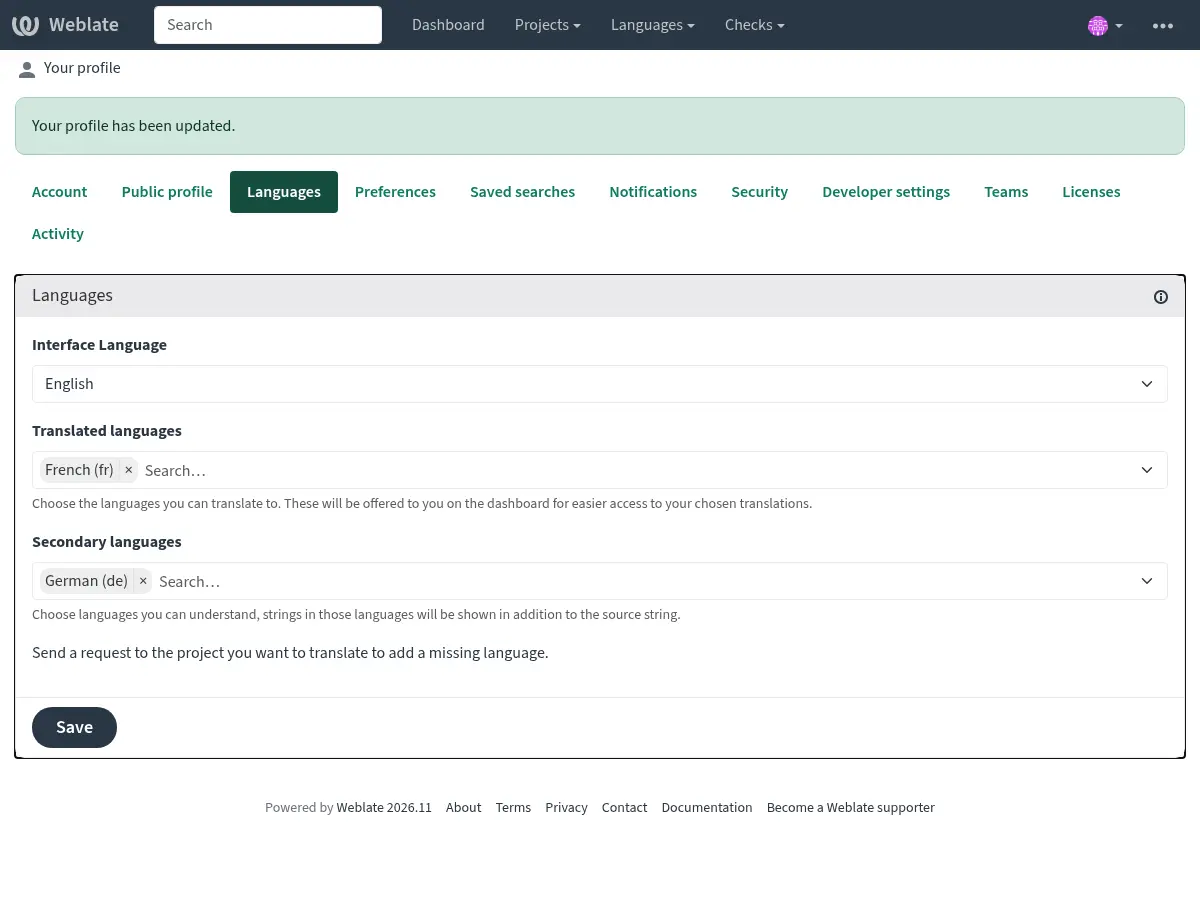
If you are signed in, open your user menu and choose Settings. Under Languages, select your Translated languages and, optionally, Secondary languages you understand. Secondary languages appear above the source as additional help. Save your settings. If you are contributing anonymously, skip this step and choose your language directly in the project as described below.
Read the project's translation instructions before starting. These can explain terminology, style, priorities, and how to contact the language team. If you cannot find them, ask the maintainers which component to start with.
Choose your language and a component. A component groups related strings, such as an application's interface or its documentation. Open Untranslated strings to start with empty translations, or Unfinished strings to include translations that still need work. Use All strings or 搜索 to find existing translations. If your language is missing, use the option to start or request a translation when available, or contact the maintainers.
翻译字符串
The editor shows the source text and a field for your translation. Read any explanation, screenshot, nearby strings, and glossary entries before writing. Short strings can have several meanings: ask in 评论 if the context is unclear. Other languages can help, but their translations can also contain mistakes.
Write a natural expression of the intended meaning in your language. Follow your language's typography and the project's terminology and style. Preserve technical markers such as placeholders and markup; see 安全地翻译特殊文本. When Weblate displays several plural fields, complete each one according to its label; see 复数形式.
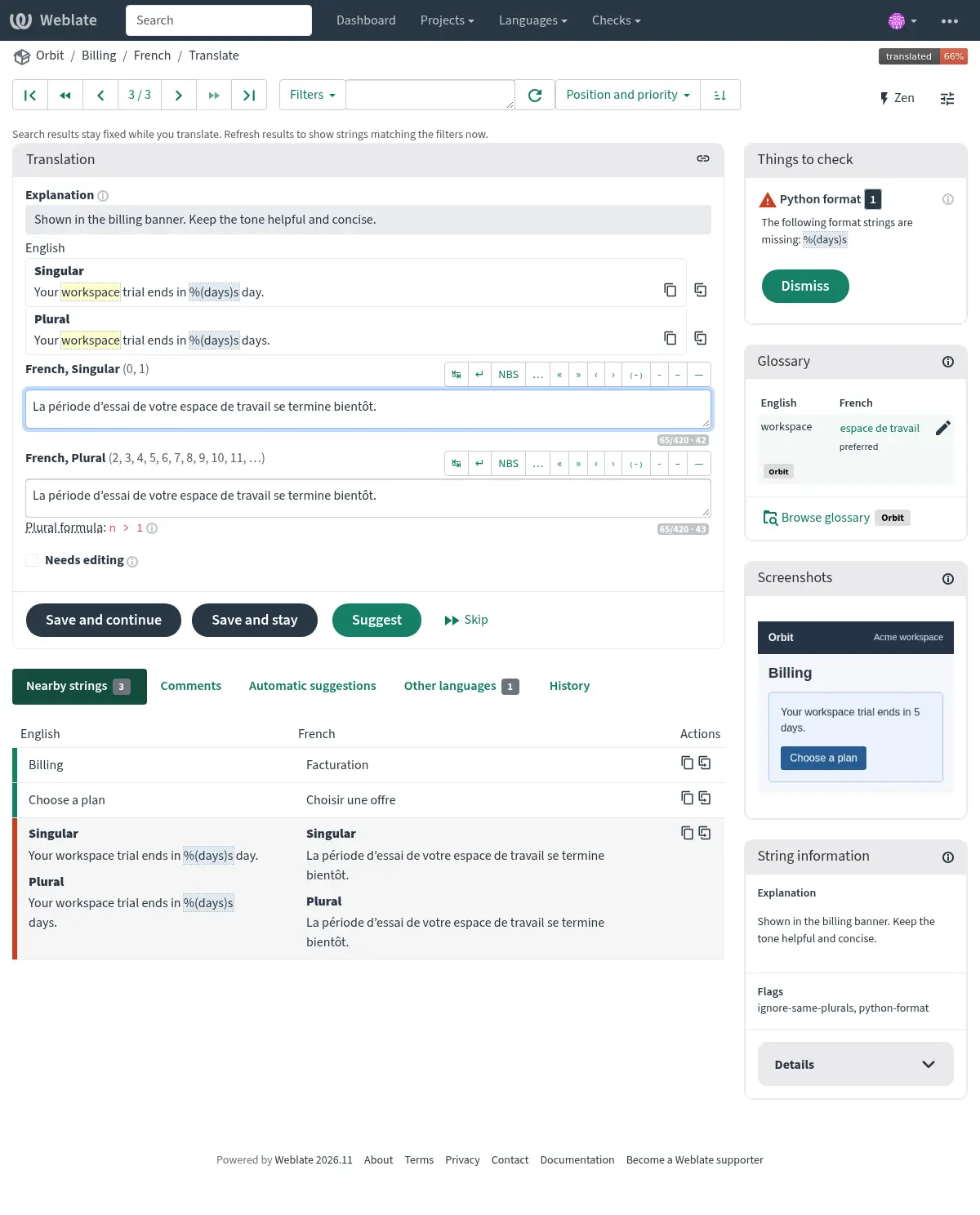
Use explanations, screenshots, and glossary terms to choose the right wording.
Quality checks highlight problems such as the missing %(days)s placeholder
in this draft. The translator can edit, save, or suggest a translation.
Choose the action that fits your contribution:
Save and continue saves your translation and opens the next string. Use Save and stay to remain on the current string.
Mark Needs editing when saving a translation that still needs work. Clear it after you have resolved the outstanding issues.
Suggest proposes a translation for someone to accept. Use this when you want another translator to consider your wording, or when the project only allows you to suggest changes. A suggestion does not replace the current translation until it is accepted.
Skip moves on without saving your edits. You can return later.
The available actions depend on your permissions and the project's workflow. For example, an approved translation might only allow you to suggest a change. Saving in Weblate does not mean the translation is immediately published in the application: review, repository synchronization, and releases depend on the project. See 翻译状态 and 翻译工作流.
Check your work and ask for help
Read your translation again after saving. If Weblate reports failing quality checks, open their explanations and correct the problem. Ignore a check only when you have confirmed it is a false positive and your permissions allow it. Passing all checks does not guarantee that the meaning or tone is correct. Review suggestions from translation memory or machine translation just as carefully as text you write yourself.
Use a translation comment for questions about your language, or a source string comment for an unclear or incorrect original. Explain the problem and include the context you have found. If source editing or source review is available, follow the project's instructions for proposing a correction; otherwise use its advertised contact or repository link. See 评论 and 接收源字符串反馈.
持续贡献
Watch projects you want to return to and choose your 通知. Your 操作面板 helps you find watched translations in your selected languages. You can also help by reviewing existing translations and suggestions when your permissions allow it.
As you become familiar with the editor, explore 键盘快捷键, 翻译上下文, 术语表, and 搜索. The editor's History tab shows earlier changes to a string. See 首选项 for editor preferences and 下载和上传译文 for downloading and uploading translations to work offline.