持續在地化
有適當的基礎結構,因此您的翻譯緊隨開發。這樣,翻譯人員可以一直進行翻譯,而不必在發佈之前處理大量的新文本。
也參考
與 Weblate 整合 描述了將您的開發整合到 Weblate 中的基本方式。
這是過程:
開發人員進行變更並將其推送到版本控制系統(VCS )儲存庫。
可以選擇更新譯文件(這取決於檔案格式,請參閱 引入新字串)。
Weblate pulls changes from the VCS repository, parses translation files and updates its database, see 更新儲存庫.
翻譯者使用 Weblate Web 介面提交翻譯,或上傳離線變更。
Once the translators are finished, Weblate commits the changes to the local repository (see 簡易提交).
Changes are pushed back to the upstream repository (see 推送 Weblate 的變更).
提示
Upstream code hosting is not necessary, you can use Weblate with 本地檔案 where there is only the repository inside Weblate.
更新儲存庫
應該新增一些從他們的來源來更新後端儲存庫的方式。
使用 通知掛勾 來與多數常見的代碼託管服務整合:
You must also 啟用掛勾 for this to work.
在儲存庫管理中或使用 Weblate 的 REST API 或 Weblate 用戶端 來手動觸發更新
允許
AUTO_UPDATE在您的Weblate事例上自動更新所有組件Execute
updategit(with selection of project or--allto update all)
每當 Weblate 更新儲存庫時,更新後附加元件都將被觸發,請參見 附加元件。
避免發生合併衝突
The merge conflicts from Weblate arise when same file was changed both in Weblate and outside it. Depending on the situation, there are several approaches that might help here:
Avoiding merge conflicts by changing translation files in Weblate only
Avoiding merge conflicts by locking Weblate while doing outside changes
Avoiding merge conflicts by changing translation files in Weblate only
Avoiding edits outside Weblate is easy with monolingual files — you can add new strings within Weblate and leave whole editing of the files there. For bilingual files, there is usually some kind of message extraction process to generate translatable files from the source code. In some cases, this can be split into two parts:
The extraction generates template (for example gettext POT is generated using xgettext).
Further process merges it into actual translations (the gettext PO files are updated using msgmerge).
You can perform the second step within Weblate and it will ensure that all pending changes are included before this operation.
Avoiding merge conflicts by locking Weblate while doing outside changes
Integrating Weblate into your updating process so that it flushes changes before updating the files outside Weblate can be achieved by using Weblate 的 REST API to force Weblate to push all pending changes and lock the translation while you are doing changes on your side.
進行更新的指令碼看起來像這樣:
# Lock Weblate translation
wlc lock
# Push changes from Weblate to upstream repository
wlc push
# Pull changes from upstream repository to your local copy
git pull
# Update translation files, this example is for Django
./manage.py makemessages --keep-pot -a
git commit -m 'Locale updates' -- locale
# Push changes to upstream repository
git push
# Tell Weblate to pull changes (not needed if Weblate follows your repo
# automatically)
wlc pull
# Unlock translations
wlc unlock
If you have multiple components sharing the same repository, you need to lock them all separately:
wlc lock foo/bar
wlc lock foo/baz
wlc lock foo/baj
備註
The example uses Weblate 用戶端, which needs configuration (API keys) to be able to control Weblate remotely. You can also achieve this using any HTTP client instead of Weblate 用戶端, for example curl, see Weblate 的 REST API.
儲存庫維護
The Repository maintenance view shows repository status for a project, component, or translation and lets privileged users run maintenance operations from the user interface.
The same actions can also be triggered using Weblate 的 REST API or, for the supported subset, Weblate 用戶端.
Availability of individual actions depends on permissions, the configured version control system, whether pushing is configured, and whether the selected object can be locked.
動作 |
What it does |
Typical use |
|---|---|---|
Commit |
Commits pending changes stored in Weblate to the local repository. |
Flush pending Weblate changes before doing repository work elsewhere. |
Push |
Pushes committed local repository changes to the configured upstream. |
Send committed translations upstream when automatic push is disabled or delayed. |
Update |
Fetches upstream changes and integrates them using the component's configured 合併類型. |
Bring Weblate in sync with upstream using the default integration strategy. |
Update with merge |
Fetches upstream changes and integrates them with an explicit merge. |
Override the default merge style for a single update. |
Update with rebase |
Fetches upstream changes and rebases local Weblate commits on top of upstream. |
Keep history linear when that matches your workflow. |
Update with merge without fast-forward |
Fetches upstream changes and creates an explicit merge commit even when a fast-forward would be possible. |
Preserve merge commits for auditing or branch-management reasons. |
Lock / Unlock |
Prevents or allows translators to make further changes in Weblate. |
Freeze translation changes while doing repository maintenance outside Weblate. |
Reset and discard |
Resets Weblate's local repository to upstream and discards pending Weblate changes. |
Use when upstream should overwrite the local Weblate repository state. |
Reset and reapply |
Resets Weblate's local repository to upstream while preserving pending translations. See Reset and reapply recovery behavior. |
Recover from diverged history while keeping pending Weblate translations. |
Cleanup |
Removes untracked files and stale branches from the local repository checkout. |
Clean up leftover files or stale repository state in Weblate's checkout. |
Synchronize |
Forces Weblate to write all known translations back to the repository files. |
Repair cases where repository files became out of sync with the database state. |
Rescan |
Re-reads translation files from the local repository into Weblate. |
Import file changes after manual repository work or file creation. |
Reset and reapply recovery behavior
The Reset and reapply operation keeps pending translations from Weblate while resetting the local repository state to match upstream.
The operation can restore pending translations only when the target language files still exist after the reset or when Weblate can create them for the component, for example using a valid 新翻譯的範本.
If neither of these conditions is met, Weblate keeps the pending changes in its database and reports a recovery error instead of failing later with a generic parse error.
Avoiding merge conflicts by focusing on Git operations
Even when Weblate is the single source of the changes in the translation files, conflicts can appear when using 匯併 Git 提交 add-on, 合併類型 is configured to Rebase, or you are squashing commits outside of Weblate (for example, when merging a pull request).
The reason for merge conflicts is different in this case - there are changes in Weblate which happened after you merged Weblate commits. This typically happens if merging is not automated and waits for days or weeks for a human to review them. Git is then sometimes no longer able to identify upstream changes as matching the Weblate ones and refuses to perform a rebase.
To approach this, you either need to minimize the amount of pending changes in Weblate when you merge a pull request, or avoid the conflicts completely by not squashing changes.
Here are few options how to avoid that:
Do not use neither 匯併 Git 提交 nor squashing at merge time. This is the root cause why git doesn't recognize changes after merging.
Let Weblate commit pending changes before merging. This will update the pull request with all its changes, and both repositories will be in sync.
Use the review features in Weblate (see 翻譯工作流程) so that you can automatically merge GitHub pull requests after CI passes.
Use locking in Weblate to avoid changes while GitHub pull request is in review.
也參考
從 GitHub 自動接收變更
Weblate 伴隨 GitHub 本地支援。
If you are using Hosted Weblate, the recommended approach is to install the Weblate app. The app delivers GitHub notifications to Hosted Weblate, so you do not need to configure a separate Webhook in GitHub. It does not by itself grant Hosted Weblate write access to the repository, though. To push changes back, you still need to add the Hosted Weblate weblate GitHub user as a collaborator with write access, see 從Hosted Weblate 存取儲存庫.
If you are not using the app, add the Weblate Webhook in the repository settings (Webhooks) to receive notifications on every push to a GitHub repository, as shown on the image below:
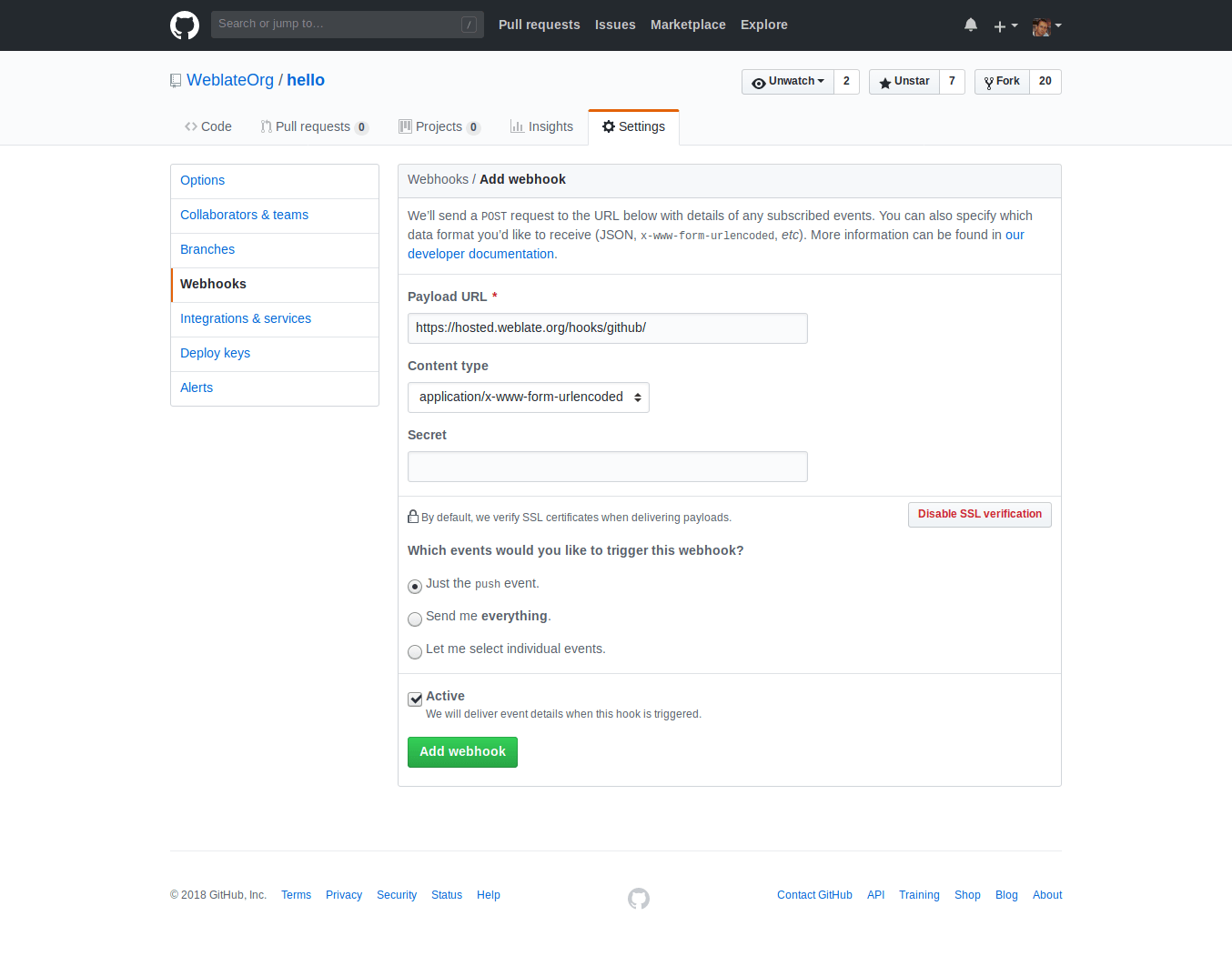
The Payload URL consists of your Weblate URL appended by
/hooks/github/, for example for the Hosted Weblate service, this is
https://hosted.weblate.org/hooks/github/.
可以將其他設定保留為預設值( Weblate 可以處理內容類型,並只消費 push 事件)。
從 Bitbucket 自動接收變更
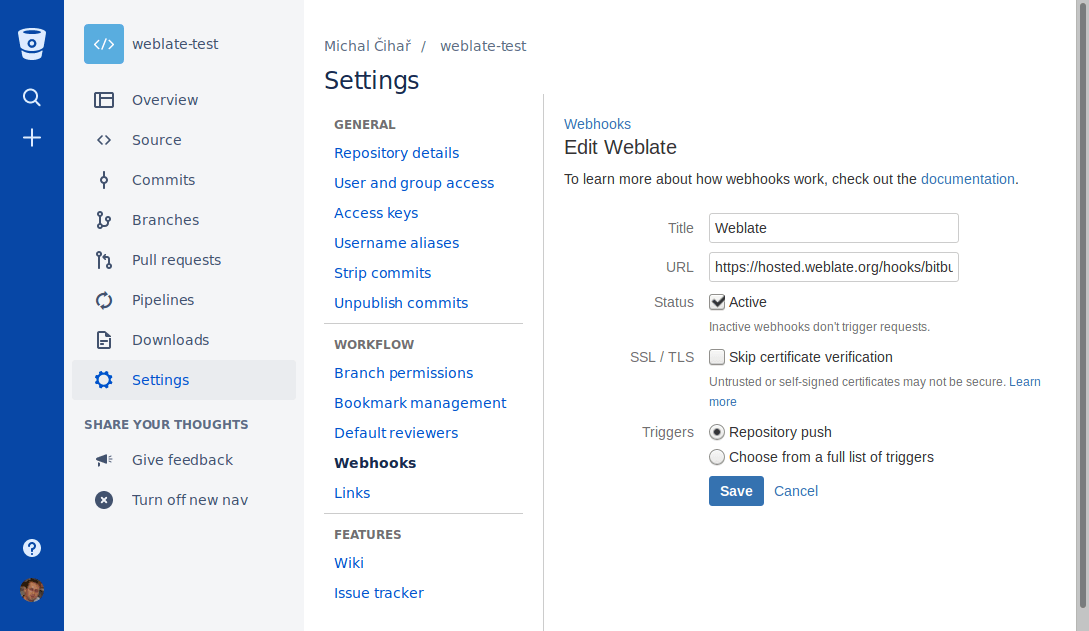
Weblate has support for Bitbucket webhooks, add a webhook
which triggers upon repository push, with destination to /hooks/bitbucket/ URL
on your Weblate installation (for example
https://hosted.weblate.org/hooks/bitbucket/).
從 GitLab 自動接收變更
Weblate has support for GitLab hooks, add a project webhook
with destination to /hooks/gitlab/ URL on your Weblate installation
(for example https://hosted.weblate.org/hooks/gitlab/).
疑難排解
Check GitLab webhook request history if webhooks are delivered.
The response payload contains information about matched components.
從 Pagure 自動接受變更
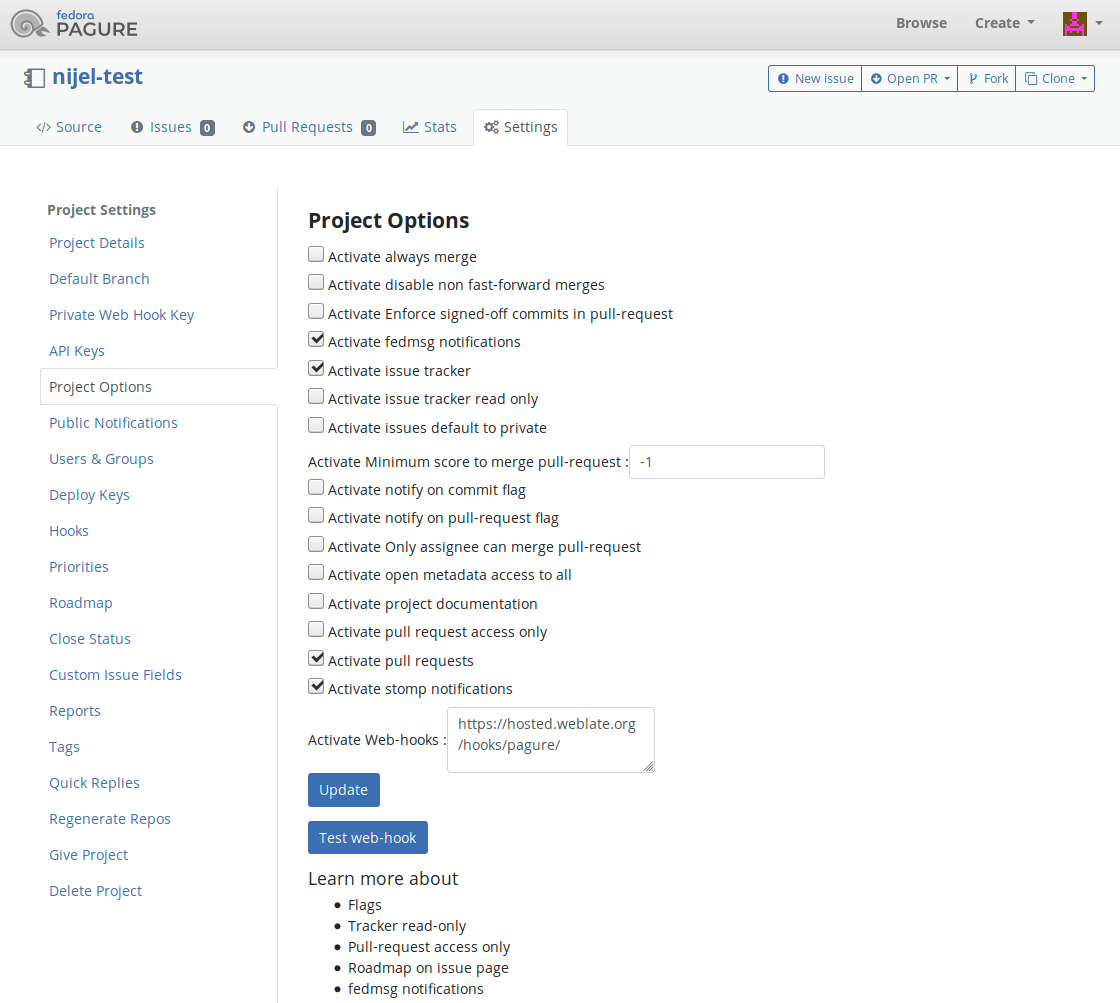
Weblate has support for Pagure hooks, add a webhook
with destination to /hooks/pagure/ URL on your Weblate installation (for
example https://hosted.weblate.org/hooks/pagure/). This can be done in
Activate Web-hooks under Project options:
從 Azure Repos 自動接收變更
Weblate has support for Azure Repos webhooks, add a webhook for
Code pushed event with destination to /hooks/azure/ URL on your
Weblate installation (for example https://hosted.weblate.org/hooks/azure/).
This can be done in Service hooks under Project
settings.
從 Gitea Repos 自動接收變更
Weblate has support for Gitea webhooks, add a Gitea Webhook for
Push events event with destination to /hooks/gitea/ URL on your
Weblate installation (for example https://hosted.weblate.org/hooks/gitea/).
This can be done in Webhooks under repository Settings.
Automatically receiving changes from Forgejo Repos
Weblate has support for Forgejo webhooks, add a Forgejo Webhook for
Push events event with destination to /hooks/forgejo/ URL on your
Weblate installation (for example https://hosted.weblate.org/hooks/forgejo/).
This can be done in Webhooks under repository Settings.
從 Gitee Repos 自動接收變更
Weblate has support for Gitee webhooks, add a WebHook for
Push event with destination to /hooks/gitee/ URL on your
Weblate installation (for example https://hosted.weblate.org/hooks/gitee/).
This can be done in WebHooks under repository Management.
每晚自動更新儲存庫
Weblate 在後面合併變更時,每晚自動擷取遠端儲存庫來提高效能。可以選擇將其同樣轉換為進行每晚合併,通過允許 AUTO_UPDATE。
推送 Weblate 的變更
每個翻譯組件可以新增推送 URL(請參見 儲存庫推送 URL ),在那種情況下 Weblate 能夠將變更推送到遠端儲存庫。 Weblate 還可以配置在每次提交時自動推送變更(這是預設的,請參見 提交時一併推送 )。如果不想變更自動給推送,可以在 Repository maintenance 之下手動進行,或通過 wlc push 使用 API。
推送選項根據使用的 版本控制整合 而不同,更多細節可以在那個章節中找到。
In case you do not want direct pushes by Weblate, there is support for GitHub 拉取請求, GitLab 合併請求, Gitea 拉取請求, Pagure 合併請求, Azure DevOps 拉取請求 or Gerrit reviews, you can activate these by choosing GitHub, GitLab, Gitea, Gerrit, Azure DevOps, or Pagure as 版本控制系統 in 組件配置.
Overall, following options are available with Git, Mercurial, GitHub, GitLab, Gitea, Pagure, Azure DevOps, Bitbucket Data Center and Bitbucket Cloud:
需要的設定 |
|||
|---|---|---|---|
不推送 |
空 |
空 |
|
直接推送 |
SSH URL |
空 |
|
推送至單獨的分支 |
SSH URL |
分支名稱 |
|
不推送 |
空 |
空 |
|
直接推送 |
SSH URL |
空 |
|
推送至單獨的分支 |
SSH URL |
分支名稱 |
|
來自叉子的 GitHub 拉取請求 |
空 |
空 |
|
來自分支的 GitHub 拉取請求 |
SSH URL [1] |
分支名稱 |
|
來自叉子的 GitLab 結合請求 |
空 |
空 |
|
來自分支的 GitLab 結合請求 |
SSH URL [1] |
分支名稱 |
|
Gitea merge request from fork |
空 |
空 |
|
Gitea merge request from branch |
SSH URL [1] |
分支名稱 |
|
來自分叉的Pargue合併請求 |
空 |
空 |
|
來自分支的 Pagure合併請求 |
SSH URL [1] |
分支名稱 |
|
Azure DevOps pull request from fork |
空 |
空 |
|
Azure DevOps pull request from branch |
SSH URL [1] |
分支名稱 |
|
Bitbucket Data Center pull request from fork |
空 |
空 |
|
Bitbucket Data Center pull request from branch |
SSH URL [1] |
分支名稱 |
|
Bitbucket Cloud pull request from fork |
空 |
空 |
|
Bitbucket Cloud pull request from branch |
SSH URL [1] |
分支名稱 |
備註
還可以允許 Weblate 提交後變更的自動推送,這可以在 提交時一併推送 中完成。
受保護的分支
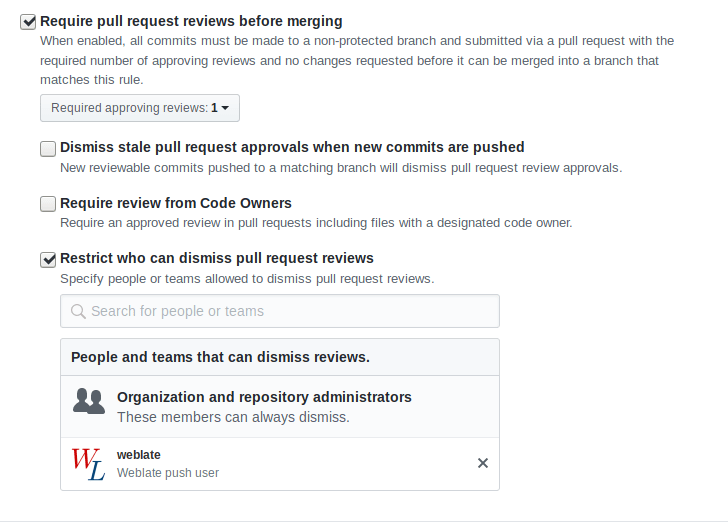
如果在受保護的分支上使用 Weblate,可以配置使用拉取請求,並執行翻譯的實際複查(對您不知道的語言可能有問題)。另一個方法是去掉對 Weblate 推送使用者的這個限制。
例如在 GitHub,這可以在儲存庫配置中進行:
與其他相互影響
Weblate 通過使用它的 API,使與他人的交流更容易。
簡易提交
Weblate 會盡可能將同一作者的提交分組到一個提交中。這大大減少了提交的數量,但是如果您想同步版本控制系統(VCS )儲存庫,例如合併,您可能需要明確地告訴它去做提交(這對 Managers 群組是預設允許的,參見 特權清單)。
如果多個組件分享相同的儲存庫,需要分別將他們全部鎖定:
某人另外變更了已經被變更的字串。
來自上游的結合發生了。
明確地請求了提交。
A file download is requested.
變更比 組件配置 上定義為 變更後提交的經過時間 的時間段更陳舊。
提示
Commits are created for every component. So in case you have many components you will still see lot of commits. You might utilize 匯併 Git 提交 add-on in that case.
If you want to commit changes more frequently and without checking of age, you
can schedule a regular task to perform a commit. This can be done using
Periodic Tasks in Django 管理介面. First create desired
Interval (for example 120 seconds). Then add new periodic task and
choose weblate.trans.tasks.commit_pending as Task with
{"hours": 0} as Keyword Arguments and desired interval.
用指令稿處理儲存庫
自訂 Weblate 與儲存庫互動方式是 附加元件。關於如何通過附加元件執行外部指令稿的資訊,請參見 從附加元件執行指令稿。
跨組件保持翻譯一致
一旦具有多個翻譯組件,您會想要確保相同的字串具有相同的翻譯。這可以在幾個層次實現。
翻譯宣傳
With 允許翻譯再用 enabled (what is the default, see 組件配置), all new translations are automatically done in all components with matching strings. Such translations are properly credited to currently translating user in all components.
Propagation preconditions:
All components have to reside in a single project (linking component is not enough).
Enable 允許翻譯再用 to automatically reuse translations for matching strings.
翻譯宣傳需要金鑰來匹配單語言翻譯格式,因此在建立翻譯金鑰匙請記住。
The strings are propagated while translating, strings loaded from the repository are not propagated.
小訣竅
This feature currently has limitations, and we want to make it more universal. Please share your feedback at https://github.com/WeblateOrg/weblate/issues/3166.
一致性檢查
在字串不同時 不一致 會啟動檢查。您可以藉此來手動複查其差異,並選擇正確的翻譯。
自動翻譯
Automatic translation based on different components can be way to synchronize the translations across components. You can either trigger it manually (see 自動翻譯) or make it run automatically on repository update using add-on (see 自動翻譯).