Control d’accés
Weblate comes with a fine-grained privilege system to assign user permissions for the whole instance with predefined roles, or by assigning one or more groups of permissions to users for everything, or individual projects, components, glossaries, and so on.
Control d’accés del projecte
Nota
Els projectes que executen el pla Libre gratuït a Hosted Weblate sempre són Públics. Podeu canviar al pla de pagament si voleu restringir l’accés al vostre projecte.
Limiteu l’accés dels usuaris a projectes individuals seleccionant una configuració diferent de Control d’accés. Les opcions disponibles són:
- Públic
Visible per a tothom.
Qualsevol usuari autenticat hi pot col·laborar.
Pot ser que el repositori del sistema de control de versions sigui visible per a tothom.
Trieu-ho per a projectes de codi obert o quan la vostra instància de Weblate sigui privada o tancada.
- Protegit
Visible per a tothom.
Només els usuaris seleccionats hi poden col·laborar.
Només els usuaris seleccionats poden accedir al repositori del sistema de control de versions.
Tria aquesta opció per obtenir visibilitat, però encara tens control sobre qui pot contribuir.
- Privat
Visible només per als usuaris seleccionats.
Només els usuaris seleccionats hi poden col·laborar.
Només els usuaris seleccionats poden accedir al repositori del sistema de control de versions.
Trieu aquesta opció per a projectes que no s’han d’exposar públicament en absolut.
- Personalitzat
Visible només per als usuaris seleccionats.
Només els usuaris seleccionats hi poden col·laborar.
Només els usuaris seleccionats poden accedir al repositori del sistema de control de versions.
No disponible al lloc web allotjat.
Haureu de configurar tots els permisos utilitzant Site-wide access control.
Trieu-ho a la vostra pròpia instància de Weblate si voleu definir l’accés d’una manera específica i finament personalitzable.
Control d’accés es pot canviar a la pestanya Accés de la configuració (Operacions ↓ Configuració) de cada projecte respectiu.
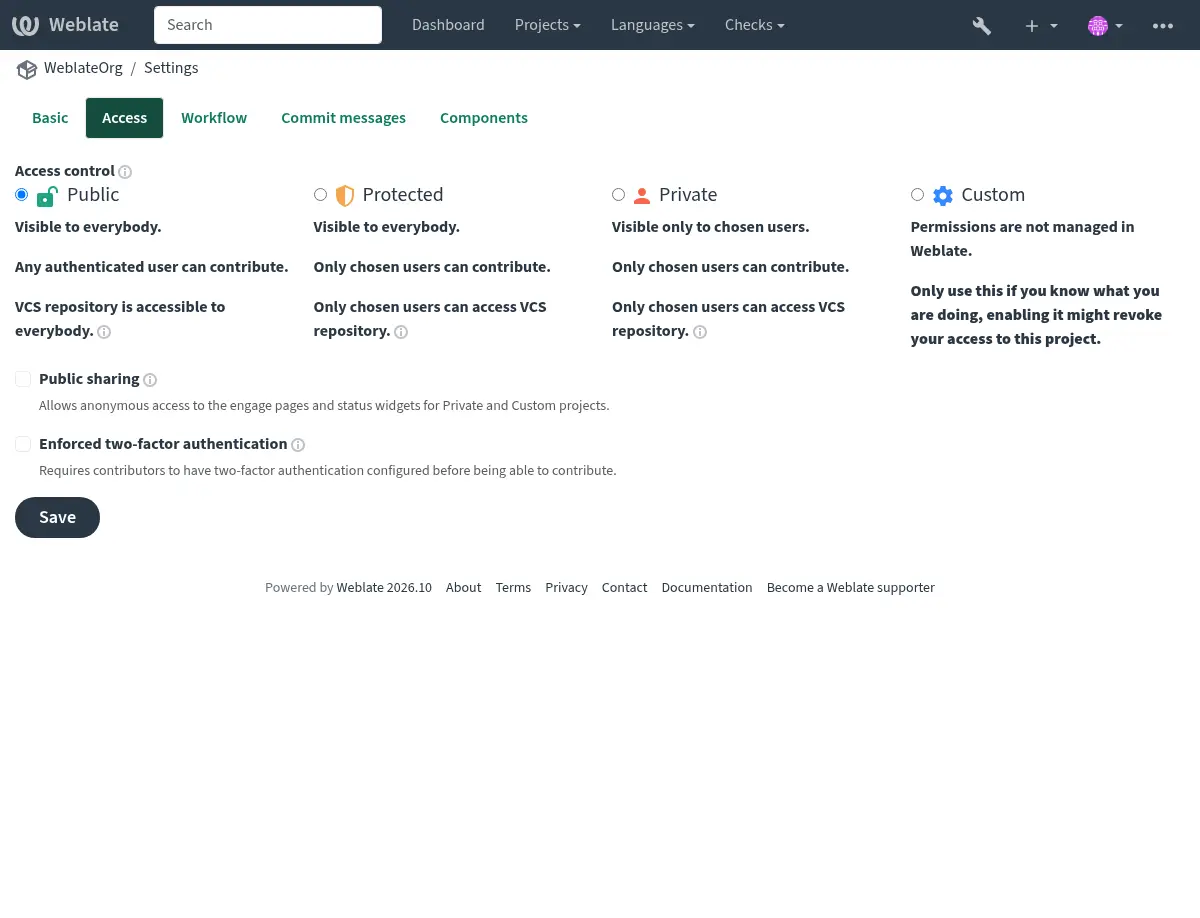
El valor predeterminat també es pot canviar configurant DEFAULT_ACCESS_CONTROL.
Private and Custom projects can make their Public sharing engage pages and status widgets anonymously accessible without making the rest of the project public. Public sharing is disabled by default for these projects.
Nota
Aggregate statistics include Private projects and restricted components, including in site-wide, language, and workspace summaries. Object listings, names, and actions in the web interface and API remain permission-filtered, so these aggregates do not grant access to the underlying projects or components.
Nota
Generic incoming notification hooks are an explicit compatibility exception to identifier confidentiality. When supplied with a matching repository URL, their diagnostic response includes match counts and, when an update is scheduled, the project/component slug and API URL. This also applies to Private projects and restricted components, except components managed through an authenticated integration. The API URL does not bypass access control, and no project content or credentials are included. See Matching webhook targets.
Nota
Els administradors d’instàncies poden modificar els conjunts de permisos predeterminats disponibles per als usuaris en projectes «Públic», «Protegit» i «Privat» mitjançant configuració personalitzada.
Vegeu també
Workspace access control
Els equips de l’àmbit de treball estan documentats a Workspace access control.
Managing per-project access control
Per a projectes «públics», «protegits» i «privats»:
Granting users Manage project access (see List of privileges) allows them to assign other users in Public, Protected and Private (but not Custom) projects via adding them to teams.
When enabling a project feature requires a built-in team name already used by a custom team, the custom team receives a numeric suffix. Its memberships and permissions are preserved, and the settings page reports the rename.
Existing teams with duplicate names can still be edited without changing their names. Saving the project settings repairs duplicate names: a built-in team keeps its name, and additional teams receive numeric suffixes. Additional built-in teams become editable custom teams. Memberships and permissions are preserved, and the settings page reports the renames.
Aquests són els equips predeterminats proporcionats amb Weblate; Els equips poden ser afegits o modificats per usuaris amb privilegis suficients:
- Administration
All available permissions for the project.
- Review
Approve translations in a review.
Disponible només si revisió del flux de treball està activat.
Només per a projectes «Protegits» i «Privats»:
- Translate
Tradueix el projecte i puja les traduccions fetes fora de línia.
- Sources
Editeu les cadenes d’origen (si es permet a la configuració del projecte) i la informació de la cadena d’origen.
- Languages
Manage translated languages (add or remove translations).
- Glossary
Manage glossary (add, remove, and upload entries).
- Memory
Manage translation memory.
- Screenshots
Manage screenshots (add, remove, and associate them to source strings).
- Automatic translation
Pot fer servir les traduccions automatitzades.
- «VCS».
Manage VCS and access the exported repository.
- Billing
Access billing info and settings (see Facturació).
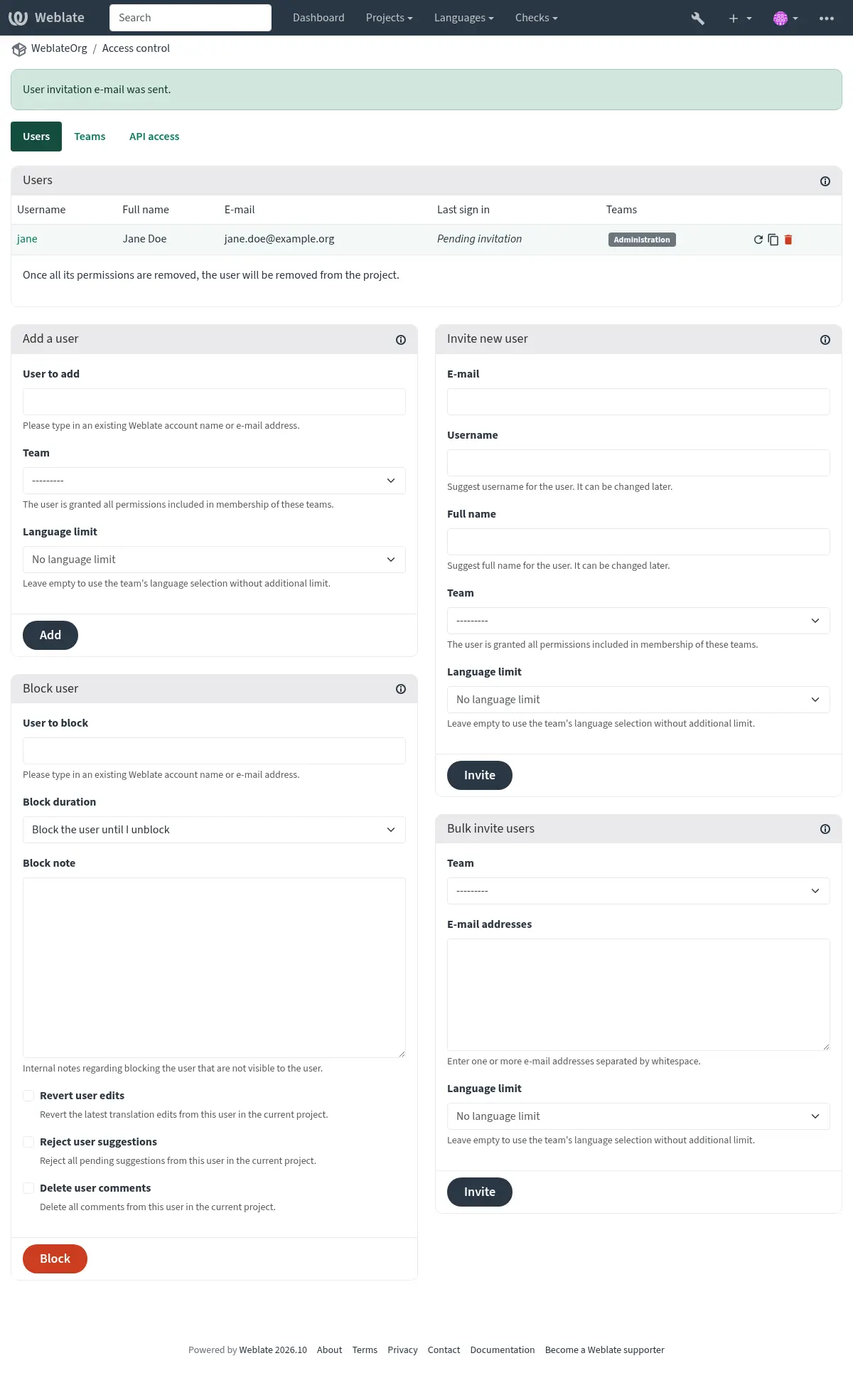
Aquestes funcions estan disponibles a la pàgina Control d’accés al menú del projecte Operacions ↓ Usuaris.
Suggeriment
You can limit teams to languages or components, and assign them designated access roles (see List of privileges).
Before moving a component to another project, remove it from teams defined in its current project. Moving a category requires removing its components from such teams as well. Removing the last component from a team grants its roles to the whole project, so review the team’s membership and roles first.
Teams left with moved components by an earlier release show those assignments by component ID. The assignments grant no access to the destination project. You can remove them through the REST API after reviewing the effect of an empty component selection on the original project.
Administradors de l’equip
Afegit a la versió 4.15.
Each team can have team administrators, who can add and remove users within the team. Administrators relying on this designation must satisfy the team’s enforced two-factor authentication. Their team management access is suspended while they are blocked in any project covered by the team, or while a covered project requires two-factor authentication they have not configured. For a team covering multiple projects, the restriction applies to the whole team.
Això és útil en cas de voler crear equips autogovernats.
Site-wide team management
Site-wide team management is controlled by the global group.edit
permission. This is a trusted administrative permission which allows creating,
editing, and deleting site-wide teams, including changing their roles and
project, component, component list, and language selections.
Project and component assignments are not limited to projects the team manager can access directly. A team manager can therefore grant existing team members access to a private project without gaining direct access to that project.
Treat group.edit as instance-wide access management, not as permission to
manage only teams or projects already visible to the user. To delegate access
management within a narrower scope, use a project Administration team,
workspace administration, or a team administrator. Team
administrators can add and remove users, but cannot change the team’s access
scope.
Inviting new users
Si afegeixes usuaris existents, se’ls enviarà una invitació per confirmar. Amb REGISTRATION_OPEN, l’administrador també pot convidar nous usuaris mitjançant el correu electrònic. Els usuaris convidats han de completar el procés de registre per accedir al projecte.
An invitation can also include team administration. The invitation states this explicitly, and the user becomes a team administrator only after accepting it. Team administrators can add or remove team members.
No és necessari tenir cap privilegi a tot el lloc per fer-ho, n’hi hauria prou amb el permís de gestió d’accés a l’abast del projecte (per exemple, una pertinença a l’equip «Administració»).
Suggeriment
Si l’usuari convidat ha perdut la validesa de la invitació, s’ha de crear una nova invitació.
El mateix tipus d’invitacions estan disponibles a tot el lloc des de la interfície de gestió a la pestanya Usuaris. Tant els administradors del projecte com els administradors del lloc també poden convidar diversos usuaris alhora enganxant adreces de correu electrònic separades per espais en blanc. Totes les invitacions creades en una acció massiva utilitzen l’equip seleccionat, i les invitacions massives a tot el lloc també apliquen la marca de superusuari seleccionada.
Opening the Users page requires recent identity verification, including for users with read-only access. Weblate requests a second factor when configured, or an existing sign-in credential otherwise. Verification remains valid for ten minutes and is checked again when submitting changes.
Site-wide user management is controlled by the global user.edit
permission. Unlike project access management, this is a trusted administrative
permission which allows editing user accounts across the whole instance. It
includes adding or removing the managed account from any site-wide, workspace,
or project team, and granting or revoking superuser status, even for the
caller’s own account. These actions do not require the Manage teams
permission or separate authority over the affected team.
Treat user.edit as effectively equivalent to superuser access, not as a
limited helpdesk permission. To delegate access management within a narrower
scope, use a project Administration team or a team administrator instead.
Site administrators can also disable password authentication for a user. The Regenerate API key option is enabled by default so that the current personal API key stops working. Clear it only when the current API key should remain active.
Les invitacions massives es processen individualment. Les adreces no vàlides i les adreces amb una invitació ja pendent s’ometen mentre es creen i s’envien les invitacions vàlides.
Canviat a la versió 5.0: Weblate ara no crea comptes automàticament ni afegeix usuaris als equips. Això només es fa després de la confirmació de l’usuari.
Account security findings
In Manage → Users, select Validate leaked
passwords to upload a CSV report containing usernames or e-mail addresses and
passwords. This requires the global user.edit permission and recent identity
verification. Reports and findings are shared with other administrators who have
this permission. Opening the security report or an individual finding also
requires recent identity verification.
The CSV upload form opens on a separate page after identity verification. If verification expires before the upload is submitted, confirm your identity again and select the file for another upload. Weblate does not retain uploads rejected because verification expired.
Weblate detects common delimiters and credential column names automatically. If detection fails, configure the delimiter, whether the file has a header, and the column numbers, starting from one. Use UTF-8 files of at most 10 MiB and 50,000 data rows. The uploaded file remains available for configuration for one hour. Validation runs in the background and redirects to stored findings when complete. The summary counts unknown or ambiguous accounts, unusable passwords, malformed or duplicate entries, and matching or nonmatching passwords.
Identifiers are matched against exact usernames, primary e-mail addresses, and verified secondary e-mail addresses. E-mail matching uses the same normalization as account recovery. Inactive users and bot accounts are included. Ambiguous identifiers are not used for password resets. Only confirmed matches become findings. Passwords are never displayed or stored in findings; the uploaded credentials are temporarily encrypted and deleted after processing or expiry.
The Security report link appears once findings or validation reports exist. Findings remain available with their history after handling them. Filter by status, type, or scan. Select Validation reports to return to previous uploads, including reports with no matches and reports still running or that failed. Reports record the uploaded filename and the administrator who submitted it. Individual reports include resolved and dismissed findings by default. Finding history links to each report that detected the issue, and finding details list these reports under Detected in reports. Use the breadcrumbs to move between user management, the security report, validation reports, and findings.
Open findings on the current page are selected by default. Select or clear checkboxes in the browser, then submit an action. Actions apply only to checked findings shown on that page; selections do not carry across pages. Bulk actions require confirmation:
Reset passwords for selected accounts disables matching local passwords, invalidates sessions, revokes all API tokens, and notifies accounts with an e-mail address. Single sign-on and two-factor authentication settings are preserved. Passwords changed since validation are skipped and their obsolete findings resolved.
Dismiss selected findings records the administrator’s decision without changing credentials or notifying the account. A later upload confirming the exposure reopens the finding; retrying the same scan does not.
The deployment check weblate.W052 warns while open findings exist. Resolve or
dismiss them in the report to clear the warning. A matching credential establishes
that the current password was present in the report; it does not establish where
it was exposed.
An upgrade check also reports verified e-mail addresses that match their account’s primary address only under the database’s former locale-sensitive comparison. These findings indicate a possible earlier account compromise. The address remains usable until an administrator reviews the finding. The Remove lookalike e-mail identities and reset selected accounts action removes the suspect verified address and associated sign-in identity, disables the account password, invalidates sessions, revokes API tokens, and notifies the primary address. Dismiss a finding only after confirming that the address is intentionally linked to the account.
Blocking users
Afegit a la versió 4.7.
If users misbehave in your project, you can block them from contributing. Blocked users cannot access the project or use their project permissions, including project administration permissions. Site superusers are exempt.
Blocking preserves team memberships. Permissions granted by those memberships apply again when the block expires or is removed. Blocking does not cancel background work that was already authorized or remove existing administrative configuration, such as add-ons.
Remove a user’s project administration or team administration rights before blocking them. Weblate rejects new blocks on administrators and direct administrative team assignments to users blocked in a covered project. Changes to broader team roles or project scope can still create such a combination; the block continues to suppress project permissions in that case. Project blocks do not revoke independent workspace permissions.
Cleaning up user contributions
When blocking spam or abusive accounts, project administrators can also clean up the user’s existing contributions in that project. Use Operations ↓ Users, block the user, and select the cleanup actions in the block form. For users who are already blocked, use Clean up user contributions in the blocked users list.
The available cleanup actions are:
Revert user edits reverts the latest editable translations by the user.
Reject user suggestions rejects pending suggestions by the user.
Delete user comments deletes comments by the user.
Site administrators with the site-wide user.edit permission can perform
the same bulk cleanup across all projects from the
management interface on the Users
tab. Open the user’s profile, select the Edit tab, and use
Contribution cleanup.
Gestió de permisos per projecte
Podeu configurar els vostres projectes a Protegit o Privat (vegeu Control d’accés del projecte) i gestionar l’accés dels usuaris per projecte.
Per defecte, això impedeix que Weblate concedeixi l’accés proporcionat pels «Usuaris» i els «Visitadors» equips predeterminats a causa de la configuració pròpia d’aquests equips. Això no us impedeix concedir permisos a aquests projectes a tot el lloc modificant els equips predeterminats, creant-ne un de nou o creant una configuració personalitzada addicional per a un component individual, tal com es descriu a Site-wide access control a continuació.
Un dels principals avantatges de gestionar els permisos mitjançant la interfície d’usuari de Weblate és que podeu delegar-lo a altres usuaris sense donar-los el privilegi de superusuari. Per fer-ho, afegeix-los a l’equip d””Administració” del projecte.
Aquesta delegació de l’àmbit del projecte és independent del permís user.edit de tot el lloc. La pertinença a un equip d””Administració” del projecte permet gestionar l’accés només per a aquest projecte, mentre que user.edit atorga la gestió d’usuaris a tot el lloc a la interfície d’usuari i l’API de Weblate i només s’ha d’assignar a administradors de llocs de plena confiança.
Per-project access tokens
Afegit a la versió 4.10.
Podeu definir fitxes d’accés a l’àmbit del projecte a la pestanya Accés a l’API. Els testimonis de l’API poden tenir una data de caducitat establerta i els seus permisos es poden personalitzar per membres de l’equip igual que amb els usuaris.
Vegeu també
Site-wide access control
Nota
This feature is unavailable on Hosted Weblate.
El sistema de permisos es basa en rols que defineixen un conjunt de permisos i equips que vinculen rols amb usuaris i traduccions, llegiu Users, roles, teams, and permissions per a més detalls.
Les característiques més potents del sistema de control d’accés de Weblate es poden configurar a la Interfície de gestió. Podeu utilitzar-lo per gestionar els permisos de qualsevol projecte. No cal canviar-lo necessàriament a Personalitzat control d’accés per utilitzar-lo. Tanmateix, heu de tenir privilegis de superusuari per utilitzar-lo.
Si no esteu interessats en els detalls de la implementació i només voleu crear una configuració prou senzilla basada en els valors predeterminats, o no teniu accés a tota la instal·lació de Weblate (com a Hosted Weblate), consulteu la secció Managing per-project access control.
Site-wide permission management
To manage permissions for a whole instance at once, add users to appropriate default teams:
Users (this is done by default by the automatic team assignment).
Revisors (si utilitzeu revisió del flux de treball amb revisors dedicats).
«Gestors» (si voleu delegar la majoria de les operacions de gestió a algú altre).
Hauríeu de mantenir tots els projectes configurats com a Públics (vegeu Control d’accés del projecte), en cas contrari, els permisos de tot el lloc proporcionats per la pertinença als equips Usuaris i Revisors no tindran cap efecte.
You may also grant additional permissions to the default teams. To change a built-in role for every team using it, customize its permissions as described in Default teams and roles. For example, adding screenshot permissions to Power user affects the Users team and any other teams assigned that role.
To change permissions for only one team, create a custom role and assign it to that team. Custom roles remain independent of upstream defaults. To reduce a team’s permissions, replace or remove its existing roles as needed; adding a narrower role does not revoke permissions granted by another role.
També podeu definir alguns equips personalitzats nous. Si voleu continuar gestionant els vostres permisos a tot el lloc per a aquests equips, trieu un valor adequat per a la Selecció de projectes (p. ex. Tots els projectes o Tots els projectes públics).
Custom permissions for languages, components or projects
Podeu crear els vostres propis equips dedicats per gestionar els permisos per a diferents objectes, com ara idiomes, components i projectes. Tot i que aquests equips només poden concedir privilegis addicionals, no podeu revocar cap permís concedit per equips de tot el lloc o per projecte afegint un altre equip personalitzat.
Exemple:
Restringir la traducció a «txec» a un conjunt seleccionat de traductors (tot i que es mantenen públiques les traduccions a altres idiomes):
Remove the permission to translate Czech from all users. In the default configuration this can be done by altering the Users default team. Built-in teams reject this change in the team management UI, use the Django admin interface instead.
Group Users¶ Totes les llengües
Desactivat
Llengües
Tot menys «txec».
Afegiu un equip dedicat per als traductors de «txec».
Group Czech translators¶ Rols
Power users
Selecció de projectes
All public projects
Totes les llengües
Desactivat
Llengües
Czech
Afegiu usuaris als quals voleu donar els permisos a aquest equip.
Els permisos de gestió d’aquesta manera són potents, però poden ser una feina força tediosa. Només podeu delegar-lo a altres usuaris concedint-los l’estat de superusuari.
Users, roles, teams, and permissions
Els models d’autenticació consten de diversos objectes:
- “Permís”
Permís individual definit per Weblate. Els permisos no es poden assignar als usuaris, només mitjançant l’assignació de rols.
- “Rol”
Un rol defineix un conjunt de permisos (i es pot reutilitzar en diversos llocs).
- Usuari
A user can belong to several teams.
- “Grup”
Els grups connecten rols i usuaris amb objectes d’autenticació (projectes, idiomes, components i llistes de components).
Nota
Un equip no pot tenir cap rol assignat, en aquest cas s’assumeix l’accés per navegar pel projecte per part de qualsevol persona (vegeu més avall).
Project-browsing access
Un usuari ha de ser membre d’un equip vinculat al projecte, o qualsevol component d’aquest projecte. Tenir la pertinença és suficient, no calen permisos específics per navegar pel projecte (això s’utilitza a l’equip «Visualitzadors» per defecte, vegeu Llista d’equips).
Component-browsing access
Granting browsing access to a user in one project gives it access to any component with derived browsing permissions. With Accés restringit on, ordinary component access requires an explicit grant. Users with Edit project settings permission can also browse all components in that project.
Scope of teams
L’abast del permís assignat pels rols dels equips s’aplica per les regles següents:
Si l’equip especifica qualsevol Llista de components, s’atorguen tots els permisos donats als membres d’aquest equip per a tots els components de les llistes de components adjunts a l’equip, i es concedeix un accés sense permisos addicionals per a tots els projectes en què es troben aquests components. Components i Projectes s’ignoren.
L’ús de llistes de components enormes pot tenir un impacte en el rendiment, si us plau, considereu donar accés mitjançant projectes.
Si l’equip especifica algun Components, es concedeixen tots els permisos donats als membres d’aquest equip per a tots els components connectats a l’equip, i es concedeix un accés sense permisos addicionals per a tots els projectes en què es troben aquests components. Projectes s’ignoren.
Otherwise, if the team specifies any Projects, either by directly listing them or by having Projects selection set to a value like All public projects, all those permissions are applied to all the projects, which effectively grants the same permissions to access all projects unrestricted components.
The restrictions imposed by a team’s Languages are applied separately, when it’s verified if a user has access to perform certain actions. Namely, it’s applied only to actions directly related to the translation process itself like reviewing, saving translations, adding suggestions, and creating new translations. Requesting a language from maintainers does not create a translation and remains available outside the team’s language selection.
Els membres d’equips individuals poden limitar encara més aquests permisos als idiomes seleccionats. Si deixeu el límit d’idioma per membre buit, no s’aplica cap límit addicional més enllà de la selecció d’idioma de l’equip. El mateix límit d’idioma es pot establir quan es convida nous usuaris a un equip de projecte. Quan s’estableix un límit d’idioma per membre, la pertinença només concedeix permisos que es poden avaluar per a un d’aquests idiomes. No s’atorguen permisos per a tot el projecte, per a tot el component i per a tot l’equip d’aquest membre.
Aggregate translation downloads apply these rules to each translation. Project, category, component, component-list, and workspace archives contain only components and languages for which the user has Download translation file permission. Restricted components therefore require an explicit component grant for this permission even when the user can download unrestricted components in the same project.
The VCS permissions to commit, push, reset, and update are evaluated on the component that owns the repository. A member needs component-wide permission on that owner, even when starting an operation from a linked component in another project. Permissions on linked components neither grant this authority nor restrict the owner’s authorized users. A per-member language limit cannot grant these permissions.
Linking a component accepts the owner’s authority over the shared checkout. Repository operations affect the whole checkout and its linked components. They do not grant access to otherwise inaccessible component pages.
Project-wide repository status and operations include repositories for which the member has permission on the owner. Other repositories are listed separately and are not inspected or changed. An operation is denied when none of the project’s repositories are available to it.
The Manage reports permission applies to the complete selected report scope. It grants access to report data from restricted components and, at workspace scope, private projects even when those descendants are not otherwise visible to the user. Grant it only to users trusted with all report data in that scope. Complete workspace reports are unavailable to regular users until they configure two-factor authentication when any project in the workspace enforces it. Superusers and bot accounts are exempt.
The Edit component settings permission allows administrative operations that can affect repository contents. For example, users can choose files through component settings or install and configure component add-ons. An automatic translation add-on can copy translations from an eligible restricted source component into a component its manager can access, even if that manager can not directly access the source; see Complements. For a linked component, these operations use the complete shared checkout. Grant this permission only to users trusted by the repository owner with that checkout. Ordinary translation permissions do not grant this administrative access.
Repository-wide VCS permissions protect explicit commit, push, reset, and update operations. They are not required for Weblate’s normal background commit and push of translation changes made through an authorized component.
The Edit project settings permission authorizes persistent administration across the project. Project backups contain all components, including restricted ones. It also grants direct access to all project components and allows editing their settings, deleting them, and changing restricted access, subject to billing limits. It does not grant translation, review, or download permissions. On restricted components, these action permissions must come from a team scoped to the component or a component list containing it; project-scoped action permissions do not apply, including for project administrators. Project and category add-ons also operate on all compatible components in their configured scope. Grant this permission only to users trusted with the complete project data and these administrative effects.
Add-on configuration is stored system configuration rather than a delegation from the account which saved it. Component add-ons can consume inputs outside the destination component when the add-on documents such a source scope. The available configuration and the meaning of options such as all compatible components do not vary with the administrator who last saved the add-on. The add-on continues to run if the configuring user’s permissions or account later change; review or remove the configuration separately during access revocation.
Suggeriment
Use All languages or Project selection to automate inclusion of all languages or projects.

Exemple:
Un projecte
fooamb els components:foo/barifoo/baz, amb drets de revisió i gestió, en el següent equip:
Grup Revisors-administradors espanyols¶ Rols
Review strings, Manage repository
Components
foo/bar
Llengües
Spanish
Els membres d’aquest equip tindran aquests permisos (suposant la configuració predeterminada del rol):
Accés general (de navegació) a tot el projecte
fooincloent els dos components:foo/barifoo/baz.Reviseu les cadenes a la traducció espanyola de
foo/bar(no en cap altre lloc).Gestioneu VCS per a tot el repositori
foo/bar, p. ex. confirmar els canvis pendents fets pels traductors per a tots els idiomes.
Automatic team assignments
While editing the Team, you can specify Automatic assignments, which is a list of regular expressions used to automatically assign newly created users to a team based on their e-mail addresses. Rules are evaluated only upon account creation, for every new user on the instance.
For project and workspace teams, matching rules create invitations. Users receive an e-mail identifying automatic team assignment as the source and must accept the invitation before joining. Pending invitations are also available in account settings. Accounts without an e-mail address see the invitation only in account settings. Team managers can see pending invitations.
For site-defined teams, matching users are added directly. This includes the default teams. Existing memberships are not changed by this behavior.
The most common use-case for the feature is to assign all new users to some
default team. This behavior is used for the default Users and Guest teams
(see Llista d’equips). Use regular expression ^.*$ to match all users.

Un altre cas d’ús d’aquesta opció podria ser donar alguns privilegis addicionals als empleats de la vostra empresa de manera predeterminada. Suposant que tots ells utilitzen adreces de correu electrònic corporatives al vostre domini, això es pot aconseguir amb una expressió com ^.*@mycompany.com.
Nota
L’assignació automàtica de l’equip a «Usuaris» i «Visitadors» sempre es recrea quan s’actualitza d’una versió de Weblate a una altra. Si voleu desactivar-lo, configureu l’expressió regular a ^$ (que no coincidirà amb res).
Nota
Les invitacions massives mitjançant la interfície d’usuari creen invitacions. Els usuaris existents encara han de confirmar la invitació abans de convertir-se en membres de l’equip.
Default teams and roles
Després de la instal·lació, es crea un conjunt d’equips per defecte (vegeu Llista d’equips).
These roles and teams are created upon installation. Administrators can edit built-in role permissions in the management interface or through the REST API. Built-in roles have fixed names and cannot be deleted. The role list identifies built-in roles and indicates whether their permissions are customized. Editing a role affects every team assigned that role. You no longer need to create a custom role solely to change built-in defaults; use a custom role when you need an independent permission set for selected teams.
During upgrades, database migrations merge changes to the built-in defaults with your assigned permissions. Locally added permissions remain assigned, and locally removed permissions remain excluded. New upstream permissions are added, and permissions removed from upstream defaults are removed. Custom roles are unchanged. The merge compares permission sets, not editing history: keeping an existing default permission does not record a separate local addition. If an upstream permission is removed and later reintroduced, it is treated as a new upstream addition. A previous local removal does not survive the permission’s intervening absence from upstream defaults.
To discard customizations, select built-in roles and use Reset built-in roles to defaults in the management interface, then confirm the reset. Resetting applies the current upstream defaults to all teams using those roles.
Canviat a la versió 2026.11: Built-in role permissions became editable. On the first upgrade to this version, existing built-in roles are assumed to be synchronized and receive the current defaults. Earlier changes made through the API or database are replaced. Subsequent upgrades preserve local customizations.
Existing custom roles named Discover users or View user profiles are
renamed with a (custom) suffix before the new built-in roles are created.
A numbered suffix is used if that name is already taken. Their permissions
and team assignments are preserved.
Confidential collaboration
The resource permission contribution.view_author controls contributor
attribution in translation history, comments, suggestions, activity, feeds, and
the REST API. Built-in translation and review roles grant it by default,
including Administration. History and attribution remain stored;
hiding identities does not remove changes, timestamps, diffs, or revert actions.
Vegeu també
Configuring confidential collaboration for the combined role and team configuration.
Regenerated translation exports require translation.download and remain
available without contributor identity access when the exporter explicitly
supports identity-safe output. Original files, original-file archives, and
unclassified exporters also require contribution.view_author because their
metadata can contain contributor identities. The built-in Access
repository and Manage languages roles grant contributor identity
access to preserve their original-file download capability. Remove this grant
from those roles too when configuring confidential collaboration.
The following inventory summarizes independent identity disclosure paths:
Surface |
Authorization |
|---|---|
Editor attribution, history, comments, suggestions, feeds, notifications |
|
Regenerated content exports |
|
Original files and unclassified exports |
Download permission and contributor identity access |
Independent |
|
Full reports and change downloads |
Independent |
Own-data reports |
The report creator, limited to their own contributions |
Membership, directory, and profile information |
Existing access-management and user permissions |
Workspace-only attribution |
|
Unscoped global attribution |
Site administrators |
Administrator-configured add-on searches |
Persistent administrative configuration, independent of direct contributor access |
Administrator-configured integrations |
Trusted destinations; contributor identities are retained |
Author filters in full reports and change downloads use their independent
reports.view and change.download permissions, including when
contribution.view_author is removed.
Workspace grants do not override project, component, or language restrictions when a history entry has a more specific resource scope.
Original archives omit auxiliary files when their translation scope is not allowed. Auxiliary files without a translation scope require component-wide download and contributor identity permissions.
Configured add-ons retain their administrative search scope, just as they do for restricted components. Removing a configuring user’s contributor identity access does not disable the saved operation.
Individual notifications use the recipient’s permissions. Administrator-managed integrations, including webhooks and Slack, are trusted exports and can retain contributor identities. Configure their destinations for an appropriately restricted audience, or disable them. Weblate cannot control onward sharing or remove copies already delivered to mailboxes, downloaded files, or external systems.
This feature hides system-provided attribution, not identifying text entered by users in translations, comments, announcements, filenames, or other content. It does not provide comprehensive anonymity or prevent correlation using timing and content. See Privacy configuration for the separate Git commit identity, profile, and discovery controls.
List of privileges
Abast |
Permisos |
Built-in roles |
|---|---|---|
Col·laboradors |
View contributor identities |
Administration |
Edit source |
||
Add suggestion |
||
Access repository |
||
Power user |
||
Translation coordinator |
||
Review strings |
||
Translate |
||
Manage languages |
||
Canvis |
Baixa els canvis |
Administration |
Comentaris |
Publica un comentari |
Administration |
Edit source |
||
Power user |
||
Translation coordinator |
||
Review strings |
||
Translate |
||
Suprimeix el comentari |
Administration |
|
Comentari de resolució |
Administration |
|
Translation coordinator |
||
Review strings |
||
Component |
Edita la configuració del component |
Administration |
Bloca el component, evitant-ne la traducció |
Administration |
|
Manage repository |
||
Glossari |
Afegeix una entrada al glossari |
Administration |
Manage glossary |
||
Power user |
||
Translation coordinator |
||
Afegeix terminologia al glossari |
Administration |
|
Manage glossary |
||
Translation coordinator |
||
Edita l’entrada del glossari |
Administration |
|
Manage glossary |
||
Power user |
||
Translation coordinator |
||
Suprimeix l’entrada del glossari |
Administration |
|
Manage glossary |
||
Power user |
||
Translation coordinator |
||
Puja entrades al glossari |
Administration |
|
Manage glossary |
||
Power user |
||
Translation coordinator |
||
Serveis de traducció |
Utilitza els suggeriments automàtics |
Administration |
Edit source |
||
Power user |
||
Translation coordinator |
||
Review strings |
||
Translate |
||
Memòria de traducció |
Edita la memòria de traducció |
Administration |
Manage translation memory |
||
Suprimeix la memòria de traducció |
Administration |
|
Manage translation memory |
||
Projectes |
Edita la configuració del projecte |
Administration |
Gestiona l’accés al projecte |
Administration |
|
Informes |
Gestiona els informes |
Administration |
Workspace administration |
||
Captures de pantalla |
Afegeix una captura de pantalla |
Administration |
Translation coordinator |
||
Manage screenshots |
||
Edita la captura de pantalla |
Administration |
|
Translation coordinator |
||
Manage screenshots |
||
Suprimeix la captura de pantalla |
Administration |
|
Translation coordinator |
||
Manage screenshots |
||
Cadenes d’origen |
Edita la informació addicional de la cadena |
Administration |
Edit source |
||
Cadenes |
Afegeix una cadena nova |
Administration |
Suprimeix cadenes |
Administration |
|
Ignora la comprovació fallida |
Administration |
|
Edit source |
||
Power user |
||
Translation coordinator |
||
Review strings |
||
Translate |
||
Edita les cadenes |
Administration |
|
Edit source |
||
Power user |
||
Translation coordinator |
||
Review strings |
||
Translate |
||
Revisa les cadenes |
Administration |
|
Translation coordinator |
||
Review strings |
||
Edició massiva de cadenes |
Administration |
|
Bulk editing |
||
Edita la cadena si els suggeriments són obligatoris |
Administration |
|
Translation coordinator |
||
Review strings |
||
Edita les cadenes d’origen |
Administration |
|
Edit source |
||
Power user |
||
Translation coordinator |
||
Suggeriments |
Accepta un suggeriment |
Administration |
Edit source |
||
Power user |
||
Translation coordinator |
||
Review strings |
||
Translate |
||
Afegeix un suggeriment |
Administration |
|
Edit source |
||
Add suggestion |
||
Power user |
||
Translation coordinator |
||
Review strings |
||
Translate |
||
Suprimeix el suggeriment |
Administration |
|
Power user |
||
Translation coordinator |
||
Vota el suggeriment |
Administration |
|
Edit source |
||
Power user |
||
Translation coordinator |
||
Review strings |
||
Translate |
||
Traduccions |
Afegeix una llengua de traducció |
Administration |
Power user |
||
Translation coordinator |
||
Manage languages |
||
Fes una traducció automatitzada |
Administration |
|
Automatic translation |
||
Suprimeix la traducció existent |
Administration |
|
Manage languages |
||
Baixa el fitxer de la traducció |
Administration |
|
Edit source |
||
Access repository |
||
Power user |
||
Translation coordinator |
||
Review strings |
||
Translate |
||
Manage languages |
||
Afegeix diverses llengües de traducció |
Administration |
|
Manage languages |
||
Uploads |
Defineix l’autor de la traducció pujada |
Administration |
Sobreescriu les cadenes existents amb la pujada |
Administration |
|
Edit source |
||
Power user |
||
Translation coordinator |
||
Review strings |
||
Translate |
||
Puja traduccions |
Administration |
|
Edit source |
||
Power user |
||
Translation coordinator |
||
Review strings |
||
Translate |
||
VCS |
Accés al repositori intern |
Administration |
Access repository |
||
Power user |
||
Translation coordinator |
||
Manage repository |
||
Publica els canvis al repositori intern |
Administration |
|
Manage repository |
||
Puja els canvis del repositori intern |
Administration |
|
Manage repository |
||
Reinicialitza els canvis del repositori intern |
Administration |
|
Manage repository |
||
Mostra la ubicació del repositori font |
Administration |
|
Access repository |
||
Power user |
||
Translation coordinator |
||
Manage repository |
||
Actualitza el repositori intern |
Administration |
|
Manage repository |
||
Anuncis |
Publica anuncis |
Administration |
Translation coordinator |
||
Suprimeix els anuncis |
Administration |
|
Translation coordinator |
||
Workspaces |
Edita la configuració de l’espai de treball |
Workspace administration |
Afegeix projectes a l’espai de treball |
Workspace administration |
|
Add workspace projects |
||
Gestiona l’accés a l’espai de treball |
Workspace administration |
|
Privilegis a tot el lloc |
Browse users |
Discover users |
Search resource contributors |
Discover users |
|
View user profiles |
View user profiles |
|
Utilitza la interfície de gestió |
||
Gestiona la configuració del lloc |
||
Afegeix projectes nous |
Add new projects |
|
Afegeix espais de treball nous |
Add new projects |
|
Afegeix definicions de llengua |
||
Gestiona les definicions de llengües |
||
Gestiona els equips |
||
Mostra la informació de l’equip |
||
Gestiona els usuaris |
||
Mostra la informació d’usuaris |
||
Gestiona rols |
||
Mostra la informació dels rols |
||
Gestiona anuncis |
||
Gestiona la memòria de traducció |
||
Gestiona els serveis de traducció |
||
Gestiona llistes de components |
||
Gestiona la facturació |
||
Administra els complements globals |
Avís
Roles do not have a separate scope; the permissions in a role determine its scope. A role containing a permission listed under Site wide privileges grants that permission across the Weblate instance when assigned through a site-wide team. The team’s project selection does not narrow these permissions.
Site-wide privileges are not granted to any default role. Treat any roles
containing them, including customized built-in roles, as trusted administrative
access because some are effectively equivalent to superuser status. For example, group.edit
allows changing team scope to grant access to private projects, and
user.edit allows users to change their own team memberships and grant
themselves superuser status. See Site-wide team management and
site-wide user management for details.
Llista de rols integrats
Discover users |
|
View user profiles |
|
Administration |
|
Edit source |
|
Add suggestion |
|
Access repository |
|
Manage glossary |
|
Power user |
|
Translation coordinator |
|
Review strings |
|
Translate |
|
Manage languages |
|
Bulk editing |
|
Automatic translation |
|
Manage translation memory |
|
Manage screenshots |
|
Manage repository |
|
Workspace administration |
|
Add workspace projects |
|
Add new projects |
|
Llista d’equips
Els equips següents es creen després de la instal·lació (o després d’executar setupgroups) i podeu modificar-los. La migració, però, els tornarà a crear si els suprimiu o els canvieu el nom.
- “Convidats”
Defineix els permisos per als usuaris no autenticats.
Aquest equip només conté usuaris anònims (vegeu
ANONYMOUS_USER_NAME).Elimineu rols d’aquest equip per limitar els permisos dels usuaris no autenticats.
Default roles: Add suggestion, Access repository, View user profiles
- «Espectadors».
Aquesta funció garanteix la visibilitat dels projectes públics a tots els usuaris. Per defecte, tots els usuaris són membres d’aquest equip.
Per defecte, assignació automàtica d’equip fa que tots els comptes nous siguin membres d’aquest equip quan s’uneixen.
Rols per defecte: cap
- «Usuaris».
Equip per defecte per a tots els usuaris.
Per defecte, assignació automàtica d’equip fa que tots els comptes nous siguin membres d’aquest equip quan s’uneixen.
Default roles: Power user, Discover users, View user profiles
- «Revisors».
Group for reviewers (see Fluxos de treball de traducció).
Funcions per defecte: Revisar cadenes
- “Managers”
Grup per a administradors.
Funcions per defecte: Administració
- Project creators
Afegit a la versió 5.1.
Users who can create new projects.
Default roles: Add new projects
Avís
No elimineu mai els equips i usuaris de Weblate predefinits, ja que això pot provocar problemes inesperats! Si no els utilitzeu, simplement elimineu tots els seus privilegis.
Additional access restrictions
Si voleu utilitzar la vostra instal·lació de Weblate d’una manera menys pública, és a dir, permetre nous usuaris només per invitació, podeu fer-ho configurant Weblate de manera que només els usuaris coneguts hi tinguin accés. Per fer-ho, podeu establir REGISTRATION_OPEN a False per evitar els registres de qualsevol usuari nou, i establir REQUIRE_LOGIN a True per requerir la sessió per accedir a totes les pàgines del lloc. Aquesta és bàsicament la manera de bloquejar la instal·lació de Weblate.
A més, canviar DEFAULT_ACCESS_CONTROL a 100 farà que tots els projectes creats recentment siguin privats, requerint l’accés explícit.
Suggeriment
Podeu utilitzar Inviting new users integrat per afegir usuaris nous.
Expiration of user accounts
Cada compte pot tenir un conjunt de caducitat. Després del venciment, el compte es desactivarà automàticament. S’utilitza per a Per-project access tokens, però també es pot utilitzar per als usuaris habituals.
See Privacy configuration to configure user discovery and profile access through roles.