Registre i perfil d’usuari
Registre
Tothom pot navegar per projectes, veure traduccions o suggerir traduccions de manera predeterminada. Només els usuaris registrats poden desar els canvis i se’ls acredita cada traducció feta.
Podeu registrar-vos seguint uns senzills passos:
Omple el formulari d’inscripció amb les teves credencials.
Activeu el registre seguint l’enllaç del correu electrònic que rebeu.
Opcionalment, ajusteu el vostre perfil per triar quins idiomes coneixeu.
Tauler principal
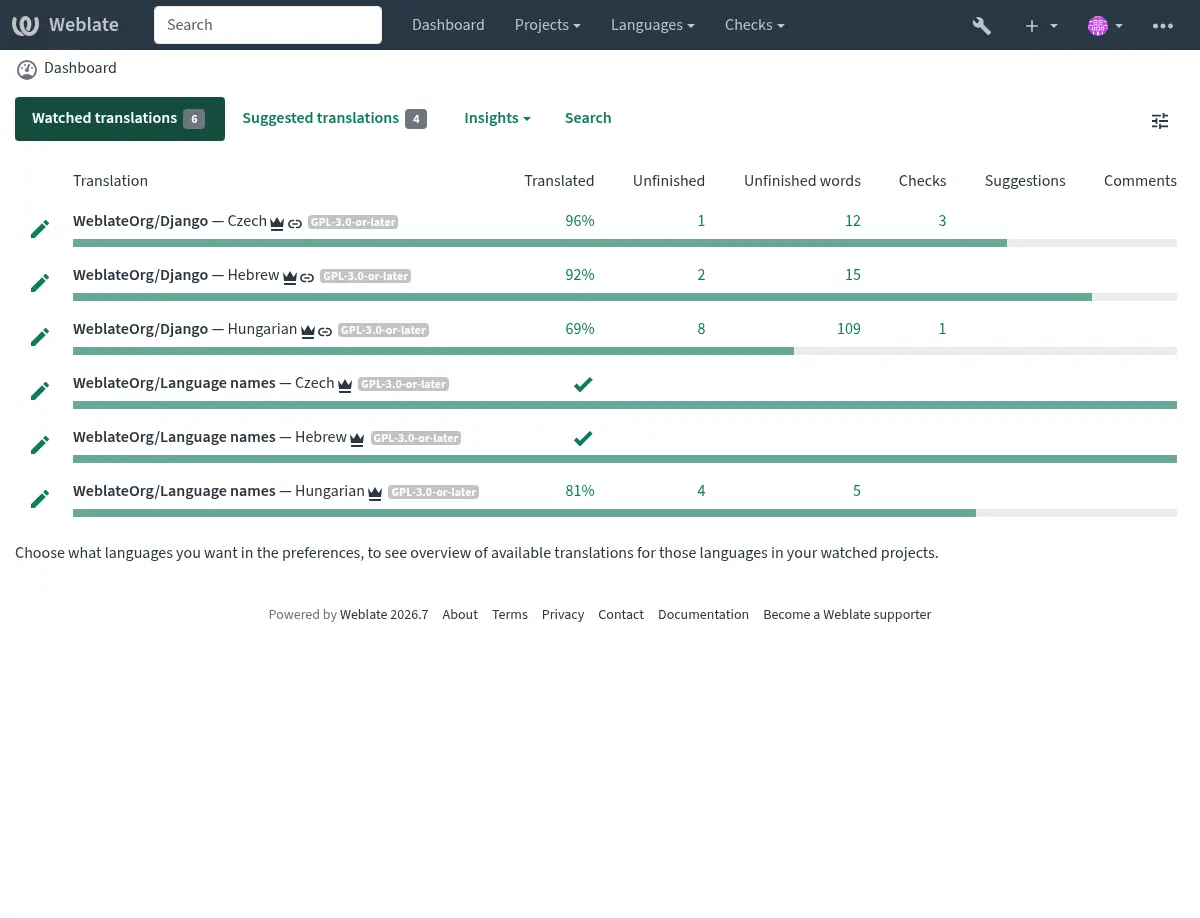
Quan inicieu la sessió, veureu una visió general dels projectes i components, així com la seva progressió de traducció respectiva.
Els components dels projectes que esteu veient es mostren de manera predeterminada i es creuen amb els vostres idiomes preferits.
Suggeriment
Podeu canviar a diferents vistes mitjançant les pestanyes de navegació.

El menú té aquestes opcions:
Projectes > Navega per tots els projectes al menú principal que mostra l’estat de traducció de cada projecte a la instància del Weblate.
Si seleccioneu un idioma al menú principal Idiomes mostrarà l’estat de traducció de tots els projectes, filtrat per un dels vostres idiomes principals.
Les traduccions mirades al tauler de control només mostrarà l’estat de la traducció dels projectes que esteu veient, filtrats pels vostres idiomes principals.
A més, el desplegable també pot mostrar qualsevol nombre de llistes de components, conjunts de components del projecte preconfigurats per l’administrador del Weblate, vegeu Component Lists.
Podeu configurar la vostra vista personal del tauler predeterminat a la secció Preferències de la configuració del vostre perfil d’usuari.
Nota
Quan Weblate es configura per a un únic projecte utilitzant SINGLE_PROJECT al fitxer settings.py (vegeu Configuration), el tauler no es mostrarà, ja que l’usuari es redirigirà a un únic projecte o component.
Perfil d’usuari
Es pot accedir al perfil d’usuari fent clic a la icona d’usuari a la part superior dreta del menú superior i, a continuació, al menú Configuració.
The settings tabs separate account and commit identity, public profile information, preferences, security, and developer access. Name and e-mail address are used in VCS commits, so keep this info accurate.
Nota
Totes les seleccions d’idiomes només ofereixen idiomes traduïts actualment.
Suggeriment
Sol·liciteu o afegiu altres idiomes que vulgueu traduir fent clic al botó perquè també estiguin disponibles.
Llengües
Interface language
Choose the language you want to display the UI in.
Llengües de traducció
Choose which languages you prefer to translate, and they will be offered on the main page of watched projects, so that you have easier access to all these translations in each of those languages.
Llengües secundàries
Podeu definir quins idiomes secundaris se us mostren com a guia mentre traduïu. Es pot veure un exemple a la imatge següent, on la llengua hebrea es mostra com a secundària:

Suggeriment
This can be also configured in the project (Llengua secundària) or component (Llengua secundària). In that case it can be used for String consolidation using secondary language.
Preferències
Tema
Trieu si Weblate segueix la configuració del sistema per al tema fosc o clar, o trieu-ne un manualment.
Table columns
By default, Weblate hides some columns in listings (languages, components, projects, …) when the browser window is too narrow to fit them. Enable Show all columns in lists using horizontal scrolling to keep all columns instead and scroll the table horizontally when needed.
Use Visible columns in lists to choose which statistics columns are shown in the listings. This way you can hide numbers you are not interested in, or make room for additional ones such as Total strings.
Visualització per defecte del tauler principal
A la pestanya Preferències, podeu triar quines de les vistes del tauler de control disponibles voleu presentar de manera predeterminada. Si trieu la Llista de components, haureu de seleccionar quina llista de components es mostrarà al menú desplegable Llista de components per defecte.
Vegeu també
Enllaç de l’editor
Es mostra un enllaç de codi font al navegador web configurat al Configuració dels components per defecte.
Suggeriment
En establir l’enllaç Editor, feu servir el vostre editor local per obrir el fitxer de codi font VCS de les cadenes traduïdes. Podeu utilitzar Marcatge de plantilla.
Normalment alguna cosa com editor://open/?file={{filename}}&line={{line}} és una bona opció.
Vegeu també
You can find more info on registering custom URL protocols for the editor in the Nette documentation.
Caràcters especials
Caràcters especials addicionals per incloure al Teclat visual.
Notificacions
Subscriu-te a diverses notificacions des de la pestanya Notificacions. S’enviaran per correu electrònic les notificacions dels esdeveniments seleccionats en projectes observats o administrats.
Algunes de les notificacions s’envien només per a esdeveniments en els vostres idiomes (per exemple, sobre cadenes noves per traduir), mentre que algunes s’activen a nivell de component (per exemple, errors de combinació). Aquests dos grups de notificacions estan separats visualment a la configuració.
La notificació Resum de l’activitat de traducció és només un resum i resumeix les cadenes afegides, actualitzades, traduïdes, aprovades, necessitades d’edició i sense acabar.
Each periodic notification e-mail contains entries from all matching projects. Listings of individual changes contain up to 100 entries and indicate when additional entries were omitted, while grouped summaries are not limited.
Podeu canviar les notificacions dels projectes observats i dels projectes administrats i es pot ajustar (o silenciar) més per projecte i component. Visiteu la pàgina de visió general dels components i seleccioneu l’opció adequada al menú Mirant.
Project and component notification subscriptions are automatically removed when you lose access to their targets. Cleanup runs hourly for a different group of users, checking every user once daily. Subscriptions are retained during temporary project blocks or while two-factor authentication requirements are unmet.
In case Automatically watch projects on contribution is enabled you
will automatically start watching projects upon contributing to them. The
default value depends on DEFAULT_AUTO_WATCH.
Nota
No rebràs notificacions de les teves pròpies accions.
Suggeriment
L’enviament de notificacions és limitat, no rebràs més de 1000 correus electrònics al dia. Qualsevol altra notificació per a vostè serà descartada.
Open Notification diagnostics from your notification settings to
inspect your own subscriptions. Administrators with management access and
permission to edit users can open the same page for another user from that
user’s Edit tab. The Overview tab includes watched
projects, notification languages, and subscriptions grouped by scope and target.
In the Diagnostics tab, enter an object path such as
project/category/component/cs. Project and category paths summarize inherited
project settings and exceptions across all accessible
components. Equivalent component settings are grouped together, with counts and
up to five example links to inspect individual components. Component paths show
effective settings and language restrictions; translation paths check the selected
language specifically. Broad summaries do not enumerate individual translations.
Summaries are limited to 200 accessible components and 10 original projects
(including the selected project). For larger scopes, choose a smaller category,
a component, or a translation; partial summaries are not shown.
Lists of more than five watched projects or notification languages show counts
instead of individual links.
Only events with a matching subscription are shown, including disabled subscriptions and subscriptions blocked by language or account conditions. Event conditions and overridden subscriptions are shown directly. Subscription links highlight the matching row in the Overview tab. Component example links open diagnostics for that component. Shared components use subscriptions from their original project.
The diagnostics check eligibility without sending e-mail. Notifications that depend on event details, such as mentions or alerts, are marked as conditional. Actual delivery also depends on the event author, digest content, and rate limits.

Compte
The Account tab contains your username, name, account e-mail, and commit identity. You can verify another e-mail address here. The account management section at the bottom lets you export your user data (see Weblate user data export), import settings, or remove your account.
When you add an e-mail address, verification instructions are sent to the new address; access to your old mailbox is not required. Open the verification link while signed in to the account where you requested it, then follow the confirmation steps. You may be asked for your current password. Adding an address does not change your account e-mail address. After verification, you can select the new address in the Account tab.
If the new address already belongs to another account, that mailbox receives guidance on recovering access instead of a verification link. Sign out before recovering the other account. Contact support, when available, for help moving an address between accounts. The browser displays the same confirmation page in both cases to avoid disclosing whether an account exists.
Changing or resetting your password invalidates pending e-mail additions. Request a new verification link to continue adding an address.
Account e-mail addresses match without regard to ASCII letter case. Non-ASCII characters must match exactly when signing in or resetting a password.
You can import settings from a user data file on the Account tab. Compatible language, editor, dashboard, watched-project, and public-profile settings replace the corresponding settings on this server. Unavailable values are skipped and shown after import. The file must be no larger than 50 MB. Contribution counts, activity history, username, and account e-mail are not imported.
Personal Saved searches from the file are added to your existing ones; a saved search with the same name is replaced.
General notification settings and commit identity choices can be imported separately by selecting the corresponding options. Both are off by default. An imported commit e-mail unknown to this account is replaced with the current site’s generated private address. If private addresses are disabled, the unknown address is skipped and your existing choice is preserved. Imported public e-mail addresses must be known to the current account. Both public and commit e-mail addresses must pass the current site’s e-mail validation. Project- and component-specific and one-time notification rules are included in the export but not imported.
The Commit e-mail and Commit name settings let you choose
private identities instead of your account e-mail and name in version control
commits. Use these to avoid publishing your real e-mail and name there. Be aware
that using a different e-mail can disconnect your contributions on other servers
(for example your contributions will no longer link to your profile on GitHub).
Administrators can make private identities the default by setting
PRIVATE_COMMIT_EMAIL_OPT_IN and PRIVATE_COMMIT_NAME_OPT_IN
to False. Your explicit choices override these defaults.
Vegeu també
Changes to these settings affect future commits. Names and e-mail addresses already recorded in repository history remain unchanged.

Perfil públic
Tots els camps d’aquesta pàgina són opcionals i es poden suprimir en qualsevol moment; en omplir-los, ens doneu el consentiment per a compartir aquestes dades arreu on aparegui el vostre perfil d’usuari.
Els URL de perfil públic, com ara URL del lloc web, URL de contacte, URL de Fediverse i URL del lloc de codi, haurien d’apuntar a un lloc web, contacte o pàgina de perfil. Els enllaços de descàrrega directa de fitxers evidents es poden rebutjar i els enllaços de perfil públic mostren un avís abans de sortir de Weblate sempre que sigui possible.
The Code site URL should use common code-hosting profile paths,
such as /username or /~username; existing repository-style links such
as /username/project or /group/subgroup/project are also accepted. The
Fediverse URL
should use common profile paths, such as /username, /@username,
/web/@username, /users/username, /accounts/username,
/channel/username, /profile/username, /u/username, or
/people/identifier.
L’avatar es pot mostrar per a cada usuari (segons ENABLE_AVATARS). Aquestes imatges s’obtenen mitjançant https://gravatar.com/.
Vegeu també
Security
The Security tab manages your password, connected sign-in identities, and two-factor authentication. Security keys, authenticator apps, and recovery codes each show their current status and management actions.

Nota
The list of sign-in services depends on your Weblate configuration, but can include sites such as GitLab, GitHub, Google, Facebook, or Bitbucket and other OAuth 2.0 providers.
Previously connected services remain listed after an administrator removes their authentication backend. You can still use Disconnect to remove their sign-in identities from your account.
Llicències
Developer settings
You can get or reset your API access token and view usage examples here. Use Manage code-hosting connections for integrations with workspaces you administer. These connections are separate from the sign-in identities in Security.
Activitat
The audit log keeps track of the actions performed with your account. It logs IP address and browser for every important action with your account. The critical actions also trigger a notification to a primary e-mail address.
Vegeu també